
Our latest insights
Read the latest insights

Career Advice
Developer Survey Results 2019 – Key Findings
Each year Stack Overflow surveys developers across a wide variety of issues, from their favoured languages to how they learn new programming languages. We outline the key findings of the Stack Overflow Developer Survey 2019.
This year’s Stack Overflow Developer Survey 2019 analysed responses from 90 000 developers (down from 101,592 developers in 2018). Developers filled in a 20-minute survey to share their views and experiences about their career and learning paths. Interestingly, approximately 75% of professional developers who took the survey were younger than 35. This piece will explore the top takeaways, as well as some interesting stats that arose from the survey, such as developers’ best and worst technologies.
Top takeaways
The Stack Overflow Developer Survey 2019 noted the following top takeaways:
- Python, the fastest-growing major programming language, edged out Java this year. Behind Rust, it’s the 2nd most loved language.
- By the time they were 16, more than half of the respondents had already written their first line of code.
- When it comes to successful developers, DevOps specialists emerged as the highest paid, most experienced and most satisfied with their jobs.
- Where will you find the most optimistic developers? Chinese developers top the list believing that people born today will enjoy a better life than their parents. More pessimistic developers come from Western European countries like France and Germany.
- Men are more likely to complain about being tasked with non-development work, while toxic work environments are potential productivity blockers for gender minority respondents.
Education
Only 46% of respondents have a Bachelor’s degree – it is fairly common to find accomplished programmers who haven’t completed a formal degree. Of the developers who studied at a university level, approximately 40%, majored in something other than computer science, computer engineering, or software engineering – e.g. health science, humanities or even fine art.
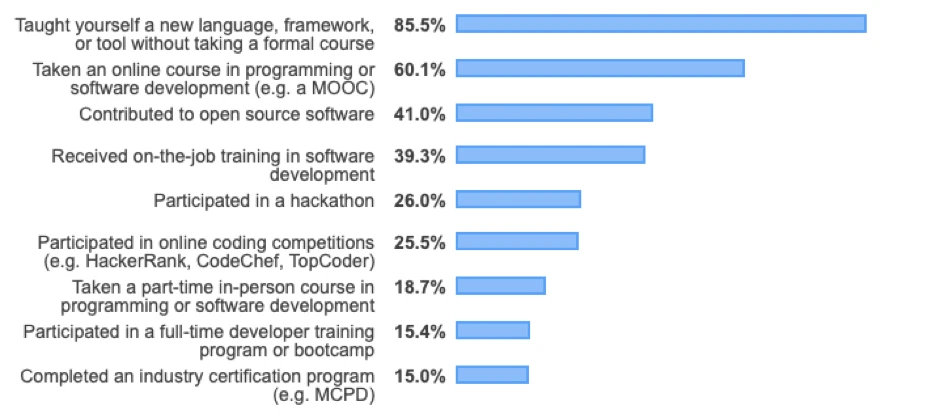
In addition, developers tend to be lifelong learners. Almost 90% of all developers say “they have taught themselves a new language, framework, or tool outside of their formal education”. Among professional developers, about 15% of them participated in a full-time developer training program or bootcamp.
Most loved technologies
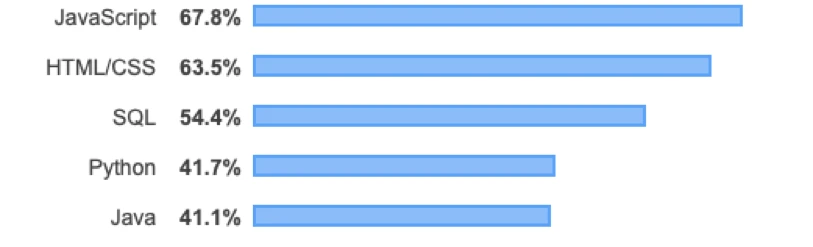
According to the Stack Overflow Developer Survey 2019, JavaScript is again the most commonly used programming language (for the seventh year in a row), while Python has once more risen in the ranks. Python edged out Java this year – similarly, it surpassed C# last year and PHP the year before that.
The top three programming languages, form part of HyperionDev’s Full Stack Web Developer course. And Python and Java are a core section of the Software Engineering bootcamp’s curriculum.
Here are the six most popular programming, scripting and markup languages:
As far as web developer frameworks go, here are the top three. The HyperionDev Web Development bootcamp covers React, as well as other frameworks, in its online and on-site programs.

For the third year in a row, Python is the most wanted language. Basically, developers who don’t yet use Python want to learn it.

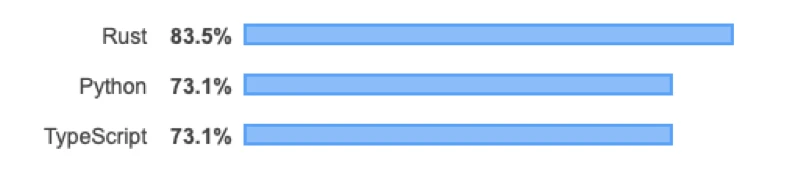
Rust, for the fourth year in a row, came out tops as the most loved programming language, followed closely by Python. More developers, therefore, want to continue working with these languages rather than other languages.
Salaries
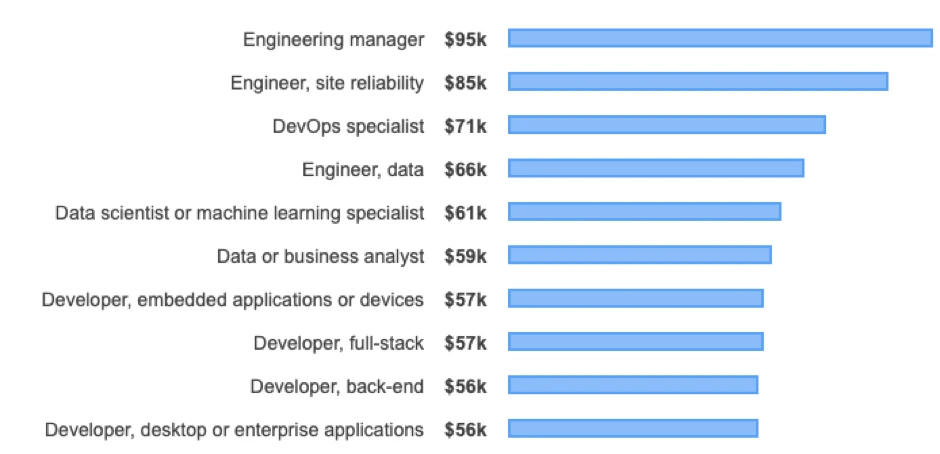
It’s well-known that programming work is both in high demand and able to command a lucrative salary. Here are the top ten salaries for developers, globally. You can see that data scientist is in the top five.
Developer Satisfaction
Almost 75% of developers report that their work brings them some satisfaction. Similar to previous years, “developers tend to be more satisfied with their career than with their current job”.

In closing, we’ve covered the top findings of the Stack Overflow Developer Survey 2019. Perhaps of greatest relevance to developers and those wanting to enter this field is that learning never stops. Developers are lifelong learners. They are also, by and large, satisfied in their chosen field.
If you’re keen to change careers or upskill, consider enrolling on a HyperionDev online bootcamp in Full Stack Web Development, Data Science or Software Engineering. You can also trial one of these courses for free. If online learning is not your thing, you could enrol in an immersive, face-to-face Web Developer or Software Engineering course in Cape Town or Johannesburg. Python is included in the Software Engineering and the Data Science bootcamp.
Web Development
Infographic: Front-end vs back-end web development
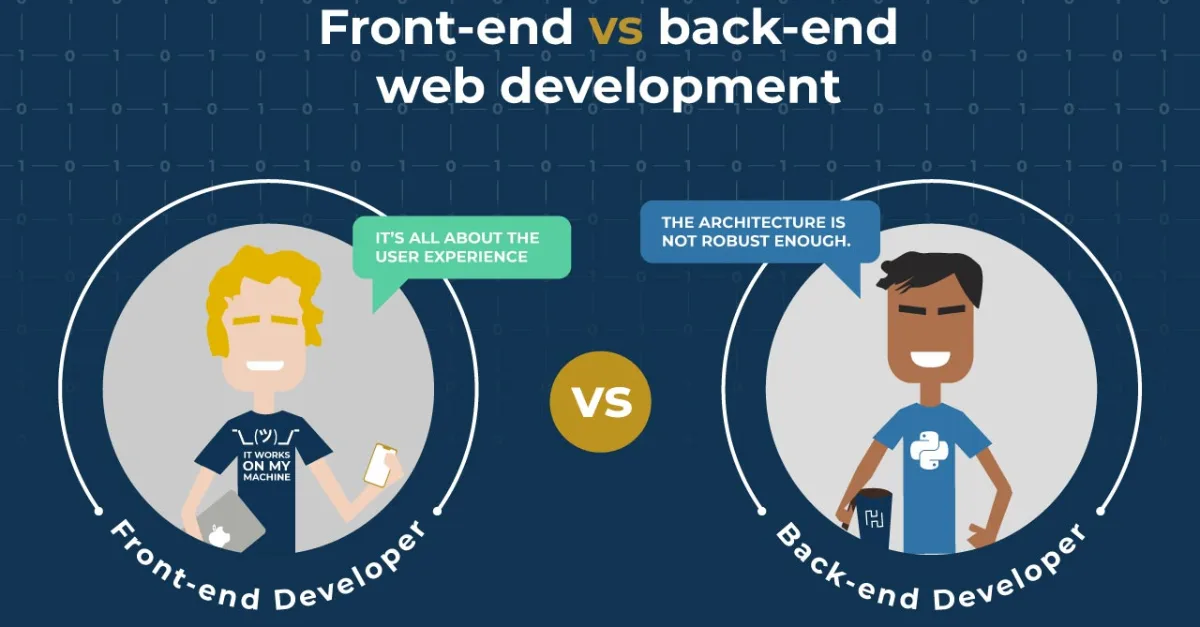
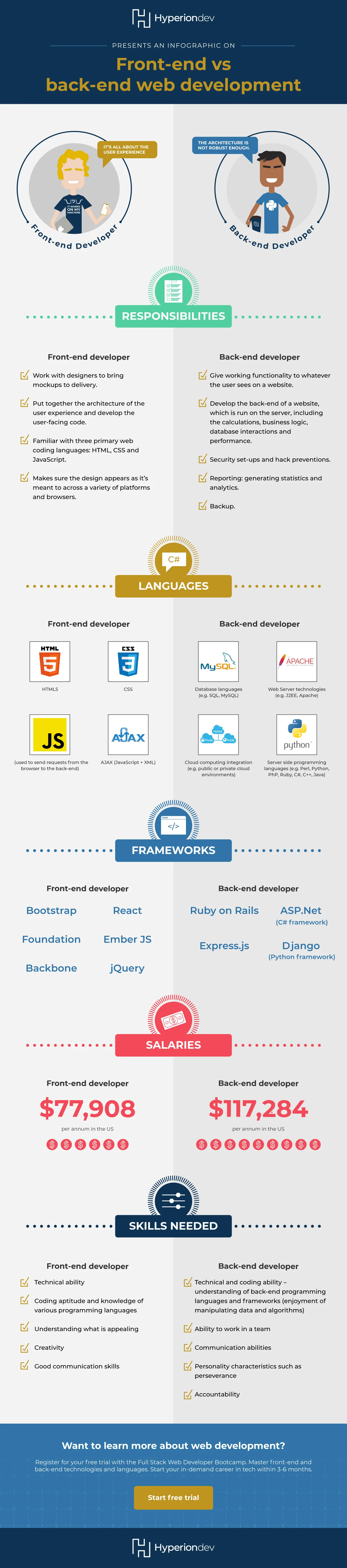
Front-end vs back-end web developer: how do these roles compare? Our simple infographic outlines key differences between these two web developer jobs. Find out about responsibilities, expected salaries and skills needed among other things when considering these two occupations.
If you’re keen to be a web developer, you’ve probably heard people in the industry talk about the different roles, namely front-end vs back-end developer. Check out our nifty infographic to see how these jobs differ. Find out what languages you would need to learn to become a front-end or back-end developer, and what you can expect to earn. We’ve even included a tongue-in-cheek assessment of what you’ll end up saying and how you’ll dress as either a front-end or a back-end web developer.
News & Announcements
April 5, 2019
4 Company Values of CoGrammar
Company values are integral in defining the heart of your organisation’s culture. What start-up company values does CoGrammar support? Here we list the 4 P’s, the defining company values of CoGrammar.
Company values are vital. A recent study found that over 50% of executives feel that corporate culture has a wide impact on an organisation, including productivity, creativity, profitability, firm value and growth. According to Forbes, company values fulfil the following functions:
- Determine how you hire: hiring the person who will best fit into your team is probably more important than technical expertise. Your company values help determine best fit – if ‘passion’ is a company value, for example, you can assess whether a new potential recruit possesses this quality before making any offers.
- Change behaviour: any corrective feedback given to employees is more effective if connected to how their behaviour is not reflecting company values.
- Set the heart of your culture: values are the fabric of the company’s culture, regardless of who currently runs the organisation. Like-minded people who share the same values are the best path to company success.
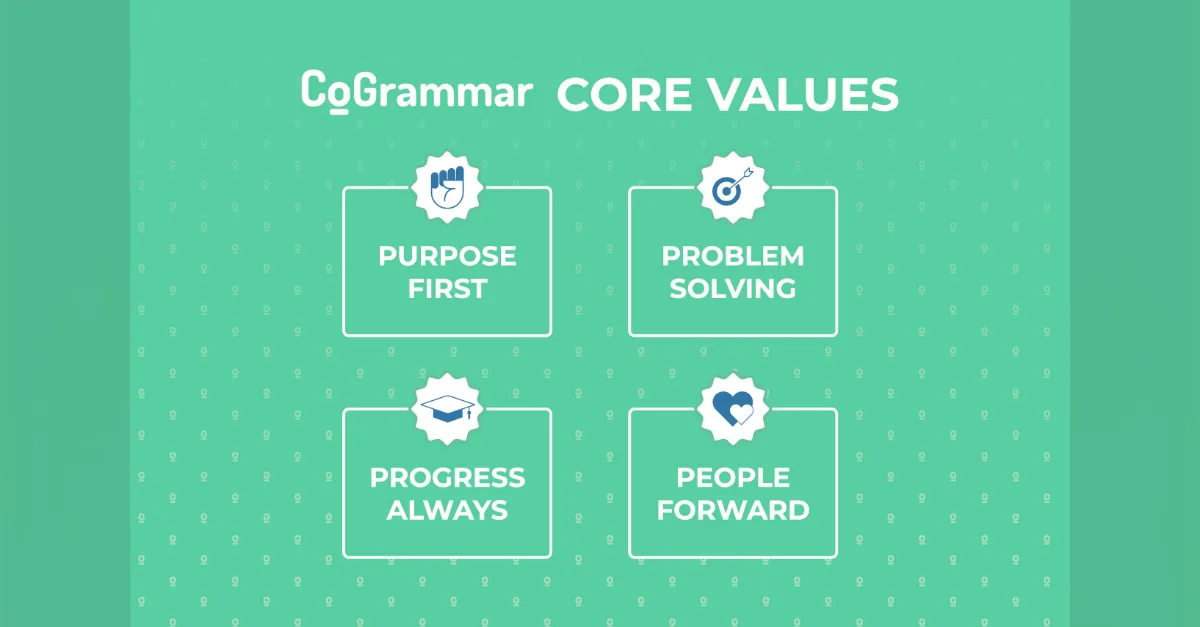
CoGrammar, integrates scaled and affordable human review of code into businesses around the world, and prides itself on embodying a unique company culture to close the global tech skills gap. The company currently helps some of the world’s most selective and rigorous coding education providers lower the cost of technical grading and mentorship in their tech courses. CoGrammar has powered coding education for over 2000 students to date to lower the cost of effective software development education that gets aspiring developers into fulfilling tech careers. What are the start-up company values of CoGrammar? Here are the four P’s, which have propelled the company into becoming one of the top EdTech startups in Europe, the Middle East and Africa.
Purpose First
This is at the heart of CoGrammar. Because our goal is to change lives, we put purpose first and build our integrity on that. What we do at CoGrammar is greater than each individual. In essence, we are building new roads to bring technology skills into the world.
Progress Always
We always progress towards mastery. The company is built around knowledge sharing with each other and our mentors. The company culture is one of learning, collaborating, improving and setting new standards. At CoGrammar, we write code right.
People Forward
We respect people and their potential. By people, we include our teams, our clients and our educators. When it comes to education, people are at the heart of what we do. We remain sensitive to their needs, hopes and desires. We prioritise the value in every person above technology, and we talk as much as we listen.
Problem-Solving
This value is about finding a way to do things, and not about “how it can’t be done”. It’s about not giving in or giving up, but about being entrepreneurial and innovative under pressure. We work towards solutions while maximising resources.
In conclusion, the start-up company values, or 4 Ps, help CoGrammar reach its objectives of supporting students from over 40 countries to reach their goals of acquiring fulfilling tech careers. States CoGrammar CEO Riaz Moola: “Bearing in mind that tech disproportionately contributes to a country’s economy, we have to look at ways of reducing barriers to entry. One way to do this is to embrace non-traditional education paths.” The company values of CoGrammar make massive strides in achieving just that.

Career Advice
Which industries will be impacted by tech?
Read about the impact of technology on various industries, such as medicine, bookkeping and even law. Is your job under threat?
It’s difficult to think of an industry that has not been affected by tech. And of course automation and AI (Artificial Intelligence) is a huge driver of this change. Austrian economist Joseph Schumpeter came up with the concept of “Creative Destruction” to describe “the way technological progress improves the lives of many, but only at the expense of a smaller few,” states Investopedia. During this process, certain industries are destroyed, but the industries that replace them create new jobs. Let’s look at the impact of technology on a variety of industries.
Automation – what can we expect?
A recent study by the Brookings Institution, a Washington think tank, reported in Techradar, found that 25% of jobs in the US – the more “repetitive ones”, as one might expect – are under direct threat from automation. The Future of Jobs Report 2018, put out by the World Economic Forum, confirms this. “Nearly 50% of companies expect that automation will lead to some reduction in their full-time workforce by 2022, based on the job profiles of their employee base today,” states the report.
Who is highest at risk? It appears that low-skilled workers, particularly those who work in the food service industry, could be replaced. This is already a reality for some waiters in Japan whose work has been taken over by robots. (Interestingly, the robots are controlled by people with severe physical disabilities.) Highly creative or technical positions are least likely to be automated.
However, all is not lost. New technology also creates jobs, which means you need people familiar with this new technology. The report conducted by the World Economic Forum found that “75 million jobs may be displaced by a shift in the division of labour between humans and machines, while 133 million new roles may emerge that are more adapted to the new division of labour between humans, machines and algorithms.”
What are these emerging in-demand roles? Certain established roles that will experience increasing demand in the period up to 2022 include Software and Applications Developers, Data Analysts, and Ecommerce and Social Media Specialists. New specialist roles include AI and Machine Learning Specialists, Big Data Specialists, Information Security Analysts, User Experience and Human-Machine Interaction Designers, Robotics Engineers, and Blockchain Specialists. In essence, by 2022, “no less than 54% of all employees will require significant re- and upskilling,” explains the report.
Impact of technology on specific industries
Here are some industries that are likely to feel the impact of technology directly:
Bookkeepers and Accountants: According to the website Will Robots Take My Job, these jobs have a 98% chance of having their jobs automated. Whether your job is at risk from AI generally depends on four variables: does your job require that you come up with clever solutions, do you have to personally help others, does your work require negotiation and, interestingly, does your occupation need you to squeeze into small spaces (i.e. jobs that are routine, repetitive and predictable are more likely to be replaced)?
Lawyers: 20 corporate attorneys specializing in corporate law and contract review competed against AI to spot mistakes in Non-Disclosure Agreements (NDAs). The outcome: AI achieved 94% accuracy versus 85% accuracy from the lawyers. Plus: it took the lawyers 92 minutes on average, whereas AI could spot errors in a staggering 26 seconds! This doesn’t bode well for the law profession.
Medicine: Tech could prove to be even better at diagnosis than doctors. In fact, Stanford researchers developed a health screening program to distinguish between cancerous and non-cancerous moles with more than 90% accuracy – that beats the human dermatologists.
In closing, the impact of technology on virtually every industry cannot be underestimated. We will all be affected. “Unless you are 80 years old or something, you will have to repeatedly reinvent yourself in the coming decade – you’ll probably change your job a number of times,” says Yuval Harari, famous historian and author of 21 Lessons for the 21st Century. Perhaps it’s time to think about upskilling. If you want to learn programming skills to stay relevant, consider enrolling on a HyperionDev online bootcamp in Full Stack Web Development, Data Science or Software Engineering. You can also trial one of these courses for free. If online learning is not your thing, you could enrol for an immersive, face-to-face Web Developer or Software Engineering course in Cape Town or Johannesburg.

Software Engineering
How does your job stack up against being a software developer?
Are you thinking of becoming a software developer? If so, how does software development stack up against other jobs? We look at key variables to see how well software development performs as a career.
If you’re thinking about becoming a software developer, you’re probably keen to know how software development stacks up against other jobs. For example, should you stick with your job in marketing, which might have more stability, rather than becoming a software developer. We’ll look at key aspects of a career in software development to see how it compares with other popular jobs.
Overall Best Job
The U.S. News & World Report ranks the 100 best jobs for 2019 across a number of variables. To do well, jobs have to “pay well, challenge us year after year, match our talents and skills, (be not) too stressful, offer room to advance throughout our careers and provide a satisfying work-life balance,” states the site. Guess which job came out at #1? Yes, you guessed right: software development.
Here’s the scorecard for software development:
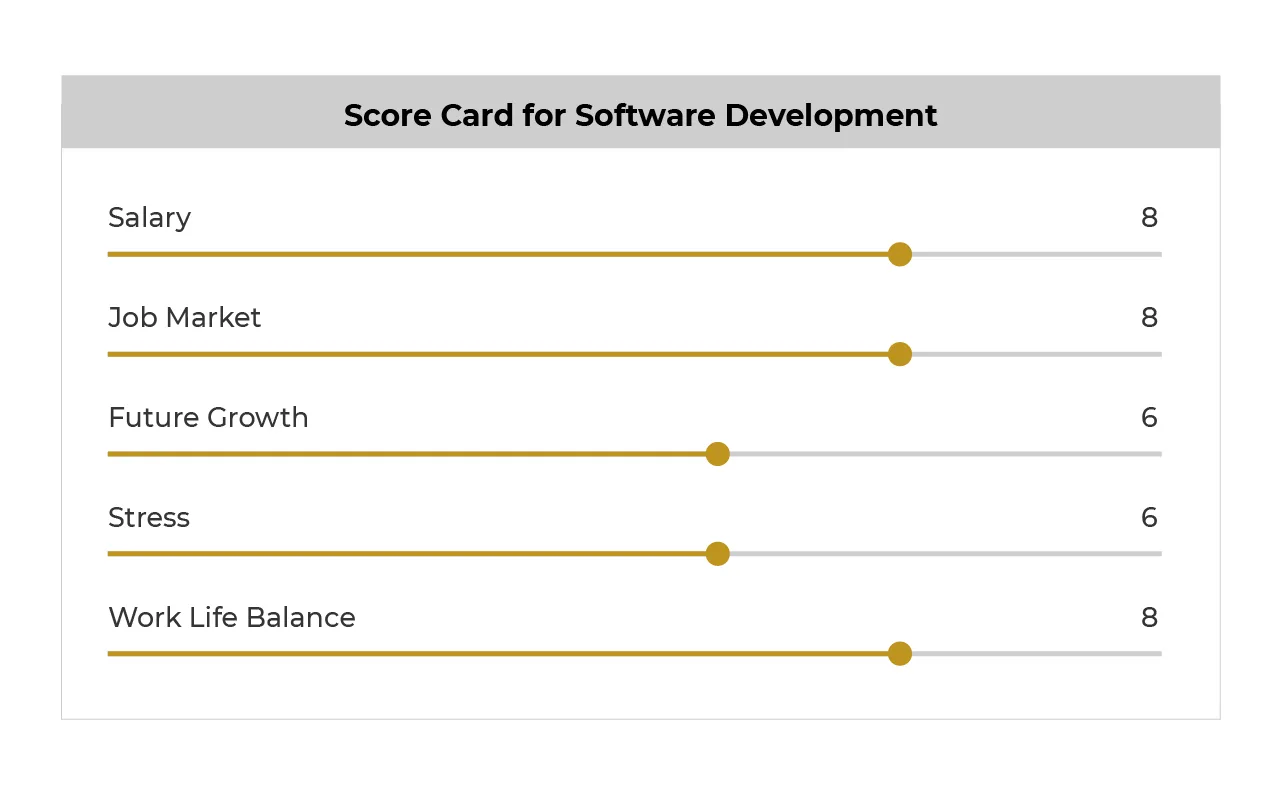
Image Source: https://money.usnews.com/careers/best-jobs/software-developer
Besides the 100 best jobs, the Report also looked at various other rankings, such as the ‘Best Paying Jobs’, the ‘Best Stem Jobs’, the ‘Best Health Care Support Jobs’, etc. Software development came out as #1 for ‘Best Stem Jobs’ as well as ‘Best Technology Jobs’.
Because software development scored slightly lower on stress, let’s see what software developers actually do and how stressful the job really is.
Stress
Drawing from a variety of sources, Business Insider has published a graphic showing the most and least stressful jobs. Firefighters top the list with exposure to very high stress levels. Luckily, both web developer and software engineers feature on the low-stress side of things.
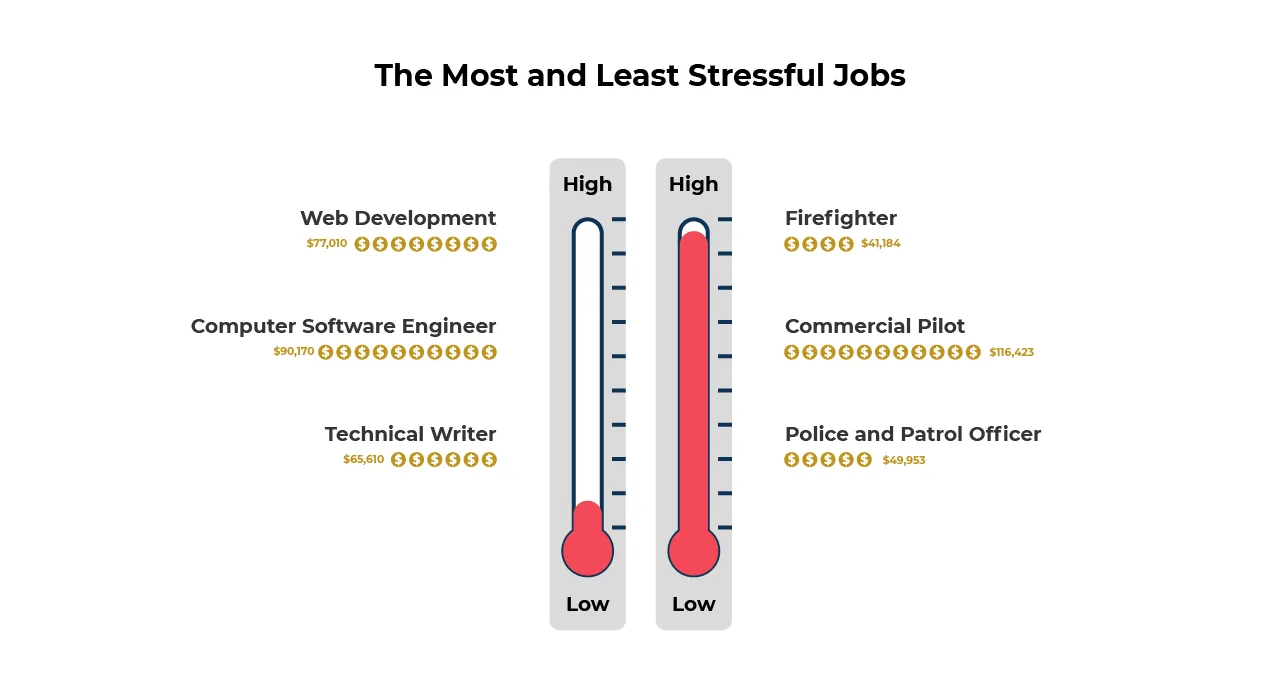
Image Source: https://www.businessinsider.com/the-most-stressful-jobs-on-the-planet-picture-2011-2?IR=T
You might think that software developers sit at their desks all day, but this is not actually true. Their job involves many components, including writing new code for client projects, improving code for programs that are already running, checking for bugs, or collaborating with other developers, managers or clients. They are natural problem solvers with strong analytical skills.
Automation
Automation is likely to hit certain industries hard, yet not software development, which only has a 13% change of being automated, according to the website Will Robots Take My Job. Compare this with bookkeepers and accountants who sit at a whopping 98%.
Demand for Jobs
The Bureau of Labor Statistics projects a 30.7% employment growth for software developers between 2016 and 2026.This translates into an estimated 255,400 jobs opening up.
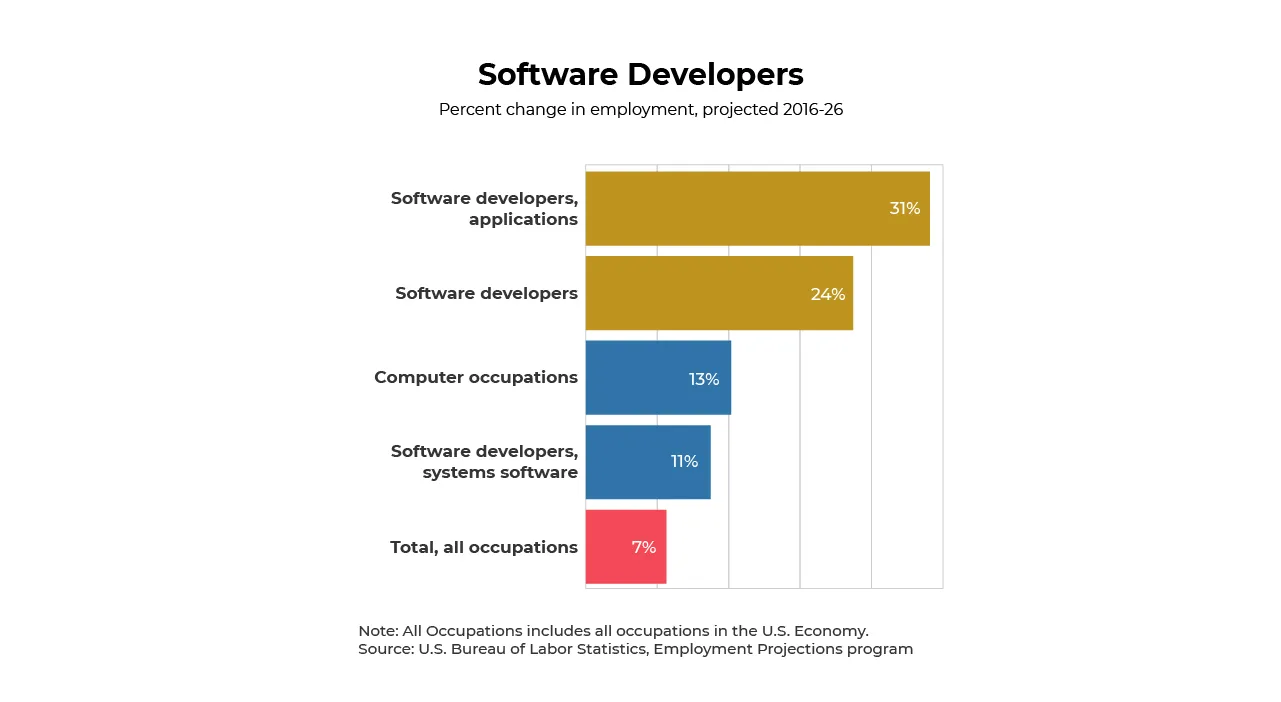
Image Source: https://www.bls.gov/ooh/computer-and-information-technology/software-developers.htm#tab-6
Compare this with advertising, promotion and marketing management, for example, which is predicted to grow at 10%.
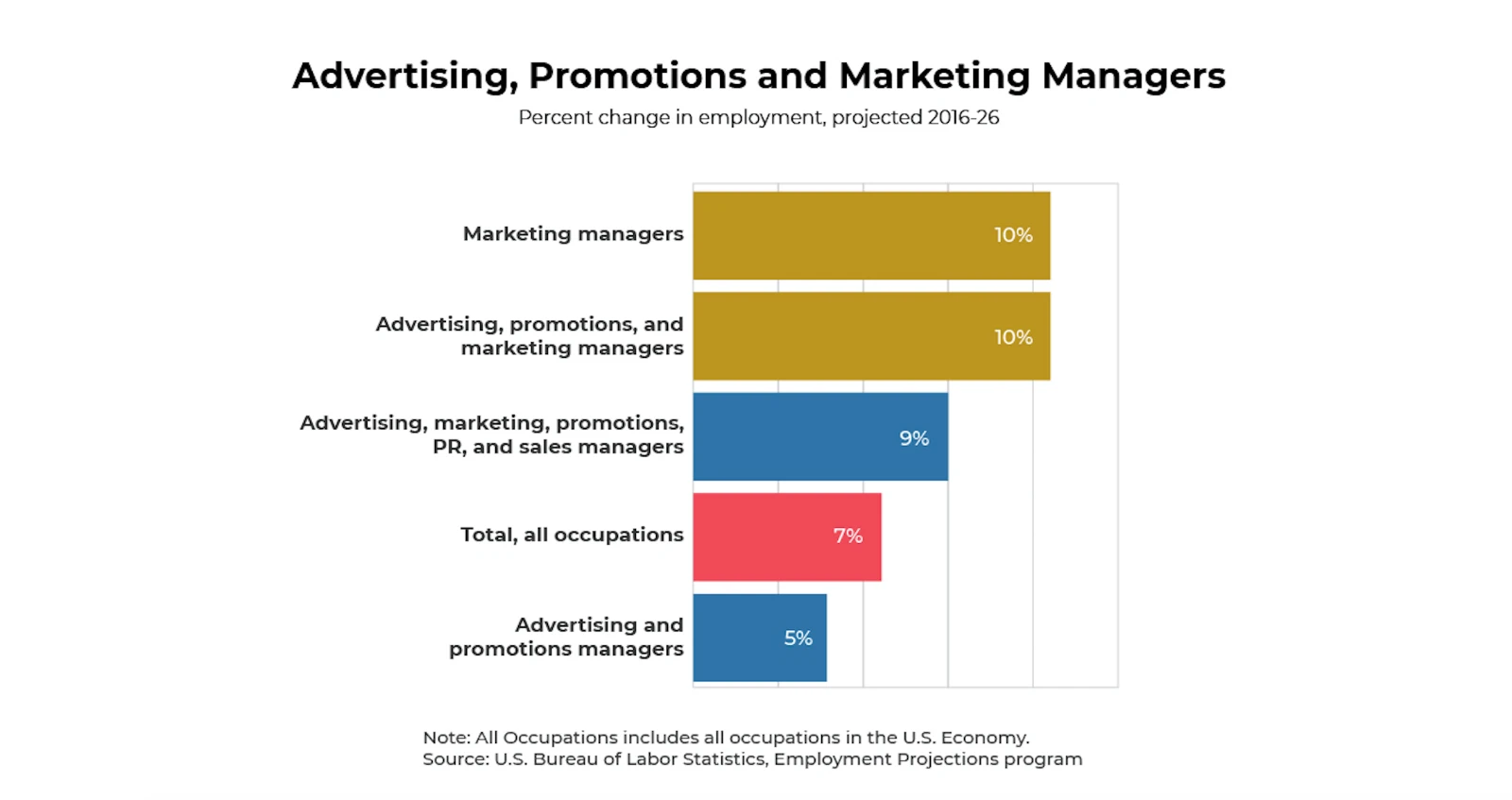
Image Source: https://www.bls.gov/ooh/management/advertising-promotions-and-marketing-managers.htm#tab-6
Salary
According to the U.S. News and World Report, the best-paid software developers make $128,960 per year with a median salary of $101,790.

Image source: https://money.usnews.com/careers/best-jobs/software-developer
The median salary for the job that came in at #2 is $84,060. Any idea of the job? Bet you didn’t guess it was a statistician.
In closing, we’ve looked at a number of key variables when comparing software development to other jobs, including stress levels, salaries, demand, automation and overall job ranking. If you’re keen to switch careers, you may want to consider your talents and interests. Here are some tips for working this out:
- You won’t discover you have a musical talent if you never try an instrument. Attempt to try something new every week. If you want to try out coding, think about enrolling on a free bootcamp trial via HyperionDev.
- What is easy for you to do? Ask others what you are good at – these are likely to be your talents. Think about what you loved doing as a child.
- Think of successes you have had, even if they are minor. For example, perhaps you organised a fantastic surprise party for your best friend – and it could be that you have a talent at event planning.
- Take a personality test to get a better sense of your natural proclivities. Two popular tests include the Myers-Briggs, which divides people into sixteen personality types based on research by the famous psychologist Carl Jung, and the Keirsey Temperament Sorter, which separates people into various temperaments.
If you’re keen to become a software developer, you can choose to either study part-time and online via HyperionDev’s Software Engineering Bootcamp or you could choose an immersive, face-to-face program. These take place in Cape Town or Joburg.

Student Success Stories
Graduate Outcomes Report: where do our graduates end up?
The number of people enrolling on coding bootcamps is increasing. What bootcamp outcomes can you expect? Also, find out about likely salary increases once you’ve graduated from your bootcamp.
The number of people enrolling on coding bootcamps is increasing. In 2018, for example, there was a 20% growth in US students graduating from online coding bootcamps. With this rise in demand for tech education, what bootcamp outcomes can prospective students expect? Let’s take a closer look at HyperionDev’s Graduate Outcomes Report for more insights.
Switching careers: various options
At HyperionDev the goal is to help people switch careers, whether they are new to coding or not, in order to become industry-ready. Bootcamps on offer include:
Students learn to master engineering in Python and Java, as well as the software development principles, data structures, science and algorithms needed to kick off a rewarding career as a software engineer. They also receive a solid foundation in data science and machine learning technology as they progress through the bootcamp.
Full Stack Web Developer Bootcamp
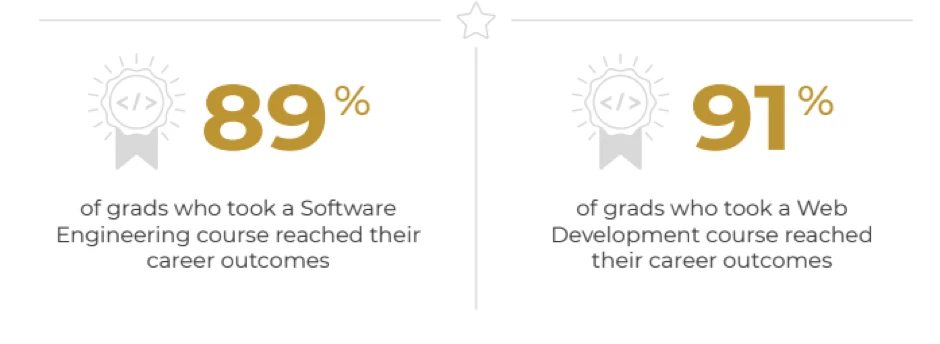
Learn to build powerful database-driven web apps in HTML, CSS and JavaScript. Students are equipped for both front-end and back-end web development. Many bootcamp attendees are, in fact, learning Full Stack Web Development skills – 91%, in fact, according to Course Report.
Students learn to harness the full power of Java and Android to leave their mark on this key industry.
During the bootcamp, students study the essentials of probability and statistics for data analytics. You’ll also cover Python, Java, Object Oriented Programming, and machine learning, which is one way of achieving artificial intelligence. Machine learning brings together computers and statistics to build algorithms that allow computers to learn new tasks. It allows the computer to use experiences to learn by seeking statistical patterns in the data.
Short courses are designed to help students master a skill in three months in the following areas:
- C#
- C++
- Python Software Developer
- Java Software Developer
Our graduate outcomes
What are the HyperionDev bootcamp outcomes? According to the results of a questionnaire sent to all graduates, 95% of graduates reached their career outcomes since graduating. These outcomes included moving to a new career in tech, starting their own business, upskilling in their current tech role or using their new skills in another job.
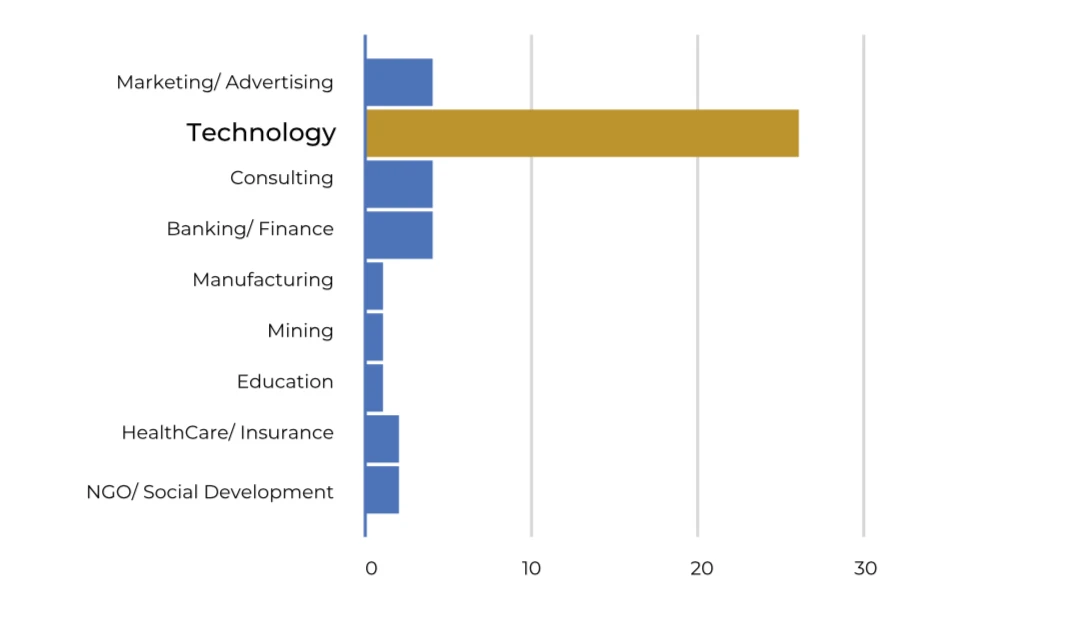
However, most graduates ended up working in the tech industry. Here’s a graph showing the industries where graduates can be found – you can see that 72% are now working in tech fields, although a coding career prepares one for a wide variety of fields, from social development to mining.
Research shows that more workers, especially younger professionals, think that changing roles every few years is highly useful to their careers. Global staffing firm Robert Half conducted a study showing that 64% of professionals polled think “changing roles every few years can be beneficial, with the biggest perk being a higher salary.”
Here’s a breakdown of students reaching their career outcome by course:
What about salaries?
Once graduates completed their courses, their salaries, on average, increased by R12 000 per month, equating to an extra R144 000 per annum. That’s what happens in South Africa, but what happens elsewhere? Do bootcamps lead to salary increases? Before taking a bootcamp, Course Report found that students were, on average, earning $46,974 compared with $70,698 post-bootcamp. As graduates become more experienced developers, salaries continue rising even further. In their second jobs, bootcamp graduates earn around $80,000 per annum. And by their third jobs, they are earning, on average, $90,421 per year.
Time taken to land a job
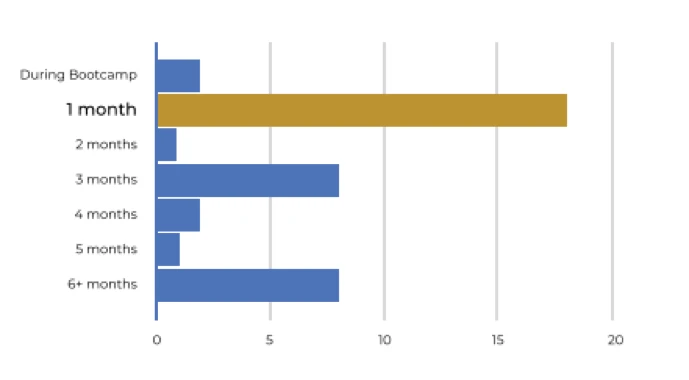
Here’s a graph depicting how long it took graduates to find a job after finishing their bootcamps – 72% who found a new tech job were employed three months after graduating. This indicates that the tech industry is satisfied with short course and online bootcamp qualifications.
In conclusion, bootcamp outcomes from the Graduate Outcomes Report are highly positive and exciting. Not only are students able to find work in a variety of industries, though mostly in tech fields, they can expect a significant salary increase as well. If you’re keen to change careers or upskill, consider enrolling on a HyperionDev online bootcamp in Full Stack Web Development, Data Science or Software Engineering. You can also trial one of these courses for free. If online learning is not your thing, you could enrol for an immersive, face-to-face Web Developer or Software Engineering course in Cape Town or Johannesburg.

Career Advice
How universities are partnering with coding bootcamps to update curriculum
What’s behind the growing trend of traditional universities partnering with bootcamp academies, allowing learners to enrol in university coding bootcamps?
There is a growing trend of traditional universities teaming up with bootcamp academies, giving learners the opportunity to enrol in university coding bootcamps. Which universities have been pioneering this movement, and how is it benefitting their students?
Let’s start with a look at some recent university coding bootcamps that have been made available to learners:
Recent university & bootcamp partnerships
Wyncode Academy & Lynn University: Web development and UX bootcamp provider Wyncode has partnered with Lynn University in Florida. The partnership offers university credits to learners who graduate from the 9-week Wyncode Web Development bootcamp. Graduates can put these towards the 36 credits required for a Master’s degree.
Dominican University & Make School: California’s Dominican University found they were lacking offerings for students interested in tech and computer science. They have partnered with Make School, a coding bootcamp school in San Francisco, who were looking to get their 2-year programme accredited to offer a Bachelor’s degree. Each school is now helping to fill in the gaps for the other. Dominican will help Make School add liberal arts courses to its coding curriculum, upgrading to a Bachelor’s degree programme, and Make School will help Dominican create a minor in computer science.
Flatiron School & Yale University: The Flatiron School and Yale University’s Summer Session have teamed up to offer a Web Development bootcamp to students for Summer 2019. The bootcamp will carry 2 Yale College credits. This 10-week course is a special collaboration between Flatiron and Yale’s Computer Science department, providing an introduction to full stack web development.
DevPoint Labs & University of Utah: DevPoint Labs partnered with the University of Utah’s Professional Education department in 2017, launching a full-time 11-week web development programme for adults who want to change careers.
Trilogy Education & multiple universities: Several universities are partnering with the workforce accelerator Trilogy Education, to launch part-time bootcamps in their continuing education departments. The courses usually take place on the university campus, through the department of continuing education. Graduates receive a certificate of completion from the host university.
The power behind these partnerships
What’s behind this trend in the education world? There are a number of reasons why traditional educational institutions are partnering with more modern learning providers.
Online coding bootcamps are highly relevant, with content that is constantly updated and fresh. This is essential for those looking to start out in the fast-evolving tech industry. There also tends to be more of a practical focus in a bootcamp curriculum, whereas universities offer more theoretical learning to aspiring coders.
In short, coding bootcamps can help graduates become better equipped to launch a coding career.
Partnerships like these also allow universities to keep up with the “digital economy” offering quick and affordable computer science minors for students across a range of disciplines.
Choosing a university coding bootcamp
If you’re looking into a university coding bootcamp partnership, here are a few tips to help you make an informed choice:
Look at student outcomes: The practicalities of your qualification are just as important as the prestige that comes with completing a bootcamp attached to a university – if not more so. Find out the bootcamp’s graduation rate, and the employment rate for those graduates. This will help you to determine whether the bootcamp qualification will help you to land a job quickly and easily after graduation.
Find out who will be teaching: Most likely, a bootcamp instructor and not a university professor will be teaching this course. This is a good thing however; it means you’ll be learning from someone with real-world, professional experience.
Do your homework: Do as much research into a university-aligned bootcamp as you would for an independent bootcamp. This will help you ensure you’re making a choice that aligns with your learning and career goals.
Cut the middle man out and join a coding bootcamp today. HyperionDev offers a choice of full-time and part-time bootcamps for those interested in web development and data science. Our courses include personalised mentorship and on-demand code review, to help you learn and grow at a fast pace.
Whether you’re looking at university coding bootcamps or the independent coding bootcamps from HyperionDev, there’s a learning opportunity out there for you, to help you advance in today’s increasingly digital workplace.

Career Advice
Tech in South Africa: initiatives that support tech education and job creation
These five innovative initiatives are helping to make education and employment in the tech sector more accessible to South African youth.
Tech in South Africa is on the rise, yet the country is still facing many challenges, including unemployment and the prospect of automation. It’s estimated that 90% of all jobs in the future will require some level of digital skills or capability. Here are a few more fast facts about the tech job landscape:
- 98% of South African CEOs say they are worried about the availability of key skills for the future.
- An estimated 5.7 million jobs in South Africa are at risk of total automation. Strong tech skills are essential in order to stay relevant in the job market.
- South Africa has a national unemployment rate of 27,2%, with the country’s youth (ages 15-34) being largely affected.
These five innovative initiatives are helping to make education and employment in the tech sector more accessible to South African youth.
- The YES Initiative
Summary: The Youth Employment Service (YES) programme is a collaboration between business and government, focused on helping black South African youth in urban, peri-urban and rural areas.
Objectives: The programme aims to create one million new jobs and job opportunities for young people in South Africa, over the next three years. The YES initiative successfully found work opportunities for 4,600 young people in 2018.
Apply: You can find out more about the programme and application criteria online.
- CapaCiTi
Summary: The Cape Innovation and Technology Initiative (or CiTi) is the oldest tech incubator in Africa. CiTi works with government, business and society to promote the inclusive growth of the digital economy. CapaCiTi is CiTi’s technology skills and job readiness programme.
Objectives: In 2018, CiTi announced a significant scale up of the CapaCiTi programme, having unlocked R250 million to support technology skills and job creation. Over the next three years, the programme aims to train more than 3,000 young people with in-demand technology and business skills, and place them in permanent jobs.
Apply: Click here to find out more about CapaCiTi tech skills training, career coaching, career matching and internships. You can also apply for the CapaCiTi programme online.
- The Innovation Hub
Summary: The Innovation Hub is the innovation agency of the Gauteng Province, based in Pretoria. It is a wholly owned subsidiary of the Gauteng Growth and Development Agency, established by the Gauteng Provincial Government through its Department of Economic Development.
Objectives: The Innovation Hub aims to promote economic development and competitiveness of Gauteng, by fostering innovation and entrepreneurship. Their programmes include skills development initiatives like the FabLab Schools Programme, and the CoachLab skills and leadership development programme.
Apply: You can find out more about skills development and business incubation offerings from The Innovation Hub online.
- Silicon Cape
Summary: Silicon Cape is a non-profit, community-driven initiative in the Western Cape. It’s a community of tech entrepreneurs, developers, creatives and investors.
Objectives: The initiative aims to improve the environment in the Western Cape to create and improve start-ups, and increase access to capital.
Apply: You can join the Silicone Cape community by applying for membership online.
- JoziHub
Summary: JoziHub is a co-creation space in Johannesburg
Objectives: JoziHub is looking to transform the technology industry by connecting entrepreneurs and developers with the critical resources they need. It has partnered with industry heavyweights like Google for Entrepreneurs, and Omidyar Network.
Apply:JoziHub offers networking, mentorship and workspace services. Read more online to find out how this initiative can help you launch your tech career.
- LaunchLab
Summary: This Nedbank-backed initiative is based in Stellenbosch, and forms part of the University’s Innovus initiative for technology transfer, entrepreneurial support and development, and innovation.
Objectives: The LaunchLab offers incubation space, pitching competitions, workshops and more, to help tech start-ups and entrepreneurs. The initiative has raised R110 million since 2016.
Apply: You can complete the Lift-Off Application Form online to become a part of the LaunchLab.
- The Sable Accelerator
Summary: The Sable Accelerator is an international partnership group dedicated to helping South African entrepreneurs and start-ups to promote and commercialise their technology innovations.
Objectives: The accelerator aims to promote and protect intellectual property, fund new business concepts, finance growth, and help South Africans expand into global markets. It is powered by MentorCloud, a cloud-based mentorship platform, which also works with the University of the Witwatersrand Alumni Association.
Apply: Become a member and take advantage of Sable’s tech acceleration services.
Another less traditional route towards a recognised coding qualification is to sign up for an online coding bootcamp. This learning pathway is quicker, more flexible and more affordable than a traditional Computer Science degree. Read some of our student success stories, to find out how we’ve helped South African learners to find employment or switch careers.

Career Advice
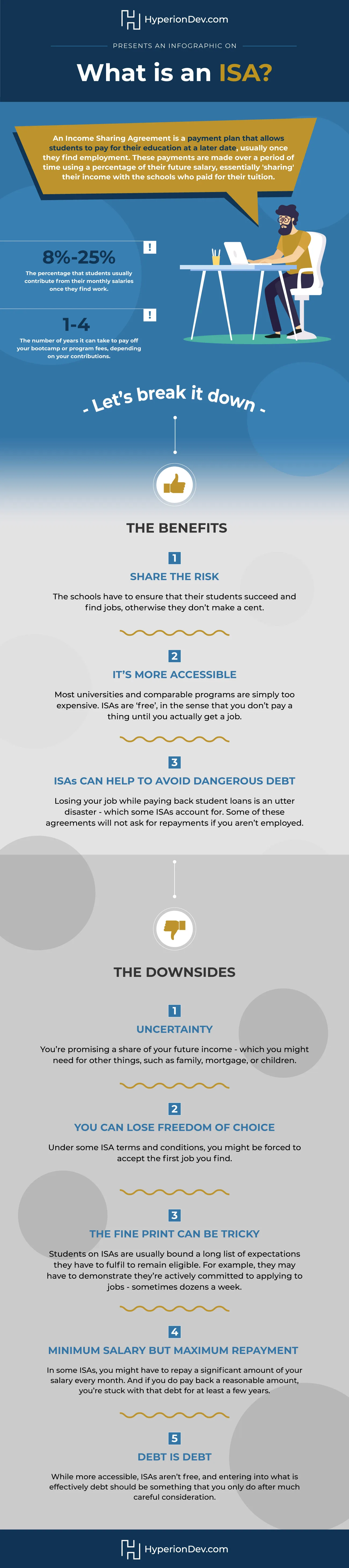
[Infographic] What are Income Sharing Agreements (ISAs) and are they worth it?
Our simple infographic outlines the benefits and the downsides of these agreements, so that you can make up your own mind.
Income Sharing Agreements are a relatively novel way of paying your tuition costs. But as with any financial decision, you should think carefully about signing up for any long-term debt agreement – and understand the fine print like the back of your hand. Sometimes a great deal is simply too good to be true.
According to the HyperionDev Graduate Outcomes Report you can expect, on average, a salary increase of R12 000 per month, equating to an extra R144 000 per annum after completing your coding bootcamp. You need to think carefully if you want to commit a portion of this increased salary to paying off your tuition costs, sometimes for years on end. In the the long term, you could well end up forced to work a job that wasn’t your first pick, to pay back far more debt that you initially bargained for.
At HyperionDev, we think some things are simpler. Like our various tiers of payment plans, including upfront and installment schedules that make it easier to plan your budget when studying and when you land your first job. And when it comes to our 2018 graduates, 72% found a new tech job within three months after graduating – earning salaries that were all theirs, with no long-term payments to us.
If you’re keen to change careers or upskill, consider enrolling in a HyperionDev online bootcamp in Full Stack Web Development, Data Science or Software Engineering. If online learning is not your thing, you could enrol for an immersive, face-to-face Web Developer or Software Engineering course in Cape Town or Johannesburg. Best of all, you can also try any one of these courses for free.
Editor’s note: This was post was originally published on 29 April 2019 and has been updated on 12 March 2020.

Tutorials
[Tutorial] Building a responsive top navigation menu with HTML and CSS
A responsive top navigation menu is the cornerstone of a webpage. Here is tutorial that covers everything you need to know.
A responsive top navigation menu is the cornerstone of a webpage. Without it, we would just blindly navigate web pages to find what we want. That would increasingly become a problem when there are topics nested in sub-topics nested in sub-topics.
For example, you’re looking for a specific brand of laptop online, and you decide to visit the website of a particularly large store, that sells everything from furniture to clothing. You, however, don’t care about anything else besides the laptop. A “search” function could be useful to quickly find exactly what you are looking for. But what if you only know the vague details but don’t know the specific name of the laptop you want? A general category like “Tech and Gadgets” would be really useful in finding what you want. Enter the navbar….
When the word “navigation” or “navbar” is brought up in a conversation in the context of a web page, the picture that pops into your head is likely a top navigation or “topnav”. The reason for this is likely that most of the companies’ web-pages that we visit almost always include a topnav. They seem to pull it off so effortlessly and, most importantly, the experience across devices(Desktop, tablet and mobile) seems so smooth and uniform. The average user can have confidence that, for any given website, they can have an easy experience on almost any device. This is due to the “Responsiveness” factor. That, or the company has spent quite a hefty budget on building different views for different devices.
This tutorial is aimed at beginners to junior developers, who want to learn how to build a responsive top navigation menu and gain a strong grasp of the related concepts.
We will walk you through a specific implementation of the navbar, and you can further customise it from there.
Why not use a framework such as Bootstrap?
As a developer, you’ve probably heard of frameworks such as Bootstrap, which would have built-in, out of the box responsiveness, and can easily be tweaked for most of your purposes. However, we’re choosing to manually implement the responsiveness ourselves.
Some of the advantages of manually implementing it are:
- You’d have more control on where to set your breakpoints (ie, the maximum places where the current view transitions into the next. e.g. 500px can be the maximum place where the mobile styling applies, before the tablet view is more appropriate). Related to this, you can add as much additional breakpoints as you want, wherever you want.
- The learning curve is smoother, as you don’t need to learn a whole new framework. You’d just be using CSS.
- There is no need to add the framework as an extra resource, which would cause extra overhead.
- Your webpage would be distinctive from “Yet another bootstrap clone”.
- Less cluttering of the html.
Some disadvantages of manually implementing navbar responsiveness would be:
- It would likely take longer, as you’d have to spend more time implementing the views. With practice, this would be more and more reduced.
- If you’re not as good with CSS to begin with, the final responsive product won’t look any better.
- There is some additional complexity in the CSS.
What we’ll be using for the implementation:
- Mobile-first approach
- Font-awesome icons
- jQuery (For brevity, you’re welcome to implement the solution in Vanilla JavaScript)
What the responsive top navigation menu will consist of:
- A logo
- The navigation links
- A search-bar
- A hamburger menu for the smaller views
Getting started
Before we begin, you’ll want your boilerplate code and links to font-awesome and jQuery set up:
I’ve generated this template using my text-editor (Visual-studio Code at this moment in time), but you can use what your text editor/IDE provides, or even type it from scratch. The first meta tag is particularly important, because it ensures the responsiveness applies to all devices. The other two links are CDN links I found on their official websites.
Next, we flesh out the HTML structure of the page:
Notice how we’re using icons for the hamburger menu button and the search bar, while making sure that each and every element is visible, and, as easily as possible, able to be uniquely selected. By now, we have:
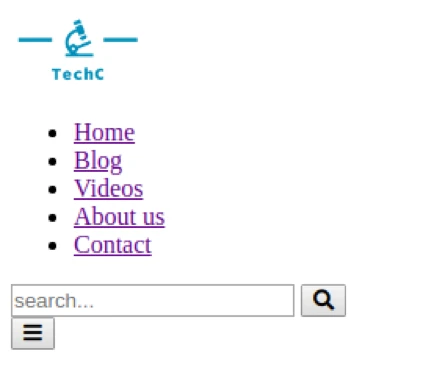
Now that we have our basic skeleton setup, we can begin with the actual meat of the project: the different responsive views. We’ll split those views up into 3 sections, using a mobile-first approach.
Step 1: Mobile view
In general, mobile views consist of single-column layouts, and the navigation needs to be as unobtrusive as possible. Therefore, a common approach to the mobile view would be the hamburger menu, served as a dropdown list upon a user’s click. Also, since it’s a single-column layout, scrolling all the way towards the end of the page would take longer than if it was all in a compact, multi-column layout. So we’ll be making our navbar sticky, for easier access.
Firstly, I’ve added a small reset, so that some of the default styling from the browser doesn’t interfere with how we want it to look. The basic idea here was to give the navbar a fixed height, while hiding the search bar and navlinks for now. I added the background colors for the sole purpose of making the different sections distinctive.
Next, we’re styling the navlinks:
The links themselves have typical styling: the removal of the underlines on the links, etc. For the hamburger button, we float it to the right. This will put it at the absolute right edge of the page, as there aren’t any obstructions. Then, we give it an absolute width and height of 30px and a margin of 10px. You could alternatively give it padding, instead of a width and height, but then the margin wouldn’t work as effectively. The margin is 10px right around because it will not only take it slightly away from the absolute edge of the page, but it will also vertically align the button! This is because the navbar itself has a height of 50px, so the 10px on top and the 10px on the right would give it some breathing space.
Finally, we added some styling to the search bar. I selected both the text field and the button for this. Notice that while we’ve added styling to the navlinks and search bar, they are still not visible!
Next, we add the code that implements the actual showing and hiding of the navlinks and search bar:
$(document).ready(function() { $("#hamburger").click(function() { // alternate between showing and hiding navbar $("#nav_links, #search_bar").toggle(1000); // alternate between bars and times $("#hamburger i").toggleClass("fa-bars").toggleClass("fa-times"); }); });
For this to work, make sure that you’ve properly linked jQuery before you implement this code. Line 1 is a function that contains a built-in event listener for when the DOM loads. Then, on line 3 we have a click event listener for the hamburger button. You’d notice that jQuery generally follows that format, where “$(selector).functionName()” comes with a callback function as a parameter.
Nevertheless, we continue to line 4, where we’re calling the toggle function on the navlinks and searchbar respectively (notice how the selector syntax is the same as with CSS). The toggle function will take turns to hide and show the selected items, with the parameter being how long it takes to show and hide it in milliseconds. So it takes one second to fade in and out.
Line 5 is changing the bars icon to the times (a cross) icon, to show which button to click to hide the menu again.
That’s all we need for the mobile view, and it should look something like this:


Step 2: Tablet view
The advantage of using a mobile-first approach, is that you are minimising the amount of code you would have to rewrite for the other types of views. All that needs to change is the size and layout of the content. Tablet views can still make use of a single-column layout. In order to make your navbar responsive, you would wrap your view-specific code in a responsive media query, which is a declaration of what styling to apply to a specific view:
Don’t let the syntax scare you. All it means is that “when the width of the page is at least 700px, apply the following styling”. Within the media query, you would add:
You could have skipped the tablet view in favour of the mobile view for medium devices, but I’ve decided to keep the search bar on top (largely because of the extra space provided due to the viewport being wider).
Now we have 3 columns in the top_nav itself. I’ve used CSS-grids to position them. You can alternatively use any of the other technologies that handles positioning (‘Flex-box’, in particular, would stand out as an awesome alternative).
Due to the ordering of the elements in the html, this would put the navlinks in the third column, instead of the search bar. So I’ve used ‘position: absolute’ to make sure that it is placed below the navbar when it appears. This also removes it from the natural ordering of the elements. Also, the width is set to 100% to span the width of the page.
For the search bar, we’re simply making it visible again, and this would make it automatically be the third grid-item as defined in the “.top_nav”.
By now, you’d notice that the hamburger button isn’t working as expected, because both the navlinks and search bar still fade away when clicked. We would need to detect the device width when it reaches the tablet view, and ensure that only the navlinks are being toggled.
So we would add an if-else-statement to the original script such as below:
This works because ‘window.innerWidth property’ holds the current width of the screen. By now you’d have something such as the below:
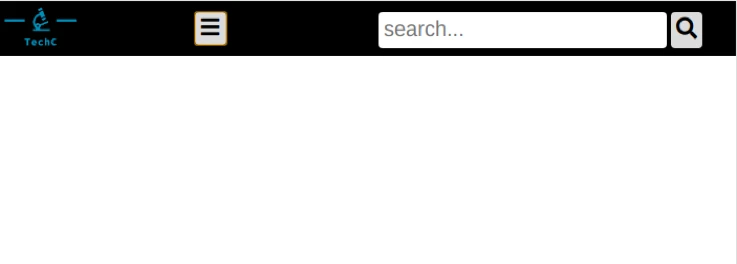
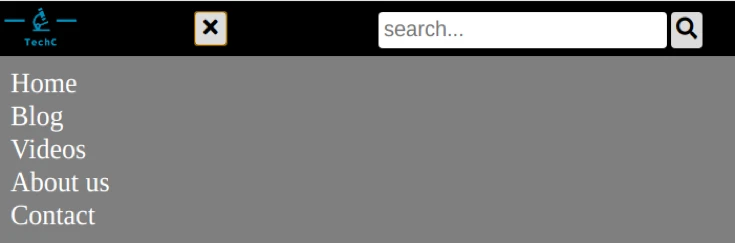
Now all that’s left is to round it off with the desktop view.
Step 3: Desktop view
Here, you’d use pretty similar code to the tablet view with one important difference (and a few less important differences):
The hamburger button itself will not be displayed, while the navlinks will. This is because the user would have a wide-enough screen for a proper multi-columned layout. The absence of the hamburger button and presence of the navlinks means that the navlinks will take up the extra column in the topnav’s layout code. Due to the natural ordering of the elements in the html code, the navlinks will be in the middle.
You’d also notice that the code for the navlinks would need some overriding, as the positioning was absolute in the tablet view. Also, the display would be set to ‘inline’ to keep with the general theme of making it fully horizontal.
I’ve added a simple hover effect just for some spice, and the code looks like the following:
Your final desktop view would look something like this:

Closing remarks
So by now you likely have a working responsive top navigation menu on your site. From here, you can try your hand at customising it to have a different layout, better animations and transitions, etc. You would also have enough knowledge about responsive media queries by now to customise and make just about any web page responsive. Just note that converting a non-responsive webpage can often be more difficult than starting from scratch, so tread carefully there as not to break it.
The source code can be found here.
Happy coding 🙂
This post was written by Ridhaa Cupido, HyperionDev mentor and code reviewer.

Career Advice
The tech startup scene in South Africa: Cape Town vs Joburg
What is the tech startup scene in South Africa like? We outline key trends, including most popular city in which to start a tech business as well as which city has the greatest success rate.
If you’re a South African tech entrepreneur, what’s the South African startup scene like? Should you be opening your new business in Cape Town or Joburg? Where are you most likely to encounter success? Here are the key trends on the tech startup scene in South Africa.
Gauteng winning
At first glance, it seems that Gauteng has the upperhand. It appears to be the most popular province in which to run a tech startup in 2018, according to the Ventureburn Tech Startup Survey. Check out the below graph, which shows 55% of the 153 tech founders questioned in an online survey operate in Gauteng compared with the next highest contender at 37% in the Western Cape. The data also indicated that the rise in Gauteng startups is driven by an increasing number of black tech entrepreneurs.
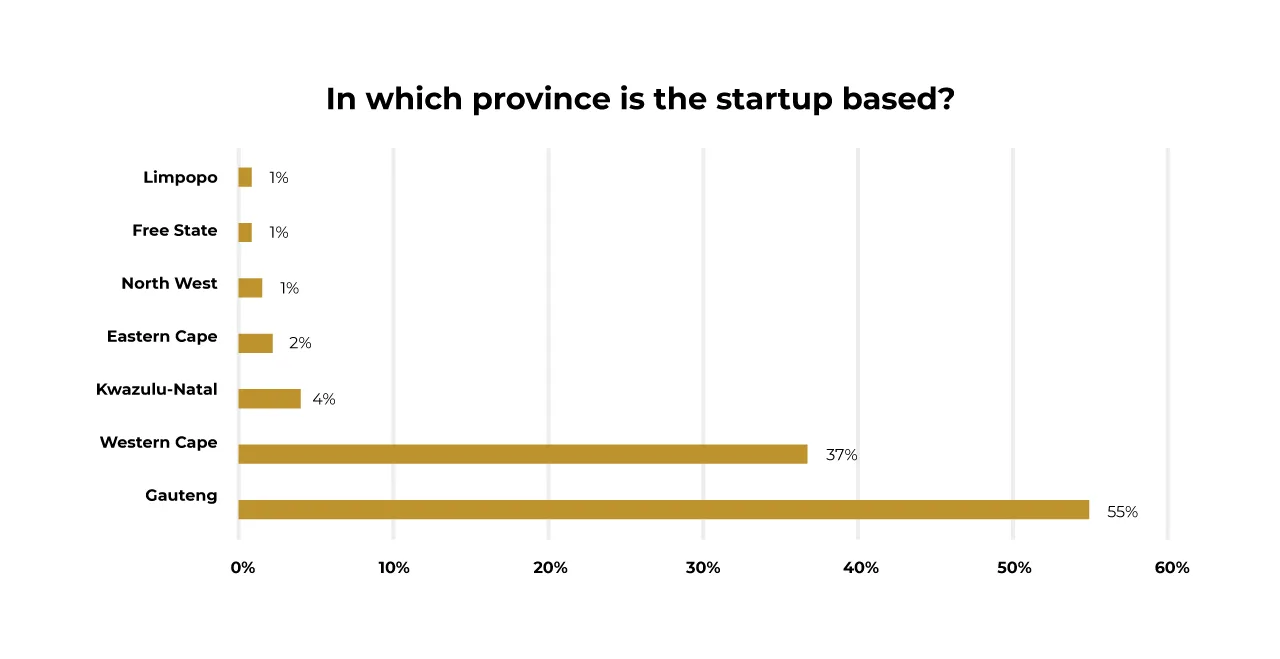
Img Source: http://ventureburn.com/2018/11/gauteng-top-2018-ventureburn-survey/
Western Cape still popular for tech entrepreneurs
However, even though most tech startups begin their journey in Gauteng, here’s an important addendum: the more successful startups tend to be Western Cape based. 36% of startups in the Western Cape report making a profit whereas the figure in Gauteng sits at a lower 23%. Of those surveyed, only 21% are turning over R1 million per annum. 27% generate between R100 000 and a million per year. According to Stephen Timm, editor of Ventureburn and reported in ITWeb, the key reason “behind this success is the higher prevalence of venture capital (VC) funding in the Western Cape.”
Behind the startups
What kind of people are involved in tech startups? And what is the nature of the businesses? Let’s look at who is behind the tech startup scene in South Africa.
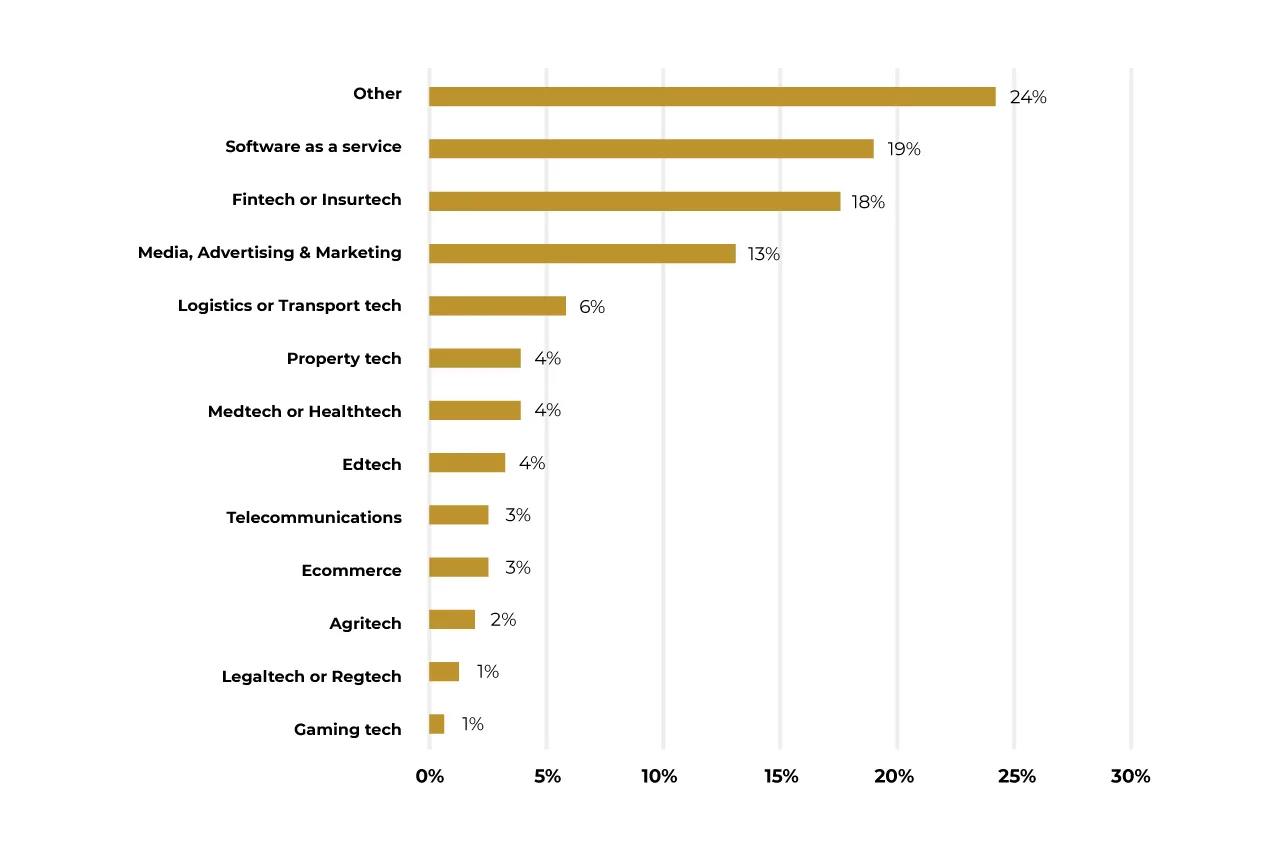
The biggest driving force behind tech startups tend to be men between the ages of 25 and 50. 65% of tech startup founders are male. The three most popular areas for startups are SaaS (Software as a Service) at 19%, fintech and insurtech at 18% and the media, advertising and marketing sector, which sits at 13%. Here’s a graph indicating the various sectors within the tech startup environment.
Img Source: http://ventureburn.com/2018/11/gauteng-top-2018-ventureburn-survey/
Now for some good news: about a third of the respondents began their startup in the last year. Remember, it’s never too late to begin a new tech venture or career in tech. In fact, according to the 2018 Stack Overflow report, a full third of professional developers only learned to code within the past five years. Moreover, almost 12% of developers who work in the industry only learnt to code in the past two years.
And some more good news about the tech startup scene in South Africa: only a quarter operate from the office. The overwhelming majority work either from home or remotely. (If you want to read more about remote development work, check out these tips.)
Black tech entrepreneurs: problems encountered
It’s not all roses, however. Startups begun and run by black tech entrepreneurs struggle more than their white counterparts, although, as mentioned earlier, there are an increasing number of black tech entrepreneurs. Only 7% of black-owned tech startups are turning a profit compared with 15% of startups begun by white entrepreneurs. Also, the financial position of black startups is more dire than for white-owned new businesses: 28% of white founders have three or fewer months left of funds whereas the equivalent situation for black tech startup founders is 51%. The reason for this appears to be that white tech startup founders have greater access to capital, skills, experience and productive networks, which obviously has a knock-on effect.
In closing, the tech startup scene in South Africa seems to be shifting to Gauteng, although companies in Cape Town enjoy greater success. If you’re got a killer tech idea, consider a startup, particularly if you would enjoy remote work. To brush up on your coding skills, think about enrolling on a HyperionDev online bootcamp in Full Stack Web Development, Data Science or Software Engineering. You can also trial one of these courses for free. If online learning is not your thing, you could enrol for an immersive, face-to-face Web Developer or Software Engineering course in Cape Town or Johannesburg.

News & Announcements
March 11, 2019
Meet the team: Lelethu Mkefa
Meet the team and find out about career consulting from HyperionDev’s team member Lelethu Mkefa, who speaks to us about his favorite and least favorite things about his job.
One of the goals at HyperionDev is to ensure you undergo career consulting before enrolling on a Software Engineering, Fullstack Web Developer or Data Science bootcamp. Remember, an online bootcamp entails a commitment of 10 hours per week over six months in order to change careers by the end of it so it needs to be the right decision. Let’s meet team member Lelethu Mkefa to find out what he does on a day-to-day basis as a career and course advisor.
You work as a career and course advisor currently. How do you assist students in making the correct decisions about their careers – what factors do you consider?
Career counselling is not an exact science, although it is a big responsibility. You’re advising someone to take a certain path which will define the next few years of that individual’s life. It’s not something to be taken lightly.
To start with, I rely on the student being as open as possible in telling me his or her story. I’m listening very carefully to what the student is saying. I’m looking for clues about what excites that person, their natural inclinations or abilities, as well as the type of work environment the individual prefers. For example, does this person enjoy interacting with people or is he or she more of an introvert?
Besides their abilities, there’s another vital side to the equation. Not only must I check the person’s expectations and understanding of his or her desired coding career, but also any previous knowledge and background. For example, a complete beginner will need a softer introduction to coding. In that case, I would advise web development, because it’s easier to pick up the basics, which sets the foundation for building more complex applications that require greater experience at a later stage. However, if the person is a novice but has a good technical or mathematical aptitude – for example, she wants to understand why a computer program works or to build new tools rather than just using existing tools – I would recommend software engineering or data science.
Lastly, how does the person want to spend his or her day? What kind of problems interest them? Someone who is interested in making sense of data is different from an individual who wants to build applications to help a business or user achieve goals. When it comes to career counselling, it’s very important to know the kinds of problems someone wants to spend his or her day solving.
At the simplest level, I help match people’s interests and inclinations with a coding course that can best achieve their goals.
According to your experience, what kind of people are best suited to make the switch to coding?
The profile of “the programmer” or “the developer” has changed since the “age of the geek”. To some extent, the software space still attracts the typical introvert, but companies need software professionals who can interact and engage with users and business stakeholders to deliver a product. A coding professional can come from a multitude of backgrounds while still contributing usefully to product development. Remember, many interrelated roles, from programmer to product manager to business analyst, require problem-solving skills for technology environments.
Our students come from all walks of life. Some are changing career paths, whereas others are looking to learn a new skill to advance their current career, while some are just starting out as high school graduates. There’s a place for all of them.
Can any person change career to tech?
Actually, I don’t think that’s the right question. The correct question is rather, “should everyone receive a coding education?” I’d have to say “absolutely”, because every job is affected by technology. Understanding fundamental computational problem-solving gained from computer science topics is an essential skill to ensure you remain relevant. Remember, automation is replacing jobs at a rapid rate. Have a look at www.willrobotstakemyjob.com to find out if you should be seriously considering updating your skills.
What are the best and worst parts of your job?
I love it when students genuinely feel supported and when they better understand something about themselves, and the career they’re researching. I suppose the worst part is when potential students aren’t able to break through their fear of making the change they know they need.
What do you like to do in your spare time?
I’m passionate about learning new skills, from design to coding. I’m a fan of doing DIY projects at home. I love watching Marvel cinematic movies and spending time with my family and friends.
How do you start your day at HyperionDev?
I’m first in office at 7am. I start with a strong cup of java, a cheese croissant and practice coding.
In conclusion, career consulting is taken seriously at HyperionDev. Potential students require professional assistance to ensure they make the best possible decisions about their future careers in tech, which is a vast and growing sector. To make the most of this service book a 1-on-1 call with a career consultant today.

Career Advice
Where to study coding in Johannesburg
Few industries offer job security like a career in coding. This is a result of the global tech skills gap, and the ever-growing demand for industry-expert coders. If you’re keen to study coding in Johannesburg, here are some excellent options.
Gauteng is known for its hard work and getting things done. Don’t knock back on Friday at 2 – that’s a Cape Town thing. Besides industriousness, there are also great places to study coding in Johannesburg. Whether you’re interested in software engineering or web development, you’re bound to find a course that suits your pocket and your schedule. We’ve listed six awesome places to study coding in 2019.
This non-profit organisation has a unique vision involving no teachers or classes; students learn via a peer-to-peer problem solving environment. The two-year course is sponsored by companies looking to support the development of local tech in the digital economy, which means there are no tuition fees. The aim of the program is to teach students how to solve problems using coding as their tool.
Anyone can apply provided you’re between the ages of 17 and 35, and you’re able to study full-time for two years at one of their campuses, situated in Cape Town or Johannesburg (at 84 Albertina Sisulu Street, Johannesburg CBD). No prior education or coding experience is required. To get into their course, you have to pass their online application process. Successful applicants are invited to participate in a selection bootcamp and then ultimately onto the full-time course.
HyperionDev offers part-time or full-time 3 month intensive classroom learning experiences in Web Development or Software Engineering. In the Software Engineering course, you’ll master Python and Java and learn to apply important computer science, data science and software engineering principles. The Web Developer course teaches you to build your own dynamic, data-driven web applications. You’ll learn HTML, CSS, JavaScript, Node.js, MongoDB, Express and React. Basically, you’ll cover back-end, front-end and full-stack web development.
Courses take place at their Cape Town or Johannesburg venues (all courses are also offered online) and include job search support and career coaching. During the course you’ll learn to write industry-quality code with the help of your own mentor. You’ll attend physical classes, while work will be submitted to an online platform.
Located in Woodmead, Code College offers a wide variety of short and longer courses. There are two categories of courses – ‘short courses’ and ‘Full Stack Web Coding Bootcamps’. They also offer a variety of coding courses for kids, including Scratch, MBot Robotics and Python for kids. Their short courses cover JavaScript, .Net, Java, Android, Python, and more. Many of the courses take place over five days and include an online component.
This institution, located in Centurion, offer a number of programming courses, both virtually and in their physical classrooms. Programming courses include the following: Java, .Net, C and C++, Web Development, Object Oriented courses, as well as other programming courses (e.g. Perl, SQL, Linux, etc.).They also have a variety of one-day technology seminars in JEE, Web Services, Mobile Application Technology and Coding Ethics. You can view their full training schedule here.
Leading Edge operates from Sandton. The institution offers a variety of short courses in programming and IT. Part-time and full-time study is available. In-person, instruction-led tuition, as well as online training, is offered. Courses include web design as well as programming (HTML, CSS, Bootstrap, Flash and others). There is also training in databases, such as SQL and MySQL.
Damelin, which has campuses throughout South Africa, offers both university-level and Further Education and Training (FET) qualifications. They offer a Bachelor of Commerce in Information Management, which takes place over 3 years, full-time. You can choose a career in one of a number of fields, such as Software Development, Database Analysis, E-commerce Management, etc.
In conclusion, if you’re keen to study coding in Johannesburg, we’ve listed some excellent options. HyperionDev, particularly, offers industry-specific courses in a stimulating environment. If you want to change careers in 2019, check out one of these courses. Remember, few industries offer job security like a career in coding. This is a result of the global tech skills gap, and the ever-growing demand for industry expert coders. Let us know if there are any other tech courses in Johannesburg you’d recommend in the comments below.

Career Advice
Will I get a job after a coding bootcamp?
Many students want to know: will I get a job after a coding bootcamp? How employable does a bootcamp qualification make you, and how long will your job search take?
Coding bootcamps are a challenging, rewarding and fun way to learn new skills or improve your existing knowledge. But naturally, many students want to know: will I get a job after a coding bootcamp?
So, how employable does a bootcamp qualification make you, and how long will your job search take?
It’s important to remember that a bootcamp certificate alone won’t get you a job – but then, neither will a traditional degree or diploma. Industry-aligned skills, sound technical knowledge and a strong portfolio are the attributes you need to land the developer job you’ve always wanted.
How do employers perceive bootcamp graduates?
A 2017 survey conducted by job site Indeed found that the vast majority (72%) of employers consider bootcamp grads to be “just as prepared to be high performers” as graduates with degrees.
A much smaller percentage of employers (17%) favoured degree holders over bootcamp grads, while 12% of employers actually perceived bootcamp learners to be “more prepared to be high performers” than traditional graduates.
Simply put, a large majority of employers out there view bootcamp graduates in a fair light, and don’t consider a lack of a traditional computer science degree to be a setback.
More recently, in 2018, Fullstack Academy released findings that showed a positive upswing in bootcamp graduate hiring trends over the past 5 years. According to Fullstack Academy:
- Start-ups have been hiring bootcamp grads since 2013, but bigger companies took longer to get on board.
- By 2018, major companies like Google, Facebook, LinkedIn, Amazon, Dropbox, JPMorgan, Goldman Sachs and Amex were hiring bootcamp graduates.
- Middle-grade companies, which are profitable but very risk-averse, are still the most hesitant to hire bootcamp grads.
Employment rates for coding bootcamp graduates
The results of the Stack Overflow 2018 Global Developer HIring Landscape report shone some light on the statistics around bootcamp learning:
- Nearly 90% of developers have taught themselves a new language, framework or tool outside of their formal education.
- 10.5% of these learners participated in a full-time developer training programme or bootcamp.
- Other popular learning methods included participating in hackathons, and contributing to open source software.
- 45% of coding bootcamp participants already worked as developers, using the bootcamp experience to update their skills.
What do the success rates look like for the other 55% of bootcamp graduates, in search of their first coding job?
- 16.3% found a job immediately after graduating
- 7.5% found a job in less than a month
- 10% found a job in 1-3 months
- 5.2% found a job in 4-6 months
- 3.6% found a job in 6-12 months
- 3.2% took longer than 12 months to find a job
- 8.7% are still in the job market
Misconceptions about coding bootcamp graduates
There are still some false beliefs and misconceptions floating around the job market, but these are shifting as more employers and learners become aware of the value of bootcamp training.
- Bootcamp students have no experience working as professional developers: Looking at the Stack Overflow report, we can see this is false, as nearly half (45%) of bootcamp learners surveyed were already working as developers before starting the course. That means many coding bootcamp graduates have plenty of experience under their belts and are actually ready to take on senior roles.
- Bootcamp graduates struggle to find jobs: Graduates with recognised bootcamp qualifications are in high demand, just as their counterparts with more traditional degrees are. Of course, a bootcamp certificate doesn’t guarantee a job, but the interview and hiring process won’t differ significantly between bootcamp graduates and more traditional graduates. Technical ability speaks louder than a piece of paper.
- Students only use bootcamps as a way to change careers: This is certainly the case for some learners, but many others enroll in bootcamps to supplement their current non-programming jobs.
- Bootcamp students need a background in science: Neither science nor maths is a prerequisite to succeed in a coding bootcamp. Many learners come into the course with non-traditional backgrounds, including writing and art. At the end of the day, the most important thing is the developer’s ability to write quality code.
HyperionDev bootcamp graduate success rates
Our 2018 Graduate Outcomes Report for our South African bootcamp graduates revealed these positive trends:
- 95% of graduates reached their career outcomes.
- These outcomes include: moving to a tech career, starting a business, upskilling in their current tech role, or using their new skills in a non-tech job.
- 61% of graduates switched to a career in tech.
- 72% switched to a new career within 3 months.
- Average salary increases post-graduation were estimated at R12k per month/ R144k per year.
Post-course support improves the hiring process
Our support doesn’t end once graduates receive their bootcamp certificates. We also offer career services to help set them apart from other candidates. While we don’t place our graduates directly in jobs, we do provide comprehensive post-course support to make the process that much easier.
Technical CV and portfolio creation: We provide technical assistance in getting each CV industry-ready.
Interview preparation: Helps graduates know what to expect when getting ready for that big interview, with expert preparation and advice from industry professionals.
Hiring network: We work with select hiring partners to place our students in new jobs within 6 months of graduating. There are also internship placements available with select partners.
To sum up, skilled coders are in high demand, and in most employers’ eyes, your skills and knowledge often take precedence over the type of qualification you have. It’s certainly possible to get a job after a coding bootcamp – and a rewarding one too – especially with the help of post-course services.
Editor’s note: This was post was originally published on 28 May, 2018 and has been updated on 4 March, 2019.

Data Science
Python vs R: Learn data science in 2019
Which one should you choose, Python or R, if you’re keen to learn data science and work in this lucrative and in-demand field?
The average salary for a data scientist is $117,345 per annum in the US, according to Glassdoor. In addition, LinkedIn’s 2018 US Emerging Jobs Report states that there are currently more than 6000 data scientist job openings and it’s the 7th most in-demand job with a growth rate of five times above the average. If you want to learn data science, there are two programming languages you should consider: Python or R, but which one should you choose?
Python vs R: what is the difference?
Both Python and R are open-source languages with large communities developed in the early 1990s. Python, however, is a more general-purpose language with a readable syntax. In fact, it’s one of the first languages newbie developers are encouraged to learn, because it reads similarly to English, which means it removes a lot of syntax-learning stress from coding beginners. It’s also widely used in data mining and analysis, scientific computing and machine learning. It contains powerful statistical and numerical packages for data analysis, such as PyBrain, NumPy and MySQL.
R was built by statisticians and academics, but can pretty much do the same tasks as Python. Both languages are capable of pulling large amounts of data to run repeated automated analyses to produce data visualisations, such as maps and charts. However, the learning curve for R is more difficult, at least initially. But these factors aside, if you want to learn data science which language is more popular and has better job opportunities?
Which language is more popular?
According to the TIOBE index, which looks at the popularity of various programming languages, Python is the 3rd most popular language in February 2019 (up from 4th place in February 2018). It’s way ahead of R, which sits in 15th place (down from 13th in February 2018). It’s also the world’s fastest-growing programming language.
A potential reason for this is that Python isn’t only used for data science. It’s a highly versatile language with many uses. Here are some of the incredible things you can do with Python:
- Automate the boring stuff
- Build web applications and websites from scratch
- Take advantage of micro frameworks like Flask and Bottle
- Develop GUI (Graphical User Interface) applications
- Do scientific and numeric computing
- Automate your browser to do social media posts
- Make robotics possible
Python vs R: job demand
Data science job listings, according to Glassdoor, tend to include Python, R and SQL as their top three skills. However, when it comes to Python vs R, there is greater job demand for Python. A 2018 Cloud Academy report, which analysed data engineer job descriptions to see which technologies were in highest demand from companies, revealed far less demand for R compared to those proficient in Python. “Nearly 66% of data engineer job postings mentioned Python, compared to just 18% of postings that mentioned R,” states TechRepublic, reporting on these findings.
To conclude, the high demand for data scientists seems self-evident if you consider that almost all companies are in a position to collect large amounts of data. Employees with specific skills to analyse this data for business insights are therefore crucially needed, though Python seems more desirable than R. The Cloud Academy report stated the following: “Python is known to be an intuitive language that’s used across multiple domains in computer science. It’s easy to work with, and the data science community has put the work in to create the plumbing it needs to solve complex computational problems. It could also be that more companies are moving data projects and products into production. R is not a general purpose programming language like Python.”
If you want to learn data science in 2019 and enter this lucrative and stimulating field, consider signing up for HyperionDev’s online Data Science or Software Engineering course – they both include Python. You can also trial one of these courses for free.

Web Development
Types of web development jobs to look for in 2019
Web development is a huge and growing field. There are many types of web development jobs, from digital marketing to back-end development. Here’s a list of the main types of web development jobs.
As we move deeper into the digital age, certain tech domains continue creating new and varied jobs. Web development is one such field. From 2016 to 2026, the employment of web developers is projected to grow 15 percent, according to the Bureau of Labor Statistics, which is much faster than the average for other occupations, which sits at around 11%. E-commerce and mobile devices drive this demand for web developers. Whether your aesthetics sensibilities are well developed or you’re an analytical person, there’s certain to be a web development career that suits your personality and talents perfectly. Here’s a list of the types of web development jobs out there.
Web Designer
What you’ll do:
As expected, the emphasis here is on design. This job entails deciding how the website looks and works.
What you need to know:
Even though the job is about design, you might need to do some implementation, which could require some coding skills. Ideally, you should know the following:
- Design theory
- Photoshop or Sketch
- HTML (Hypertext Markup Language)
- CSS (Cascading Style Sheets)
- Basic JavaScript knowledge
- Frameworks like Bootstrap or Foundation, libraries like jQuery, CSS “extensions” like SASS or Less
UX Designer / UI Designer (User Experience Designer / User Interface Designer)
What you’ll do:
The UX or UI designer incorporates a lot of psychology into their design to try to understand how users think and what motivates them. The job really focuses on getting to grips with users’ “habits, needs, behaviours, motivations and emotions”. In this job, you’ll focus on research, information architecture, interaction design, usability testing and content strategy. You’ll analyse the user’s experience and behaviour, iterate (i.e. make adjustments) and then traction test your modifications.
What you need to know:
- HTML
- CSS
- JavaScript
- Wireframing tools
- Version control tools – Git + GitHub
- Data analysis
Front-End Developer
What you’ll do:
As a front-end developer you’ll be responsible for converting mockups into web pages, as well as creating and optimising graphics for the web. You’re basically the bridge between the designer and the back-end developer, and you’ll need to write clean and efficient code.
What you need to know:
- HTML
- CSS
- JavaScript
- Frameworks like Bootstrap or Foundation
- JavaScript frameworks like ReactJS, AngularJS
Back-End Developer
What you’ll do:
You’re the person dealing with what’s under the hood. Basically, the back-end developer ensures the site can “deliver information quickly and reliably while scaling under load”. You’re essentially dealing with the server-side of the website and the information that needs to be pulled from there.
What you need to know:
- Scripting languages (Python, Ruby, JavaScript)
- General programming languages (Java, C#, etc.)
- Databases (SQL)
- Frameworks – Ruby on Rails, Django, Node,js
- Web services
SEO Copywriter
What you’ll do:
Your job is to increase traffic to the website by building up inbound links, optimising copy and metadata for SEO, and writing attention-grabbing stories and headlines.
What you need to know:
- A/B Testing
- Google Analytics
- Growth / data analysis
- Copywriting skills
Digital Marketer
What you’ll do:
The digital marketer needs a good understanding of the website’s customers. Advertising happens on digital platforms, including social networking sites, emails, blogs – and so you’ll need to understand the demographics and functions of all these platforms. Hard data will have to be analysed to measure campaigns and their relative success.
What you need to know:
- Email marketing
- A/B testing – i.e. experimenting with two variations of data
- SEO and web analytics
- Branding
- Basic HTML & CSS knowledge will assist when working with developers and building digital campaigns
Dev Ops
What you’ll do:
These people are the bridge between the developers and the IT staff. They oversee code releases. They could sit on either side of the bridge – i.e. they are developers interested in deployment and network operations or sysadmins who are keen on coding.
What you need to know:
- Server software
- Version control
- Deployment
- Build processes
- Security
- Testing, integration and deployment
In conclusion, this article has outlined many types of web development jobs. Whether you’re interested in marketing, writing, design or coding, there’s sure to be something on offer in the field of web development. HyperionDev offers both an online and a face-to-face Full Stack Web Development Bootcamp.

Career Advice
How can you become a VR developer?
Where do you start if you want to design virtual reality games or apps? Here’s how you can become a VR developer, or virtual reality developer.
VR or virtual reality is a field on the up. For starters, there are 171 million active VR users, according to Statista reports. And this market is said to surge. In 2016, the global virtual reality market stood at $2.02 billion. However, from 2017 to 2022, the revenue in this market is forecast to reach $26.89 billion. Remember: VR development is not only for games; other areas, such as education and healthcare, are going to see rapid increases as well. So how can you become a VR developer?
No simple set of requirements
Because it’s a relatively new area of expertise, there’s no clearly mapped out route to become a VR developer. A good place to start, claim many experts, is with traditional game development, where you look at things like systems design, physics, animation, 3D art, etc. It’s fairly common to move from standard game development to VR.
Choose your game engine
There are two popular game engines for VR: Unity 3D and Unreal Engine. “The first engine uses C#, the second one C++,” says Maciej Szczesnik, a freelance developer, Lecturer of Game Design at Warsaw Film School and Packt author on Techworld.
According to The Ghost Howls, a blog about VR and AR (augmented reality), a game engine is a “big software framework that offers you lots of functionalities (rendering pipeline, model importing, physics engine, multiplayer, etc.) out of the box, so you can develop a game in an easy way”.
Both engines include support, video tutorials, documentation and an active forum for troubleshooting, though Unity, many people say, tends to be easier to learn. In fact, the Unity game engine is the most popular game engine today. 34% of top free mobile games are made with this engine, as well as 90% of all Samsung Gear and 53% of all Oculus Rift VR games and apps.
Learn a visual scripting language
Although you’ll eventually have to learn a scripting language, like C# or C++, the good news is that you can start with a visual scripting language, which allows you to build a prototype – i.e. an early model of your game or app. Both game engines have visual scripting languages: Blueprints for Unreal Engine and Playmaker for Unity. Here’s an example of Blueprints’ visual scripting system – you can see how everything is done visually. It’s a way for non-programmers to dive straight in.
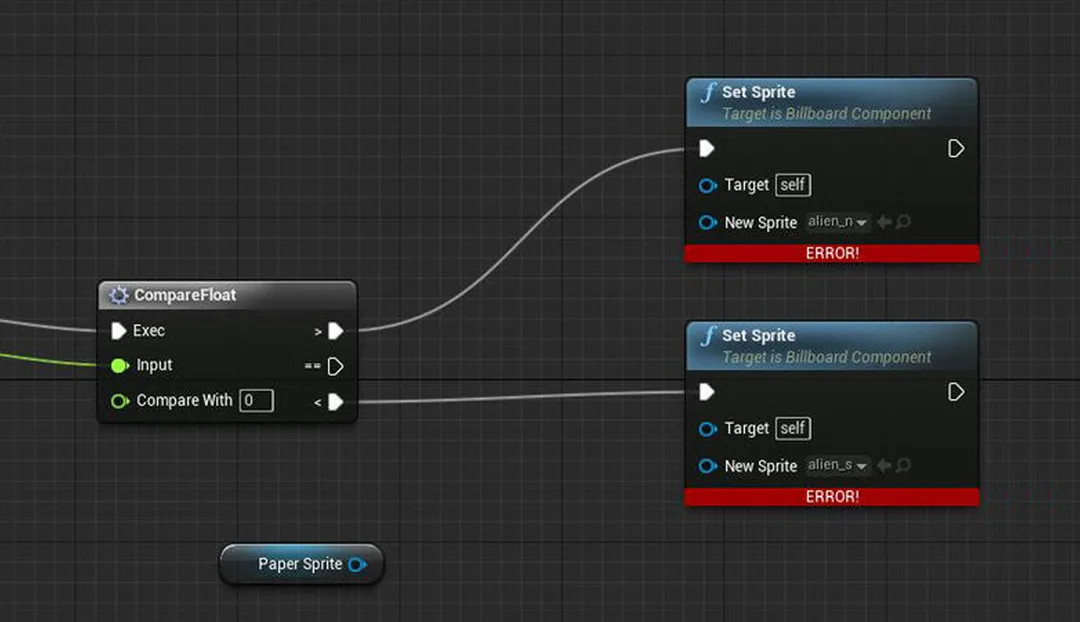
Image source: https://forums.unrealengine.com/filedata/fetch?id=1149664&d=1431301479
Learn the scripting languages
As mentioned, you will ultimately have to learn C# or C++ for the various game engines. C# (pronounced ‘sea sharp’), one of the most popular programming languages in the world, was developed in 2000 by Microsoft. It’s an object-oriented programming language, which means it’s organised around objects rather than actions, and data instead of logic. C++ (pronounced see-plus-plus) was created back in 1985 – it literally means ‘increased C’ (technically, it’s the C language but with classes added).
Create a simple game
Users on Quora frequently mention playing and creating VR games as a strategy for learning how virtual reality works. One user recommends creating a VR pacman game. You’ll need to Google the things you want to add – e.g. gravity, and then showcase your demo to the local VR community. Crowd learning is certainly the way to go. You’ll also want to learn about VR hardware, such as Google Cardboard, a simple way to make a virtual reality headset, or Oculus Rift, a state-of-the-art headset.
Once you’re up to speed with VR, you might be keen to get a job. What can you expect to get paid? The average annual VR developer salary in the US is $104 000. Here are the average salaries for other tech hubs around the world.
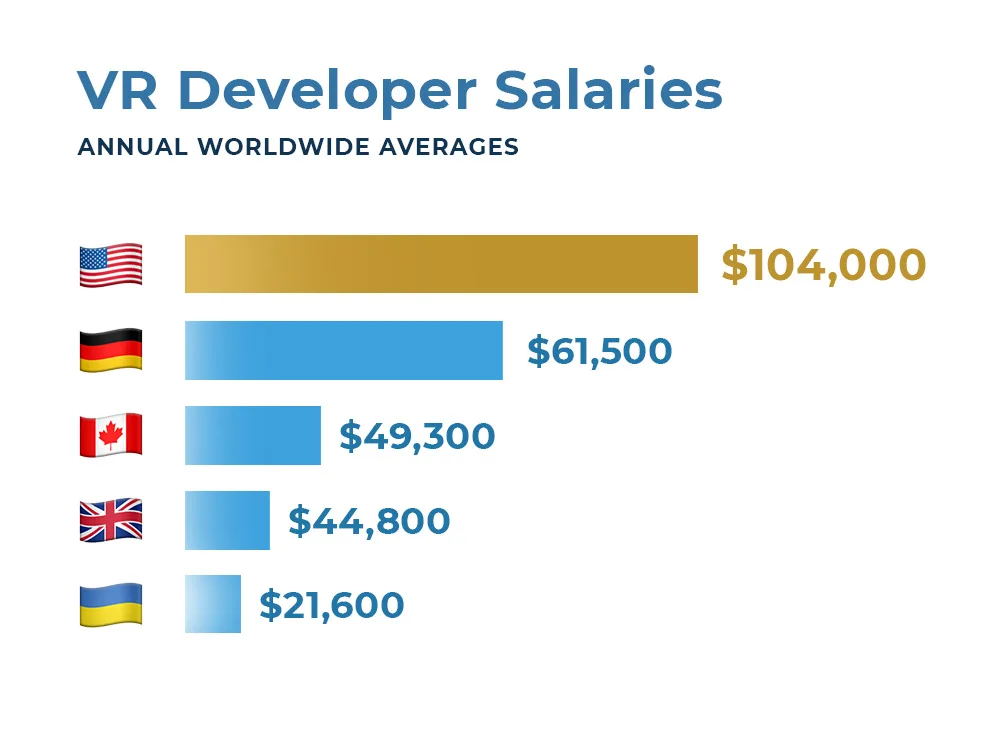
Image Source: https://mobilunity.com/blog/how-much-does-vr-development-cost/
In conclusion, according to an article in Medium, it took 27 years for PCs to grow from 2% to 70% of US adoption, the Internet took 13 years and smartphones averaged at 8 years. Many analysts predict VR will achieve this in the next 4-5 years. It’s clearly time to climb on the bandwagon. If you’re interested in learning the scripting languages for VR, consider signing up for a HyperionDev part-time, 3-month C# short course or a short course in C++.
Data Science
Why data science is the most promising job in 2019
Data science is shaping up to be a highly promising career choice, with demand (and salaries) for data scientists rising in major cities around the world.
Data science – the field of extracting knowledge from data using a multitude of systems and algorithms – is shaping up to be a highly promising career choice. The past three years have seen an industry trend that reveals a bright-looking future for aspiring data scientists.
Shortage of data scientists in the USA
Back in 2015 there was a surplus of data scientists in the US, making it a highly competitive field with few employment opportunities. By 2018, however, things had changed. A LinkedIn Workforce Report released in 2018 reports that most US cities now have a shortage of data scientists. In fact, the country has a shortage of people with data science skills totalling 151,171 – which means demand for qualified data scientists is off the charts.
What’s behind this trend? In short, data is becoming the world’s most valuable resource. More and more industries are now relying on big data to make business decisions. Skills like data analysis and machine learning have become more important across multiple industries, beyond tech and finance, where they were concentrated previously.
Did you know? More data has been created in the past two years than in the entire previous history of the human race! IBM estimates that 90% of the world’s data creation has taken place in the last two years.
Demand for data scientists worldwide
There are also many positive trends for data science appearing outside of the US.
United Kingdom: Surveys show that a whopping 80% of UK businesses are looking to hire a data scientist in 2019. Analysts are predicting that 2019 will be “the year of the data surge, with eight in ten companies seeking specialist skills and expertise to help navigate potentially uncertain market conditions.”
China: Since 2012, the Chinese government is applying big data to banking, retail, energy consumption and more. There’s a significant data talent shortage, and it’s estimated this will reach an estimated 1.5 million vacant data science positions by 2020.
India: The data science field is growing quickly in India. Demand has risen by more than 400% in the past year, whereas the number of qualified data scientists has risen by only 19%.
Africa: South African data scientists are in high demand right now. Data volumes in the country are growing at a rate of 40% per year, which means more corporate employers are showing an interest in hiring data scientists. With a shortage of qualified professionals to fill these roles, there is a call for the country to invest more in data scientist skills.
How much do data scientists earn?
The rise in demand means a rise in pay for those who can fill the gap. LinkedIn salary data shows that data scientists earn an average of $107,000 a year. Glassdoor estimates an even higher salary of $137,500 a year.
Australia also pays its data scientists well, with average annual salaries of $111,000 a year.
Meanwhile, data science salaries in the United Kingdom have yet to catch up with the industry growth, with British data scientists taking home the equivalent of $66,000 a year. In China, the average annual salary is $41,000.
PayScale puts the average South African data scientist salary at R388,890 annually. In Nairobi, Kenya – often called “Africa’s Silicon Valley” – the average data scientist makes around US$16,000 yearly.
Did You Know? We create 2.5 quintillion bytes of data every single day! This data comes from sources like social media posts, cell phone GPS signals, digital pictures and videos, purchase transaction records, and more.
How to become a data scientist
Not only is data science an in-demand and high-earning career, it’s also a fascinating field to work in, with exciting new developments happening all the time. If all this has piqued your curiosity, you’ll be pleased to hear that launching your data science career just got a little easier.
HyperionDev’s Data Science Bootcamp will teach you how to use the right software and techniques to read visual and statistical data, and present your results in a way that solves real-world problems. You’ll learn the fundamentals of the Python programming language, and explore the cutting-edge world of machine learning. You’ll also be introduced to popular data science libraries like scikit-learn and NumPy.
This 3-6 month course covers all the tools and techniques you need to prepare for a data science career.

Career Advice
Top tech events to look out for in 2019
Learn the latest tech trend or expand your network by attending a tech event this year. We’ve listed the top tech events in 2019 in Europe, USA, Africa and Asia.
Make 2019 your year by expanding your network, learning the latest tech trend or meeting prospective clients or investors. How can you do this? One excellent way involves attending a tech event – it’s sure to give your career a boost and you’re likely to become inspired by meeting like-minded people. Let’s have a look at the top tech events in 2019.
Europe
Where and when? London, April 25 & 26
What is this event about? Attend the world’s largest blockchain conference and exhibition to find out which key industries are set to be disrupted by this new technology, including legal sectors, retail, financial services, healthcare, insurance, energy, music, government, real estate and more.
Where and when? Paris, May 16-18
What is this event about? This tech event celebrates innovation. Meet up with startups and leaders, while discovering tech trends in VR, AR, robots, drones, and more. VivaTech is an excellent springboard for early-stage startups.
Where and when? Amsterdam, May 9-10
What is this event about? This technology festival brings together international technology executives, top-tier investors and promising startups for two days of business and knowledge sharing. With more than 17,500 attendees a day and 3,500 companies from all over the world, you’ll extend yourself discussing topics ranging from artificial intelligence to blockchain, and everything in between.
USA
Where and when? San Francisco, 25-26 March
What is this event about? This event covers human-computer interaction and everything AI related. The 2019 event will encompass three main themes: What’s Next for AI?, AI’s Economic Impact, and A Global View. You’ll gain a much deeper understanding of the growing economic impact this field is having on organisations and industries around the world.
Where and when? Onboard the Royal Caribbean ‘Harmony of the Seas’ cruise, departing Orlando, Florida, 7-14 June
What is this event about? Now this is something different. Who says your tech conferences have to take place on dry land? You’ll cover all aspects of digital marketing sailing via the Bahamas, Costa Maya, Roatan and Cozumel, including content strategy, web experience management, mobile marketing, customer engagement, social media, analytics and data, marketing automation, and much more.
Where and when? San Francisco, 9-11 April
What is this event about? With over 450 sessions and keynote speakers, Google Cloud Next provides opportunities to meet one-on-one with Google experts on a wide range of topics, such as AI, machine learning, security, enterprise friendliness and infrastructure. Learn about the latest all-important Google Cloud innovations.
Africa
Where and when? Johannesburg, 26-27 March
What is this event about? This is the premier IoT event on the continent bringing together the biggest players to showcase many of the latest IoT solutions to the public and private sectors. IT leaders will rub shoulders with senior business executives at presentations, panel discussions, industry-focused break-away sessions and interactive case studies.
Where and when? Cape Town, 18-19 March
What is this event about? Join 300+ tech leaders and professionals at Africa’s vibrant centrepiece for women in tech. The conference includes inspirational keynotes, deep insight into tech trends and business strategy, technical classes, and career development workshops.
Where and when? Cape Town, 4-5 September
What is this event about? This is the largest business focused Artificial Intelligence (AI) & Data Science Community event in Africa. It includes investors, buyers, suppliers, innovators, enterprise executives and global brands. The event will cover real enterprise cases studies and the application of AI and data science in business today, available technology and cloud platforms, deployment challenges, as well as ethical considerations.
Asia
Where and when? Thailand, 19-20 June
What is this event about? Said to be the “best and most diverse tech summit in Asia”, this event brings together entrepreneurs, startups, artists, filmmakers and more to talk about blockchain, VC, healthtech AI, smart cities and other fascinating topics. It’s a diverse “cultural festival” that goes beyond tech into music and fashion.
Where and when? Singapore, 11-15 November
What is this event about? This is the world’s largest Fintech festival and global platform for the Fintech community – fintech is an area of technology to aid banking and financial services.
Where and when? Singapore, 2-3 April
What is this event about? This 2-day event is dedicated to business innovation within all major industries from the Food Sector to AI. Sixteen industries, including Energy, IoT, Gaming, Aviation, Cyber Security, AI, Fintech, etc., will share one stage.
In conclusion, we’ve listed twelve great top tech events 2019, taking place all over the world. Make this the year for broadening your tech skills and networking. Feel free to add any other tech events in the comments below.

Tutorials
Python machine learning: Introduction to image classification
Build an image recognition classifier using machine learning and scikit-learn, a popular and well-documented Python framework.
This tutorial is an introduction to machine learning with scikit-learn (http://scikit-learn.org/), a popular and well-documented Python framework. We’ll be using Python 3 to build an image recognition classifier which accurately determines the house number displayed in images from Google Street View. You’ll need some programming skills to follow along, but we’ll be starting from the basics in terms of machine learning – no previous experience necessary.
So what is machine learning? It’s an area of artificial intelligence where algorithms are used to learn from data and improve their performance at given tasks. For example, if we previously had wanted to build a program which could distinguish between an image of the number 1 and an image of the number 2, we might have set up lots and lots of rules looking for straight lines vs curly lines, or a horizontal base vs a diagonal tip etc. What machine learning allows us to do instead, is feed an algorithm with many examples of images which have been labelled with the correct number. The algorithm then learns for itself which features of the image are distinguishing, and can make a prediction when faced with a new image it hasn’t seen before.
Typically for a machine learning algorithm to perform well, we need lots of examples in our dataset, and the task needs to be one which is solvable through finding predictive patterns. There are different types of tasks categorised in machine learning, one of which is a classification task. This simply means that we are aiming to predict one of several discrete classes (labels). An example of this could be predicting either yes or no, or predicting either red, green, or yellow. This is in contrast to regression, a different type of task which makes predictions on a continuous numerical scale – for example predicting the number of fraudulent credit card transactions.
The dataset
For this tutorial, we’ll be using a dataset from Stanford University (http://ufldl.stanford.edu/housenumbers). It contains images of house numbers taken from Google Street View. Each one has been cropped to 32×32 pixels in size, focussing on just the number. Some examples are shown below.

Source: http://ufldl.stanford.edu/housenumbers
There are a total of 531131 images in our dataset, and we will load them in as one 4D-matrix of shape 32 x 32 x 3 x 531131. This represents each 32×32 image in RGB format (so the 3 red, green, blue colour channels) for each of our 531131 images. We’ll be predicting the number shown in the image, from one of ten classes (0-9). Note that in this dataset the number 0 is represented by the label 10. The labels are stored in a 1D-matrix of shape 531131 x 1. You can check the dimensions of a matrix X at any time in your program using X.shape.
Although this tutorial focuses on just house numbers, the process we will be using can be applied to any kind of classification problem. Autonomous vehicles are a huge area of application for research in computer vision at the moment, and the self-driving cars being built will need to be able to interpret their camera feeds to determine traffic light colours, road signs, lane markings, and much more. With this in mind, at the end of the tutorial you can think about how to expand upon what you’ve developed here.
The set-up
To set up our project, first, let’s open our terminal and set up a new directory and navigate into it. This is where we’ll be saving our Python file and dataset.
We’ll need to install some requirements before compiling any code, which we can do using pip. If you haven’t used pip before, it’s a useful tool for easily installing Python libraries, which you can download here (https://pypi.python.org/pypi/pip). Once you’ve got pip up and running, execute the following command in your terminal:
We also need to download our dataset from http://ufldl.stanford.edu/housenumbers/extra_32x32.mat and save it in our working directory. This is a large dataset (1.3GB in size) so if you don’t have enough space on your computer, try this one http://ufldl.stanford.edu/housenumbers/train_32x32.mat (182MB), but expect worse results due to the reduced amount of data.
Finally, open up your favourite text editor or IDE and create a blank Python file in your directory. From here on we’ll be doing all our coding in just this file.
Feature processing
Now let’s begin! To understand the data we’re using, we can start by loading and viewing the image files. First we need to import three libraries:
Then we can load the training dataset into a temporary variable train_data, which is a dictionary object. The dictionary contains two variables X and y. X is our 4D-matrix of images, and y a 1D-matrix of the corresponding labels. So to access the i-th image in our dataset we would be looking for X[:,:,:,i], and its label would be y[i]. Let’s do this for image 25.
* Note that if you’re working in a Jupyter notebook, you don’t need to call plt.show(). Instead use the inline function (%matplotlib inline) just once when you import matplotlib.
As you can see, we load up an image showing house number 3, and the console output from our printed label is also 3. You can change the index of the image (to any number between 0 and 531130) and check out different images and their labels if you like.
However, to use these images with a machine learning algorithm, we first need to vectorise them. This essentially involves stacking up the 3 dimensions of each image (the width x height x colour channels) to transform it into a 1D-matrix. This gives us our feature vector, although it’s worth noting that this is not really a feature vector in the usual sense. Features usually refer to some kind of quantification of a specific trait of the image, not just the raw pixels. Raw pixels can be used successfully in machine learning algorithms, but this is typical with more complex models such as convolutional neural networks, which can learn specific features themselves within their network of layers.
We’re also shuffling our data just to be sure there are no underlying distributions. The library we’ve used for this ensures that the index pairings between our images in X and their labels in y are maintained through the shuffling process. You can use the parameter random_state=42 if you want to replicate the results of this tutorial exactly.
Machine learning algorithms
Now that we have our feature vector X ready to go, we need to decide which machine learning algorithm to use. We don’t need to explicitly program an algorithm ourselves – luckily frameworks like sci-kit-learn do this for us. Scikit-learn offers a range of algorithms, with each one having different advantages and disadvantages. We won’t be going into the details of each, but it’s useful to think about the distinguishing elements of our image recognition task and how they relate to the choice of algorithm. This could include the amount of data we have, the type of problem we’re solving, the format of our output label etc.
If you don’t have any prior experience in machine learning, you can use this helpful cheat sheet to guide you in which algorithms to try out depending on your data. But, I would really recommend reading up and understanding how the algorithms work for yourself, if you plan to delve deeper into machine learning. This will be especially useful for tuning hyperparameters. Hyperparameters are input values for the algorithm which can tune its performance, for example, the maximum depth of a decision tree.
For now, we will be using a Random Forest approach with default hyperparameters. You can learn more about Random Forests here, but in brief they are a construction of multiple decision trees with an output that averages the results of individual trees to prevent fitting too closely to any one tree.
First we import the necessary library and then define our classifier:
We can also print the classifier to the console to see the parameter settings used. Although we haven’t changed any from their default settings, it’s interesting to take a look at the options and you can experiment with tuning them at the end of the tutorial.
Training the model
We’re now ready to train and test our data. But before we do that, we need to split our total collection of images into two sets – one for training and one for testing. You can also add a third set for development/validation, which you can read more about here.
Keeping the testing set completely separate from the training set is important, because we need to be sure that the model will perform well in the real world. Once trained, it will have seen many example images of house numbers. We want to be sure that when presented with new images of numbers it hasn’t seen before, that it has actually learnt something from the training and can generalise that knowledge – not just remember the exact images it has already seen.
Usually, we use between 70-90% of the data for training, though this varies depending on the amount of data collected, and the type of model trained. For example, neural networks are often used with extremely large amounts of data and may sample 99% of the data for training. In this tutorial, we’ll go with 80%.
Because of our large dataset, and depending on your machine, this will likely take a little while to run. If you want to speed things up, you can train on less data by reducing the size of the dataset. The fewer images you use, the faster the process will train, but it will also reduce the accuracy of the model.
Test results
Now we’re ready to use our trained model to make predictions on new data:
_________________________________________________
Accuracy: 0.760842347049
So our model has learnt how to classify house numbers from Google Street View with 76% accuracy simply by showing it a few hundred thousand examples. Given a baseline measure of 10% accuracy for random guessing, we’ve made significant progress. There’s still a lot of room for improvement here, but it’s a great result from a simple untuned learning algorithm on a real-world problem. You can even try going outside and creating a 32×32 image of your own house number to test on.
Extensions
What can you do next? How can you expand upon this tutorial?
If you’re interested in experimenting further within the scope of this tutorial, try training the model only on images of house numbers 0-8. Then test it on images of number 9. Do you think we can transfer the knowledge learnt to a new number? Why or why not?
You could also perform some error analysis on the classifier and find out which images it’s getting wrong. Try to spot patterns in the errors, figure out why it’s making mistakes, and think about what you can do to mitigate this. Take a look at the distribution of different digits in the dataset, and you’ll realise it’s not even. Is this having an effect on our results?
If you want to go further into the realms of image recognition, you could start by creating a classifier for more complex images of house numbers. This dataset contains uncropped images, which show the house number from afar, often with multiple digits. Next you could try to find more varied data sets to work with – perhaps identify traffic lights and determine their colour, or recognise different street signs. Finding or creating labelled datasets is the tricky part, but we’re not limited to just Street View images! There are a ton of resources available online so go ahead and see what you can build next.
A Github repo with the complete source code file for this project is available here.
If you want to read more pieces like this one, check out HyperionDev’s blog. You might, for example, be interested in reading an Introductory Python piece. You can also register for a free trial on HyperionDev’s Data Science Bootcamp, where you’ll learn about how to use Python in data wrangling, machine learning and more.
This piece was contributed by Ellie Birbeck.
Editor’s note: This was post was originally published 11 December 2017 and has been updated 18 February 2019.

Tutorials
Android HTTP requests made easy
This tutorial shows you how to make Android HTTP requests using two different methods: custom classes, and using a third-party library.
If you’ve ever had to make an HTTP network request in Android, you know what a pain it can be. Making Android HTTP requests usually involves writing a lot of boilerplate code. You could make things a bit easier by creating some custom classes, but it can still be tedious.
In this tutorial I will show you how to make network requests using two different methods. The first method involves creating custom classes, which will aid in code reusability. The second method involves adding a library called the Android Asynchronous Http Client by loopj. This library will greatly reduce the amount of code you will need to write.
In addition, we will be making a network request to the BitcoinAverage API which returns a JSON string. You will learn how to handle the JSON string, both with and without the use of the Android Asynchronous Http Client library.
This tutorial is for those who:
- are comfortable with the Android development environment;
- want to learn an easier way to make HTTP requests in Android.
Note: you should also be comfortable with Java and how Object-Orientation works in Java.
Adding permissions
This step is relevant to both methods. Navigate to your AndroidManifest.xml file and add the following permission before the <application> tag:
Method 1: Creating custom classes
The first class we will be creating is called the RequestPackage class. This class will accept three important values when making HTTP requests. First, it will receive the URL. Next, it will receive the request method (POST or GET). Last, it will receive any values that the server might need (e.g. product_id). The request package will then be sent to the HttpManager class that we will create later.
Create a class called RequestPackage and add the following code to the class:
HttpManager
Next, we will create the HttpManager class. As mentioned earlier, the HttpManager receives the RequestPackage that we created in the previous section. The HttpManager is responsible for making the actual request and receiving the response from the server.
Create a class called HttpManager and add the following code to it:
Putting it all together
Finally, we can use the code we just implemented. Here we will be putting everything together within the MainActivity. We will have to create a private class within the MainActivity and we will call it Downloader.
The Downloader class is an AsyncTask, which is required when making network requests in Android. If you try to make network requests outside an AsyncTask, your UI will freeze until it gets the HTTP response from the server.
Create an activity called MainActivity and add the following code:
And we are done. The amount of code we needed to write in order to get those three small pieces of information is a lot. It gets even worse if you want to use something like a RecyclerView. That would involve creating an adapter, which would significantly increase the amount of code we need to write.
In the next section, I will show you how to do the same thing by making use of the Android Asynchronous Http Client.
Method 2: Android Asynchronous HTTP Client
Navigate to the app/build.gradle file and enter the code below in the dependencies section:
Android Studio will ask if you would like to sync your project. You should do this and the dependencies will be downloaded.
Creating the MainActivity
Next, you will need to add the code below to the MainActivity:
Run your app and, voila, you’re done.
Conclusion
Well done! You have completed this tutorial. As you can see, the amount of code needed when working with the Android Asynchronous Http Client is far less than making HTTP requests using no library.
You now have a choice to make: do you prefer method 1 or method 2?
To find out more about the Android Asynchronous Http Client, please visit: http://loopj.com/android-async-http/
To view and/or clone a similar project to the one in this tutorial – that also uses the Android Asynchronous Http Client – please visit: https://github.com/londonappbrewery/bitcoin-ticker-android-citispy
To find out more about the BitcoinAverage API, please visit: https://bitcoinaverage.com/
Find out more about our Certified Mobile Developer Bootcamp. You will cover the following modules: Java Programming Essentials, Introduction to Mobile Development and Advanced Mobile Developer.
This article was contributed by Yusuf Isaacs.
Editor’s note: This was post was originally published November 14th, 2017 and has been updated February 18th, 2019.
News & Announcements
February 18, 2019
Meet the team: Melanie Willett
Meet the team. Our code reviewers and mentors are integral parts of the HyperionDev team. Find out about code review and mentorship from HyperionDev’s team member Melanie Willett.
Welcome to our ‘Meet the team’ series! When you enrol on a HyperionDev Software Engineering, Full stack Web Developer or Data Science bootcamp, an important part of the learning experience involves your relationship with your mentor, an integral team member of HyperionDev, from whom you receive regular code reviews. Here’s why learning through code review is smarter than other methods of learning programming:
- It’s true you can automate your code checking, but that’s a bit like conducting a spell check. You won’t write something world-class this way. Only through the human review of code will you become truly fluent as a developer.
- Many online programming courses have very high dropout rates, as students become frustrated with generic error messages. Daily and rapid code review via a person helps you overcome any stuckness by debugging your programs.
- Code review is a standard part of a developer’s day in the workplace. Be exposed to this kind of assessment from your first day of training.
Melanie Willett is an integral team member of HyperionDev. She works as a mentor and code developer. Prior to that, Melanie lectured in IT at the CTI Education Group, Nelson Mandela University and Northampton College. In this “meet the team” interview, she gives the inside scoop on the code review process and how mentoring works for her. So let’s see what she has to say.
Q: Melanie, how do you mentor students?
A: The mentorship role involves a lot of interaction with students. You need to be available to help students understand various coding concepts as well as be there to answer specific questions. I often have 1:1 syncs with students who then share their screen so we can look at specific examples of troublesome code. Sometimes I share my screen to show students relevant examples that could help them know how to modify their code.
Q: What do you want to know about students as their mentor?
A: During our initial 1:1 sync, I find out whether a student wants to become a full-time developer or is more interested in learning specific skills for a particular function – e.g. starting a new business. It’s important to understand each student’s current exposure and experience with coding and / or a specific development environment or language. It’s also an opportunity to respond to any concerns or questions the student might have.
Q: What happens during a code review?
A: Firstly, I check the code is correct, both the syntax and the logic. Remember, beginner coders often struggle to find and fix errors. Often helping them see how to use tools and logic to identify bugs and errors in the first few tasks makes the student confident to do this by him or herself efficiently later. Once the code is running correctly, I offer suggestions on how to make the code more efficient, easier to read and maintain, and more compatible with industry norms and standards.
A good code review has two main outcomes: (1) provides the opportunity to learn something (2) imparts confidence that the code is correct, efficient and adheres to industry standards.
Q: What are the difficulties of conducting a code review?
A: Even if you are an experienced developer, finding errors in code can be complicated. It takes time. Also, the world of programming changes quickly – for example, JavaScript gets updated fairly regularly. This means that sometimes there are a few different ways of writing code that does exactly the same thing. Knowing what is the most efficient and relevant (in terms of the industry standard) way of doing something is not always easy.
Q: What do you love about your job?
A: The best part of my job involves seeing someone achieve his or her goals. Hearing that a student did well in a job interview or that they have been able to create a website for their business is always wonderful! It is also always great to see students realise the potential of what they can do with their new skills and get excited by it. Students often tell me about something they’ve read or researched for themselves that excites them – this enthusiasm is contagious and very satisfying.
Q: What advice do you have for prospective coders?
A: Start making continuous learning a habit early on. Subscribe to YouTube channels, blogs etc that will help you know what is happening in your field. Set aside time in your schedule to read, discuss or learn a little every day. Technology changes quickly. If you develop the habit of setting aside some time to learn something every day (and learn to enjoy that time), it will make your life as a developer MUCH easier in the long run.
In conclusion, code reviewing at HyperionDev is an exciting career for those who enjoy mentoring and helping people become better programmers. In this ‘meet the team’ interview, Melanie proves this in her important responsibilities as a HyperionDev team member and mentor. If you’re keen to learn programming via this process, consider these bootcamps offered by HyperionDev: Full Stack Web Development, Data Science or Software Engineering.

Career Advice
Top tech trends in 2019
What tech trends in 2019 are going to take the world by storm? Here’s a look at five top predicted trends for the year to come.
With the new year well underway, predictions for 2019 are still coming thick and fast – especially in the world of technology. What tech trends in 2019 are going to take the world by storm? Here’s a look at five top predicted trends for the year to come.
Cryptocurrency
What is it? A cryptocurrency is a digital, encrypted currency. Encryption methods are used to regulate how units of this currency are generated, and to ensure secure transfers of funds. These digital currencies operate independently of central banks. Bitcoin, Ethereum and Zcash are all popular examples of cryptocurrencies.
Why is it trending? Cryptocurrency uses a system called Blockchain, where records of the transactions (these records are called “blocks”) are kept across several computers linked in a peer-to-peer network using cryptography. Blockchain is an extremely secure way of maintaining records, and those in FinTech are realising how useful it could be elsewhere.
The coming year will see new, experimental blockchain applications in banking, business and media. Blockchain systems could be the future of record-keeping in a world where security concerns around digital data are very real.
Screen time services
What are they? Screen time services are apps designed to monitor how much time a user spends online – and reward them for the time they spend logged off. Examples include Apple’s iOS Screen Time, Android’s Digital Wellbeing Dashboard, and third-party apps such as Hold. The aim is to help people develop a healthier relationship with technology.
Why are they trending? Social media, which was everyone’s favourite way to waste time online in the early 2000s, is out of vogue. Facebook especially earned itself a big “dislike” from users last year, after a major data mining scandal. Plus, many of us are waking up to the fact that all that scrolling simply isn’t healthy.
2019 is set to be a big year for “digital detoxing”. Jaded users are stepping away from their screens, using “screen time service” apps to put controls in place and keep their online time low. Soon, instead of measuring how many people liked our latest profile pic, we’ll be comparing screen times and seeing how low we can go. Time to ditch that feeling of FOMO for good!
Regulation
What is it? Now more than ever before, our privacy is under threat. Regulations are being introduced in some parts of the world, to help protect private information online. Europe’s latest General Data Protection Regulation (GDPR) came into force in May, 2018.
Why is it trending? The demand for regulation is spreading. Americans can expect some movement on data protection regulations in 2019. A collection of bills from the US House and Senate, aimed at officially regulating the tech industry, could eventually be combined into one comprehensive Personal Data Privacy Act. This would make it harder for companies like Google, Facebook and Amazon to use customer data without explicit consent.
5G
What is it? 5G is fifth-generation wireless – the latest iteration of cellular technology, designed to make wireless networks even faster and more responsive.
Why is it trending? The first 5G-ready mobile CPUs should become available in 2019, alongside improved infrastructure that makes widespread 5G technology a reality. It takes time for this sort of infrastructure to become widely available, so it’s expected that we’ll start to see 5G gaining traction from 2020 onward.
Robotics
What is it? Robotics is the branch of technology, science and engineering that deals with the design, construction, operation, and application of robots. Once the stuff of science fiction, robots and AIs are now very much a part of our daily lives.
Why is it trending? Robots are advancing in leaps and bounds. In 2017, the world welcomed its first robot citizen, Sophia – this Hong Kong-made robot became the first of her kind with legally recognised personhood. The era of truly agile, realistic humanoid robots has arrived, and we should expect more fascinating advances in this field in the next few years.
Augmented reality
What is it? Augmented reality (AR) is a technology that superimposes a layer of computer-generated content over a user’s view of the real world, creating a composite view. Users can interact with the digital elements. We’ve seen some really innovative applications of AR in recent years, from advertising campaigns that turn everyday objects into something remarkable, to next-level mobile gaming like the wildly popular Pokémon Go.
Why is it trending? Augmented reality will have a big year in 2019, with many flagship phones now supporting it. More AR tools for business and personal use will start to make an appearance on the market, as consumers look for more ways of using technology to enrich and simplify their day-to-day lives.
If you want to find out more about AI and software engineering – the type of skill set that could land you a job working on one of these big tech trends in the next year – check out a HyperionDev online bootcamp, and enter the exciting world of code.

News & Announcements
February 15, 2019
SONA reSONAting with HyperionDev
Ramaphosa’s 2019 SONA emphasised a number of tech goals for South Africa. HyperionDev, Africa’s leading provider in the EdTech space, outlines various lessons learnt in tech education.
Ramaphosa’s SONA was, according to TechCentral, “the most technology-focused speech ever delivered by a South African head of state”. The state-of-the-nation address proposed various interventions to develop the skills needed for the “fourth Industrial Revolution”. Among others, Ramaphosa wants to see:
- The creation of new jobs to absorb youth in productive economic activity, particularly in tech-related fields – e.g. coding and data analytics.
- The training of both educators and learners who are equipped to deal with emerging technologies, such as the Internet of Things, robotics, artificial intelligence, etc.
- The introduction of new technology subjects, including technical mathematics and technical sciences.
It’s no surprise Ramaphosa wants to focus on developing tech skills. There is high global demand for such skills and South Africa suffers from an alarming 2018 unemployment rate of 27,5%. With over 200 000 students reached, HyperionDev has dramatically shaped tech education in South Africa. Riaz Moola who started HyperionDev, a South African-based start-up offering Web Development, Software Engineering and Data Science bootcamps to both South Africans and the world, shares his lessons learnt as the largest provider of tech education in the country.
Tech disproportionately contributes to a country’s economy
“Bearing in mind that tech disproportionately contributes to a country’s economy,” says Moola, “we have to look at ways of reducing barriers to entry. One way to do this is to embrace non-traditional education paths.”
He explains that it’s no good just relying on traditional routes like universities or technikons to teach young South Africans in-demand tech skills. “My motivations for setting up HyperionDev stemmed directly from witnessing the depressing drop-out rates in South African universities in computer science degrees. With an average failure rate of 88%, I couldn’t see South Africa meeting its tech demands and I wanted to change that. My initial idea was a simple one: an online course where people with limited internet access, a reality in South Africa, could still become programmers.”
“To deal with uniquely African conditions, including low bandwidth, l developed a simple online course in Python to teach students the basics of artificial intelligence utilising small files – rather than the large videos offered by many massive open online courses (MOOCs).” And from there, HyperionDev grew to cover other educational streams such as Data Science, Web Development and Software Engineering. It’s currently the largest online coding bootcamp in Africa and has been scaled to over 40 countries internationally.
Direct link with employment
Any educational offering needs to link directly with an employer’s requirements. “We should align education with employment opportunities,” states Moola, “rather than focussing on specific skills or programming languages. Remember, the field of ‘coding’ is vast, so we need to see where the gaps exist. Our research – we’re always speaking to potential employers – shows the biggest gaps exist for Full Stack Web Developers, Backend Developers, Software Engineers and Devops Engineers. We then train accordingly.”
It seems to be working, because there’s a direct link between HyperionDev’s courses and student employment rates. “Our Graduate Outcomes Report shows that over 95% of our graduates reach their career outcomes and 72% switch into new tech jobs within 3 months of graduating.”
Prioritising accredited courses
Interestingly, one of Moola’s biggest challenges involves accreditation. Consumers and funders still prioritise accreditation, he explains. However “the South African National Qualifications Framework does not have unit standards for the majority of tech skills required by employers, partly because of how rapidly technology changes.”
Python, a very versatile programming language, illustrates this point. “When we first started HyperionDev, Python was not popular in South Africa. Now the demand from students and employers alike is massive. Python is used widely in Web Development and Software Engineering. We were able to meet that demand.” EdTech providers need to move quickly to mirror market requirements; lengthy and outdated accreditation procedures don’t always allow this to happen.
In closing, Moola is excited to be involved in his field. “EdTech goes hand in hand with non-traditional education models. Coding bootcamps are a powerful alternative, or sometimes even an addition, to universities.” Ramaphosa has hit the nail on the head with this year’s SONA speech: it’s the right time for South Africa to start skilling up in tech fields.
Still have questions?
Contact our Admissions Team, and a real person will get back to you.