
Our latest insights
Read the latest insights

Career Advice
Top 5 beginner-friendly open source projects on GitHub
If you’re keen to be a developer, GitHub is an important place to be. Check out these top five open source projects on GitHub across multiple areas, including Machine Learning, JavaScript, group chat applications, etc.
Launched 10 years ago, GitHub has grown exponentially. In fact, as of October 2018, the GitHub community reached 31 million users. In essence, it’s a site where developers store their projects and network with like-minded people. “GitHub is a good place to collaborate and meet with other developers,” says Gareth Dwyer, software and operation developer at HyperionDev. One key reason developers love GitHub is “much like using Microsoft Word or Google Drive – you can have a version history of your code so that it is not lost with every iteration.” Why have we put together the top five open source projects on GitHub for this month? Quite simply, when things happen in the coding world, they happen on GitHub, so we’d encourage all devs to jump on this bandwagon.
This is a curated collection of useful JavaScript snippets that you can understand in 30 seconds or less. You can check out these snippets here as well. The goal of this project is to provide a quality resource for both beginner and advanced JavaScript developers. They have collected hundreds of snippets of code that are useful in a wide range of situations. They also welcome new contributions and fresh ideas provided the code is short and can be grasped in about 30 seconds. The only downside is that some of the snippets are not ideally optimised for large, enterprise applications – i.e. they are not yet production-ready.
This is a great project to help beginners contribute to open source projects. The rationale behind this project is that doing something is probably better than merely reading articles and watching tutorials. Ideally, however, you should be doing both. This project will cover the procedures you’ll need to master if you want to contribute to open source projects on GitHub. From there you can move on to contributing to other projects by checking out their web app.
- TensorFlow Models
For those interested in Machine learning and Deep learning, you might be interested in checking out this TensorFlow project.
TensorFlow Models is the open-source repository that consists of many libraries and models related to deep learning. You would start with checking out the official models that are well-maintained, tested and kept up to date. Thereafter, if you want to contribute to models, be sure to review the contribution guidelines. There are also TensorFlow tutorials.
This powerful, open source group chat application combines the immediacy of real-time chat with the useful productivity of threaded conversations. It’s one of the fastest growing open source group chat projects with over 300 contributors.
You could get involved in any of the following:
- Contributing code. Check out our guide for new contributors to get started.
- Contributing non-code. Report an issue, translate Zulip into your language, write for the Zulip blog, or give feedback.
- Checking Zulip out. Drop by the Zulip community server.
- Running a Zulip server. Setting up a server takes just a couple of minutes. Zulip runs on Ubuntu 18.04 Bionic, Ubuntu 16.04 Xenial, Ubuntu 14.04 Trusty, and Debian 9 Stretch. The installation process is documented here.
This is not really a project, but a useful repository, which has the goal of helping developers master concepts in JavaScript. Here are some of the things you will learn: Factories and Classes, DOM and Layout Trees, JavaScript Engines, etc.
We’ve mentioned the top five open source projects on GitHub. You can also check out the trending repository on GitHub to see what the community is most excited about on a daily basis. To brush up on your coding skills, consider enrolling on a HyperionDev bootcamp in Full Stack Web Development, Mobile Development or Software Engineering. You can also try out any of these courses for free on the trial. Read more about what you can expect on your free trial with HyperionDev.

AI Engineering
How IoT and machine learning could change everything
With the convergence of machine learning and IoT (the internet of things), our lives could start running more seamlessly than we ever imagined, thanks to our smart devices.
You wake up. Your first port of call? The bathroom. You stop at the mirror to check if any new spots appeared overnight. The mirror recognises your irises and displays a motivational quote. As the quote appears, your bathroom sound system switches on and plays ambient rainforest sounds. Your shower starts running. You step inside. It’s going to be a good day. Sound like a movie? With the convergence of machine learning and IoT (the internet of things), our lives could start running more seamlessly than we ever imagined, thanks to smart technology.
What is IoT?
The term IoT, or “the internet of things” was coined by tech innovator, Kevin Ashton in 1999. In the broadest sense, IoT refers to the interconnectedness of devices that “communicate with each other.” The computers that we have come to know and use in the twentieth century, are essentially “brains without senses” in that they only “know” what humans tell them. They are wholly reliant on a specific kind of input from humans in order to function. Smart thermostats that maintain the temperature of a space at an optimum level, are just one example of how IoT is taking shape in the world as we know it. These kinds of inventions are changing the way we interact with each other and the world around us.
What is machine learning?
Writer, Daniel Faggella explains (on behalf of Tech Emergence) that machine learning “is the science of getting computers to learn and act like humans do, and improve their learning over time in autonomous fashion, by feeding them data and information in the form of observations and real-world interactions.” In the consumer electronics arena, machine learning means that smart devices can learn human preferences and make “decisions” based on repeated human behaviour over time.
A different perspective
Software developer and data scientist, Shayaan Jagtap argues that the move towards the convergence of IoT and machine learning can be explained visually as a simple shift. What the world has grown accustomed to, can be represented like this:

Source: Towards Data Science
In this scenario, we are used to smart devices that make our lives easier. Our fridges for example can be programmed to operate at a the ideal temperature in different parts of the fridge, to preserve certain types of food. We can connect our television to our smartphone at the touch of a button and use it as a remote control. We have grown accustomed to smart technology. But think about it – the common denominator, is humans. We programme our devices manually and tell them how to operate. What we are moving towards in the future, is something that looks more like this:

Source: Towards Data Science
In a reality where IoT and machine learning meet, our smart devices will “talk” to each other. As Shayaan Jagtap puts it, it is a world, “independent of human error.”
The Comparison
Taking the lead from an article written on the subject by Jagtap, let’s look at how the convergence of IoT and machine learning can affect the way we live.
Scenario 1: IoT
17:15 PM: I get into my car. It’s a blustery day outside so I turn on the heater function for the drive home.
18:00 PM: I’m not sure what to make for dinner so I use an app that suggests a recipe based on which ingredients I have in my fridge. I decide on the recipe and wait for the oven to warm up.
18:15 PM: While my meal cooks, I set my electronic egg timer to time the meal. The timer displays digital information on the progress of the meal, taking readings from the food thermometer that I inserted into the oven.
18:30 PM: I turn on the chill setting on the water container in the fridge with a remote.
18:45 PM: Dinner is ready, and so is a glass of fresh, cold water. I sit down in front of the television to enjoy the meal – it flips to the channel I programmed in for 18:45 PM. Life is good.
Scenario 2: IoT with machine learning
17:15 PM: By the time I get into my car, it has already recognised that my work computer has been turned off for the day and has heated itself to the optimal temperature based on my preferences in relation to the temperature outside.
18:00 PM: As soon as I get home and open the fridge, my smartphone automatically scans the fridge and notifies me of a possible recipe using the ingredients I have. As soon as I select the recipe, the oven turns on automatically and begins to warm up to save time. When the oven turns on, the water container in the fridge activates its chill function. The oven knows exactly when the food has been cooked to perfection and notifies me when it’s ready.
18:30 PM: Dinner is ready, and so is a glass of fresh, cold water. The television turns on automatically when it detects my irises and flips to my favourite channel. A message in the corner of the screen reminds me to take my after-dinner meds. Life is even better.
Siri, Cortana, Gmail’s predictive text, Uber – these are all examples of the level of machine learning that we enjoy today. Our devices are becoming extensions of who we are and how we live. At the meeting place between IoT and machine learning, is a world of possibility for the seamless integration of our devices and our everyday lives. The more we learn about our devices, they more they “learn” about us. With the fourth industrial revolution well underway, these are the kinds of developments that will help us take the next step in human evolution.
Want to know what it is like to work at the forefront of the industry that is changing the world? Ask us about how you can jumpstart your career in development. We’re eager to connect with you.
Career Advice
Programming 101: How to get started
Anyone can learn how to program. If you’re keen to start building your own software, here are some practical tips on how to get started with programming.
If you’re keen to build your own software, web or mobile app, we’ll show you how to get started with programming. It’s probably easier than you think. Developers teach themselves new technology or languages all the time. ‘(A)lmost 90% of all developers say they have taught themselves a new language, framework or tool outside of their formal education,’ states 2018’s Stack Overflow Developer Report. So how should you get started? Here are some useful principles.
1. Don’t get hung up on a particular language
Many beginners distract themselves from learning the fundamentals by getting stuck on trying to work out which language they should learn, states Lifehacker. Remember, there’s no one “best” language. In fact, the language matters less than other important things like “understanding data and control structures and design patterns”.
Instead, think about the kind of development you want to do and for which platform – such as web or mobile development, or perhaps you want to get started with programming on your desktop.
2. Choose a scripting language
At its most basic, a script, or scripting language, refers to a computer language consisting of a series of commands within a file that can be executed without being compiled. Scripts have multiple advantages including being:
- Open source – allowing users to view and edit the script if required
- Easy to learn and write
- Able to port between different operating systems
- Faster to develop than an actual program
Here are different scripts you can develop for a variety of platforms:
2.1 Desktop scripting
For those new to programming, desktop scripting is a great place to start. Learn how to automate actions on your desktops with these free tools:
AutoHotkey (for Windows) – known as the “ultimate automation scripting language for Windows”.
Automator (for Mac) – watch this video for more on Automator.
2.2. Web scripting
Perhaps you want to look at a web scripting language, such as CSS (the style information for the site) or JavaScript (to make web applications more interactive), to develop a web app.
HTML is a very popular first language to learn for web development but strictly speaking, it’s not a scripting language. It’s a markup language to create structure for a document aimed at web publication. Scripting implies that the code can evaluate and take an action on what it finds; there is a decision-making capacity. To find out more about the difference between HTML vs. CSS, check out this piece. Other examples of web scripting languages include PHP, PERL, Python and Ruby, which are server-side scripting languages.
2.3 Command line scripting
The command line might not be as exciting as a web or desktop app; however, if you want to write a program that takes textual or file input and outputs something valuable, the command line is the place to do it. This is about the rapid development of quick scripts to automate processes.
States Hongkiat: “Some developers cringe at the mere thought of opening a terminal window. For the uninitiated it can be daunting, stressful, and downright annoying. But devs who understand the command line would argue it’s one of the best tools at your disposal.” If you get confused along the way, websites like Stack Overflow have many of the solutions to your programming challenges.
3. Learn about add-ons
Many modern browsers and web apps support add-ons – bits of software that bolt onto them and add features. This is another good place to get started with programming. Take Greasemonkey, for example – it’s an add-on for Mozilla Firefox that allows users to install or create scripts to make on-the-fly changes to web page content either before or after the page is loaded on the browser. Watch this short one-and-a-half minute video to see how it works and how you can develop or download scripts as add-ons. Developing Firefox extensions, for example, has merit, because it forces you to be comfortable with JavaScript and XML, a markup language that is similar to HTML, but with a stricter format.
You could also look at extension frameworks for other web applications, like WordPress and MediaWiki. These are PHP apps, so you would need to feel comfortable with that language as well. Here’s how to write a WordPress plug-in using PHP.
4. Perseverance
Programming is about problem-solving. Although it’s a highly rewarding activity, it can at times be frustrating and solitary. You need to learn to persevere during the difficult times.
We’ve provided some recommendations on how to to get started with programming. However, if you’re interested in learning coding part-time, consider enrolling on a HyperionDev bootcamp in Full Stack Web Development, Mobile Development or Software Engineering. You can also try out any of these courses for free on the trial. Read more about what you can expect on your free trial with HyperionDev.

Career Advice
The top 10 industries disrupted by tech
There are multiple industries that have been disrupted by tech. Which ones are they and which industries can we expect to be disrupted in the future?
“Creative Destruction” is a concept thought up by Austrian economist Joseph Schumpeter to describe “the way technological progress improves the lives of many, but only at the expense of a smaller few,” states Investopedia. During this process, certain industries are destroyed, but the industries that come after them create new jobs. For example, take cars, which disrupted horse transportation, and all the related industries, such as the building of carriages, that must have accompanied equestrian modes of transport. However, the automobile industry that came after added many jobs in a wide variety of fields. So what are some of the industries disrupted by tech currently and what can we expect in the future?
Industries Disrupted by Tech
Here are some industries that have already been disrupted by tech.
1. Are you still booking your travel via human agents? Probably not. You’re likely to book airline tickets directly through the relevant airlines or via multiple sites, such as Expedia. And the same holds true for accommodation – nowadays you might use Airbnb or a site like Booking.com.
2. The financial industry has been hit hard by tech, from stockbroking to the reduction of human bank tellers. There are online trading websites like eTrade and even robo-advisors, which offer financial advice with minimum human intervention.
3. It’s well-known that the print industry has suffered terribly at the hands of tech. Newspapers have seen steadily-declining circulations. However, that’s probably just the start. Computer software will likely produce news stories as we move into the future.
4. Job recruiters have certainly seen their skills falling by the wayside. Websites like LinkedIn, Indeed and Monster, where job seekers can get masses of information about vacancies and potential salaries, have taken over.
5. Warehouse workers. Watch this this 3-minute video to see how robots can replace human workers in a warehouse. In fact, back in 2016, the Internet retailer Amazon was a leader in warehouse innovation with their fleet of 30,000 robots operating as an automated workforce.
And here are some industries that are in the process of being disrupted.
6. Wedding planners are on the out. Despite the fact that the wedding industry grew from $72 billion to $76 billion last year, Americans are spending less on wedding planners, reports Inc.. Younger people, who are very tech savvy, are very comfortable using wedding planner apps, such as The Knot, as well as various startups (Joy let’s guests manage their guest lists and RSVPs) to get the job done.
7. The call centre industry – Cristian Rennella, CEO and co-founder of Colombia-based elMejorTrato.com, states that the call centre industry will be replaced by AI. He says: “Thanks to Artificial Intelligence through deep learning with Google’s TensorFlow platform, we were able to automate 56.9 percent of queries. In this way, the user receives their response in seconds and our team only has to answer those questions that were never consulted before.”
Now what about the industries that are likely to be disrupted in the future? Yuval Harari, the famous Israeli historian and author of 21 Lessons for the 21st Century, states in GQ that we assume that “AI will kind of reach its maximum capacity by 2025, which is extremely far from the truth. We’re not even approaching the full capacity of AI. It’s going to just accelerate. So yes, we will have these huge changes by 2025—but then we’ll have even bigger changes in 2035, and even bigger changes in 2045, and people who have to repeatedly re-adjust to these things.”
Here are some industries likely to be disrupted in the future.
8. Bookkeepershave a 97.6% chance of being automated. Whether your job is at risk from AI generally depends on four variables: does your job require that you come up with clever solutions, do you have to personally help others, does your work require negotiation and, interestingly, does your occupation need you to squeeze into small spaces (i.e. jobs that are routine, repetitive and predictable are more likely to be replaced)?
9. Lawyers are not on a winning wicket – they may well need to reinvent themselves sooner rather than later. In a key study, 20 corporate attorneys specializing in corporate law and contract review competed against AI to spot mistakes in Non-Disclosure Agreements (NDAs), reports Hackernoon. The outcome: AI achieved 94% accuracy versus 85% accuracy from the lawyers. Plus: it took the lawyers 92 minutes on average, whereas AI could spot errors in a staggering 26 seconds!
10. Medicine is a big one. AI is likely to be even better at diagnosis than doctors. In fact, last year, reports Inc., Stanford researchers developed a program to distinguish between cancerous and non-cancerous moles with more than 90% accuracy – that beats the human dermatologists. The researchers fed the system more than 130 000 images of moles and lesion, some of them cancerous. The system could ultimately be installed on smartphones. And there are other programs in the pipeline: Freenome, a startup, is looking at technology that could detect cancer in the body, including its location and type, using only blood samples.
Clearly, we can expect the number of industries disrupted by tech to increase over the upcoming years. Yuval Harari says: “Unless you are 80 years old or something, you will have to repeatedly reinvent yourself in the coming decade – you’ll probably change your job a number of times.” Perhaps it’s best to think of tech as a job creator, and not a destroyer. And remember, it’s never too late to learn something new. If you want to learn programming skills to stay relevant in the future, consider HyperionDev’s online coding bootcamps in Full Stack Web Development, Mobile Development and Software Engineering.

Web Development
Here’s what you should know about Web 3.0
The web as we know it, has changed dramatically since its earliest origins as Web 1.0. In this post, we explore what Web 3.0 is, and why it matters.
The web as we know it, has changed dramatically since its earliest origins. We used AltaVista to browse some of the first websites that were published in Web 1.0. Later, we turned the sharing of content into a global culture, posting images, recording our own videos and contributing to huge information hubs online – no question was left unanswered. We called this version, Web 2.0. Now we’re talking about Web 3.0. In this post, we explore what Web 3.0 is, and why it matters.
What is Web 3.0?
As Daniel Nations explains, coming up with a definition for what Web 3.0 is, is a challenging task. One of the reasons for this, is that technically the origin of Web 3.0 cannot be pinned down to an exact date and time. Some would argue that technically Web 3.0 is already a reality, while others may argue that the transition from Web 2.0 is still a few years away. Either way, it’s difficult to define something that is intangible and without any defining parameters. What we can do towards finding some kind of workable understanding of Web 3.0, is look at its predecessors.
Quite simply, as Nations suggests, Web 2.0 is an “interactive and social web facilitating collaboration between people.” We’ve seen the development of Web 2.0 reach benchmarks like the invention of social media, blogs, wikis and collaborative consumption platforms. This contrasts starkly with what we understand by the term Web 1.0, which can be defined as “a static information dump where people read websites but rarely interacted with them.” By definition then, Web 3.0 is the next generation in the evolutionary progression of the world wide web.
A Brief History of Web 2.0
Web 2.0 is characterised by “greater user interactivity and collaboration, more pervasive network connectivity and enhanced communication channels.” Traditionally, before Web 1.0 went mainstream, its usage was reserved for a select few – the few people who understood a bit about how the first search engines worked and the basic technology behind what was then called the “world wide web.”
The evolution of Web 2.0 however, marked the onset of what many now refer to as the “sharing economy” or a more collaborative global community that uses the internet to share information and relay content in a more interactive and participatory way than was previously imagined. Web 2.0 can be associated with social networking sites like Facebook and Twitter, as well as user-generated content, like the information we see on blogs. It is also marked by the emergence of platforms that rely solely on the collaborative knowledge base of its users, like Wikipedia, as well as SaaS (Software as a Service), which includes web applications like Gmail, Dropbox and Slack.
A Snapshot of Web 1.0
Web 1.0 is largely thought of as the first stage in the development of the world wide web. Technopedia explains that generally speaking, Web 1.0 was a set of static websites that were not yet providing interactive content. These static websites provided users with no reason to return to the site other than to reread existing content. In Web 1.0, users had no influence over the site content and had no ability to interact with the site by leaving comments, making suggestions or sharing the content. Examples of Web 1.0 websites included Ask Jeeves and MSN messenger.
What Does Web 3.0 Mean for the World?
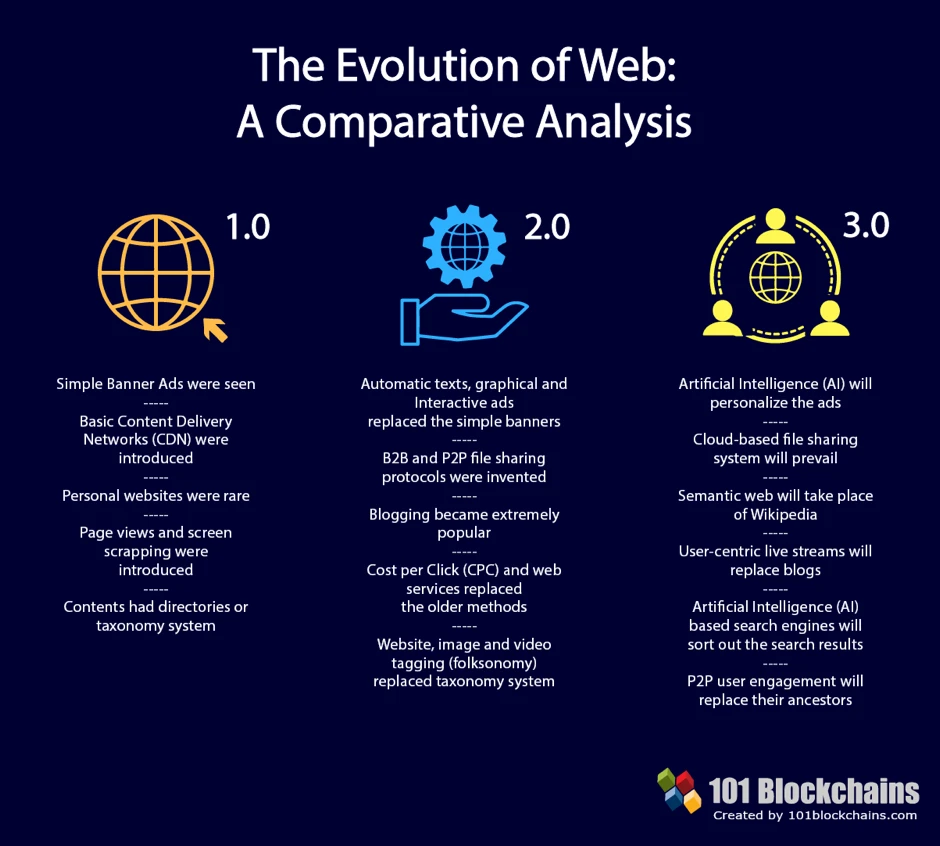
Web 2.0 and the global culture of sharing content has led to the rise of important issues around web security and privacy. Founder of Essentia.one, Matteo Gianpietro Zago suggests that Web 2.0’s successor will be more human-centric: “Rather than concentrating the power (and data) in the hands of huge behemoths with questionable motives, it would be returned to the rightful owners.” So what will this change in direction mean for the web?
Zago predicts that the power will be placed back in the hands of users who will have the security of encryption so that they can regain complete control of their own data. A further development might be the interoperability of applications – instead of only being able to run on one type of device, applications will be device-agnostic and able to run on smartphones, TVs, car operating systems and home appliances. In other words, “the internet of things” will become ever more interconnected.
Whether it’s called Web 3.0 or another name, the fact that the next evolution of the web is imminent, is arguably undeniable. Exciting times lie ahead for the connected world as we redefine the parameters of a system that we have all contributed towards in one way or another. Now more than ever, the world needs devs who can drive the next evolution of the web as we apply the lessons we have learnt.
Interested in trying your hand at web development? Hyperiondev is a great place to start. Schedule a call with us and our mentors will give you great advice on how you can get started.
Tutorials
HTML beginner tutorial 2: lists, links & images
The second HTML tutorial in a series from HyperionDev will show you how to set up HTML page titles, headings and paragraphs for a web page, using HTML code.
Welcome to part 2 of a 4-part series by HyperionDev showcasing an HTML tutorial for beginners. We hope you enjoy this upcoming tutorial, focusing on lists, links and images. By the end of our first HTML tutorial, your document in Notepad++ should be displaying as follows:
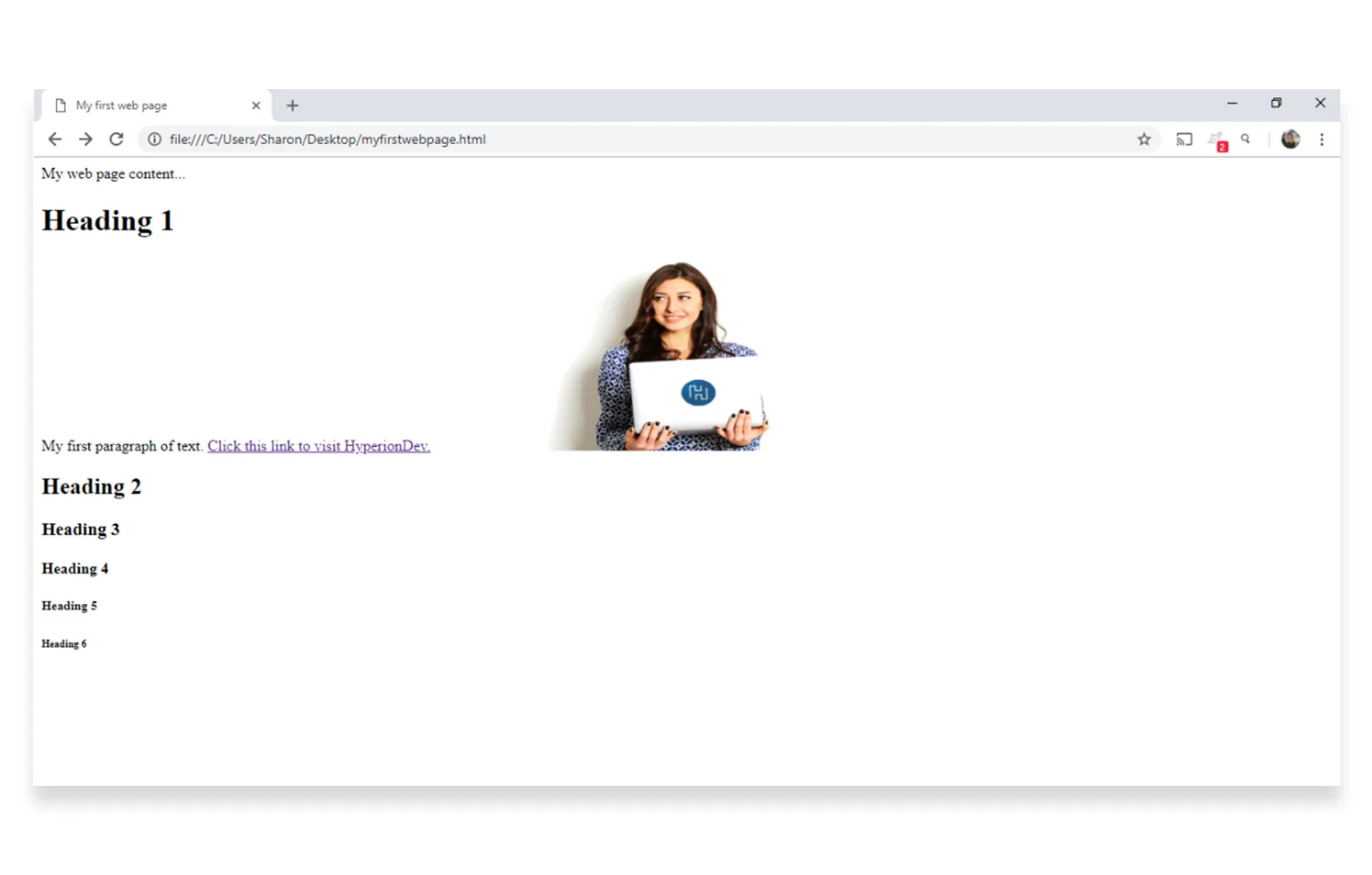
In this next tutorial, you’ll be adding to the code to create lists, links and images in HTML.
HTML lists
Lists are very common in web pages. They’re used in online articles, navigation menus, and product features on e-commerce websites.
There are a few different types of lists you can use, depending on the content you want to display.
Unordered list:
An unordered list is a simple HTML list that you can use when the order of the items you’re listing isn’t important, and rearranging the order wouldn’t cause confusion or change the hierarchy of the list.
The <ul> and </ul> tags define the beginning and end of an unordered list. The <li> and </li> tags are list item tags, which contain the items or points you are listing.
Add an unordered list to your document, by inserting the following code underneath the “My first paragraph” code.
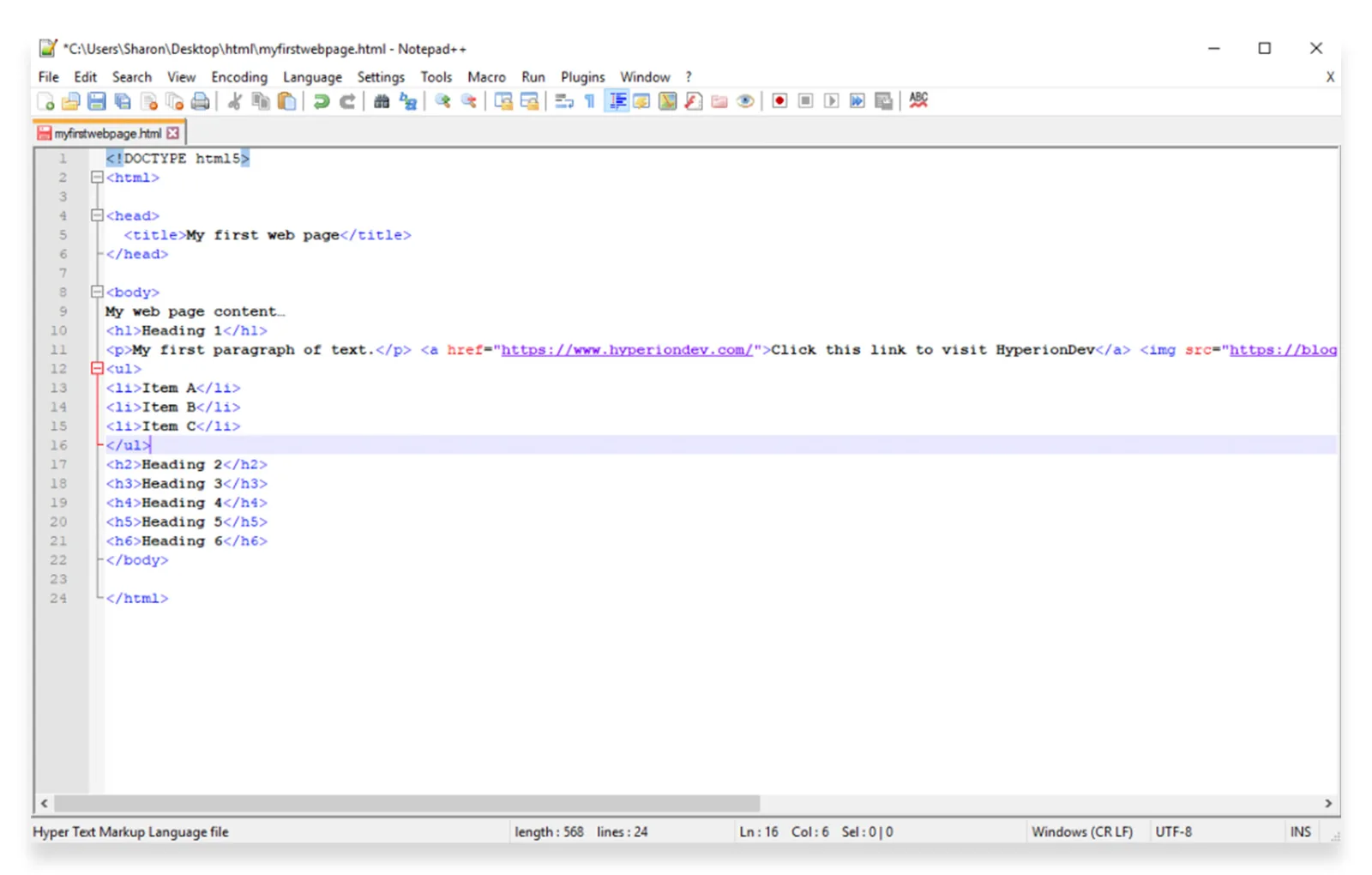
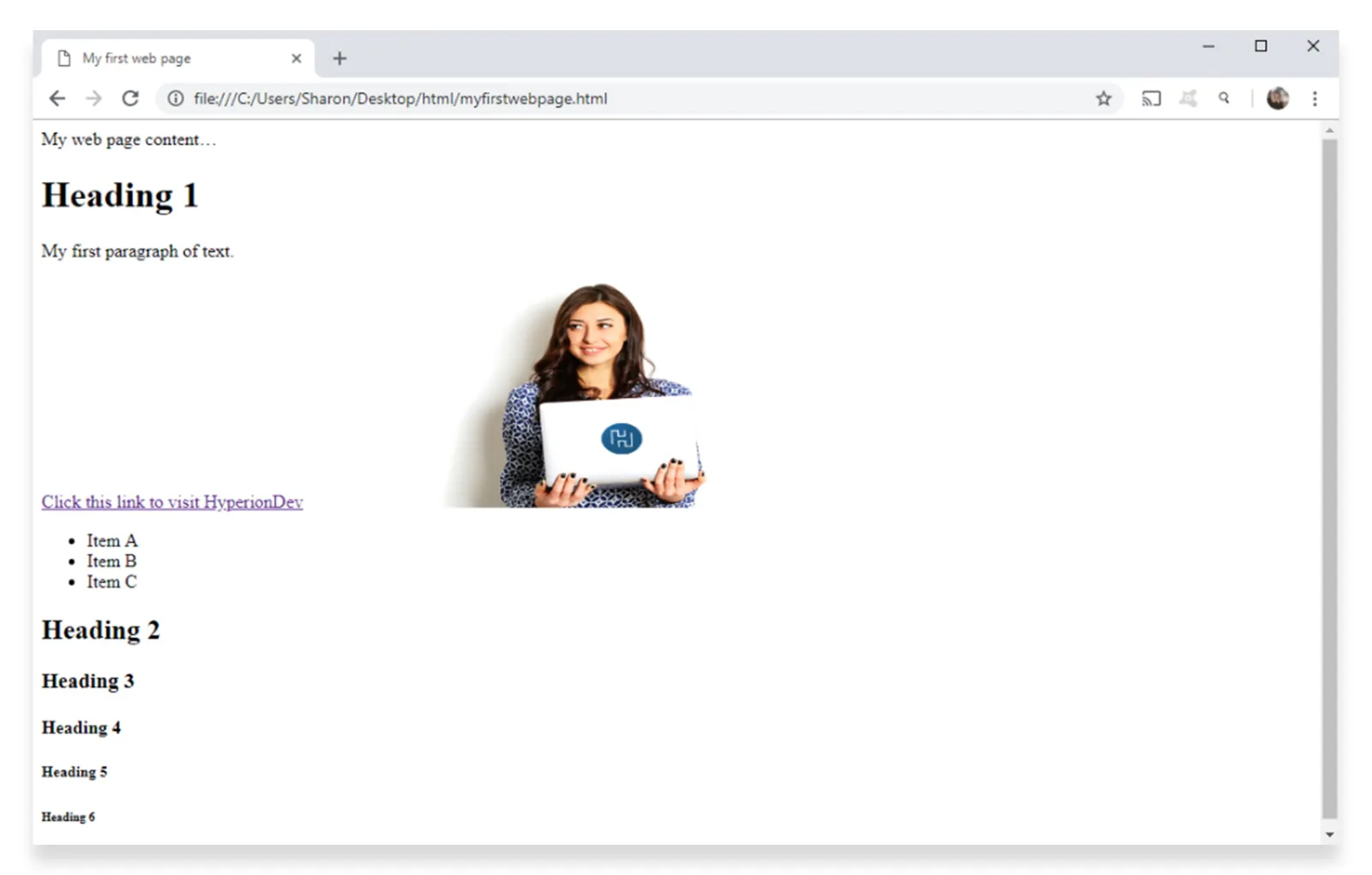
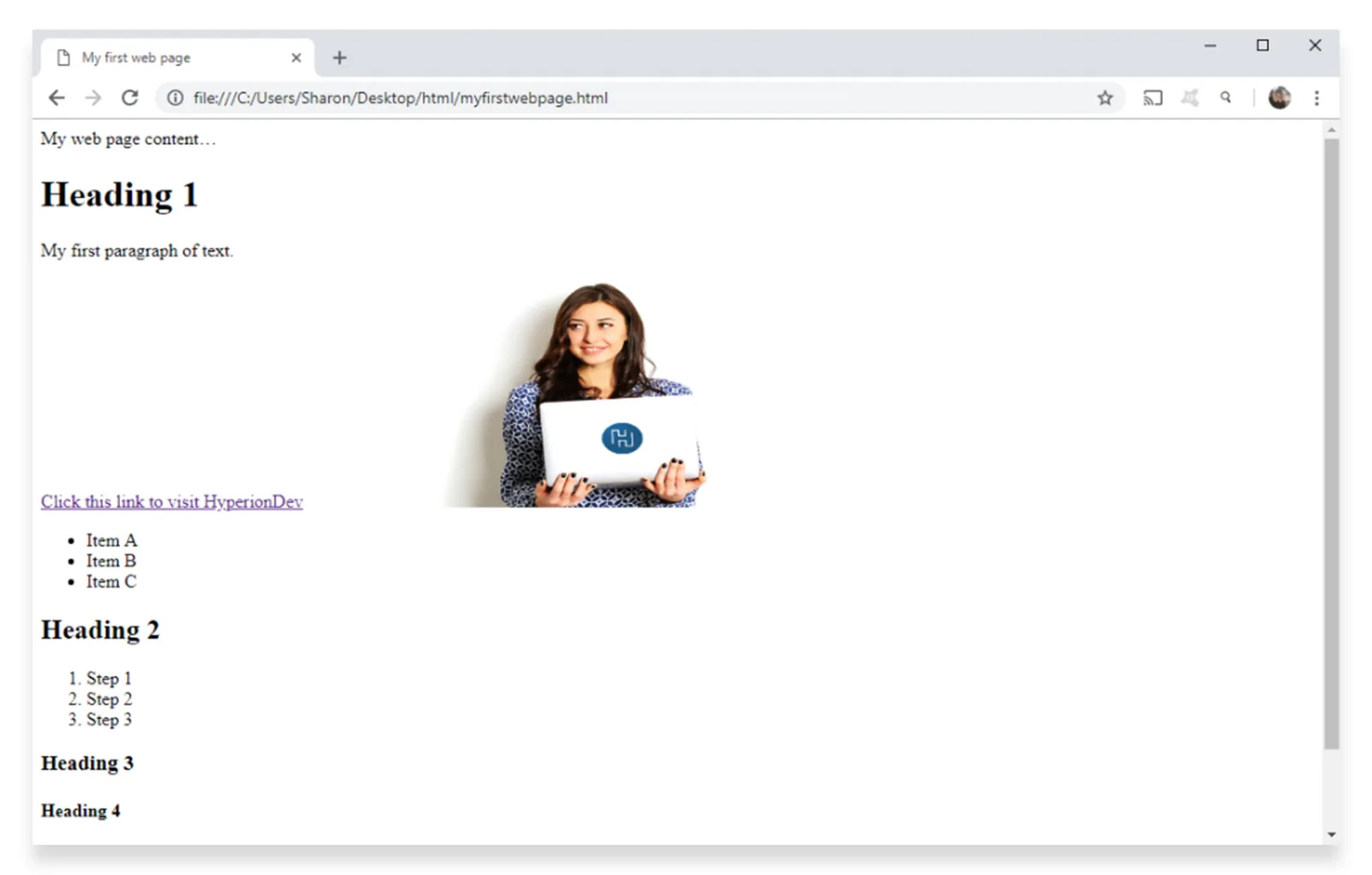
When you save and refresh, the list will appear as follows:
Ordered list:
Ordered lists are used when the order of the items is important, for example, a list of instructions that must be followed in order. The syntax is the same as for unordered lists, except that the <ol> and </ol> tags are used to define the beginning and end of the list, instead of the <ul> and </ul> tags which are used for unordered lists.
Add an ordered list to your document, by inserting the following code underneath the “Heading 2” code.
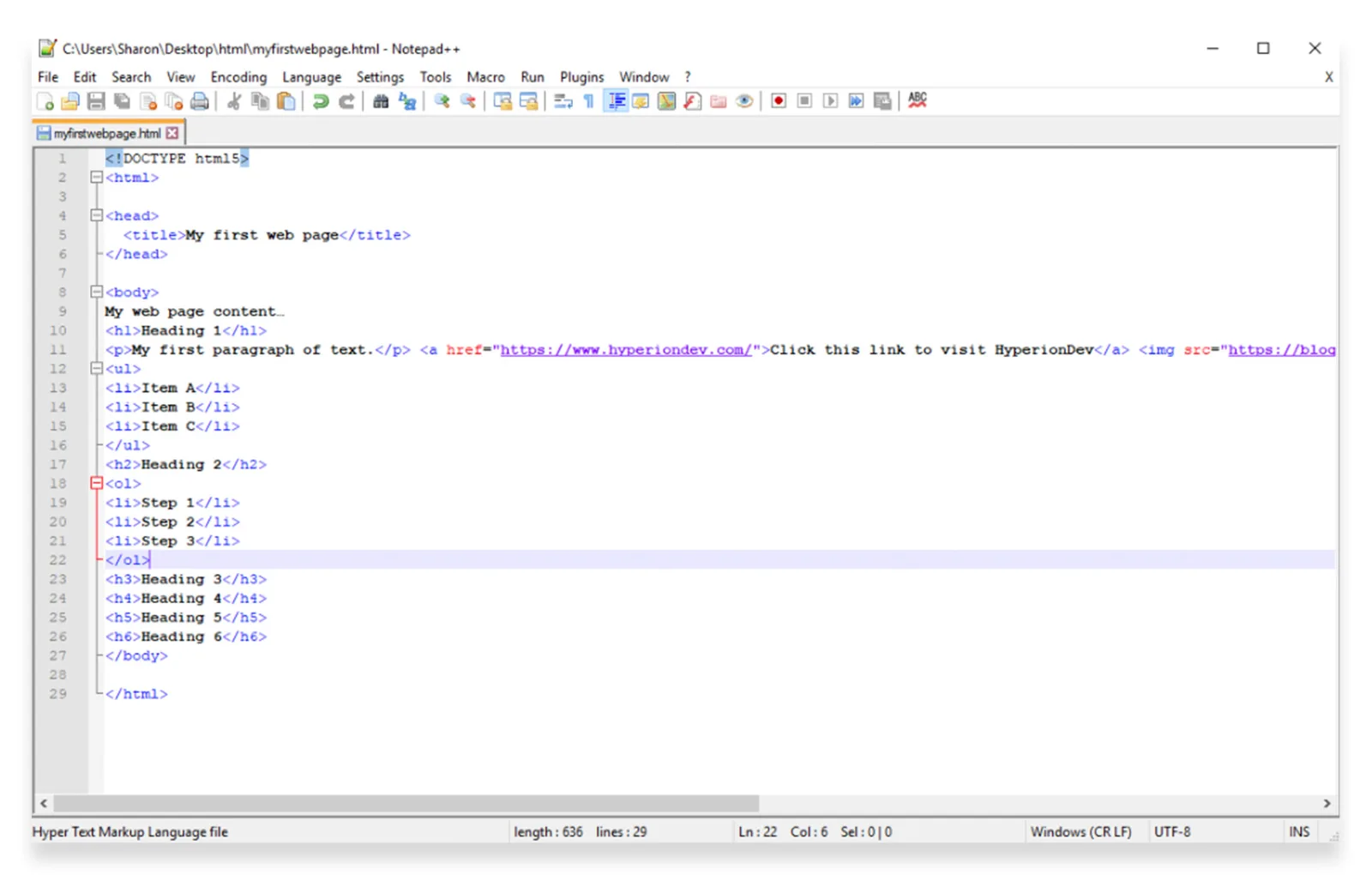
When you save your document and refresh your browser, you’ll see the list appear as follows:
Nested list:
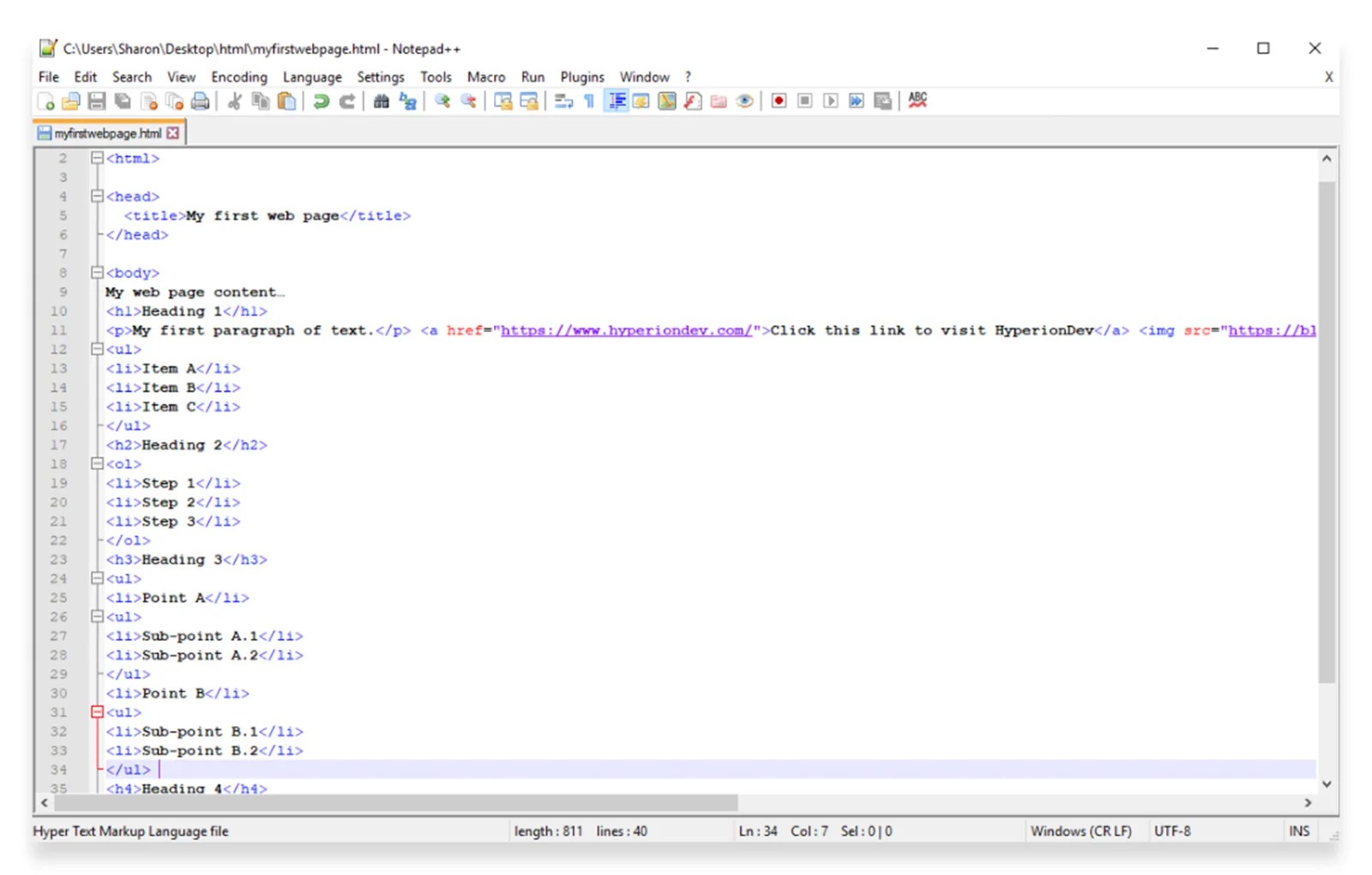
A nested list is a little more complex, because it’s essentially a “list within a list” with a variety of different indentations and bullet point types used to denote points and sub-points.
Add a nested list by typing this code into your document, under Heading 3.
Your updated web page will appear as follows:
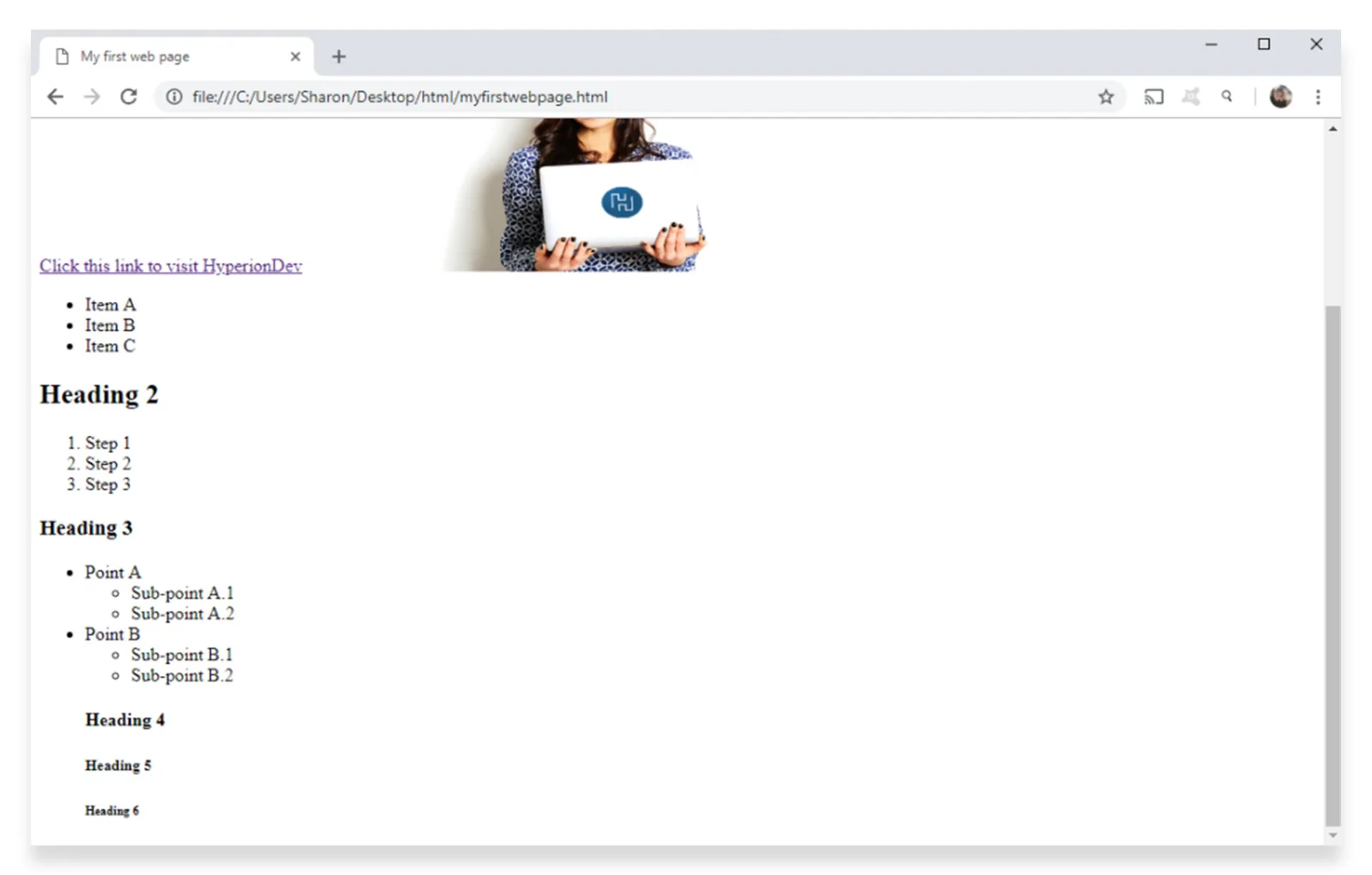
A real-world example of this would be something like a gym or exercise studio listing their daily schedule. The points would be the days of the week, and the sub-points would be the classes taking place each day.
If you want to see this real-world example on your web page, you can edit the text as follows:
When building a real website, you would be able to add as many points and sub-points as you need, depending on the site content.
Remember that HTML isn’t presentational, and in order to add styling to your lists (e.g. defining the font used for the list), you will need to use Cascading Style Sheets (CSS).
HTML links
HTML links are hyperlinks which allow the user to click and navigate to another page or document. When a piece of text is hyperlinked, a mouse cursor will turn into a hand icon to show the user that it is clickable.
In our first HTML beginner tutorial, we covered how to insert a simple HTML link using the <a> and </a> tags and the href attribute, as follows:
HTML also allows you to define the behaviour of your links in a bit more detail, such as creating targets and linking images.
Targets:
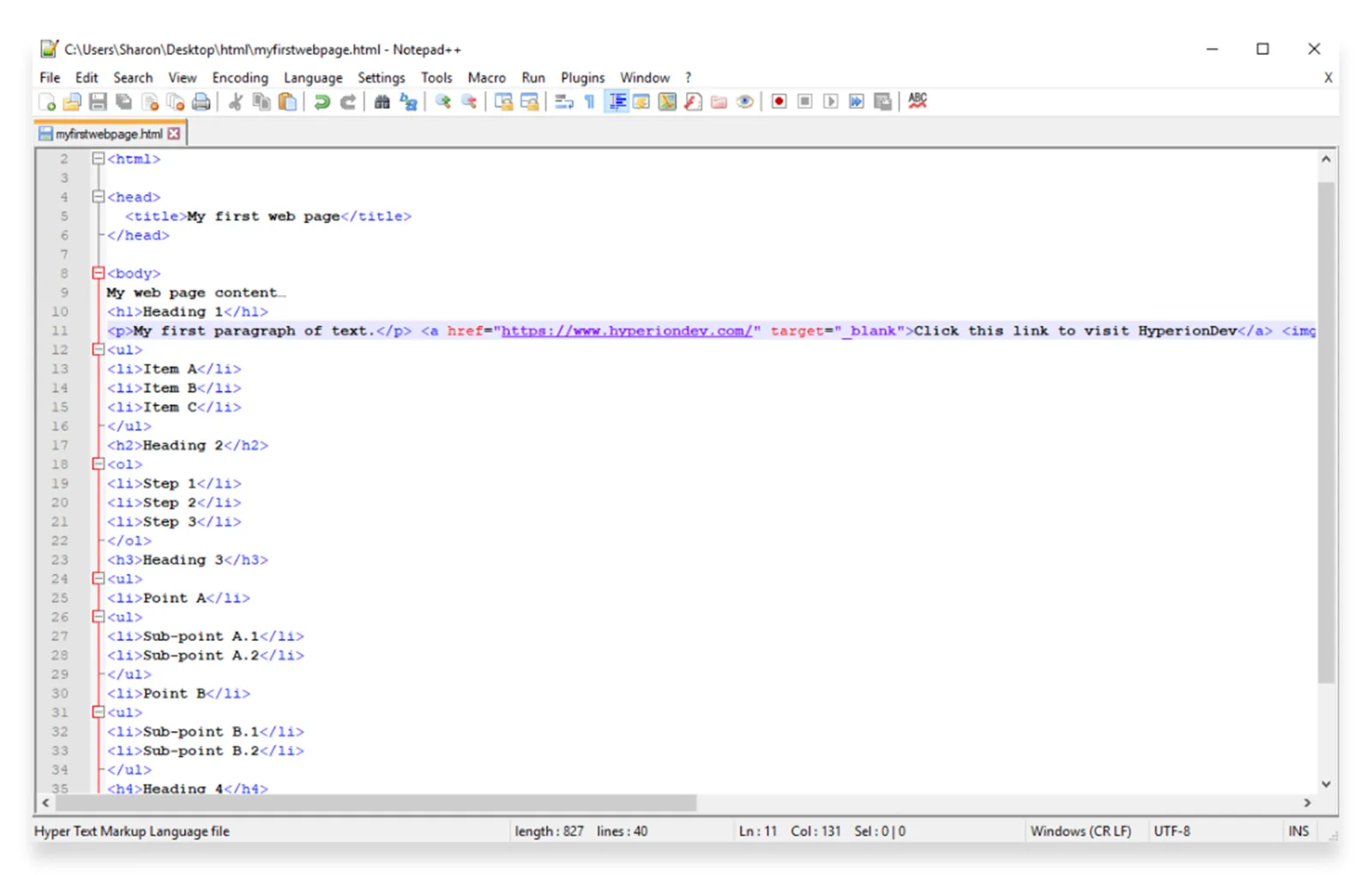
You can use a target attribute to specify where to open the link. You can do this by adding a target attribute to your link code and applying one of the following values:
- _self opens the link in the same window or tab as it was clicked
- _blank opens the link in a new window or tab.
- _parent opens the link in the parent frame
- _top opens the link in the body of the window
- framename opens the link in a named frame
Go back to the link in your document, and edit it as follows:
This example will open your link in a new browser window or tab. This is useful, because it allows the user to open the link without clicking away from the original web page or site.
When you refresh your page and click the link, the content will open in a new tab.
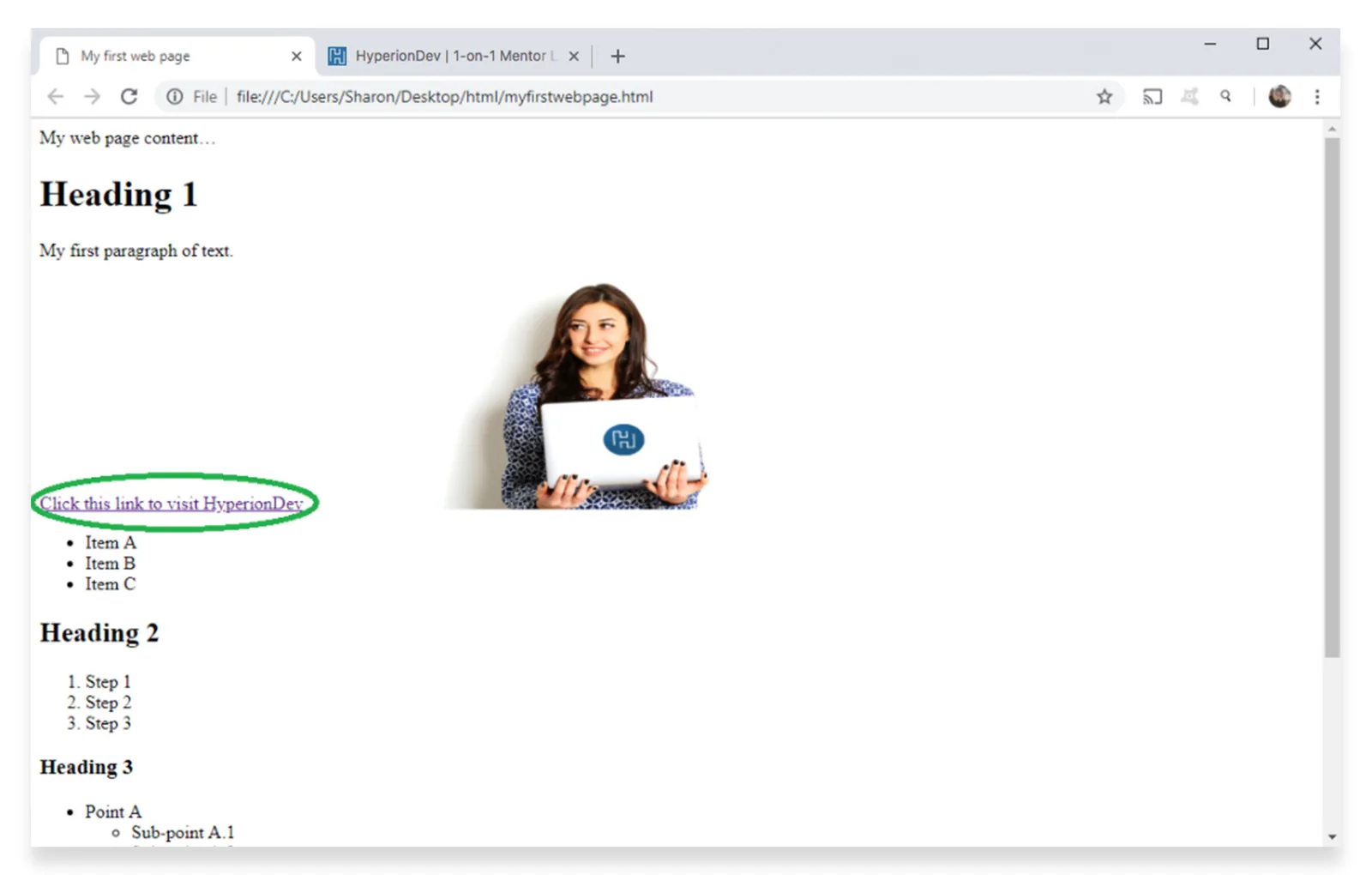
By default, an unvisited link will be underlined and appear as blue text. A visited link will be underlined in purple text, and an active link will be underlined in red text. To change these default colours, you would need to use CSS to style them further.
Linking images:
Images can be hyperlinked as well as text.
Go back to your image in your document, and add your <a> </a> tags and href attribute, as you would for a text link.
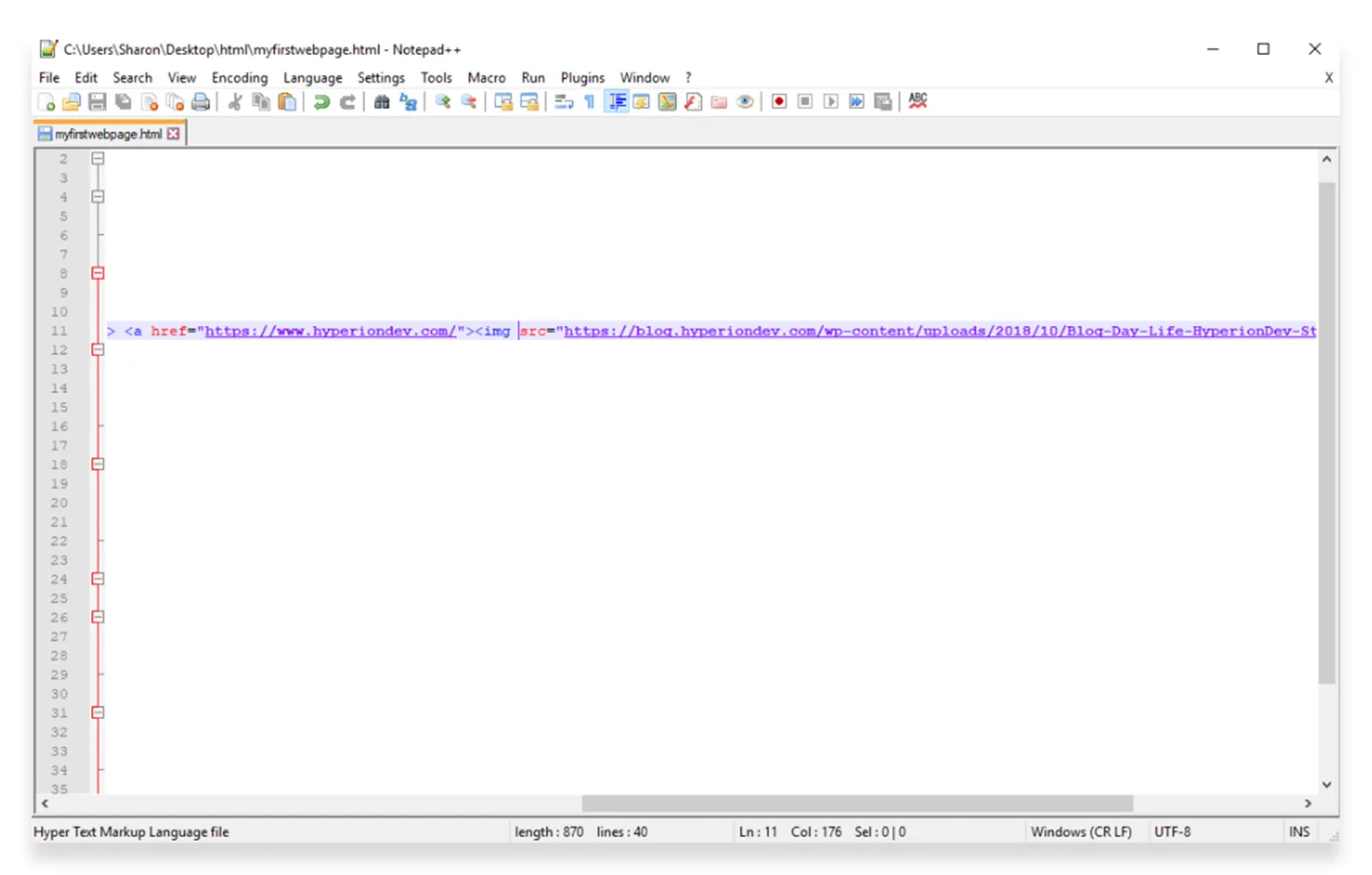
When you refresh your page, the image will look the same, but your mouse cursor will change to a hand when you hover over it – showing that the image is now clickable.
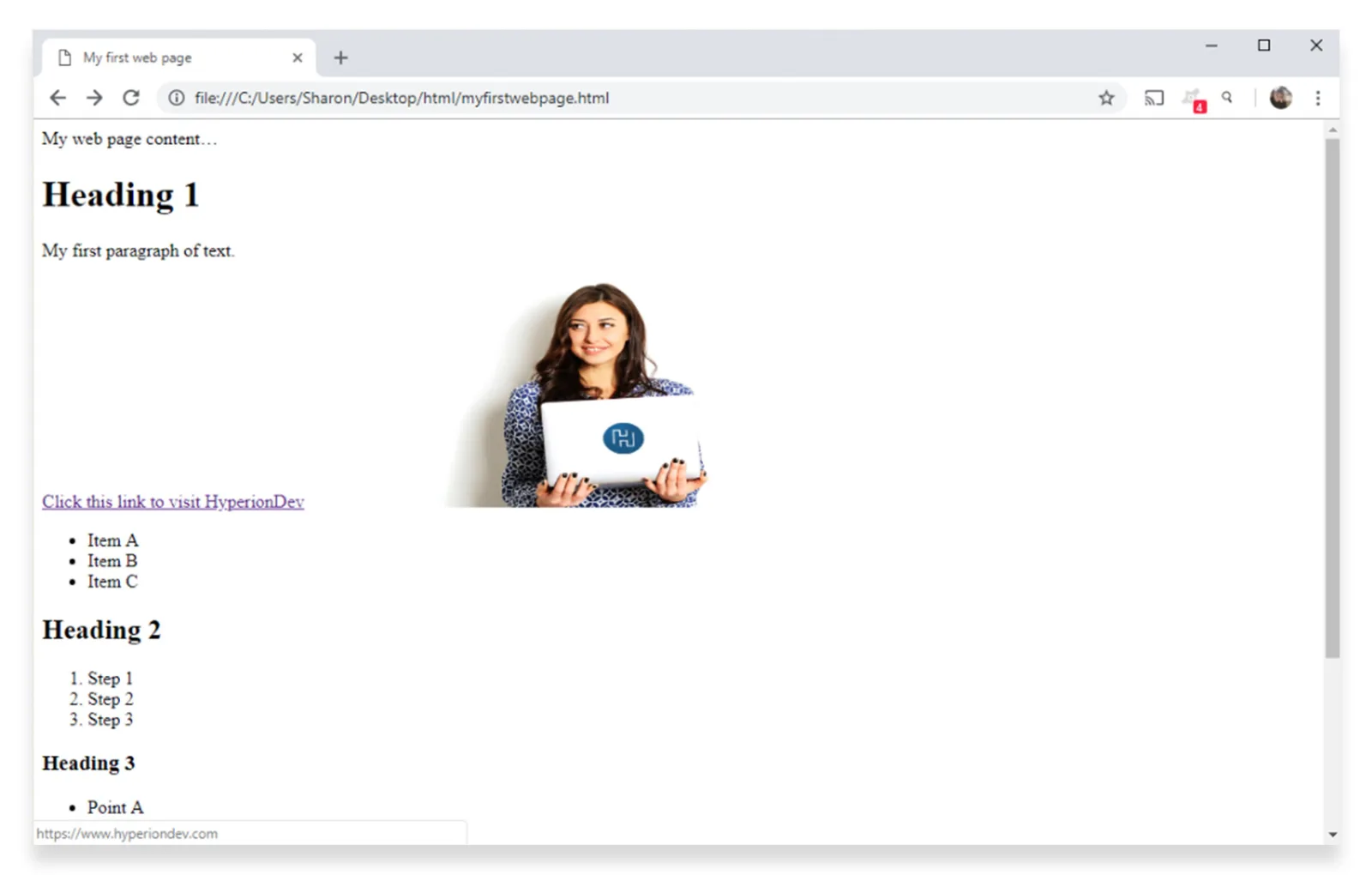
Clicking the image will open your link in the same browser tab. You can change this to open in a new tab, by using a target attribute as you would for a text link.
HTML images
In the first tutorial, you learned how to add an image to your HTML page, using the <img> tag.
The <img> tag contains attributes only, and does not have a closing tag. The src attribute, which you’ve already learned how to use, specifies the location (web address or URL) of the image.
The alt attribute provides alternate text for an image, in case the user isn’t able to view the image itself. This could be caused by a slow Internet connection or an error in the src attribute.
Let’s say for example the url you were using was incorrect. Go back to the image in your document, and change it to a purposely incorrect url, as follows:
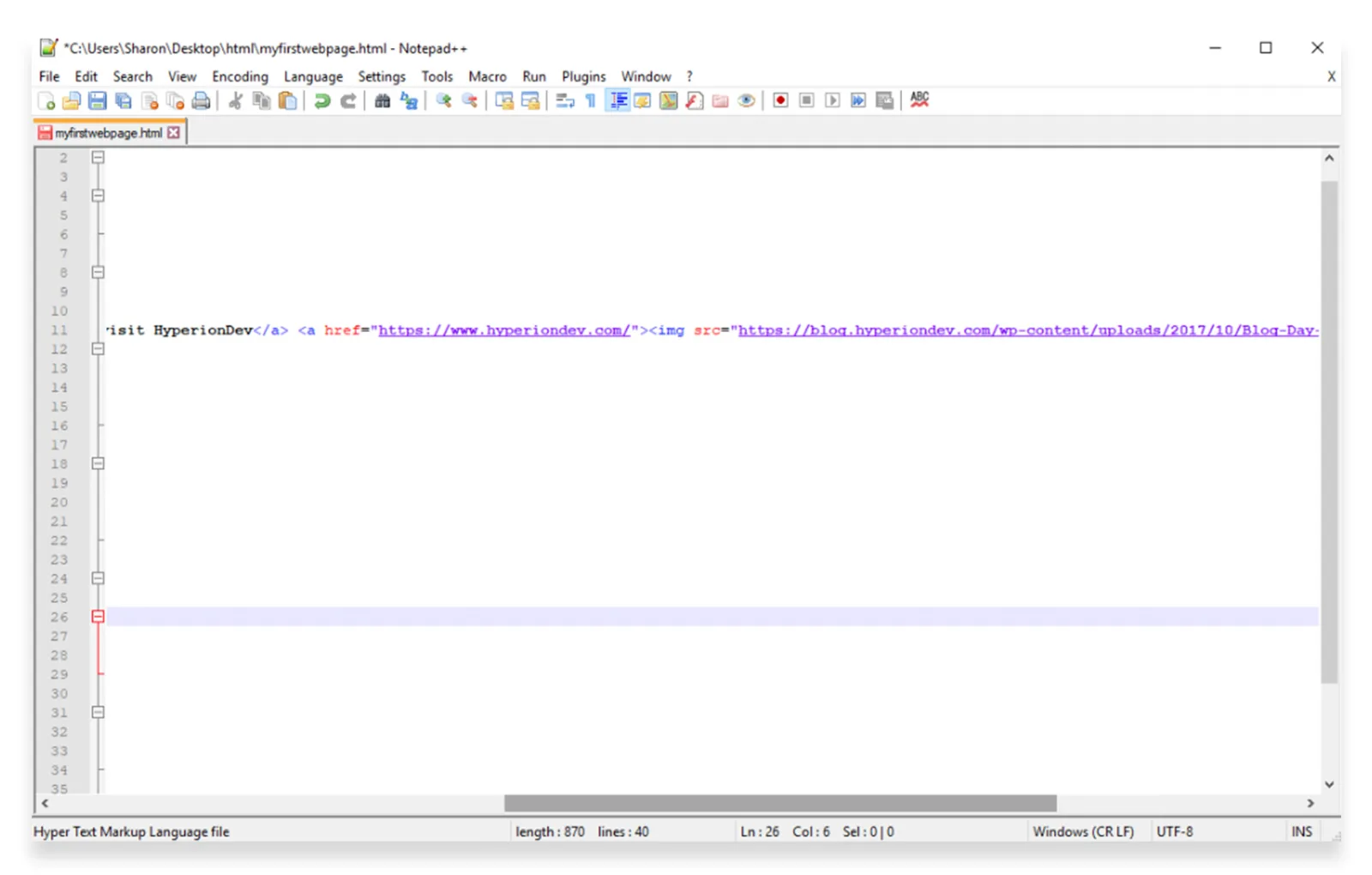
When you refresh the page, you’ll see a broken image with no description of what ought to be displaying there.
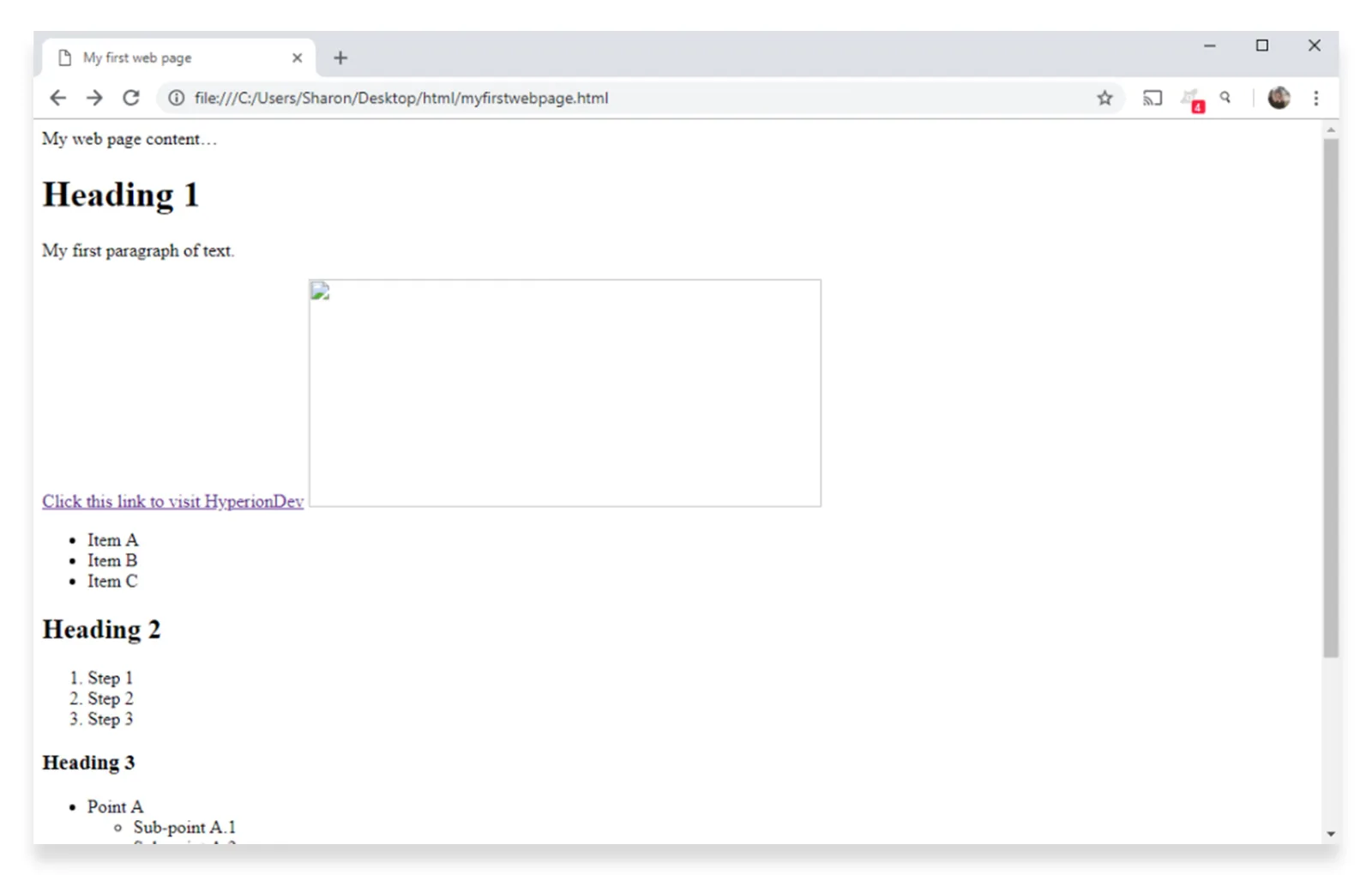
Putting alt attributes in place for your images ensures that your users (and search engines) can see what’s meant to be there, even if there is a problem with loading the image.
Add an alt attribute to your image using the following text:
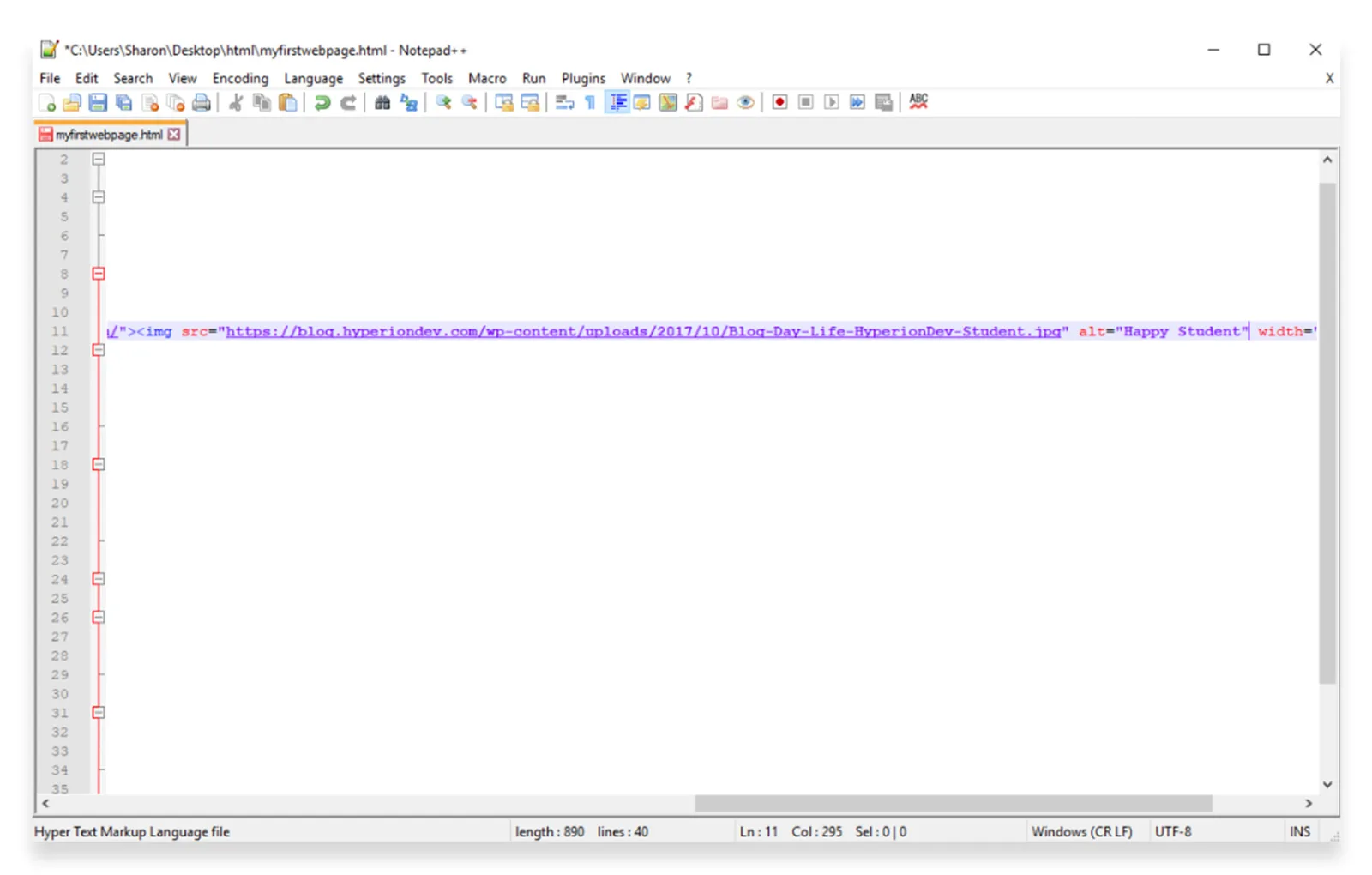
When you reload the page, the alt attribute value will display where the image should be:
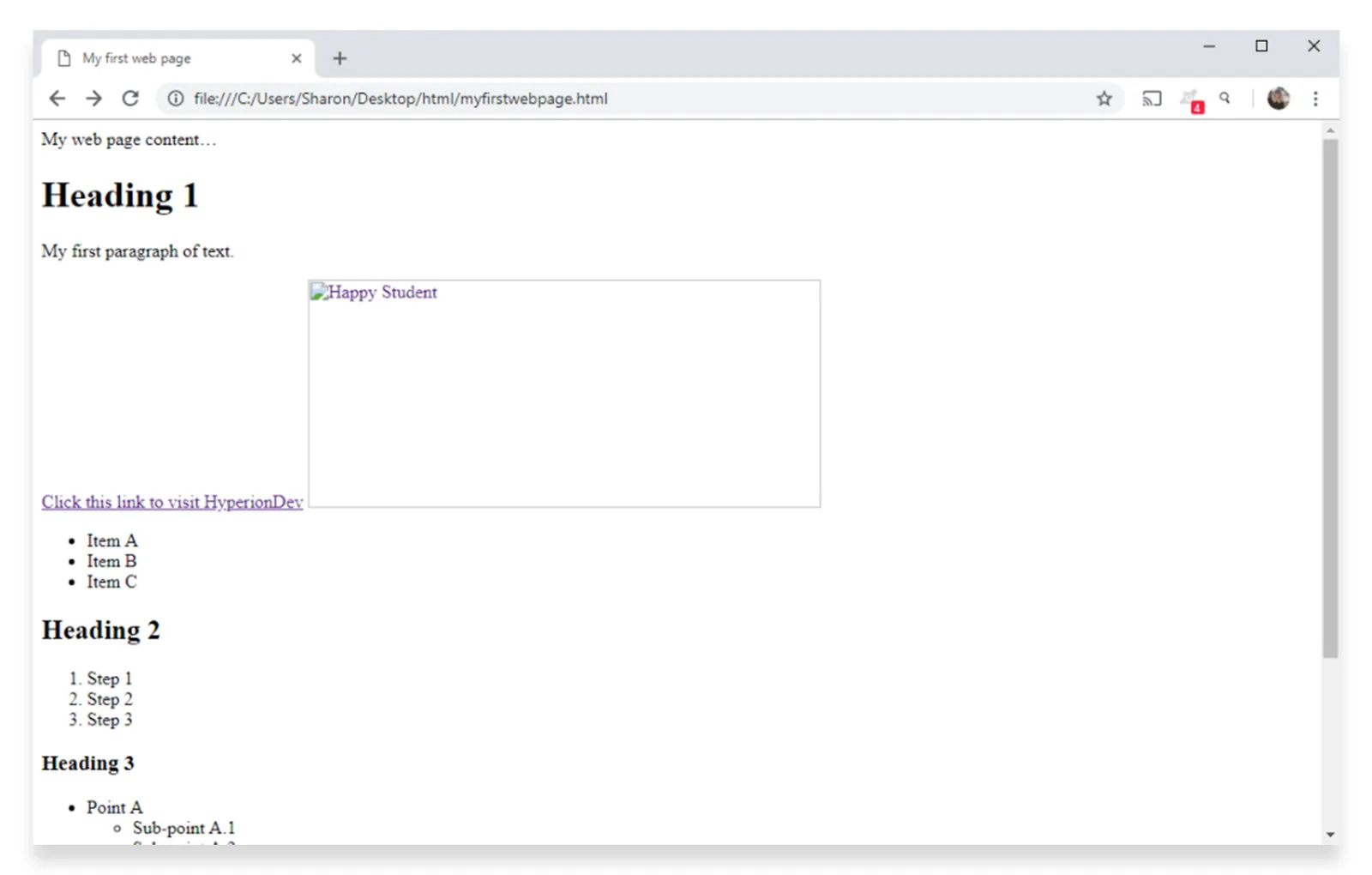
Note: Be sure to fix your image url before continuing. Ideally, the images should display, and alt attributes should be in place as a back-up.
Part 3 of our HTML tutorial will show you how to set up tables and forms.
This tutorial will give you a simple introduction to the popular web language, but if you want to learn more about HTML code in-depth, why not sign up for a mentor-led full stack web development course?
Tutorials
HTML beginner tutorial 1: getting started, tags, attributes & elements
The first HTML beginner tutorial in a series from HyperionDev - getting started with HTML, tags, attributes & elements. Part 1 of 4.
HTML stands for Hyper Text Markup Language. It is the standard markup language used by developers to create web pages. It is a simple, useful way to structure content. HTML is typically used together with JavaScript and Cascading Style Sheets (CSS). These three technologies are the cornerstone of web development. This HTML beginner tutorial will introduce you to a few basic concepts, including tags, attributes and elements.
Getting started with HTML
HTML files are simple text files. To write your first code in HTML, all you need is a text editor, like Notepad++ or Wordpad.
To create a basic HTML page, you need to follow these steps:
- Open a text editor and type a few words, for example “My first web page”.
- Create a folder named “html”.
- Save the file to this folder as a plain text file with html extension, for example “myfirstwebpage.html”.
- Be sure to save the file as plain text, not rich text.
- Be sure to use the “.html” extension, as some text editors will automatically save the file as “.txt” otherwise.

To view the HTML file, open your web browser and type the location of the file you just saved into the address bar. For example,“c:\html\myfirstpage.html”. Then press Enter. (You can also go to the File menu of the browser, select Open, and browse for the file you saved.)
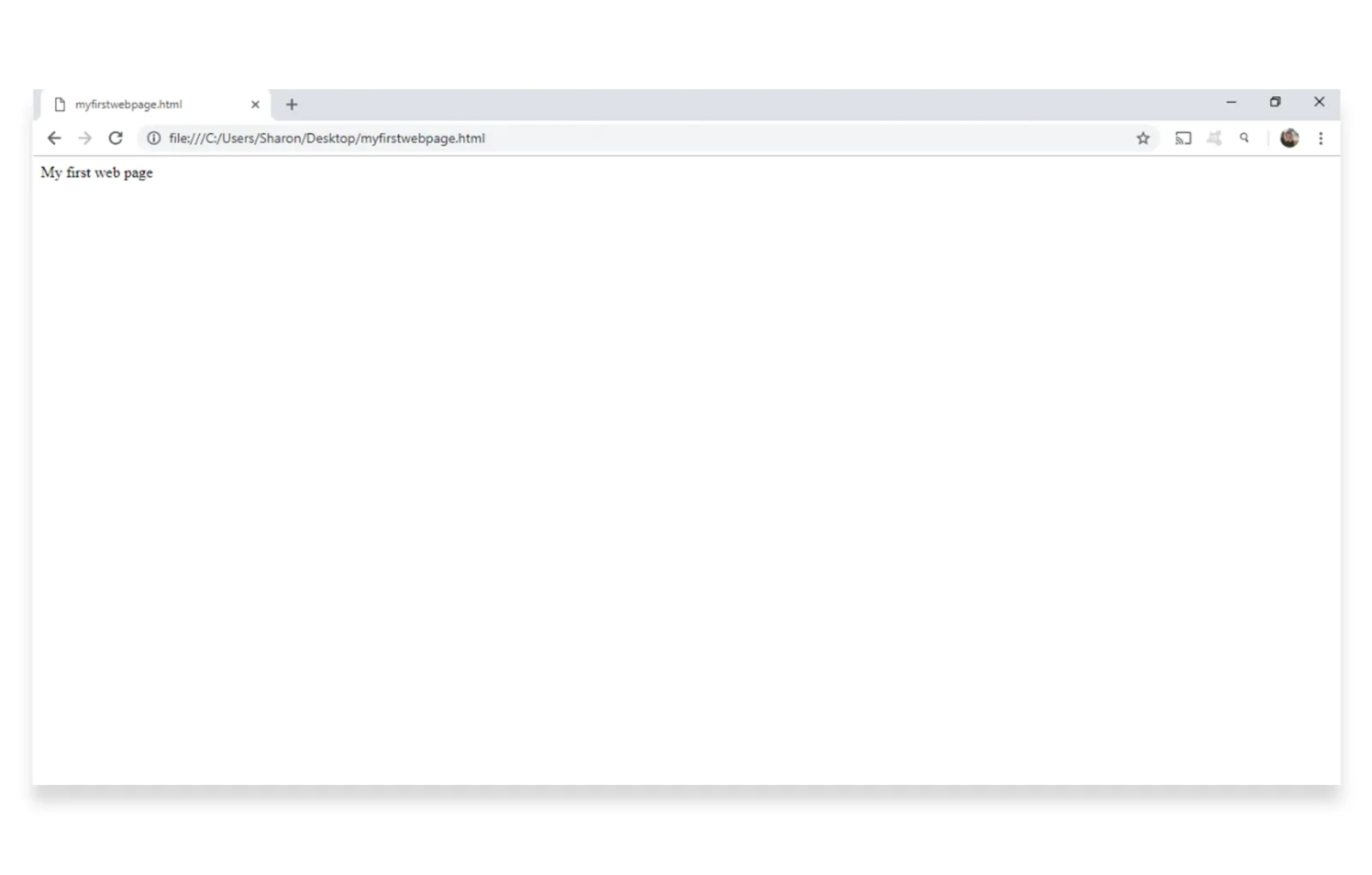
You will now be able to view the file as a web page.
The next stage of our HTML beginner tutorial will look at how to start adding structure to your web page, using tags.
HTML tags
A tag is a piece of code that helps to define the basic structure of your HTML document. Tags will surround the content in your document, and apply specific meaning to that content. For example, do you want to define a document, a heading, a sub-heading or a paragraph? You’ll use tags to show these definitions.
- An opening tag between these symbols: < >
- A closing tag appears between these symbols </ >
Tags can be used to define a few words of content, a few lines, a few paragraphs, or even an entire document.
Tags in action
To start off with a few simple tags, add this text to your document, before and after your first line of copy:

The <!DOCTYPE html> tag is a document type declaration, which tells the browser which type of HTML you’re using. HTML5 is the most updated version.
The <html> tag tells the browser that everything between that opening tag and </html> closing tag is an HTML document. You need to ensure that there is an opening tag and a closing tag, to mark the beginning and end of the code.
The <head> and <title> tags define the title of your document. Title tags are required for all HTML documents, because they determine the title that appears in the browser toolbar, and in search engine results.
The <body> tag defines the main content of the document, which will appear in the browser window and will be coded between that opening tag and the </body> closing tag.
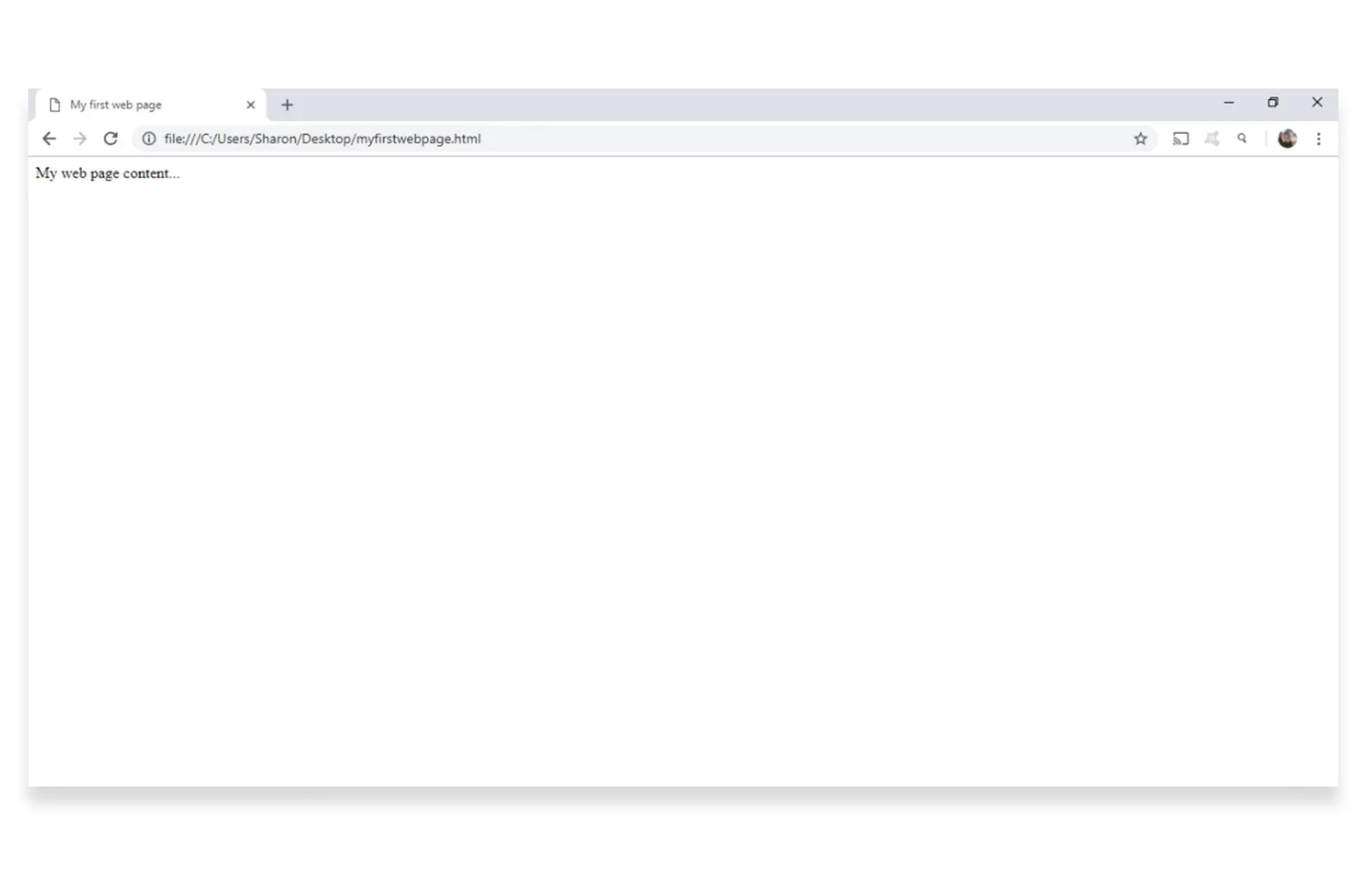
If you save the file and reload it in your web browser, you’ll see that the title “My first web page” now appears in the browser, and the main body “My web page content…” appears on the page.
Next, you can add headings and paragraphs to your document using tags.
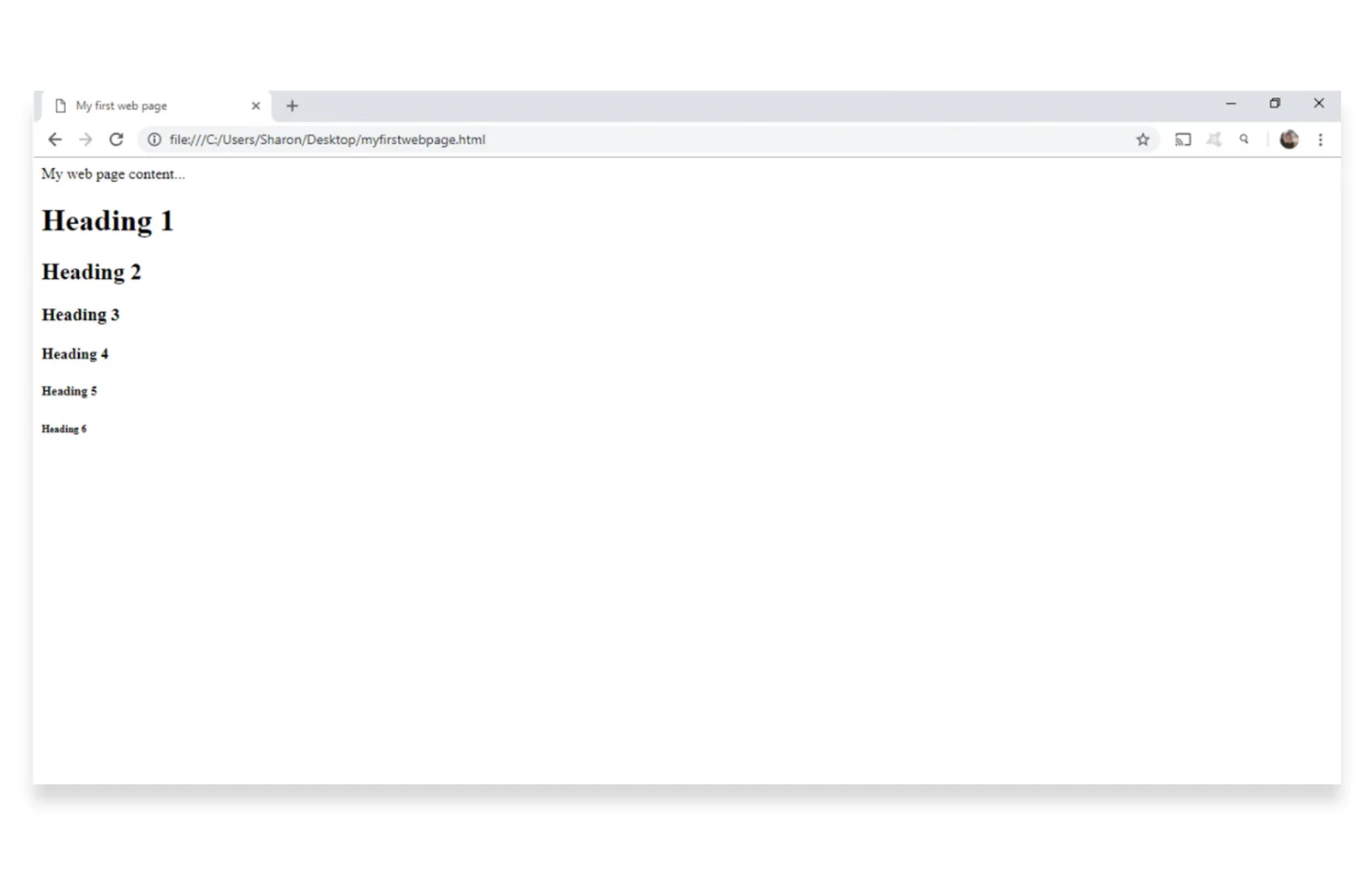
Headings are defined using <h1> to <h6> tags, with <h1> being the most important heading and <h6 > being the least important.
Add a series of heading tags as shown below, between the <body> and </body> tags. Then save your document and refresh your page.
The web page will show a list of headings in different sizes, depending on their importance.
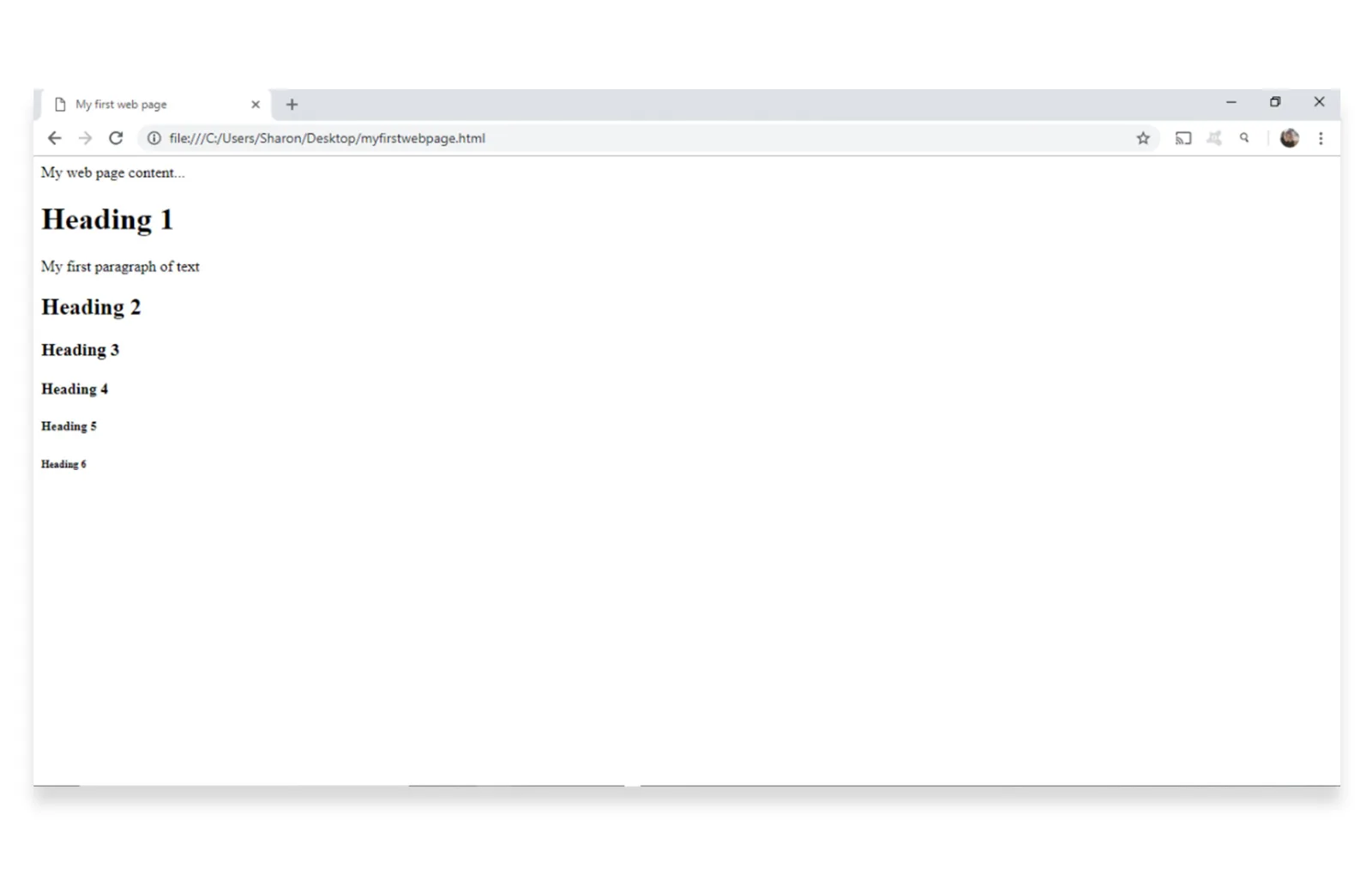
Paragraphs are defined using the <p> tag. The browser will automatically add some space before and after each paragraph.
Add a short paragraph of text with opening and closing tags under the first heading in your document. Then save and refresh.
The paragraph will appear under the first heading, with space (margins) before and after the text.
These are the essential tags you will need to set up the basic structure of a web page. Have a look at some other common HTML tags here.
HTML attributes
Attributes are extra bits of information, which appear inside opening tags inside quotation marks. They usually come in name and value pairs, for example: name=”value”.
Tags with attributes are written in a format as follows: <tag attribute=”value”>Text</tag>.
Attributes in action
Links: HTML links are written using the tag <a>, and the actual URL (link address) is specified using an attribute called the href attribute.
For example, you can add a link to your first paragraph using the following tag and attribute:
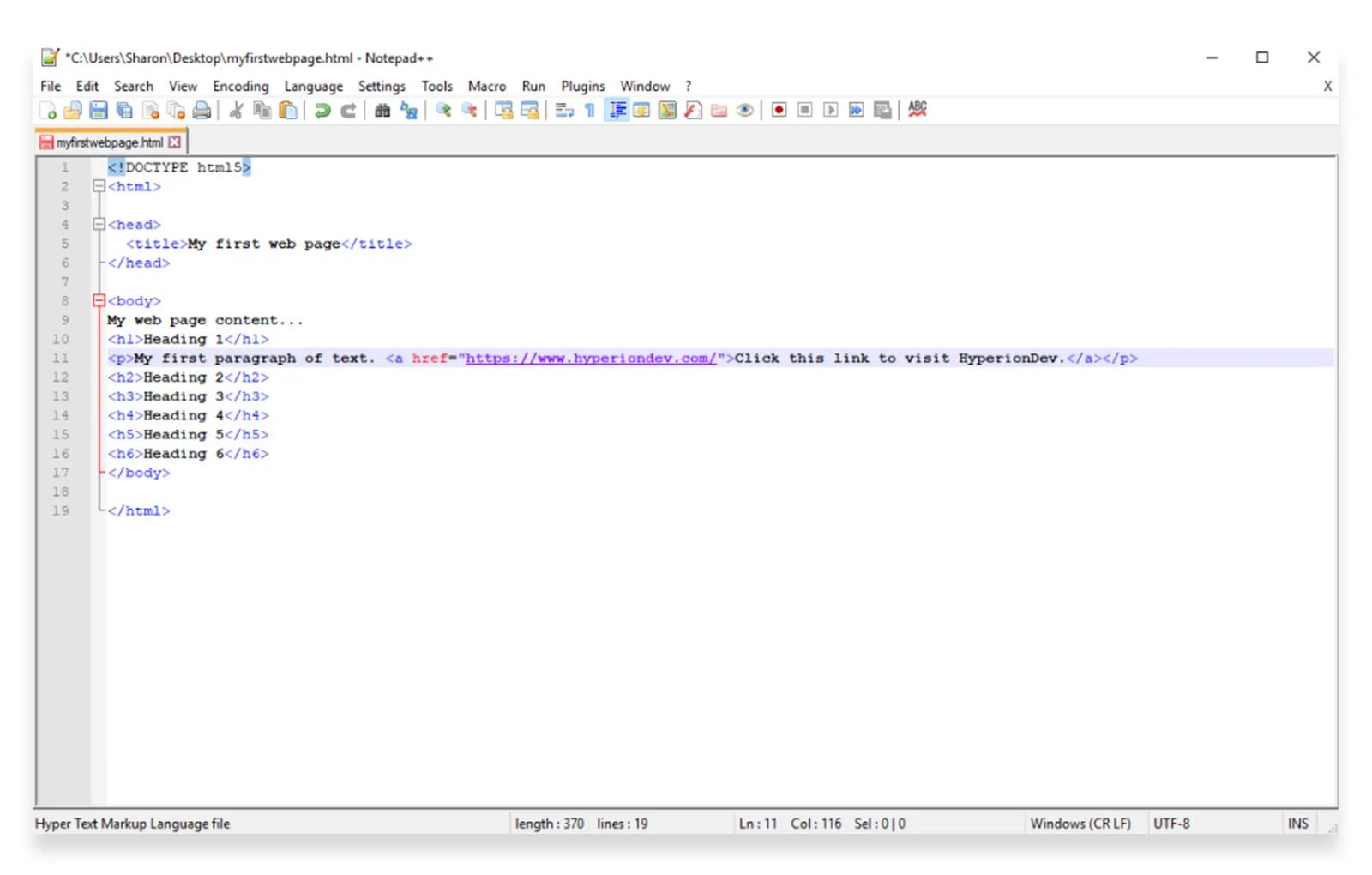
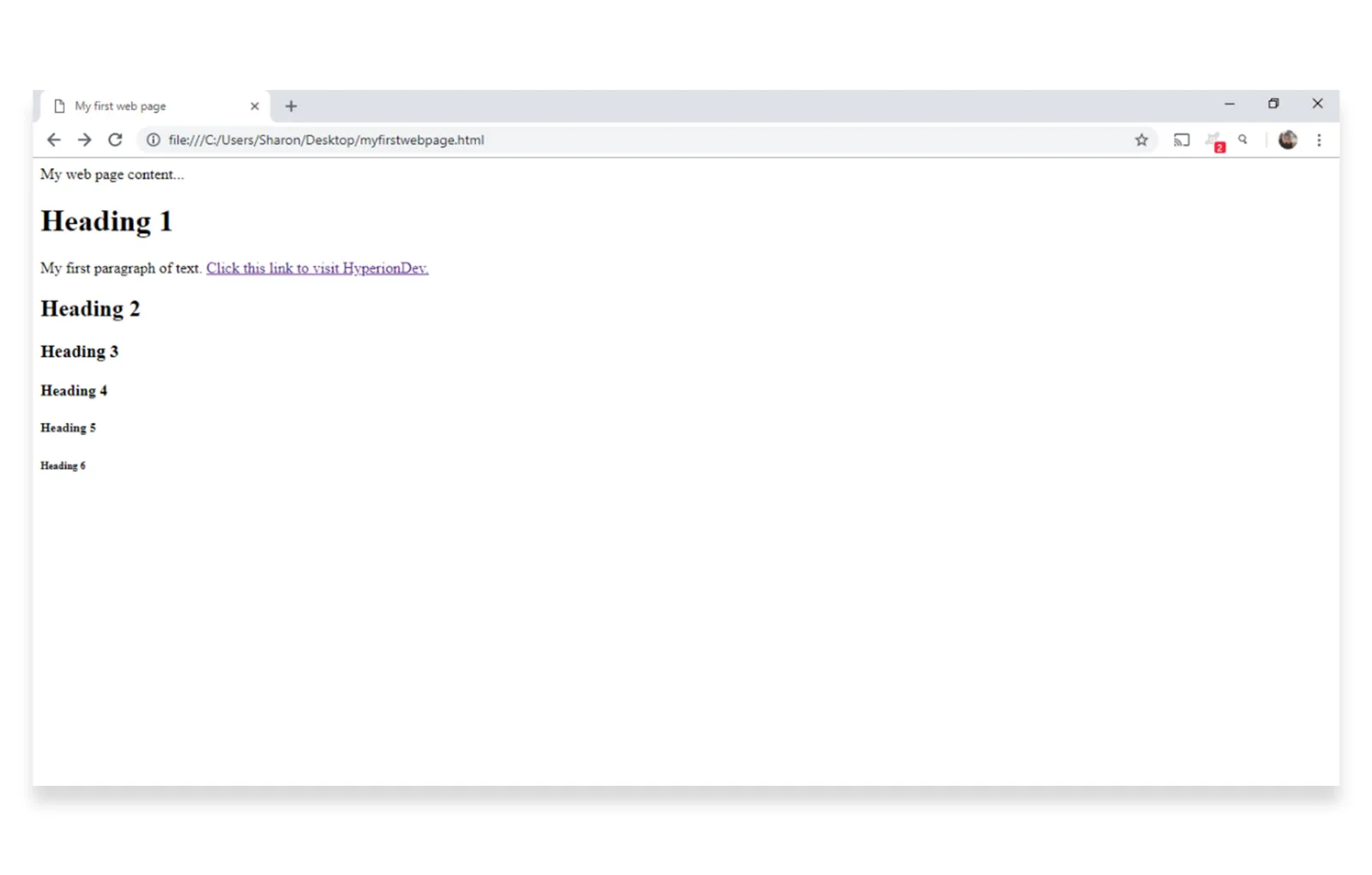
When you save and refresh, there will be a clickable link on your web page.
Images: HTML images are coded using the tag <img>, and the image source filename is specified using an attribute called the src attribute. Note that the image URL must be written inside quotation marks.
The image must be stored on an HTML page online – not on a local computer. Note that the <img src> tag doesn’t require a closing tag.
For example, you can add an image to your first paragraph using this code:
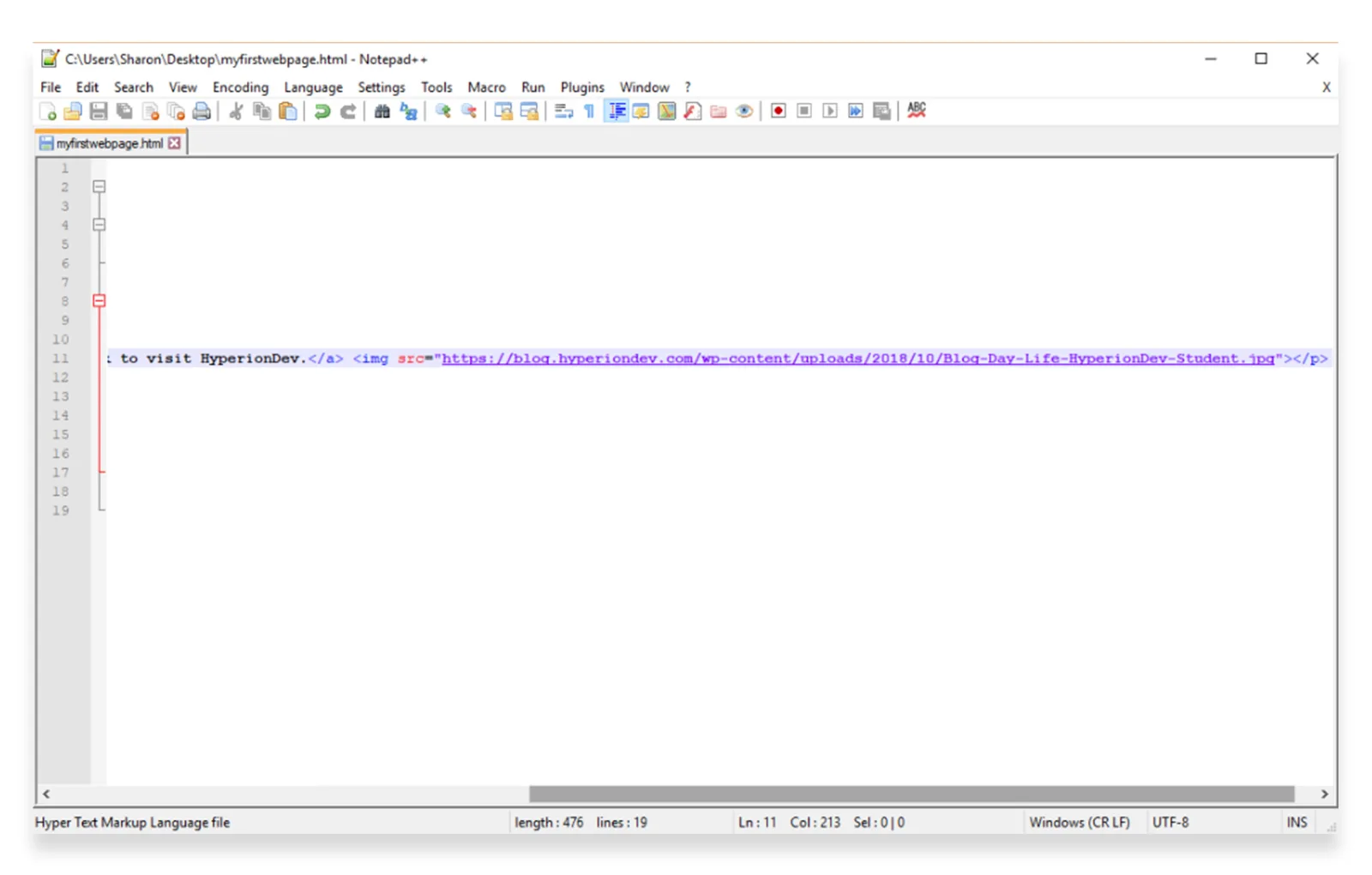
When you save and refresh, the image will display.

Dimensions: You can set the height and width of an image in HTML using size attributes. The dimensions are specified in pixels. Note that the pixel number must always be written inside quotation marks.
For example, you can resize the image in your first paragraph by using the following code:
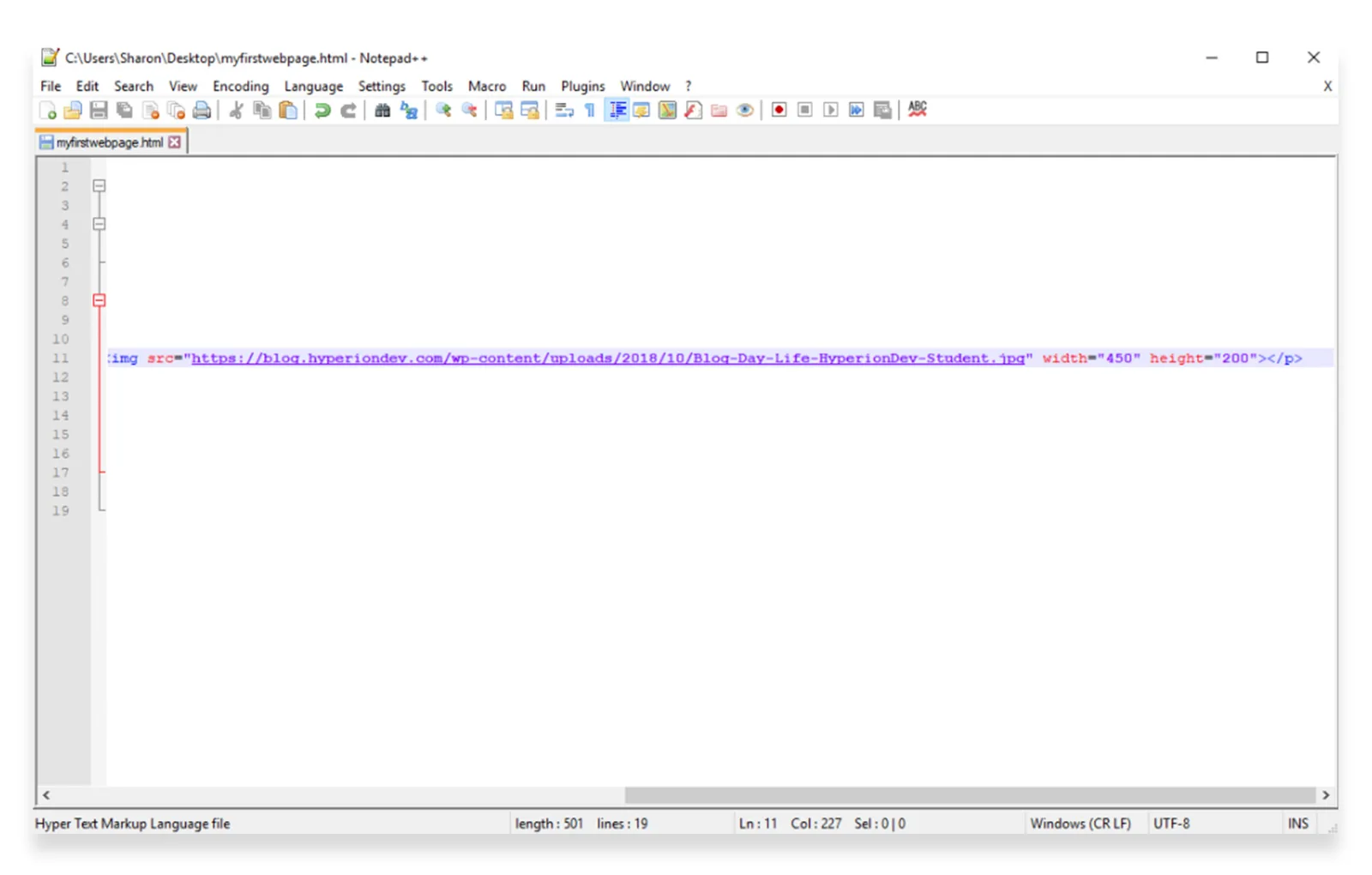
When you save and refresh, the resized image will display.
HTML elements
When we talk about elements, we’re referring to the individual parts that make up a web page. Your HTML tags mark the beginning and end of each element.
For example, the content that appears between the <body> and </body> tags is the body element. And the text that appears between the “<title>” and “</title>” tags, “<title>My Page Title</title>” would be called the title element.
Part 2 of our HTML beginner tutorial will show you how to set up lists, links and images. In the meantime, if you’re interested in learning more about HTML code, check out our mentor-led online coding courses.

Web Development
10 podcasts for web developers
Pack extra learning into your busy schedule by tuning into a podcast. Here are 10 podcasts for web developers aimed at covering all skill levels and interests.
In web development, technology moves at a rapid rate. Podcasts are an ideal way to stay up to date. They’re an excellent fit for packed and busy lives, because you can listen to them while on the move. So which are the best podcasts for web developers? Here we list ten of them aimed at covering all skills levels and interests.
This weekly show is described as a ‘Tasty Treats Podcast for Web Developers’ – it’s run by full stack web developers Wes Bos and Scott Tolinski. This podcast covers a range of technical issues – such as hosting and servers, as well as more industry-related issues including freelancing hot tips.
The hosts are good at simplifying complex topics, explaining how things work and giving relevant examples from their own work experience. Each podcast is approximately an hour long.
This podcast for web developers is designed to fit inside your ten-minute tea break. It’s part of the Spec Network aimed at both designers and developers to help them learn, find great resources and connect with each other. Their podcasts are downloaded more than 100 000 times per week. There’s also a Spec community you can join.
This site provides a wide variety of podcasts on a number of programming languages. Some of their interesting-sounding, language-specific podcasts for web developers include ‘Adventures in Angular’, ‘Javascript Jabber’, ‘Ruby Rogues’, etc. Javascript Jabber, for example, would include the latest features in Javascript as well as topics like functional programming, design patterns, etc.
The Changelog is aimed at full stack developers and includes one of the largest communities on the web. The podcast features all things open source and includes discussion with hackers, leaders and innovators of software development. Some guest speakers include Paul Fremantle, the CTO and Co-Founder of WSO2 as well as Jason McGee, the VP and CTO of IBM Cloud Platform.
This one sounds like fun. It’s a podcast featuring a panel of Software Engineers from Netflix, Evernote, Atlassian & LinkedIn talking over drinks about all things relating to Front End development. Some episodes are career-focussed – for example, the latest episode features a discussion on internships and leveraging your internship into a full-time job, whereas others are more tech-focussed – such as a discussion on Progressive Web Apps.
If it’s UX, or user experience, that gets you going in the mornings, try Motion and Meaning. This podcast is aimed at those wanting to bring more motion and animation into their UX designs. The hosts have a long track record in innovative design and animation, and each week features a new special guest.
This podcast is for those wanting a deeper dive into web development, including front and back end issues. Every episode, host Adam Wathan is joined by a guest to talk about everything from product design and user experience to unit testing and system administration. It’s a fairly tech-heavy podcast.
A podcast aimed at front end development and design. The podcasts are relatively long, between 60-75 minutes each. They cover new or updated technologies as well as some listener questions in some of the shows.
If you’re starting out on your coding journey, this is the podcast for you. Every Monday you can hear a new story of someone starting out on his or her coding journey. For example, you could hear how someone went from being a musician to a developer, or how to build a robot in JavaScript.
And now for something a little different. This is a design-focused podcast that lets you see the world with fresh eyes. The podcast is a mixture of design, architecture and culture. If you’re a web designer interested in the ‘unnoticed architecture and design that shape our world’, check out this podcast. Even if you’re not a designer, this podcast should make you notice design issues that happen all around us.
We’ve mentioned ten podcasts for web developers, ranging from tech-heavy podcasts to those more appropriate for newbies. If you’re interested in other online learning opportunities, check out HyperionDev’s Full Stack Web Developer Bootcamp. You can do it part-time and under the guidance of an experienced coding mentor.

Software Engineering
Small app success stories
Have you got the next big app idea? Here are five app success stories of people who have made it big with their cool app ideas. Also, find out why app development is such an exciting career.
To create the Next Big App, all you need is a good or compelling idea, some tenacity and mobile development skills. The good news is that app revenue is on the up: the Statistics Portal has put together a graph depicting worldwide app revenue growth in 2015, 2016 and projected growth in 2020.

Here we list some small app success stories to motivate you on your path to becoming a mobile developer.
Five Small App Success Stories
This is one of the most surprising success stories out there. It was created by a 24-year-old Lebanese developer called Paul Salameh. The game is based on the Japanese digital pet Tamagotchi, but Pou is a colourful, mobile version of this game. It’s wildly addictive. Says Salameh: “People really relate to Pou, and they think it’s cute.”
It costs $1.99 in the Apple app store and is free for Android users (with in-app purchases). The app spent a lot of time in the Top 5 Paid iOS apps lists, plus it achieves between 260,000-320,000 downloads per day by Android users.
(2) iShoot
Ethan Nicholas, the developer of iShoot, is a self-taught coder. This was his first app, which he developed on an ancient Macbook using Objective-C (he learnt to program as he went along). Unbelievably, he managed to hit $37 000 in one day. The game: a simple battle shooting game. He has made about $600 000 in profit from his game.
(3) Bubble Ball
This is a 72-level physics puzzle game with tools, ramps and planks, from simple to challenging, that was downloaded 2 million times from the Apple iTunes store during the first two weeks of its release. And here’s the most astounding part: The developer, Robert Nay, was only 14 years-old when he came up with the idea for this app. At one point the app surpassed Angry Birds as the number 1 spot for free games on the Apple app store. Both versions of the app, Android and Apple, are free and the game has been downloaded more than 16 million times!
(4) HER
When Robyn Exton, 28, came up with HER, a lesbian dating site, she was motivated by observing the problems with current lesbian dating apps. They were just reconfigured gay male apps, states Time magazine. Says Exton: “They would always be gay male sites that would be re-skinned and turned pink and purple.”
But women look at profiles differently from men and what motivates them to send a message also differs from guys. For example, women tend to follow a lengthier courtship. “For us, it takes about 10 days before women meet each other and there’s a whole number of conversations in between.” Her app uses this kind of research to make the experience much better for users. HER has accumulated a following of several hundreds of thousands of users in the UK and the USA, and has had over 500 000 downloads on Google Play.
(5) Impossible
This app developed in 2013 by Lily Cole, an English model and actress, was set up as a social network for altruists. It took three builds to get it right! Users can ask for random acts of kindness or offer kind acts of their own. It has since morphed into a open source favour trading platform. Impossible launched in 2014 and achieved 50,000 downloads in the first month.
Here we’ve listed five app success stories. But beyond the opportunities to make good money, developing Android apps has several other reasons for successful growth:
- High Demand – as we know, tech jobs are on the rise. There’s an anticipated 12% growth in tech employment by 2024 (compared with 6,5% projected growth in other industries). This translates into 48,500 additional tech jobs. The 13 top tech skills include Mobile Application Development, states an article in Forbes.
- Price – if you choose to develop for Android, there’s no annual fee unlike the Apple platform, which charges you a set fee each year. Also, the Software Development Kit, or SDK, is free. And these development tools offer advantages, because Android Studio runs cross-platform – i.e. on both Mac and Windows machines unlike iOS, which only runs on Mac.
If you’re keen to become a mobile developer and turn your rad app idea into reality, consider enrolling in our a Mobile Developer Bootcamp. The course can be taken part-time and online. You’ll also get your own personal mentor for one-to-one coaching whenever you get stuck or confused. And lastly, you can try the course for free by signing up for a free trial.

Software Engineering
This is why software developers need communication skills
Software developers need communication skills in order to establish themselves as valuable team players and essential parts of highly functional workforces.
The typical developer, a reclusive, individual living in a basement, typing code feverishly between walls of littered fast food containers – it’s a stereotype that has been perpetuated by popular culture. Yet, today we understand that nothing can be further from the truth. The developers of the digital age are well-rounded individuals who work in fast-paced environments in which exciting innovations are born. Software developers need communication skills in order to establish themselves as valuable team players and essential parts of highly functional workforces.
Direct client communication
The era in which developers were desk-bound and confined to their offices while client services handled all the people-related matters, is long gone. Today, developers are often called upon to communicate directly with clients. This makes it essential for devs to be able to communicate technical concepts to non-technical people. Essentially, if a dev is playing a pivotal role in solving a client’s problem using technology, then who better to ask about the final result than the dev himself/herself?
This is why, even in agency environments, devs are often called into client-facing meetings and expected to be able to give input in a way that is practical and relatable. For some, becoming a good communicator in this sense is a big challenge, but the most senior developers understand that mastering this skill will set them apart as trusted, knowledgeable sources of information in the workplace.
Good leaders are effective communicators
As Amy McCabe asserts, software developers need communication skills if they aspire to be future leaders in their own right. Today’s devs are strong climbers of the proverbial career ladder, proving that they have technical ability as well as the “soft skills” that are required to manage people. Leading a team, making tough decisions, inculcating a work culture of openness and responsibility – all these goals require devs to step away from the code and focus on developing people. Delegation as a leader is essential to getting the job done, and to delegate effectively, you need to be able to communicate tasks and goals in a clear, concise manner.
Of course not all software developers have high aspirations to become leaders, but those who do, will need to invest in becoming good speakers, good listeners and good writers. As Jon Cairns puts it: “If you possess the ability to work well with others, to be able to lead and to follow when required and to communicate your ideas clearly and empathetically, then you possess something that is far more valuable than programming knowledge or experience.”
Approachability goes a long way
There’s nothing worse than working with someone who comes to work every morning with a dark cloud hanging over their heads and a huge “leave me alone” sign emblazoned on their foreheads in invisible ink. This is true for employees across the board. Cronofy makes this point very succinctly: “If you can establish a rapport with people, they’re more likely to work with you and not against you.” It’s really that simple.
Because of the prevailing stereotypes and old-school misconceptions, devs are often regarded as being intimidating and unapproachable. It’s important that the myth of the “loner genius nerd” is unravelled so that the industry becomes a more attractive prospect for a wider group of people. Approachability will go a long way in shifting that mindset. According to Claire Cain Miller puts it: “The loner stereotype can deter talented people from the industry — not just women, but anyone who thinks that sounds like an unattractive job description.” Approachability begins with taking out your headphones, asking a colleague about their interests or patiently running through a complex concept with a client one more time. Simple but powerful.
Software developers need communication skills because in many senses, the coding world is shifting away from being about humans communicating with machines, towards humans communicating with humans via machines. In today’s workplace, skills like empathy, demonstrating respect and listening are characterised by emotional intelligence, which is just as important as one’s IQ.
When we talk about communication skills, we’re referring to verbal kinds of communication, like doing a presentation or giving a talk, as well as non-verbal communication like body language and something as simple as sending an email response. Good people skills require qualities like patience, compassion and open-mindedness. As always, practice makes perfect.
At Hyperiondev, our mentors are friendly, approachable and helpful. Allow us to guide you towards building a successful career in coding as we demonstrate just how important effective communication is in the digital age. Schedule a call with us – we’d love to meet you.
Web Development
Infographic: HTML vs CSS
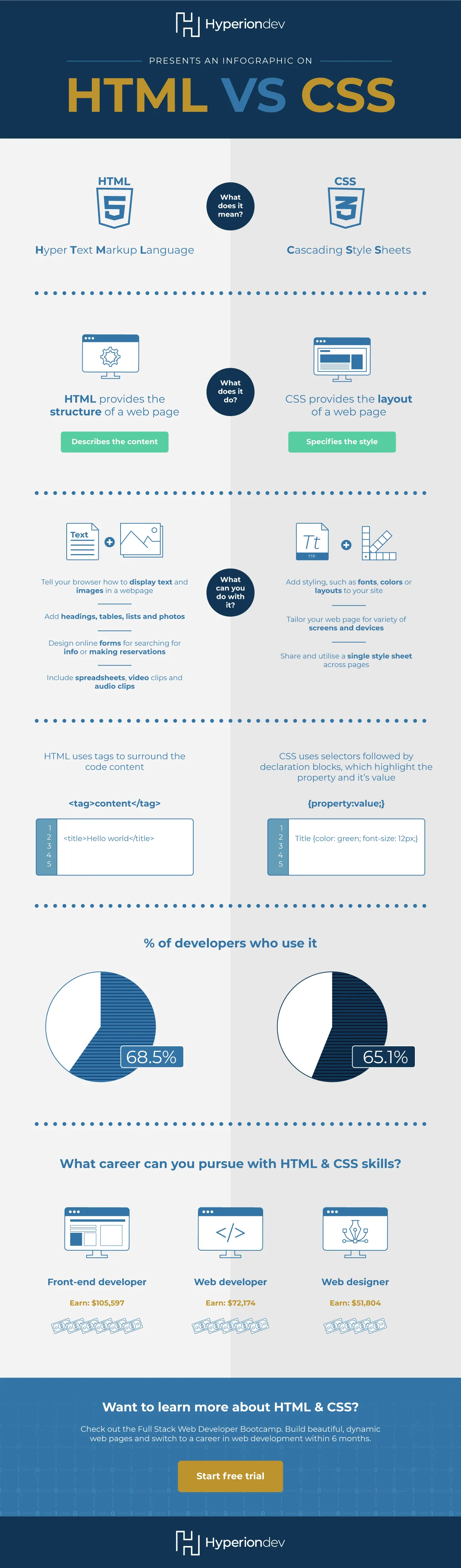
To become a web developer or designer of web applications, you need to know HTML and CSS. Find out the key features and differences between these two integral web development languages, HTML vs CSS.
You’re keen to become a programmer, but where should you start? We’ve put together this handy and easy-to-understand infographic on two of the most popular and simple-to-learn web languages around, HTML vs CSS. If you’re wanting to become a web developer or build web-based applications, this is where you should begin. We hope this infographic tells you all you need to know when deciding between HTML and CSS, or both! Find out the following:
- The key differences between the two languages
- What you can do with HTML vs CSS, including things like stunning designs and versatile online forms
- Exciting and lucrative career paths with these computer languages, such as web developer and web designer
- The percentage of developers using these two tech languages

Software Engineering
October 25, 2018
A beginner’s guide to blockchain
Have you ever wondered what blockchain is and how it’s going to change the world? Find a quick and simple explanation of blockchain and some likely uses for this technology.
Everyone has heard of bitcoin, especially since its meteoric rise at the end of 2017, but possibly the most interesting thing about cryptocurrencies is the underlying technology, or blockchain, that makes bitcoin work. The central question is the following: is blockchain going to transform the world as we know it, or is it just a thrilling fad? Read this simple beginner’s guide to blockchain before deciding for yourself if a new order is about to be born.
What is the blockchain?
Basically, blockchain is a public ledger or record of transactions, financial or otherwise, developed by Satoshi Nakamoto in 2008. Adding to the mystery, nobody knows the identity of Satoshi Nakomoti – in fact, it’s quite possible that the pseudonym refers to a group of people and not a single person.
The blockchain is essentially “an incorruptible digital ledger of economic transactions that can be programmed to record not just financial transactions but virtually everything of value,” states the authors of the book Blockchain Revolution.
Here are some basic concepts for the beginner’s guide to the blockchain:
- The blockchain, at its simplest, is a spreadsheet that has been duplicated many, many times over a network of computers or nodes. This network is regularly updated when a transaction occurs; for this to happen, all the nodes have to check the validity of a transaction (this is done by something known as a ‘hash’, which is a string of numbers and letters). If a majority of nodes – remember, the nodes are computers keeping a copy of the digital ledger or blockchain – say the transaction is valid, then it is written into a block.
- The blocks are a growing list of ordered records. Each block has a timestamp as well as a link to a previous block. Users can only edit, via cryptography, the parts of the blockchain owned by them by having private keys that are used to write the file.
- The information held by the blockchain isn’t stored in one spot (i.e. it is hosted by millions of computers and is decentralised) – this makes it public and easily verifiable. Decentrailsation also means it operates on a user-to-user (or peer-to-peer) basis.
- If you want an analogy, states blockchain specialist William Mougayar, compare a Word document with a Google document. If you want to edit a communal Word document, you make your revisions before sending them on to the next person. Two people can’t collaborate on the same document simultaneously. Currently, this is how banks work: when a money transfer happens, the bank briefly locks access to make the changes to the database and then the reverse happens to update the other side. With Google docs (in this case, blockchain), both parties have access to the same document at the same time and the single version of the document is visible to both of them – it is a shared ledger. The document is, like the blockchain, also distributed – that means that sharing involves a number of people.
Who will use the blockchain?
In essence, a blockchain lets anyone send value anywhere in the world as long as the blockchain can be accessed, states Forbes. The private, cryptographically created key lets you access the parts of the blocks that belong to you.
Here are some uses:
- Medical records – Each entry, or block, which could include diagnoses or treatments, has a timestamp, date and time when the record was created. The doctor and the patient would each have their own private key to access the information; however, information could be shared with a third party – for example a hospital or a specialist – by sharing the private key.
- Financial transactions – With blockchain technology, payment, validation and settlement could take place in real time, even across borders, with substantially reduced transaction fees. Money transactions could also occur 24/7.
- Supply chain monitoring – Using the blockchain should help to spot inefficiencies in supply chains. In addition, businesses and even consumers could view their products from a quality-control perspective as they travelled from their point of origin to the retailer.
- Social networking – Currently, social networking sites are centralised and can be censored by this authority. Decentralised social media platforms – for example, Steemit – use blockchain technology to prevent this. They also offer financial rewards to their content creators.
These are just some of the uses for blockchain technology. There are many others including property and stock exchange transactions, authenticated voting, distributed cloud storage, etc.
We hope you found this beginner’s guide to blockchain useful and you now feel more confident about the role blockchain might play in the future. To become a blockchain developer, you’ll need to have an understanding of the fundamentals of programming as well as knowing a relevant computer language, such as JavaScript or C++. A good place to start is the HyperionDev Software Engineering Bootcamp, which is a six-month, online course.

Career Advice
3 ways to succeed at an online coding bootcamp
A professional, effectively facilitated bootcamp can be the key to unlocking a thriving career in development. It all begins with the right mindset. Here are our tips on how to maximise the positive impact of a bootcamp.
Coding bootcamp. The term may conjure up images of life in the military – instructors barking orders, being made to feel like a broken human and hours of what feels like physical, mental and emotional torture. Getting through 3 to 6 months of intense theory and training may sound like it fits the stereotype, but in reality, online coding bootcamps are very different. A professional, effectively facilitated bootcamp can be the key to unlocking a thriving career in development. It all begins with the right mindset. Here are our tips on how to maximise the positive impact of a bootcamp.
Stay away from the comparison trap
Before choosing an online coding bootcamp, you may read success stories about how students have built award-winning apps or started their own businesses after maximising the positive impact of a bootcamp. In scenarios like these, human beings have the weird tendency to focus on the differences between people rather than their similarities, and to start drawing proverbial battle lines between those who know their stuff and those who don’t. We encourage you to resist the urge to compare yourself to others – it’s a sure-fire way to feeling inferior, whatever your level of knowledge is. And quite frankly, the comparison trap detracts from your ability to learn from others.
Stay away from comparing yourself and the pace at which you work, to the stories you may hear. Everyone learns at their own pace and with different results. Own your journey and take responsibility for doing your best – beyond that, with a bit of luck and good timing, your bootcamp will be a stepping stone to something big.
Get honest
Most coding students think that anxiety or nervousness is a sign of weakness. Not so. Feeling anxious about learning something new is a completely natural response. And let’s face it, bootcamps are not for the faint-hearted. The solution is simple – get honest with yourself, with your peers and with the bootcamp facilitator. The worst thing you can do is bottle up your anxiety, suffer in silence and eventually allow it to ruin what should be an informative and uplifting experience.
You may even find that your peers relate to what you are feeling, and that the facilitator finds it useful to know that you are anxious so that they can give you individual attention when possible. Another great way to combat your nerves is to join online forums on the topic and get tips on how to overcome anxiety as you dive headfirst into complex concepts. Reach out – you might be pleasantly surprised at how many people are willing to listen and give you valuable advice.
Some online coding bootcamps are mentor-led, so you’ll have the opportunity to work 1:1 with a mentor, who is a specialised trainer. Mentors review your code to make sure that it’s accurate and aligned to industry standards. They’re also a source of personal motivation and an infinite source of knowledge, so if your bootcamp provides you with a mentor, reach out to him/her and discuss your challenges. Good mentors are good listeners.
Be Proactive
If you go into an online coding bootcamp expecting school-style learning where teachers guide the process step by step, you may find it challenging. Good bootcamps are the ones that encourage proactiveness. You won’t simply be given answers – you’ll be expected to think independently and do extra research to solve problems. In this way, bootcamps prepare you for the world outside the classroom, where you’ll be expected to take responsibility for your career and the course it takes. Bootcamps require you to think on your feet and go the extra mile.
This is certainly not one of those cases where you’ll achieve a good result by doing the bare minimum. If you really want to maximise your return on investment (so to speak), you’ll need to be proactive. Before the bootcamp begins, inform yourself, do research and learn as much as possible on the topic so you attend your first lesson prepared and ready to go. And after every lesson, go over the material and apply it practically in whichever way you can. Build as you learn. Practice makes perfect.
Coding bootcamps can be intimidating, especially if it’s your first one. But don’t let that stop you from getting it under your belt and pursuing a career in what can arguably be thought of as the most lucrative field in the digital age. Bootcamps are intense because they’re designed to be that way. They are designed to equip you with the tools you need to build a strong foundation in your field of development. With the right mindset and work ethic, an online coding bootcamp can be a springboard to a successful future.
Thinking about attending a bootcamp? Ours are award-winning. Browse our bootcamps here and ask us any questions you may have. We can’t wait to get to know you.

Career Advice
4 dying programming languages developers should avoid
As an aspiring developer, it pays to focus on learning in-demand, relevant programming languages and avoid these dying programming languages.
As an aspiring developer, when you’re deciding which languages to start learning, it pays to focus on those that are highly in-demand by potential employers in the industry. There are also some dying programming languages that have lost their relevance, and beyond your own personal curiosity, there’s no reason to spend weeks of months getting to grips with them. Which programming languages are on their way out?
Objective-C
Objective-C is a programming language developed in the 1980s, and was the main language that Apple used for their macOS and iOS operating systems. But in 2014, Apple launched Swift, a general-purpose language designed to replace Objective-C (to be used for building iOS, macOS and watchOS apps).
Objective-C has experienced a steady decline since then, although there are still a lot of apps around today that were written in this language. It will take a while for Swift to make its predecessor obsolete, but it is sure to happen in the coming years.
Perl
Perl was first developed in 1987, and became really popular in the years that followed. The language once held a position in the TIOBE Index Top Ten, and has been used to build some of the biggest websites around, such as the American classified ad site Craigslist.
Perl’s popularity has declined significantly, and many programmers attribute this to the rise of Python, which has a cleaner, simpler syntax and is attracting more beginner developers. Python is in demand and more programmers are choosing to learn this language over Perl.
CoffeeScript
This is a younger programming language, released in 2009. CoffeeScript is designed to transcompile into JavaScript (meaning it takes the source code of a programme written in CoffeeScript as input, and uses it to create the equivalent source code in JavaScript).
Today, the advantages that previously came with CoffeeScript have been incorporated directly into JavaScript itself. This has made CoffeeScript far less relevant, and largely unnecessary for developers to learn. There has been a distinct drop in developer interest over the years.
COBOL
COBOL (common business-oriented language) was specifically designed for corporate use. First developed in 1959, this long-established language is something of a grandaddy in the business world, and many younger developers consider it a dinosaur.
Numerous large corporations still have COBOL codebases in place, and developers who have been working in COBOL for a while do have good salary prospects. However, it’s not recommended for new developers. As more corporations switch to cloud-based solutions and replace their tech stacks, a career in COBOL programming is becoming less viable.
Top programming languages to learn today
In contrast to these dying programming languages, there are a few languages that stand head and shoulders above the rest in the development industry. Employers are on the lookout for devs who can programme in Python and Java.
Python
Demand for Python developers increased by around 5000 job postings during 2017, and this trend has continued throughout 2018. It’s also been ranked #1 on the PYPL (PopularitY of Programming Language) Index.
Java
Java is a long-established language that’s relatively easy to learn, and widely used by large multinational companies. 90% of Fortune 500 companies today choose Java for their backend development, and all apps developed for Android devices are Java-based.
The fastest way to learn top coding languages online
To learn these relevant coding languages and more, sign up for an online coding bootcamp and get the skills you need to get you noticed by prospective employers.
The HyperionDev Software Engineer Bootcamp covers Python and Java, as well as object oriented programming. Secure your place in one of these online courses and get the grounding you need to launch your career in development.

Software Engineering
Internships for developers: landing your first gig
Tech internships are the best way to take your developer knowledge to the next level. Find out various strategies for landing your first internship as a developer.
20-year-old Victor Zhang, a second year undergraduate at University College London, recently completed a back-end developer internship at HyperionDev. A highlight for him was the opportunity “to solve real world problems and bring tangible value to the company”. There are many benefits to securing an internship, but how does one go about landing such a position? We’ll look at strategies for securing your first internship as a developer, as well as the various advantages of internships for developers.
It’s all about the portfolio
Simply put, what you’ve built probably matters more than your grades or your school’s brand. “You need to show that you are the kind of programmer who is sensitive to the needs of the end user, who can make good product decisions and who has a track record of following through and finishing projects,” states Medium. In essence, it’s all about your portfolio.
Victor confirms this. He advises those looking for internships to be adventurous during their free time. “Try to work on building something that you like. If you don’t know where to start, sign up for hackathons, you will be able to learn a lot within (typically) 24 hours. Once you have an idea of what to do, start small and gradually increase the size and scope of your projects.” Besides hackathons, you could also try finding clubs and like-minded people who can be part of your community to build projects for your portfolio.
In order for your portfolio to be seen by prospective companies offering internships for developers, you need to showcase it. Here are a variety of strategies to document your portfolio so that it can been by recruiters:
GitHub
GitHub is where developers store their projects and network with people who have similar interests. It’s a place to contribute to the development of a project, get advice and gain access to updates as they happen. One key reason why developers love GitHub is “much like using Microsoft Word or Google Drive – you can have a version history of your code so that it is not lost with every iteration.”
Tip: Once your projects are on GitHub, spend at least a few minutes per day working on code and pushing it to GitHub, which displays your longest streak spent coding. You want to make this as impressive as possible for potential recruiters.
Website
Your website should showcase your skill set. It should be clean and simple, but, importantly, it needs to show your projects as well as your personality and passions.
For the website:
- Include at least three projects. Ensure that projects have the following: name of project, a photo and a brief description. If a potential employer clicks on the project, he or she should either be able to use the project or see the code on Github.
- Put your best projects first.
- If you’re including unfinished projects, state this as well as why the projects aren’t completed – for example, perhaps you worked on one of the projects during a hackathon.
Resume
Keep it a simple one-pager. Don’t use fancy fonts or strange styling. Remember, use the same sort of terms you see in job postings – it’s possible your resume will be graded by an algorithm and not even a human. Don’t pass yourself off as an expert if you’re only starting to learn a language. Be honest.
“I Learnt What I Don’t Know”
There are many advantages to an internship. “You get a real sense of being a full-time developer,” says Victor, “which allows you to assess if you enjoy building software to solve problems, and to see if being a software developer is the right path for you. I also learnt how software development works in the industry. This is different from course work or projects in an academic setting. Importantly, I learnt what I don’t know. Odd as this sounds, I now know what I should learn about and work on, and that’s invaluable.”
Now that you’ve got a portfolio and are showing it off, draw up a list of your top tech companies offering internships and start applying. An internship is an excellent way for new tech developers to level up. If you’re just getting started in coding, consider enrolling on a HyperionDev Software Engineering Bootcamp. You can study part-time and online. Once you’re finished, you’ll be ideally qualified to start looking for tech internships.
Software Engineering
4 tips on how to launch an app on the Android store
If you’re into all things dev and you want to see your app idea take flight, here are some simple tips on how to launch an app on the Android store.
Twitter. Instagram. Slack. These apps all have one thing in common. They all started as someone’s side hustle and grew to become million-dollar startups. Looking back, no one could have predicted the sheer virality of these apps. So quite frankly, you never know – you could be in the process of conceiving an idea for an app that will take you places. If you’re into all things dev and you want to see your idea take flight, here are some simple tips on how to launch an app on the Android store.
- Go smoothly from design to development
Once you’ve designed the look and feel of your app and you’ve done all your homework in terms of how strategic UX can enhance the performance of your app, you’ll need to solve one of the ultimate dev challenges: how to translate the design into workable pieces of code. Web and mobile app development company, the BHW Group highly recommends using Zeplin to make this process as smooth as possible. Zeplin is an app that automatically generates specs, assets and code snippets from designs. The code snippets that Zeplin churns out are tailored for the platform you’re developing for. Is it foolproof? Not at all. But it will save you valuable time when you launch an app.
- Target your marketing efforts
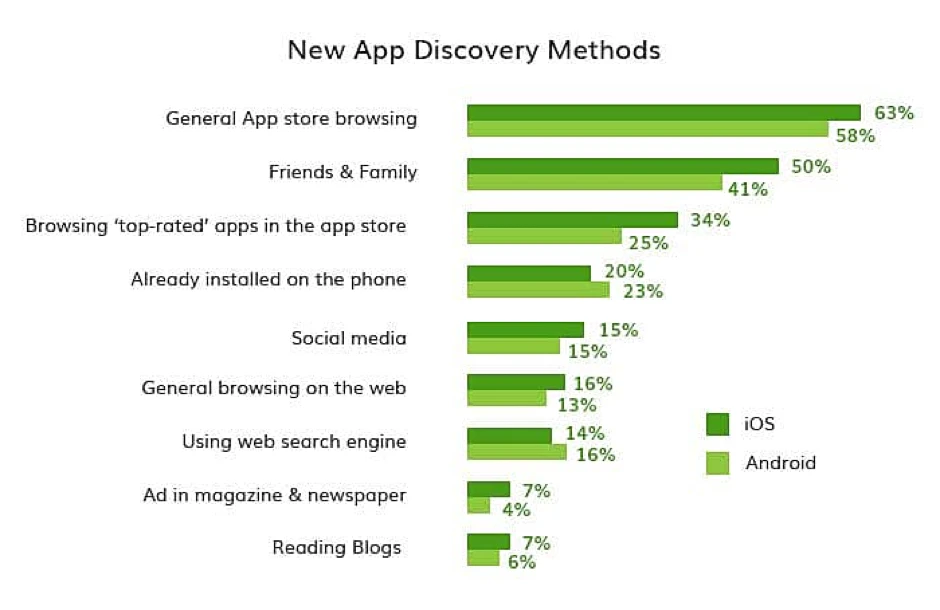
One of the major challenges that new app founders face when they enter the launch phase of their project, is marketing. Generating buzz before you launch an app is imperative. And the multi-channel, “throw something into the ether and hope something sticks” approach is just not going to do. What you need is a targeted strategy. Here’s an interesting insight: According to Apptentive, 63% of the users have reported that they generally browse through the app store as a means to discover new apps over any other channels or methods. Referrals is up next with 50% of users reporting that they work. Do extensive research and rely on actionable insights rather than pre-empting what you think might work best. An in-depth look at what your users’ online behaviour is will go a long way.
Source: Apptentive
- Consult the Checklist
Over time, the Android team has compiled everything it has learnt about the launch process, into a simple checklist. The list is comprised of 21 questions and covers everything you need to double-check before you launch an app. This comprehensive checklist takes some of the thinking work out of the launch process so you can concentrate on the bigger picture. Things like testing your app extensively on different formats like TV, tablets and wearable devices is of paramount importance. And one of the last tasks you’ll need to perform is “checking your vitals,” using the Android function that provides you with the information you will need to understand and fix stability issues and other gremlins that might have crept in along the way.
- Get ready to iterate
Most people think of the launch of an app as a celebration with black ties and champagne. In reality, the launch of an app is a time when devs start frantically debugging – it’s when the early-hours-of-the-morning slog begins. It’s just the way it is. According to a survey by Quettra, 77% of daily mobile users stop using an app after just three days. In order to stay ahead of the curve and retain users, you need to take an agile approach to development. The real-life use of your app will bring up issues that just can’t be picked up in the testing phase,. You need to be able to fix those bugs quickly and develop in a way that caters to the needs of your target user. Be flexible and prepare to put in a few late nights when you launch an app.
One of the first things you’ll need to watch out for, are possible copycats and competitors. In the mobile app world, competition for the number one spot is rife. Taking an iterative approach that will enable you to make changes fast and innovate might just be the factor that gives you an edge.
Building a website, becoming a Github guru and launching a mobile app have to be up there with the top accomplishments you can conquer as an aspiring dev. Whether it’s your main career move or your side hustle, creating a successful mobile app takes time, dedication and personal resources. Don’t be afraid to take the plunge, but have patience – some of the most ubiquitous apps took years to lay their claim on the digital world.
Interested in mobile app development? We’ve got the inside scoop on how to launch an app and turn your idea into something you’ll be proud of. You can register for a free trial of our mobile developer bootcamp right here.

Software Engineering
4 mistakes to avoid when developing an app
Here’s what we learnt when we drew insights from devs who have taken the plunge - 4 of the most prevalent mistakes to avoid when developing an app.
Developing a mobile app is one of the most challenging yet exhilarating tasks a dev can tackle. It’s especially exciting if you’re an indie dev and the mobile app is your side hustle. When it comes to the technical side of things of developing an app, you may be confident in your abilities, but today’s most successful apps had entire teams working on them from the onset – from UX experts to copywriters and marketing gurus. While you may not have endless resources to pour into developing an app, think about asking people for advice, connecting over coffee and picking the brains of people who could add value to the process. Here’s what we learnt when we drew insights from devs who have taken the plunge – 4 of the most prevalent mistakes to avoid when developing an app.
- Developing for too many platforms
According to Matt Garrett, a number of developers have fallen prey to the same tendency – totally overestimating the resources it takes to develop for multiple platforms. You may believe your idea is the next big thing, and it may just be, but developing an app for multiple platforms at the same time has its pitfalls. You’ll need what most indie devs don’t have in the beginning – time and money. The minute you launch on a range of platforms, you’ll likely find yourself putting out fires and fixing platform-related bugs like a crazy scientist. And you may not have the resources to keep up with the pace of the iterations you’ll need to make to retain users.
Our advice? Start with one of the big platforms like Google Play and The App Store, based on your target audience research and take it from there. When resources aren’t infinite, the “slow and steady wins the race” axiom applies.
- Not investing in pre-launch marketing
As Darshan Patel explains, pre-launch marketing is often an area that is neglected, simply because during the development phase of an app, getting everything to work is the main priority. But investing in a pre-launch strategy can quite literally be a make-or-break factor.
There are simple but effective ways to create a hype around the launch of your app and to onboard users before the app even exists. Build a website and post regular blogs about the design and development process, build a social media following by offering the app at a discounted rate to the first 100 users, use influencer marketing to get the right people saying the right things about your app. Another great idea is to make a beta phase of your app exclusively available to a select group of people before it launches, thus creating a team of brand ambassadors. It’s a huge time investment and possibly a substantial financial one too, but it’s well worth it.
- Focusing on downloads rather than retention
A study by Quettra has revealed that 77% of daily mobile users stop using an app after just three days. That’s a shocking figure. But with the proper planning, your app doesn’t have to become part of that statistic. Essentially users hear about an app, download it, spend seconds (literally) testing its functionality and if it doesn’t make a lasting impression, they delete it. The success or failure of your app can be determined in seconds. As a dev, you should be focusing less on the glamour of getting thousands of downloads in a day and more on retaining thousands of customers per month. This is where smart UX design comes in. Make sure the user journey is intuitive, engaging and entertaining. Get the formula correct and you’ll build a loyal user base rather than a fleeting one.
- Not developing a solid monetization strategy
Matt Garrett raises another important point, which is that the monetization strategy of your app is just as important (if not more so) as its functionality. In a nutshell, your monetization strategy is based around how your app will make money in the short-term and later, in the long-term. Some monetization avenues include in-app purchases, advertising and subscriptions.
If you’re a dev who’s braving the world of app design alone, it’s important to supplement your knowledge with the expertise of others. In other words, don’t rely on what you know – ask questions, build a support network and draw on their insights. The reality is that most devs are technical geniuses but that does not always mean that their entrepreneurial skills are on point. A good place to start before you even begin developing your app, is to run it by a few business people you trust. Let them scrutinise the money-making ability of your idea and tackle it from all angles. Be preemptive about possible challenges so that you can ensure that you maximise your return on investment.
As a dev in the process of developing an app, building a support network around you that will serve to inform, encourage and inspire you, is one of the most effective tools you’ll ever have. And if you have a mentor in that support network, even better. Ask questions, empower yourself with the right information – in the long run it will help you to avoid some of the common pitfalls.
Interested in turning your idea into a workable app? Try a free trial of our mobile development bootcamp – we’d love the opportunity to be a part of your next big step.

Student Success Stories
A day in the life of a HyperionDev student
Change your career by learning coding part-time and online. Find out how you’ll spend a typical day as a HyperionDev student, learning valuable and in-demand coding skills.
If you’re wanting to enter the lucrative field of coding, what can you expect? We catch up with Clarinda van Wyk, a 36-year-old Kempton Park resident, who recently completed the HyperionDev Software Engineering Bootcamp. She tells us what learning coding part-time is really like.
Clarinda describes herself as “very technical and logical”. She says: “I decided to do this course because I knew it would play to my strengths. Also, I didn’t just want to learn how to code in one language. I wanted the full spectrum of Software Engineering.”
Before deciding to study Software Engineering, Clarinda considered two aspects of her personality which were relevant to her choice of future career. “I’m ADHD (Attention Deficit Hyperactivity Disorder) and I’d describe my personality, according to the Myers–Briggs test, as INTP, a very logical personality type,” she says. She explains that online courses, because of her personality style and ADHD, frequently bore her and she tends to procrastinate.
“I couldn’t make it through the first 2 or 3 lessons of most online courses and they didn’t offer the broad spectrum of understanding that I was looking for; however, when I went through the syllabus and the free online trial with HyperionDev, I knew I had found a place that could keep me engaged with what I was learning. It offered everything I was looking for in a condensed, easy to understand but interactive manner.”
A typical day when learning coding part-time
When learning coding part-time, how does a typical day look for Clarinda? She explains that she was able to work full-time doing administration and assistant bookkeeping during her Software Engineering bootcamp. She says: “I made time to study after work, and during lunch times. I was also always the first person at the office, so once I had planned my day, I would play around with my tasks for an hour or so. During lunch, I would eat while coding or watching YouTube videos about concepts I hadn’t quite grasped. In the evenings, I’d code for 2 or 3 hours after dinner before spending time with my husband. On weekends, I slept late, but would spend a few hours coding before spending the rest of the day with my husband. Honestly, I had ample time to rest and do my normal daily activities between work and study.”
She explains that the course never interfered too much with her life, because the concepts were relatively easy to understand and the learning curve was gradual. “As you move from task to task,” she explains, “ you naturally grasp new concepts because the foundation from the previous task is solid, and easily built upon. Even if you don’t understand, your mentor is readily available and can quickly clarify any misunderstandings for you. Of course it took a bit more planning, and some understanding from my loved ones to ensure I got everything done in time.”
Freaking myself out
She utilised a novel method to motivate herself through the course. I would “freak myself out,” she states, “by looking at the very last task of the module with which I was busy. I would then realise it would be a challenge to get it done, and this would force me to really pay attention to every task ahead of it, even if it may have felt tedious. By the time I got to the ‘scary’ last task, it was a piece of cake, and I could really see that I had learned and progressed. Of course I also knew my mentor was always available if I didn’t understand a concept or what was expected. He always had a good explanation to get me back on track.”
And her plans from here on? Clarinda is busy learning coding part-time on her second HyperionDev course. She’s currently doing the Data Science course, which she should have under her belt by November. “I decided to do this course because I have a strong interest in Artificial Intelligence and Machine Learning,” she says. “It is more challenging than my previous course, but well worth the effort, as it brings much of what I’ve already learned into a different perspective and application.” Clarinda is also job hunting. “I’ve connected with a few software engineers on LinkedIn who have offered their help and guidance. One of the things I love most about the tech industry is how incredibly humble and helpful most people are.”
If you’re interested in learning coding part-time, consider enrolling on a HyperionDev bootcamp in Full Stack Web Development, Mobile Development or Software Engineering. You can also try out any of these courses for free on the trial. Read more about what you can expect on your free trial with HyperionDev.

Career Advice
The best websites for your developer job search
If you’re starting your online developer job search, these trusted websites will help you find excellent opportunities and salary estimates in your region.
Now that you’ve got your qualification and your developer job search has begun in earnest, where do you start? With so many online job resources out there, it can be hard to differentiate quality from quantity. To help you get the most from your online job hunt, here are our top website recommendations.
Indeed
Indeed is a worldwide job listing search engine based in the USA. This job site gets over 200 million unique visitors every month. The site places a strong focus on job seekers, allowing them to create and upload their resumés, access thousands of job openings in their regions, and research companies, free of charge.
The site’s Essential Job Search Guide provides job seekers with valuable insights, from research tips to interview advice. There’s also a functionality that allows users to view salary ranges for popular job titles.
Glassdoor
Glassdoor is a website that allows job seekers to search for open positions in the development field, and also lets current and former employees post anonymous reviews of companies. Job hunters can also look at personalized salary estimates, based on their field of expertise, their years of experience, and their location.
Monster
Monster is a UK-based site that also operates in Europe, the USA and Canada, the Middle East and Asia Pacific. Monster helps to match job seekers and hiring companies in a variety of fields. The site also provides tools like Monster Career Snapshots, and Monster Career Benchmarking.
Tech in Asia
Tech in Asia is the largest English technology-focused media source covering the Asian region. Developers can search for tech and startup positions in China, Japan, India, Malaysia, Vietnam and more. The site also covers tech trends and news in the region, and organizes tech conferences across Asia.
Graduateland
Graduateland is Europe’s largest career portal for graduates and students in search of jobs, internships and graduate programmes. As well as a job search function, the site also provides links to upcoming career fairs, and gives students advice on acing interviews and excelling in their first jobs.
JobRapido
JobRapido is an employment site that serves the Americas, Europe, Africa and Asia Pacific. You can search for available job postings in your region, and if you’re unsure of the exact job title to search for, the site provides their top searched positions to guide you.
OfferZen
OfferZen is a South African site that helps developers find tech jobs that perfectly suit their skill levels. Job seekers can reach more than 800 applicants at once by making their details available on OfferZen. Applicants create a profile, chat with a skilled talent advisor, receive interview requests from companies, and find their perfect match.
Tips for your online developer job search
Use reliable platforms: Use trusted search engines and sites, like those listed above, which have high rates of traffic and proven results.
Brush up your skills: Read the industry news and interview tips on these platforms. They’re typically written by industry insiders, and will give you valuable information you need to make a good impression.
Do your homework: Research the employer beforehand. Take advantage of the company information and reviews provided on the websites above, so you get a feel for the company culture and history. This knowledge will help you with your cover letter.
Build your presence: Do some networking, both online and in the real world. Join industry forums, participate in industry surveys, and get your name out there on trusted job sites. Attend local tech networking events and get to know people – most employers like to put a face to a name.
Apply for a narrow range of positions: Don’t waste your time on “long shot” applications for jobs you aren’t well suited for. Keep your focus on positions where you can add value to the hiring companies.
Switch to a career in tech
Get qualified with an online coding bootcamp, run by coding specialists and dedicated mentors. Adding this qualification to your CV will get you noticed by prospective employers as you start your developer job search online.

Career Advice
Get the lowdown on self-taught courses vs coding bootcamps
So you’ve decided that you’d like to turn your love for all things coding into a career. Great! Now you’re at the first of many crossroads - self-taught courses vs coding bootcamps. In this post, we break down the main differences and shed some light on these forms of learning to help you make an informed decision.
So you’ve decided that you’d like to turn your aptitude for all things coding, into a career. You know a few of the basics and have an end goal in mind. Brilliant. Now you’re at the first of many crossroads – self-taught courses vs coding bootcamps. It can be a tough decision, especially when resources are finite and time is of the essence. In this post, we break down the main differences and shed some light on these forms of learning to help you make an informed decision.
Personalised pace vs an immersive experience
Individuals who are self-starters and are willing to spend a generous amount of time on gaining practical insights often gravitate towards teaching themselves to code. And there’s a lot to be said about that level of dedication. But it’s easy to get distracted and fall into the procrastination trap. What’s great about teaching yourself to code is that you can do it at your own pace, in your own time.
Bootcamps, on the other hand, are immersive experiences. It’s about eating, drinking, walking and talking code for a specific amount of dedicated time. Bootcamps are faster-paced than university or college qualifications – so expect them to be intense and comprehensive. For some, that’s exactly what’s needed – a crash course on everything you need to know so that you can take the next step.
Independent learning vs mentorship
Massive open online courses (MOOCs) are great for people who can’t stand group work and prefer to be in control of the entire learning experience, from the time they dedicate to certain tasks to which learning areas to tackle first. Independence and learning on your own terms may be how you prefer to work, but developers from all over the world seem to agree on one point – coding mentorship gives you an edge.
As Ken Mazaica puts it, “The best developers seek out coding mentors who can challenge them and lift them beyond their limits.” The most effective bootcamps assign mentors to students. Mentors serve as guides, fellow problem-solvers and coding peers. Some coders develop lifelong friendships with their mentors. The general consensus is that when it comes to bootcamps, mentorship is one of their best selling points.
Self-driven learning vs networking opportunities
With a MOOC, you’ll gain access to valuable content. Self-taught courses seemed to lack real quality in the past, but MOOC providers have really levelled up. Today, there are countless coding MOOCs that provide students with a learning experience that’s pretty much on par with formal learning. However, a good bootcamp not only provides valuable content, it offers potential for networking with like-minded individuals.
Some of the people you meet may be future colleagues, teammates, employees and clients. Some of them may be the key to unlocking employment opportunities. Socially-driven individuals flourish in this kind of environment. So if you’re not afraid to put yourself out there and enjoy meeting new people, a bootcamp may be exactly what you need to kickstart your career.
Flexibility vs structure
MOOCs are perfect if a flexible schedule is what you’re after. Self-taught learning has a certain mix-and-match character to it – you learn what you think you need to learn, as you go. A lot of coding when you’re self-taught comes with trial and error, and for some coders, that’s the best way to learn.
With a bootcamp, however, you’ll work systematically through a strategically planned structure of content. You’ll build your skills one level of mastery at a time, and be assisted by mentors who will help you sift through some of the complexities you’ll face along the way. For some coders, there’s a sense of security and comfort in this level of structure and support.
When it comes to self-taught courses vs coding bootcamps, it’s important that you know one thing – no one course or qualification can teach you everything you’ll need to be a great coder. A blended approach is what works best. As an aspiring coder, your first bootcamp may set you on the right path or inspire your next move.
Ultimately, you’ll always be learning and evolving – it’s the nature of the industry. Somewhere along the line, a self-taught, independent method of learning will come into play. Know that you’ll need to be dedicated and persevere. For many, coding becomes so much more than a career, a side hustle or a fun pursuit. It’s a new way of thinking about the world around you. And that requires a paradigm shift that happens over time, with lots of thought and lots of action.
Thinking of enrolling in a bootcamp? We can help you with that. Check out our different bootcamps and ask us questions – we’d love to get to know you.

News & Announcements
October 12, 2018
Finance your coding education with mobicred
There are many ways to finance a coding bootcamp. But you might want to try the new kid on the blog, mobicred; a simple credit facility for purchasing a HyperionDev online coding bootcamp.
Siphilile Magubane, 25, worked as a personal trainer before deciding he wanted to enter the lucrative field of coding. He knew he wanted to study part-time and online. “One of the biggest benefits of part-time, online learning relates to flexibility. I could still earn some money as a trainer while upskilling. It was just a matter of how best to finance my career transition. That’s when I heard about mobicred, a novel way to finance my bootcamp.” Read on to find out how to finance your coding education with mobicred, among other ways.
How can I finance my bootcamp?
There are many ways to finance a coding bootcamp, including:
- Plan and save: A Business Insider case study works out that if you forego your daily purchased coffee, you save in the region of $1000 per year.
- Try for a scholarship: Plenty of coding bootcamps offer scholarships on the basis of financial need or merit. Here’s a list from Course Report of scholarships on offer for bootcamps.
- Crowdfund: Digital Trends lists some of the best crowdfunding sites online including Indiegogo and GoFundMe.
- Apply for a student loan: After surveying reports from 73 qualifying coding schools, Course Report found that the average salary increase after a bootcamp was 50,5%, which equated to $23,724 extra per annum, so you should pay back your student loan fairly quickly.
- Opt for a different payment plan: Many bootcamps offer a variety of payment plans, from paying the full amount at a slightly discounted rate upfront to paying off the course over the duration of study. HyperionDev offers several payment plans, including a monthly option and a significant discount if you choose to pay upfront.
- Work sponsorships: If you’re planning on continuing your full-time employment during your online coding bootcamp, consider speaking to your employer – they may want to invest in the skillsets of their employees. Make sure you sell it to them by stating how your skills will benefit the company as a whole.
But there’s another way to pay for your bootcamp, mobicred – a simple credit facility for purchasing a HyperionDev online coding bootcamp. “We believe coding should be accessible to everyone, everywhere,” states Riaz Moola, HyperionDev’s Founder and CEO. And mobicred ensures this is the case.
mobicred: how does it work?
It’s simple to finance your coding education with mobicred. Here’s how it works.
- Apply once online.
- Accept the terms and conditions and get your credit limit.
- Buy your HyperionDev bootcamp. Click on the link found on the HyperionDev Tuition page to set up your mobicred account. Once your account has been set up and approved, simply choose the PayFast option on the checkout page and select the mobicred payment method. Enter your mobicred details and that’s it!
- Pay one single monthly instalment for the next 12 months.
- Securely manage your account online or via your phone.
So what are the application requirements for mobicred?
- A valid SA ID number.
- 18 years or older.
- A minimum monthly salary of R550.
- An existing and valid bank account in your name.
- A current and valid email address and mobile number.
- The submission of 3 months of your most recent bank statements or payslips.
Once mobicred has approved all your supporting documents, the good news is that it only takes up to one business day for your mobicred account to be approved.
And how is it all paid back? The credit amount shown for each product available for credit is based upon 12 monthly repayments. Interest is charged at 21% per year and excludes the set-up and service fees for mobicred.
With mobicred, you can change careers today. HyperionDev offers online coding bootcamps in Full Stack Web Development, Mobile Development or Software Engineering. Today is the day to sign up for the career you’ve always wanted.
Career Advice
What does it mean to become a code reviewer
Code reviewing performs a vital function by looking for things like bugs, security issues and performance problems. Read about how to become a code reviewer, as well as the salary you can expect for this role.
Code reviewing is a vital part of the coding process. It’s basically a software quality assurance activity during which a person reviews the source code of any program looking for things like bugs, security issues, coding standards and performance problems.If you want to become a code reviewer, here are some important things worth thinking about.
Some broad level code reviewing considerations might include: Is the code readable, uniform and understandable? In addition, is the code correct? Or, are there performance problems, security vulnerabilities or malware? There could be both accidental errors (e.g. typos), as well as structural errors (e.g. dead code, logic or algorithm bugs, performance or architecture concerns), explains an article in Medium.
The overall impact
Nigel Munoz, a former full-stack engineer at TheMuse and a current freelance software engineer, states that a code reviewer needs to think about how a ‘change affects the larger and smaller picture.’ When considering the bigger picture, the adept code reviewer will search for code that is repeated, non-modular or doesn’t adhere to recent standard conventions.
According to Code Project, the main areas a code reviewer focuses on are the following:
- General unit testing
- Comment and coding conventions
- Error handling
- Resource leaks
- Thread safety
- Control structures
- Performance
- Functionality
- Security
Nothing too big or too small
Sam Donow, a core developer at Hudson River Trading, believes that ‘there is nothing too big or too small to comment on.’ Small improvements can lead to much bigger improvements in other parts of the codebase.
What to look for
Valerie Moyo, aged 25, works as a code reviewer for CoGrammar. She facilitates the learning process of students who are enrolled on one of HyperionDev’s bootcamps – Software Engineering, Full Stack Web Development or Mobile Development – by guiding them towards writing code that meets good coding practices. “I’ve always believed that anyone could code,” says Valerie. “I have a passion for teaching, so when I read up what it meant to become a code reviewer I knew that CoGrammar was the right place. I then pursued code reviewing as a potential career path.”
She looks for three things when code reviewing her students’ work:
Code correctness
This is about writing code that is structured correctly and conforms to the syntax (or structural) rules of a programming language.
Code style
This aspect looks at whether the code is readable, modularized and well-documented.
Code efficiency
Code efficiency is about ensuring that the code is implemented in a manner that requires fewer computational resources. This process can be rather complex when reviewing code as it involves determining the efficiency of your code using tools such as the Big(O) notation. However, the idea is that your code performs reliably, faster and optimally especially when developing programs for large-scale applications.
Never forget security considerations
Proposed changes can have an impact on more than just the codebase. For example, if a new feature includes user entry, then as a code reviewer you would want to check out whether other security vulnerabilities have been introduced.
Testing
Ensure you ‘review the tests with the same importance as the rest of the code,’ says Abhishek Pillai, a tech lead at Teachers Pay Teachers on TheMuse. This will prevent new bugs and function as a form of documentation for anyone else working on the software in the future. However, you can’t entirely rely on tests as a code reviewer. Just because you ran tests it does not mean there are no bugs.
If you become a code reviewer, what can you expect to earn? According to Glassdoor, the average annual US salary for a code reviewer is $104,348. It’s clearly money well spent for companies, though. A study at one of the organisations at AT&T found a 14% increase in productivity and a 90% decrease in defects after the introduction of code reviewing.
In closing, code reviewing clearly provides a vital benefit to programmers. Essentially it’s an extra pair of eyes on the code to find errors, some of which can be very subtle. If you’re interested in becoming a code reviewer, check out CoGrammar.

Software Engineering
10 free coding games to strengthen your skills
These free coding games give you a fun, creative way to round out your understanding of code and improve your programming skills in a variety of languages.
Coding games have become a popular way for educators to help their students get to grips with computer science and programming basics. There are many free games available today that will teach aspiring coders of all ages how to successfully code in a variety of languages. And the best part is, the whole experience feels less like work and more like play.
While playing coding games certainly isn’t going to teach you everything you need to know, it’s a fun, creative way to round out your understanding of code and to enhance your skills. Here are our top 10 recommendations:
- CodinGame
CodinGame is a suite of solo and multiplayer turn-based coding games. You can play against your teammates and friends, which gives you the chance to match skills with fellow coders as you solve fun puzzles and challenges.
The games here cover more than 25 programming languages, including JavaScript, Perl, Python, Go, C++, C#, PHP and Ruby.
Check out what CodinGame has to offer here.
- Cyber Dojo
Flex your coding muscles with Cyber Dojo’s practice exercises for Ruby, Python, JavaScript, PHP and many more. You can play on your own or in a group. Each challenge includes an example showing what the end result should look like, guiding you towards your goal.
Do your “coding workout” at the Cyber Dojo here.
- Code Wars
Code Wars is on a mission to help players “achieve mastery through challenge”. On this beautifully designed site, programmers can improve their skills by training alongside others in real-world code challenges. Choose from one of 20 languages, prove your understanding of it with a basic test, and then you can get cracking.
Code Wars also helps companies to assess their prospective employee’s skills, and provides resources for educators with an automated teacher’s assistant for code classrooms.
Start your training with Code Wars here.
- CodeCombat
CodeCombat is a role-playing game that’s ideal for computer science teachers and younger students, but any coder can play along. The idea is to get students to type real, fast and accurate code; cementing the fundamentals of their programming skills. Players must move their hero character through the game’s various levels, using basic commands according to the tutorial provided.
Educational gaming is good for children’s brains, as it gives them positive motivation and rewards their “productive struggle” as they meet the challenges set for them. Older students will appreciate this way of learning too, using CodeCombat to get to grips with languages like Python, JavaScript, or even Lua, a game scripting language.
Start your CodeCombat quest here.
- Empire of Code
Empire of Code is a sci-fi strategy game created by CheckIO. Learn JavaScript or Python in a creative outer space setting, defending your base against invaders.
Learn more about CheckIO’s educational coding games or check out Empire of Code.
- Screeps
Screeps (meaning “scripting creeps”) is a massively multiplayer online (MMO) strategy game, specifically aimed at JavaScript developers. Players control units called creeps, which help them to mine resources and establish their territory, alongside other players and their creeps.
Explore the open world environment of Screeps here.
- FightCode
This is a fun one for anyone who grew up with a love of robotics. The goal of FightCode is to use your programming skills to create your own virtual robot – one that’s tough enough to win in a battle against other players’ robots.
Code your robot in JavaScript, challenge another coder to a robot duel, and see who will become the champion!
Start building your FightCode robot here.
- CSS Diner
This deceptively simple coding game takes the player through 32 increasingly complex levels, teaching the basics of CSS selectors. Each new level will build on what you learned in previous levels.
Try your hand at CSS Diner here.
- Ruby Warrior
As the name suggests, this is the game of choice for coders wanting to learn Ruby. Guide your hero on “a triumphant quest of adventure, love and destiny, all within a few lines of code.” There are beginner and intermediate levels for programmers at different stages of learning.
Start the Ruby Warrior adventure here.
- CodeMonkey
This is a good choice for coders aiming to design their own games one day. CodeMonkey uses a language called CoffeeScript to teach players how to code and build their own HTML5 games.
Get started with CodeMonkey’s game-based learning here.
Serious about coding?
While coding games are a great way to strengthen your programming skills, you can’t become a qualified coder on “fun and games” alone. An online coding bootcamp with expert mentorship will give you the training you need to launch your coding career.
Web Development
Developer roles: Front-end vs back-end vs full stack
This summary of web developer roles and skills introduces the key differences and similarities between front-end, back-end and full stack web development.
If you’re looking to get qualified as a web developer, you’ll likely have heard people in the industry talk about three different developer roles, namely front-end, back-end and full stack developers.
What do each of these roles involve, where do they overlap, and which is the right one for you? This introduction will help you better understand the differences and similarities between these three types of developers.
- Front-end developers
The front-end of a website is the part that the users will see and interact with; in other words, the browser where the user interface appears. The front-end is also known as the presentation layer.
The front-end is built using three key components.
HTML (HyperText Markup Language): Every website out there is built using HTML. It’s the backbone of the world wide web, used to define the site’s structure and content.
CSS (Cascading Style Sheets): CSS will define how the HTML appears visually on a web page. CSS determines fonts, colours, layout, background images and more.
JavaScript: This programming language allows front-end developers to add more interactivity to the websites they build. Recent developments in JavaScript (and improvements in browsers) have made it possible to do more complex work on the front-end, creating features that used to be reserved for more complex back-end languages.
Front-end developer roles require a good understanding of HTML, CSS, JavaScript and various JavaScript frameworks (for example, AngularJs, React and Node.js). It’s also important to have a creative mindset and an eye for design, as you’ll be dealing with the presentation of the websites you build.
Average annual salary for front-end developers: $92.738/yr (Glassdoor.com)
- Back-end developers
The back-end is the part of the website that users don’t see. It refers to the server side, which is responsible for returning the page, and for storing or fetching user data. It’s also known as the data access layer.
Back-end programming languages (like Python, PHP or Ruby) are often used to build content management systems and large, complex web applications.
The front-end and back-end of a website interact with each other, and so do front-end and back-end developers. A back-end developer’s role will include working with a front-end developer to ensure their behind-the-scenes code works within the visual design of the website.
A back-end developer will deal more with logic than with creativity. This role requires a good knowledge of frameworks, software architecture, databases and servers. Different programming languages will be required for different jobs, depending on what the best fit might be.
It must be said that the line between front-end and back-end functionalities is blurring as front-end software and browsers become more powerful. This is making it easier for developers to enter into “full stack” roles.
Average annual salary for back-end developers: $114,255/yr (Glassdoor.com)
- Full stack developers
Full stack development encompasses both front-end and back-end development work. Full stack developer roles require a holistic view of every website, to find a full solution.
A developer in this position must know where (and how) to apply the various front-end and back-end technologies. They must be familiar with HTML, CSS and JavaScript, as well as a few popular back-end languages. Many of them will specialize in one specific back-end language.
Average annual salary for full stack developers: $112,491/yr (Indeed.com)
There has been a rise in demand for full stack developers in recent years. UK recruiters report a 607% increase in demand over the past three years, and the US Bureau of Labour Statistics predicts a significant surge in job opportunities for full stack developers by 2024.
To find your place in the world of full stack development, and secure a job in this lucrative industry, enrol in a Full Stack Web Developer Bootcamp. This online course will give you the grounding you need to build dynamic web applications and learn a number of useful programming languages. In just six months, you’ll be ready to start looking for suitable full stack developer roles.
Still have questions?
Contact our Admissions Team, and a real person will get back to you.