
Our latest insights
Read the latest insights


Career Advice
Learn to code Cape Town: top 5 IT courses in Cape Town
Few industries offer job security like a career in coding does. This is a result of the global tech skills gap, and the ever-growing demand for industry expert coders. Here are the top 5 IT courses in Cape Town.
If it’s job security and high demand you’re after, perhaps you’re considering a tech career for 2019. Find out the top 5 IT courses in Cape Town. Let 2019 be the year you implement those tech career plans.
This full-time, one year coding program is based in Harrington Street in Cape Town’s East City Precinct. The curriculum focuses on Full-Stack web development. The goal is not to teach specific frameworks, but to expose students to the building blocks of programming so that you pick up whatever framework you require at a later stage. Students learn to build secure web applications using encryption, authentication and authorisation, and then deploy to the cloud. The core curriculum is based on JavaScript, but graduates use various tech stacks including Ruby, Python, PHP, .Net and Java.
The 2018 cost is R70,000 (ex VAT). Eligible coders with demonstrated financial need could qualify for a Stipend Scholarship for transport and living costs, as well as Tuition Sponsorship covering some or all of the tuition costs. The school also offers loans on commercial terms.
This Non-Profit organisation has a unique vision involving no teachers or classes; students learn via a peer-to-peer problem solving environment. The two-year course is sponsored by companies looking to support the development of local tech in the digital economy, which means there are no tuition fees. The aim of the program is to teach students how to solve problems using coding as their tool.
Anyone can apply provided you’re between the ages of 17 and 35, and you’re able to study full-time for two years at one of their campuses, situated in Cape Town or Johannesburg. No prior education or coding experience is required. To get into their course, you have to pass their online application. Successful applicants are invited to participate in a Selection Bootcamp and then ultimately onto the full-time course.
This school offers both online and face-to-face tuition in the Western Cape. They offer a wide variety of courses, including PC Engineering, Web Design, SQL, Programming courses, AutoCad, Social media and MS Office. Programming courses include C#, Java, Python, Android and C++. School of IT focuses on the practical side of programming and IT.
CodeSpace offers a range of full-time and part-time face-to-face courses that include lecture and project days. The full-time courses include Web Development Extended (R37,500, 17 weeks) and Web Development Intensive (R29,500, 15 weeks). The aim is to create functional, interactive web applications using HTML, CSS, JavaScript, PHP and MySQL.
There are a variety of part-time coding courses including coding websites (HTML and CSS), Intro and Intermediate JavaScript, Intro to Deployment, Intro to React, Intro to SQL – courses range from 2-4 weeks in length.
You’ll be paired 1:1 with an expert mentor as you work your way through industry-aligned course content. With next-day code reviews, on-demand feedback and direct referrals to their handpicked hiring partners, you’ll be well on your way to landing your tech dream job. HyperionDev offers three online coding bootcamps: Full Stack Web Development, Data Science or Software Engineering.
The Software Engineering bootcamp ensures you’ll master Python, Java, Object Oriented Programming and machine learning to guarantee your future as a software engineer. Students learn how to use the right software and techniques during the Data Science bootcamp to read visual and statistical data and to present the data in a way that solves real world problems. The Full Stack Web Development course teaches you to build your own dynamic, data-driven web applications. Learn HTML, CSS, JavaScript, Node.js, MongoDB, Express, React, Python and Django part-time and online.
With HyperionDev, you can enrol on a free bootcamp trial at no cost (and learn Python) before you purchase a course to assess how the learning program works for you.
In conclusion, we’ve covered the top 5 IT courses in Cape Town: codeX, Wethinkcode, School of IT, CodeSpace and HyperionDev. If you’re keen to change careers in 2019, check out one of these courses. Remember, few industries offer job security like a career in coding does. This is a result of the global tech skills gap, and the ever-growing demand for industry expert coders. Let us know of any other tech courses in Cape Town you’d recommend in the comments.

Career Advice
Software engineer salaries in South Africa
These fast facts about software engineer salaries and hourly rates in South Africa will give you some useful insight into your earning potential in this career.
As the new year begins, many of us are evaluating our financial stability and future career prospects. If you’re in the software development field, what can you expect going forward? These fast facts about software engineer salaries in South Africa will give you some useful insight into your earning potential.
How much do SA software engineers earn on average?
According to the latest statistics from PayScale, most senior software engineers in South Africa earn an average hourly rate of R320. This translates to an average annual salary of R567,996 per year.
On the lower end of this scale, the average hourly pay for a software engineer is R143, which works out to an average of R361,000 a year. Earners on the higher end of the scale earn just under R729 hourly, taking home an average of R827,000 annually.
What are the differentiating factors that have some South African software engineers earning so much more than others? Experience plays a big role, and location can make a significant difference in your earnings too.
Software engineer salaries by experience
The newbies:Entry-level software engineers in South Africa typically start off with an hourly rate that can range anywhere from R75 to R240. This works out to an annual salary of between R280,000 and R649,000.
In the middle:Mid-career software engineers will get significantly higher pay. Hourly rates start at just over R190 and can go all the way up to around R560. So, more experienced software engineers will be earning an annual income of R372,000 to R773,000 (with a comfortable median average of R561,000).
The old hands:More experienced software engineers will start to see a higher hourly earnings rate, ranging from just under R150 on the lower end, to R780 on the high end. Average annual salaries are around R651,000, with the lower end being R422,000 and the high earners taking home R914,000 yearly.
The experts: Late-career software engineers will have many years of experience under their belts, which makes for better salary prospects. Average annual pay starts at R450,000 and can go as high as R979,000, with most senior engineers earning R632,000 a year.
Software engineer salaries by city
City of gold: In bustling Johannesburg, the average hourly rate for a senior software engineer is R350. This works out to a monthly salary of around R42,330 and an annual salary of R508,000.
Jacaranda city: Further north in Pretoria, the earning prospects are a little higher than Jo’burg. Here, software engineers with the same level of experience will earn roughly R46,250 monthly and R555,000 annually.
The mother city:Cape Town is often labelled as a city of low salaries, but not in this case. Software engineers in the Cape can take home an average of up to R48,830 monthly or R586,000 a year.
The harbour city: Further along the coast in Durban, software engineers typically earn a median average of R47,000 monthly or R564,000 annually.
Exciting growth trends for SA software engineers
Software engineering and development was recently named “the fastest-growing job skill in South Africa”. With technology taking over almost every facet of the modern-day workspace, more and more employers across various industries are looking to employ developers that can properly maintain their digital systems.
With software engineering in such high demand nationally, we can expect this field to become a really lucrative career for South African developers.
Looking to start a software engineering career?
So, how do you go about qualifying as a software engineer? An online bootcamp is the perfect place to start.
HyperionDev’s 3-6 month online course is designed to help you start coding professionally as quickly as possible. The curriculum includes an introduction to Python, Java, Object Oriented Programming and machine learning, as well as data science and algorithms. You’ll also have access to expert mentorship, and post-bootcamp support.
Take this first exciting step on your career journey, and join the ranks of South Africa’s up-and-coming software engineers.

Career Advice
How clued-up criminals are taking advantage of technology
The proliferation of social media, keyless technology and tracking software has brought an unprecedented level of convenience into our lives, but it’s also led to a rise in tech-driven crime. In this post we look at some of the ways in which criminals are taking advantage of technology.
We’ve heard it said by politicians and cyber crime investigators – the smarter technology gets, the smarter criminals get. It’s an unfortunate reality. The proliferation of social media, keyless technology and tracking software has brought an unprecedented level of convenience into our lives, but it’s also led to a rise in tech-driven crime. In this post we look at some of the ways in which criminals are taking advantage of technology.
Keyless car crime
According to Oscar Quine, industry experts have reported a surge in keyless car crime since 2017. Criminals are taking advantage of technology to break into vehicles. Most drivers today will be familiar with digital fobs, which are slowly but surely replacing keys. Unfortunately, thieves are launching “relay attacks” which make use of handheld electronic devices to amplify the signal given off by a digital fob, in order to override the car’s security system and “fool” the car into unlocking. The disturbing part is that relay amplifiers and transmitters are easily available on the internet for a few hundred dollars.
Big data crime
If you’ve ever received an SMS or email claiming that you’ve won a big cash prize that you need to pay a small fee to collect, you’ve most likely been contacted by a big data crime syndicate. These kinds of crimes are on the rise throughout the world, although there has been a particularly high surge in Africa. Big data has opened up new doors of possibilities for companies to get to know their customers – to understand consumer behaviour and predict trends that will drive product and service innovation. Unfortunately though, when databases fall into the wrong hands, the results can be devastating. Cyber criminals traffic in massive information and sell the data to the highest bidder on the dark web. Think about it, a simple data breach at a major organisation can cause millions of records to be compromised – mobile numbers, addresses, credit records. For this reason, major companies are investing heavily in cyber security systems and coders who can help them protect their data.
Social media and identity theft
Social media has brought the world closer together; there are a myriad of benefits that are being derived from this social form of technology. But with people living online lives and providing information like where they are, what they’re doing and who they’re connected to, it’s become so much easier for cyber criminals to get away with fraud. We’ve all heard the horror stories – Facebook profiles being hacked, people being blackmailed with personal information and data being used to hack online banking profiles. The security threats are real. This is why Facebook in particular is investing millions into security measures and systems. As Khari Johnson explains, “Facebook has committed to doubling the headcount of its safety and security workforce from 10,000 to 20,000 in the coming years. Some of those additional 10,000 people may not be Facebook employees but rather partner businesses.”
Some staggering stats:
- According to VPN Geeks, “over 24 000 malicious mobile apps are blocked daily.”
As a report by Symantec details, lifestyle apps are the main targets. Apps for romance, cooking and health hacking for example are more than likely to be used a few times each day and feature more shareable content to increase their virality, making them more susceptible to malware. These apps are built to leak phone numbers as well as device locations and banking details.
- On average, companies take over 6 months to notice a data breach.
More specifically, research suggests that companies take up to 197 days to realise that they have been breached. For most consumers, this is an arresting statistic – definitely something to consider if you want to work in cyber security.
- More than 60% of fraud originates from mobile devices.
According to VPN Geeks. “fraudulent transactions are now over double the value of real transactions.” Consumers have been urged to protect their mobiles using multiple passwords and forms of access control. The threat is very real.
Could the increased need for cyber security be an opportunity for aspiring coders? We think so. Understanding how the internet works, how websites are built and how systems work online is a great place to start if you would like to be part of the team that builds the next social network, the next online banking app or even the next newsletter database. A career in cyber security in an age where the human need for privacy and safety online is imperative, is a good prospect for any budding coder.
Connect with us – we’ve got the accolades to prove that when it comes to giving coders a boost into lucrative careers, we know what we’re doing. We promise you’ll have fun learning.

Software Engineering
December 19, 2018
How tech is improving public transport
To beat worsening congestion, commuters have to increasingly rely on public transport. Luckily, tech is improving public transport via a variety of interventions and strategies - most of which rely upon the analysis of large amounts of data.
Guess the most congested city in the world? Mexico City. It has a congestion index of 66%, states the TomTom Index, which measures traffic congestion worldwide. Below is a table of the five most congested cities worldwide. Luckily, there are alternatives to get around the frustration of congestion starting with using public transport. In this piece we’ll look at ways in which tech is improving public transport.
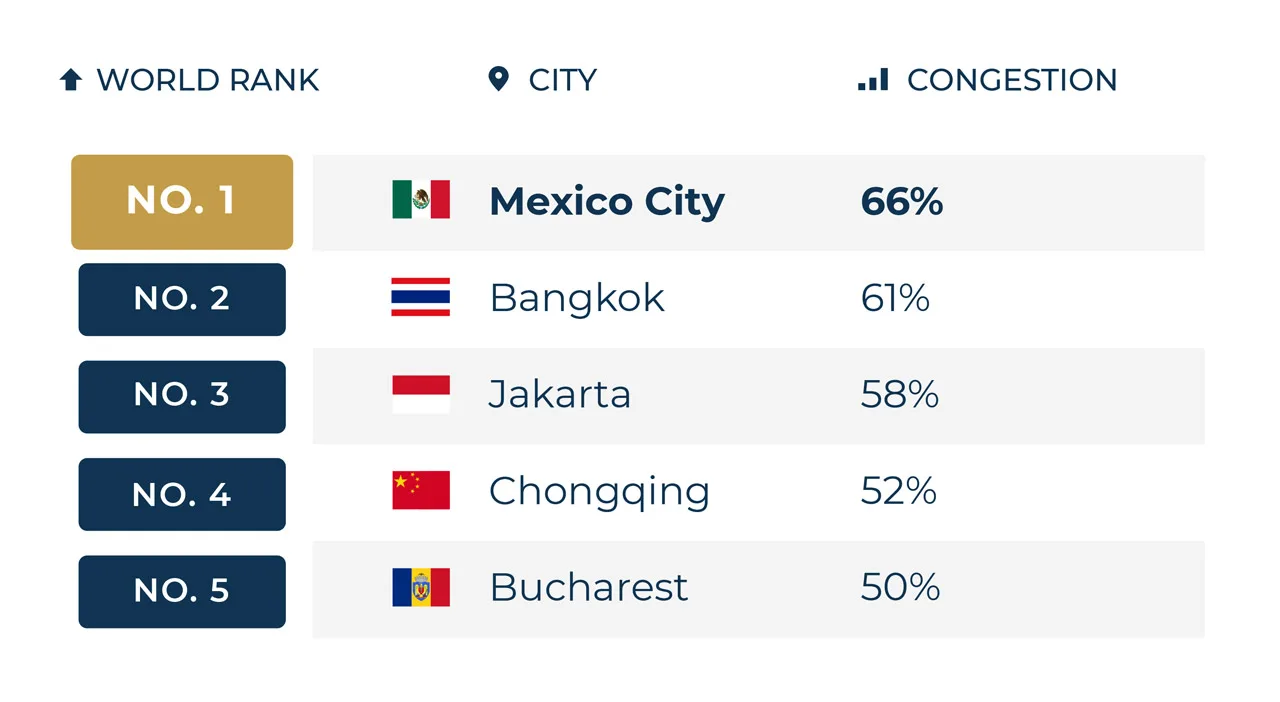
Image Source: https://www.tomtom.com/en_gb/trafficindex/
As urbanisation increases (the United Nations suggests that will increase to 70% within four decades), densely populated areas will face transportation issues, states Engineering.com. By 2035, the number of vehicles on the road worldwide is expected to triple. However, public transport, including walking and bicycling, can improve air quality and reduce CO2 emissions as well as save households an average of $6,251 per annum.
Driven by various technologies, the public transport system is on the brink of a technological revolution. These technologies include real-time information flow between commuters and transport providers, Artificial Intelligence (AI) and smart algorithms, which allow for the rapid processing of this information. Here are some specific ways tech is improving public transportation.
- Real Time Vehicle Tracking
Many people become frustrated because they don’t know when their public transport vehicle will arrive at their stop. Internet of Things (IoT) technology will allow providers to easily track the location of their vehicles by installing GPS systems on vehicles that are connected to the Internet. This internet data can be easily communicated to passengers’ devices.
- E-Tickets
The paper ticket has effectively disappeared in many countries. Apps that incorporate e-tickets can be very flexible, even allowing one person to send an unused travel ticket to a friend.
- Intelligent Transport Systems (ITS)
Real-time traffic and passenger information can be fed through intelligent transport systems which then automatically adjust traffic signal timings. This can greatly improve the capacity and speed of transport systems.
- On-demand public transportation systems
Imagine if you didn’t have to plan your journey around bus or train routes; instead, you could summon the bus to pick you up. This isn’t just a pipe dream; in fact, Singapore is introducing an on-demand bus service this year. Using a smartphone, a commuter will indicate where he wants to be picked up and dropped off within designated areas. The bus operators will aggregate these demands via algorithms to work out the number of buses to deploy and which routes to take. Empty routes will be avoided and commuters can expect much shorter waiting times.
- Open source transport apps
Open source transport apps provide visual displays that link together various types of transport – e.g. bike share systems or trams. An example of such an app is Transportr, which makes it easier for people round the globe to use public transport.
Many of the ways mentioned above rely on the processing of large amounts of data to develop relevant algorithms. This is really the work of Data Scientists. Basically, a Data Scientist analyses data for actionable insights on anything from product development to customer retention to new business opportunities. In 2018, the demand for Data Science talent in the US is projected to be 50-60% greater than the supply. This translates into a shortage of 140 000 to 190 000 people, as well as 1.5 million manager and analysts, states Medium.
In conclusion, there are many ways tech is improving public transport. If you’re interested in becoming a Data Scientist, you’ll want to start learning Python, R and SQL, analytical languages for Data Science. You could also consider enrolling on HyperionDev’s Data Science online bootcamp.
Tutorials
CSS tutorial 2: internal, external & multiple style sheets
This CSS tutorial will cover the key differences between internal, external and multiple style sheets, as well as how to create them.
In our previous CSS tutorial, we introduced the concept of Cascading Style Sheets and how they can be used to change and enhance the appearance of HTML web pages. This tutorial will cover the key differences between internal, external and multiple style sheets, as well as how to create them.
Internal style sheets
An internal style sheet is included directly in an HTML document. You would use internal style sheets in cases where you want to specify styles that apply to one web page only; for example, if one page has a unique visual style that’s different to the rest of your site.
Internal CSS code must be placed in the <head> section of the page you want to style. It must be enclosed between <style> and </style> tags.
To see an example, create a new folder called css-test, and set up a new HTML index page with the following code:
When viewed in the browser, your web page will appear with no styling, as follows:
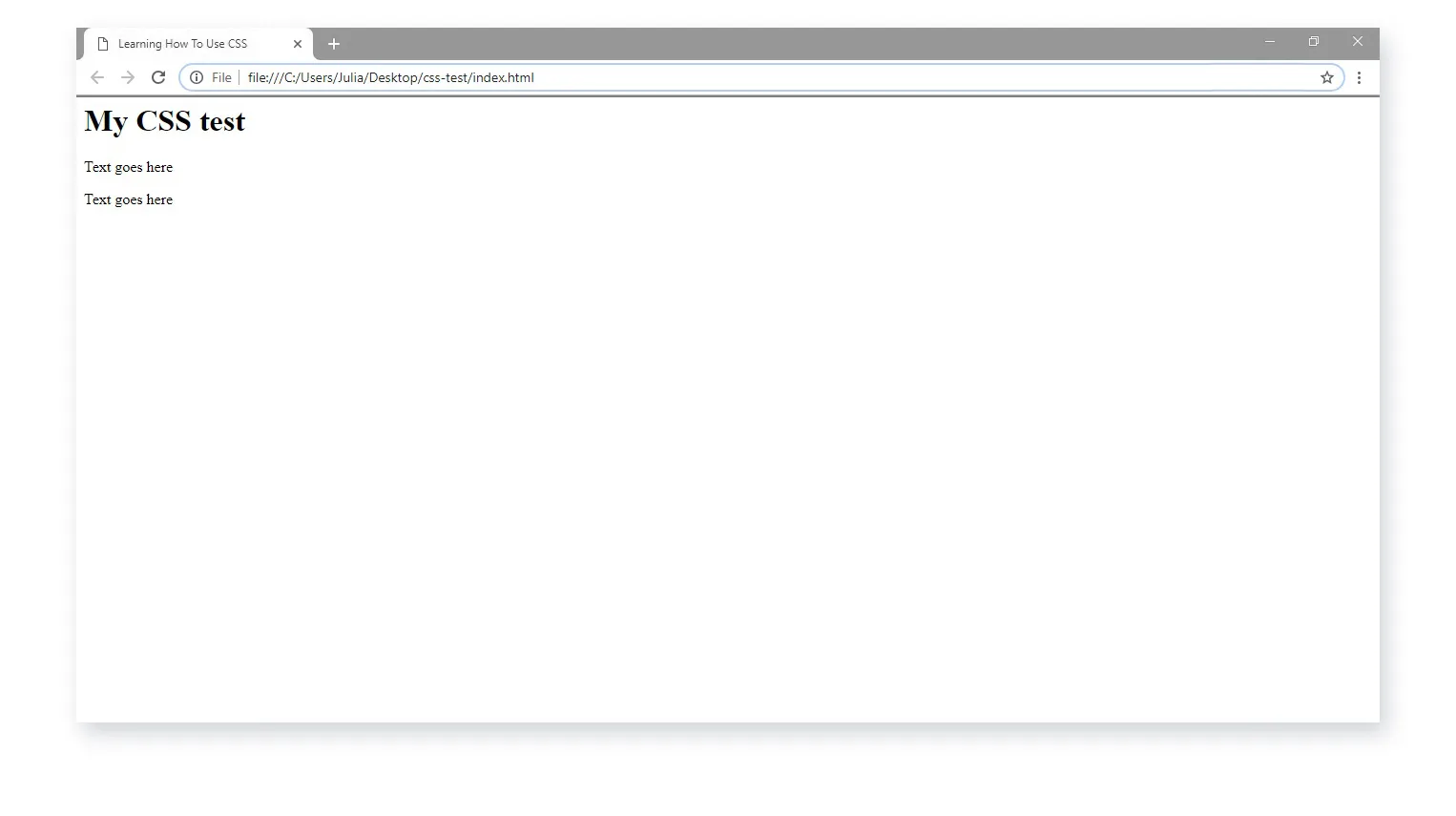
Now add the following internal CSS code after the opening <head> tag:

Save the document and refresh your page, and you’ll see the style has been applied.
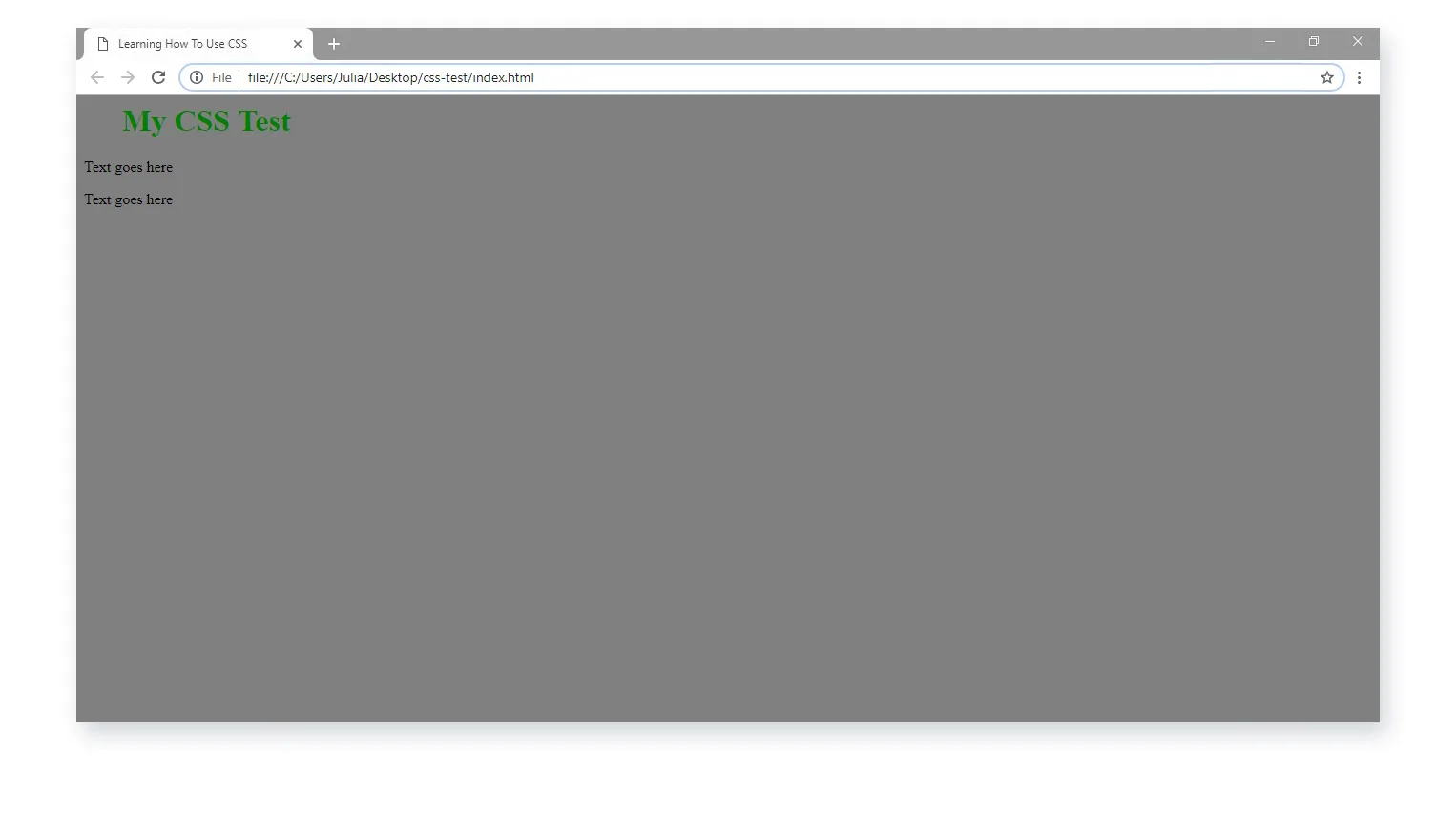
Note: When using an internal style sheet for a particular page, you won’t be able to refer to that stylesheet from any other page.
An inline style is a piece of internal code you can use to narrow it down even further, and apply a unique style for a single element rather than a single page.
To use inline styles, you would add the style attribute containing the CSS property to the relevant element.
For example, to make visual changes to the <h1> element you would add the below code inside the <h1> opening tag.
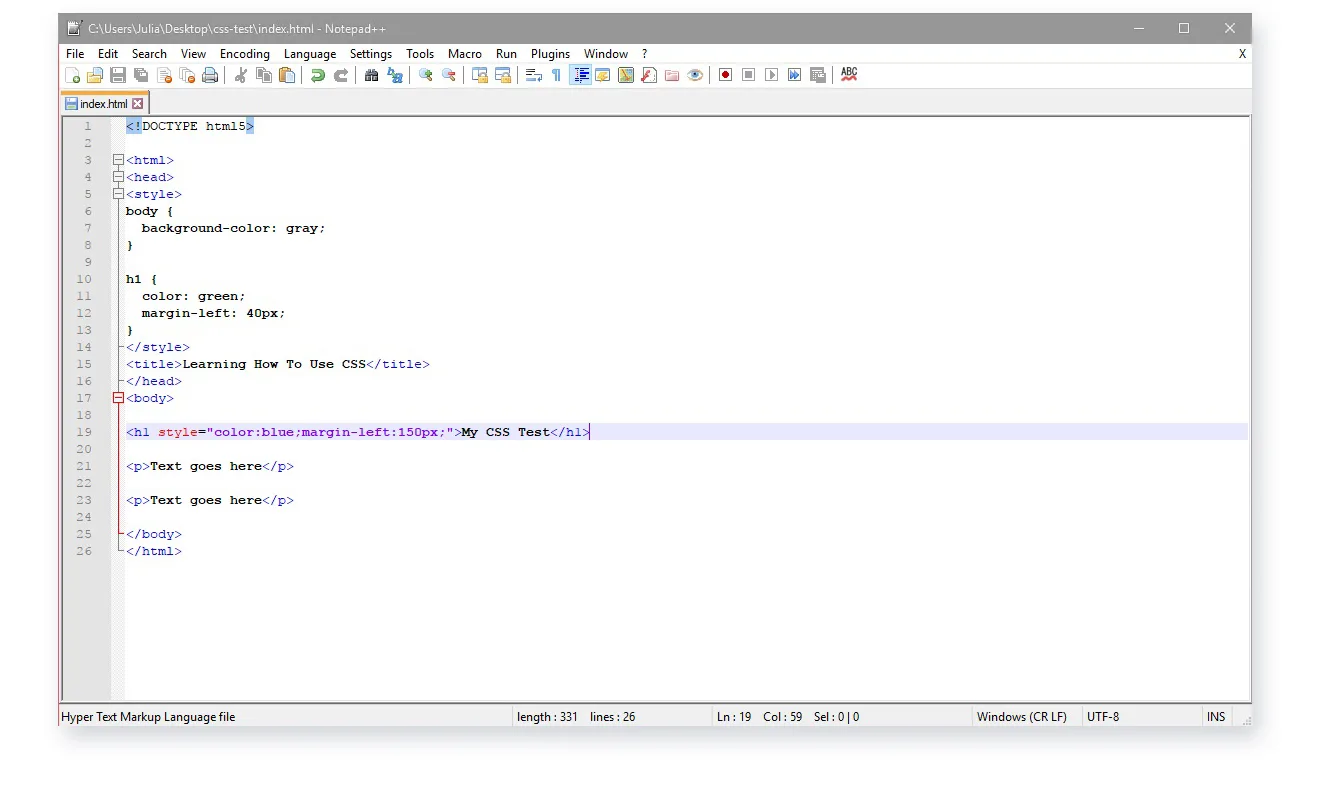
The element will reflect this style when you save and refresh:
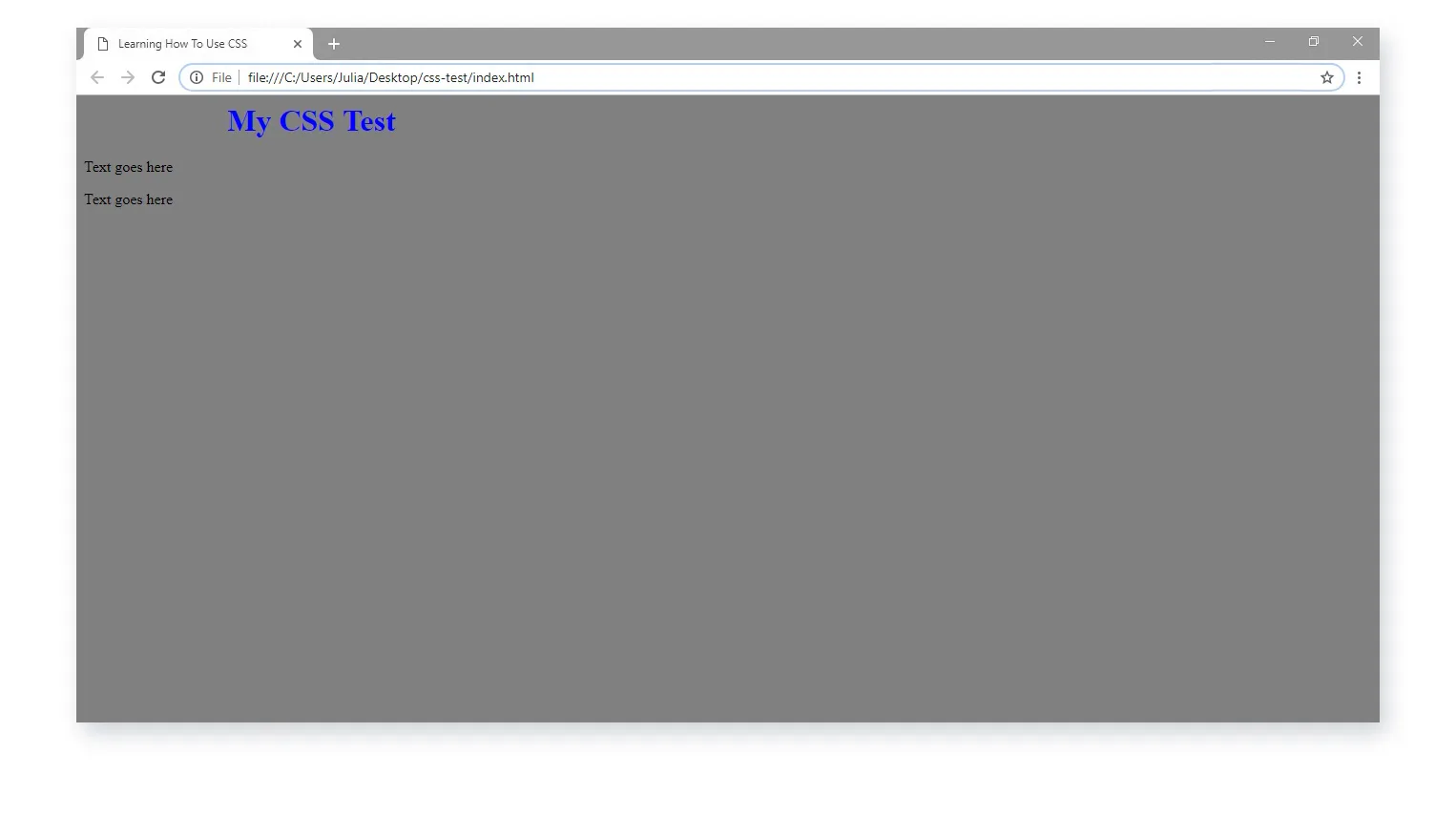
External style sheets
An external style sheet is one that is created externally to the HTML document, and is “attached” to the document using code. This is used when you want to allow a single style sheet to control the appearance of multiple documents.
You can change the look of an entire website by editing just one file. This helps to save development time, download time and server space.
An external style sheet file only contains CSS syntax, with no document content or elements. You would use selectors, which were covered in the previous CSS tutorial, to specify what styles attach to which parts of the document.
Every HTML page must include a reference to the external style sheet file, which must be placed inside the <link> element, within the <head> section.
As an example, remove all the internal CSS code from your index page. The styling of the page will be removed.
Then, create and save a style.css file within your folder as you did in CSS tutorial 1.
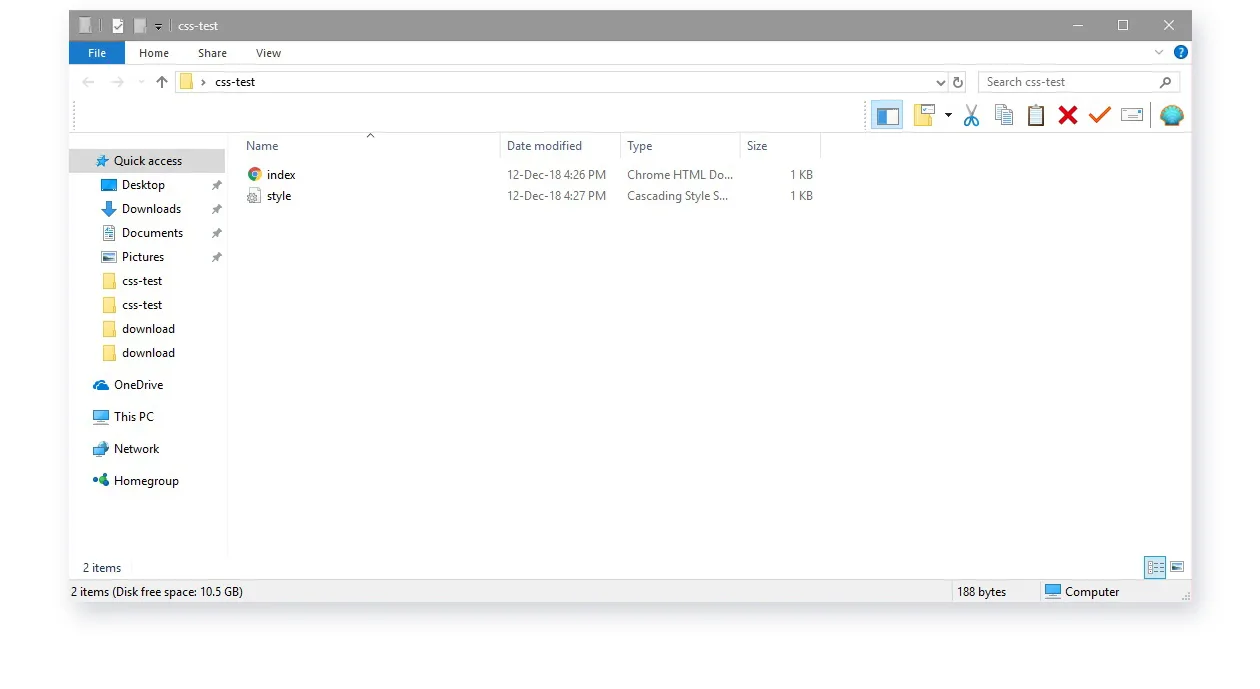
Add this code to the CSS file:
Then, apply this code to your HTML file that will link it to the CSS file:

When you save and refresh, you will see that the style is once again reflected on the page, this time using an external style sheet setup instead of an internal one.
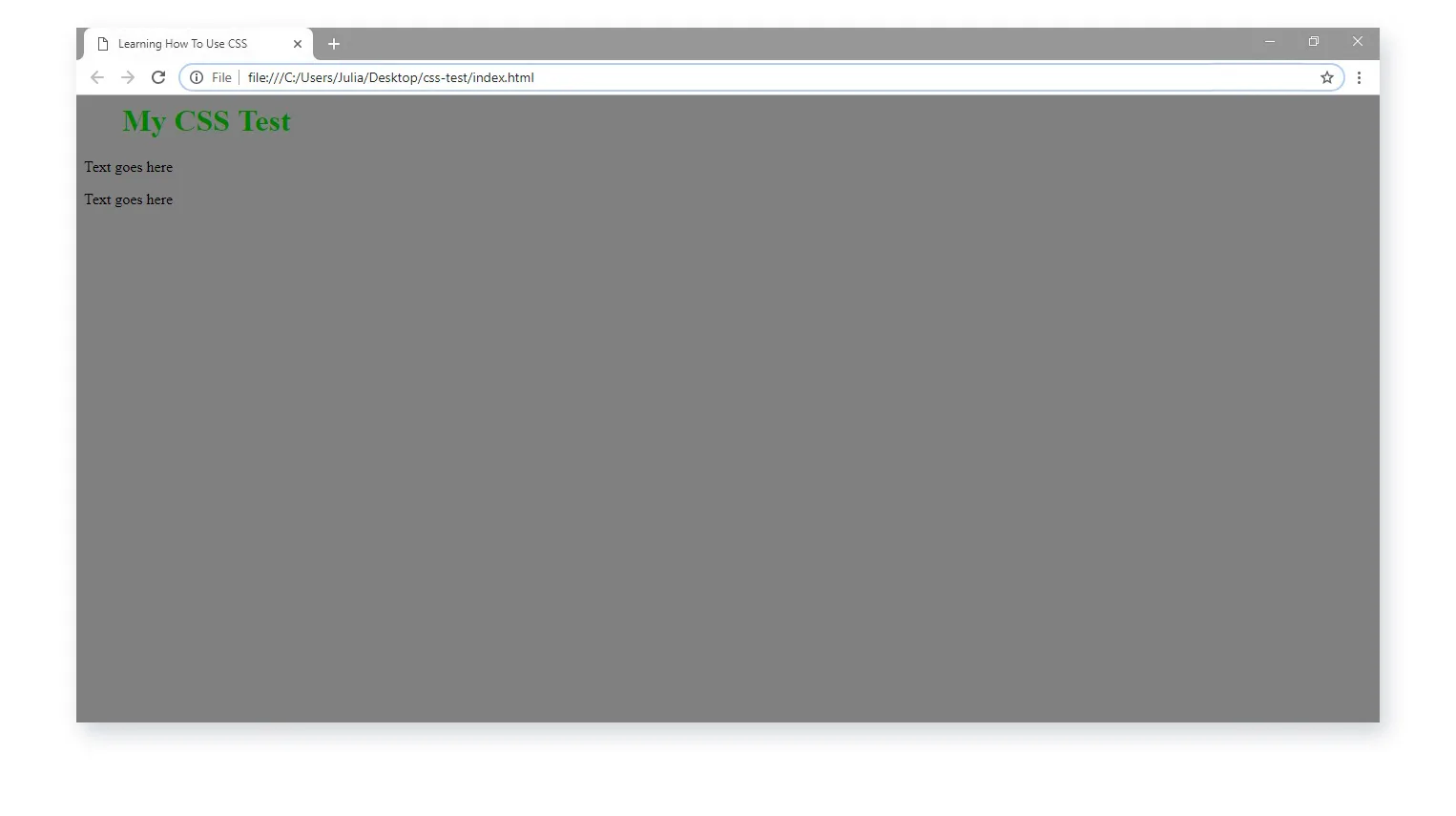
Multiple style sheets
What happens in cases where one site has multiple style sheets? If some properties have been defined for the same selector or element in multiple different style sheets, the value from the last-read style sheet will be used.
So, say that an external style sheet states that the style for the <h1> element should be color:blue, while an internal style sheet states that the style for the same <h1> element should be color:green.
If the internal style is defined before the link to the external style sheet, the <h1> element will be appear as blue, as per the external code. On the other hand, if the internal style is defined after the link to the external style sheet, the <h1> element will follow the internal style sheet code and appear as green.
Using multiple CSS files instead of one big file can help you to keep things organised when working on a large site with a variety of style requirements. For example, you might want to style one website for multiple devices including mobile, and applying the different styles to separate CSS files can help to keep things tidy.
As a developer using multiple style sheets, it’s best practice to use different classes or id names in different CSS files, otherwise it will default to whichever was declared latest.
Find out more
Are you ready to step up your CSS game? Take a look at an online developer bootcamp, and enjoy the benefits of mentor-lead online learning at your own pace.

Career Advice
US cities with the highest-paid Python developers
Python developers are in high demand. The average Python salary in the US per annum is $92,000, but you can expect to earn much more in these five US cities, which pay their Python developers the best.
You’ve probably heard how Python is a popular and in-demand programming language. According to Glassdoor, the average Python developer in the US makes $92,000 per annum, but with highs up to $137,000 per year. So which are the US cities with the highest-paid Python developers?
Firstly, it’s worth mentioning why Python is so well paid. A key reason is that Python is probably the most used programming language in Data Science. The language includes powerful statistical and numerical packages for data analysis (such as PyBrain, NumPy and MySQL).
Also, anyone comfortable with the Python programming language can use it as a tool to organize, process, and visualize data. Even if programmers are not in a Data Science field, Python is still useful to them because most programmers deal with data, in one way or another, in their day-to-day work. Further, Python is one of the more versatile, with over 125,000 third-party Python libraries available as a resource.
Besides Data Science, Python is well placed to aid with future technologies. It’s one of the top four languages for building IoT, or Internet of Things, solutions. IoT is really about connecting things – such as coffee makers, washing machines, lamps, etc. – to one another via the Internet, explains Forbes. Most things that have ‘on’ and ‘off’ switches can be part of IoT.
In addition, Python is a very popular language. The TIOBE index looks at the popularity of various programming languages. This is determined by looking at the following variables: number of skilled engineers in a particular language world-wide, courses offered in that language and third party vendors. This information is combined with popular search engine results for the different languages on Google, Bing, Yahoo!, Wikipedia, Amazon, YouTube, etc. For December 2018, Python was ranked as the 3rd most popular language, up from 4th place in December 2017.

Image Source: https://www.tiobe.com/tiobe-index/
Now that it’s clear why Python is so in-demand, which are the US cities with the highest-paid Python developers?
Highest-paid cities
According to Indeed, a career website, the highest-paid Python engineers live in San Francisco, where the average salary of a Python developer reaches $137K per year. Below, Daxx lists the US cities with the highest-paid Python developers.
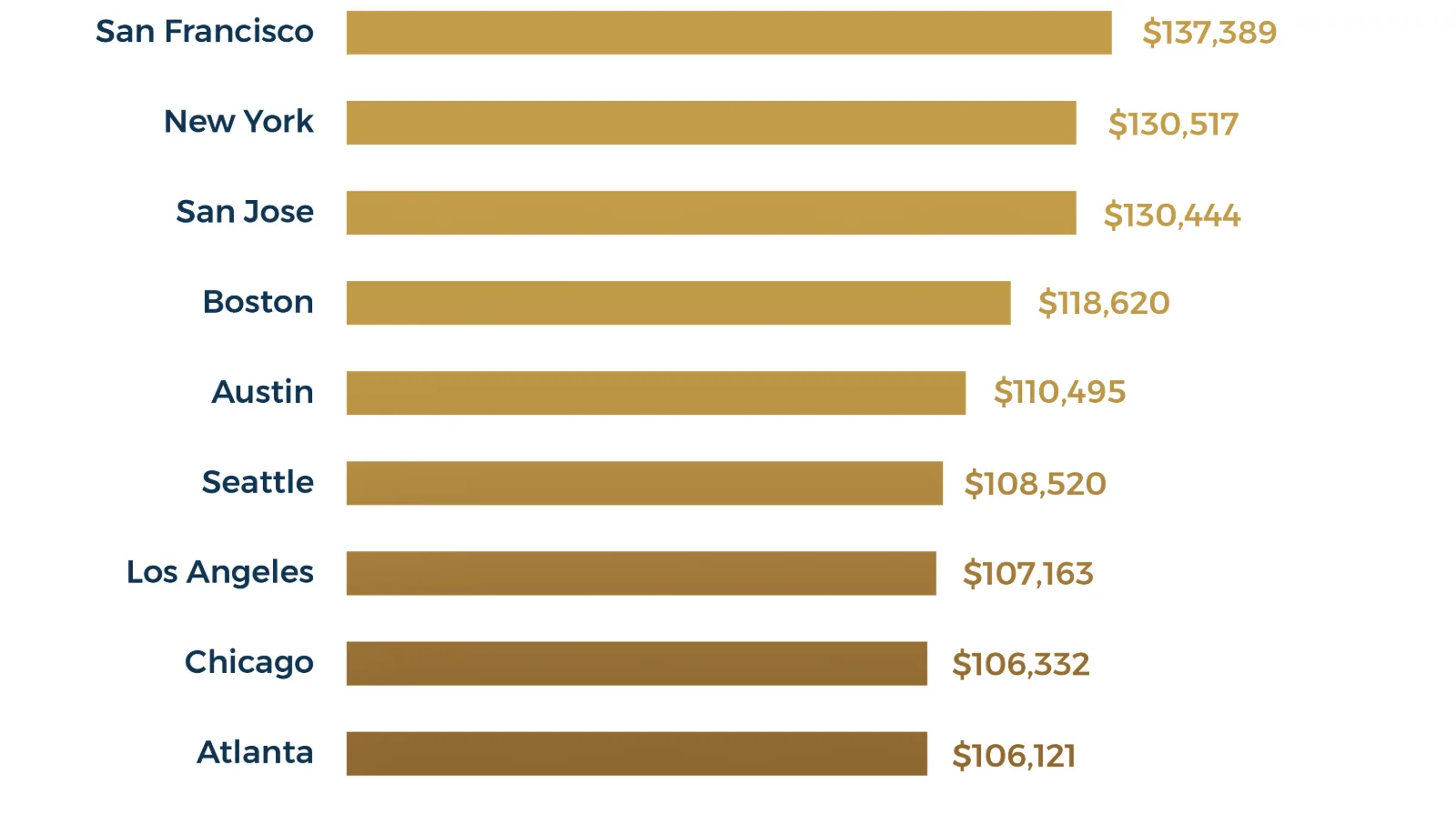
Image Source: https://www.daxx.com/article/python-developer-salary-usa
The good news is that it’s an easy language to learn. Responses to questions about Python on Software Engineering Stack Exchange, indicate that it’s one of the first languages newbie developers should learn, because it’s simple to read. In fact, it reads similarly to English, which means it removes a lot of syntax-learning stress from coding beginners. Python handles the complexity for you.
And it might just be the only language you need, because it’s such a versatile language. From building websites to developing GUIs and analysing data, Python can do it all. To cover your development needs, it’s an excellent place to start.
This piece has mentioned the US cities with the highest-paid Python developers. If you’re keen to learn Python in 2019, HyperionDev offers a six month online Software Engineering Bootcamp, which includes Python as part of its back-end programming. Or you could enrol on the Full Stack Web Developer Bootcamp. Each of these courses includes your own personalised mentor to ensure your learning happens smoothly and easily.
Career Advice
Top 5 open source projects on GitHub in December
Used by over 31 billion developers, GitHub is a place for developers to collaborate on projects. Here we list the top five open source projects on GitHub in December 2018.
There are over 31 billion developers on GitHub, according to the 2018 Octoverse report that analyses GitHub statistics over the previous year. There are also more projects than ever before with co-operation across 1.1 billion contributions. Most of the developers, 80% in fact, come from outside the United States. With so much action, what are the top five open source projects on GitHub in December 2018?
Firstly, just a quick recap: GitHub is a site where developers can store their projects and work with other like-minded individuals. It’s clearly an excellent place to collaborate. The collaboration happens via Pull Requests, which lets you tell others about changes you’ve pushed to a GitHub repository. Interested parties can then check out these changes and propose potential modifications (read here about how to create a Pull Request). Also, like Microsoft Word or Google Drive, you can maintain a history of your code – with new iterations, you don’t lose previous versions.
So without further ado, here are the top five open source projects on GitHub in December 2018.
Here you’ll design components for a CSS framework. Cascading Style Sheets, or CSS, provides the layout for a web page. With CSS, you can utilise a single style sheet across multiple web pages. It’s an ideal language to learn if you’re interested in becoming a front-end or even a full-stack web developer.
Flutter makes it easy and fast to build beautiful mobile apps. It is Google’s mobile app SDK (Software Development Kit) for putting together high-quality interfaces on iOS and Android very quickly. Flutter is free and open source, and it’s used by developers and organisations around the world. It works with existing code as well.
Even if you don’t have any mobile development experience, this is an easy and fast way to build awesome mobile apps. Potentially, this is a good GitHub project to explore, because Android developers are well paid – according to Glassdoor, the average US annual salary for Android developers is $101,572.
This project empowers you to use machine learning to get valuable insights from data. You’ll learn how to implement basic ML algorithms and deep neural networks with PyTorch. You’ll find out how to run it all on the browser, and you’ll learn object-oriented ML to code for products.
In case you don’t know, Machine Learning brings together computers and statistics to build algorithms that allow computers to learn new tasks. It allows the computer to learn by seeking statistical patterns in the data. An example of Machine Learning would be teaching a computer to distinguish between dogs and cats – for example, working out that cats have shorter noses and dogs come in a larger variety of sizes.
This image compression web app lets you make images smaller using best-in-class codecs, right in the browser. A codec is a computer program for encoding or decoding a digital data stream. This project lets you update and streamline Squoosh.
This is a JavaScript framework for building User Interfaces on the web. It’s also an open-source project. To use the framework, you need to know HTML, CSS and JavaScript. There are multiple fixes and upgrades you can get involved in on this GitHub project.
We’ve mentioned the top five open source projects on GitHub in December 2018. You can also check out the trending repository on GitHub to see what the community is most excited about on a daily basis. To brush up on your coding skills, consider enrolling on a HyperionDev bootcamp in Full Stack Web Development, Data Science or Software Engineering. You can also trial one of these courses for free.

Career Advice
7 FAQs about coding bootcamps
Many people are keen to upskill or change careers by enrolling on a coding bootcamp. In this article, we cover 7 FAQs about coding bootcamps.
There are are many reasons to enrol on an online coding bootcamp. For example, you can study in your own time while still holding down a full-time job and earning a salary. Here we’ve outlined the most important FAQs about coding bootcamps. Find out whether this is the right career choice for you by checking out the answers to these frequently asked questions.
- What is an online coding bootcamp?
Online bootcamps are structured, mentor-guided platforms that replicate the in-class experience. You should expect to devote between 5 to 30 hours per week to the course, but the flexibility of an online medium allows you to choose when those hours will take place. The average length of a coding bootcamp is about 14 weeks or about 3.5 months. 80% of coding bootcamp graduates, states Course Report, say that they’re employed in work requiring the technical skills they learnt in the bootcamp, and the majority are finding full-time employment.
- Why pay for a coding bootcamp when I can do an online course for free?
It’s true, there are many online free coding course – you could try a coding MOOC (Massive Online Open Course), for example. But if you get stuck, you could well run into problems. One of the most important aspects of a paid online course is the mentorship you receive.
Coding mentors are particularly helpful, because they:
- Teach coding best practice – a mentor helps you avoid common stumbling blocks and teaches you best industry practices.
- Offer constructive feedback – mentor feedback should be specific, timely, understanding and positive. The faster you receive feedback on your code submissions, the better.
- Allow for individual attention – Mentorship is 1:1 personalised feedback.
- What is the difference between a coding bootcamp and a Computer Science degree?
Firstly, there’s the time issue: many degrees have a longer duration, approximately three to four years, compared with a bootcamp, which can be a couple of weeks up to six months. And then there’s the course content itself: bootcamps tend to teach industry-specific coding skills, whereas a university Computer Science degree is likely to be more abstract, focussing on things like how computers are able to solve problems for programmers”. It’s a more theoretical than a practical approach – consequently, you might not learn how to actually code in real-life scenarios.
- Will I get a job after completing a bootcamp?
Yes, more than likely you will. Here are some reasons why:
- 68% of graduates work in IT within 6 months of graduating from an online coding bootcamp, according to SwitchUp.
- A 2017 survey, conducted by Indeed, found that 72% of employers think graduates from bootcamps are “just as prepared” as degree holders to be high performers. In fact, 12% of employers think bootcamp graduates are more prepared and more likely to be high performers than those with computer science degrees.
- How much more can I expect to earn after finishing a bootcamp?
Simple answer: a lot. After surveying reports from 73 qualifying coding schools, Course Report found that average salary increase was 50,5%, which equated to $23,724 extra per annum. The average post-bootcamp salary was $70,698. The average salary for a web developer in the US, for example, is $76,633.
- How do I choose the right coding bootcamp?
Coding bootcamps aren’t a one size fits all; they need to map to your needs, states a Medium article. Before deciding on a particular bootcamp, some questions you should ask yourself include:
- What do you want to achieve from the bootcamp?
- What languages do you want to learn?
- Do you want personalised mentoring, or are you happy to learn alone?
- How much money are you wanting to spend on tuition?
Once you’ve answered these questions, do some research among the wide pool of bootcamps. You could check out the following sites: CourseReport or SwitchUp. To figure out which bootcamp is worth your time or money, you need to do some further research via reviews, Quora or searching for blog posts.
- What should you do if you can’t afford a bootcamp?
From an affordability perspective, an online coding bootcamp makes sense bearing in mind that a face-to-face bootcamp in the US costs in total between $9,000 to $21,000, with an average of $11,451, whereas you can enroll at an online coding bootcamp for as little as $3000. But this is still a fair amount of money, so what should you do if you can’t immediately afford a bootcamp? Here are some ideas:
- Plan and save: A Business Insider case study works out that if you forego your daily purchased coffee, you save in the region of $1000 per year.
- Try for a scholarship: Plenty of coding bootcamps offer scholarships on the basis of financial need or merit. Here’s a list from Course Report of scholarships on offer for bootcamps.
- Crowdfund: Digital Trends lists some of the best crowdfunding sites online including Indiegogo and GoFundMe.
- Opt for a different payment plan: Many bootcamps offer a variety of payment plans, from paying the full amount at a slightly discounted rate upfront to paying off the course over the duration of study. HyperionDev offers several payment plans, including a monthly option and a significant discount if you choose to pay upfront.
- Work sponsorships: If you’re planning on continuing your full-time employment during your online coding bootcamp, consider speaking to your employer – they may want to invest in the skillsets of their employees.
We’ve covered 7 FAQs about coding bootcamps. If you have any further questions, feel free to ask them in the comments below.

Career Advice
How do cities become tech hubs?
Some of the world’s most well-known capitals are stepping up their game in the tech space and developing into booming tech hubs. In this article we look at Silicon Valley and ask some important questions around how cities become tech hubs.
Some of the world’s most well-known capitals are stepping up their game in the tech space and developing into booming tech hubs. The spotlight is also falling on smaller cities like Manchester and Leeds for their rate of progress in the tech arena. In this article we unpack what the startups in these flourishing cities are getting up to, and which cities are making their mark on the world through innovation. We also look at Silicon Valley and ask some important questions around how cities become tech hubs.
What is a tech hub?
Quite simply, a tech hub is a community that fosters innovation for technology startup companies. When most of us think “tech hub,” we think “Silicon Valley,” because it has risen to prominence in recent years as the home of Apple, Google and Facebook. But a tech hub can also be a specific part of a city, like London’s Silicon Roundabout, a building or a collective like Silicon Cape Initiative in Cape Town, South Africa. Tech hubs often provide opportunities for startups to meet potential investors and funders while providing a platform for business networking. According to Joe Svetlik, this is done by “encouraging experimentation, not demonising failure, and helping firms network with other like-minded individuals and enterprises.”
Which are the biggest tech hubs in the world?
According to the Global Startup Ecosystem Report (and an analysis by CityLab), these are some of the biggest players in the tech hub space globally:
Silicon Valley, California
The study identified Silicon Valley as a Heavyweight Hub due to its high concentration of big names in tech. As a Heavyweight Hub, it has fewer new companies entering the market than more emerging hubs, as well as a stable growth rate. In Silicon Valley there is also a higher density of engineering hiring and on average, investment 670 deals were sealed by the startups in the region between 2012 and 2017. In terms of deal values, $38 billion was raised (on average) by startups in the region between 2012 and 2017. These staggering figures make Silicon Valley a proverbial Shangri-La for budding startup founders and digital entrepreneurs.
Beijing, China
Beijing, China is considered a High Growth Hub for a number of reasons. Firstly, in relation to Heavyweight Hubs like Silicon Valley, Beijing has a higher frequency of early startups entering the market. As such, it has higher dollar investment, deal count rates and corporate-backed deal-making. According to the study, the average investment deal count between 2012 and 2017 was 171. The average dollar amount raised between those same years equated to $14 billion.
Stockholm, Sweden
Europe has its fair share of developing tech hubs which are outside of London. Amongst them is Stockholm, which according to the Global Startup Ecosystem Report (and an analysis by Citylab), is an “up and comer.” Tech hubs in this category generally have lower deal counts than other hubs, and lower dollar investment. There are also a high percentage of first-time funding rounds and high foreign investment rates. On average, the investment deal count between 2012 and 2017 in Stockholm amounted to 75, with an average deal amount of $2.5 billion within the same time period.
What are startups in these tech hubs getting up to? The study suggests that there is an overall trend towards “investment in AI, Big Data and Analytics, Blockchain and Advanced Robotics and Manufacturing.
How cities become tech hubs
100 years. That’s how long it took for Silicon Valley to become synonymous with technology. This may be a surprising fact given that it seemed to have sprung up overnight. To illustrate some of the highlights in the history of Silicon Valley, Corey Protin, Matthew Stuart and Matt Weinberger put together this timeline:
- Late 1800s: San Francisco became one of the earliest hubs of telegraph and radio. In 1909, San José was the birthplace of one of America’s first radio stations. Less than two decades later, Moffett Field became the early home of the aerospace industry. In 1939, due to the work of the Ames Research Centre, the same area played host to the world’s largest wind tunnel.
- 1939 arrived, William Hewlett and Dave Packard founded Hewlett-Packard in Palo Alto. During these formative years, computers were the size of a room!
- In the 1940s, William Shockley invented what would become the computer processor, at Bell Labs. Later, he would found his own company and be the first to make processors out of silicon rather than germanium.
- In 1957, eight of Shockley’s employees became disgruntled, left his company and partnered with Sherman Fairchild to create Fairchild Semiconductor. A few years later, Fairchild helped to make components for the Apollo program. In the 1960s, those eight employees founded their own independent companies, some of which led to the establishment of brands like Intel, AMD, Nvidia and Kleiner Perkins.
- In 1971, journalist Don Hoefler entitled a 3-part report on the semiconductor industry “SILICON VALLEY USA.” The name stuck.
- During the 1970s, Atari, Apple and Oracle were founded in the area.
- In the 1990s, eBay, Yahoo, Paypal and Google were founded in the area.
- In the decade that followed, Facebook, Twitter, Uber and Tesla joined the suite of flourishing startups.
Tech hubs develop slowly but surely, and are accelerated by concentrated efforts to encourage tech incubators, investors and innovation hubs to move their efforts into a particular geographical region.
There are major considerations to be made during the developmental stages of a tech hub. For example, with Amazon considering establishing its second headquarters in Seattle, there are a number of important factors to be considered. What will the effect on traffic be? Which construction company will handle the development of the building? How will the GDP of the city be affected? Will it mean more jobs for Seattle dwellers? As technology continues to demonstrate its pervasiveness, the world and how we perceive our urban environments will need to evolve in order to accommodate society’s inevitable progression.
Excited about what the tech industry has to offer you? Join us for a bootcamp and kickstart your career. We’d love to meet you.
Tutorials
CSS tutorial 1: introduction and syntax
This CSS tutorial will introduce you to the concept of Cascading Style Sheets and CSS syntax, and explain how CSS can make coding that much easier for you.
This CSS tutorial will introduce you to the concept of Cascading Style Sheets, and how this styling language can make coding that much easier. Before beginning this tutorial, we recommend that you check out our HTML tutorial series. HTML and CSS work hand in hand, so understanding HTML is essential to getting the most out of CSS.
What is CSS?
CSS stands for Cascading Style Sheets. It’s a styling language that’s used to determine the visual presentation of a web page or document that’s been written in a markup language, such as HTML. CSS is used to define the layout and design of the HTML elements, and also determines the variations in display for a range of different screen sizes and devices.
Why use CSS?
CSS was created to solve a significant problem with HTML and to make life easier for developers. HTML was originally created to describe the content of a web page, not to format the content or apply styles to it. However, in later versions of HTML (specifically 3.2), new tags and attributes were added to define visual elements such as fonts and colours. This turned web development into a long, cumbersome and costly process, as coders were expected to add this visual information to every single page of a website. The World Wide Web Consortium (W3C) developed CSS as an answer to this issue, effectively removing the need for style formatting in HTML.
When working in CSS, you will typically save the style definitions in external .css style sheet files. This allows you to change the appearance of an entire website by simply editing one file. In other words, understanding CSS will save you a great deal of time and hassle as a developer.
CSS syntax
CSS code is made up of rule-sets. A CSS rule-set consists of two main parts: a selector and a declaration block.
Selector: The selector indicates the HTML element you want to style. CSS selectors are used to “find” or select HTML elements.
Declaration: The declaration block contains one or more declarations (separated by semicolons), and each of these declarations includes a CSS property name and a value (separated by a colon).
Property: The property is the part of the element’s appearance that you want to change; for example, the size, alignment, font, colour, and so on.
Value: The value describes what you want the property to look like; this is where you would specify that you want to change a colour to blue, or the text size to 12px, and so on.
Note that a CSS declaration must always end with a semicolon, and declaration blocks must be enclosed in curly brackets or braces: { and }.
CSS in action
To create a test CSS document, we first need to create a simple test HTML document. Before beginning, we do recommend that you go through our HTML tutorial and get to grips with the basics of Hyper Text Markup Language.
Open your text editor (like Notepad++) and add some simple HTML code to the document as follows:
Create a new folder and name it “css-test”, then save your file in that folder, as “index.html”.
Open the HTML file in your browser, and it should appear as follows:
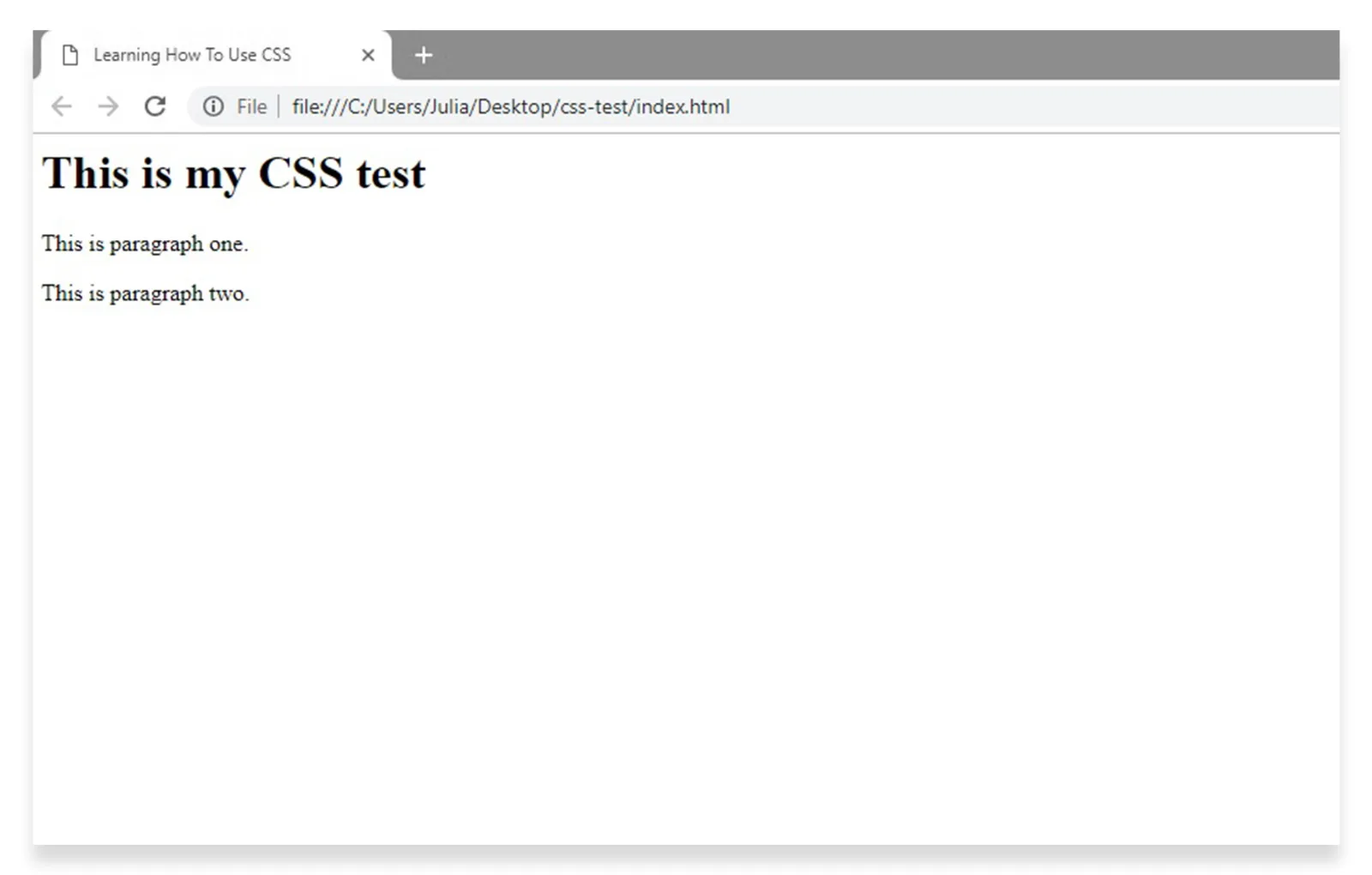
Now that we have our basic HTML file set up, let’s say we want to use CSS to change the appearance of the page heading. We want to change the colour to green, the font size to 20px, and the alignment to centred. Those are three properties that we want to add to the heading, each with its own value; so we will need three declarations in our declaration block.
In this case, the rule-set would be made up as follows:
- h1 is the selector – the HTML element that we want to style.
- The first declaration in the declaration block will be color:green; with color being the property and green being the value.
- The second declaration in the declaration block will be font-size:20px; with font-size being the property and 20px being the value.
- The third declaration in the declaration block will be text-align:center; with text-align being the property and center being the value.
Tip: Remember, properties and values are separated by a semi-colon.
To set this up, open up a new document in your text editor, and add the following code:
Now, save the document in your css-test folder, using the file name style and the extension .css – your style.css document should now appear in the folder with the index.html document.
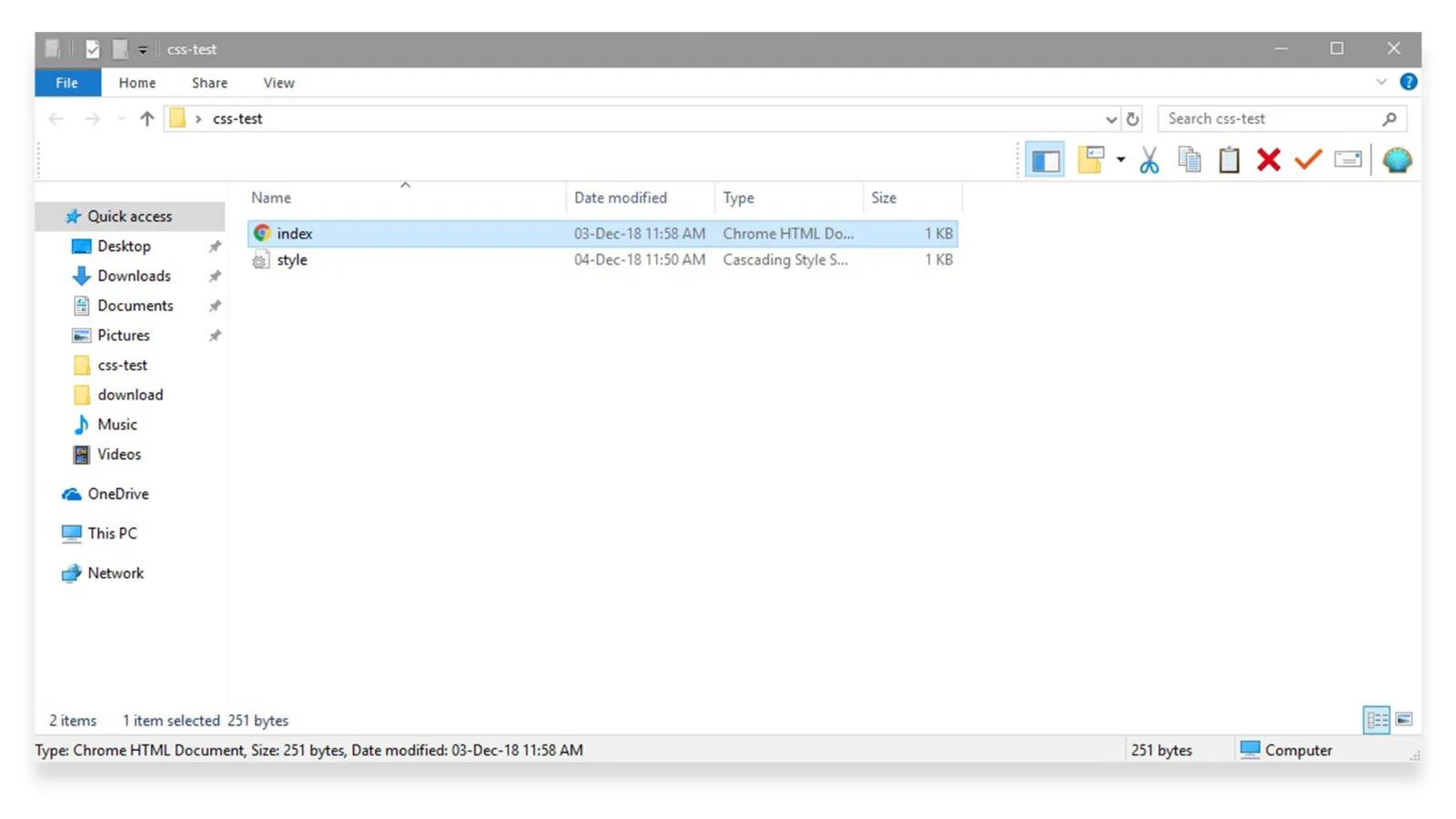
The next step is to link the CSS file and the HTML file together – your CSS code can’t work its magic unless you tell the browser to load the stylesheet along with the HTML page.
To link the files, go back to your HTML document and add the following code, underneath the page title and above the </head> tag:
This code directly links to the saved file name.

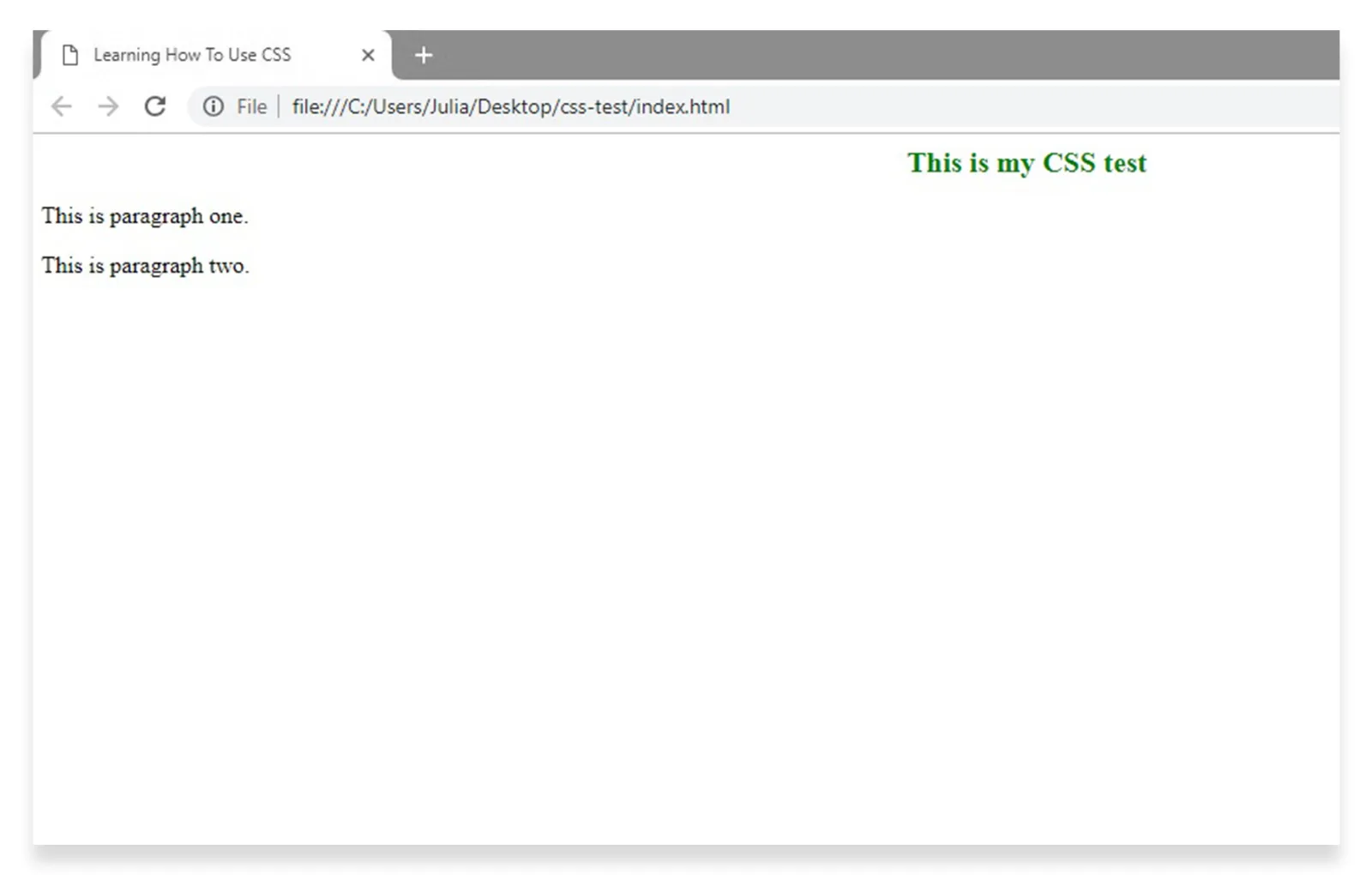
Save the document and refresh the web page in your browser. You should see that the three visual changes have been implemented, and your page heading now appears in green, in the specified font size, aligned in the middle.
Different types of selectors
We mentioned before that CSS selectors are used to select HTML elements. Selectors can do this in a variety of different ways, based on the element’s name, id, class, attribute, etc. Let’s look in-depth at a few different types of CSS selectors you might use:
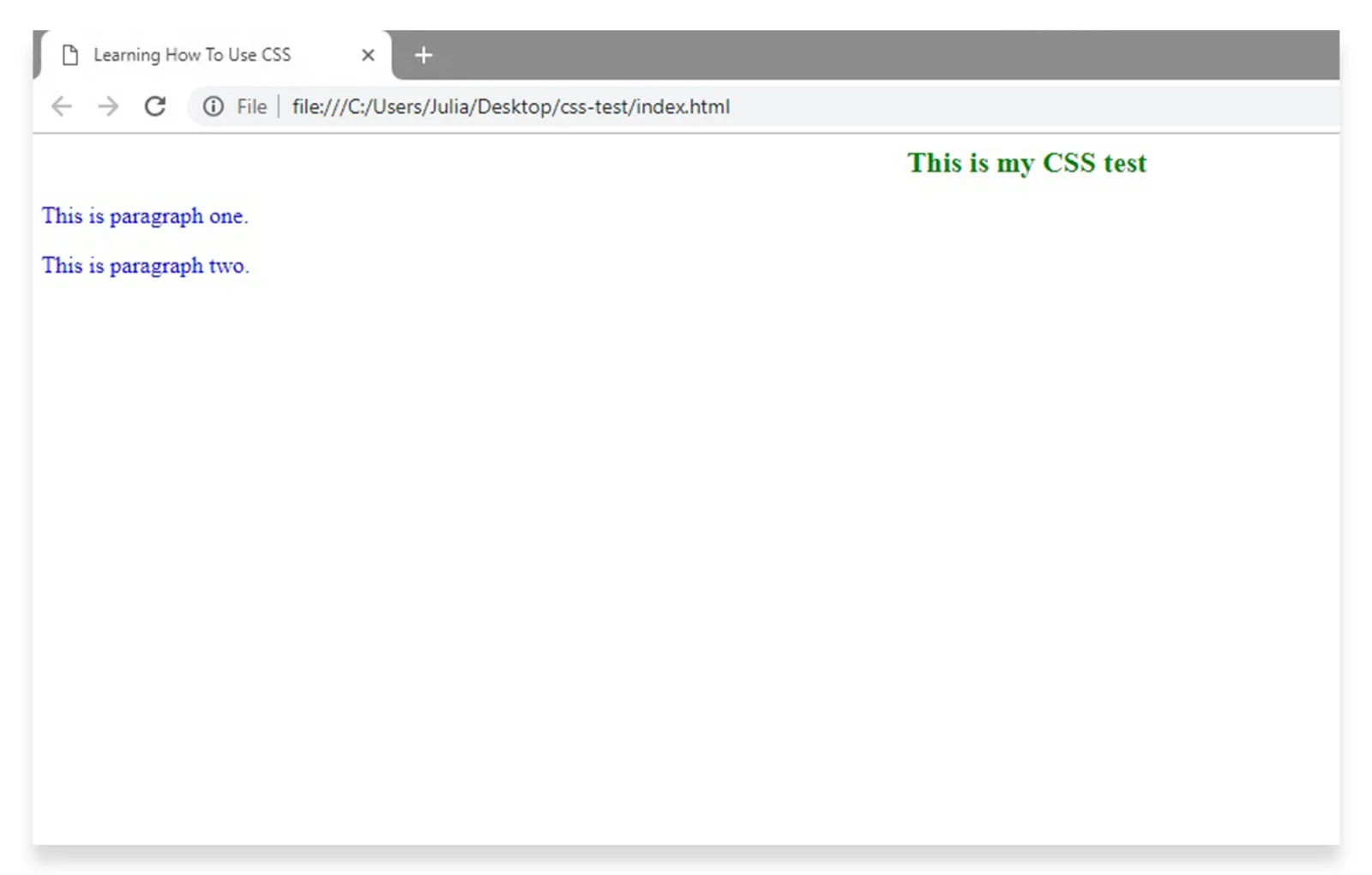
Element selector: Selects elements based on the element name. So for example, if you want to change all paragraphs on a page to blue, you can use the following code in your CSS file:

All <p> elements in your HTML file will be selected, and will appear in blue. This saves you the hassle of having to apply code to every paragraph separately.
id selector: Selects a specific element based on its unique id attribute.
The id of an element should be unique within a page, so the id selector is used to select one unique element.
To select an element with a specific id, you would write a hash (#) character, followed by the id of that element.
For example, if you had one paragraph on the site that you wanted to style, without changing the others, you would give it an id attribute like id=”para1″ and begin your CSS rule-set code with #para1.
For example:
Class selector: Selects elements with a specific class attribute.
To select elements with a specific class, you would write a period (.) character, followed by the name of that class.
For example, if you wanted to style all left-aligned paragraphs, you would give them the class attribute class=”left” and begin your CSS rule-set with .left.
You can group selectors together in your CSS document to minimise code, and separate them with commas.
For example:
Ready to learn more?
In our next CSS tutorial, we’ll look at how to set up internal, external and multiple style sheets. If you’re interested in delving deeper into the world of HTML and CSS, sign up for a Web Developer Bootcamp for a convenient online learning experience.

Career Advice
Top 10 tech jobs in high demand in 2020
These days, almost all companies use tech. But what are likely to be the top tech jobs in high demand in 2020? Here we list ten of them.
We all need to look ahead to make sure our skills stay in demand. With this in mind, what are the top tech jobs for 2020? For starters, IT roles will include more advanced technologies like artificial intelligence (AI), augmented and virtual reality (AR and VR) and the Internet of Things (IoT). Raj Mukherjee, the Senior Vice President of Product at Indeed, a global job search site, says: “Demand for tech workers continues to grow at a pace that’s unmatched in other industries.” Some jobs that have enjoyed high demand, like full-stack developers, will maintain their growth position in the coming years, but newer job roles will gain popularity as well. So what are the other top tech jobs for 2020, as published by ZDNet in a special feature?
1. Computer Vision Engineer
Computer Vision Engineers “build and improve computer vision and machine learning algorithms and analytics to detect, classify, and track objects,” states ZDNet. It’s basically recreating the human ability to understand, interpret and interact with images and visual surroundings. It’s already being used in image recognition technologies found in certain applications, such as Google Lens and SnapChat. But it will be used in many more technologies including self-driving cars, robotics, drones and medical data.
2. Machine Learning Engineer
These are advanced programmers, capable of developing AI machines and systems. AI, explains this YouTube video, is a broad area of computer science that makes machines seem like they have human intelligence.
These factors have made AI the Next Big Thing:
- Huge amounts of data are now being created every minute (90% of the world’s data has, in fact, been generated in the past two years).
- Increased computer processing; computers can now make sense of all this data.
- Tech giants and venture capitalists are keen to infuse the markets with cash, as they have bought into the idea of AI.
3. Network Analyst
IoT (Internet of Things) refers to the interconnectedness of devices that communicate with each other. With this in mind and as IoT enters the workplace, businesses are investing more heavily in their networks. Things need to be connected efficiently and that will drive the demand for network analysts.
4. Security Analyst
A cyber security specialist is “in charge of the electronic security of an organization”. This could include re-certifying or updating the security of applications and servers, troubleshooting country-wide security threats, testing, as well as regular updates for virus protection. Other important aspects of the job involve training workers on security procedures to maintain security and informing management of any security violations. The demand for this job will increase as cyber attacks become more sophisticated as well as the technologies that fight them.
5. Cloud Engineer
As more companies move their vital systems to the cloud, these cloud engineers will be in high demand. They will need to develop solutions at scale, which makes use of both in-house technologies and various outside systems.
6. App Developer
Revenue from apps is climbing hugely: mobile apps are projected to earn $188,9 billion in revenue via app stores and in-app advertising by 2020. Consequently, we can expect an increase in the demand for app developers.

Image Source: https://www.statista.com/statistics/269025/worldwide-mobile-app-revenue-forecast/
7. Business Intelligence (BI) Analyst
This job entails analysing where the company stands in comparison to the industry and how growth can happen. The analyst gathers data from a variety of sources, including internal software, competitor information as well as industry trends.
8. DevOps Lead
Gareth Dwyer, software and operations developer at HyperonDev, explains that a DevOps engineer is “a software developer who also knows how to do server configuration and management, and therefore doesn’t rely on a system administrator for operating systems, platform and hardware support.” DevOps straddle deployment and network operations as well as scripting and coding. They have skills in development and project management.
9. DataBase Administrator
This job will see a growth in demand as more companies offer software that includes AI, and the potential to put together AI-powered models. Companies will need databases that are effectively maintained for these products to work efficiently.
10. User Support Specialist
Support specialists will be vital as digital transformation happens. Both employees and users will require training, upskilling and support.
This piece has identified the top tech jobs for 2020. It’s more than likely that one of these jobs will suit your aptitude and skills. If you want to get a headstart, consider learning programming skills. Sign up for one of HyperionDev’s six-month, part-time online coding bootcamps in Full Stack Web Development, Mobile Development or Software Engineering.

Web Development
Why graphic designers should learn to code
Compelling reasons why graphic designers should learn to code, plus advice on how to get started in the programming world and some handy tools to help you out.
This might come as a surprise to the artistic types out there, but it’s true: graphic designers should learn to code in order to be competitive in today’s job market. If you’re a graphic designer, here are a few compelling reasons why you should consider learning at least the basics of programming.
A complete skill set
The ability to use a combination of graphic software, HTML and CSS design together is a very powerful skill set that will set you apart from those who do “one or the other”. Learning to code also means having fewer limitations, as you won’t be dependent on one specific platform or piece of software to build a site.
Improved job prospects & security
The demand for web designers is growing. According to the outlook for web design prospects over the next few years, the role is more in demand than ever before. The majority of employers want workers who know their way around the digital space. The ability to code and use design software makes you an asset to prospective employers.
More cohesive teamwork
Chances are, unless you’re working for a very small company, you won’t be building a website from scratch on your own. Designers and developers typically work together in teams, with designers creating the visuals and developers taking care of the programming side. If you’re a designer with basic knowledge of coding, you’ll be able to speak the developers’ language, and understand the limitations (and possibilities) of the software being used to code the site. This will make you a more valuable team player, and help you to work more seamlessly with the programmers.
In short, it’s clear that graphic designers should learn to code; it’s a skill that will make you a better designer and all-rounder. So, how do you get started?
Steps for learning to code as a designer
Take a course
To start learning to code, begin with a few basic online tutorials, and then enrol in an online course. Taking an online coding bootcamp with one-on-one mentorship will help you fast-track your coding knowledge, without the expense and inconvenience of enrolling in a traditional on-campus course.
Find industry resources
Start following respected programming blogs and forums online. This will help to answer any coding questions that might come up for you, and to keep you informed of programming news and trends.
Experiment & practise
Get hands-on with code and start building. It’s the only way to see how things work (and break) practically. Play around and don’t be afraid to get things wrong.
Learn from others’ examples
Analyse and deconstruct existing code from other programmers, to see how it’s done. Find examples of online design you like and admire, and use your browser developer tools to inspect it and work backwards to see how it was built.
Talk to the experts
Connect with experienced developers and ask them for advice or recommended resources. You might want to think about attending occasional meetups and keynote addresses too.
Here are some handy tools to make the transition from graphics to code a little easier.
Top tools for graphic designers learning to code
Atom
Atom is an open source text editor that designers will love. The attractive visual themes and handy auto-completion feature make it intuitive for designers to use.
Canva
This tool is a colour scheme generator that helps you to find the right color combination for your designs. Canva also has a colour wiki, with more information on individual colours and their corresponding hex codes.
WhatFont
WhatFont is a Chrome extension that helps you find out what fonts a specific site is using. This makes it easier to make informed decisions about online typography.
Wappalyzer
Wappalyzer is another Chrome extension, used to identify which libraries and frameworks a site is using. Great for front-end developers and designers.
There are many more tools and resources out there that you’ll be able to pick up though reading design and development blogs, or talking to experts in the field.
Graphic designers should learn to code, and a mentor-led online developer course gives you a great starting point.

Career Advice
How to win a hackathon
Hackathons are a great way to learn to code while building something awesome. They also often offer cool prizes - here are some strategies on how to win a hackathon.
Hackathons are a great way to improve your coding skills or even get into coding. They frequently also offer cool prizes. Essentially, says Hackathon Guide, hackathons are about ‘creative problem solving’. That means they don’t have to be technical in nature, although they frequently are. At its most basic, it’s an event of any duration where people come together to solve problems. Here are some strategies on how to win a hackathon.
1. Putting Together The Team
There are definitely advantages to setting up the team before the hackathon, states The Tech Edvocate. For example, you’ll already know the strengths and weaknesses of the group and their degree of compatibility. Because the group is working under pressure at the hackathon, you need to be able to communicate effectively and if you know each other, this might be easier.
In addition, if the group is set up beforehand, you can ensure there is the right technical expertise, including at least one front-end engineer. Ideally, you also need the following skill sets: organisational skills, business acumen and presentation skills. Basically, you’re looking for a broad range of skills, states a Medium article. And you should include the following roles besides the front-end developer: a designer to make the hack look professional and the back-end developer to provide the “core of your product, connecting the APIs and writing the algorithms”.
If you can’t build the group prior to the event, ensure you choose a group based on compatibility and roles rather than just a cool idea.
2. The Idea
Here’s how to win a hackathon: make sure you have the right idea before you start programming. And know this: pivoting, a Silicon Valley idea referring to starting something and then leveraging aspects of the technology into something else, happens often in hackathons. Be open to it. Spend the first three hours of your hackathon on coming up with the right idea, but be open to the pivot.
Here are a few further tips:
- Find a cool API, recommends Medium – cool APIs provide the WOW moment in the final presentation that set you apart.
- Choose the right platform – for example, is it going to be a website or an app?
- Plan the main features of your app first.
- Write down some ideas before the hackathon and then research its feasibility, uniqueness and the cost of implementation. Even if there are similar technologies out there and there’s a good chance that’s the case, you may still be able to find differentiators that make your product better than the current players.
3. The Hackathon Itself
Group management is key here. Some tools to help with that include:
- A chat platform: try Slack, which is simple to set up.
- A task list: check out Trello. You need to be able to split tasks, know what everyone is working on and add relevant tasks as the development proceeds.
Also, ensure you meet regularly, say every hour to ensure everyone is on board a new idea or a potential pivot.
Remember, states George Krasadakis, a Product Architect writing for Medium, “You need to build an impressive prototype fast, and this is challenging.” He divides the prototype into two elements: the core innovation or key components and the secondary components, which include data, models, user interfaces and APIs to support the core components. The thing to remember is that you need to prioritise and focus on the right items. “Instead of wasting time and energy on ‘secondary components’ (those needed for your prototype but conventional — needed only to support/frame your solution) you can hard-code them, mock data and consume existing API’s wherever possible.”
4. The Pitch
Depending on the hackathon, the pitch could take a number of different forms such as a video presentation or presenting to a panel of experts.You’ll need to include your product design, wireframes, code and functional prototype. Here are some tips for the pitch:
- Research the background of the judges before the pitch – what is their knowledge level like? This helps you decide how technical you want to go.
- Summarise the competition and how your product can be differentiated from this competition.
- Use key statistics, which could be from the public domain with references.
- Keep it simple and fast but passionate.
- No login screen – assume the user is logged in. With a short presentation, you don’t want to waste time inputting emails and password.
Now that you know how to win a hackathon, it’s time to sign up for one. “You’ll gain more practical knowledge in one hackathon than from a month of lecturers,” says Tim Fogarty, the EU commissioner for MLH (Major League Hacking), a global student hackathon league. Not only will you learn the technical aspects of a project like APIs, frameworks libraries, version control, testing, etc. (stuff software engineers know), but you’ll also learn about idea generation, working with others, and managing a project. In fact, if you want to learn how to code, go to a hackathon!
If you’re keen to brush up on your coding skills first, consider signing up for one of HyperionDev’s six-month, part-time online coding bootcamps in Full Stack Web Development, Mobile Development or Software Engineering. You’ll get your own personalised mentor to help you whenever you get stuck and with those finely-honed coding skills, you’ll be well set to ace that hackathon.

Career Advice
Top five sites to find remote programming jobs
If you’re keen to be employed and enjoy all the benefits of not having to sit in an office all day, check out these top five sites where you can easily find remote programming jobs.
Of course you want to work remotely – there are many benefits, such as:
- Greater productivity (remote workers say their productivity levels are 7.7 out of 10, compared with a score of 6.5 from those in open plan offices), according to a Canada Life Survey.
- Lower stress levels.
- More time for exercise, states The Telegraph.
- Improvement in the environment. Forbes states that the average commute in the UK is between 60-80 minutes. Remote work reduces our carbon footprint and allows companies to be more green.
- Less cost for the company including lower leases, less expenditure for furniture, equipment and office supplies.
Here we list five sites to find remote programming jobs.
Remote Tech jobs have thousands of remote programmer jobs, and all the jobs get removed after 30 days to ensure fresh listings. This site comes best-of list, because tech is what Remote Tech Jobs does and you don’t have to pay anything to apply for jobs. You can also tailor your search across a wide range of technologies, including Android, Angular, JavaScript, Python and Java, or different fields such as Sales, Security, or Copywriting, but you’ll probably come off best if you’re a developer or an engineer.
From part-time to full-time, entry-level to executive, this site has over 50 categories of over 30 000 remote positions. It’s also ideal for freelancers who are looking for more clients and projects. You can read their guide or watch their video on how to find a remote job.
The software development jobs on the site cover a wide range of categories, including Java and Android jobs, PHP, Python, Ruby on Rails and iOS jobs. The upside about this site is that they screen each posting, so you know they’re legitimate. The downside: there are fees involved ($14.95 per month) – and you can only apply and see a job’s full details once you’re a member.
Upwork claims the title of “largest global freelancing website”. Millions of jobs are posted annually, with freelancers earning money by providing companies with over 5000 skills across more than 70 categories of work. You need to complete your profile and the site will then highlight the most ideal jobs for you. In return for the services provided, Upwork charges freelancers a 20%, 10%, or 5% service fee depending on the total amount they’ve billed with a client, but you can earn bonuses from work well-performed on this site.
If you want daily or weekly emails with lists of remote jobs, sign up with with Working Nomads. You can check the categories, such as Development, that interest you. This is particularly useful for those who don’t have constant internet access.
This site claims to have the largest community on the web, with over 2 500 000 monthly visitors. Although they include non-tech categories, there are also a wide variety of tech fields, including programming, DevOps, sysadmin and design. This site is definitely worth a daily check. There are also a variety of resources, such as the ‘Top 100 Remote Companies’ and ‘Top Products for Remote Workers’, as well as community pages worth checking out.
In closing, this piece has listed five sites to find remote programming jobs.
Many developers dream of working remotely. In fact, 10,3% of developers regard the opportunity to work from home as a top priority, according to the 2018 Stack Overflow Developer Survey, which interviewed over 100 000 developers. If you’re keen to work remotely, think about signing up for one of HyperionDev’s six-month, part-time online coding bootcamps in Full Stack Web Development, Mobile Development or Software Engineering. You’ll get your own personalised mentor to help you whenever you get stuck and coding skills are always in high demand at remote companies.

Career Advice
Top 10 programming blogs to follow
A list of 10 great programming blogs, tutorials & resources, which aim to provide aspiring coders with relevant industry information, insights & career advice.
Beginner, intermediate and advanced coders alike find programming blogs to be an excellent source of industry information, news and insights.
Part of growing and honing your skills as a programmer is keeping yourself updated on the latest trends and developments in the world of coding. Bloggers will also share valuable tips, tricks and hacks to help you master your chosen coding languages.
Here are our recommendations for 10 great programming blogs to inform and inspire you.
- Microsoft Developer
This is the official Microsoft programming blog, run by professional software engineers who have a wealth of knowledge to share. This is where you’ll find the latest info on software and tech developments, as well as expert coding advice.
Visit the Microsoft Developer blog here.
- Google Developer
This is Google’s official resource for programmers, and includes a range of discussion groups for programmers using Google Developer products. In addition, the blog will keep you updated on the latest Google tools, platforms and events.
Check out the Google Developer blog here.
- Linux Foundation
For those who favour Linux over Windows, this is the Linux Foundation’s official open source community blog. There’s a wide range of content here, contributed by experts in programming and software engineering.
Get the latest from the Linux Foundation blog here.
- Geeks for Geeks
This is a computer science portal for new and aspiring programmers looking to launch their careers. In this online journal, programming “geeks” discuss the best answers to potential programming questions and problems they may be presented with in an interview. There are also regular guest blog posts with insight into common programming queries and practices.
Get involved with the Geeks for Geeks community here.
- HyperionDev
HyperionDev is a resource for mentor-led online coding bootcamps, and the site includes a blog which has loads of relevant advice for new programmers. Topics include the most in-demand programming languages, average salaries for developers in different roles, and the best companies and areas for a developer job search. There are also tutorials for those looking to get to grips with the basics.
Read the HyperionDev blog here.
- CSS-Tricks
This is the ultimate resource for developers working with cascading style sheets (CSS). However, the blog also covers JS, jQuery, PHP and many other commonly used components of web development.
Find out more by visiting CSS-Tricks here.
- Code Cartoons
Something a little different – this blog is a collection of animated illustrations that explain programming concepts like Flux, Redux and Facebook Relay. This is a great resource for those who prefer a more visual learning medium.
Watch some educational Code Cartoons here.
- The JavaScript Playground
This is a useful resource for JavaScript tutorials, focusing on topics like BackboneJS, FirefoxOS, NodeJS and jQuery. It’s a good blog for full-stack developers, as it covers quite a broad range of technologies.
Take a look at The JavaScript Playground here.
- Coding Horror
This quirky blog is run by Jeff Atwood, creator of StackOverflow. It covers a variety of relevant programming topics and coding concepts, accompanied by useful (and often humorous) visuals.
You can read some Coding Horror stories here.
- David Walsh
David Walsh is a respected senior web developer at Mozilla, who has a rich depth of knowledge to share. David’s tutorial-style blog focuses on the practical rather than the theoretical. You’ll find some useful development demos here, with frequent updates to keep your learning fresh.
Check out David Walsh’s blog (DWB) here.
These are just a few of the best programming blogs out there. Find your favourites and feel free to share them with us in the comments!

Software Engineering
10 podcasts for mobile developers
Podcasts are a great way to improve your knowledge of the mobile development industry. Here we’ve listed 10 podcasts for mobile developers to suit every need, some more tech-heavy than others.
Podcasts are a great way to listen to experts talking about topics that interest you. Get exposed to new ideas and connect with some of the top app developers in the industry, while listening on the move. We’ve put together 10 podcasts for mobile developers to follow.
1. Developer Tea
With over 7 million downloads to date, Developer Tea is a short podcast that you can absorb during your coffee break. The content is updated frequently and covers a variety of topics, such as scaling, optimising code, prototyping and more.
This weekly podcast is an excellent listen for those interested in developing apps for Apple. The content ranges from highly technical topics to marketing and integration. You’ll find something on every topic you can imagine in iOS development, as well as a wide range of resources to take your interests further.
This is one of the most popular weekly podcasts for anything related to the Android ecosystem, including apps, news and the platform itself. This podcast is great for Android developers as well as just Android enthusiasts.
The goal of this podcast is to help you become a better Android Developer, but the contents are still easily digestible and fairly light weight. Topics include testing, best Android practices, useful libraries, patterns and more. It also includes interviews with top Android Developers.
This podcast takes a non-technical look at iOS and Android app development. The goal is to help non-technical founders of mobile app products become more comfortable with technical jargon and concepts so that they can turn their ideas into successful apps. You might, for example, cover which metrics to use to evaluate an app idea.
If React, a JavaScript library for assembling user interfaces, is your language of choice for building apps, this weekly podcast will be just up your alley. It features a variety of developers who build in React Native and you’ll cover a range of topics from building mobile apps, animating in React, integrating tools, navigation, etc.
Take a listen to the engineers on the Android team at Google with this podcast, which includes in-depth discussions and interviews. It’s a tech-heavy podcast for those who already have some grip on mobile development.
From development and design to marketing and support, Under the Radar is all about independent app development – it’s a great podcast for indie and iOS developers, and the episodes themselves are never longer than 30 minutes, making it perfect for your commute to work.
This weekly podcast is aimed at Angular app developers. You’ll cover development in the Angular community, tools, techniques and the ecosystem. Angular is a JavaScript framework maintained by Google.
Explore everything to do with IT with this podcast. You’ll hear about what it means to be working in IT, as well as the absurd and hilarious situations encountered in this career. There’s also a good dose of hardcore tech stuff, including servers, virtualization, cloud computer, cyber security, etc. If you are an IT professional or you want to become one, this is a good podcast to download.
We’ve mentioned ten podcasts for mobile developers, ranging from tech-heavy podcasts to those more appropriate for newbies. Check out the ten best podcasts for web developers here. Alternatively, if you want to develop your app coding skills, HyperionDev offers a Mobile Developer Bootcamp. You can do it part-time and under the guidance of an experienced coding mentor.
Tutorials
HTML beginner tutorial 4: putting it all together
The fourth HTML beginner tutorial in a series from HyperionDev will show you how to put together everything you have learned, to create your first HTML website.
In our HTML beginner tutorial series, we’ve covered the basics of creating a website using HTML code. We’ve talked about tags, attributes and elements, shown you how to set up headings and paragraphs, discussed images and links, and even touched on how to create forms and tables.
Here is a recap of the concepts covered in the past three tutorials:
General:
- HTML stands for Hyper Text Markup Language, the standard markup language used by developers to create web pages.
- HTML is typically used in conjunction with JavaScript and Cascading Style Sheets (CSS).
- HTML files are simple text files. You can write HTML code using a text editor like Notepad++ or Wordpad.
- HTML files must be saved as plain text, with the extension “.html”.
Tags:
Tags define the basic structure of your HTML document, surrounding the content in your document and applying meaning to that content. Tags can be used to define words, lines, paragraphs, or even an entire document.
Opening tags appear between these symbols: < > and closing tags appear between these symbols </ >.
Types of tags commonly used in HTML:
- The <!DOCTYPE html> tag is a document type declaration, which tells the browser which type of HTML you’re using.
- The <html></html> tag tells the browser that everything between those tags is an HTML document.
- The <head></head> and <title></title> tags define the title of your document.
- The <body></body> tag defines the main content of the document.
- The tags <h1></h1> to <h6></h6> are used to define headings, with <h1> being the most important and <h6> being the least important.
- The <p></p> tag defines a paragraph of text.
- The <a></a> tag is used to define a link.
- The <img> tag is used to define an HTML image. There is no closing tag needed for the <img> tag.
Attributes:
Attributes are extra bits of information that you can add inside opening tags, contained within quotation marks.
Tags with attributes are written in the format: <tag attribute=”value”>Text</tag>. Attributes usually come in name and value pairs, for example: name=”value”.
For example, an image with size attributes added to define its width and height would be coded as follows:
Types of attributes commonly used in HTML:
- Link addresses are specified using the href attribute, together with the <a></a> tag. For example: <a href=”https://www.hyperiondev.com/”>Click this link to visit our website.</a>
- Text and images can be linked.
- HTML images are specified using the the src (image source filename) attribute, together with the <img> tag. For example: <img src=”https://blog.hyperiondev.com/wp-content/uploads/2018/10/Blog-Day-Life-HyperionDev-Student.jpg”>
- You can set the height and width of an image in pixels, using size (width and height) attributes. The dimensions are specified in pixels.
Elements:
Elements are the individual parts that make up a web page. Your HTML tags mark the beginning and end of each element, e.g. the content that appears between the <body> and </body> tags is the body element.
Lists:
- Lists are used in online articles, navigation menus, e-commerce website product features, etc.
- The <li></li> tag is a list item tag, which contains an item or point you are listing.
- Unordered lists (where the order does not matter) are coded using the <ul></ul> tag.
- Ordered lists (where the order is significant) are coded using the <ol></ol> tags.
- A nested list is a “list within a list” with a variety of different indentations defining points and sub-points.
Link targets:
- A target attribute tells the browser where the link should open.
- You can specify where to open a link by adding a target attribute to your code and applying a specific value.
- This determines whether you want the link to open in a new window, the parent frame, a named frame, etc.
Below is an example of a link that’s been coded to open in a new tab:
Alt attributes:
- The alt attribute provides alternate text for an image, informing your users (and search engines) what the image is about, which can be seen if there is a problem with loading the image.
The alt attribute would be added to the code following the image location URL, for example:
Tables:
- Tables can be a useful way of organising content on a web page.
- The <table></table> tag is used to define the beginning and end of a table.
- The <tr></tr> tag defines a row in a table.
- The <th></th> table defines a table heading.
- The <td></td> tag defines a cell of data in a table.
- The <caption></caption> tag can be used to give the entire table a caption, telling the user what the table is about.
- To add borders to your table and align the text, you would need to use CSS properties.
You can use HTML code to create tables with cells that span multiple columns, using the colspan attribute, or multiple rows, using the rowspan attribute.
Example of a table coded in HTML:
Forms:
- The <form></form> tag is used to define a form to collect input from users.
- There are various types of input elements like text fields, check boxes, radio buttons and submit buttons.
- The <input> element and type attribute are used to define a specific type of form element.
- Input types and names must appear inside quotation marks.
- The <br> tag adds a line break, which allows you to display text on a new line.
- The value attribute specifies the value of a form element.
Types of input commonly used in HTML forms:
- <input type=”text”> defines a one-line text input field, where the user is required to type something like their name or e-mail address.
- <input type=”radio”> defines a radio button, an icon representing a of a set of options. A user can only select one option at a time.
- <input type=”submit”> defines a submit button, which allows the user to submit the form data to a form-handler (a server page that processes the data). The form-handler is specified using the action attribute.
Example of completed form code (with input fields, radio buttons and a submit button):
Test your knowledge
Use your new knowledge of HTML code to recreate the basic web page below, with headings, paragraphs, a linked image, a list, a table and a form.
URL: https://www.hyperiondev.com/courses/
Image source: https://blog.hyperiondev.com/wp-content/uploads/2018/11/Blog-Programming-101.jpg

If this HTML beginner tutorial has left you feeling inspired to go further, register for a Full Stack Web Developer bootcamp where you can learn HTML in more detail.
Check out our previous HTML tutorials:
Career Advice
4 reasons why you should tackle the #100daysofcode challenge
If you’re connected to the coding world in any way, you will most likely have heard about the #100daysofcode challenge. Here’s why we think it’s a great way to level up your coding skills.
If you’re connected to the coding world in any way, you will most likely have heard about the #100daysofcode challenge. Developers from all over the world are filling their social media pages with their progress reports and inspiring stories about how it’s changed their perspective on coding. But what exactly does the challenge entail? According to Richard Middleton, the challenge is a simple one – code for at least one hour every day, and tweet your progress using the hashtag: #100daysofcode. Here’s why we think it’s a great way to level up your coding skills.
Practice makes perfect

Source: Medium
This comic by Sarah Anderson illustrates what many believe is one of the English language’s biggest cliches. But “practice makes perfect” is a cliche that bears a real nugget of truth, and in the world of code, it’s proven to to be quite the anthem. At this point you may be asking – why commit to a 100-day challenge when you can just practice in your own time and at your own speed? Fair point. But there is something you’ll get from taking the #100daysofcode challenge, that you might not develop on your own – consistency. Some of the most successful practitioners in their field claim that consistent practice is the key to mastering a skill. The #100daysofcode challenge only involves an hour of your day, but it’s a meaningful hour – an hour of growing your skill set and knowledge, that you will build on the next day (and the next…). If you make a commitment and follow through with it consistently, you’ll be well on your way to forming a new habit of learning how to hone your skill, one day at a time.
Become accountable
Consistency isn’t the only new habit you’ll form if you decide to tackle the #100daysofcode challenge. What you’ll also learn is accountability. Part of the challenge is to tweet about your progress every day – what you’re working on, how far you’ve gotten and which day of coding you’re on.
If you’re a coding newbie and you’re just starting to find your feet, this challenge is a great way to learn how to work with a mentor. As we keep hearing from some of the top names in dev, mentorship is a key ingredient of a successful career in coding. And part of building that relationship is learning how to become accountable – learning to admit your mistakes, finding a solution to problems and checking in with someone consistently. If you’re new to all of this and you find the whole idea of building a professional relationship with someone intimidating, then the #100daysofcode challenge is the perfect crash course. Why? Every time you tweet, it’a a little check-in with a global community – a way to make sure that you’re staying on track. Even though it’s on a micro level, you’ll be learning accountability.
Join a global community
When you tweet, and follow the hashtag, you’ll become connected to a network of developers from all over the globe. You’ll meet new people with whom you can share ideas and victories. The hashtag has become an almost infinite repository of inspiration and ideas. Coders have used the challenge to build entire websites, mobile apps and other side projects. When you join a like-minded community, the task will feel less daunting and more exhilarating.
Take the opportunity to build a portfolio
If you’re really smart, you’ll use the #100daysofcode challenge as a step up to bigger, better things – like your next job. Think about it, by taking the challenge you’re able to build a portfolio of work – something to show for the skills and knowledge you’ve acquired over time. Remember, if you’re fresh out of college or you’ve just completed a bootcamp, you still need one more essential ingredient to put your best foot forward, and that’s experience.
Coding employers these days look for candidates who have hands-on experience with working in the field. And it’s a tough one because to get experience, you may think you first need a job. But this doesn’t necessarily have to be the case. Showing some evidence that you’ve done the challenge, means that you can show that you’ve taken initiative to gain valuable experience. It might just give you the competitive edge you need to get ahead.
When Alexander Kallaway proposed the #100daysofcode challenge, he had no idea that it would become as ubiquitous as it has. The challenge was born out of his personal frustration with lack of consistency and a struggle to find the drive to code. Today, he has inspired millions of coders to build their ideas, one day at a time, for 100 days. Are you up for the challenge?
Want to be part of the challenge but don’t know where to start? Schedule a call with us today and we’ll give you helpful advice on how to build a future in coding.

Career Advice
IT salaries in South Africa
Before learning IT skills such as programming, you need to know what you can expect to earn. Read about IT salaries in South Africa, including geographical differences in earning potential and the price range for different positions in the Information Technology field.
Are you thinking about entering the lucrative field of technology? Before doing so, you’re probably keen to know what IT salaries in South Africa are really like. The good news is that MyBroadband recently completed their 2018 IT Salary Survey, which interviewed 2,695 respondents. Let’s see what the results showed.
Facts At Your Fingertips: IT Salaries in South Africa
According to the Salary Survey, the average salary for South African IT professionals has increased from 2017 to 2018 – it’s up from R41,555 to R42,673 per month. Let’s compare this to the average salary for South Africans. Stats SA reports that the average monthly salary decreased from R20,060 in November 2017 to the February 2018 salary of R19,858, as reported in BusinessTech. There is some controversy, however. BankservAfrica reports the average salary is significantly lower at R13,621 a month – which equates to R163,450 a year. Either way you look at it, IT salaries in South Africa are a lot higher.
Here are some other interesting facts about the IT field:
- Salaries increased by 74% from 2017 to 2018
- The average salary increase during this period was 8.7%.
- Last year, 60% of IT professionals received a bonus.
- As far as perceptions go, 55% of IT professionals think their salary is fair, while 43% believe they are underpaid, and 2% think they are overpaid.
Here’s a table showing the gross monthly salary for various IT professionals. To interpret that data, know the following: Entry-level (little experience, 10th percentile), Experienced (relevant experience, 25th percentile), Mid-level (5-10 years relevant experience), Senior (senior level, 75th percentile), High-end (very senior, 90th percentile).
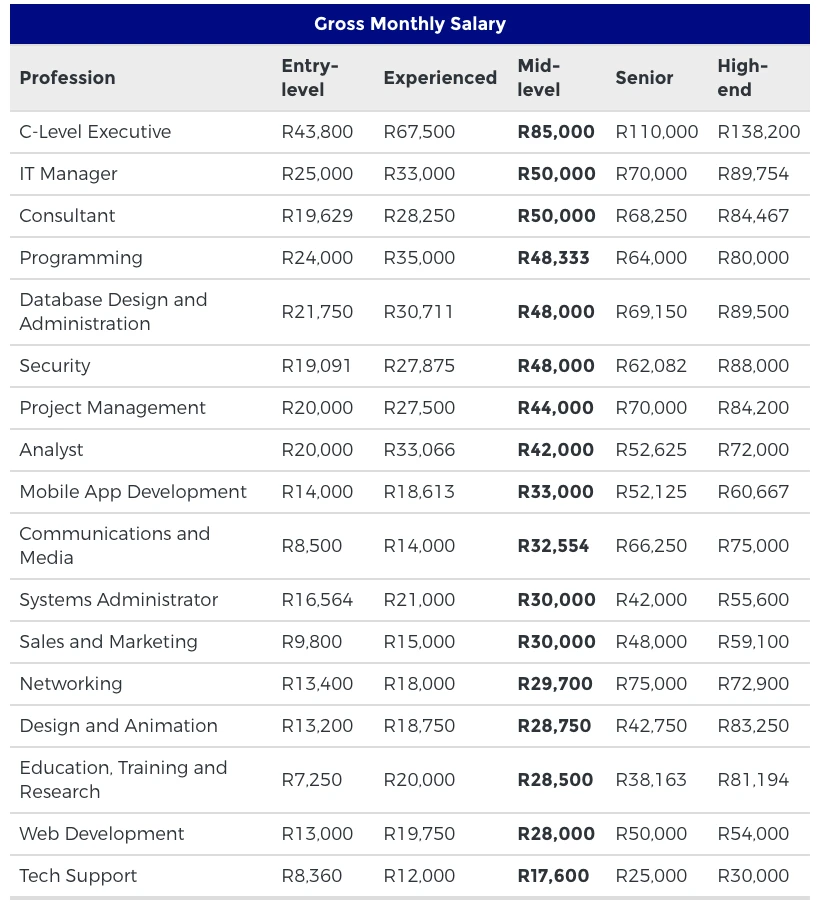
Image source: https://mybroadband.co.za/news/business/275951-south-african-it-salaries-in-2018-how-much-people-really-get-paid.html
Regional Differences: IT salaries in South Africa
CareerJunction released its 2018 Salary Review survey based on 16 000 job posts. Here’s what they found regarding geographical differences in IT salaries in South Africa. Perhaps as expected, the Western Cape and Gauteng remain the best locations as far as salary goes for IT professionals. “Salaries in these regions are very close to the national average, while salaries in KwaZulu-Natal are not nearly as competitive,” said CareerJunction.
OfferZen has conducted similar research and found that Cape Town entry level salaries for developers are on average 14% higher than their Northern cousins: Joburgers starting out can expect to earn about R22 000 per month, while developers in Cape Town earn, on average, about R25 000 per month. However, at the 4-6 year experience mark, Joburg takes the lead: with more than 6 years of experience, the average monthly salary for Joburg developers is R61,240, whereas Cape Town developers with the same number of years of experience earn on average R54,750 per month. Essentially, entry level salaries for developers are better in Cape Town; however, the more years of experience you gain, the better off you are salary-wise in Johannesburg. One potential reason for this is the high number of large financial institutions in Joburg.
In both cities, there is high demand for the following programming languages:
In addition to the languages, Cape Town also currently has “high demand for UX Designers, Python, and PHP developers,” states co-founder Philip Joubert from OfferZen in My Broadband.
In conclusion, IT salaries in South Africa look healthy; they are certainly better than the national average. If you’re thinking about entering the lucrative field of programming, consider signing up at HyperionDev with one of their part-time online coding bootcamps in Full Stack Web Development, Mobile Development or Software Engineering. Alternatively, if you’re keen to equip yourself with valuable data science skills and tools required to think like a data scientist, pre-register for HyperionDev’s brand new data science bootcamp today. You’ll learn about machine learning, data analysis and bioinformatics to prepare you for your career as a data scientist.

Software Engineering
The 5 top podcasts for software developers
Podcasts are an awesome way to make sure your brain is always engaged in some form of learning activity - particularly in your formative years as a coder. We searched the interwebs and came up with a list of podcasts for software developers that we highly recommend.
The digital world has opened up countless doors of opportunity for coders to develop their skills and up their coding game. There are Youtube channels dedicated to development, blogs, live streamed conferences, and then there are podcasts. The latter have literally blown up in popularity over the past years, especially amongst the coding community. What’s great about podcasts is that they don’t necessarily need your full attention – you can download them and listen to them while you’re taking a jog, while you’re driving or during your morning commute. It’s an awesome way to make sure your brain is always engaged in some form of learning activity – particularly in your formative years as a coder. We searched the interwebs and came up with a list of podcasts for software developers that we highly recommend.
- Software Engineering Daily
What’s not to love about a podcast series with an “About” page that the founder signs off as: “If you are a software engineer, and you are not listening to Software Engineering Daily, I want to know why?” With that level of confidence, it best be something to write home about. And it is. Software Engineering Daily features daily interviews about technical topics, by experts in their field. Previous guests have included CEO and Founder of Diffbot, Mike Tung, as well as Evan Gilman, the co-author of Zero Trust Networks. This podcast series is a treasure trove of brilliant content, curated in a way that will expose coders to a wide range of fields. Software Engineering Daily founder, Jeff Meyerson’s value proposition is that after every episode, you should feel like you are 1% better at understanding how software works. Be consistent about listening to these podcasts; by dedicating a relatively small amount of time to honing your skills, you’ll improve one podcast at a time.
- JavaScript Jabber
JavaScript is one of the first programming languages that most coders are exposed to when they enter the field. And there’s a good reason for that. The barrier to entry is extremely low – all you need is a suitable browser and you can start producing real, tangible results with relatively little code. This programming language has become so ubiquitous that there’s an entire podcast series dedicated to mastering it. It’s called JavaScript Jabber and it’s part of a media company called Devchat.tv – a website dedicated to empowering programmers through online learning. JavaScript Jabber features a panel of coders discussing front-end development, the latest trends, advice on how to make career moves in the industry, and frameworks. While you may not immediately grasp the high-level terms in certain podcasts, the series caters to a variety of different levels.
- This Developer’s Life
Sometimes as a coder, the technical stuff is the last thing you want to hear about. You want to be able to subscribe to content that mixes it up a bit – that throws in some life stuff, that talks to the highs and lows of life as a coder. If you relate, then The Developer’s Life podcasts are waiting to entertain, inform and inspire you. Based on the podcast, this American life, the owners of this podcast series have added their unique spin on things. Topics range from typeface design and tech entrepreneurship to more outlandish topics like space (asking questions like, “why aren’t we on Mars yet?”) and why some developers in the industry seem hell-bent on being mean to newcomers. So worth the subscription.
- Entreprogrammers: The Podcast for Developerneurs
Sometimes coders enter the industry with a business goal in mind. At the convergence between the digital world and the business world, there are so many unknowns. Sometimes you may wish you had a blow-by-blow account of what it’s like to start a business as a coder, the teething issues you face and how to keep solving your way to success. Enter Entreprogrammers: The Podcast for Developerneurs. These podcasts are created by four developers-turned-entrepreneurs who give their audience the inside scoop on the world of a dev-based business. These four rather entertaining friends share their experiences in a no-holds-barred kind of way, including challenges like not getting paid on time, the slog of constant travelling and how to convert audiences to customers.
- Developer Tea
The first thing that might strike you about the Developer Tea podcast is the simplicity of its website’s user interface. It’s bold, it’s scrollable, it’s simple – no frills, no fuss. And that same philosophy is captured by the style and content of all its podcasts. Developer Tea was created by Jonathan Cutrell, the co-founder of Spec and developer at Clearbit. To date, it’s had over 7 million downloads and it’s going strong. With the existing topics and sheer brilliance of the guests that are featured, it’s easy to understand why it’s so popular. Its mission is to “help driven developers connect to their ultimate purpose and excel at their work so that they can positively impact the people they influence.” What’s not to love about that?
Many listeners believe that with podcasts, they find content that they wouldn’t find anywhere else. And research proves that this belief is true. There are golden nuggets that come through in conversation that simply cannot be gleaned from other ways of garnering content. And therein lies the magic of the podcast. We’d love to hear more about what you’re listening to as a coder. Tweet us and let us know.
Want to join the global community of coders but don’t quite know how to start? Try one of our online coding bootcamps – we’ll make sure you put your best foot forward.

Data Science
Five books every data scientist should read
If you’re keen to improve your data science skills or you want to learn about the industry from scratch, here are five books every data scientist should read.
Whether you’re starting off as a data scientist or you’ve been in the industry for decades, it’s ideal to be doing additional reading in parallel with your work or studying. We’ve rounded up the five books data scientists should read.
Before we list the books, just a quick recap: data science involves the analysis of data for actionable insights on anything from product development to customer retention to new business opportunities.
And now here are the books data scientists should read.

This book covers many of the most fundamental data science tools and algorithms by implementing them from scratch. You’ll need some programming skills and an aptitude for maths to get to grips with the maths and statistics at the heart of data science.
Some things covered include:
- A crash course in Python
- The basics of linear algebra, statistics, and probability— as well as understanding how and when they’re used in data science
- The collecting, exploring and manipulating of data.
- Machine learning
A newer edition of this book is coming out in June 2019.
This is a crucial read for anyone in the data science industry. The book is basically about the organisation and extraction of vast quantities of data. This comes down to looking at how to get rid of unclear and excess data, improving data collection processes and presenting data, or data visualization, in relevant and practical ways. It’s the guide to what you should do with the useful data you’ve collected and how you should do this.
Some of the things covered in the book include:
- Understand the importance of context and audience
- Determine the appropriate type of graph for your situation
- Recognize and eliminate the clutter clouding your information
- Direct your audience’s attention to the most important parts of your data
- Think like a designer and utilize concepts of design in data visualization
- Leverage the power of storytelling to help your message resonate with your audience
Data scientists use machine learning – it’s one of their fundamental techniques. It’s a way to conduct an in-depth analysis of your data by creating a predictive model. This is a great starting-out book, because it assumes you know almost nothing about machine learning. The goal of the book is to supply the concepts, intuitions and tools needed to implement programs capable of learning from data. The techniques covered range from the simplest to the most commonly used (e.g. linear regression) to some of the Deep Learning techniques. The book uses actual production-ready Python frameworks.
Briefly, Scikit Learn is a great entry point to master machine learning. TensorFlow is more complicated and uses data flow graphs to train and run very large, distributed neural networks.

Python is still the leading language for data science. If you’re starting out with Python, this is an excellent first step. This hands-on guide takes you through this important language one step at a time. You’ll start with basic programming concepts and ultimately move on to functions, recursion, data structures and object-oriented design. Every few chapters the book ties the key concepts together and includes relevant case studies. It is aimed at students at college level, as well as self-learners and professionals who need to learn the programming basics.

R is another top programming language for data science. In fact, R is growing at a similar rate to Python, though from a smaller initial base, claims a Stack Overflow blog post. A recent poll in the data science community found that 52,1% of programmers use R versus 52,6% who use Python.
This book will introduce you to R, RStudio and the tidyverse, a collection of R packages which work together to make data science fast and fluent. It’s suitable for readers with no previous programming experience who want to get R-fit as quickly as possible.
You’ll learn the following:
- Wrangle—transform your datasets into a form convenient for analysis
- Program—learn powerful R tools for solving data problems with greater clarity and ease
- Explore—examine your data, generate hypotheses, and quickly test them
- Model—provide a low-dimensional summary that captures true “signals” in your dataset
- Communicate—learn R Markdown for integrating prose, code, and results
This article has covered five books data scientists should read. If you’re keen to equip yourself with valuable data science skills and tools required to think like a data scientist, pre-register for HyperionDev’s brand new data science bootcamp today. You’ll learn about machine learning, data analysis and bioinformatics to prepare you for your career as a data scientist.

Cyber Security
Should you consider a career as a cyber security specialist?
Are you keen to ensure that a computer’s networks and systems remain safe? If so, becoming a cyber security specialist might be the ideal occupation for you. Read more about this job, the computer languages required, expected salaries and demand.
There are many ways to enter the lucrative field of programming, from designing mobile apps to looking after the safety of a computer’s networks and systems. If you’re interested in risk reduction strategies, particularly in the field of information technology, cyber security might be just the right job for you. We’ll explore the career of cyber security specialist in more detail, including what you need to know, expected salaries, the demand in the workplace for this role and more.
What is a cyber security specialist?
In essence, a cyber security specialist is “in charge of the electronic security of an organization”. This could include re-certifying or updating the security of applications and servers, troubleshooting country-wide security threats, testing as well as regular updates for virus protection. Other important aspects of the job involve training workers on security procedures to maintain security and informing management of any security violations.
What languages should I know to become a cyber security specialist?
According to the website Cyber Security Jobs, specialists in this area should know about “system architecture, system administration, operating systems, networking, virtualization software, and other major components of IT systems”.
Although not all cyber security specialists have coding skills (products such as Solar Winds’ Access Rights Manager are coding-free solutions to improve IT and data security), you may find your path severely limited without some programming knowledge. Programming is used to assemble software, apps and websites. You will need to understand how these applications work to understand how they can be hacked or manipulated. Here are some languages you should think about learning:
JavaScript
This is one of the best languages to learn because this language is everywhere. In addition, if you want to steal cookies, manipulate event handlers and perform cross-site scripting – i.e. hacking-type behaviour – you’re likely to use JS.
Python
In answer to the question on Quora, ‘What programming languages are best for cyber security?’, many respondents mention Python. Some reasons they give include: (1) Interacting with files, dealing with binaries and much more (2) Automating tasks and tools to enhance your security arsenal. In addition, Python is an easy language to learn for newbies. In fact, it reads similarly to English, which means it removes a lot of syntax-learning stress from coding beginners.
C
Many Operating Systems and 90% of libraries and frameworks are written in C. Learning how to program in C will help you a lot as a cyber security specialist.
Various front-end and back-end web languages
You’ll want to understand how websites are coded in order to know how they can be hacked. From a front-end perspective, you could consider HTML (a markup language for website), CSS (a styling language to determine how the website will look) and JavaScript, as discussed earlier. You might also want to include a framework, which allows you to work with all three front-end languages, such as Bootstrap, the most widely-used open source framework in the world.
Back-end languages for websites include PHP, SQL, Python and Ruby among others. A popular back-end framework is Ruby on Rails.
Let’s look now at the demand for cyber security specialists.
What is the demand for cyber security specialists?
There is a growing demand for this job role. From 2016 to 2026, the Bureau of Labor Statistics anticipates a 28% increase for work in this category. That’s faster than the average growth for all occupations in the US.
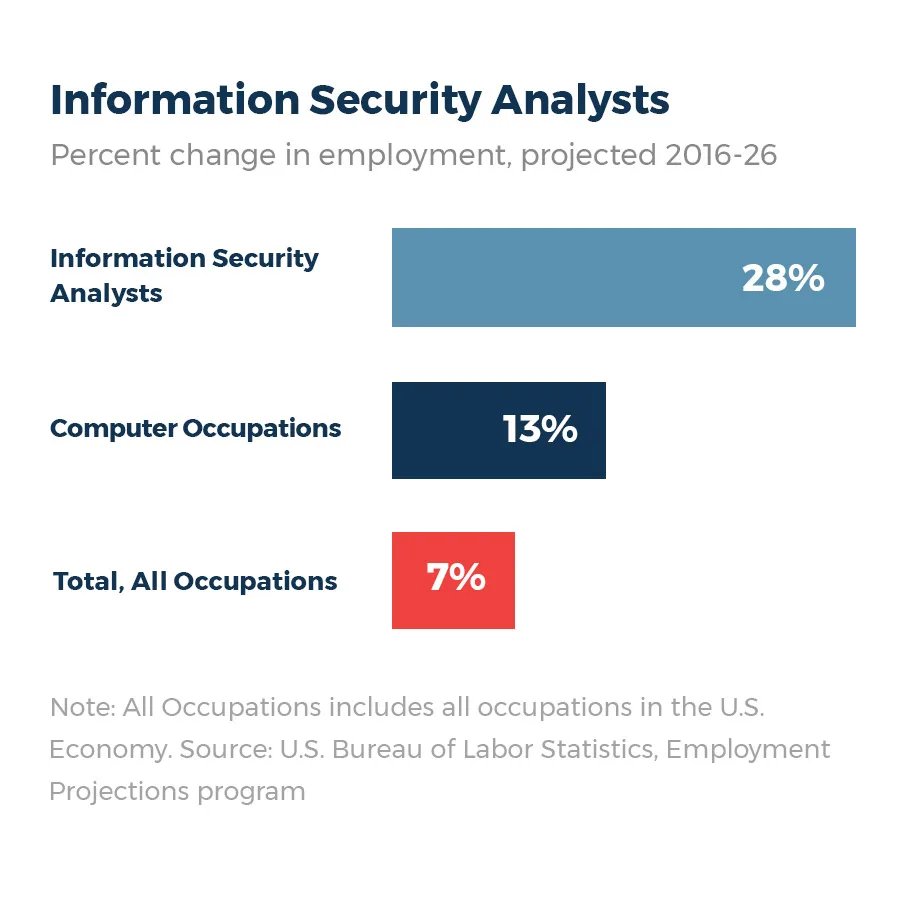
Image Source: https://www.bls.gov/ooh/computer-and-information-technology/information-security-analysts.htm#tab-6
The reason for the high demand relates to an increase in cyberattacks. Cybercrime will cost the world $6 trillion annually by 2021, according to Cybersecurity Ventures. This is substantially up from the 2015 amount of $3 trillion. If these predictions bear out, cybercrime will be more profitable than the global trade of all major illegal drugs combined. No wonder cyber security specialists are in such high demand.
What can I expect to be paid as a cyber security specialist?
The average annual salary for cyber security specialists in the US in 2018 is $107,433, according to ZipRecruiter. The majority of salaries – i.e. from the 25th to the 75th percentile – range between $79,500 and $122,500.
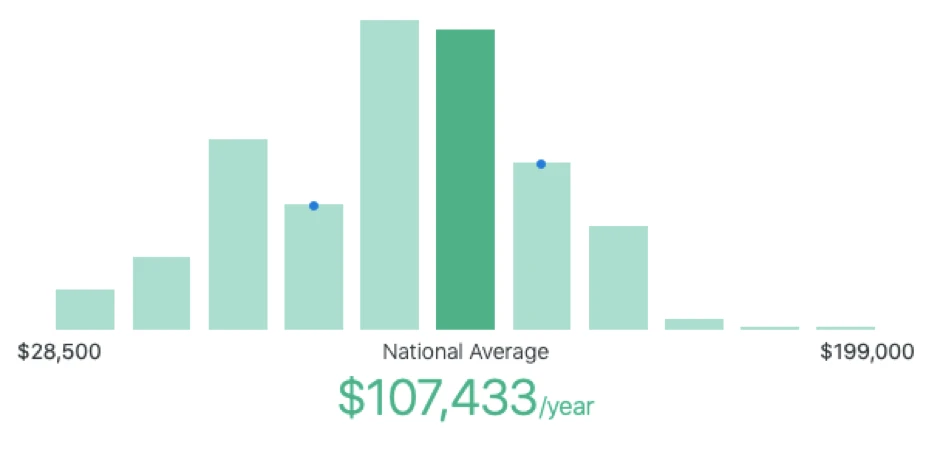
Image Source: https://www.ziprecruiter.com/Salaries/Cyber-Security-Specialist-Salary
In conclusion, the job of cyber security specialist seems absolutely worth pursuing. The demand for the position is high and the jobs are well paid. You can learn the coding skills component of the job at HyperionDev with one of their part-time online coding bootcamps in Full Stack Web Development, Mobile Development or Software Engineering.
Tutorials
HTML tutorial 3: tables & forms
The third HTML tutorial for beginners in a series from HyperionDev will show you how to set up HTML tables and forms for a web page, using HTML code.
If you’ve been following our HTML tutorial series, you’ll be familiar with how to create a basic HTML page with titles, headings and paragraphs. You’ll also have a basic understanding of Lists, links and images. By the end of our second tutorial, your document in Notepad++ should be displaying as follows:

In this next tutorial, you’ll be adding to the code to set up tables and forms in HTML.
HTML tables
Tables can be a useful way of organising content on a web page, particularly text.
- A table is defined with the <table> tag.
- Each row in the table is defined with the <tr> tag.
- A table heading is defined with the <th> tag. (Headings are bold and centred by default.)
- Each cell of data in the table is defined with the <td> tag.
Basic table: Set up a table with three headings to your page, by adding the following code to your document under the “ordered list” code. This is a real-life example that lists a weekly class schedule. The <th> tags will form the columns in this table, and the <td> tags will form the rows.

When you refresh your page, the table will appear as follows:
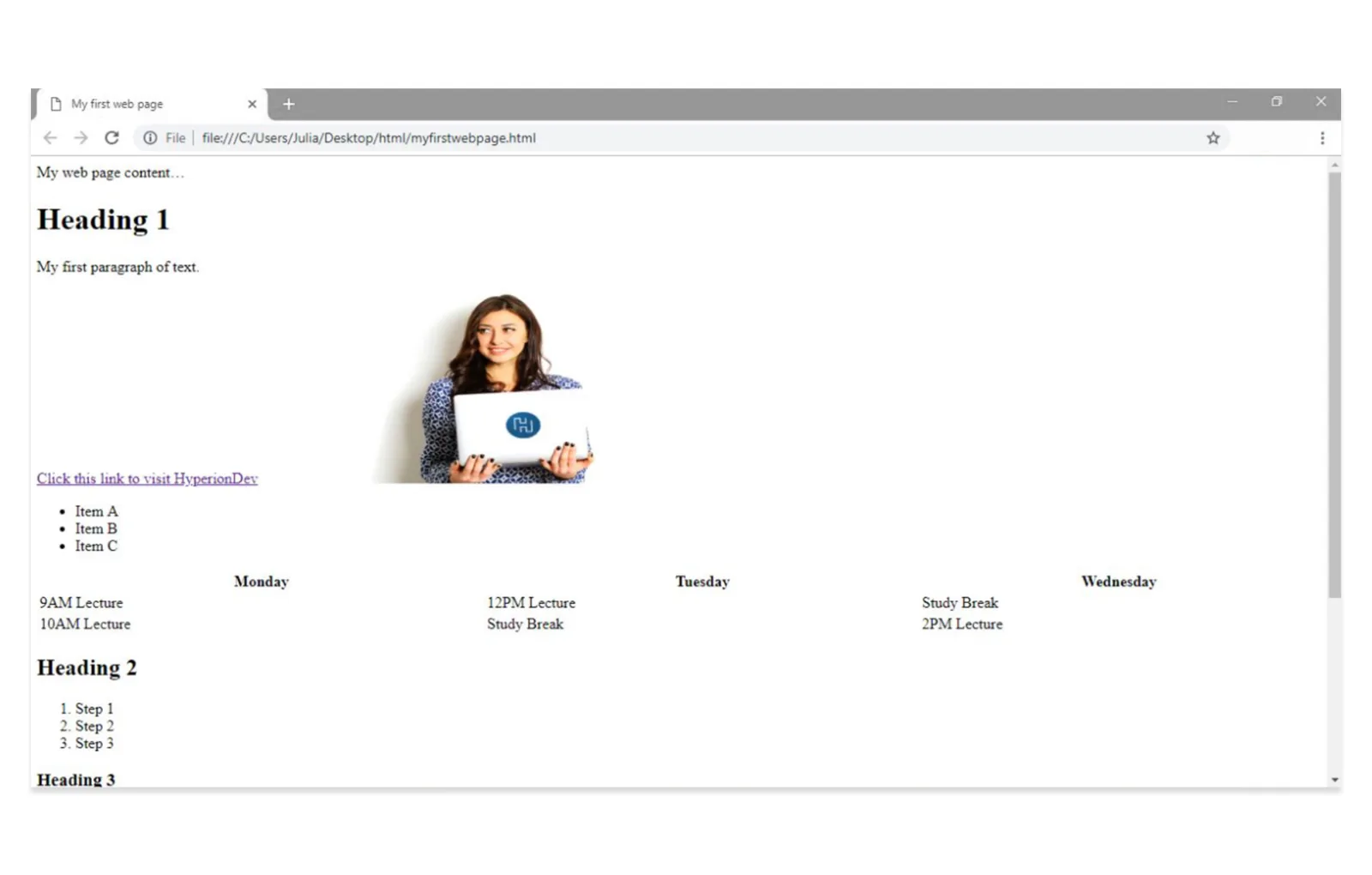
To add borders to your table and align the text, you would need to use CSS properties.
To make our example more visually clear, we’ve added the CSS border property: border=”1″ to our table. You’ll be able to learn more about CSS properties and how to use them in future tutorials.
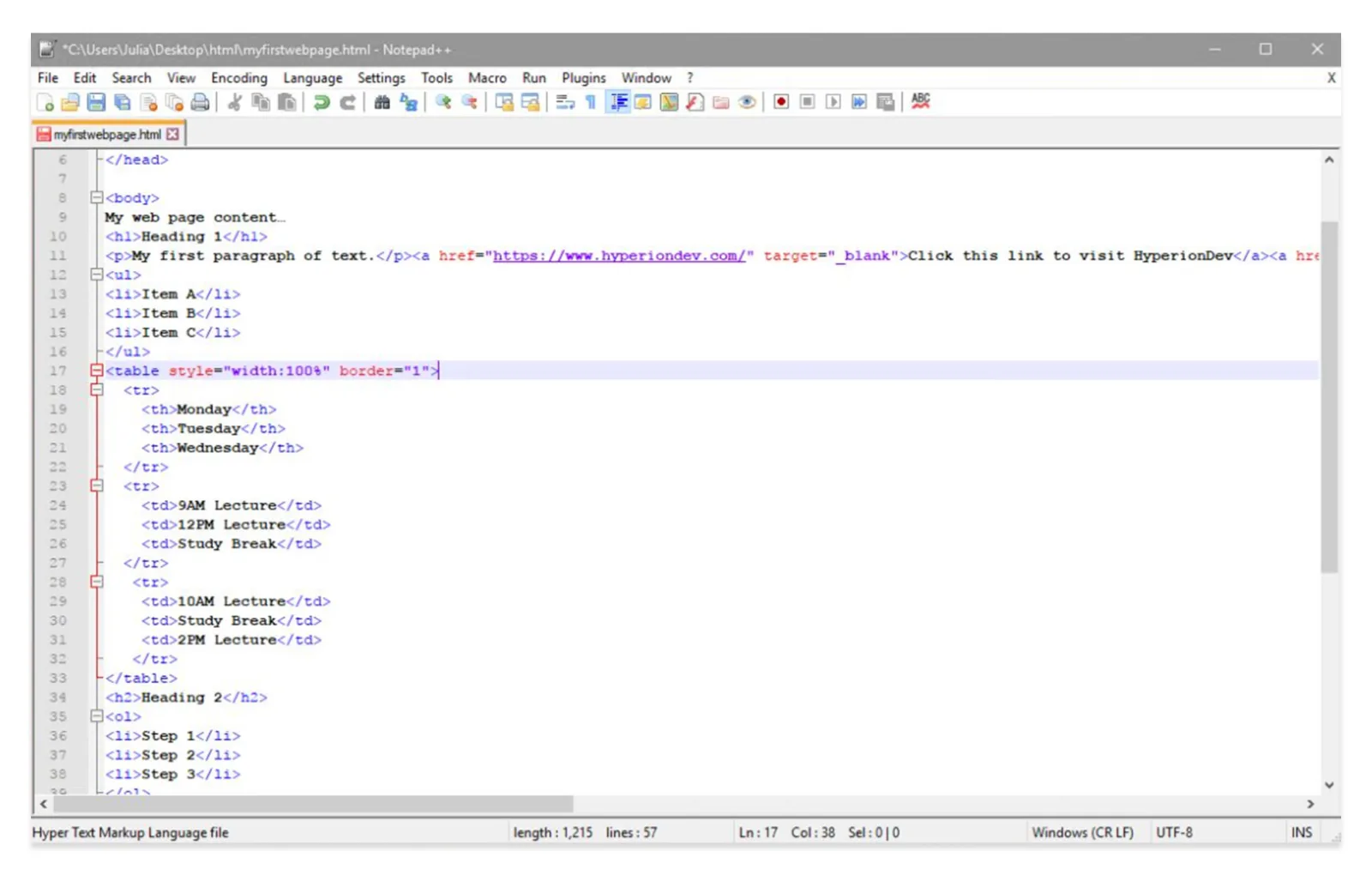

Captions: You can also add a caption to your table to tell the user what the content is about, using the <caption> tag. (For example, “Class Schedule” or “Client Details”.) This tag sits between the <table> tag and the first <tr> tag.
Add the caption “Weekly Class Schedule” to your table by adding the following code:
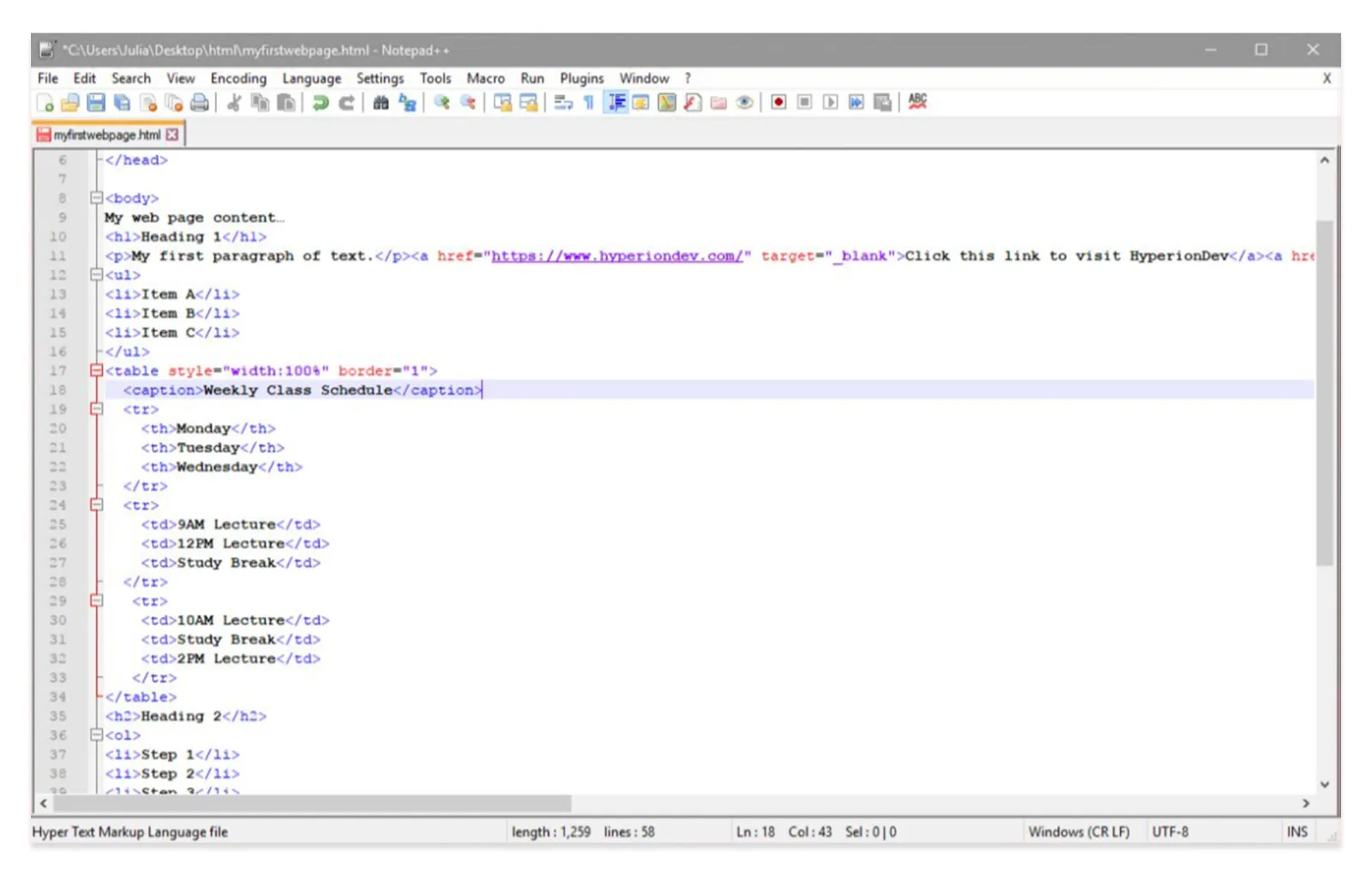
When you refresh the page, you’ll see that your caption appears above the table headings:

You can use HTML code to create tables with cells that span multiple columns, or multiple rows.
Multiple columns: To make a cell span more than one column, we must use the colspan attribute. (Remember, attributes are what we use to provide additional information about a specific HTML element.)
The number of columns must appear between quotation marks, ie. “2”.
For example, let’s say we want to adjust this class schedule, to show that the same 9AM lecture takes place both on Monday and on Tuesday. Edit the table by adding the colspan attribute to the “9AM Lecture” cell, and removing the ”Study Break” cell.
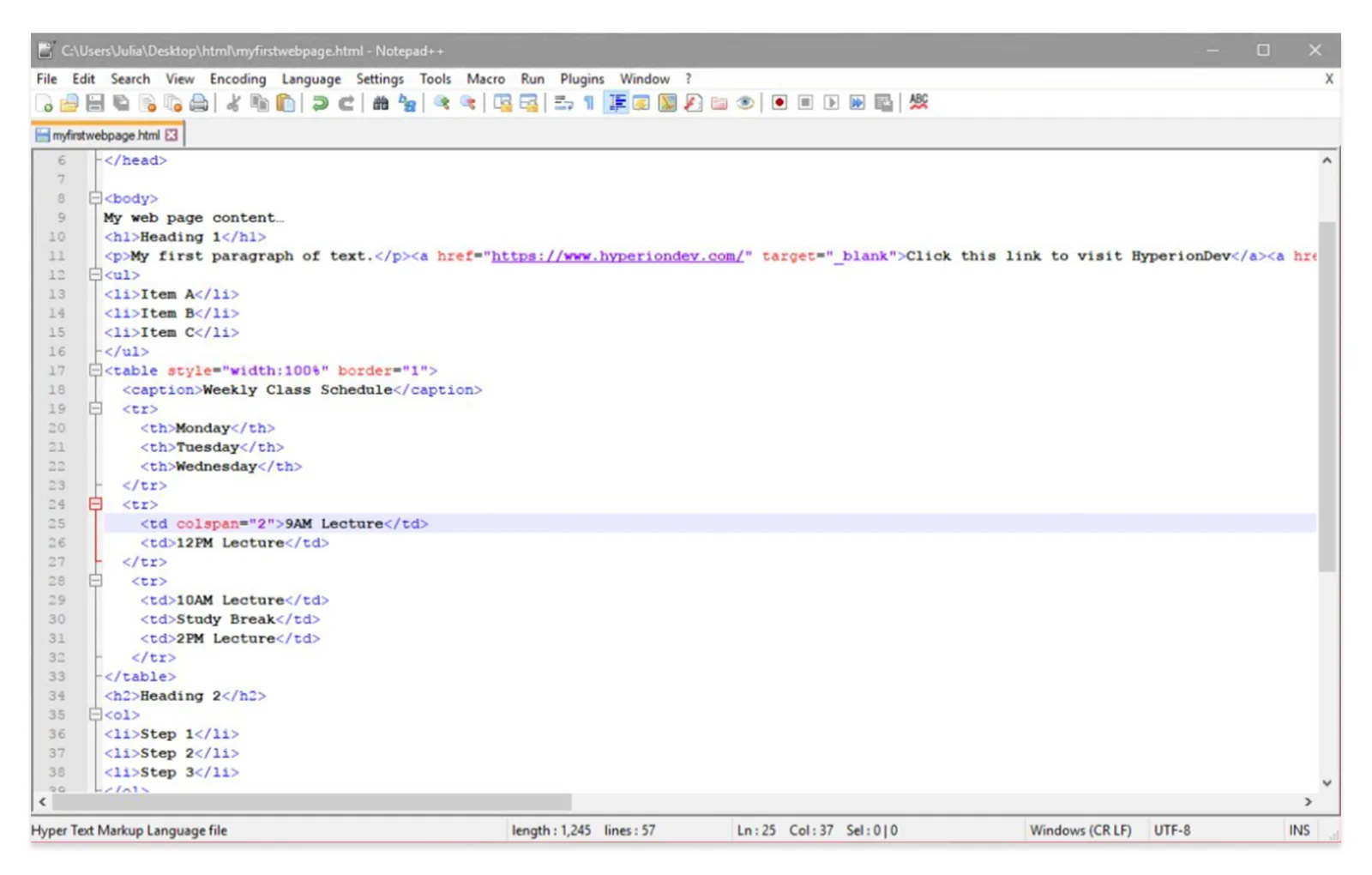
When you refresh, the appearance of the table will have changed, with the “9AM Lecture” cell spanning the Monday and Tuesday columns.

Multiple rows: To make a cell span more than one row, use the rowspan attribute. Again, the number of rows must appear between quotation marks. This is useful in cases where you have two rows that fall under one heading.
To change the “Tuesday” heading so that it spans two rows, edit the table by adding a rowspan attribute.

When you refresh, the ”Tuesday” cell will span over two rows.

HTML forms
A form allows users on the site to enter information. You will need to use the <form> tag to define a form that will be used to collect user input.
An HTML form contains form elements, which are various types of input elements, including text fields, check boxes, radio buttons and submit buttons.
Add your opening and closing tags for your form, above the table:
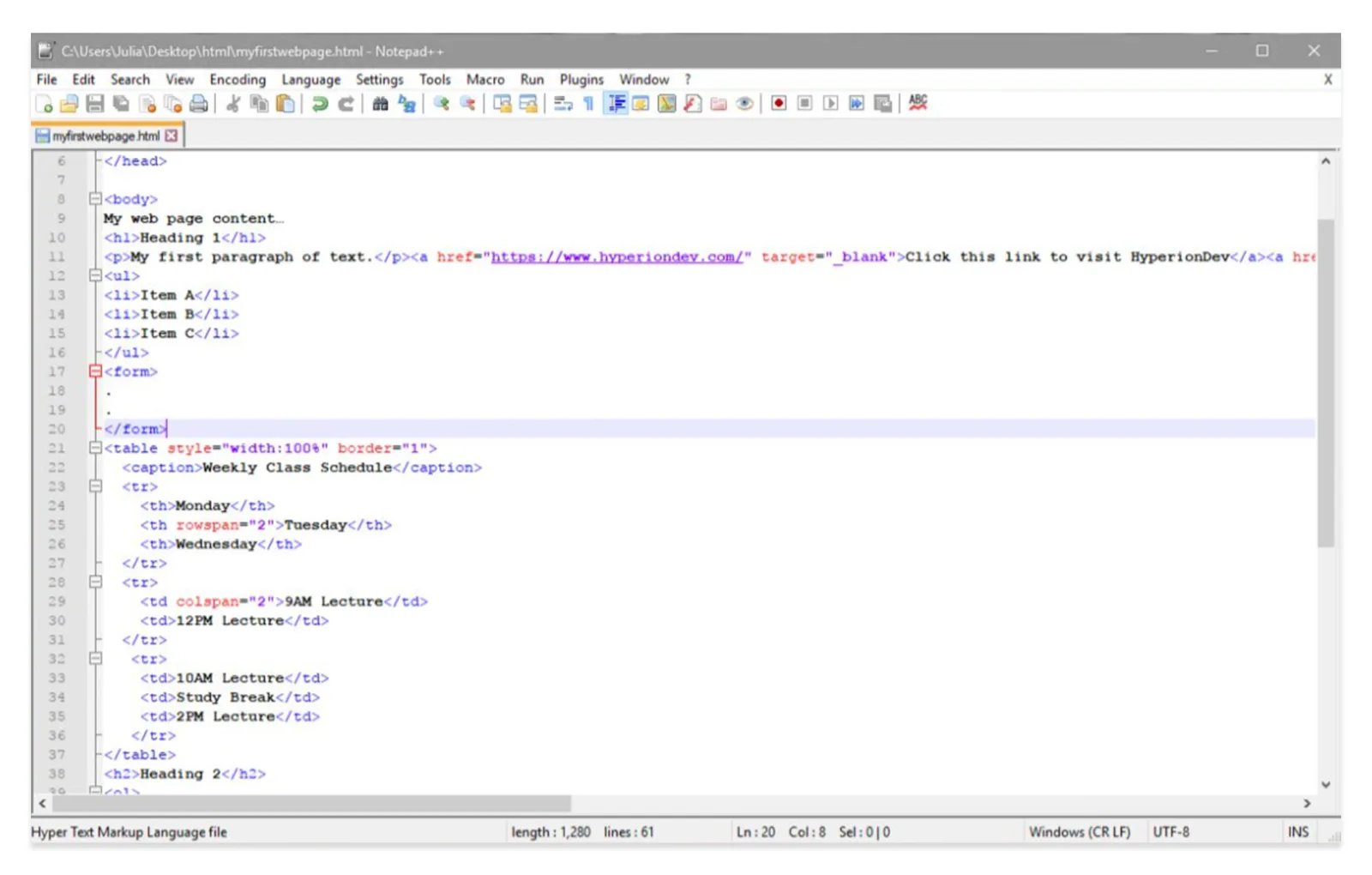
You will now have space for the form on your refreshed page:
The <input> element is the most important of all the form elements. It can be displayed in a number of ways, depending on the type attribute used.
For example:
<input type=”text”> defines a one-line text input field.
<input type=”radio”> defines a radio button.
<input type=”submit”> defines a submit button.
Text fields: Add attributes into your form as follows, asking the user to input their name and e-mail address. The <br> tag adds a break, which allows you to display text on a new line. The input type and name must appear inside quotation marks.
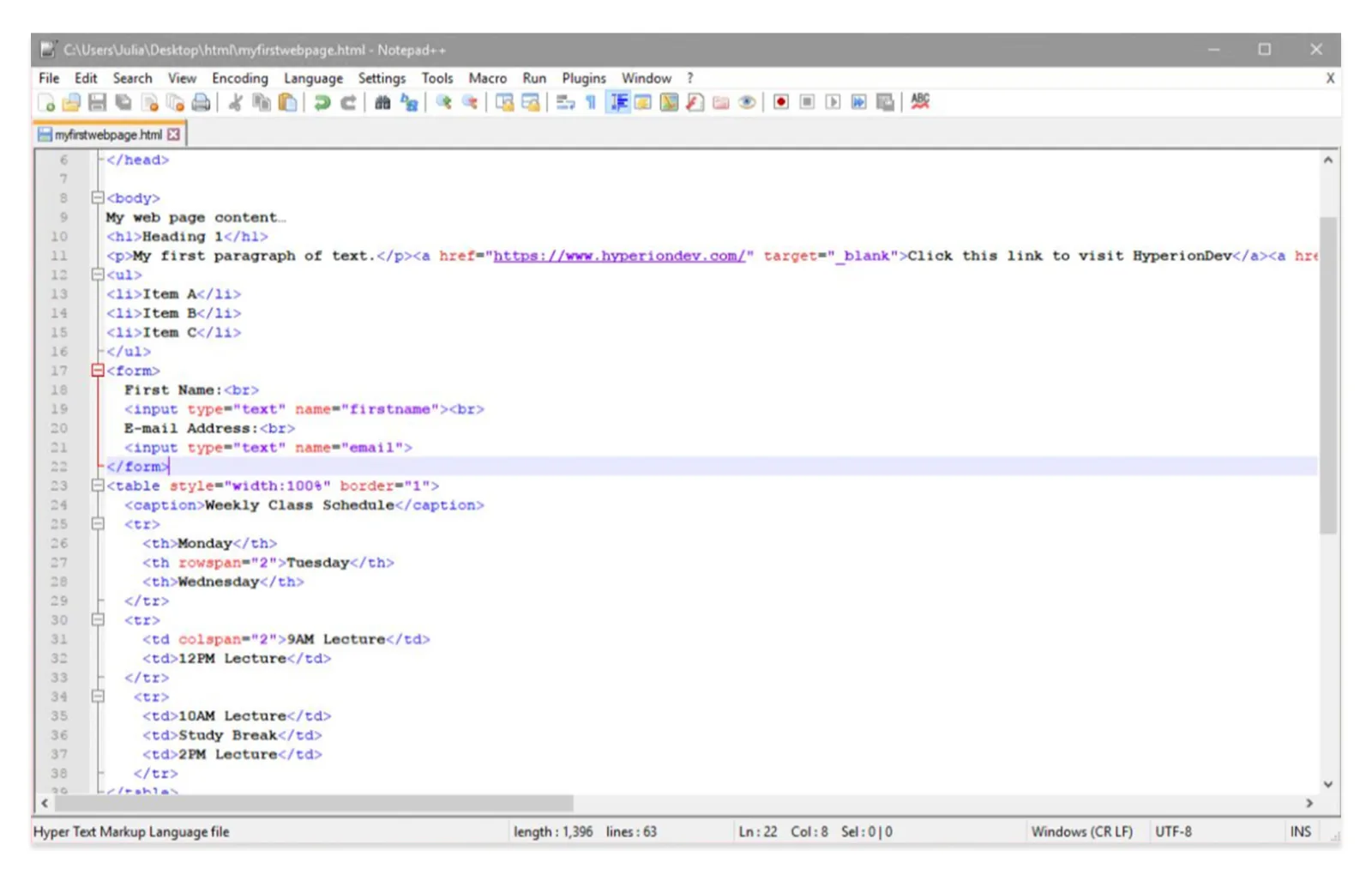
Now the input fields will appear in the form on your page.

Radio buttons: A radio button is a graphical icon representing one of a set of options. A user can only select one option at a time.
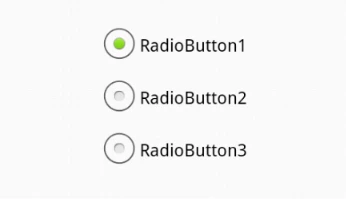
You will also need to use a value attribute, which specifies the value of an <input> element. Again, input types and names must appear inside quotation marks.
Add three radio button options to your form, using this code:
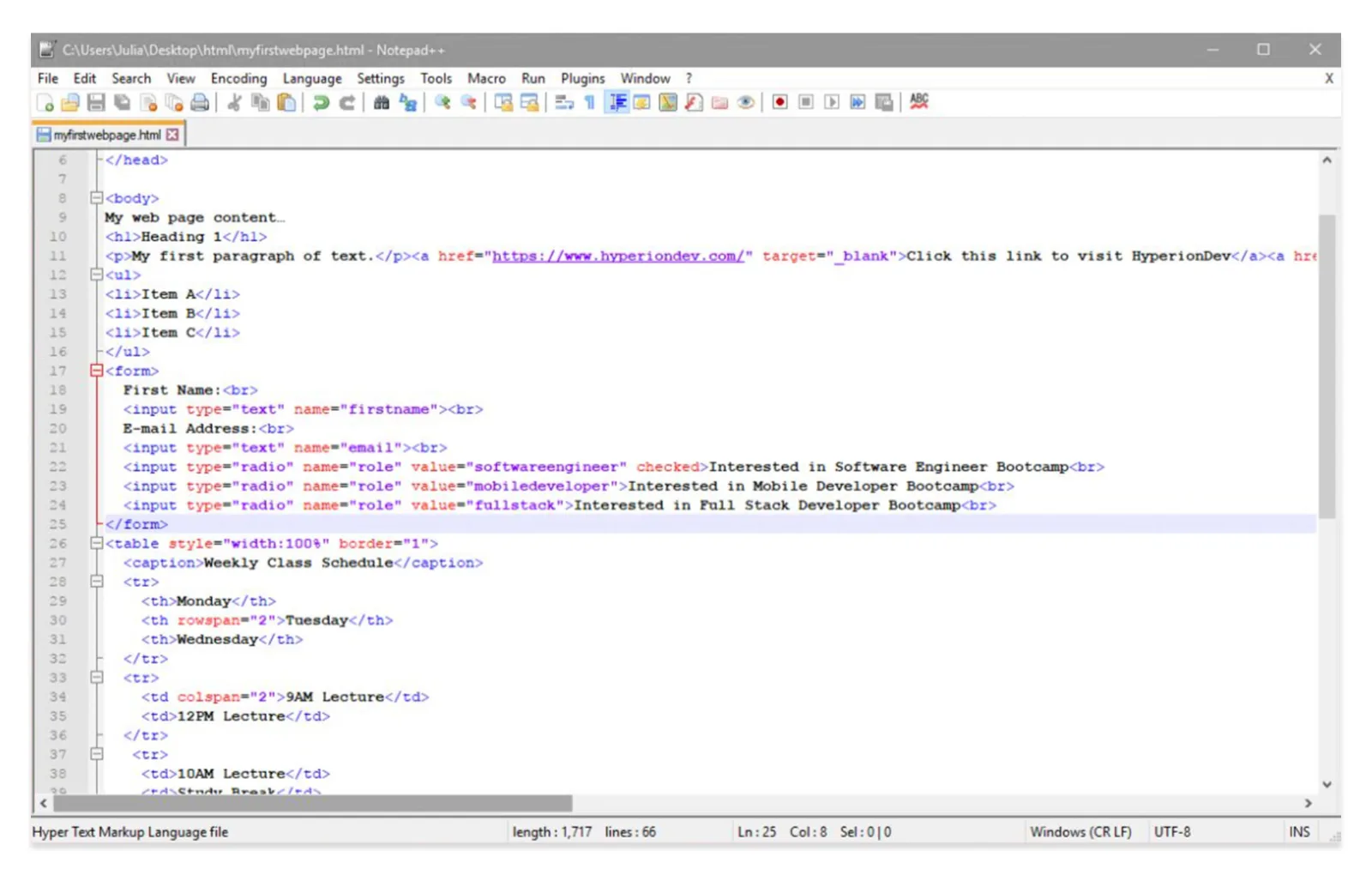
The updated page will display a choice of three clickable radio buttons.

Submit button: This button allows the user to submit the form data to a form-handler; a server page that processes the data.
The form-handler is typically a server page with a script for processing input data.
The form-handler is specified using the action attribute. This attribute defines the action that will be performed when the form is submitted. In this case, “/action_page.php” would contain a server-side script to handle the form data.
Add a submit button and action attribute to your form as follows:
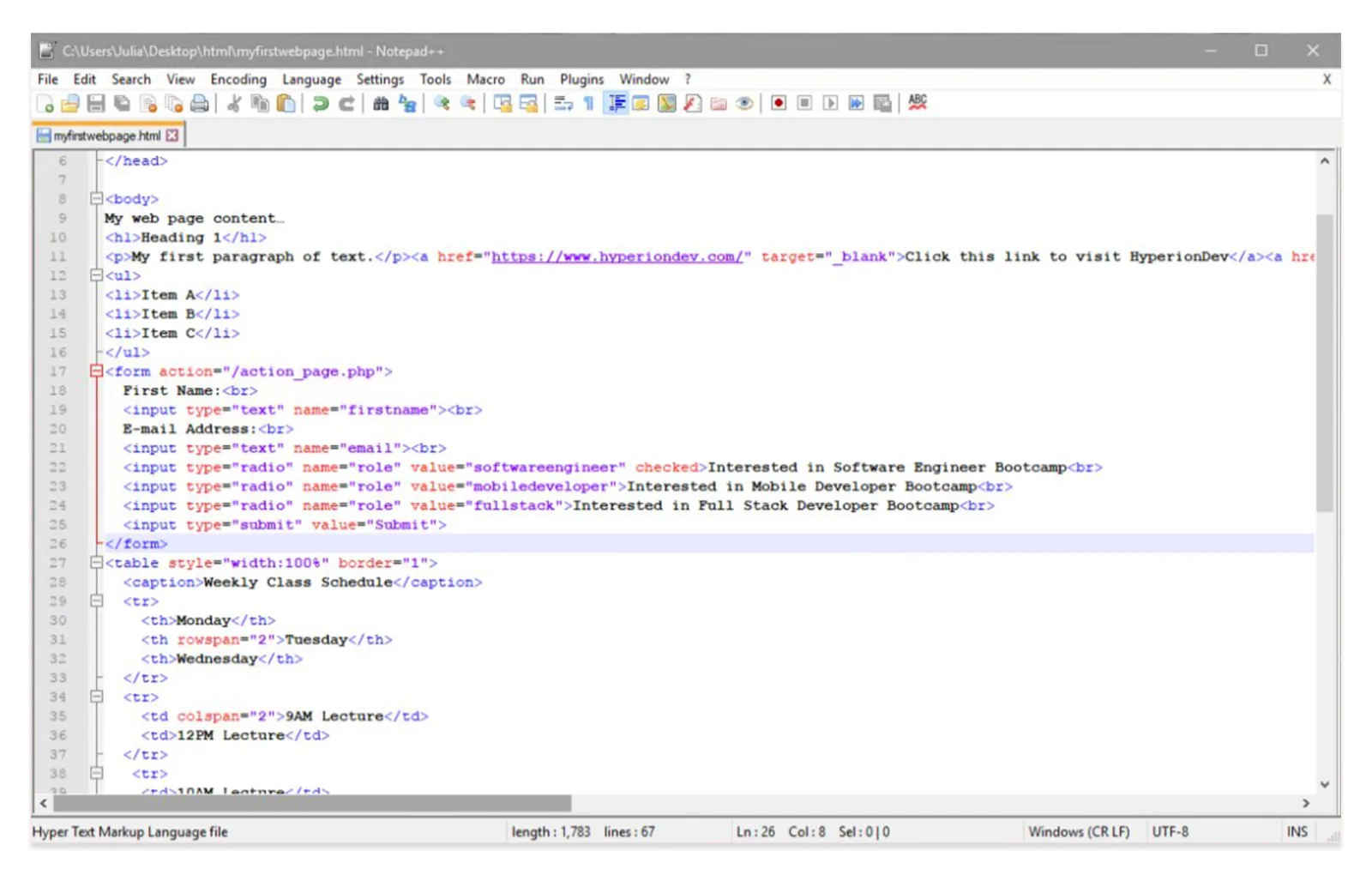
The submit button will appear in the browser.
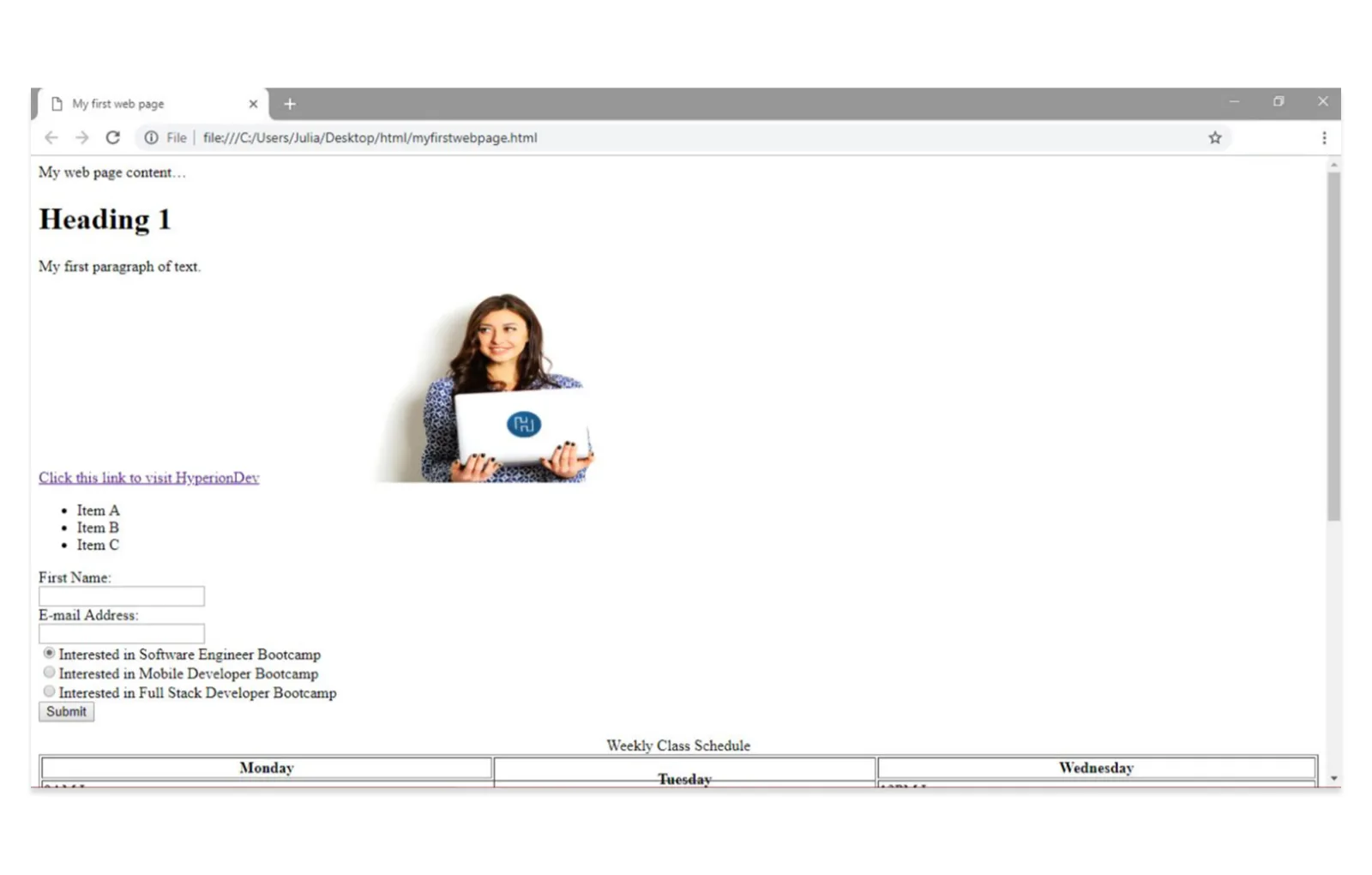
Now that you’ve covered the basics of tables and forms, you can try your hand at some more complex layouts.
If you want to learn about the finer details of HTML coding, it’s time to go a little further than an HTML tutorial for beginners. Dive into an online coding bootcamp, complete with mentorship and code review.

Tutorials
5 Tips to Boost Video Performance on Your Website
How do you leverage the most from a video once you’ve added it to your website? You don’t want the performance of the video to negatively impact the load time of your webpage. This article lists out 5 tips you can use to optimize the videos on your WP blog
According to a study by Cisco, global video traffic will be 82 percent of all consumer Internet traffic by 2021. With Instagram Live, Periscope and other services, live video has been bubbling for a while. Add to that the fact that 64% of consumers are more likely to purchase a product on a retail website after watching a video, it is no surprise then that 70% marketers report videos to be a better conversion medium.
However, how do you leverage the most advantage from a video once you’ve added it to your website? You don’t want the performance of the video to negatively impact the load time of your webpage. This article lists out 5 tips you can use to optimize the videos on your WP blog. Right from technical details like codecs through to self vs. hosted videos to videos for multiple devices, we have you covered.
Uploading and Adding Video File Types to WordPress
After the latest WordPress update, uploading videos to your WP site has become much simpler. We’ve listed the steps below:
- Click ‘Add Media’ from within a post or a page. Click the ‘Upload Media’ tab on the top of the page –
- Next, click ‘Select Files’ button –
- Select the video file you wish to upload and follow the prompt
- After the file has been successfully uploaded, you can enter a title, caption, and description as needed towards the right of the page. You need to ensure that the Embed Media Player option is selected.
At the final step, click ‘Insert into post’ and your video will be added along with a thumbnail. You can use plugins to upload the video if you’re not going to store it on your WordPress server.
When it comes to encoding videos, there are specific file extensions that WordPress allows for video uploads. These include –
- .MP4, .M4V (MPEG-4)
- .WMV (Windows Media Video)
- .OGV (Ogg)
- .AVI
- .MPG
- .MOV (QuickTime)
- .3GP (3GPP)
- .3G2 (3GPP2)
In case you would like to add videos in formats not allowed by default, here is the code you would need to add to functions.php–
In case you need to replace a file type from the pre-defined list of accepted file types, you can add this code –
Self Hosted Videos – Is it a Good Idea?
There are two options when it comes to choosing where your videos are stored – Self-hosted and hosted.
Self-hosted videos are those that are stored on your server that also hosts your WordPress site. Hosted videos, on the other hand, implies that your videos are stored in a different location and embedded or linked to your site.
There are a number of different reasons focused on video performance as to why you would choose one option over the other. Here are some pointers to help you make the decision.
In case you plan to display a number of HD videos, there is a possibility that you will exhaust the storage and bandwidth limit of your server pretty quickly. In this case, it might be best to host your videos at a different location. You could use video optimization plugins to compress the video before they are sent to the server. This would improve the video performance on your site.
What hosting options do you have?
The hosting option you choose is important. If you’re self hosting, you might have to use a dedicated hosting with sufficient bandwidth.
Shared Hosting & VPS hosting – Although it might be okay to store a few static video resources of smaller size on your shared/VPS hosting, you’ll be limited by the bandwidth offered by your host.
Dedicated Hosting – Depending on your infrastructure setup, you should be able to do quite a bit with your videos when using dedicated hosting. However, as you add to your video library, you may need to consider an upgrade in the future.
Optimize your Site and Server for Speed – Ensure that your server has sufficient RAM and a generous processor speed. As a general rule, a 1GB video should fit comfortably in your hosting plan as long as it has 2.5 GB of RAM and a dual-core processor with 1500 MB of storage space.
Ensure you have Sufficient Bandwidth – The amount of bandwidth depends on the number of visits you expect. If you foresee a spike in visits, you need to consider the amount of bandwidth your site can leverage. Typically, a 1GB video played or downloaded 1000 times requires 1TB of bandwidth.
Hosting Your Videos in the Cloud
A popular alternative to hosting your own videos is hosting it on Youtube, Dailymotion and other video sharing platforms. They have unlimited bandwidth and you don’t have to pay a dime. You can them embed the videos on your pages using WordPress’ HTML5 player or a third-party player.
If you’re not happy sharing your videos on social video platform like Youtube, you can instead host it over at a video cloud hosting solution like Cloudinary, JW Player etc. You can then embed the video using an HTML5 video player plugin offered by these vendors. These cloud solutions offer dynamic video transcoding functionality too. For instance, you can customize the quality of the video on the fly so that the users with slower connections can load a version of the video with smaller file size.
Furthermore, if you have expertise with AWS or a similar cloud platform, you can use an object storage service like AWS S3 or Google Firebase storage. You can add additional modules for video optimization and video tagging. Firebase for instance has a ML-Kit that covers many of the everyday AI requirements like video tagging and classification.
Displaying Responsive Videos in WordPress
If you use the default WordPress player, your videos would usually be fully responsive. However, this can be a problem, especially when using untested players on iframe to display videos.
The initial step to ensure your iframes support responsive videos is to download the FluidVids.js script by Todd Motto on GitHub. It’s particularly optimized for video performance.
Next, upload a copy to your media library, to each page file you plan to use for your theme – or, at a minimum, the type of page where you wish to display videos.
You can add this script to your /wp-content/themes/your-theme/page.php file to display responsive videos embedded with iframes on your WordPress pages. You can edit the file and call the script toward the top of the page, after all the initial page notes.
What Settings Should You Use?
The settings you need to use to ensure your videos display well might be different for different users, especially when using a video hosting service as each service comes with their own recommended settings.
In case of self-hosted videos though, a general rule applies. Here are some recommended settings –
MP4 H.264 (AAC or MP3)
The MP4 container format with the H.264 video codec and the AAC audio codec is natively supported by desktop/mobile Internet Explorer, Safari, Chrome and Firefox.
Video
- Codec: H264 (High profile)
- Frame Rate: 24, 25 or 30 (Constant)
- Frame Size / Resolution: 1280 x 720 (720p)
- Fields: Progressive
- Bitrate: 5000 – 10000 kbps
Audio
- Codec: AAC-LC
- Bitrate: 320 kbit/s
- Sample Rate: 44.100 OR 48,000 kHz (retain original sample rate)
WebM
The WebM format uses the VP8 or VP9 video codec and the Vorbis or Opus audio codec. WebM is sponsored by Google and supported natively on Firefox, Opera, Chrome, and VLC Media Player.
Video
- Filename Extension: .webm
- MIME-type: video/webm
- Audio-only MIME-type: audio/webm
- Video Codec Name: VP8 or VP9
- Audio Codec Name : Vorbis or Opus
Audio
- Ogg Theora Vorbis
- Ogg Opus
Summary
In this article, we’ve covered the steps that you need to follow to improve the performance of videos on WordPress. Next time you’re about to add videos, give it thought whether your host is capable of providing you bandwidth and storage space that meets your requirements.
If you have any thoughts to share, let us know in the comments.
Still have questions?
Contact our Admissions Team, and a real person will get back to you.