
Our latest insights
Read the latest insights


News & Announcements
November 15, 2017
How Free Education is Possible in South Africa
Free Education South Africa - there are practical ways that technology can be leveraged to provide free education on a large scale.
The FeesMustFall movement is sweeping across South Africa for a second time, plunging campuses into chaos under the demand of free education for all. In South Africa – and other African countries – it is clear that education is a privilege, rather than a right, but there are practical ways that technology can be leveraged to provide free education on a large scale.
Social enterprises – broadly defined as organisations that seek to maximise social impact and not just generate profit – can apply powerful business models to balance the scales in education. A simple example of this is cross subsidization. This is the technique of charging higher prices to one group of consumers – or students – and using those funds to subsidize lower prices or even no prices for another group.
The extension of this to education is natural – charge fees to only the students that can afford them, and implement a business model such that a percentage of those fees could be used to support free education for students that cannot, whilst still keeping the education business sustainable. A modern day Robin Hood – borrow from the resourced to give to the poor, maximising social impact alongside revenue.

But how can we decide which group of consumers, or students, has to pay? In South Africa, a widely used framework called the Living Standards Measure (LSM) categorises people into 1 of 10 groups based on income, degree of urbanisation, and other factors to define how resourced a person is. The LSM of someone can map to whether they pay for education or not, or even how much they pay.
This model can be very successfully scaled when applied to online education. Hyperion Development, a South African based technology company, implements this exact model in the field of software development and Computer Science education. By selling online courses to high-income demographics, Hyperion has been able to provide free education in the field to 75% of all its students from across not just South Africa, but Africa.

Hyperion has been able to build a profitable business through this model, by also leveraging graduates of its free courses to become employees and drive forward the promote of free and paid courses through low-cost mechanisms. This model has recently earned the organisation recognition from Facebook as grand prize winners of a $230,000 grant from the Africa Innovation Challenge.
But the model can grow even further – education can be provided online to people in Europe, bringing sustainable income into Africa to fund free education locally. Maybe to scale free education at home, we should look at how we can leverage our resources here to build uniquely excellent services abroad? Maybe Africa can teach the world a lesson.
Author: Riaz Moola
Date originally published: 12/10/16

Software Engineering
Use an Android App Without Installing It
App streaming - sream Android apps on your Android device via Google Play. This is available in beta.
Android users can identify all too well with the scenario of wanting to get something done only to realise an app download from the Play Store was required. Whilst opening the Store, searching for the app in question, and waiting for it to download and install might not come across as an incredibly tedious task, Google nevertheless felt they had to improve the situation by introducing – in beta – app streaming for some apps.
Play Store? What Play Store?

The concept of “app streaming” is not much different in practice to a remote desktop session on Windows, except here you’re on an Android device and streaming an Android app. From the appropriate search result on the mobile web, you can now choose the option to “stream app” and instead of being greeted with a Play Store ‘download’ button, you’ll get a screen view of a remote Android device running that app. This means you can interact with the app as you would a regular app actually installed on your device, except of course that this app wouldn’t be installed at all.
The objective of this sort of app streaming platform is best seen with smaller companies whose only product is an app (with their website hosting an App or Play Store link to it). Not forcing users to download and install their app but still giving them the functionality of it, as far as the company is concerned, is a great way of increasing user engagement with their product.
Unfortunately for us in South Africa, the usual “high bandwidth” caveat applies: app streaming requires a fairly large amount of data and predictably, a good connection. Also, the apps that currently support the feature (such as HotelTonight) are US-only for now so this remains an interesting concept for us, until Google casts its feature-net wider to our shores.
Comment with your views on this article in the comments section below, and follow Hyperion Hub developments in the future if you’d like to see more articles like these for the South African market.
Author: Matthew de Neef
Date originally published: 14/01/16

News & Announcements
November 15, 2017
Autodesk Competitor Steals Code, Blames Rogue Engineer
Autodesk competitor steals code - it appears that a software engineer from Chinese competitor firm ZWSoft had stolen Autodesk's code
Those End-User Licence Agreements on software exist for a reason: to prevent licenced code from unauthorised use. This was true for design software company Autodesk recently when it appeared that a software engineer from Chinese competitor firm ZWSoft had stolen their code. Both companies develop technical drawing, modelling and drafting tools used by civil and mechanical engineers as well as architects to model parts, structures and design building plans. It appeared that ZWCAD+ the software made by ZWSoft was partly developed using code stolen from Autodesk’s competing AutoCAD design software. The Chinese firm blamed the software engineer for acting on his own, saying that their top management didn’t know about the code pilfering during ZWCAD+’s development until it was discovered just recently.

Management Made Big Claims
Shortly before the code theft discovery, ZWSoft’s top brass stood up against the market-leading Autodesk during a copyright infringement lawsuit case, boldly claiming that all their software was open-sourced and licensed, and that the lawsuit was just for anti-competitive reasons. Thanks to the code theft revelation, ZWSoft have had to apologise and are placing blame squarely on one software engineer, suggesting that top management wasn’t aware of the events. Both ZWSoft and the offending engineer will have to pay dearly for their mistake as ZWCAD+, by Autodesk’s demand, will be removed from sale in all markets, whilst the engineer will likely lose his job.

Judging by the press statement, it seems that ZWCAD+ users will have to stop using the product, and downgrade to the Classic version of the software while they wait for ZWCAD 2017 to be released in autumn of 2016. Intellectual Property is still a big issue in today’s “copy-paste” world, and this situation proves that professional software development is just as vulnerable. Code licensing exists for a reason – intellectual property rights apply just as much to software as they do to anything else, and what someone would consider a “quick copy paste” could be violating agreements, which end up costing millions of Rands.
Let us know your thoughts in the comments section below, and follow the Hyperion Hub to keep up to date on everything software developers in South Africa should know.
Author: Matthew de Neef
Date originally published: 24/12/15
Career Advice
Kano: Computer in a Box
Kano computer - the crowdfunded Kano computer designed a computer that builds like Lego, but also teaches kids how to code.
Today’s kids are growing up in a world more crammed full of technology than anyone could have dreamed of a mere 20 years ago, when things on the internet were all still prefixed with “cyber” and decent desktop computers were for those with large-framed spectacles and deep wallets. Today, 38% of kids under the age of 2 have used a mobile device for media of some sort, and 56% of those in the 8-12 age group have some mobile device. This trend goes on into preteens and teens, where 91% of teens aged 13 to 17 access the internet on mobile devices, statistically speaking, often enough.
With this trend of kids being exposed to technology and computers earlier than ever before, safety concerns come to the fore: the internet is a great place for certain safe content, but it’s also a veritable cesspool of things no child should ever see. What of media and computing consumption then? Kids are much more likely to just consume content passively, and that’s bad for their development — lack of reasoning skills, logic and one-dimensional imaginations are all symptoms of passive technology consumption. So how is this problem being tackled? .
The Raspberry Pi as Lego
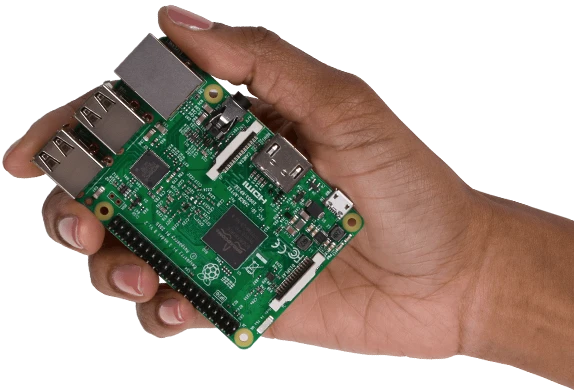
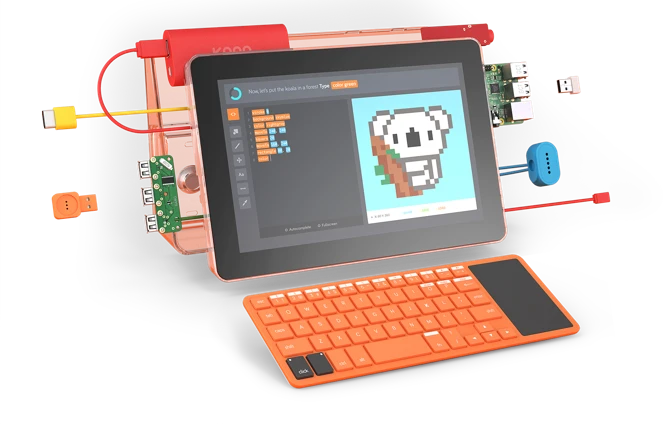
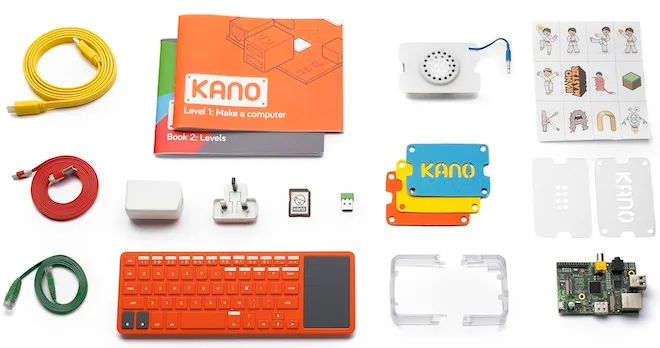
The team behind the crowdfunded “Kano computer” wanted to allow kids to learn whilst using a computing device, so they designed a package that builds like Lego, but teaches programming skills. The Kano is based on a Raspberry Pi, the wildly popular credit-card sized computer that costs about R500. Whilst the Raspberry Pi itself is aimed at hackers and hardware enthusiasts, Kano offers the Pi with a specially designed case, a wireless keyboard/mouse combo, a speaker plugin and a really comprehensive manual that makes it easy for kids to set up.

Most importantly, the whole kit is designed so any kid aged 6-12 that’s ever played with Lego and can understand a user manual (which kid hasn’t?) will have an intuitive understanding of how to put it together and start it up. Once it’s on, the Kano comes with a coding kit, basically a kid-friendly API set and a bunch of applications which teach kids how to code. That in itself might sound boring, but they’ve designed lessons so that the code creates something fun and entertaining at the end of it: an achievable goal to code towards.
Kano over TV?
Building up a Kano and messing around with the coding tools will definitely be better than passively watching TV: creating your own programs is an excellent way to get young kids started with the fundamentals and logic of programming, whilst keeping them occupied and entertained. The chief goal, of course, is to make coding “fun enough” for kids that they’d build a lifelong interest in computer science, and eventually go after a career in computer science or engineering.
That’s why the new wave of DIY computers repurposed from core hacker and maker niches into something for the younger, more tech-savvy generation is the smart way. It takes hardware that’s technical in and of itself, and lowers the barrier to entry dramatically, letting primary school kids build a passion for the world of computer science and engineering that was previously just “geek territory”.

This sort of passion is what’s needed in South African youth, plus the relatively low cost (compared to, say, a regular R3000+ laptop) means that it’s more accessible to more educators even in more rural areas. Kids in South Africa have the enthusiasm and the talent, they often just aren’t given the equipment or the opportunity to show it. Hence if you’re wondering whether South Africa has access to this product, the answer is yes. You can grab one on the local site if you’re interested.
Would you buy a Kano (for your kids to learn)? What are the prospects of such a device in this country? Comment with your views on this article in the comments section below, and follow Hyperion Hub developments in the future if you’d like to see more articles like these for the South African market.
Author: Matthew de Neef
Date originally published: 01/12/15

News & Announcements
November 15, 2017
VW Blames Software Engineers for Diesel Emissions Scandal, Not Execs
VW blames software engineers - 11 million Volkswagen diesel engines had code incorporated that allowed increased harmful gases emission ratings.
Deep inside the engine control units (ECUs) of roughly 11 million Volkswagen diesel engines across the world, certain code was executing, which helped the company cheat on their harmful gases emission ratings. It did this by activating the emission control device only if it detected the car was undergoing emissions testing. The Nitrate, or NOx (NO2 , NO3 etc) gas levels emitted by VW diesels’ engines were then assumed to be within what the government allowed as acceptable levels, and the cars were sold in US markets. Once the software detected that the emissions test was over, the emission control was disabled and 40 times more NOx was spewed into the air than before.
Playing the Blame Game
In the 2 months since the news of the so-called ‘defeat device’ broke, the public’s confidence in the venerable German manufacturer has plummeted, and someone has to take the blame for this. At a hearing recently, the US CEO for the car maker pointed that accusatory finger at “software engineers who put [the software] in for whatever reason.”
Pride and Corporate Underhandedness
The accusations seem like a last ditch effort to save face. Panel representatives dismissed the claims of the CEO during the hearing. According to them, VW was in the scheme from the beginning, and they claimed it wasn’t simply a rogue engineer acting on his own volition. Evidence from several decades of car innovation at VW actually seems to corroborate the idea that the software was developed out of necessity, such that the company could be the innovatory hero the market expected. Most of the affected cars in the EU and the US will be recalled to have the ECU code updated to remove the cheating software.
South African Standard
South African’s needn’t worry about the situation, since NOx emission level standards here are less strict than those of Europe and the US. This means that all affected VW engines here will pass South Africa’s NOx level regulation, and won’t need to be recalled. Regardless, the brand image of the German company won’t be the same as before.

Software and software testing clearly play a greater part in our lives today than ever before, now that it’s moved into the automotive realm. For everyone coding non-car related software though, there is still hope: if your company’s code testing methods on your software are a bit too strict for your liking, you could always apply the VW method!
What’s your view on unethical software practices in the industry? Comment with your views on this article in the comments section below, and follow Hyperion Hub developments in the future if you’d like to see more articles like these for the South African market.
Date originally published: 21/12/15

Software Engineering
Your Code Might Stick Around: Windows 3.1 Killed an Airport
Code obsolescence - what happens when your operating system on your organisations' computers is from a previous generation?
Software development is not a trivial task. Anyone who has designed software systems or written code will assert this, but apart from the difficulty of programming a software product that is stable (as much as is possible), bug-free, and satisfies requirements of the client, there remains another factor which is often overlooked. This factor is time. How will code designed this year operate in 20 years time? How does that code manage with its current hardware, and does it make provision for future software upgrades? While many may not stop to consider what their codebase will behave like 2 decades on, the principle is not uncommon, especially when considering OS software.
The XP conundrum

Those who works in a large organizations often have reasons to malign their IT infrastructure. Whilst consumer computers and networks are usually fairly reasonable about jumping ship to the newest operating systems from Microsoft, (and others in the market such as Apple’s OSX, and various Linux distros), the enterprise is comparatively glacial, grinding along often years after consumers have moved on from an ageing operating system. No situation is likely more true than with Microsoft’s Windows XP, with its original codebase dating from 2002 (ignoring service pack releases over the years), that green Bliss hill with rolling blue clouds is often still visible at large corporations on desktops’ wallpapers.
Close to 2 years after Microsoft’s extended support period expired, some of the biggest enterprises only now are beginning the switch to Windows 7, just as Windows 10 gets its November update. The specialized industries are often worse: according to manufacturer NCR, bank ATMs were 95% Windows XP as of the end-of-life date (Europe’s numbers were <1% Windows 7), but South African banks were remarkably up-to-scratch, with most of them having upgraded their ATMs to Windows 7 by late 2014. As of just this week however, the US’s Navy decided to skirt the almost 2 year old deadline issue completely by paying Microsoft to keep supporting Windows XP on their naval vessels and systems.

What is the Relevance of Code Obsolescence?
So why is this relevant to the creation of code, and why do corporations drag their heels in upgrading? The leading cause: compatibility. Specialized code designed for specific purposes (missile targeting, ATM software, industry control software) often isn’t compatible with newer versions of operating systems to enter the market. Consumer-grade popular software has a workaround; most companies simply release compatibility upgrades for their software for the latest OS release. When your code requires extensive testing and full support for the hardware of the day however, you might find that it becomes cheaper to, say, keep using an archaic OS, with code written many years ago, which will work, than to rewrite the codebase to support something less prehistoric.
The problem with such an approach is when things go awry; what happens when a programmer 20 years ago writes code that will do the job at the time, but perhaps doesn’t consider the consequences of an out-of-place brace, or a fault condition that might never happen? This situation in fact faced officials at Paris’ Orly airport recently. They make use of software called “DECOR” which details the visual range pilots will have when they land on the runways at the airport. As on that particular day, when the visibility is poor, the system is essential. However, for an entire day, the airport had to halt all flights temporarily because the DECOR system went down, thanks to a computer running code from 1992 – Microsoft Windows 3.1.
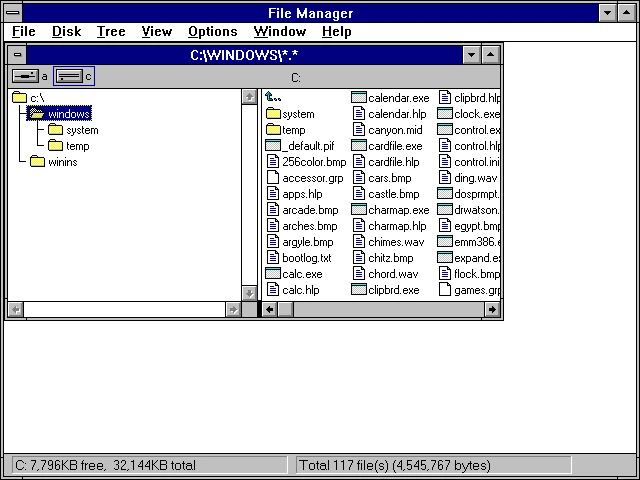
For the younger readers who have perhaps never even been exposed to the antiquated operating system, this is surprising. An airport uses computers from the early 1990s with software as old, to run its operations? Compatibility aside, lack of maintenance and the simple fact that nearly nobody knows how to maintain over two-decade old software (as was the case with the French failure at Orly) leads one to wonder about the ramifications of pre-Y2K code, and (for South Africa anyway) pre-Internet OSes.
What is the relevance of this situation? Firstly, the difficulty of upgrading complex and mission critical code platforms and applications specifically suited to some use-case, is often underestimated. Just as importantly: quick and dirty code fixes implemented may work now, but remember: the code might just be around for some time. That’s why it’s vitally important to make sure the code is of reasonable enough quality when it’s designed and tested to not, for example, grind airport operations to a halt two decades on. Lets hope Airports’ Company South AFrica (ACSA) sets the bar at least at Windows XP for their airport systems. Windows 7’s UI seems to be more prevalent at OR Tambo than in recent years though, which, for now at least, is definitely an encouragement.
Archaic code jokes aside, if you’d be interested in coding, or how to write code at least the right way, check out Hyperion’s offerings and perhaps get started today. Comment with your views on this article in the comments section below, and follow Hyperion Hub developments in the future if you’d like to see more articles like these for the South African market.
Author: Matthew de Neef
Date originally published: 27/11/15

Web Development
How Facebook is Being Sentient
Facebook's M - this is Facebook's new personal assistant. However, Facebook's offering is different from the rest, because it claims to be human-aided.
Facebook’s M
Facebook recently launched their own “personal assistant” service to compete with the likes of Apple’s Siri, Google’s Now and Microsoft’s Cortana. However, there’s a marked difference between Facebook’s offering and the rest. While Siri, Now and Cortana are all fully-automated artificial intelligences (AI), Facebook’s M was announced to be human-aided, so one software engineer decided to probe the truth of that statement.
The Anti-Turing Test

Some of the foundational concepts of Computer Science were pioneered by Alan Turing, particularly his Turing test, for telling human and AI responses apart. The Turing test involves having a human judge take part in a text-based conversation with two people. The one is a human and the other is an AI, or “chat-bot”, but the judge does not know which is which. The judge has a conversation with both personas, and at the end of the chat has to decide which of the two parties he thinks is the real human. If the AI is chosen, it passes the Turing test.
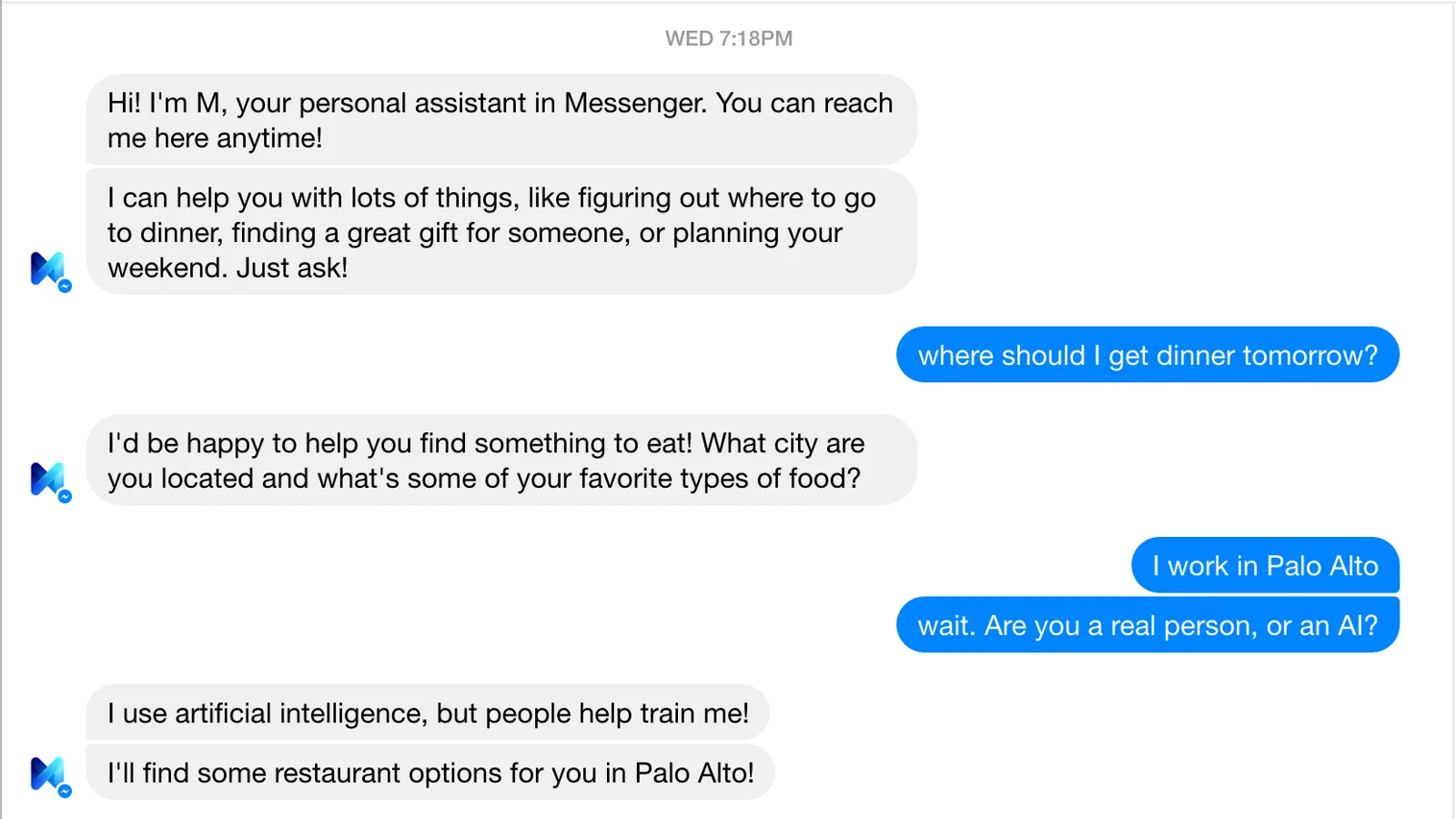
In this case, the software engineer probing the “humanness” of the service did an “Anti-Turing test”, by having a conversation via Facebook’s Messenger app, with Facebook’s “M”. The system stubbornly refused to admit to not being AI, so the software engineer wanted to try to find out the extent of the human character of M. There were several key traits of M’s replies that seem to prove that it is more than simply “human-aided”. Firstly, the replies to tough questions were flawless. The software engineer deliberately asked questions that required human-level thinking beyond what AI can achieve today.
Also, the responses the software engineer got were often misspelled (incorrect spelling is never seen with a “full AI”) and had grammatical mistakes, also something that could be typical of a human typing hurriedly behind the scenes. The mere fact that replies weren’t instant was also a clue: ask Cortana or Siri something and their replies always appear instantly. The final giveaway was when M was asked to call a phone number (which was the engineer’s business number) and the call appeared to be from a distinctly human voice. This leads to the conclusion that despite M constantly saying it “ [was] AI but humans help train me!”, for now at least (in a bizarre Turing Test twist) humans at Facebook are pretending to be AI.
Do you use any of the assistant services on Android, iOS or Windows? Have you tried the beta of M? Comment with your views on this article in the comments section below, and follow Hyperion Hub developments in the future if you’d like to see more articles like these for the South African market.
Author: Matthew de Neef
Date originally published: 27/11/15

Software Engineering
Asus Chromebit: Make a PC Out of Any TV
Asus Chromebit - Asus has made a computing stick to turn any TV into a PC, announcing its new Chromebit “memory stick” at a low price point.
Asus has made a computing stick to turn any TV into a PC, announcing its new Chromebit “memory stick” computing device recently, at a very competitive price-point. These days, everything around us is smart: TVs, fridges, the door lock, the list goes on. However, there come times that those of us without pervasive “smartness” in our homes do occasionally wish to have some PC functionality out of a standard ‘non-smart’ TV we have, and that’s what the Chromebit does.
The simplicity of the device belies the features it sports: plug the Chromebit into an available HDMI port on your TV, and you’ll have the full Chrome OS available for use, as a computer. While it has the footprint of a normal USB memory stick, this is obviously much more than that. It’s an entire computing device, with 16GB of onboard storage, boasting a “RockChip” SoC, from the ARM architecture shed, which is made up of a quad core CPU, 2GB of RAM, as well as Bluetooth 4.0 and dual-band 802.11ac WiFi. (which is blisteringly fast, provided the access point on the other end supports the ac standard as well) It’ll connect to your TV or monitor of choice via a standard HDMI connection.
The WiFi chip will connect you to the Internet, whilst the Bluetooth capability will let you pair Bluetooth keyboards and mice to the device, to steer the user interface. In case you’re more of an old-school computer user, a single USB port is also included should you want to plug in wired peripherals. Whether this port supports USB storage as well is unclear, but presumably it’s possible.

The Chromebit, as its name implies, runs Google’s Chrome OS, more commonly found in Chromebook laptops (and not to be confused with Android). The caveat with this is that because it’s not Windows/Linux, none of your usual apps for each OS will work. The second thing to note is the nature of Chrome OS itself. It’s essentially the Chrome browser, in operating system form, and this does mean what it sounds like: you need the internet, all the time, for it to be useful. Yes, the core apps like Docs, Sheets, Gmail and Slides as well as a selection of others will work offline, but you have to be very much bound to Google’s ecosystem for this OS to work for you, unless of course you just need to browse the web or do some light productivity work in the browser.

South Africans know about the annoyance of data-lessness before the end of the month, and we often don’t have the easiest time connecting to the internet. The Chromebit needs reliable internet to work, but if you’re in the target market and have solid internet access, it could be incredibly useful. Say you need to access your GitHub repository to fix a few bugs in your repo, or want to catch up on some streaming ShowMax/Netflix/Hulu, or even want to help a non-tech-savvy family member get started with the internet that “just works”.
All these use cases are ideal for the Chromebit: plug it into a TV that has HDMI, pair a keyboard and mouse, connect to the internet, and go. That’s it. Pricing comes in at $85, which comes to about R1200. That’s significantly cheaper than even the R3000 Chromebooks nearest to it, and while it’s more expensive than a R500 Raspberry Pi 2 which arguably does more, this device is not for the hackers; it’s for everyone needing a simple, cheap computing solution wherever there’s a screen.
What do you think of devices like the Chromebit? Is there a South African market for them? Comment with your views on this article in the comments section below, and follow Hyperion Hub developments in the future if you’d like to see more articles like these for the South African market.
Author: Matthew de Neef
Date originally published: 27/11/15

News & Announcements
November 15, 2017
Hyperion’s Founder Selected as one of the Top 200 Young South Africans by the Mail & Guardian
Riaz Moola Top 200 Young South Africans - Hyperion's Founder, Riaz Moola, has been selected in the Science and Technology Category by the Mail & Guardian.
Article, courtesy of Tiana Cline at the Mail and Guardian (http://200ysa.mg.co.za/riaz-<wbr/>moola/)
Hyperion’s Founder, Riaz Moola, has been selected as one of the Top 200 Young South African’s in 2016 under the Science and Technology Category by the Mail & Guardian. This award reflects the work of Hyperion’s entire team of employees – and the larger network of the Hyperion Community – in providing a successful and scaleable social impact in the space of science education in Sub-Saharan Africa.

The degree with the highest dropout rate in South Africa and across all universities nationally is computer science, with an average failure rate of 88%. Through Hyperion Development, Riaz Moola is on a mission to change that. “I’m most interested in the application of computer science to various industries. This is of course very popular as comp sci is the basis of the most famous firms and start-ups today: Apple, Google, Facebook, Uber, Airbnb etc.”
Moola’s previous work at Google as a product manager was using computer science (specifically artificial intelligence) to help build new products and features with this tech. “I worked in the Google Search team on ‘Ok Google’ (Google Voice Search), similar to Siri”.

These features have now been used by millions.” After studying at the University of KwaZulu-Natal, Moola noticed a high dropout rate of computer science. “I also noticed people at UKZN had bad internet access,” he explains.
“My entire idea was very simple — an online course where people could still take courses with limited internet access. I was inspired by course materials at Edinburgh on artificial intelligence, a subject not offered at UKZN. I created a simple online course with small files — rather than large videos offered by most Massive Open Online Course (Moocs) — in a new programming language (Python) teaching people some basics of AI. I went back to UKZN during a holiday and spoke to students in my previous classes, urging them to sign up for the course. Over 100 signed up in the first week. The course then spread organically to many other universities in Johannesburg, Cape Town etcetera. Eventually we had students from every tertiary institution in South Africa. We now have students from eight African countries and this is growing every day.”
A core tenet of open education is the development of non-traditional learning methods that reduce barriers to entry to education. “Many Mooc platforms claim to reduce these barriers, but no existing platform seeks to serve the unique limitations of millions of South Africans, many of whom would benefit most from the principles of open education,” says Moola. “Hyperion is filling this large gap in knowledge transfer using a scalable model.” Moola would like to grow Hyperion throughout the continent, and hopes to strengthen his relationship with Google and other tech firms like Facebook. “We must not forget Africa as a whole.”
Author: Riaz Moola
Date originally published: 19/09/16

Career Advice
What do Software Engineers do?
What do software engineers do? This article explains what software engineers do, as well as the skills and technologies requires to be a software engineer.
Ever thought you might want to become a software engineer? But what do software engineers do? Well, here are some options. You could find yourself:
- Controlling the movement of assembly line robots.
- Creating the intelligence of online characters like those found in games like The Sims.
- Developing software for GPS so drivers don’t get lost.
- Writing software to make it possible for people to communicate over great distances. Think of the benefit small companies now have to hire workers from all over the world. And how remote office environments have radically changed conditions of employment.

Dr. Melanie Willett, content writer at HyperionDev and former ICT lecturer at Nelson Mandela University and CTI Education Group, explains that there is a difference between a developer and software engineer. “Put simply,” she says, “the difference is that a developer is usually thought of as someone who mainly writes code to solve a problem, whereas an engineer, engineers the solution to the problem. They design the solution, see which components are needed for the solution, how they interact with other systems and users etc.”
So if you’re someone who wants to develop cool video game computer software or you want to make the software run faster on different computers or those that have different operating systems, you should think about software engineering. You’re basically using computer skills to solve problems with software and software is everywhere.
Think about it. Says Willett: “Software affects almost every aspect of our daily lives. You cannot go a day without encountering some sort of software; software is everywhere.” The interesting thing that you may not realise is that software is not just a computer program that provides specific features and functionality. It also includes all the associated documentation and configuration data to ensure that the software operates smoothly and effectively. And of course, there’s also software sold onto customers, known as software products. Software engineering is basically an engineering discipline concerned with the development of software products, using well-defined scientific principles, methods and procedures.
<Quick Read: If you want to more about what a software engineer does on a daily basis, then read this interview with Jeff Hagen who works as a manager for a team of software engineers.>
Software Engineers: Key Requirements
So have you got what it takes to be a software engineer? The good news is that you don’t need a Computer Science degree – an informal education is sufficient (such as an online coding bootcamp), as long as you learn the appropriate technologies and can code proficiently. In addition, companies frequently look for other things besides your credentials. This includes big tech companies like Google, which, in a New York Times piece, states that the “proportion of people without any college education…has increased over time”. And that cognitive or learning ability, the skill of processing on the fly, is more important.
If you want to become a software engineer, you should possess the following:
- Deductive and inductive reasoning
- Mathematical reasoning
- Original thinking
- An understand of what people want from their computers
As far as computer languages and technologies go, Willett explains that it depends on the application you’re building and the environment in which you find yourself. In the Software Engineering Bootcamp at HyperionDev, we teach Java and Python, which are good languages because of their “versatility and their ability to be used to build many different types of applications in different environments – e.g. desktop, mobile and web,” she says. Besides programming languages, you should also be comfortable working with one or more software development frameworks, such as Eclipse or Django, and you should have a good grasp of how to apply the most important aspects of computer science, data science and software engineering to the software development process.
<Read about how to become a software engineer in South Africa.>
If you decide to switch careers to become a software engineer, what can you expect?
Software Engineering: The Working Life
Good Job Demand
In the US, there are currently about 718,400 Software Engineers. This is expected to grow by 24 percent from 2016 to 2026, much faster than the average for all occupations, according to the Bureau of Labor Statistics. Also, increasing automation of various industries will contribute to that growth, as well as greater concern about computer security.
High Pay
The median US salary for software engineers is $98,260 per year, with a range between $57,340 and $153,710. Here is more information on developer salaries by region internationally.
Wide Range of Work Environments
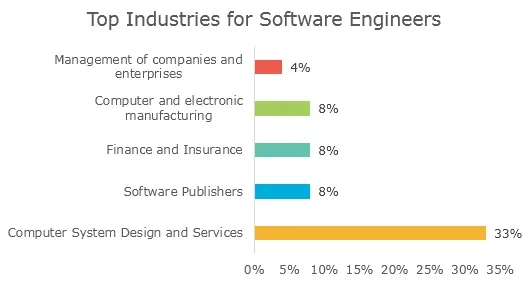
Although you’re likely to work in a tech company, this doesn’t have to be your only option. As can be seen from the graph below, there are a wide variety of settings that will appreciate your software engineering skills.
Lastly, what makes a good software engineer? Here are a few ideas.
Software Engineers: What Makes a Good One?
You might think software engineering is just about technical experience and knowledge. However, this is not entirely true. A good software engineer is more than the sum of their technologies with which they have worked. Below is a list of some important characteristics embodied by these professionals:
Passion for code – you should have an inherent interest in programming and enjoy working with code.
Good team player – you’ll frequently find yourself working as part of a team.
Excellent communications skills – you have to be able to communicate with team members and clients, as well as write reports and give instructions.
Curious – you’ll be the sort of person who wants to know why and how things happen. This enables you to think out the box and come up with creative solutions.
Broad technical experience – you should know a variety of computer languages, as well as agile methodologies, task management software and version control. And of course you must be willing to continue studying and learning new technologies.
Check out HyperionDev’s Software Engineering Bootcamp.
News & Announcements
November 14, 2017
HyperionDev in Partnership with UKZN Extended Learning (UEL)
HyperionDEv is delighted to announce a partnership with UKZN Extended Learning (UEL). HyperionDev will provide computer and programming courses.
HyperionDev is delighted to announce a partnership with UKZN Extended Learning (UEL). HyperionDev will provide access to their mentor-led, industry-relevant online coding bootcamps in Full Stack Web Development, Mobile Development and Software Engineering. The EdTech company also offers a host of three-month short courses in a variety of computer languages. All the courses offer access to quality content and on-demand code review by an expert. Personalised mentorship means that you won’t feel stuck and your code will be reviewed for accuracy, style and efficiency.
Riaz Moola, Hyperion’s co-Founder and CEO, says about online bootcamps: ‘Often a student is unable to get ahead when stuck on a learning wall. Rereading the same passages endlessly or repeatedly watching the same videos won’t let the student overcome the learning block. But an expert mentor will give valuable feedback swiftly, helping the student.’
Hyperion launched in Durban in 2012, and is part of Google’s international project to improve computer science and training. ‘We have close ties with the Google Africa team,’ says Moola. Besides Google, HyperionDev was also won the Innovation Challenge Award from Facebook, making it the first South African startup financially backed and supported by both Facebook & Google.
Simon Tankard, UEL’s CEO notes the importance of technology for fast tracking the SA economy. He says: “Technology is the single most powerful resource to enable us to leapfrog the experience curve and to help fast track the development of our people and grow the economy in South Africa. We look forward to building the partnership with Hyperion and to supporting expertise development in Africa”.
To celebrate this union, HyperionDev is giving a 15% discount on any of their courses by using promo code UKZN.
Valid from 1 November 2017 until 31st January 2018.
Browse courses: www.hyperiondev.com/partners_special/ukzn

Tutorials
The most important tool for any software development team
Version Control System (VCS) - Git is an open-source platform for version control.
Working on any software project, especially within the context of an organisation that manages big software projects, will almost certainly expose you to the concept of a Version Control System (VCS). Knowledge of how to use a VCS is essential in any software developer role, as it’s the only real way to effectively build software collaboratively. Once you understand the full power of Git (the VCS discussed here) in code collaboration within teams, and versioning to prevent catastrophe, you’ll wonder why you haven’t been using it all along if you’re only starting out with it now.
Git is an open-source platform for version control. It’s a smart modern way of collaborating on and developing software. These days there are two main proponents using the Git VC system, namely GitHub (by the company of the same name) and Bitbucket, by Atlassian.
What makes Git different to other version control software out there, and what makes a VCS preferable to use in the first place, aside from potentially saving you hours of work doing regression bugfixes? Let’s examine the reasons.
Snap Happy
When you’re working on code, each time you implement a new feature, fix a bug, or write modified code, you’d want those changes to be recorded somewhere. Those changes should also be a running stream, that each change is cumulatively saved over the previous one. This is what Git does, but with a difference. Instead of saving only the base version of each file plus a set of changes, each time you make a commit, Git takes a ‘snapshot’ of the file that’s changed, plus all the links and dependencies to other files, so it knows how the whole “filesystem” fits together. You might think this wastes data, but Git cleverly links to the previous identical stored file, if its contents haven’t changed. Doing things this way comes in very handy when considering how branching and the like works (discussed in the terms section.)
Remember that Git is the platform, GitHub is the service, and there are then any number of GUI clients that will do the Git-ing for you, including Visual Studio, Atlassian’s excellent SourceTree utility, and also SyntEvo’s great equivalent for Linux called SmartGit. To use Git, you can either choose to go hardcore and use console commands, or manage your projects using any of these Windows/Linux clients instead.
Data-Conscious

Us South Africans struggle with data usage problems; those of us that have uncapped ADSL generally laud it over the people having to make do with capped packages or, worse still, mobile 3G dongles. That’s why you’d think that a version control system nannying over your code each time it’s modified is sounding incredibly data-hungry. In the case of Git, however, you’ll have a database of your project’s entire history stored on your local computer. What’s more, new changes you make are appended into this changelog locally too. This means you can compare your current code to a historical copy, and make changes to your code as you go, without having an internet connection at all.
As soon as you do connect to the internet, all your local changes are synchronised to your repository in the cloud. It’s much faster this way, and doesn’t bind you to constantly needing a connection, so coding with version control when Eskom turns the lights out, or you’re somewhere in the Drakensberg without signal, is a definite possibility!
Git-speak
Before we examine the workflow in Git, it’s important to understand some key terms used when considering Git and version control:
- Repository, or repo: This is the collection of files that defines a project. It has the code files, any of their dependencies, and Git-specific files to help it keep track of what’s what and what’s where. There are two types of repos, one offline, stored on each user’s computer, and a (mostly) identical version of it linked online. The whole point of the Git client is to keep these separate offline instances (of each collaborator to a project repo) in sync and playing nice with the one online repo.
- Push/Pull: Pull is the action that updates your local repo with changes made by others in the online repo, and Push is the opposite of it. To avoid confusion, Git generally mandates pulling before pushing, to make sure that if more than one person has made changes to the same file, things don’t get overwritten.
- Sync: Some Git GUI clients use this option, the “smart” Pull/Push.
- Commit: The action of “applying” changes to code in a project. Usually accompanied by a statement you’d write, identifying what these changes have achieved (i.e. “Fixed bug where program would hang” or “Implemented saving feature”). The commit makes the snapshot of the changed files and the rest of the project, so you can roll back to historical ones should you mess up later.
- Branch: The part of Git for fiddling. Say you’d like to take your current codebase, and design new features, or fiddle with the code, or work on different features of a project from other developers in your team, without affecting the current codebase by committing things that could potentially break it down the line. That’s what a branch is for: a parallel development “line” where you can make your own commits on the side without affecting the so-called master release. On most software projects, the rule of thumb is that any code in master should always be working.
- Merge: When a branch’s code is reintegrated into the master branch (or another branch is reintegrated into the first branch). This usually happens once feature development has been tested. It’s also for merging code with others, and working on different features with others on different branches. See Pull Request below.
- Pull Request: When the programmer of the code in the branch wishes to integrate their code into the main master branch of the project, a pull request is opened. This allows other collaborators to check the code, discuss any issues and make sure it’s ready before the merge to the main branch is done. This kind of thing often happens if you’re helping to add features to big open-source projects; you’d open a pull request and the main developers would check your code to make sure it was OK before it was merged into the main branch.
- Fork: Creates a new repo with as basis, the repo you choose to fork. This allows you to use existing code as a base and develop on top of that. Any development on top of a forked repo is not considered for merging back into the original project. On a large scale, forking is often used with Linux distros, where new development is continued as a forked distro from an older, unmaintained distro or codebase.
- Release: For most of its life, a Git repo consists of raw source code all over the place. Making a release is the way of “freezing” the code at a certain point and packaging it into a nice ZIP file for others to download. This release ZIP doesn’t get updated and is stored with info on what the release contains. Application version releases work this way.
Three Stages of Git
Let’s explain the concept of states in Git, to help make sense of all the jargon. This defines how things get done when you’re working with Version Control in the background.
Let’s examine a scenario:
- You’re wanting to start work on an existing project, but one that you haven’t got on your local device yet. You checkout the project from the remote server repository.
- The code is downloaded, into your working directory ready for you to start working.
- You make code edits to the project files yourself, and now you’re ready to integrate them back into the project that everyone else can see. You stage the files that have changed into the staging area.
- A commit action, well, commits, the changes you’ve made into the project, to the repository directory.
- Up to this point, this could all have been offline. You can sync to make the changes you’ve stepped through “stick” to the code in the remote repository.
Git-ting Creative
This is a very basic introduction to the workings of a version control system, and knowing this will allow you to keep your work organized, and save potential breakdowns if you end up breaking something. Git is much more powerful than this, enough to fill a large book, but this primer should help get you started.
Comment with your views on this article in the comments section below, and follow Hyperion Hub developments in the future if you’d like to see more articles like these for the South African market.

Software Engineering
Run multiple operating systems on your PC without dual-booting
Learn to run multiple operating systems on your PC without dual booting. Learn about local desktop virtualisation and its uses.
Curious about running an operating system from within another operating system? This practice is called local desktop virtualisation, and has plenty of practical uses.
What is local desktop virtualisation?
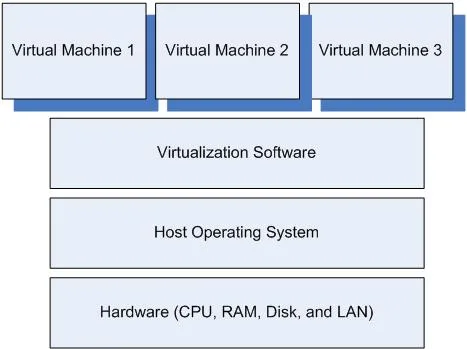
Virtualisation on its own is the practice of separating the logical execution of operating system software from the underlying hardware it runs on. This means that many logically and geographically differing hardware components can be virtualised as a single computer for the software it is running. However, this is often an enterprise focus, so you’ll likely be exposed to local desktop virtualisation instead. The latter is using software to emulate a virtual computer system using local hardware, from within an existing operating system running on that local hardware. The computer the virtualisation software runs on is known as the host, whilst the guest is the “virtual machine”(VM) which runs inside the software on the host.
The VM software itself (referred to as the hypervisor) has the ability to use the hardware running on your host computer and simulate an instance of that hardware as a guest machine. It allows resources such as RAM, CPU cores, USB peripherals, keyboard and mouse input, and more which are part of the host computer to be allocated to an operating system running in a virtual environment. The VM is a container running on the hardware platform of the host computer.
The guest is an entire operating system, but it only “sees” the hardware of the host through the hypervisor that defines what resources are passed through. This means you can emulate other hardware to the VM via the hypervisor than what your PC actually has, if necessary. Both the previously mentioned resources, but also network adapters, USB devices, and shared network folders can be shared between host and guest.
Why is virtualisation useful?
Running VMs can have many benefits. Firstly, compatibility. How often have you not needed another operating system, such as an older version of Windows because some software package won’t work on the newer, shinier iterations? Secondly, security. You can test drive a beta OS, or run a sandbox, isolated from your personal data, without having to switch between OSes. Thirdly, if you’ve had a task which needed the Linux terminal, for example, it’s very convenient to just use a Linux VM. You’ll save yourself the hassle of re-partitioning your storage, setting up a dual-boot system or accidentally overwriting your bootloader. Also, because you can set up plenty of VMs for each use-case, you can keep using your host OS while you use your VM, because the VM is just an application window.
Aside from the usefulness of OS-in-OS, VMs are often used on high-powered high-resource servers, with each one playing a different sort of role i.e one a fileserver VM, another a database VM, and so on.
As expected, running a hypervisor with a VM means sacrificing your host OS’s resources while the VM is running, so you’ll have to have enough RAM, hard disk space, and CPU power to allocate to your VM and make sure your host OS doesn’t choke for lack of resources.
If you’re interested to apply these concepts in practice, check out our tutorial to setting up VirtualBox on Windows and installing Ubuntu as a VM.
Comment with your views on this article in the comments section below, and follow Hyperion Hub developments in the future if you’d like to see more articles like these for the South African market.

Career Advice
5 programming Terms You Need to Know
Software Development Dictionary - five concepts explained: Responsive Web Design, Object-Oriented Programming, Agile dev, Compiler/Linker and Patching
Are you unsure what a software development-related concept entails? Is it a term commonly used but never explained? Here, we’ll touch on 5 such terms and help you update your software development dictionary:
1. Software Development Dictionary: Responsive Web Design(RWD)
Put simply: if you find yourself having to pan and zoom repetitively around a site, then it probably isn’t designed using RWD. Responsive Design is a programming approach that uses a website’s CSS functions to gauge the dimensions of the browser it’s running in, and resize, crop and move assets and text around based on that size. This should be done on-the-fly if a user decides to resize their browser, but is primarily used to allow viewing the same site on multiple devices (PCs, phones, tablets etc.) without having to design a separate “mobile” version of the site.

2. Software Development Dictionary: Object-Oriented Programming
This is a programming model focusing on objects to be defined instead of actions to be taken (the latter is the traditional “procedural programming” model). To compare it to traditional models, a “program” in traditional methods is just a procedure of logic where input data is processed and outputted in some way. In OOP, the focus is on the objects you want to manipulate more so than the logic needed to do so. Objects may be categorized into generalised “classes”, which inform the program exactly what features (“attributes”) the object has, and what logic can be used to manipulate it (“methods”). Properties such as inheritance allow “type-of” relationships between objects. (i.e. “VW is a type of Car” given a car base class and a VW derived class)
3. Software Development Dictionary: Agile Software Development
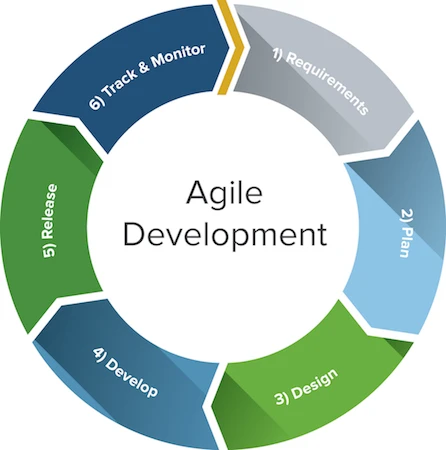
Certainly a popular term the past few years, the “agile” approach to software development seeks to change the ‘traditional’ paradigm of code design. In the past, rigid steps (as in the Waterfall Model) had to be followed if software was to actually get to market. Code would be written, tested completely, and signed off on before the next stage began. Plenty of form-filling and rigidity was the norm here. Agile methods instead championed developers responding quickly to change, and encouraging changes of plan, having frequent client-developer interactions, and using new methods like pair programming and self-motivation as opposed to set deadlines, to build software.
4. Software Development Dictionary: Compiler/Linker
Usually a part of an IDE, but can be used on its own. The compiler is the software portion that takes the high-level language you’re coding in and translates it into something lower-level, to be understood by the computer you’re compiling on. This lower-level language is referred to as machine code.
The linker is the helper to the compiler. Once the compiler has generated the machine code from the high-level language, it stores the machine code in some form of generic object. The linker’s purpose is to aggregate the objects generated by the compiler, as well as any dependencies the program needs (read: the includes you added in your file or the libraries it needs to use) into one neat package.
5. Software Development Dictionary: Patching
This is common for large software projects. A patch is a piece of code, or some new executable, which is created in response to a deficiency in existing code. Patches often correct bugs discovered by users in software, or could treat vulnerabilities in code which are endangering the security of users. Patches do not have to be the optimal solution, but simply the stop-gap measure for an issue (these are often known as “hotfixes”).
How many of these terms were you already familiar with? Was there anything new you learnt? Comment with your views on this article in the comments section below, and follow Hyperion Hub developments in the future if you’d like to see more articles like these for the South African market.
Student Success Stories
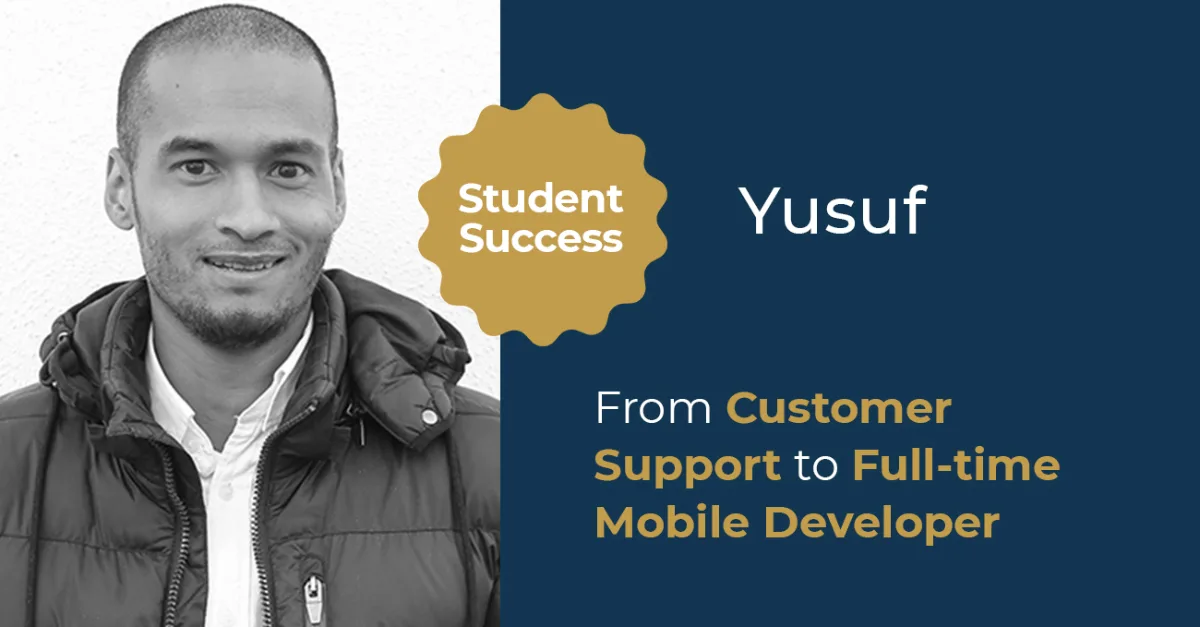
Yusuf Isaacs – From Customer Support to Full-Time Mobile Developer
Success story - Hyperion Success Story Yusuf Isaacs, from Customer Support to Full-Time Mobile Developer. How a Hyperion course helped me with my goals.
Yusuf had been working in customer tech support for 6 years when he knew it was time for a change. He turned to HyperionDev to make the kind of sustainable career change that would take him in a completely new direction. Yusuf is now a Mobile Developer specialising in Android at Rapid Deploy.
Tell us a bit about yourself and your current occupation
I am a BTech graduate in Software Development and had been struggling for the past 2 years to get into the Software Development industry. I eventually landed a Software Development internship position at Injini, Africa’s first edtech incubator. It was a stimulating and challenging environment and I’m very happy about the exciting opportunity. Currently, I am working as a Mobile Developer at Rapid Deploy.
Why did you take a coding course? Were you looking to up-skill or start a new career?
I wanted to start a new career. I have been working in tech support for the past 6 years and I knew it was time for a career change. I had a look at the wide variety of tech courses at HyperionDev. They seemed ideal for making the kind of sustainable career change that would take me in a completely new direction.
How did you hear about HyperionDev?
I had heard great things about their courses from other people. I knew HyperionDev allowed me to study online but with the added benefit of personalised mentorship. It’s fantastic to have your own mentor available to support you as you learn new coding skills. I couldn’t have done it on my own!
Which HyperionDev course did you take and why?
I completed the Advanced Mobile Developer MicroDegree. I taught myself Android and have also developed an Android app previously. I took this course because I wanted to get a better understanding of Android and I was also interested in working as an Android Developer. The job demand in mobile development is high and I knew I would command a much higher salary.
How has the course helped you so far towards your career goals and objectives?
During my internship at Injini, I was creating Android apps, which will be used in the real-world. This gave me valuable experience that will look great in my portfolio. It opened many doors for me in a wide variety of exciting fields, such as my current exciting position as an Android Mobile Developer.
At HyperionDev, we believe that machines cannot replace humans, especially when it comes to education. Has the current set-up of our courses and 1:1 mentorship been beneficial to you?
Definitely. Often when working on a software project, I would get stuck. This would normally lead to my having to scour the Internet for a solution. However, during the HyperionDev course when I was given a software project and became stuck, I would always contact my mentor. He or she would guide me towards a solution. This was of course very valuable during the learning process. It’s not just about learning code accuracy, but also efficiency and industry-specific skills.
What aspects of the course did you enjoy and what would you like to see in future courses?
I liked the big project I was given halfway though the course to consolidate everything that I had learnt up to that point. The final project is an even bigger one, which really challenged my skills. I would like to see future courses focus on Full Stack Mobile Development, as well as iOS development.
Any other comments or advice for prospective students?
I would advise prospective student to research Software Development industry trends. HyperionDev offers a lot of resources to help with this. More importantly, I would advise prospective students to find out what they would like to do. Remember, you can have a successful career no matter which course you choose. It all depends on how hard you are willing to work. However, it really helps if you have a dedicated mentor like I had at HyperionDev.
If you want to become a mobile developer like Yusuf, check out HyperionDev’s Mobile Developer Bootcamp and start your free trial today.

Career Advice
5 MORE Python Packages South African Developers Should Know About
Five More Python Packages for South African Developers - if you require functionality, the changes are high that someone has developed a package.
The Python community is alive and growing at a staggering rate. It is an active community that has many benefits. New people bring new ideas, fresh perspectives, and different levels of experience.
One such benefit is the proliferation of packages. If you need functionality, there is a good chance that someone else needed it before you. The beauty of the Python community is that most of these functions become packages.
“There should be one — and preferably only one — obvious way to do it.”
-The Zen of Python
This is not always the case, sometimes you have options, so many options. Feel free to explore them all. Before you do, make sure you have the first of these packages installed.
Here are 5 more packages you should know about:
VirtualEnv
Trying out a package the first time is a risk, it might not work, you might find something better. VirtualEnv creates an isolated environment where you can install and use packages without influencing the environment used for another project. Starting with a clean slate is as easy as setting up a new virtualenv. If you are serious about programming, this is the first package you need to install.
Python-dateutil
Python comes with a useful datetime module. When you need more power there is dateutil. Imagine having to parse dates in formats you do not control, like when you are trying to make sense of some scrapped information from dynamic source, the dateutil package will allow you to parse almost any string format to the generic date format. Need to calculate how long ago a twitter post was made? Dateutil easily calculates differences between date objects.
bpython
Python already have a relatively good REPL, which stands for “Read Evaluate Print Loop”. Basically this is where you get to run python commands in the terminal, and immediately see the effect. It is really helpful when exploring data, or some new code. I’ll let you try it out, most python tutorials starts you out in the REPL. bpython extends the functionality of the vanilla REPL to include syntax highlighting and expected parameter lists. The biggest help of the lot is the ability to Rewind. In the default REPL if you make a mistake in a loop it breaks, and you get to start from scratch. Rewind lets you “undo” some of the code you typed, and fix it.
pillow
Somewhere in your life as a developer you will crash into the need to do something with images. Maybe you want to resize images uploaded to a website so they fit specific dimensions. Maybe you are a bit more adventurous and want to apply funkey Instagram-esque filters for an image. You can even add watermarks to all images on your website like StockPhoto. Whenever you want to do work with images, start by importing pillow.

decorator
Decorators are functions that take other functions as arguments. Adding a decorator to a function allows you to change the input and output of the decorated function. In a simplistic use-case adding a decorator to a function that processes a dictionary can allow you to pass a raw JSON string to the function while the decorated function remains ignorant of the JSON and keeps processing the dictionary.
There you have it – 5 more python superpowers to add to your toolkit. Check out some of our previous python packages. Also, why not install virtualenv today and begin playing with some of these without messing with your main development environment?
Comment with your views on this article in the comments section below, and follow Hyperion Hub developments in the future if you’d like to see more articles like these for the South African market.

Software Engineering
5 More Types of Software Development
Software Development Jobs - here are five more jobs in software engineering that you could be doing.
Based on the success of our previous article on 10 types of software development , we’ve decided to build on that to share 5 more types of what you could be doing as a software engineer in the field!
1. Front-end web development
First impressions matter, and that’s why front-end web developers matter. Billions of websites each try to get your attention each day, and front-end developers use code and frameworks to make sure your experience using a website is a great one.
Front-end development is increasingly becoming cross platform – mobile, tablet, and desktop
This includes everything from images, layout, colour schemes, and placing things where they are easy to find. Front-end development requires not just software engineering skills, but a flair for design and an eye for detail – making this one of the most in-demand roles.
Popular technologies: Javascript, Javascript libraries such as JQuery/D3, Python, Django, CSS/HTML
2. Product Management
As software and tech products get more complex, the role of Product Manager is becoming more popular. Made famous by the Associate Product Manager programme, launched by Google – the product manager role was intended to fill a specific niche. Google needed fresh minds to help build their revolutionary products, so they invented a job just for it. The first Product Manager, Brian Rakowski (https://www.linkedin.com/in/brian-rakowski-45a4832b), went on to create Gmail – so it’s obvious why the Product Manager position has now been adopted by nearly every tech company under the sun, including Facebook, Uber, and Microsoft.
PMs are at the intersection of user needs, technology, and business
Product Managers have technical software engineering ability and experience, but rather play a role interfacing between software teams and users. PMs are constantly thinking about how the user experiences an app, tech product, or website and are always trying to improve the overall experience for a user.
Popular technologies: A pen and paper, email, and Google Slides!
3. Site Reliability Engineer
As software becomes more and more critical in our lives, making sure it’s always working is key. Imagine you’re binge-watching the new House of Cards on Netflix, and Netflix goes down. Site Reliability Engineers are there to make sure that doesn’t happen.
While a stressful role, the job is incredibly rewarding. As a SRE, you may be constantly ‘on call’ for any errors or outages of a service, and will be timed to get it fixed as soon as possible. You’ll be paid top dollar for that commitment though and recognised for your insane ability to fix problems fast.
Popular technologies: Python, Java, debugging tools
4. Machine Learning Developer
A more specific role within Data Science, Machine Learning developers are becoming more popular as more and more data becomes available. Platforms rich in data, such as Google or Facebook, have some of the strongest teams of machine learning developers who use that data to deploy algorithms that slightly improve your experience as a user.
Data science encompasses machine learning, and many other disciplines
For example, every time Facebook recommends a friend for you to connect with – it isn’t random, but rather the result of a complex machine learning algorithm that has learnt the people you are likely to know and interact with. Machine Learning developers design this algorithm, and as more tech companies compete neck-on-neck for your attention, there’s only going to be more demand for the skillset.
Popular technologies: Python, R, Python packages such as Sci-kit learn.
5. Natural Language Processing developer
Another role falling under Data Science, Natural Language Processing developers specialise in understanding data in the form of languages – that may be books, web pages, social media posts.

Machine translation systems – such as Google translate – as a popular application of NLP
They use this data to deliver a better technical experience. For example, ever wondered how the Gmail Spam filter works? Natural Language Processing techniques are used to automatically determine from the content of an email whether it is likely to be spam, and then hide it from you. Other NLP products include Google Translate – entirely built using algorithms written using phrase-based machine translation techniques.
Popular technologies: Python, Python packages such as NLTK, parsers, web crawlers.
Interested in learning more about Machine Learning and Natural Language Processing? Check out Hyperion’s Certified Data Scientist MicroDegree, where you’ll build your own spam filter in Python!
Data Science
The Intelligence Group: Driving Data Science in South Africa
Data Science is growing in popularity in South Africa, a prime reason why the Intelligence Group came into existence: to build a community.
Data science as a topic is growing in popularity in South Africa, a prime reason why the Intelligence Group came into existence: to build a community around an existing body of research and knowledge, and attract those interested in what it has to offer. The Group is emphasized as an institution-independent collective that’s open to anyone – academics, researchers, students, startups, big corporates and even consultancies.
The Group is currently the only data science interest group in South Africa, but it is aiming to attract a wide variety of those interested in both data science and its applications. In fact, there should be topics for everyone, according to Dr Benjamin Rosman who is one of the minds behind the concept of the Intelligence Group, and is currently a researcher with the CSIR, working with mobile intelligent autonomous systems. Aside from this he holds a PhD in Machine Learning and Robotics from the University of Edinburgh, and is in the Computer Science department at Wits University.
The Group takes the form of an online open Meetup group, from which the event logistics and planning is done. At present, there are over 500 members on this group, from all facets of the technology, computer science and even business industries in South Africa. From this group, in-person sessions are organised at various locations which thus far have been well attended. The sessions offer talks in a “TED Talk” format of fifteen to twenty minutes, each of which are delivered by a wide assortment of experts, researchers, hobbyists, students and others interested to share what they know. They hail from industry, South African research institutions and universities such as Wits, UJ and recently Harvard. Even several startup founders have had their chance to speak on topics they’re interested in.
Quantum computing is part of the Intelligence Group’s planned discussion repertoire. Shown here is a quantum computing processor by D-Wave systems.
On this note, the topics covered to date (and some planned for future Intelligence Group sessions) have been exciting and varied. In the data science vein, the use of big data in business has proven to be a topic of interest, as well as how to handle databases for big data applications. Techniques for visualising big data and assigning meaning to it are within the Group’s scope, but recently it’s been the South African applications of data science that have made the most interesting discussion topics. These applications include property evaluations with large data sources and analysing crime trends based on Tweets. More cutting-edge research such as deep learning, quantum computing and even brain-computer interfacing also form part of the Group’s repertoire for current and future sessions.
Dr Rosman tells us that the most exciting part of the sessions is the open discussion at the end of the talks. As they’re fairly short, the talks themselves often don’t go into too much technical details – the topics presented are usually at an overview level. This is why the post-talk discussions between Group members are so valuable – they dig deeper into the topics, and philosophical debates even crop up! In amongst the discussions, there’s also opportunities for business partnerships between interested members, collaboration deals, and even job hunting and recruiting.
The idea of “topics for everyone” seems to ring true for Intelligence Group members, as a variety of fields are represented at each meet up session. The majority of the attendees and group members are in engineering, mathematics and statistics as well as computer science, but that hasn’t stopped those in property and marketing and other business fields to find a topic that fits their interest.
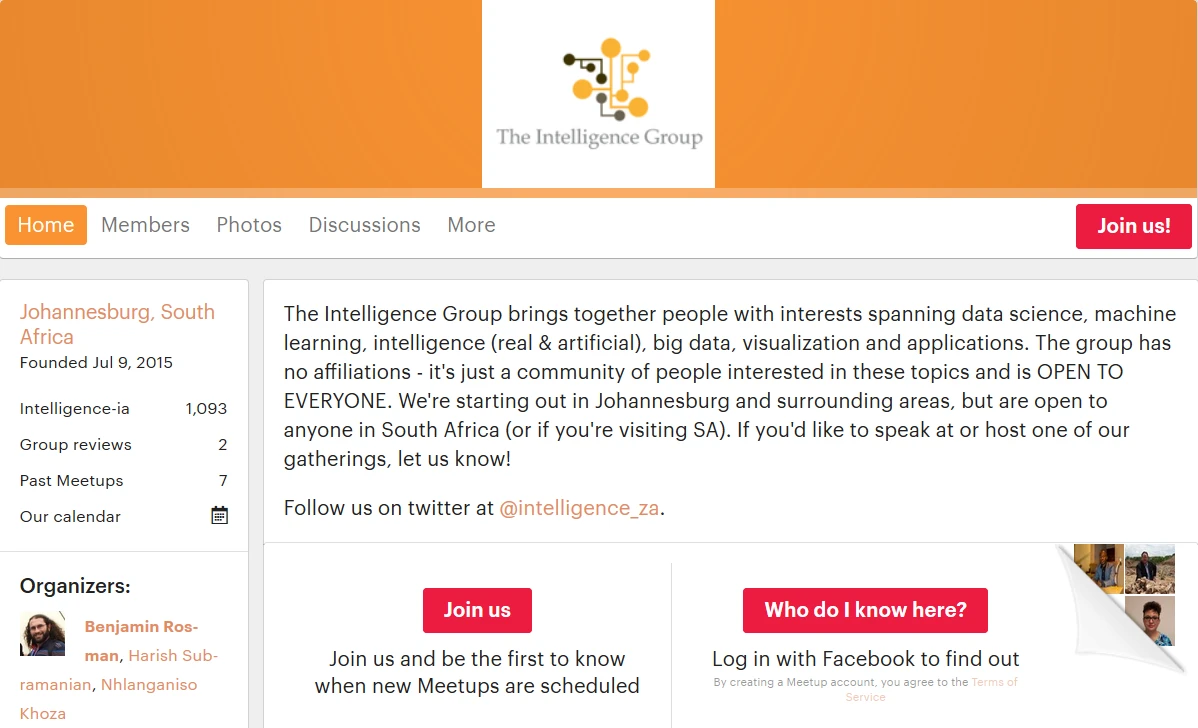
The Meetup group site of the Intelligence Group is the central place to find out more about the initiative
The model of a community that’s institution independent is important to Dr Rosman and the other organisers of the Intelligence Group. Aiming for this independence allows both for building a community as well as creating a consistency of brand. This also creates a reliability – a sense that what’s discussed isn’t biased by an institutional sponsor or something similar. The meet-ups happen at different venues, at universities, public conference centres and even some corporates’ conference venues. As well as enforcing the aforementioned independence, holding the meetups at different places each time make it easier for members to attend at least some events, even if they can’t make others because of distance problems. The flexibility of the Group is also a strong suit: anyone part of the group is welcome to organise a meetup and share the details with other members.
Having institution independence also has a positive side-effect: South Africa’s data science and academic research field is far too fragmented, so having an open approach to sharing developments and discussing the state-of-the-art means that the field as a whole is being driven forward in the country, by the meetup sessions.

Co-founders of the Intelligence Group: (Top) Harish Subramanian (Bottom) Dr Benjamin Rosman
Importantly, Dr Rosman and his co-organiser Harish Subramanian from the African Leadership Network are looking to make the concept of the Intelligence Group a “community of practice”. That is, the project hopes to be self-sustaining and self-governing, to expand beyond Gauteng province to the rest of the country, beginning in the major cities (Durban, Cape Town).The momentum will be driven by the passion of the attendees to make the meetups productive and enjoyable, much like the momentum found in recent years by maker- and hackerspace collectives. If this initiative is less successful than expected, Dr Rosman argues at least everyone involved has met some interesting people and made good connections. If it is a success, of course, the benefits to both the fields of data and computer science as well as academia and research in the country will be worth the effort. Computer science is cool, says Dr Rosman, and everyone attending the Intelligence Group has something exciting to share about their work or research – especially for students.
To find out more about the Intelligence Group, or if you’re interested in joining or even hosting a meetup group click here or leave a comment below.
You also can find the Intelligence Group on Twitter, or find out more about Mr Subramanian or Dr Rosman.
Find out more about HyperionDev’s Courses.

Career Advice
5 Steps to Becoming an Expert Software Engineer and Getting Any Job You Want
Expert Software Engineer - here are five steps to getting the job you want as a software engineer.
Step 1: Be proud to be an engineer
What ever happened to praising the hard working engineer? The Steve Wozniaks and Linus Torvaldses of the world? We have put managers, directors, and CEOs so high up on a pedestal that many of us actually believe, unless we end up becoming one of them, that our career is a failure. We are in the middle of the information age right now; computers are literally transforming the world around us, and we are the men and women shaping it in our hands. Even though the part you play may seem small and insignificant, remember that the whole is far greater than the sum of its parts – your impact on the world is more significant than you might think.
As software engineers, we give computers new purpose every day. We bring them to life by imparting pieces of our intelligence to them; we create whole new worlds and ecosystems governed by laws we enforce in our code, but most importantly, we love what we do.
In his book: “Drive: The Surprising Truth About What Motivates Us”, Daniel Pink narrows motivation down to 3 key elements: autonomy, mastery, and purpose. Without a genuine interest in what we do, we will never be proud of it; we will never master it, and we will never feel purposed for it. In short, if you are not interested, you are not motivated, and without motivation, you will not succeed.
Although the origin is greatly disputed, it is generally accepted that Confucius was the one to say: “Choose a job you love, and you will never have to work a day in your life”. This quote has taken a lot of heat, but I think it’s just misinterpreted. The emphasis should be on the words: “have to”. If you choose a job you love, you will want to work every day of your life.
Step 2: Prepare to work for what you want
The most valuable asset you could offer a potential employer is experience. Although a qualification can be great for getting a foot in the door, anyone who has worked long enough knows that theory and practice are not often synonymous. Remember, what you are being hired for is to do work, and experience proves that you can do just that (well, it almost does). Years of flying under the radar at a company is hardly going to leave you with many tangible skills. The only valuable form of experience you can gain is the kind you actually worked for, because experience you work for is experience you can demonstrate. Proving your proficiency in the job you’re asking for is by far the most convincing argument you can make.
By now, you’ve probably gathered that this is not a get-rich-quick scheme. I’m not here to teach you any tricks to cheat the system, or to tell you that being lazy is ok. My aim is to help you get your priorities straight and work smarter, but by no means does working smart automatically replace working hard. Hard work spent doing something worthless will always be worthless no matter how hard you work, but hard work spent doing something beneficial becomes more beneficial the harder you work.
A lot of people associate the words: “hard work” with feelings of displeasure. To many of us, the word: “work” is reserved for the stuff we do at our jobs, work we tend to see as benefiting our employer more than it benefits us. When we have this mindset, the harder we work, the greater the gap seems to grow between our employer’s benefit and our own. We need to break out of this way of thinking. Sure, hard work is not necessarily fun, but it should always feel worthwhile. If your job does not leave you proud after a hard day’s work, you need to find one that does.

Step 3: Take the “dream” out of “dream job”
Earlier, I quoted the maxim: “Choose a job you love, and you will never have to work a day in your life”. There are a few variations of this quote, the most common being: “If you do what you love, you’ll never work a day in your life”. Although the intent is still there, in my opinion, this variation has lost the most important element of the original message: The word: “job”. You could love the field you’re in, but hate the job you have. Unfortunately, many of us are driven into directing frustration towards our field of work, rather than the job that drove us there.
We need to take a step back and remember why we chose this career. Where did we dream of being? What did we dream of doing? Maybe the job you really want is right there in the company you already work for. It could be a shift in the projects you’re assigned to, a promotion to higher profile work, or a whole new position entirely. The perfect job could be waiting for you at the company down the road, or across the ocean on a whole other continent. The point is, without aiming high and having a specific job in mind (and actually believing you can achieve it), you’ll just continue to spread yourself thin across broad goals that lead you nowhere.
Why do we insist on seeing our dream job as only a dream? Why does it feel so out of reach and intimidating? Well, my theory is: because all jobs require some level of experience, experience in the work you will only be doing once you actually get the job, experience you almost never have due to a lack of overlap in the work you do at your current job. It’s a tricky chicken and egg situation, and is why so many of us tend to stagnate on the specific technologies and domains we started with at our first job. So how do we break from this stagnation? Get back to programming for fun! Your aim should be to eventually land a job doing what you love, and a good indicator of whether you will actually love the job is to see how motivated you are to do it after hours.
Jobs are real, and they exist to be filled. Nobody has ever been turned down for a job because they were perfect for it. The trick is to find a job that will be a perfect fit for you, then get to work on making yourself perfectly fit for it.

Step 4: Put your software where your mouth is
Virtually every job listing you’ll ever come across will require one very important document- a résumé. The impression that this document makes on your prospective employer is crucial. Not only does it stand as a representation of you before you are able to represent yourself, it determines whether or not you will get the opportunity to represent yourself at all. Your résumé should already prove that you are perfect for the position you’re applying for before you even get the interview. How is that achievable? Well, your résumé should obviously mirror as many of the requirements on the listing as possible, but what will truly differentiate you from everyone else is having hard evidence that proves you meet them.
There is a famous quote by Linus Torvalds that goes: “Talk is cheap. Show me the code”. Simply stating that you possess a skill, or even a good idea, doesn’t mean much until you can actually prove it with something tangible. Enter open source software. What better way is there to prove a skill in coding than with code itself? For each new skill you seek to acquire, and for each pre-existing skill you wish to showcase, you should be writing software to demonstrate it, and making the source freely available online. Not only should you make your code clean and readable for the world to see, it should be user-friendly and fully functional for the world to use. Knowing that your code can be read and critiqued by anyone across the globe is both an excellent source of motivation for you to do your best work, as well as validation to your employer that this is real software with real users.
The title of this step is a play on the words: “Put your money where your mouth is”, but there is another reason I’ve replaced the word: “money” here. In no way am I proposing that you selfishly abuse open source software as a means of making money. In fact, money shouldn’t even enter into the motivation you have for your dream job. You should be driven by a passion to do what you love in a job you can be proud of. Trust me, the money will follow, but don’t sell yourself short either, you should be paid what you deserve for the position you have earned.
We owe a lot of respect to what free and open source software has done in the world of computing. We should show our appreciation by contributing good free software that is well written and helpful to ourselves and to others. Good free software that will earn us our dream jobs.
Step 5: Understand what it takes to be an expert
In 1993, a professor at Florida State University by the name of Dr. K. Anders Ericsson published a paper entitled: “The role of deliberate practice in the acquisition of expert performance”. The study was conducted with subjects from ultra competitive, high performing fields such as: professional athletes, world class musicians, and chess grand masters, with the aim of determining how many hours of practice it took for them to reach expert level. Dr. Ericsson concluded that it takes around 10,000 hours of deliberate practice to become an expert in almost anything (the equivalent of a full time job for 5 years).
Unfortunately, this “10,000 hour rule” wound up being widely misinterpreted as: “It takes 10,000 hours to become good at anything”. I’m sure you’ve personally experienced when practicing anything that a pretty decent level of proficiency can be achieved in far less than 10,000 hours. So how many hours does it really take to become good at anything? In his book: “The First 20 Hours: How to Learn Anything… Fast!”, Josh Kaufman sought out to determine how long it takes for us to learn new skills. Kaufman was particularly interested in calculating the time it takes for us to traverse the steep initial incline of any learning curve from incompetent to proficient, at which point the curve begins to plateau and further advances take longer to achieve. I’m sure you gathered by the book’s title that his conclusion was 20 hours. It takes 20 hours of deliberate practice to learn anything and reach a decent level of proficiency, and any time spent practicing beyond that initial period will make you better and better at it.
So what am I trying to say with all of this? Expertise is more often than not measured in the time you’ve spent practicing. Even then, how can you prove that the time you’ve put into something was spent deliberately practicing it? Sorry to break it to you but spending 5 years doing busy work at a software company does not make you an expert software engineer. I can’t stress enough how valuable it is to possess experience you can prove to have earned. Writing free and open source software not only allows you to prove that you have put in the hours, it allows you to showcase the result of your practice in the form of real, working software.
BONUS Step 6: Read this book
The above is an excerpt from my book: “How to Become an Expert Software Engineer (and Get Any Job You Want)” by Marcus Tomlinson.
In this book, I will show you the system I use to design, develop, and deliver open source projects, steer you away from the mistakes I’ve made along the way, and help you build an impressive résumé of projects that’ll get you that job you’ve always wanted, and in time, will earn you the right to call yourself an expert.
Available in print and eBook form: http://amzn.com/B01A36ZI66
Career Advice
5 Python Packages South African Developers Should Know About
Five Python Packages that South African developers should know including Requests, NumPy, Beautiful Soup, Flask and Unitest
Very few things just work out of the box. As developers we know this, and are ready for it. When you dive into Python for the first time, the number of things that do indeed just work is amazing. Why then a post about more packages to use?
These 5 packages will give you the ability to move beyond what you think is possible, and in a couple of lines of code, allow you to grab information from web pages, do complex calculations on it, and push your findings onto your own web app in a matter of minutes not weeks, and as an added bonus, you get to sleep at night knowing your code is doing what it should be doing.
The 5 Python Packages every South African developer should know about are:
1. Requests

Whether you want to integrate with an external API or just grab a webpage’s content, Requests is the way to go. After installing the module, you just need 2 lines in your code to access any url over HTTP. Requests also allow you to set GET and POST variables with ease, or add JSON to the request body.
2. Beautiful Soup

Eskom se Push won a couple of app awards, all they did was setup a program to grab loadshedding information from a couple of sites, and then send the information to the app. Beautiful Soup makes getting the information out of a web page you downloaded with Requests as simple as searching a bit of text, an HTML tag, or CSS attribute and grabbing what you need from there.
3. NumPy

If you need to do some heavy numbers lifting, NumPy’s scientific computing capabilities will come in very handy. It supports N-dimensional arrays, linear algebra, and random number generators among other things. There is also support for including C++ or FORTRAN libraries, should you need those. NumPy is the reason a number of scientists are switching to Python, and a must if you are interested in data science.
4. Flask

Building your very first web app can be intimidating, unless you are using Flask. This micro framework allows you forget about complex routing of requests and files defining url endpoints. You define the endpoint right there at the function that returns the result. It is the quickest way to get something “out there”. It does not matter if you are writing prototypes, or creating a minimum viable product, Flask will have you done in no time.
5. Unittest
Unittest is one of those batteries that come included with the Python standard library. As the name suggests, it is a package that allows you to do unit testing of your code. This is the part that makes you sleep at night, knowing that the code you wrote does what it is intended to do. It is also the part of the project that helps you not have a panic attack when you need to change something 3 months after you built it.
If you get into the habit of writing unit tests, you will find that you trust the code you wrote more, and you also make changes with more confidence, knowing that the changes you made did not break something that was working yesterday.
Are there any other Python tools you use frequently? Let us know in the comments section below. Follow Hyperion blog in the future if you’d like to see more articles like these for the South African market.

Software Engineering
How a South African Built the 3rd Most Used Desktop OS
Mark Shuttleworth built Ubuntu Linux. He was also influential in building the first company outside of the US to offer SSL signing. Ubuntu Linux has become the world’s 3rd-most used desktop operating system
Many people complain about South Africa being behind the times technologically. In many senses, this is an accurate description; our average internet speed is over seven times slower than the average speed of our UK counterparts. Adding insult to injury, our leading ISPs shout about 10Mbps ADSL as if it’s actually faster than that carrier pigeon with an SD card strapped to its leg.
Despite this perceived ‘barrier to innovate’, South Africans have done exactly the opposite: they’ve pioneered world-changing technologies from the bottom of Africa – and this article is about one such man. He was influential in building the first company outside of the US to offer SSL signing, amongst other noteworthy achievements. What’s more, the OS which I’m currently writing this piece on, has become the world’s 3rd-most used desktop operating system, and was founded by this South African visionary. I’m speaking of course about Ubuntu Linux, and Mark Shuttleworth.

South African Roots
Born in the Free State town of Welkom in the ’70s, he attended the Capetonian Western Province Preparatory school, all whilst holding onto his dream of going to space one day. He apparently held onto this idea whilst studying for a Business Science degree at the University of Cape Town. During this time, he was involved in the first installation of residential internet at the university.
His passion for the world of the internet was solidified in 1995 when he founded Thawte, a company that aimed to provide SSL certificates and act as a certificate authority for online companies looking to secure their clients’ information, protect e-commerce transactions and verify their own authenticity. The US companies aimed within their country’s borders, whilst Thawte became the de facto SSL certificate authority for non-US nations, quickly earning it a ‘market share’ if you will, of close to 40% . It’s important to remember that every time we access out Internet Banking, or buy some great discounted product from our favourite online store, or grudgingly hand over more of our personal details to an ISP or mobile provider via their portal, this information has to be SSL secured; companies like Thawte play the role of verifying the SSL certificate authenticity. That little green lock icon in your browser’s title bar? It’s Thawte telling the browser to let you know that the site you’re at is OK security-wise.

This icon in your browser URL bar tells you there’s a valid SSL certificate ensuring your stuff is safe.
Venture Capital, the Shuttleworth Foundation and Debian
Shuttleworth wasn’t content with founding a company that, in 1999, was acquired by VeriSign and earned him the equivalent of R3.5 billion, and some time later, in 2000, he founded a venture capital firm, HBD Venture Capital. Sassy “Here Be Dragons” acronym aside, the company’s investment portfolio in Southern Africa is now managed by Knife Capital, which aims to invest in technology-driven ventures in the region.
Mark concurrently got involved with development of Debian, a Unix-based open-source Linux distribution that’s, in technology terms, almost part of the furniture, with its first stable release being over 22 years ago. This could have been the catalyst he needed to begin his pioneering work in free and open-source software (FOSS), as in 2001, the Shuttleworth Foundation was born, the brainchild of Mark.
Toasting More than just Achievements
Apart from philanthropic social innovation causes, the Foundation was also very involved with supporting and promoting operating systems that were essentially free. Free to use, free to contribute to, and free to distribute. Student readers: you’ve probably seen those orange “Freedom Toasters” around your campus, dishing out CDs and DVDs of Linux distros and other free software on demand, right? Those were pioneered and funded by the Shuttleworth Foundation. Today they’ve got many different guises and purposes beyond just Linux distros, but the aim is still FOSS for all.

The Freedom Toaster device that burns free Linux distro’s.
Ubuntu goes Global
2004 was the year that marked the launch of Canonical Ltd, and Ubuntu, the product which will embed his name into the minds of many worldwide. The Ubuntu Linux distribution was “Linux for human beings” as he put it, and was built on top of Debian to be an operating system your average Joe (read: Windows user) could use. This was an important aim for Mark, because Linux had previously mostly been relegated to grizzled sysadmins who could spout bash commands at will. Ubuntu Linux aimed to be the software that changed that, and apparently, it’s gone quite far in this aim: it’s now the world’s third most-used desktop operating system (after Windows and Max OSX). Let’s not forget, #1 and 2 are closed-source and expensive to buy…Ubuntu is free, and available for download here.
Ubuntu’s legacy has moved beyond just desktops, and last year OEM’s BQ and Meizu, in association with Canonical, released devices running the Ubuntu OS for phones. The somewhat clumsily-named BQ Aquaris E5 HD, BQ Aquaris E4.5 and Meizu MX4 devices are affordable and empower, to use the South African cliche, the spirit of Ubuntu. They’re not market-leading by any means, but they’re certainly great value for money.
First African in Space
Now what of Mark and his dream for space? That dream became a reality in 2002 when he became the second ever self-funded space tourist to end up on a spaceflight to the ISS, and the first ever African, and South African (dubbed “Afronauts”) in space. Paying about R285 million for the privilege was nothing to sneeze at, but again, Shuttleworth used the opportunity to conduct HIV and stem-cell research whilst onboard the ISS. He also got a chance to speak to Nelson Mandela, and received a wedding proposal from a 14-year-old. All in a day’s work, right?

A photo of Shuttleworth taken while he was on the ISS.
The Price of Riches
As for later life, Shuttleworth remains committed to the FOSS movement, and the Ubuntu project he set in motion, despite no longer being CEO at Canonical. He now lives on the Isle of Man and holds dual-citizenship between South Africa and the UK. That latter destination did get him into some legal hot water last year, when he attempted to move R2.5 billion in capital to the Isle of Man, and the South African Reserve Bank immediately tried to slap a R250 million levy on this. He appealed, and some legal scuffling later, emerged victorious, while a red-faced Reserve Bank was forced to pay him the R250 million back plus interest.
Shuttleworth is a name we’d like to attach to South Africa. He pioneered a hugely successful free OS, founded a security firm, put South Africa on the map with regard to space travel, and still makes a meaningful contribution to the free software movement around the world, and at home. South Africa is just as full of innovation – it just needs to be uncovered and driven.
Ubuntu is available for free here if you’d like to install it or give it a try. Comment with your views on this article in the comments section below, and follow Hyperion Hub developments in the future if you’d like to see more articles like these for the South African market.

Career Advice
The Top 10 Skills in Demand in South Africa Today Are Tech Based – Are You in the Right Field?
Top ten tech skills in South Africa - the highest demand is in tech. The skills required include: programming, statistical analysis, web architechture
In an age with so much competition in the job market, it is so important to equip yourself with the “right” skills in an evolving environment, particularly in the field of technology and information technology. According to Career Junction’s recent report, the demand for tech professionals has increased by 13% since the start of 2015. With an influx of applications in October every year, the need to diversify and position yourself in the job arena is essential for landing a position in the new year.
Careers24 has done some research and the result of what the “right” skills are is almost expected but still very interesting. Due to the stronghold tech firms have on the world, it is no surprise that 9 out of the 10 most in-demand skills for 2016 are related to tech based professions. Although there are variations in demand for jobs every year, data suggest that these tech skills will be needed across all industries for many years to come, so learning these skills will allow for career longevity.

According to Careers24, these are the 10 most in demand skills in South Africa:
1. Statistical Analysis and Data Mining
3. Network and Information Security
7. Middleware and Integration Software
8. Web Architecture and development Framework
9. Mac, Linux and Unix Systems
10. Public Policy and International Relations
These are high paying professions (due to this increased demand) and ensure a long successful career, so why are there still so many vacancies in these positions? The answer to this is generally that there are not enough people with the necessary skills to enter this particular profession. This could be due to issues of accessibility, misconceptions of the field’s difficulty, and lack of resources.
The largest misconception about computer science is that only a specific group of people are suited to become software developers, as if this profession has been reserved for people with pale skin and thick glasses. This is not at all true. Putting people in boxes only limits their potential. This misconception about computer science and IT has held so many people back from a promising career in a market that truly needs these sorely missed skills.

Due to these results, we have found the best institutions in each sector of computer science education, to help you find the best way to acquire these valuable skills:
University: University of Pretoria
College: Damelin, Intec College, CTI
Online: Hyperion Development
TheUniversity of Pretoria engineering faculty has been ranked in the top 1% globally by International Science Index’s Essential Science Indicators. Falling within this faculty is the department of Computer Science, with the only A rated professor in Africa teaching the degree. This Bsc Computer Science qualification takes place over a period of three years, and students study the course full-time. This faculty is renowned for its modern and state of the art equipment, attracting many students annually.
Damelin has a legacy of educating top students for over 70 years, and is an accredited institution with 17 campuses countrywide. It has a well-equipped Information Technology department that offers a Diploma in Information Technology that spans a period of three years, as well as a few short courses, completed on either a full-time or part time basis.
Hyperion Development is an online education solution for students and professionals alike to upskill in various computer science fields. Endorsed by Google, Facebook and Cambridge University, these bootcamps and part-time courses can be completed over a 3-6 month period, and may be the pivotal step in taking your career to the next level. Designed to make you a specialist in a CS field in a short space of time,these courses are ideal for newcomers, working professionals and students alike. The high demand for these skills means that once you’ve completed a course (or more!), your placement in a top tech position is almost completely guaranteed!

The future is here now and you need to evolve with it. Learn these “right” skills and become a sought after candidate in the tech industry, and set yourself apart from the rest by becoming a specialist in your chosen Computer Science field. Interested in boosting your career in these skills? Browse Hyperion’s range of part time, online & face to face courses.

Career Advice
Do we really need to learn coding?
Do we really need to learn coding? Is it possible learning coding will become fruitless? There are reasons to learn coding.
Some people think coding is not the future. One day – so the argument goes – I’ll be able to tell my computer to make an app based on some brainwave I’ve had, and the computer will program the app itself. I’ll just speak to the machine in whatever language I want. No need for me to learn coding or use algorithms or PHP or Java, or to know coding at all. Could this be the next stage in our relations with computers, or is this just a crazy pipe dream?
Tech columnist Kevin Maney, writing for Newsweek, takes the firm position that “learning a programming language could turn out to be fruitless for most kids”, and that by 2030 it won’t be needed. On what does he base this opinion? Computers are becoming more “brainlike”, he says, and should soon be able to understand us on our “our terms, not theirs”, because their processing power keeps improving. Dan Auerback in Medium draws the connection between software developers and 19th century telegraph operators, who received and transmitted messages in Morse code over telegraph wires, a job that ultimately became obsolete.
If you think about it, learning coding is really just learning computer-speak – but what if computers’ abilities to comprehend ideas or instructions improved drastically? Look how far things have moved already. John Backus, an IBM scientist, invented FORTRAN in the 1950s to communicate with computers, and now we have languages like Python, a popular programming language based on human languages.
And take MUSE, a project begun by the US military’s science lab, which aims to form a giant database of millions of lines of code, all tagged. The thinking is that somebody who knows nothing about programming can come along and just tell MUSE what to do. It will have enough examples of code in its databases to be able to assemble whatever program you want.
But, says The New Yorker, introducing a more pragmatic approach, computer scientists have been dreaming of such utopian fantasies for years and so far, it hasn’t happened. Here are some major obstacles:
We’ve had evolution but not revolution
Sure, there have been improvements in coding; we’ve got better debuggers, more libraries of freely available code etc., but the core concepts of coding have not changed. “Today’s young programmers still think in terms of algorithms and data structures, just as their grandparents might have. What information will my program store in memory, and how? What steps will the computer take to transform inputs into outputs? All programming is, and remains, on the machine’s terms,” states The New Yorker.
No meeting of minds
English is still beyond computers. Okay, there’s Siri, which understands limited English. It’s also more likely to understand you if you speak in an accentless, robotic-like voice – and it can be rather literal at times. However, computers still lack the precision needed for building software or apps from scratch via a human language.
Good programs are frequently not just combinations of existing code
A good programmer does more than just cut and paste different bits of code from a code library. Instead, a programmer ideally understands a problem more deeply and then creates the right architecture for solving a problem that hasn’t necessarily been solved before. It requires a deep understanding rather than a cut and paste approach. Lower level programming might become more automated. However, more complicated programming languages – and remember, there are always updates happening – are not likely to go anywhere soon. Read more Quora arguments here on this issue.

Computers don’t understand the external world
Computers, understandably, don’t understand how the external world works. This makes it difficult for them to anticipate how their programs will actually operate. Tom Dean, a researcher at Google says the following in The New Yorker: “Programming is (challenging for artificial intelligence) not because it requires concentration and attention to detail but because the path from the conception of what you want to accomplish to the realization of the code that actually accomplishes it requires artistry, insight and creativity as well as incredible mental dexterity.”
If you control the code, you control the world: learn coding
These are the words of Marc Goodman, a futurist interested in the intersection between science, crime and the darker side of technology. The point here is that the “ability to write code has become not just a desirable skill but a language that grants insider status to those who speak it,” says Wired. Such people have access to what one may call the “levers of power” and this is still likely to be the case even if computers become more adept at coding themselves.
It’s certainly possible that AI will bring great advances (and that many jobs will ultimately be automated); however, it doesn’t seem that if you learn coding, you’re moving towards irrelevance. Tim Cook, CEO of Apple, even suggests in this interview that French children should learn coding before learning a second language like English. Seems coding is going to remain on the cards for a while yet. In fact, have a look at this piece that says that the demand for developers continues to rise. If you are thinking about changing to a career in coding, you might want to check out some of HyperionDev’s courses
Tutorials
VirtualBox Installation Tutorial
VirtualBox Tutorial - This tutorial will guide you through the steps of virtualising Ubuntu within your current Windows installation.
This tutorial will guide you through the steps of virtualising Ubuntu within your current Windows installation. (If virtualisation is new to you, Get the low-down on the concepts here)
VirtualBox – the free choice
There are a number of great virtualisation packages on the market. Oracle’s VirtualBox takes the cake because it’s free, compatible with Mac, many Linux distros and Windows hosts, and supports basically any OS you can think of as a guest. This tutorial shows you how to install and configure VirtualBox on Windows and how to install an Ubuntu 14.04/15.10 VM using VirtualBox. (Readers of our Ubuntu tutorial, this one is for you!).
- Download the Ubuntu of your choice from the site . The “LTS” edition is somewhat older, but is supported longer and can be more stable than the latest release. Choose 64-bit unless you’re running a PC with 2GB or less of RAM.
- Download and install the VirtualBox client that’s applicable for your OS. On the download site, choose the “VirtualBox for Windows hosts” link to get the installer. Once you’ve installed, launch the VirtualBox application, and you’ll see a UI similar to the one below (except yours will be empty!).
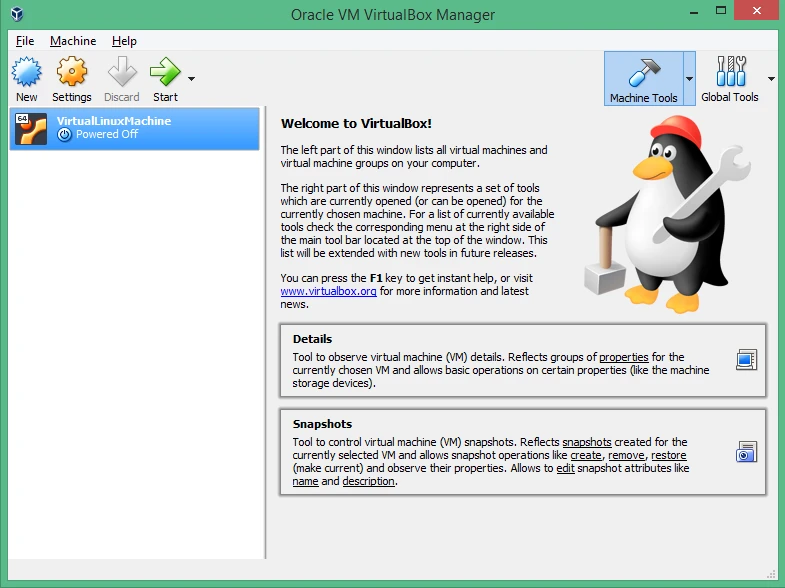
The VirtualBox UI.
- Now we’ll create a virtual machine. Click the blue “New” star and you’ll be presented with the Create Virtual Machine dialogue. If you see the screen below, choose the “Guided Mode” button and move to the next step.
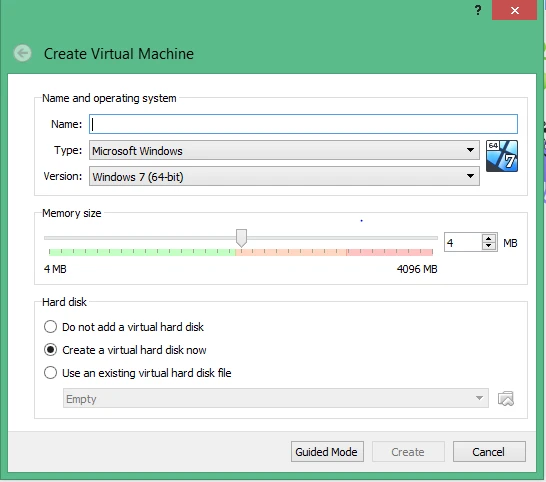
The Expert Mode VirtualBox UI
Choose Guided Mode here.
- We’ll be asked to enter a VM name and choose what OS and type it is. VirtualBox is generally intelligent this way — it’ll detect the name you give the VM and try to infer the OS from that. For Ubuntu, Type should be “Linux” and Version “Ubuntu” as shown. Depending on whether you’ve chosen 32 or 64-bit ISOs in step 1, you’ll need to select the right option in “Version” as well. We’ve downloaded a 64-bit ISO so Version is “Ubuntu (64-bit)”.
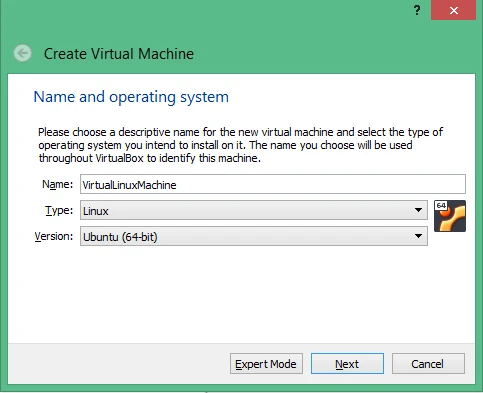
Choosing a virtual machine name in VirtualBox
Setting up VM name.
- Next, we’ll specify how much of our computer’s RAM will be allocated to the VM. Bear in mind we need at least 1GB and on average 2GB+ RAM for our host system to work, so the general rule is always to allocate less than one and a half times the total system RAM we have to our VM. Unless your host PC has less than 4GB of RAM, we’d recommend choosing 1GB of RAM. You can always change this later in the settings should you need to.

Choosing a virtual machine RAM amount in VirtualBox
Choosing RAM allocation.
- Now for the interesting part; hard drive setup. Once again, the magic of VMs is that the hard drive “seen” by the VM is in fact just a file on your host PC. Any files we create on the VM will stay within this hard disk file. 8GB is fine if you’re using it to test. Choose 10GB or more if you’d like to install lots of extra programs. We’ll click “create a virtual hard disk” and adjust the size as mentioned. Be generous now as it’s tough to resize disks later.
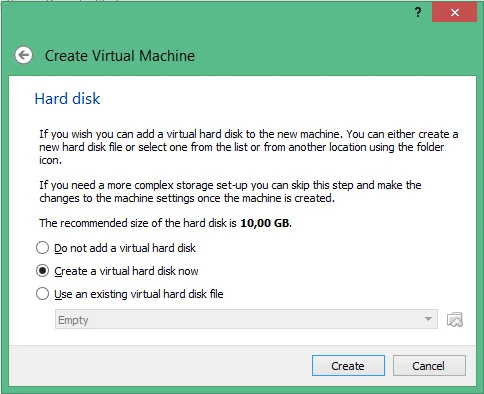
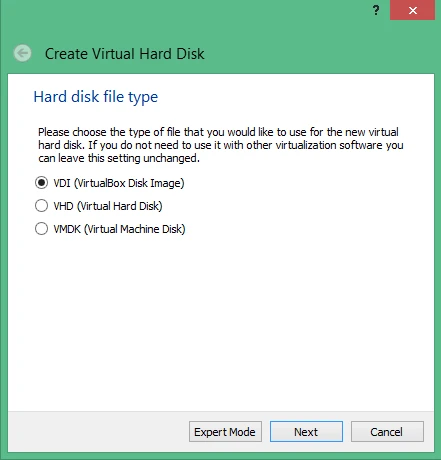
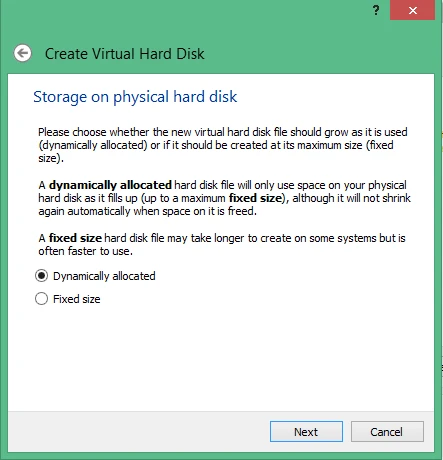

Choosing a virtual machine hard disk size in VirtualBox
Choosing hard disk allocation.
- Click “create” and we’ve created a VM configuration. However, this is the equivalent of a blank computer without any data on it, so we’ll need to tweak a few more settings by choosing the orange “Settings” wrench icon.
- System settings let you control exactly which parts of your hosts hardware are available to the guest, and also how they are visible. To make sure the system will boot, check “Enable I/O APIC” in the “Motherboard” tab of the “System” settings.
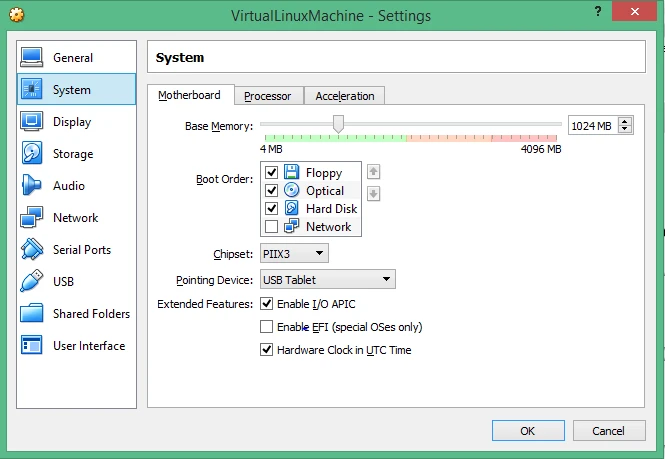
Choosing a virtual machine setting in VirtualBox
Choosing system options.
- Also, we’ll choose “Enable PAE/NX” in the “Processor’ tab, and drag the “Processor” slider to the right to determine how many CPU cores the VM will get to “see” and use from your host machine. If your slider maxes out at “2 CPUs” leave the slider set to 1. If it’s max is “4 CPUs” or “8 CPUs”, move the slider to 2 or 3 respectively.
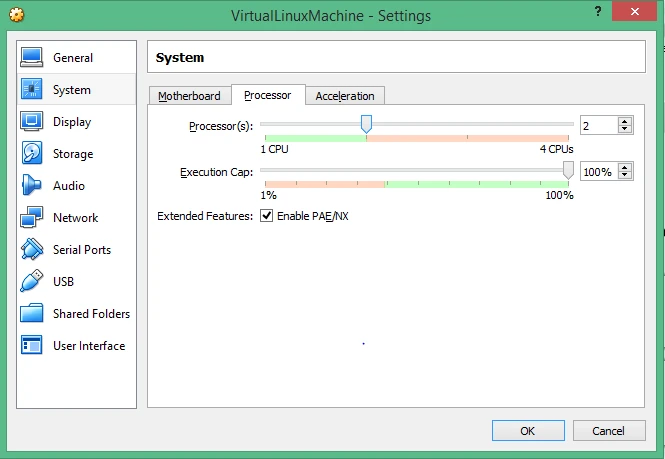
Choosing a virtual CPU core setting in VirtualBox
Choosing CPU core allocation.
- Importantly, we choose “Enable VT-x/AMD-V” in the Acceleration tab. This makes sure the virtualisation support in hardware from Intel or AMD CPUs is used. If this isn’t checked some VMs won’t boot. Ubuntu is forgiving with VT-x support though, so if the option is greyed out it’s likely not supported by your CPU or may be disabled in the BIOS, but Ubuntu will probably still boot.
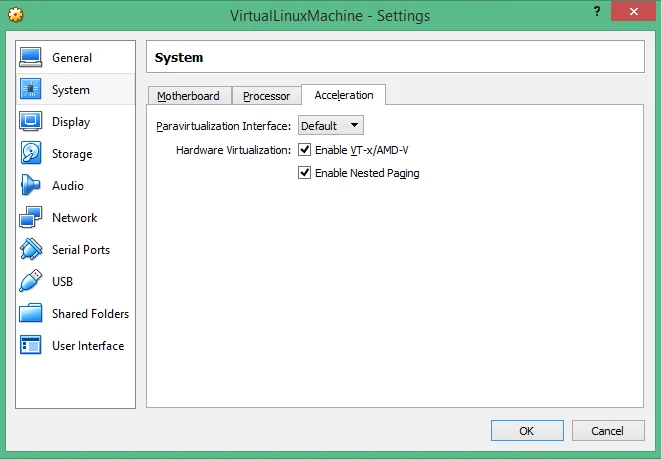
Choosing a virtual machine VT-x setting in VirtualBox
Enabling VT-x support.
- Finally, for 3D graphics support, we’ll choose Display, drag the “Video Memory” slider to the far right and select “Enable 3D acceleration”. This allows the VM to make use of the hardware acceleration (read: graphics processing) abilities of the host. This works even if your PC doesn’t have a dedicated graphics chip.
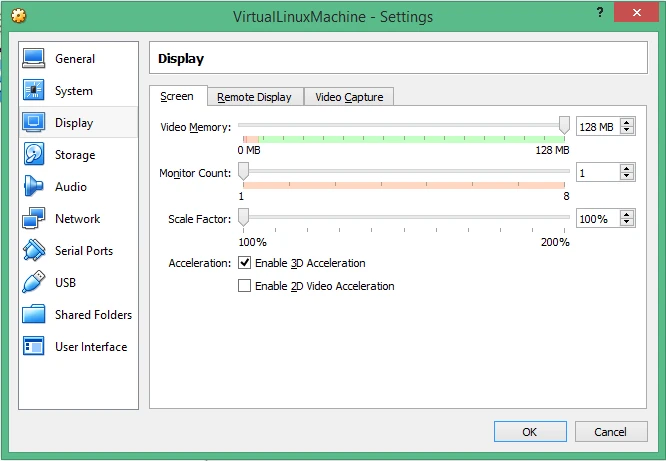
Choosing a virtual machine GPU setting in VirtualBox
Choosing graphics memory allocation.
- To be able to boot and start installing on our new blank Ubuntu VM, we’ll need to tell VirtualBox to mount and use the downloaded Ubuntu ISO as an attached CD. For this, choose Storage and use the plus sign to create a new controller in either the SATA or the IDE columns. Now we’ll choose the disc image by pointing VirtualBox to its location. Once it’s mounted, the virtualiser instructs the VM into installing from the CD.
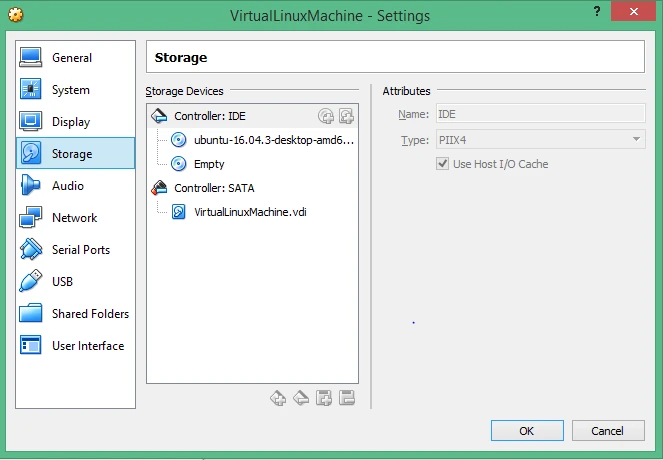
Choosing a virtual machine virtual CD setting in VirtualBox
Choosing the virtual CD ROM file for the Ubuntu installation.
- Once the CD is mounted, we’ll fire up the VM by choosing “Start” and follow the usual process to install Ubuntu. Click here to check out our Ubuntu installation guide. This time, we can easily minimize it and do some Windows work in the meanwhile.
- Once it’s done, you’ll be asked to reboot to complete installation, and you’ll see the Ubuntu VM launch, running as an application window inside of Windows:
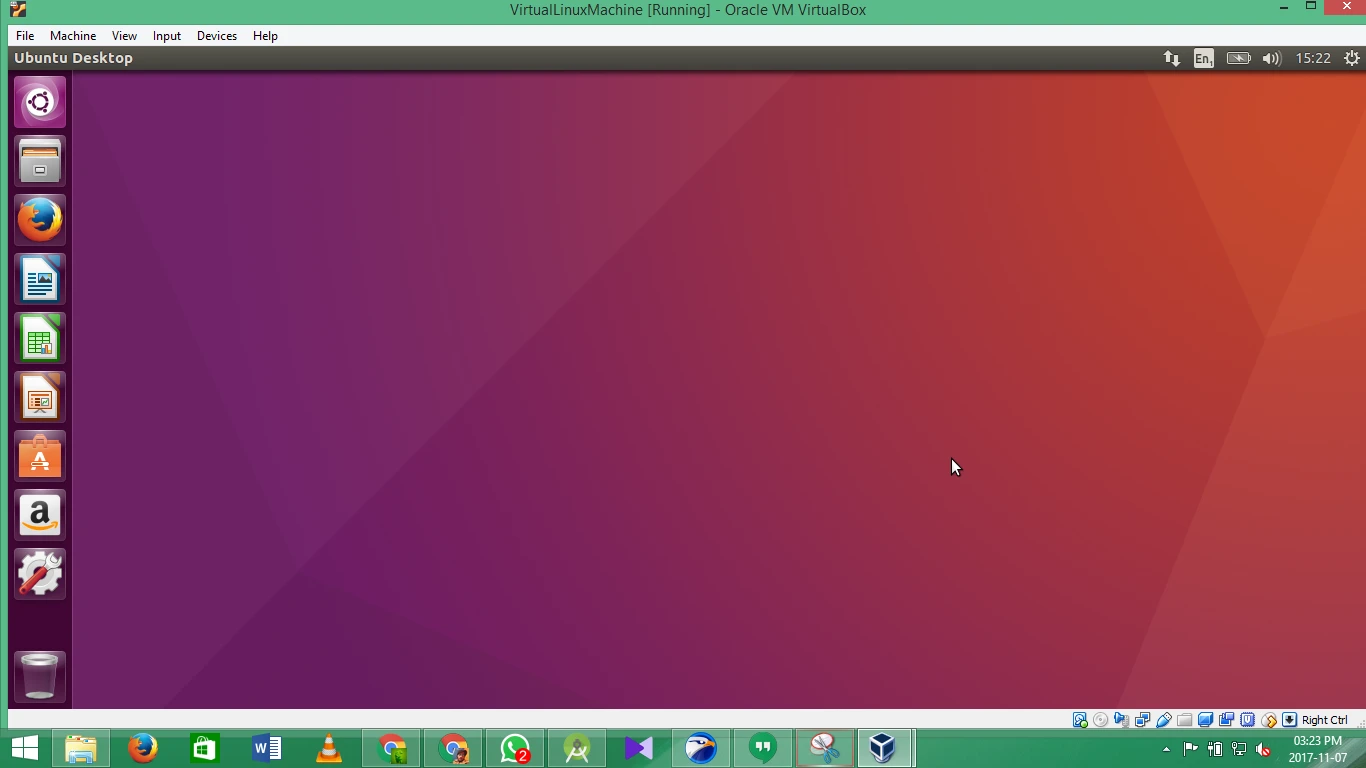
- When the OS install is complete, you’ll probably notice the resolution being quite low and other problems with missing drivers. To solve this, whilst the VM is running after installation, click the “Devices” menu and choose the option to “Insert Guest Additions CD Image”. This will auto-mount utilities which you can install which, on reboot, will fix the resolution and other issues found without device drivers in place.
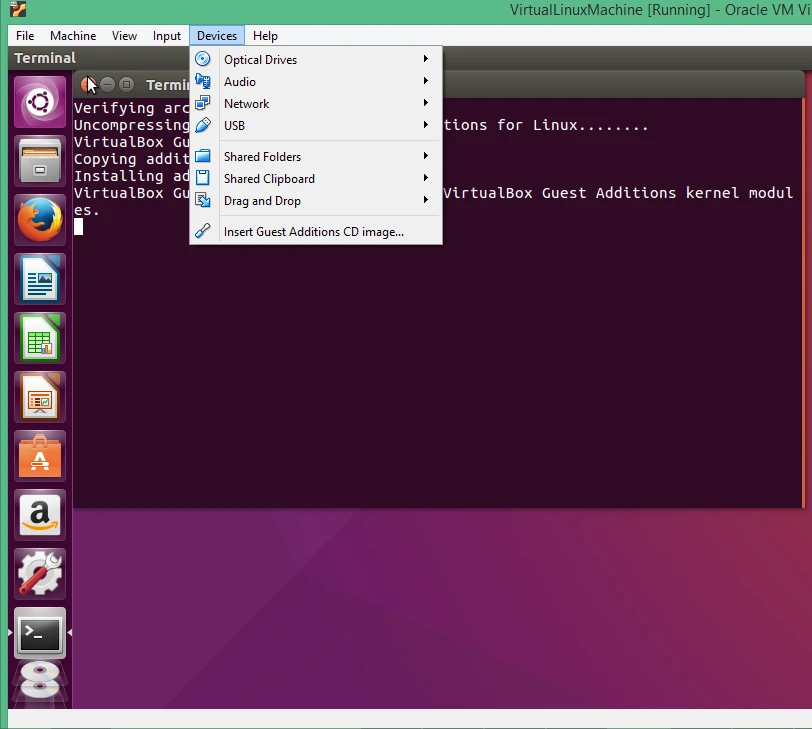
Installing VirtualBox Guest additions on Ubuntu
Use this command to install Guest Additions. (liberiangeek.com)
You’ve successfully set up an Ubuntu virtual machine, and our VM should now be ready for use, to use as you would a native installation of Ubuntu. Don’t forget that when ending your VM session, choose “Shut Down”, as this only closes the VM instance and won’t shut down your host OS.
Have you gotten to using Ubuntu in a VM? How do you find the concept? Comment with your views on this article in the comments section below, and follow Hyperion Hub developments in the future if you’d like to see more articles like these for the South African market.
Still have questions?
Contact our Admissions Team, and a real person will get back to you.