
Our latest insights
Read the latest insights


Software Engineering
Web Developer vs. Software Developer: What’s the Difference?
Here we distinguish between two popular careers choices: web developer vs software developer. What do these jobs entail, and which one is for you?
Often people will say, “I want to learn how to code”. But what type of coding do they want to do and what options are available to them? Working with computers covers such a wide range of activities, from tracking Google Analytics for marketing decisions to building mobile applications, that it makes sense to try and define how and in what context you want to “work with computers”. Here we distinguish between two popular careers choices: web development and software development. What do these jobs entail, and which one is best suited to you?
Web Developers
It seems almost too obvious to say, but here it is anyway: web developers mostly work with websites and web applications, but not with more general applications that might run on your computer. There are various ways of working with websites and perhaps you’ve come across the terms ‘front-end’ and ‘back-end’ web development. But what do these terms mean?
The front-end, or “client side” of a website is where the user hangs out. It’s everything he or she sees (i.e. it happens in the browser). It includes the special font you’ve chosen, the drop-down menus, the size of the text etc. You put this all together by using a combination of programming languages, including HTML, CSS and JavaScript that your computer browser controls. The back-end, or “server side”, of a website is where the data is stored and it usually consists of three parts: a server, an application, and a database. To become a full stack web developer, which is basically a web developer who works both front- and back-end, you would cover the following languages: HTML, CSS, Javascript, Node.js, MongoDB, Express, React, Python, and Django. A full stack web developer is a generalist with cross-discipline skills.
Check out this Quora question if you want to get a good sense of a day in the life of a full stack web developer. Activities that might take place on a typical day could include:
- Meetings with relevant people including the engineering team, devops about load testing, various clients, etc. This will probably include a daily 10-15 minute meeting about what will be achieved each day, and the impediments to achieving it.
- Programming should take up a large section of your day – for example, writing Python or Javascript code, or perhaps SQL (if you’re working on a back-end database).
- Various discussions, so communication skills are vital, about every point of the web experience, from user action all the way to the databases at the back-end. Your discussions could be with management, clients, users, technical or non-technical people.
These days, web development is exploding thanks to the emergence of new web technologies and Application Programming Interfaces (APIs) which let websites “plug in” to other useful features. The Web today can deliver ‘apps’ that feel native, because browsers now are so much more than a URL bar.
And because all businesses now requires a web presence, web developer demand is booming. Based on a 2017 survey by Stack Overflow, which interviewed 64 000 developers, a whopping 72,6% are in web development.
However, the employment of web developers “is projected to grow 13 percent from 2016 to 2026, faster than the average for all occupations,” states the Bureau of Labor Statistics. The average for other occupations is 7% – see the graph below. One of the reasons for this is that e-commerce – i.e. online purchasing – is expanding faster than the overall retail industry. In fact, the National Retail Federation claims that online sale will grow three times faster than retail sales. As online offerings increase, the demand for web developers continues to grow.
Software Developers / Engineers
This job description covers a wider range of skills and possible roles. At its simplest, it refers to designing, building and maintaining software and applications – e.g. Photoshop. The work requires a lot of testing to ensure that the software runs well and is free from errors.
Although people use the terms ‘software developer’ and ‘software engineer’ interchangeably, there is also a subtle, and frequently debated, distinction between developers and engineers.
Dr. Melanie Willett, content writer at HyperionDev and former ICT lecturer at Nelson Mandela University and CTI Education Group, explains this difference. “Put simply,” she says, “the difference is that a developer is usually thought of as someone who mainly writes code to solve a problem, whereas an engineer, engineers the solution to the problem. They design the solution, see which components are needed for the solution, how they interact with other systems and users etc.”
But don’t get too hung up on titles. A good programmer is a good programmer and interestingly, many people land themselves a programming job while still being pretty new to the field. The 2017 Stack Overflow survey reports that 11.3% of coders landed their first job within a year of learning how to program – i.e. they only learnt how to program within the previous year! A further 36.9% had learnt to program within the past four years and had now become developers.
Some activities that software developers would do on a daily basis include:
- Using a SCRUM methodology and work in sprints of a couple of weeks – this means you break down jobs into their smaller components, and spend some time writing code to implement features before testing and debugging.
- Deploying new code that has been created, tested and signed off by the client to live servers.
- Meetings with relevant people, including other programmers, management and clients.
- Staying up to date via RSS feeds or online community sites. A software developer needs to be on top of technical happenings and new research.
- You might use some of the following technologies: Java (a core foundation for many Android apps), Python (a one-stop shop and one of the most commonly taught programming languages in US schools), C# (for Microsoft apps), etc.
(If you want to hear more about the day-to-day activities of software developers, check out this article, or look at this video.)
And where do software developers land up? The Bureau of Labor Statistics reports many end up working for firms that deal with computer systems design and related services, manufacturing or for software publishers. Job outlook for software developers is very promising, as it is projected to grow 24 percent from 2016 to 2026.
A Quora post documents some of the pleasures of being a software engineer. Perhaps chief among these is the ability to ‘create’ in order to solve real-life world problems. Of course the wide range of job opportunities and good pay also contribute to job satisfaction.
Ultimately, if you’re thinking about web or software development, decide where you would like to end up. Are you drawn to developing websites and applications? In that case, web development might be the ideal career for you. Or maybe you’re keen to design and implement software and its various applications for businesses. Either way, both careers are very creative and in demand.

Career Advice
Get That Junior Web Developer Job: Ace the Tech Interview
Ace tech interview - learn tips for succeeding in the tech interview, including the ten most asked questions in the tech interview.
You’ve just completed your Full Stack Web Developer bootcamp. Now what? It’s time to land your first job in tech. To get there, you’ll have to ace a tech interview. This piece will show you how to ace the tech interview, as well as other tips for landing your first job in tech.
First, here’s the good news: tech jobs are in high demand. Thousands of US job ads were analysed on the Quartz website – i.e. when the ads were put up and when they were taken down – to see how long it took to fill certain skills. The results showed that IT jobs took the longest to fill. Google, for example, took 97 days to fill IT-related jobs, primarily software engineers. On average, tech jobs stayed open 15 days longer – i.e. are harder to fill – than non-tech jobs. Check out the graph below to see the average ad duration for each specific developer skill.
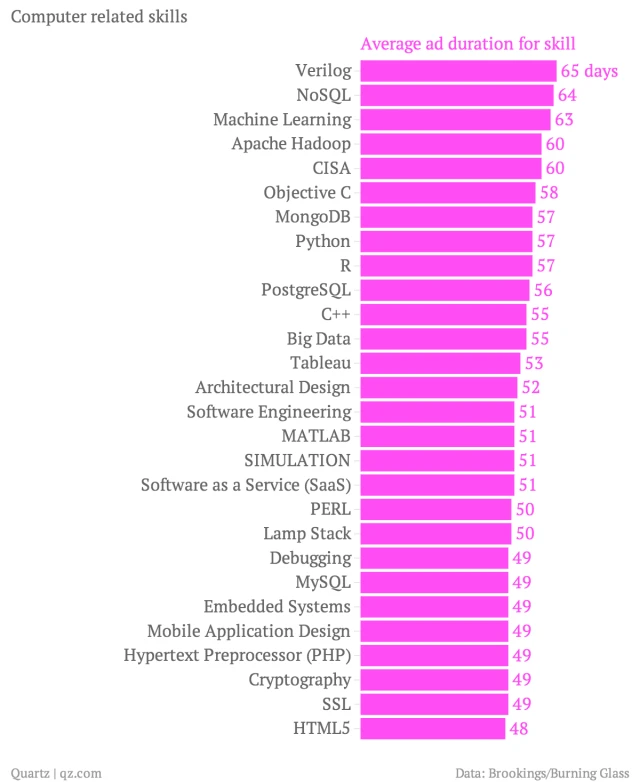
Despite the demand for tech skills, the tech interview process can be a minefield, because your technical knowledge is frequently tested (we’ll go into more detail about what you can expect – and, most importantly, how you can prepare – later in the piece), but before landing that interview, you’ll need to make sure your CV (or resume) is top-notch.
It should go without saying, but you need to emphasise your technical skills, states Nesco Resources, a staffing and recruitment agency. You want to highlight each specific qualification or skill by creating subcategories. Only list those programs or applications with which you feel comfortable. Here’s a good tip: use keywords. How do you do this? Go to any job boards – e.g. Indeed, CareerBuilder or Glassdoor – and see which keywords are used for jobs that interest you. Incorporate these words into your resume. Include additional accomplishments such as voluntary work experience, contract work and internships. Monster, a job portal sites, includes sample resumes – check out their entry level IT developer resume template.
When it comes to the actual interview, Kevin Dolan, the CTO of Metric Collective, explains on a DevPost video the three common tech interview question types (quizzes, experience and hypotheticals), and how best to approach them. Here are his tips.
Quizzes:
These are specific questions about specific technologies, as well as general concepts in computer science. The most important thing here is to avoid ‘dead air’ – i.e. silence; you want to move the conversation along. If you’re really stuck and haven’t heard about a concept, speak about an adjacent concept. Remember that you can always ask the interviewer for an explanation.
Check out CareerGuru’s top questions and answers for web developer interviews. For example, here’s a good question from that site: What are some ways to reduce the load time of a web application that you have written? Do you know the answer? Here it is: To decrease the load time of a web application you have to follow the following tips:
- Optimize images to no longer than screen resolution and save them as a compressed file
- Eliminate all JavaScript files to reduce the amount of transferable data
- Combine & Minify all CSS and JS and call them in footer
- Defer or Asynch JS Files
A few other good technical interview questions include a request to list some ways to reduce page loading time, explain how XHTML is different from HTML, and list the new APIs provided by the HTML 5 standard.
Experience questions:
These questions refer to things you have done. The interviewer is keen to see the overall narrative of projects you have worked on. Don’t be afraid of mentioning projects that haven’t been entirely successful.
If you don’t have any job experience, you could speak about hackathons you have attended, and the projects you worked on there. Alternatively, you could open an account with GitHub, a software development platform, where you can host and review code, manage projects, and build software alongside millions of other developers. Add your existing code to share with prospective employers or start new projects to keep yourself relevant. GitHub accounts are free, and it’s the best place to swap ideas and code with other programmers online. Remember to be selective with what you show on your GitHub profile. A public repository allows anyone to read your code. Hiring managers might well check out your code there. Only make substantial or interesting projects available for viewing.
Hypotheticals:
Here you are asked to walk the interviewer through a project given to you in the interview itself. Here’s a tip: repeat the problem back to the interviewer. This not only buys you time, but also give you more experience interacting with the problem. Many hypothetical questions begin with the format, ‘What would you do if….’, and then some kind of situation.
Besides these general categories, here are 12 technical interview questions along with the ten most-asked specific tech interview questions, according to Indeed:
- What are your weaknesses? Don’t name a strength that is really a weakness – e.g. I obsess about being punctual – because you’ll come across as not genuine. Rather name an actual weakness, but also include a strategy for how you overcome the weakness. For example: I noticed I can be a little lazy, but I know how to incentivise and reward myself for achieving work goals.
- How well do you know a specific programming language? Remember, most tech companies are up against a shortage, including in South Africa, and so they are not looking for perfection but merely some competence.
- The brainteaser or story problem – here your sense of logic and calm under pressure is really being tested. Feel free to ask clarifying questions, and approach the problem conversationally. The answer is less important than coming across as reasonable, articulate and analytical.
- Have you interviewed anywhere else? Remember, you don’t need to be specific.
- Do you work best alone or in a group or team? You don’t need to take a side. The ideal tech employee is capable of both independent and team work. (Check out the difference between t-shaped and i-shaped employees and which one makes the ideal tech hire.)
- Why did you leave your old job? Be careful with this one. Employers are looking for positivity and limited baggage. Don’t bad mouth your old boss.
- What salary do you want? Again, you don’t have to answer directly, because you might not yet know their budget range. Say something more vague, ‘Based on my abilities, I’m sure we can work out something fair for both for the company and myself.’ (Read further about salary negotiation tips.)
- The programming test – you will need to spend time practising. Remember, it’s the way you think that is being evaluated and not the final answer. Try these sites for code challenges: Codewars, HackerRank, Pramp and Gainlo.
- What do you do for fun? Here the interviewer wants to see something about your personality and how it will fit into the culture of the organisation. Interestingly, in the book Acing the Interview: How to Ask and Answer Questions That Will Get You The Job, Tony Beshara, the author, notes that 40% of the hiring decision rests on the issue of whether the interviewer likes you (hiring people is like ‘buying’ anything else; there are emotional factors at work).
- What are your strengths? This is simpler than it seems. Have a look at the job description and find two aspects that apply to you. Think of examples to illustrate them.
To land your first job as a junior web developer, you will need to practise. Make sure you get a more senior developer to look over your resume. And go over potential questions and how you would answer them with a good friend. With these strategies, you’ll be well on your way to climbing that first step on the lucrative tech ladder.

Career Advice
The Best Qualification for a Software Developer in South Africa
It's important to know exactly whether you should pursue IT or CS qualifications to become a software developer. We compare the salaries, employability and career paths of both IT and Computer Science degrees.
This article serves to answer that question we get asked time and time again – ‘What degree should I study if I want to become a software developer?’ We’ll compare the employability, salaries, and career paths for IT versus CS qualifications, and answer which qualification is the best for programmers.
What are the Qualifications?
There are several options for either CS enthusiasts and potential students to follow, as is the case with IT. It is essential you understand the following tables and the different qualifications before committing to years of study in a qualification that may not be the right one for your goals.
IT-based Certifications and Qualifications
There are a few options available in South Africa in terms of short-term certifications, a long course incorporating many certifications over a few years, as well as institutional National Diploma offerings. Pricing per year is based on the lowest priced or generalized qualification shown.
The South African IT Misconception
There are several issues raising confusion about qualifications in South Africa (not to mention the poor navigation of most South African universities’ websites). The first is the difference between a Degree and a Diploma. What’s labelled as a diploma here, is passed off as a degree, vice versa, there’s National Diplomas, B.Tech’s, and even the CS degrees seem to have liberal doses of BComm and Business Science with extra math streams thrown in. To clarify: an honours, masters, and PhD degree are the highest qualifications attainable in South Africa, and are formally recognised as being a higher qualification in SA under the National Qualifications Framework. Degree-level qualifications can generally only be studied at a university (such as the Universities of Cape Town, KwaZulu-Natal and Pretoria, as well as Wits), not a technical institution (like Tshwane, Cape Peninsula and Durban Universities of Technology). ‘Degree-level’ also excludes those qualifications that brand themselves as a degree, but offer a lower NQF level qualification at graduation.
The second point of confusion is an IT qualification vs a CS one. There’s so much to say on this that we’ve published an article to clear up the confusion. The takeaway of this research is that in South Africa, CS qualifications can only be attained at universities, or through one short course. The ideal course for a career in software development is a CS one.
Getting a Job, Keeping it, and Moving Up
It’s clear that in South Africa, having a BSc or BEng in Computer Science is the preferable qualification. It also means that you’re more much more likely to get a job once you move into industry, as a graduate or postgraduate. This fact is meaningful, given South Africa’s appallingly high unemployment rate of over 25%.
This trend is shown best by this study noting unemployment rates vs graduates of university degrees vs those with diplomas, and so on. Note that these aren’t simply transient trends; the unemployment problem has been ongoing for decades!
The CS graduates show higher employment rates than IT diplomates. Graph adapted from data sourced by econ3x3
As the graph shows, as of 2012, “diplomates” – students with an IT qualification – had a 85% employment rate compared to the 95% employment rate of CS graduates. That’s a significant and statistically meaningful difference.
There is a big difference here, and that’s why it’s crucial to realise how the superiority of a degree over something like an IT qualification guarantees excellent employability. Holding a degree – in all ways – is a better option to other qualifications which may claim ‘degree equivalence’, but won’t hold up under international scrutiny.
Unfortunately, more often than not, institutions offering “IT degrees” can’t deliver the same depth of understanding and job-opportunity in graduates that ‘full-meat’ CS and CE degrees can. So whilst your 3 year ‘combo courses’ of CompTIA and other bits and pieces might say “Engineering” on the box, the recognition for such a term is certainly not “Engineering” inside the box. Only an actual BSc Eng or BEng will get that for you. The exact same applies to qualifications that claim computer science. That’s a concern for those wanting to work overseas: if you’re planning to leave our borders, in short, take a CS degree with you, if you can.
So what about long-term career prospects? Data from Careers24 and CareerJunction on average salary increases for professionals “in the IT sector” in South Africa was used to compare typical job designations. The chosen jobs were those that fall under what’s considered “IT” internationally, versus a typical CS designation. The “IT” designations offered, on average, a 81,3% salary increase, versus the 122% increase of the CS designation. What does this mean? You’ll earn more money, for longer, with a CS qualification, than with an IT one.
Summary: the best qualification
All the evidence points to a BSc/BEng CS degree being the best. The core reason CS-degrees are more valued is because of how strongly they reinforce modern programming skills. What if you’ve already qualified, can’t go back to study, or don’t have the time or the means? This South African company is offering the first short CS qualifications, available part-time and online. Hyperion Development has packaged this knowledge of modern programming skills into their short courses and links successful graduates with software development roles across South Africa.
Comment with your views on this article in the comments section below, and follow Hyperion Hub developments in the future if you’d like to see more articles like these for the South African market.
Footnotes from the tables:
1 Pricing correct at time of post; sourced from noted institution’s site as-is
2 Taken from lowest-priced course Cisco CCNA, other prices vary
3 Taken from StudyITOnline.co.za, may not be indicative of market pricing
4 This is the generic CS degree as a BSc, not the BusSc or BCom CS/IT derivatives
5 BSc Mathematical Sciences: Focus CS given, Machine Learning and other specialization options also available
6 UP and UKZN call this an engineering degree, with hardware focus + CS, marketed as a BEng CS overseas
7 UP does not offer MSc/PhD by coursework, only by research. The other listed universities offer either.
8 This is currently the only short-term CS qualification of its kind available in South Africa
9 For a 5-week introductory Python course, others available

Web Development
10 New HTML Features Coming Soon
Although HTML was developed about 25 years ago, the scripting and formatting language continues to undergo revisions to match the evolving nature of the programming industry. We explore 10 new HTML features coming soon.
Hypertext Markup Language, or HTML, is the markup language underpinning most sites today. Despite its introduction being almost 25 years ago, the standard has undergone numerous major revisions and has acquired several new HTML features in its lifetime. The most recent of these is HTML5, which was standardized in 2014. It already powers the new wave of content aiming to replace the aging, insecure Adobe Flash Player browser plugin system some sites still cling to.
Despite this, HTML continues to evolve, and with that, we present a selection of 10 of the best new HTML features coming soon. Along with that, we’ll advise on which of your favourite browsers will (soon) support the feature, courtesy of this great site. When reading the browser support images under each feature, the numbers in each column indicate successive browser version numbers, with the lowest row being the currently available versions. Green blocks mean the browser supports this feature, light green means partial support, whilst red is no current support for the feature, although it may be in development.
- A new JPEG
The Joint Photographic Experts’ group is getting a new edition to its standards today! JPEG 2000 (extension *.jp2) is apparently much more effective in compression than its venerable JPEG sibling, and XML transparency can also be embedded into the metadata for the image. Bafflingly, only Apple’s Safari and iOS Safari made the cut to support the new jp2 format for now.
- WebRTC
This one will arguably drive the biggest change from an end-user’s perspective, as WebRTC allows native voice and video calls in your browser instead of the associated app or plugin. Along with voice and video, messaging is also possible with WebRTC sans plugin. Firefox and Chrome, as well as the plucky contender, Opera, are first out of the gates to support this standard.
- Agnostic Pointer Events
Anyone with a touch-screen on their laptop/tablet will appreciate the merging of how browsers understand a click versus a swipe or a touch, for example. The specification says touchscreen, mice, and pen touches are all to be consolidated and provide cross-device pointer authoring. Just IE and Edge support this one right now.
- Position: Sticky
This one fixes a deficiency previously solved by Javascript, which allows (in CSS) items such as a horizontal menu bar on a web site to scroll up as the user scrolls, but then stick to the top of the screen once the user has scrolled far enough. The best way to explain this effect is to observe it in action; simply visit this site and scroll down (and watch how the top bar menu responds). sticky{ position: sticky; } should do the trick here. Only Safari and Firefox support Sticky for now.
- Grid Layout
If you’ve ever used Android home-screen launchers, and tried to add a widget to your homescreen, have you ever noticed you find yourself restricted to a set grid? The “fixed points” define the extent of the widget size you’re making, and Grid Layout is like this for CSS, where a grid is used to allow for more predictable content layout. While it sounds great, only Internet Explorer and MS Edge sort of support it at this time.
- Font Stretch
This option lets browsers automatically choose the best font variation to use for fonts that come out-of-the-box with variations for character width. This will be important for responsive web design and similar applications. IE and Edge lead the pack with current support, with Firefox also joining the party.
- CSS Mask
This option masks contents on a page to show only the desired element. The concept is similar to that of a mask on Photoshop, where you can selectively tune colour and object visibility. Partial support for most browsers already exists, except from the Microsoft camp where neither IE or Edge support it yet.
- Image-Set
When designing sites for a myriad of screen sizes and resolutions, it often pays to have multiple image assets available for each screen resolution, so that there are no weird issues with assets on your page being cut off, or conversely, too pixelated with high PPI screens. This Image-Set method lets your browser do the guesswork by automatically choosing the correct asset for the screen PPI from a given set of assets. Again, the Microsoft camp as well as Firefox are mum on this; Chrome, Safari and Opera meanwhile, have capitalised and support the feature.
- Dialog(ue)
The “dialog” tag lets your browser annoy the user with front-and-centre displaying dialogue boxes. Whilst it’s arguable that browsers already have it, this method lets those dialogue boxes be custom-designed, and allow the background dimming element to be customized. Only Chrome and Opera support this right now.
- MIDI
While the idea was as old as the hills, the MIDI file is actually a Web MIDI API, so that coders have a base to start with, on getting musical devices using the MIDI standard to play nice with browsers. Penetration is weak so far though, only Chrome and Opera support this at present.
Don’t forget that to learn more about this and other technical programming terms, follow Hyperion Hub developments in the future, and comment with any feedback you may have on these and other articles hosted here.
Student Success Stories
Hyperion Graduates: Where are They Now?
HyperionDev graduates - where are they now? This piece interviews four HyperionDev graduates to see where they are now and how they got their ideal jobs.
Ever wondered what happens to people after they finish their online coding bootcamps? Do online coding bootcamp graduates really find jobs as easy and as quick as graduates with computer science degrees? See for yourself! We decided to follow up on some of our graduates to see where they are currently working and how HyperionDev has led them to where they are today. Read how HyperionDev helped them find their dream jobs.
Julian studied the Full Stack Web Development bootcamp part-time and is from the UK. His full-time job is as a SAS developer, which he had been doing for the last decade. ‘I wanted to change careers,’ he says, ‘into web development.’
Julian’s internship is at Uthini, a company building chatbots for learning Xhosa that is also part of the Injini EdTech incubator. ‘The internship has been a great way to consolidate bits of self-taught web development, as well as a steep learning curve for new topics, mainly Python and Django,’ explains Julian. ‘I feel I now have an increased level of competence in terms of setting up Django projects from scratch and implementing custom models and views.’ Julian was able to secure this internship through an introduction from HyperionDev and has been working remotely for Uthini from the UK.

Yusuf did the Mobile Developer bootcamp at Hyperion. Now he’s accepted a job offer as an Android developer at a company called RapidDeploy. ‘They do dispatch software for emergency services,’ he says, ‘which is similar to something I tried pursuing on my own.’ The good news for Yusuf is that he’s been working towards this kind of job for eight years. And so I’m obviously very happy about the offer,’ he adds.
‘Before that, I did an internship at Injini, Africa’s first EdTech incubator with whom HyperionDev has partnered. I worked with a start-up called Mtabe, an offline search engine for secondary school students that uses artificial intelligence. I loved my time working there and thanks to my HyperionDev bootcamp, I could really get stuck in.’
Merousha completed the Mobile Developer bootcamp. She says: ‘I’m now working with a company called Accelerated. They are putting together a teacher training and mentoring platform for the African context.
Says Merousha: ‘I was given the task of designing and developing a mobile app that allows teachers to login and have access to the Accelerated content. The app also allows teachers to display a profile of their basic information and to communicate with one another.’
‘Honestly, working on a real-life project and having responsibility for it was rather daunting at first. I did not know what to expect. However, I felt more confident after revising my course notes and the technical knowledge I had learnt on my HyperionDev bootcamp. I’m now feeling much more confident and fired-up.’

Chengetai completed the Full Stack Web Developer bootcamp at HyperionDev. He’s completing his internship with Yo’Books, an e-bookshop based in Ethiopia and also part of the Injini incubator, in the evenings and on weekends. ‘The internship has really provided me with the opportunity to apply what I’ve learnt to a real-world situation.’
He explains that it’s always necessary to carry on researching a subject in the tech field. ‘I am familiarising myself with Gitlab,’ he says. ‘I like to add to my knowledge every day, as I discover new ways of coding and best practice.’
It’s great to see HyperionDev students flourishing in their respective internships. It’s always ideal to follow up a course with application in a real-world setting. If you’re interested in mentor-led online courses in the tech field, check out these bootcamps and short courses.
Software Engineering
Should you Attend a Hackathon?
Should you attend a hackathon? Hackathons are about building something from nothing, generally technical in scope. Hackathons are team events.
Imagine if you could solve a problem in a few hours with a group of people you’ve just met. Would you be interested? If yes, then perhaps you should consider signing up for a Hackathon. ‘It’s really satisfying,’ says Gareth Dwyer, software and operations developer at HyperonDev, ‘to set aside a day or two to build something from nothing, even if the completed project is somewhat unpolished. No one really knows what’s possible in such a short time, so it’s a great challenge to see if you can achieve something worthwhile in the strict time limit.’
MLH Local Hack Day + HyperionDev
You can join a global hackathon this Saturday 2 December in Cape Town. HyperionDev is partnering with MLH (Major League Hacking) for their Hackathon Day.
Who it is for:
Any programmers, designers or creators who want to come and build a cool tech product in a limited time frame. Come with your pre-existing team or on your own to meet and work with like-minded people.
What you will do:
You’ll build a tech product such as a mobile app, website, chatbot or an API. The Hackathon starts at 9am and continues for 12 hours. Our judges will select a winning team based on the functionality, implementation, potential, and social impact of each creation.
Pizza and drinks will be provided.
Date: 2 December
Time: 9am
Place: HyperionDev, 3rd Floor, Block B, Woodstock Exchange
Sign up on FB or here. HyperionDev will provide the venue, food, internet and some cool swag.
What is a Hackathon?
Essentially, says Hackathon Guide, hackathons are about ‘creative problem solving’. That means they don’t have to be technical in nature, although they frequently are. At its most basic, it’s an event of any duration where people come together to solve problems. And the problems can be really way out. At the ‘Stupid Shit No One Needs & Terrible Ideas Hackathon’ some creations included: a 3D cheese printer, a beer selfie stick (which pours beer on you as you’re taking a selfie) and Hypochondriapp, which diagnoses you with the worst possible disease for any symptoms you might be experiencing.
Most hackathons, however, last between 12 and 48 hours. And they are constructive in nature. The team frequently builds a working prototype for a product, usually an app, although some teams build actual hardware devices. Says Dwyer: ‘I like the feeling of having built something. Day-to-day, most of us developers are working on fixing small issues, developing smaller features etc., but at a hackathon you can really build something big.’
There are other benefits as well. ‘One of the main reasons I’ve enjoyed hackathons,’ says Dwyer, ‘is the social or networking angle. I’ve met some cool people and the experience of working with three or four people for 12 or 24 straight hours, including the tensions, frustrations, etc., normally results in a long-lasting bond’” In fact, the hackathon community is very active online, too, says Forbes website. Check out the Facebook group Hackathon Hackers, which has over 50 000 member, or Hacker News, the Reddit for hackers.
Why attend a Hackathon?
Tim Fogarty, the EU commissioner for MLH (Major League Hacking), a global student hackathon league, lists these additional reasons:
Learning:
‘You’ll gain more practical knowledge in one hackathon than from a month of lecturers,’ he says. ‘(They) are super-condensed learning experiences.’ Not only will you learn the technical aspects of a project like APIs, frameworks libraries, version control, testing, etc. (stuff software engineers know), but you’ll also learn about idea generation, working with others, and managing a project. In fact, if you want to learn how to code, go to a hackathon!
Cos it’s cheap:
Hackathons frequently provide food, drink and cool stuff. Generally, you’re only paying for travel.
An opportunity to demonstrate your skills:
It’s very satisfying to do something at which you’re proficient.
Make that idea a reality:
Here’s your chance to make that app you’ve thought about often. And some fantastic ideas have emerged from hackathons. The social messaging app Group Me, which sold to Skype for $85M!, was originally hacked at Tech Crunch’s HackDay, reports Forbes.
Let’s say you’ve found a hackathon and signed up. Here are some tips for hackathon success, from Appsembler:
Make sure your expectations are realistic:
Pragmatically, in 12-48 hours, you’ll be lucky to build something that works and can be demoed. No problem with thinking big, but start small. Err on the side of limited functionality rather than adding functionality. In tech-speak, this is known as a minimal viable product (MVP) – a product with enough features to satisfy early customers and to get feedback for later iterations.
Teams that are diverse: Ideally, you want people with different competencies, such as developers, creative designers, people from business. Most teams consist of 2-5 members.
Prepare beforehand: Try and think of your product beforehand. Also, if you can, understand how the libraries you’re planning on using have been put together. This is so that you won’t have to spend your valuable time researching how to use libraries or 3rd party APIs that you may need for your product.
Work backwards:
Imagine your perfect demo and work backwards from there. Think about the functionality and the UI screen you want to show your prospective audience.
You need a version control system like Github:
When you’re working on code, each time you implement a new feature, fix a bug, or write modified code, you want those changes to be recorded somewhere. It’s much easier to roll back a version than to fix a bug that is embedded in the code.
Remember to take frequent breaks:
Creating something new is tiring. Take breaks.
News & Announcements
November 27, 2017
Partnership with Silicon Cape
Special Partner Discount Silicon Cape Members HyperionDev pleased to announce partnership with Silicon Cape on any of HyperionDev's courses.
Special Partner Discount for Silicon Cape Community Members
HyperionDev is very pleased to announce a partnership with Silicon Cape, a non-profit company committed to building and catalysing the technology ecosystem in the Western Cape.
HyperionDev will provide access to their mentor-led, industry-relevant online coding bootcamps in Full Stack Web Development, Mobile Development and Software Engineering to Silicon Cape community members. The EdTech company also offers a host of three-month short courses in a variety of computer languages including Python and Java. All the courses offer access to quality content and on-demand code review by an expert. Personalised mentorship means that you won’t feel stuck and your code will be reviewed for accuracy, style and efficiency.
Riaz Moola, Hyperion’s co-Founder and CEO, says about online bootcamps: ‘Often a student is unable to get ahead when stuck on a learning wall. Rereading the same passages endlessly or repeatedly watching the same videos won’t let the student overcome the learning block. But an expert mentor will give valuable feedback swiftly, helping the student.’
Hyperion launched in Durban in 2012, and is part of Google’s international project to improve computer science and training. ‘We have close ties with the Google Africa team,’ says Moola. Besides Google, HyperionDev was also won the Innovation Challenge Award from Facebook, making it the first South African startup financially backed and supported by both Facebook & Google.
Silicon Cape has grown to over 10 000 individual members, representing over 500 organisations with close ties with other professional bodies such as Wesgro, CITI an Global Entrepreneurship, the government of the Western Cape and the City of Cape Town.
To celebrate this partnership, HyperionDev is giving a 15% discount on any of their courses by using promo code SILICON. Valid from 1 November 2017 until 31st January 2018.

Career Advice
Should You Sign Up for a Coding Bootcamp?
Factors to consider if you want to enrol on a coding bootcamp. Coding bootcamps are very different in purpose from a computer science degree.
It’s not easy to make a big decision.
Psychology Today lists two good reasons why this might be the case:
- Lack of Self-Knowledge: You don’t don’t understand yourself well enough to know your own attitudes, preferences or tastes.
- Analysis Paralysis: You can see the pros and cons of both options and so it’s simpler just not to make a decision at all.
When it comes to deciding whether to study something new or change careers, you might find yourself stuck about what to do. We’ve outlined a number of factors worth considering before making the decision to enrol on an online coding bootcamp.
What is a Coding Bootcamp?
Before exploring these factors, it’s worth explaining exactly what an online coding bootcamp is. You can’t make a decision unless you have all the facts at your fingertips. Online coding bootcamps are structured, mentor-guided learning platforms that replicate an in-class experience. You’ll find that you need to put aside between 5 and 30 hours per week to study coding this way. But because the environment is flexible – you decide when you want to learn – you can choose when those hours will happen.
It’s useful to understand the distinction between a coding course and a Computer Science degree. In this article, the author explains how he experienced his Comp Sci degree (he studied a 4-year Computer Science Degree at a Northeastern University in Boston), and how a course like this differs from a coding bootcamp. Although he thought the degree would cover programming languages, he found that it focused mostly on “how computers are able to solve problems for programmers”. His only coding courses involved learning a programming language that was hardly ever used in the industry anymore. He concludes that many people with a CS degree are not necessarily fantastic programmers. Coding bootcamps, on the other hand, teach industry-specific coding skills – it’s more practically-oriented than theoretical.
Yusuf Isaacs, who now works as an intern at Injini, Africa’s first ed-tech incubator, did a BTech in Software Development and then followed it up with a HyperionDev Mobile Developer bootcamp, because he was tired of being stuck in tech support. “I wanted real-world skills for designing Android apps,” he says.
So, what factors should you be considering before enrolling on a bootcamp?
Should I do a bootcamp: three pivotal moments?
Stack Overflow mentions three pivotal moments in your career when a coding bootcamp might be the ideal option:
- Starting Out: You may have a college degree, but no actual tangible skills. Learning a programming language will provide you with skills that are in high demand. The average growth for all occupations between 2016 and 2026, as predicted by the US Bureau of Labor Statistics, is 7%; however, the jobs outlook for software engineers is 24%, much faster than average.
- Transitioning: It’s never too late to do something else. Perhaps you’ve started out as a Full Stack Web Developer and now you want to become a Mobile Developer who uses Java to build desirable apps, or you could be a marketing manager looking to get into tech and wanting to switch careers completely. A coding bootcamp lets you keep your day job while learning a new skill. You get a taste of the new career without needing to make any radical or permanent changes.
- Going Solo: Perhaps you want to start a new business or become a freelancer, a coding bootcamp lets you acquire the skills for these options. Or let’s say you are already a freelancer but you want to add to your skillset to acquire new customers or projects. A certification from a coding bootcamp lets potential clients know that you are competent in a particular area.
Things to consider before enrolling:
- Fear of Automation: Is there a likelihood that you will be replaced by a robot? Some careers are obviously more vulnerable than others. Bookkeepers, for example, have a 97.6% chance of being automated, whereas software developers have around a 12.8% chance.
- Unemployment: We’ve discussed people who are starting out and those who are mid-career, but what about the unemployed? Let’s say you’ve been unsuccessfully looking for a job for a while. Perhaps it’s time to acquire skills that are in high demand. Also, you can train up in only 6 months – that’s not a massive time investment, if you consider your entire working life.
- You’re indecisive: You don’t really know what you want to do. The good news about learning coding is that it opens the door to a wide range of software development careers, from a Full Stack Web Developer to a Mobile Developer, or even a Security Analyst.
- Your skills are out of date: You’ve become stuck in a very specific job and there are plans afoot to migrate systems. You need to pick up new tech skills. Forbes lists a number of tech skills that are in high demand this year, including data science, cloud and distributed computing and data visualization.
Are you ready for a career change?
Lastly, you may want to consider whether you ready for a career change. The National lists seven sign that the time is right to jump ship:
- You’re worn out and exhausted.
- Your skills and responsibilities are not a good match with your abilities.
- The salary, even if it’s large, is not enough.
- You’re not being used to your full potential.
- There is no room to grow.
- You feel overworked and under-compensated.
- You’ve lost your passion and enjoyment for your work.
It’s often easier to continue in a straight line than to shift direction. But think about it: you won’t know what is around the next corner if you don’t make that turn. Perhaps now is the right time to think about what you really want from your career.

Student Success Stories
Merousha Harichand – From Site Engineer to Full-Time Mobile Developer
Success story - Hyperion Success Story Merousha Harichand, from Site Engineer to Mobile Developer. How a Hyperion course helped me with my goals.
Tell us a bit about yourself and your current occupation
I was always intrigued by technology but never pursued my curiosity. Instead, I decided to study Engineering instead. As a Site Engineer, I felt my skills were not utilized to their fullest. I did not have the freedom to use my own ideas and it felt like my opinion counted for little. I just had to carry out instructions every day. All of these factors contributed to my days becoming repetitive and somewhat boring.
I am now currently working as a Software Development intern at Injini, Africa’s first Edtech incubator. I’m very happy about the exciting opportunity and the new stimulating environment.
Why did you take a coding course – are you looking to up-skill or start a new career?
I decided to learn a new skill, which in turn would help me to change careers.
How did you hear about HyperionDev?
After searching the web, I came across HyperionDev. I was very impressed by the idea of personalised mentorship and online code review.
Which HyperionDev course or Bootcamp did you take and why?
With Hyperion, I started the Java Essentials Program, because I had some prior knowledge with Java. On completion of two Java Programs offered at Hyperion Development, I was advised to move onto the Mobile Development course.
How has the course helped you reach your career goals and objectives?
I think Java is an excellent language to begin your coding career. It gave me a basic understanding on which to build my knowledge in Mobile Development. I’m currently interning at one of Injini’s start-ups. I’m sure this will provide a much-needed experience.
At HyperionDev, we believe that machines cannot replace humans, especially when it comes to education. Has the current set-up, including the 1:1 mentorship offered as part of our courses, been beneficial to you?
Absolutely. I could never have completed four courses with HyperionDev in a matter of four months without the assistance of my mentor. He provided relevant feedback on my code, as well as a fresh perspective on the problems I encountered.
What aspect of the course did you particularly enjoy and what would you like to see in future courses?
The technology we covered is the industry standard. All the programs I learnt are entirely relevant to my workplace.
Do you have any other comments or advice for prospective students?
If you want to learn a new in-demand skill, I would definitely recommend HyperionDev. Besides the mentorship, they provide excellent post-course support. You are never alone through the entire course.
Read more success stories here.
Tutorials
Course Setup: Installing Python and Notepad++
Installing Python and Notepad - this tutorial will take you through the process of installing Python and Notepad on your computer
This article is intended to supplement the courses offered by HyperionDev. Whilst they can be used on their own if you’re interested in getting your own development environment set up, some of the steps mentioned are specifically for those taking our Python courses. On that note, if you haven’t already, why not sign up for one of our courses? (Full-time students learn for free!)
This tutorial will help you set up your Python development environment, which consists of the Python core which has all the files, programs and libraries needed to power your Python experience; as well as Notepad++ and IDLE, a Text editor and compiler respectively, for Python.
If you’re already taking a course with us or even if you’re reading for interest, follow the instructions below as written to fire up Python on your PC.
Instructions
- First we’ll install the Python core. These are all the libraries to allow you to write and compile Python on your PC. Click here to head to the Python download page.
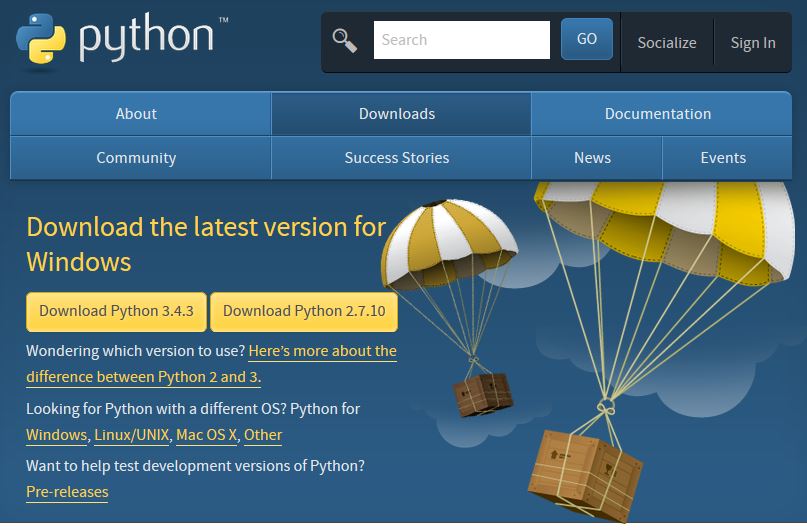
- You’ll see two options offered to you. There are some syntax and library differences between the 2.7.x and 3.x versions of Python, and so they’re offered separately for you to choose from. Our courses have been redesigned to work with the newest 3.x core so choose that option to download the Python installer.
- If you use Mac or Linux, you can find other downloads below the buttons. See the links for Linux and Mac OS X. Please choose appropriately if you are not using Windows.
- Once the download has completed, please open the Python installer and continue with the simple installation.
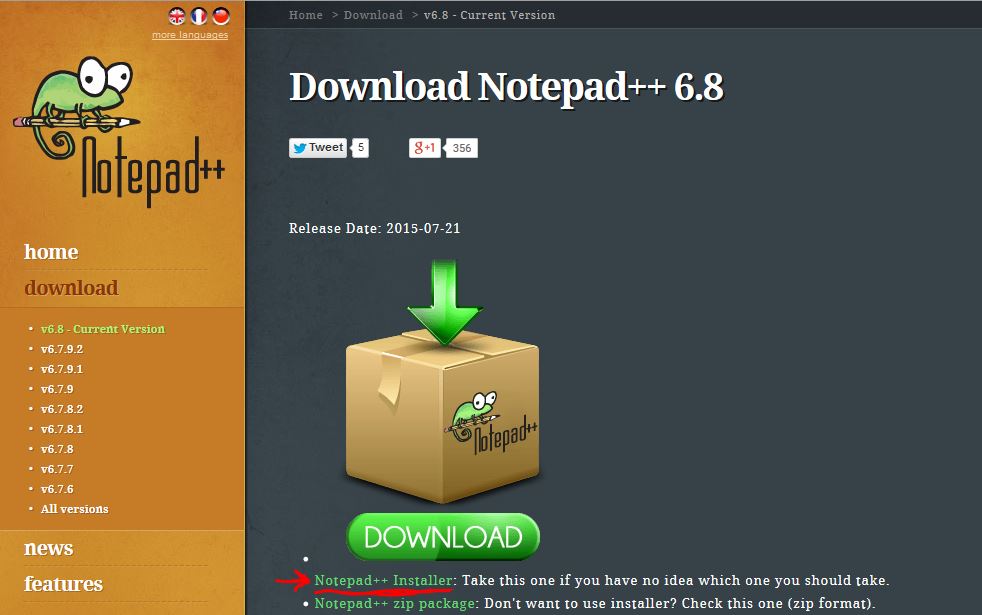
- For Notepad++, head on over to their site and you’ll be greeted with their download page.
- Note: If you’re not running Windows, this package isn’t relevant to you. In fact, as a Linux user, you’ll be able to use your favourite default text editor (gedit on Ubuntu, Kate on KDE and so on). If you’re on Mac, the OS’s default text editor will do just as well for the purpose of writing code.
- For Windows users: the easiest method is to choose the installable package for Notepad++. Choose the link as seen at the red arrow, download the package, and install it by following the prompts. There’s no difference based on which version of Windows you’re running.
That’s it! You’re all ready to get started developing in Python. Comment on this tutorial if you’re having problems or if you’re taking a course with us, the Portal has details of your trainer should you need help.
Author: Matthew de Neef
Date originally published: 24/03/16
Tutorials
Course Setup: Installing C++ and DevC++
Installing C++ and DevC++ - learn how to set up your C++ development environment, which consists of an Integrated Development Environment for C++.
This article is intended to supplement the courses offered by HyperionDev. Whilst they can be used on their own if you’re interested in getting your own development environment set up, some of the steps mentioned are specifically for those taking our C++ courses. On that note, if you haven’t already, why not sign up for one of our courses? (Full-time students learn for free!)
This tutorial will help you set up your C++ development environment, which consists of an Integrated Development Environment for C++. This IDE allows you to write, compile and run C++ code. Unlike Python or Java, for Windows, the core C++ language files and libraries come packaged together with the IDE (in our case Dev C++) so you’ll only need to install a single program to get the full debug and coding features provided by the language. You can use an alternative compiler if you’d like such as Clang or Cygwin, but the easiest way to get going fast is to let Dev C++ handle the grunt work for you.
Note: If you’re not on Windows, read on to find out how to set up your C++ development environment.
If you’re already taking a course with us or even if you’re reading for interest, follow the instructions below as written to fire up C++ on your PC.
Instructions
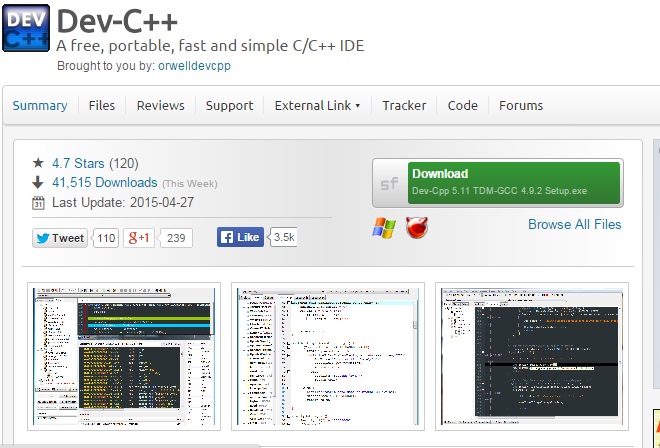
- All you need to do is head over to SourceForge, where Orwell’s Dev C++ client is located.
- Click the green download button to get the setup files for Dev C++ and follow the installation instructions. It’s as simple as that
If you’re not on Windows:
We recommend downloading Code::Blocks, a full-featured IDE which automates the below process. Download and install it from here. If you’d like to code and compile manually, follow the steps below.
- Most distributions of Linux actually come with the core C++ language and compiler pre-installed. We’ll consider Ubuntu, which uses gcc to compile your C++ code.
- To access Linux’s C++ compilers, use your favourite text editor (such as gedit) to open the file you’d like to run (usually has a “.cpp” extension).
- Open your Ubuntu Terminal and change directory to the location of your “.cpp” file. (click here to learn how)
- Execute gcc /o <executable_filename> <yourcode>.cpp where <executable_filename> is the name of the file created upon compiling your code which you’ll run, and <yourcode> is the name of the file with your C++ code.
- To run your code execute gcc /<executable_filename>
That’s it! You’re all ready to get started developing in C++. Comment on this tutorial if you’re having problems or if you’re taking a course with us, the Portal has details of your trainer should you need help.
Author: Matthew de Neef
Date originally published: 24/03/16

Web Development
6 Reasons Your Product is Doomed in Emerging Markets
Product doomed emerging markets - this piece will cover scenarios that could lead to the failure of your product in emerging markets.
In this piece, we will cover scenarios that could lead to the failure of your product in emerging markets.
1. You product doesn’t solve a big problem
You will fail if your product is not clearly better, faster or cheaper than the competition or substitute products. You can mask your lack of differentiation with marketing campaigns or deep discounts but customers will revert to their old habits after the promotional campaign. However, sometimes a new product with better branding and positioning can be successful despite lack of actual differentiation from existing products in the market.
2. The market isn’t large enough
There are several huge countries in Emerging Markets – Brazil (200m), India (1.3b), Indonesia (250m), Nigeria (170m). If your product is launched in a low population country, the customer segment you are targeting may be too small. Products that target rural customers also have this customer sparsity problem. Targeting a “region” typically doesn’t work either, because there are different cultures, laws, etc. The countries in Middle East and North Africa share a common language and religion. Nonetheless, MENA is not homogenous since the Gulf Coast Countries (e.g. UAE, Saudi Arabia) are very different from Egypt, Morocco, etc. Similar country differences exist in Latin America (common language excluding Brazil) and Francophone West Africa (common language and currency).

3. You aren’t ready to spend money
Scaling your product in emerging markets typically involves high costs in operations and marketing. Customers are skeptical of new brands. For mass market products, you need awareness across TV, radio and billboards to legitimize your product. You also need consistent presence of brand ambassadors physically on the streets to drive trial and adoption of your product. When I worked at a Nigerian bank, the bank organized “market storms” where all the staff of bank branches go into the open air markets to get customers to signup for bank accounts.

4. The incumbent is executing well
Even if you have a better product, you will fail if the incumbent is strong in the important areas of marketing and operations described in #3. For example, Flipkart is a juggernaut in India; it doesn’t make sense to go against them unless you have a clear point of differentiation and are ready to spend big.
5. You don’t have support from top management
You will fail if your Emerging Markets product is low priority in a large organization. You will have only a trickle of resources. Uber is a good example of a large organization that is expanding aggressively in Emerging Markets
6. Your approach is one size fits all
Sometimes, Emerging Markets need a different approach. Here are some of my favorite examples
- Cowbell milk pioneered small sachets of powdered milk for people who couldn’t afford larger packs
- Tata DOCOMO pioneered “per character” billing for SMS
When launching new products in Emerging Markets, you need flexibility to adapt to the market. Bureaucracy will strangle your speed of execution if you are in an organization with one size fits all policies. To steal a phrase from one of my mentors Yariv Adan, you will feel like “an ant being crushed by an elephant”
What other factors lead to failure in Emerging Markets?
Author: Aneto Okonkwo
Date originally published: 06/01/16

Career Advice
5 Essential Tools & Resources for Programmers
Tools for programming - here are five essential resources: Integrated Development Environment, the Terminal, Stack Overflow and Documentation tool
Tools for Programming
Creating excellent content requires good tools and equipment. This applies equally well to programming. There are some great utilities and resources to become aware of as soon as possible, if you have not already, to make the coding process just that much more convenient. These are the essential tools for programming every programmer should use, or at the very least be familiar with:
1. Your Integrated Development Environment (IDE)
This piece of software is the all-in-one tool for creating your code. It has tools to help you go from code-writing to executing application, all in one package. While you could certainly get away with using a plain text editor like gedit, along with a baked-in debugger like gcc on Linux, or practice such equivalence on Windows with Notepad++ and Cygwin, there’s really no beating an IDE. This software has all the bells and whistles to make development efficient. Most IDEs support a bevy of languages, have code completion, a built-in debugger, plus you can step through your code, watch variables, set breakpoints to run your code to, and manage extra libraries, header files, and code dependencies. All of this can reside in one project or solution file which the IDE will helpfully keep in order for you. They’re also very extensible so you can add plugins and add-ons as you see fit.
Some of the better choices:
- Microsoft Visual Studio (full-featured and very powerful. Also free in Community guise, paid versions free for students via DreamSpark programme)
- NetBeans (full-featured, Java only)
- Code::Blocks (Swiss-army knife of IDEs, also free, cross-platform & open-source)
- Eclipse (for Java, versions for C/C++ and PHP, FOSS, and cross-platform)
- Sublime Text (Cross-platform, cross-language, evaluation versions available)
The Visual Studio 2015 IDE (Telerik)
2. The Terminal
Unix-like operating systems (including Linux distros) have always had excellent terminals. The terminal is the application which allows you to interface with the operating system in a text-based way, and is often seen as the “blank box with the white text” to which you apply text-based commands to get responses from the system. You can learn how to get started with the Unix terminal in our tutorial series here.
As noted before, in the context of programming, the terminal does compiler duty, and your favourite text editor does, well, text-editing duties. Vi and emacs are the terminal text-editors in this space. You’d write your code in the editor, then save the file and run a terminal command to compile it. Of course, unlike IDEs, it’s mostly up to you to figure out where your code is going awry if it fails to compile, and there are no extra debugging tools natively. The best part about terminals’ use in Linux is the man pages, which offer excellent explanations and syntax help for pretty much any command the terminal supports natively. There are a huge variety of terminals in existence, based on the particular distro or windowing manager in use.
The selection:
- terminals themselves: xterm (for X11), konsole (for KDE), lxterm (for LXDE), gnome-terminal (for GNOME), xfce-term (for XFCE)
- terminal editors nano, vi, emacs (Ranking this list would be a dangerous endeavour)
- Distro graphical text editors like Kate (KDE), gedit (GNOME), scite (GTK+)
The Unix Terminal (arcadix.biz)
3. Version Control
This one is almost mandatory. The StackOverflow developer survey pointed out that 10% of devs still don’t use version control (VC), but why you wouldn’t is mind-boggling. Version control software allows for software development in collaboration with others in your organisation, and keeps everything organised. The version control framework backs up your code to a safe place online, but importantly tracks every single change you make to the code you sync online.
Every time you’ve done a ‘chunk’ of work, you commit that with a note saying what you’ve done, and that makes a ‘snapshot’ of your code and everything you choose. This lets you go back if you end up messing up something, saving time not having to debug what you’ve broken. Stronger still, the code collaboration between development teams allows for working on different ‘branches’ to develop new features without breaking the existing codebase. Check out our detailed Git article for a primer on all this jargon, aimed specifically at Git VC. It’s also pretty difficult to get away from using some kind of version control software these days, since most IDEs offer some sort of VC integration.
What the industry uses:
- (recommended) Git (sites like GitHub, BitBucket etc.)
- Mercurial (Atlassian’s SourceTree client)
- SVN (TortoiseSVN)
The GitHub web UI (GitHub.com)
4. StackOverflow
This isn’t so much a software utility as it is an incredibly useful resource. The Stack Overflow network is a fantastic Q&A site where anyone can actually ask questions on anything, but the coding part of it is absolutely enormous. SO themselves reckon they have around 4.7 million programmers all helping each other: you can see where the benefit is. If a particular problem is flummoxing you, a quick post on Stack Overflow or a search for the issue (someone usually has experienced what you’ve had) often yields great answers. Further still, you can give back to the community by helping fellow programmers with your expertise. There’s no paid account sign-up business, email and username is all, and you can get started. “Rep” on the site is an important thing and denotes how valued either your questions or answers are. Increase rep and become a respected community member.
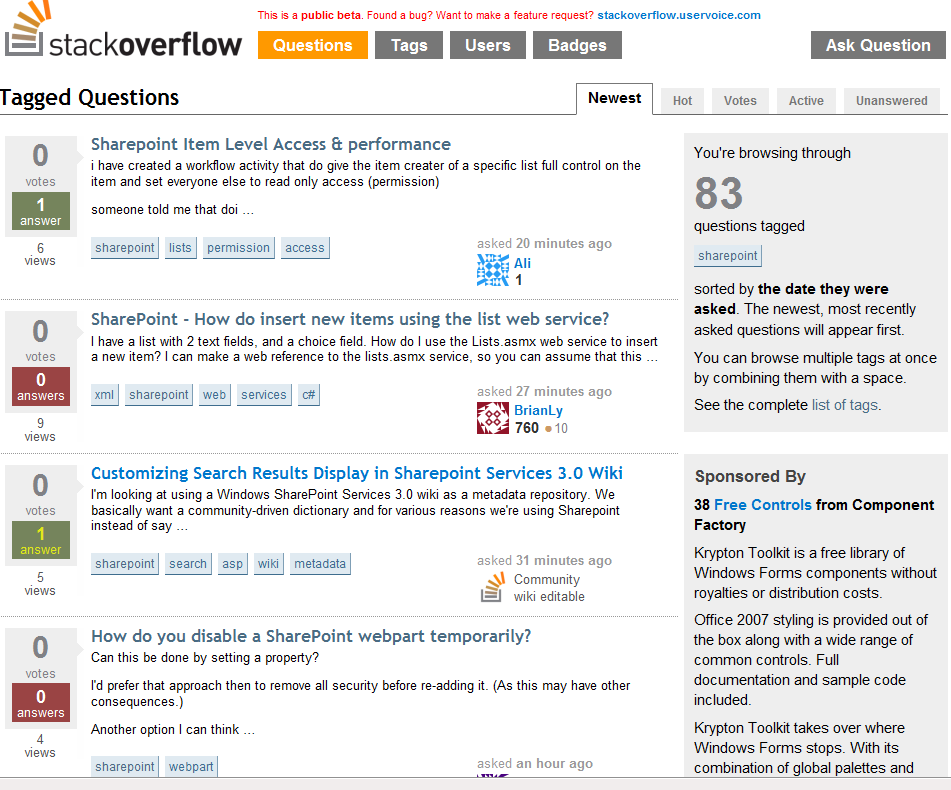
An example of a StackOverflow page.
5. Documentation Tools
The bane of a programmer’s existence often comes if they’re tasked to take over another’s code. This is due to the fact that everyone documents code differently. More often than not, however, code documentation is lacking, which makes understanding the code logic a difficult task for everyone excepting the original programmer. Documentation tool plug-ins make an excellent way of going some way to fixing this. While it still requires that the developer comments their code intelligibly, documentation tools take inline comments from code and convert them to user-facing documentation that looks pretty and reads well. It’s an invaluable tool for big open-source projects, where many contributors need to understand what the code is doing. By far the most popular documentation generator is Doxygen, but there are more than 40 other options, some proprietary, some free, some supported, and some not.
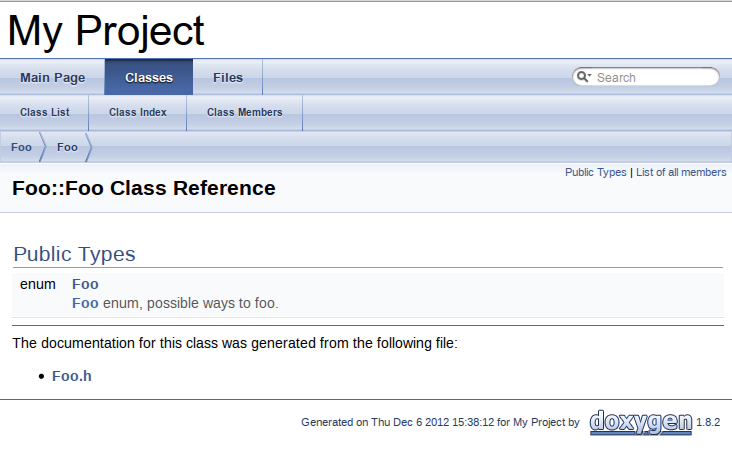
How Doxygen generated documentation looks – autogenerated from internal code comments
Those are the 5 essential tools we’d consider first when programming. Are there any we’ve missed? Comment with your additional choices in the comments section below, and follow Hyperion Hub developments in the future if you’d like to see more articles like these for the South African market.
Author: Matthew de Neef
Date originally published: 23/12/15

Career Advice
What’s the Difference Between Computer Science and IT?
Difference between computer science and IT - this article explains the key differences between computer science (CS) and IT
Information Technology (IT). Computer Science (CS). Terms which can be, and often are, confused with one another. Even specialists with tertiary education in a Computer Science/Engineering or related field sometimes have predetermined (and quite possibly incorrect) ideas about what each of these terms mean. This article will give you the low-down on what the differences are, why you’d want to pick one over the other, and what these topics even mean in the South African market.
The dictionary defines “information technology” as the study or use of systems (especially computers and telecommunications) for storing, retrieving, and sending information. “Computer Science” is simply-put, the scientific and practical approach to computation and its applications.
The Definitions: IT versus Computer Science
IT, simply put, is the collection of hands-on technician-type activities that range from network troubleshooting, hardware setup and maintenance, and installation and management of specific software packages. These activities are certified under a number of short part-time qualifications such as the ‘Microsoft Platinum Affiliate’ and ‘Gold Dell Reseller’.
Computer Science, contrary to popular belief, is not “just theory”. It’s a higher-level science, but there’s just as much practical application here as in IT – mainly through the development of software. Computer Science also involves the study of the fundamentals of hardware, software, and the essence of computation itself. This study, and the theoretical backing of important concepts along with plenty of software development, allows computer scientists to design and build the most complex technologies in the modern world.

By saying the essence of computation, words such as algorithmic complexity, (the study of how time-efficient an algorithm is to sort, search or iterate) black-box vs white-box testing (software testing methodology considering outputs and/or inner code workings) and software DLC’s (how to design, maintain and manage software) come to mind.
In South Africa, there is a strong tendency to confuse IT with Computer Science, and lack of clarity on where software development fits in. Google has recently stepped in to try help solve this.
The Nuts and Bolts of CS

A huge part of CS is the nuts and bolts, if you will, of going from conceptual UML diagrams scribbled on a napkin at your local coffee shop, to 3am caffeine-fueled coding sessions, to debugging endlessly (and thanking your lucky stars for Git) and finally, to producing a software product that will be used by many happy clients. In fact, it’s your abstract concepts, theories and concepts you probably wanted to blow off during lectures that will help you overcome that one critical hurdle to get your project done. So if you end up studying CS, there’s a high probability you’ll be a software developer, but you’ll have key further knowledge that extends beyond just the code typed from your fingers. That key extra ‘why’ knowledge is where the advantage lies. There’s thus no merit in saying that IT is more practical than CS, and that’s an important idea to grasp.

Let’s keep remembering that CS is a science, which means you’re likely to pioneer all sorts of advanced technologies, new algorithms, and operate at a research-level as well as a ‘let’s implement code practically’ level. It’s the art of thinking in a certain way, understanding, as noted before, the ‘why’ beyond the ‘how’ of the workings of code, algorithms, and research methodologies. That’s great abstract-speak, but let’s solidify it a bit: natural language processing, speech recognition tools, cybersecurity, robotics, artificial intelligence: all these doors are opened with a CS degree in hand. Again, just because it’s a science, don’t for a moment think that you’ll be lost in the world of abstract concepts all the time!
Lastly, if you’re worried about CS perhaps not propelling you into an ‘industry’ position based on what you’ve seen IT grads achieve, the good news is that in the long run, a CS degree gives you the ‘open doors’ to step up to that position anyway. IT degrees aren’t prerequisite, in fact, CS degrees are arguably more useful in achieving ambitious goals.
The Comparisons: Where’s the Overlap?
Computer engineering is Computer Science with a hardware/software integration slant, and Software Development (or software engineering if you prefer, the terms are essentially the same) is more focused on the coding aspects of CS. Where does that leave IT? While computer engineering, software development and computer science are fairly close siblings, to use a family analogy, IT isn’t really related as a field to Computer Science at all. It’s the organizational needs approach, versus the whole concept design to implementation found in CS.
The Career Prospects: How far will each get you?
A career or degree in IT seems achievable; most South African universities offer it, and it seems that recent IT graduates could stand a chance to get into upper management positions. Typical positions for those with IT qualifications includes roles such as IT managers, IT systems managers (LAN maintenance and other similar tasks), and software systems managers (Working with Git and managing developers)- roles that focus on the management of computer labs, computer equipment and networking. Notice again that IT careers are much more business-focused than its counterpart in the sciences.
The perhaps uncomfortable reality, however, is that Computer science, not IT, is in high demand in South Africa right now. This fact is more important, especially now as the mobile revolution really takes hold, and there is definitely no shortage of jobs available, from Jozi to eKapa. The advantages of choosing a CS or dev career are that if you make the choice, it’s highly probable you enjoy programming; and if that’s true, good news! You’ll be programming as a career! Applications (excuse the pun) of Software Development as a discipline, also, are endless, a quick Google will reveal a vast array of potential specialisations and options.

Computer Scientists are also in greater demand, and you could find yourself working with anything from Artificial Intelligence, to being at the cutting edge of global tech research. CS will drive you further than IT can, as well. Overseas employers are jumping at the chance to employ skilled CS grads, and that’s a springboard to success. IT on the other hand, may serve you well within South Africa, but since the international definition of the qualification waters down a bit, it’s much tougher for potential South African job-seekers to find what they’re looking for overseas, with an IT degree.
Software development, in closing, shares much if its DNA with a Computer Science degree, although in the former’s case, you can be, and a surprising majority are, employed without a formal degree, just it’s something we’d advise strongly against, for the previously discussed reasons. Software developers can also play important management roles in software projects, as they have the technical coding skill as well as the understanding of how to manage a software project. (there are plenty of odd terms to refer to how this gets done.)
Hopefully, usage of the term IT in South Africa will start to match international norms over time, and the distinct status of Computer Science and software development made clear. Comment below if you need help making the choice between IT and CS – it’s important you make the right choice when it comes to careers, industry expectations, and your future in technology.
If software development and computer science is of interest to you, and you’d like to know more, you can study a career-leveraging bootcamp or a short course through Hyperion Development! Comment with your views on this article in the comments section below, and follow Hyperion Hub developments in the future if you’d like to see more articles like these for the South African market.
Author: Riaz Moola
Date originally published: 27/11/15

Student Success Stories
Chengetai Chitungo – From Warehouse Controller to Full Stack Web Developer
Student success story - Chengetai Chitungo studied a Full Stack Web Developer course at HyperionDev. Here he explains some insights and challenges he faced.
Read how HyperionDev helped Chengetai obtain his ideal career in this week’s Featured Student interview!
Tell us a bit about yourself and your current occupation
I have been working for the past 2 years as a Warehouse and Logistics Controller for a software and telecommunications company. During this time I was able to further my education and get certified on a number of different software platforms and systems. I’d really describe myself as a person with a versatile skill set, a lot of integrity and willingness to go the extra mile to deliver results.
How did you hear about Hyperion?
The internet is a few clicks away, if you want to find out about anything. I spend most of my time on my Android phone surfing the net. I had been learning code on my own and it came to a point where I wanted to study programming and be certified by a reputable institution. I searched on Google and HyperionDev was one of the sites that came up. After going through the website, I was sold and decided to give it a go with HyperionDev.
Which Hyperion course did you choose to study and why?
I decided to do the Full Stack Web Developer Bootcamp. I was motivated by the desire to learn multiple languages including HTML, CSS, Javascript, React, Python, and Django. I knew this would provide the best opportunity for me to have a coding career, which I achieved. I’m passionate about solving problems. I’d like to build a long-term career that lets me focus on professional growth as a Full Stack Developer.
What are your career goals and objectives?
I wanted to understand all the layers of development, including the back- and front-end of a website. I knew this would increase my chances considerably when I applied for various coding positions.
Explain how the Hyperion 1:1 mentorship worked for you
I found it extremely beneficial, as I had support from my mentor whenever I became stuck. The response time from my mentor was super quick. My mentor was always able to explain potential solutions to me. Personally, I had problems with installing Django on my Windows OS . I ended up installing it on my Linux system, which actually gave me the perfect opportunity for learning the Linux system, and now I really enjoy coding on this operating system. (I did eventually manage to install Django on my Windows OS.)
What aspects of the course did you enjoy?
I thought the support was fantastic. My mentor was extremely helpful and approachable. I learnt a lot from him.
What comments and advice do you have for prospective students?
You will be challenged and get stuck at some point on your coding journey. That is part of the learning experience. But remember, others have come across the same challenges and can help you. Be persistent. Use your mentor. He or she can also help you find a community of coders that will be of use in your coding journey.
AI Engineering
nVidia’s Jetson TX1: Embedded Computer Vision
Jetson TX1 - nVidia’s Jetson TX1 platform (with the ‘Maxwell’ architecture graphics processing unit (GPU)) is certainly worth exploring.
Embedded devices seem to be all the rage these days for hobbyists, makers and students in the field of engineering and embedded systems. Devices like the Beaglebone Black, Raspberry Pi and Intel Galileo have reduced the barrier of entry into the world of embedded computing to the lowest we’ve seen in decades, and that trend shows no signs of abating either. Just R500 for example, can get you set with a Raspberry Pi, powered via SD card by any of a great selection of the best distros around; plus these are more than just credit-card sized computers. They’re designed to be extensible via general purpose I/O pins (GPIO) and hardware-attached-on-top boards, meaning their applications are vast. I’m talking anything from a smart medicine cabinet manager, to a web-server hosting, networked, picture-taking all-in-one solution powered by Python (another great reason to learn Python today). Recently though, more advanced uses have arisen for these little silicon wonders, and that’s where nVidia’s Jetson TX1 platform (with the ‘Maxwell’ architecture graphics processing unit (GPU)) comes in.

A brief primer: Neural Networks and x86 Grunt
Artificial Intelligence, including the subfield of computer vision, as well as the implementation of neural networks and their applications have long been the study of computer scientists the world over, and such studies have mostly been confined to full-fat desktop computers running MATLAB or some other huge complex software package, needing the full grunt of an x86 architecture. This is because the tasks are inherently demanding; crunching through vast training datasets, applying neuron transfer functions per hidden layer, computing target matrices, and so on. The end result though, is that computers have the capability to ‘learn’ based on a set of training data, in that they are able to identify something from an external source (say a camera) that is new, but similar to what they’ve been trained with, and can classify this with some degree of probability. This classification, for the user, usually means something intuitive, such as “the user is waving their hands” or “this footprint is a zebra print.”
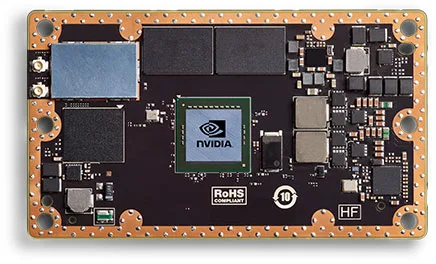
The Embedded Advantage
So what’s the appeal? Why would you abandon something like Intel’s behemoth new x86-based Skylake Core i7 processor, in favour of a tiny embedded system, when it comes to computing these complex artificial intelligence tasks?
In order to understand the reason, a quick overview for the reason for choosing GPU computing (such as that found in the Jetson TX1) would be useful. Here’s how nVidia, the GPU OEM in question, describes the process.

GPU computing uses the graphics chip, a discrete chip on the platform to the CPU, to accelerate many scientific, engineering and analytic computations, by making sure that the ‘compute’ parts of the running application get offloaded to the GPU to allow the CPU to run the rest of the code. Why does this improve performance? CPUs process tasks differently to GPUs. While a CPU generally has several cores for processing code sequentially (one after the other), GPUs have a massively parallel architecture, with orders of magnitude more cores. These are smaller but more efficient, and designed to handle multiple tasks simultaneously. This sort of architecture makes them ideal for artificial intelligence applications which need to process vast amounts of data to achieve their goal.
Hence nVidia, wanted to address some of these questions with their new ARM-based Jetson TX1 embedded system by addressing the following:
- The power consumption, for starters. Intel’s chip has a power usage (TDP) of 65W, which feels like the fuel consumption of your average Toyota Hi-Ace taxi with a hole in its exhaust compared to the “under 10W” Prius-like equivalent in the Jetson TX1.
- The footprint is another one. Intel’s socketed desktop CPU’s aren’t large per se, but once you’ve snapped on decent cooling, heatsinks, motherboard attachments and the rest of the desktop, it’s fairly large. At best maybe shoebox size. Again, the Jetson has it beat, considering it’s roughly wallet-sized. This is very important if such platforms are to be designed to end up in smart delivery drones, helper robots and other places where squeezing in a petite dev board will be a boon.
- Performance. Wait, what? x86 beaten by ARM-based devices? Well, not technically. We consider performance-per-watt in this case. nVidia ran some tests, where they trained a neural network to differentiate between objects; pedestrians, cars, motorcycles and cyclists. This sort of comparison is useful if your system will be controlling an driverless car, or figuring out if the delivery drone it’s in is at the right home. In this image classification task, the TX1 outperformed the i7, while drawing far less power. This comes down to the GPU computing discussed previously: the Core i7 6700K tested has a 6-core CPU, whilst the Jetson uses a modest quad-core ARM part. The difference is that the Jetson has a 256-core Maxwell architecture GPU, and this is what gives it the performance boost to match the compute ability of the Intel i7. Check out their test results:
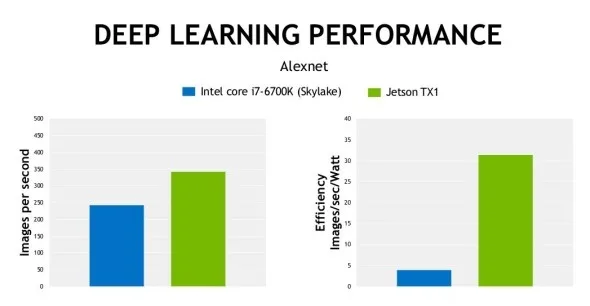
So the Jetson TX1 is very specialised, but it does that task really well, whilst being way smaller, and less power-hungry than it’s x86 cousin. What’s more, it runs Ubuntu, meaning the full community of Linux programs and tools are at your fingertips when you’re coding for the Jetson.
Why Should You Care?
If you’re in Computer Engineering, Embedded systems or similar, the embedded aspect is likely familiar to you. As a Computer Science specialist, the applications of computer vision and artificial intelligence applications in new, smaller form factors will likely excite you. As for everyone else? What makes this a big deal? Well, coding solutions to everyday problems is the continuous goal for those in the field, and it could be for you too! By knowing how to program, you could also be using devices very similar to this to power your own projects which allow computers to learn, to see, to fly (in the case of drones) and ultimately, to improve the world, one neural net at a time.
Interested in the Jetson TX1 from nVidia? Check it out here. Want to make a difference in your world with programming? Get started for free at Hyperion! Comment with your views on this article in the comments section below, and follow Hyperion Hub developments in the future if you’d like to see more articles like these for the South African market.
Author: Matthew de Neef
Date originally published: 04/01/16

News & Announcements
November 15, 2017
Hyperion Development Secures $230,000 (R3.27 million) in Funding from Facebook
HyperionDev Innovation Challenge Award Winner from Facebook. HyperionDev has received funding from Facebook as the Innovation Challenge Award winner.
South African and UK-based startup HyperionDev, which runs the largest online course platform for programming and Computer Science education in Africa, was announced as the Innovation Challenge Award Winner in a recent press release from Facebook.
This builds on a funding award and partnership that Hyperion secured with Google earlier this year, making it the first South African startup financially backed and supported by both Facebook and Google.
The award, run through Facebook’s Internet.org initiative in Africa, aimed to identify “leading examples of … online services that provide real value in the categories of education and economic empowerment”. Hyperion won the top prize in the category of education, and was the only South African company selected by Facebook. Facebook’s Founder, Mark Zuckerberg, congratulated winners under the scheme in a recent Facebook post:

The organisation has rapidly grown to over 10,000 students from 20 countries, and offers a range of introductory and advanced courses in everything from web development to data science and mobile app development. Hyperion is already one of the largest trainers of popular programming languages such as Java and Python.
Riaz Moola, Hyperion’s Founder & Director, said that “The award will allow us to scale our offerings more rapidly and internationally, accelerating the growth of what is already a profitable and socially impactful business. We’re excited to work with Facebook and Internet.org to make software development education and careers open to all.”

For each course that HyperionDev sells, the company offers one low-income or unemployed youth in Africa a free course. This is critical in African economies such as South Africa, where youth unemployment stands at over 54%. Hyperion’s paid and free courses allow students to access high-paying careers in the field of software development through the Hyperion Careers platform, bypassing traditional university education.
Hyperion – which operates out of offices in Cape Town, Johannesburg, Durban, and Cambridge – also hopes to finalise additional grant funding from Google, CapaCiti, The South African Department of Science and Technology, and the TK Foundation to bring the total amount raised to R7 million.
To take a course with Hyperion and support education in Africa, visit www.hyperiondev.com.
Author: Riaz Moola
Date originally published: 18/10/16

News & Announcements
November 15, 2017
Dev Survey 2016: Mac OS X More Popular Than Linux?
Developer survey: Apple's Mac OS X emerges as more popular than Linux, according to 50 000 sample of developers from 173 countries.
The most recent Stack Overflow Developer survey has just been released, and it has plenty of interesting stats for developers. Apart from the numbers pegging one programming language against another, the millenial argument of ‘which operating system is better’ has the opportunity to raise its head with what Stack Overflow has uncovered. The 50 000 strong sample size of developers from 173 countries around the world gives us a pretty good idea of what kinds of operating systems are most popular.

For the first time in the history of the survey, it appears that Apple’s Mac OS X operating system is used by more developers than all the varying flavours of Linux combined. What’s more, OS X is actually the most-used operating system by version versus the competition. We admit, OS X is actually an aggregate of OS X starting at version 10.5 to 10.11 and would best be compared to the past 3 versions of Windows together, but as Stack Overflow puts it – OS X trumps out Windows 7 (26,2% versus 22,5% respectively) in terms of use by developers.

Overall, Windows still holds top spot with 51,7% aggregated share, but Stack Overflow reckons that if the trends continue over the next year, by 2017 less than 50% of developers globally will be using Windows.
Check out this infographic from this survey data below or head to the developer survey 2016 for more interesting stats about the world’s software developers.
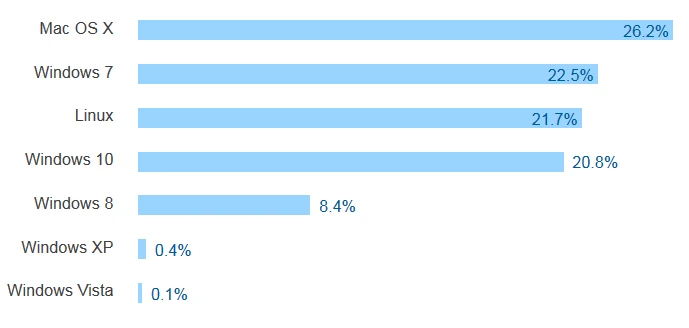
Let us know in the comments below – which OS do you use to code with and why?
Author: Matthew de Neef
Date originally published: 24/03/16

News & Announcements
November 15, 2017
Press Release: Hyperion Launches First Job Site for Software Developers in South Africa
Software Developers South Africa - the job search and candidate search experience is poorly developed for this market in South Africa
The South African market for software developers
Software developers are in high demand in South Africa, yet both the job search and candidate search experience are poorly developed for the South African market. General job search portals such as CareerJunction or Careers24 fail to fit the needs of employers and job-seekers, and both these parties often turn to sites like Facebook and even Gumtree in desperation. Recruiters struggle to find and attract developers in a consistent way.
The current job search experience
Programmers must separate real software development opportunities from IT roles such as ‘technician’ or ‘business development’ on sites like Careers24. It is also not possible to easily search for jobs by technology – developers may strongly prefer to work with a certain technology stack, and these sites to not allow users to easily search for jobs using terms like ‘Python’ or ‘C#’.
Another weakness of these sites is that they do not highlight the perks of a working environment of a particular company. In many cases, the company offering a job is hidden as these adverts are listed by recruiters, who purposefully hide this information. Developers are hence unable to find information on a company as a whole, the perks they offer (something a developer in SA is probably already enjoying in their current role), and what type of technologies the company works with as a whole. A tech startup in the Cape is a very different environment to an established financial institution, and top developers want to know who they are working for.
Other than job listing sites, a developer can turn to recruitment firms. Speaking from my own personal experience of looking for software-related jobs in both the UK and SA, this can be a perplexing experience. Having worked and spoken with a range of recruiters, it is clear that many struggle to understand the technologies in the market, and who can blame them in such a fast-paced field? They are also unsure how the roles they are hiring for relate to my past experience and future goals, or just what exactly the difference between, say, Java and Javascript is.

The search for developers
Software is a part of your business, no matter the industry you operate in. South African firms are increasingly seeking out developers who can work with the latest technologies – be it Django, Python, or AWS. Finding these developers can be a challenge when so few institutions in the country train Django developers, and when only a handful of students graduate from our universities each year with Computer Science or software development-related qualifications.
Finding, entering, or building developer communities in South Africa would be a full-time job, and something that is next to impossible for non-technical folk.
The solution
Hyperion Careers , launched in early 2016, is SA’s first dedicated job search and application website for software developers. Integrated into a community of over 8500 programmers in the country, it allows developers to search for jobs by specific technology and for companies and recruiters to list jobs in a way that gets the attention of top talent.
Hyperion Development,a Google-backed SA startup, is the company behind this Careers website and since 2012 has run online services and communities that have organically drawn thousands of developers into their network. The largest of these services is an online course platform that has allowed Hyperion to become the largest trainer of Python and Django in the region. Graduates from every Computer Science department in the country and hundreds of software developers already working in industry learn the latest technologies on Hyperion’s platform.
Founded by a technical team, Hyperion has seen impressive growth in their offerings in the last year and a recent partnership with Google is sure to see their reach into developer communities continue to grow at a rapid rate.
Interested in listing a job advert or using Hyperion Careers to find your next job? Check out careers.hyperiondev.com or drop our team an email on contact@hyperiondev.com
Author: Riaz Moola
Date originally published: 16/02/16

Software Engineering
South Africa’s Most Popular Mobile Operating Systems
South Africa mobile operating system. The trends shown in South Africa are often different to elsewhere - e.g. the BlackBerry OS.
The South African mobile market is an interesting one. The trends shown in our corner of the world are often quite different to those seen across the Atlantic – the BlackBerry retention habit is one of them. For several years after BlackBerry – or Research in Motion as it was then known – spiralled into obscurity and general lacklustreness in most of the world, it strongly held onto life in South Africa (mainly with teens and students) before being overtaken by the giants of a greener sort.

It seems that BlackBerry failed to innovate in the key areas that Android OEMs were pioneering – the Canadian company assumed that because people loved BlackBerry OS and physical keyboards back in 2007, that they’d only hold onto that even today. That’s where they were sorely mistaken, something proven after a series of failed product launches and a rapidly dropping market share in recent years.
BlackBerry’s latest attempt at relevance came at the end of last year with their absurdly-named “Priv”. It signaled that even the once-veteran phone maker had given up on its own platform, because it ran a flavour of the green robot: Android Lollipop. While it was fairly well received, the general consensus around BlackBerry’s homebrew operating system BB10 was “too little, too late”. It had some unique features but both the software and the hardware was several years late to the market, and the market share statistic reflects that.
Finally, Vodacom recently revealed the extent of the Android domination over the South African marketplace. Of their 13.4mil active users connecting to the network, 61.4% of them identified as Android devices, with BlackBerry still clinging to life at 17.7%. Bringing up the rear are iOS (7.9%) and Symbian and Windows (Phone) Mobile with 5% apiece.

As a software developer, this spread of operating systems should tell you something important: if you are interested in mobile development – Java is the right language to focus on. Since it is used in developing Android applications, it’s a great start to building your own Android apps and can be used for application programming just as well.
Click here if you’re interested in taking one of Hyperion’s Java courses: we offer bootcamps and a wide variety of short courses. Comment with your views on this article in the comments section below, and follow Hyperion Hub developments in the future if you’d like to see more articles like these for the South African market.
Author: Matthew de Need
Date originally published: 17/02/16

Student Success Stories
Hyperion Success Stories: Chris Ellingson
Hyperion Success Stories - how taking a HyperionDev course has helped students in their lives, studies and careers: Chris Ellingson
This article is part of a Hyperion Success Stories series, in which we find out from our students how taking a HyperionDev course has helped them in their lives, studies, and careers.
In this article we catch up with Chris Ellingson.
Tell us a bit about yourself?
I work as a project engineering and electronics technician, specialising in vehicle diagnostics and EOL programming systems used for VW, GM, Daimler and Isuzu.
Electronics is a hobby of mine, specifically embedded systems. Being ‘lazy’ (I prefer using the term efficient) in nature, I am always looking for ways to automate my home and life. My current personal project involves a system to automate my electronics workshop, stables and home to improve security, supervise my farm workers and keep things in order when I am at work. One of my favourite parts of this project is the keyless entry system I have implemented. I had an RFID tag implanted in my hand. Initially, my doctor was initially shocked, but he was curious enough to perform the procedure. I have been using the RFID tag for the past two years with no issue and plan to upgrade to a more advanced unit at a later stage.
How did you hear or find out about Hyperion Development?
Through a Google search.
Which Hyperion course did you take and why?
Python programming course. I have encountered many projects that use python in the industry. In addition, the fact that it is supported by so many platforms made it an attractive choice. The syntax is intuitive and well-documented.
How has the course helped you towards your studies, your career or finding a job?
The course has strengthened my programming knowledge and improved my understanding of OOP. I have started to use python in some of my personal projects, as it is so quick and easy to roll out a solution when compared to other languages.
How was the one-on-one human tutor interaction and feedback beneficial to you during the course?
My tutor was very helpful -having a tutor available is critical, especially with new or inexperienced students.
Our current course set-up allows students to do work offline – was this beneficial to you at all?
Yes, I am not always near a internet connection – being able to work offline and (automatically) submit my work when I am online again is a huge help.
What did you enjoy most about the course?
The variety of tutorials based on real-world problems. It gives a person a taste of what they could be working on in the future.
Date originally published: 25/01/16

Student Success Stories
Hyperion Success Stories: Lee Venter
Hyperion Success Stories - how taking a HyperionDev course has helped students in their lives, studies and careers: Lee Venter
This article is part of a Hyperion Success Stories series, in which we find out from our students how taking a HyperionDev course has helped them in their lives, studies and careers.
In this article we catch up with Lee Venter.
Tell us a bit about yourself?
I’ve always had a passion for technology and technological progress, and even though I’ve always wanted to be part of this wonderful world, I never made a decision to be part of it. Well, now I’ve made the decision and I plan to build a career in the IT and computer science industry! I’ve always felt that I “get” technology, and now it’s time to prove it to others and myself. Although I’ve never had the privilege to work in this industry, I know that I will be right at home and plan to excel.
How did you hear or find out about Hyperion Development?
I was searching online for the best places to enrol for coding courses and what type of programming was a good start. I stumbled onto MyBroadband and there at the bottom of the thread, a guy from Hyperion posted a short but intriguing explanation of what Hyperion offers and a link to the Hyperion website. Once I registered and requested a call-back and spoke to Riaz Moola, I was contacted by a course consultant who gave me great advice and support throughout the course.
Which Hyperion course did you take and why?
I undertook the Python Beginner Course (Now a part of the Software Engineering Bootcamp), because it fitted my budget and availability. I knew I would get a good feel for programming before learning “harder” languages in the future.
How has the course helped you towards your studies, your career or finding a job?
Since I’ve finished the course last week, I’ve been talking to various people to find out whether companies would be interested in my coding ability even though I only have limited to no experience. The feedback I’ve received shows that there is a lot of potential and I am confident that I will be able to secure a contract job or full-time employment in the near future. It sounds strange, but just by completing the beginner course, I’ve opened up the possibility of starting a career as a programmer, and built confidence to pursue it!
Our current courses allow students to work offline as well – was this beneficial to you at all?
The ability to code offline is a great benefit, as sometimes I had to work on my tasks from my current job where there was no internet connection. You can still communicate with your mentor via email, and not just the dropbox files, so I found that helpful.
How was the one-on-one human tutor interaction and feedback beneficial to you during the course?
The ability to communicate directly with your tutor is a huge benefit. I learnt a lot that way.
What did you enjoy most about the course?
That is a hard question. Identifying and comparing DNA structures and amino chains was a lot of fun. Also Machine Learning and Natural Language Processing was awesome. I don’t know all the things you will face as a programmer or what exactly you should choose, because a lot is very interesting, I’m just glad the course exposes you to various industries where you can use your coding ability.
Do you have any other comments regarding the course, especially for potential students?
I’m glad I made a decision to enter the IT industry as my next career move, and I’m very happy that I found Hyperion to help me do that. Even the beginner course is not a walk in the park, every task is a challenge. It helped me to continue growing even after I finished the HyperionDev course. I feel that what Hyperion teaches you is not just the ability to code, but also the ability to look for solutions for yourself. It’s a challenge, but it’s worth it!
Date originally published: 25/01/16

News & Announcements
November 15, 2017
Hyperion Takes Students from Aspiring Programmers to Fully-fledged Software Developers in South Africa
Hyperion software developers - aspiring software developers were trained on two of Hyperion's most popular online courses
Hyperion’s courses can change lives. This is exemplified by a recent partnerships between Hyperion and the Cape Innovation and Technology Initiative in a which a cohort of aspiring software developers based in Johannesburg and Cape Town were trained on two of Hyperion’s most popular online courses: The Certified Software Developer MicroDegree and the Full Stack Web Developer MicroDegree
Students registered for the programs from across South Africa, and the majority had no prior programming experience and have not worked as software developers in the field. The MicroDegree combination chosen allowed students to first gain a breath of knowledge in programming technologies through the Certified Software Developer content – delving into popular languages such as Java, Python, and C# – before then gaining depth in web development technologies through the Full Stack course in which students were taught how to craft both the front and back-end of complex web applications using Javascript, HTML, CSS powered by the Python Django web development framework.

The success of the trial program, funded by the South African Jobs Fund has strengthened the partnership between Hyperion and Citi, and a scaled-up version of the program is set to launch in 2017 with significantly larger student numbers supported from locations beyond Johannesburg and Cape Town.
Interested in shifting your career to software development? Browse Hyperion’s range of bootcamps including our Full Stack Web Developer bootcamp and our Software Engineering bootcamp.
Author: Riaz Moola
Date originally published: 19/09/16

News & Announcements
November 15, 2017
Hyperion Gains Support from the University of Cambridge
Hyperion Support University of Cambridge - Hyperion is now part of Cambridge's Social Ventures Programme, which is a part of a 12 month incubator programme.
Hyperion has become one of the first African social enterprises to be selected by the University of Cambridge Social Ventures Programme for a 12 month incubator programme. The Cambridge Social Ventures Programme seeks to “support a whole range of businesses that have positive social and environmental impacts.”

The programme further describes the impact that Hyperion as follows:
Across southern Africa, Hyperion is:
- Increasing accessibility to learning
- Improving career prospects for computer science students from disadvantaged backgrounds
- Improving national computer science education and standards

This established social enterprise has created a market for online computer science courses that enable undergraduates studying computer science to start from a more level playing field. The speed of its growth, coupled with its established USPs of ‘human tutors’ (when people register for a course they know they get support from a human tutor), and a delivery model that takes into account the limitations of bandwidth in the African market, protect that market share.
More information about Hyperion’s work with Cambridge Social Ventures can be read here:https://www.jbs.cam.ac.uk/entrepreneurship/programmes/cambridge-social-ventures/our-ventures/hyperion-development/.
Author: Riaz Moola
Date originally published: 26/05/16
Still have questions?
Contact our Admissions Team, and a real person will get back to you.