
Our latest insights
Read the latest insights

Tutorials
An introduction to the Unix terminal – part 1
Unix terminal - The terminal (or console/shell) is a core part of the Ubuntu distribution and other Unix-based operating systems.
A huge majority of the users of Microsoft Windows often won’t dare to venture near the command prompt; for them, a symbol of the dark days of DOS. In the world of software development, the terminal is an indispensable part of working with the OS and developing advanced software. This tutorial will introduce you to using the shell – using the Ubuntu terminal as an example – and the basics of making it useful to you.
Why Terminal?
The terminal (or console/shell) is a core part of the Ubuntu distribution and other Unix-based operating systems such as OSX, Debian, and even SteamOS, and it’s in fact really powerful. Most of the GUI-based interaction you have with the OS can be done via (and often just is automated by the GUI from) the terminal instead. It includes a vast number of additional libraries and packages compared to the Windows command prompt and new packages are simple to install. The terminal is even loaded with compiler tools for Python and C, and can host text editors in the mix (see later). It also simply isn’t possible to use certain tools needed for software development without the terminal. Let’s see how this all works.
This first part in a two-part tutorial series is an introduction to the terminal, and some basic commands. Follow along to part 2 for more advanced commands and options.
The Basics – launching, commands and manual pages
Let’s begin by launching the terminal.
- Click the Ubuntu Launcher icon in the top-left corner of your screen or press the “Super Key” (That’s the, ahem, Windows button)
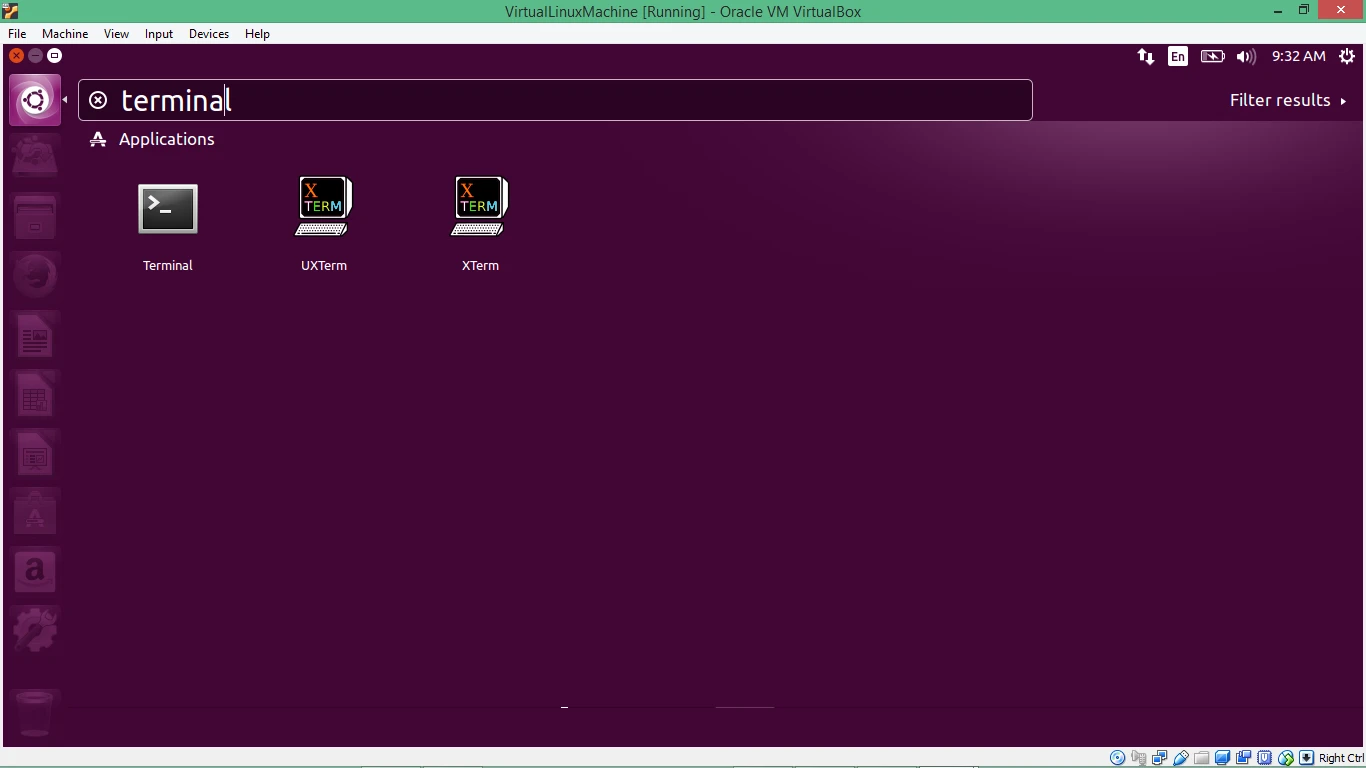
Launching Ubuntu terminal.
- Type “Terminal” and click the first result to launch the terminal. You’ll see a prompt similar to the one shown. It’ll be in the form username@PC-name:~$. The Dollar symbol at the end denotes the user state (either normal ($) or superuser (#)) which is discussed later.
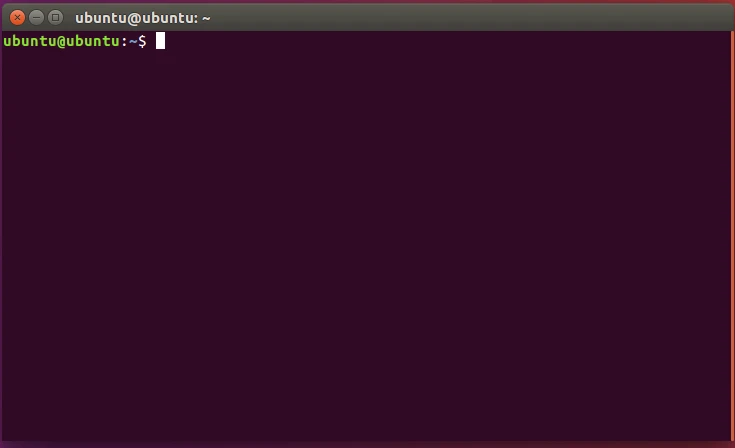
The Ubuntu terminal prompt.
Any command you type will be in the form <command> <argument> <flags> for the most part. The command is the instruction to the terminal; the “verb” if you will. The argument is the “object” – what file/folder/object the command will act on. Some commands have no arguments, others take many. Finally, the flag is the “adjective” – how the command will execute on the file/folder/object specified by the argument. Note that the flag might be before the argument. In each of these examples, when typing terminal commands, press enter at the end of each one.
- For example, type ifconfig -v eth0. We’ll explain what this means later. You should see something similar to below. The command is “ifconfig”. The flag is “-v” and the argument is “eth0”. This means the ifconfig command is acting on ‘interface’ –help with the verbose (-v) flag. Don’t worry if this is confusing for now.
Executing ifconfig.
The easiest way to get help is by the –help flag. Issue this after a command to get written help or to find out what the command is for. Manual pages are even more useful, and offer detailed explanations on commands. To access it, prepend the command you’re using with man.
- Try this out. Type ifconfig –help and man ifconfig once you’ve tried the first command. You’ll see the help and man pages explain command usage as shown. Press “q” once you’re done reading the man pages to go back to the terminal prompt.
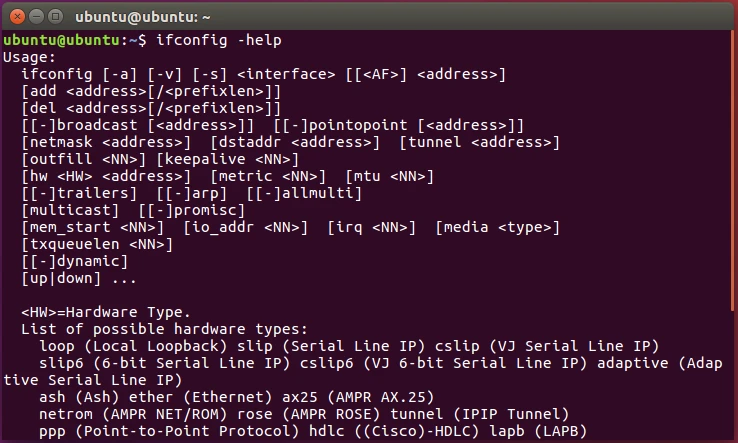
Extract of the –help result.
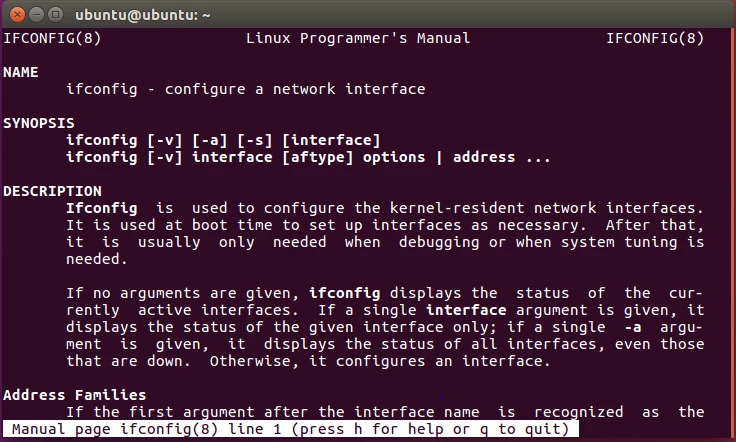
Extract of the man pages for ifconfig.
This gives you an idea of what the ifconfig command does, but we’ll return to give you a full explanation in part 2 of the tutorial.
File & folder management
Let’s look at some basic file and folder editing commands that are the bread and butter of the Terminal.
- Let’s show the contents of the folder or directory which we’re currently in. Make sure you’re back at the :~$ prompt, and type ls . You’ll see Terminal list the folder contents like in the image below. The colour-coding matters: Dark blue are folders, light blue are links, white are images, red are Ubuntu archives and green means the file can be executed.

Using ls on a folder to see its contents.
- Let’s switch from one folder to another. We want to go into the “Downloads” folder. To do this type cd Downloads. The terminal is case sensitive so watch your spelling. You’ll see the terminal prompt become username@PC-name:~/Downloads$ to tell you which folder you’re in. Issue ls in Downloads and you’ll see this folder’s contents.

Using cd to switch to the downloads folder.
- To go straight to a subdirectory (a folder in a folder, say) you’d type cd ~/main_folder_name/sub_folder_name/ replacing the folder names with your desired folder names. This saves having to issue cd for each subdirectory. To go up one directory, type cd .. which will, for example take you from your Downloads folder back to your Home folder.
- Now let’s do some folder gymnastics. We’ll create a folder called “test”. Make sure you’re back in your home folder (username@PC-name:~$). Type mkdir test and press enter.
- Nothing should appear to happen, but the directory has been created, and we can confirm this by issuing ls:
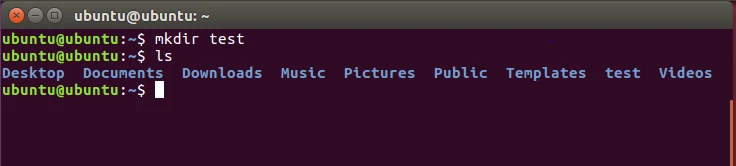
Confirming the existence of the “test” directory
- The rm command is basically the opposite of mkdir. We’ll show this by deleting our test folder. From your home folder (use ls to confirm that the “test” folder is there) type rm -r test and press enter.
- Again nothing should appear to happen but the folder is now gone. Type ls to check this.
That’s a very small sliver of the useful commands Linux offers, but after this, at least the principle of working in the terminal should be familiar to you. To see more configuration commands, follow along to our next tutorial where we discuss further commands.
Have you tried the Linux terminal? Thought of any other useful commands that would be good for a Linux starter? Comment with your views on this article in the comments section below, and follow Hyperion Hub developments in the future if you’d like to see more articles like these for the South African market.
Tutorials
An introduction to the Unix terminal – part 2
introduction Unix terminal - we'll look into some more advanced commands to accomplish administrative tasks on your PC from the Unix terminal.
The previous tutorial focused on basic file management commands that were useful in the Unix terminal. If you haven’t read the first tutorial, we’d recommend you do so now. Now we’ll look into some more advanced commands to accomplish administrative tasks on your PC from the Unix terminal.
Linux also includes some nifty tools and packages to get information about your computer, install updates and change settings. We’ll look at ifconfig, sudo and apt-get.
ifconfig is the Linux equivalent of ipconfig in Windows. It lets you see the IP address of your computer (if it’s connected to a network) and will helpfully throw a list of all your connected (or otherwise) network adapters on-screen. ifconfig without flags will show every adapter, whilst typing it as above with “eth0” (for Ethernet) and “wlan0” (for WiFi) will show only those adapter’s details.
1. Let’s try with all adapters. In a terminal window type ifconfig -a and press enter.
You’ll notice the details for the Ethernet port (including IP addresses and data usage) but also a “lo”. This is the loopback address, the “return to sender” localhost address. It’s a special address (127.0.0.1) that always maps to the computer itself.
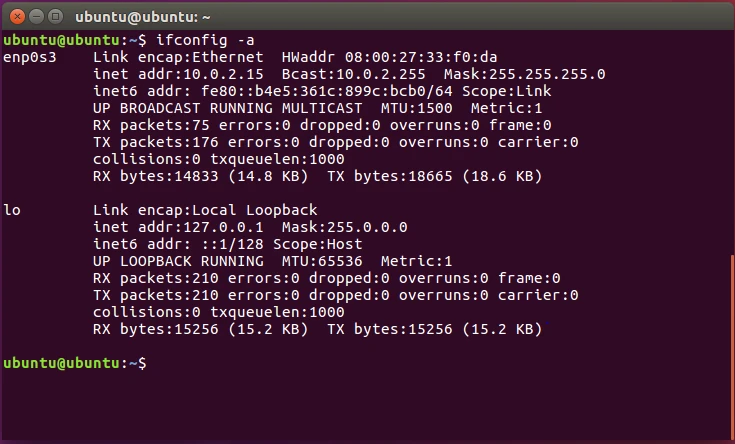
The terminal output of the command ifconfig
To get details about running programs, memory usage and to see how much CPU each app is hogging, we’ll use top.
3. In any terminal window, just type top and press enter. you’ll see system resource usage similar to Task Manager in Windows (although Resource Monitor in Ubuntu is the GUI version of top).
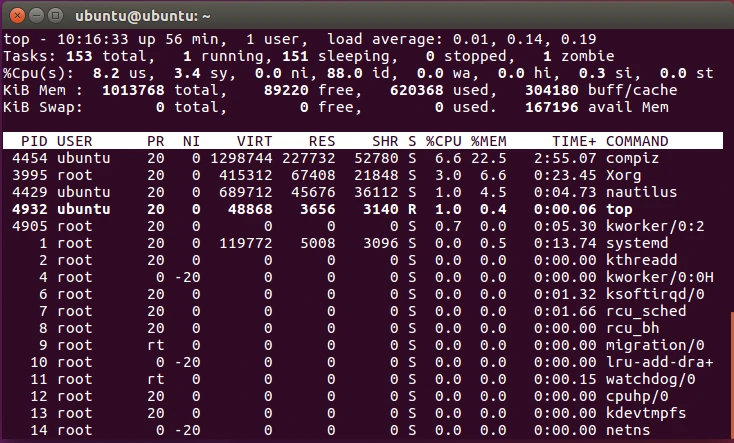
The output of the “top” command
System Administration and Package Installation
If you’re familiar with Windows, you’ll remember the nag screen that got all up in your face every time you’d want to rummage around in Windows system settings. In Linux, you’ve got the same sort of thing in sudo. Every time you sniff near a terminal command that might muck about with system files, you’ll probably get denied. Prepend sudo in front of a command to “elevate” it and gain superuser access as you would in Windows by clicking “Yes” to a UAC prompt.
We’ll demonstrate the behaviour by combining it with another command: apt-get. The latter is the package manager which allows you to easily install apps, packages, and other dependencies. The Ubuntu software centre runs these commands too, just wrapped in a friendly GUI.
For this example, let’s install files to let our Ubuntu machine talk to Windows-networked PC’s. For this we need a package called samba.
4. Start by typing apt-get install samba and pressing enter. You’ll notice an error – because you don’t have permission to access the directory!
5. Let’s try again, with sudo. Type sudo apt-get install samba. You’ll be asked for your password; type it in. It may not show up as if you’ve typed anything, but that’s for security, so keep typing and press enter to confirm.
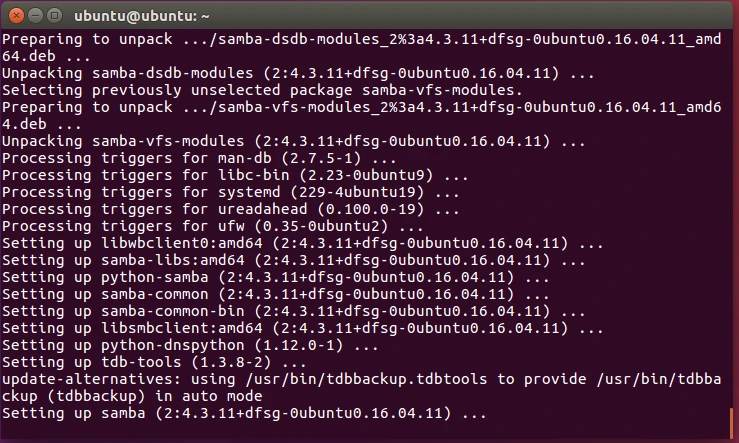
The progress of installing samba with apt-get
6. You’ll see it automatically run through everything it needs to, and will inform you how much space the operation will take. Once it’s done, it’ll automatically return to the terminal prompt, and our tools will have installed correctly. To remove them later, just use sudo apt-get remove samba.
Thought of any other useful commands that would be good for a Linux starter? Comment with your views on this article in the comments section below, and follow Hyperion Hub developments in the future if you’d like to see more articles like these for the South African market.
Tutorials
Programming 101 – learning Python
Learning Python - we introduce you to programming in this tutorial using a programming language called Python, a fairly easy-to-learn language.
Programming is an important and highly sought-after skill. It’s a great asset to have for any professional knowledge-worker in this information age. Aside from the career benefits, you can also learn programming to improve your logical thought processes, build the next awesome mobile app, or just have fun with something new. We introduce you to programming in this tutorial using a programming language called Python.
Introduction to Programming Languages
There are various programming languages out there – Visual Basic, Java, C, Python and PHP, amongst others. We use a programming language to write out a set of instructions that define how a computer program must function. Therefore, programming is the science and the art of telling the computer what to do. The language that a programmer may choose to use depends on a number of things; their past experience with programming, the type of problem they need to solve and the environment that the program will be running in. Different programming languages are designed for solving specific problems within a certain environment.
Why Python?
Since there so many programming languages around, designed for such diverse purposes, why should we choose to learn Python instead of something else? As the Python designers say on their website: “Python is a programming language that lets you work quickly and integrate systems more effectively.” As a new programmer, you want to start building interesting programs as soon as possible, and Python will not burden you with unnecessary complications that might quench your enthusiasm for learning this new skill. It’s an easy-to-use, and easy-to-learn language that will have you writing powerful code in no time! Let’s dive into it so you can experience it for yourself.
Getting Python
We’ll assume that you’ve got Python installed and ready to go before we begin. If you haven’t gotten around to installing Python yet or run into issues, read our handy guide to Installing Python first, then come back here and keep reading!
Getting Your Feet Wet!
The Python shell is an interactive environment where we write Python code and immediately see the results of the statements when we execute them. This is a great way to learn how to program because you receive immediate feedback on what you do. Now let’s introduce a few programming concepts using the interactive shell so that you can get acquainted with the language.
We’ll begin with some basic arithmetic.
- Type out the following on the shell and press the Enter key.
>>> 5 + 10
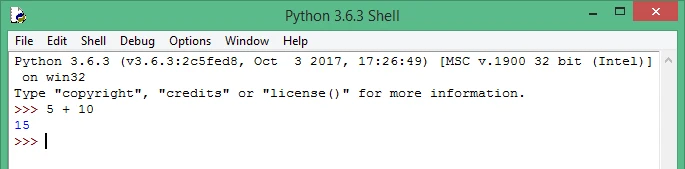
Python calculates the result of the addition and displays it.
It’s all well and good that Python can compute mathematical results, but what happens if we want to save the output of our computations? Well, storage in Python is done via variables. A variable is an alphanumeric (letters and numbers) label that we give a storage space which keeps any values we put in it.
- To create a variable and store the first number in it type:
>>> numOne = 5
- Create a second variable called numTwo and store value 10 in it.
- To view the contents of the variables we have created, we simply type out their labels and execute the statement by pressing Enter.
In the statement above, we retrieved the contents of the variable numOne and numTwo by writing them out in the line of code to be executed. This is called referencing a variable.
- Create a third variable called numThree and store the sum of numOne and numTwo in it.
- Display the contents of numThree to see it the answer is correct.
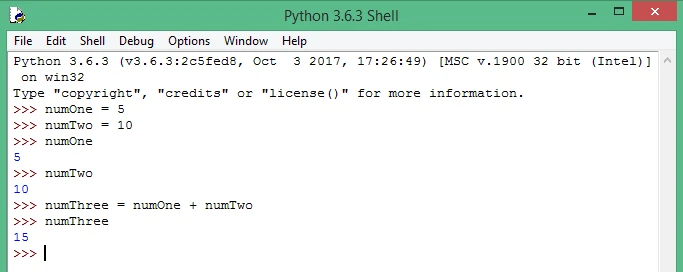
- Python performs all mathematical operations, we’re not limited to addition only.
- We can also store words in a variable. To create a variable with a word in it, execute the following line of code:
>>> string = “Hyperion Hub”
A word or collection of words written between quotation marks in Python is called a string. All programming languages use this term to refer to series of characters that are stored as a single complete unit. The terms is used because the letters are stored as a string of characters in the computer’s memory.
Note that we have to use quotation marks around the string we want to store in the variable. If we don’t add the quotation marks around the words, we get an error.
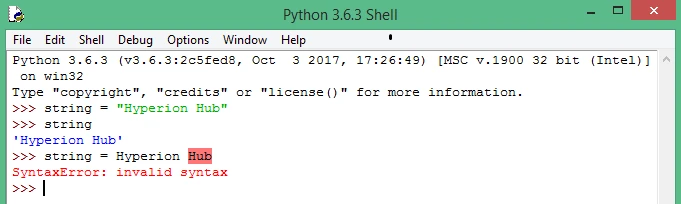
Error messages are displayed in red font on the shell. This message is simply telling us that we have written code that doesn’t conform to the rules of the language.
- Create a variable called firstName and assign your first name to it.
- Create another variable called lastName and assign your last name to it.
- Check the contents of these variables to see that contents stored in them.
- Now create a variable named fullName by joining the first two strings together:
>>> fullName = firstName + lastName
The process of joining strings is called string concatenation.
- Check the contents of fullName. Do you notice anything wrong?
We write our full names with a space between the first and last name. Python doesn’t put in the space automatically for you. You need to be explicit, by concatenating a space after the first name.
>>> space = “ “.
- Rewrite the last statement and add the space between your first and last name.
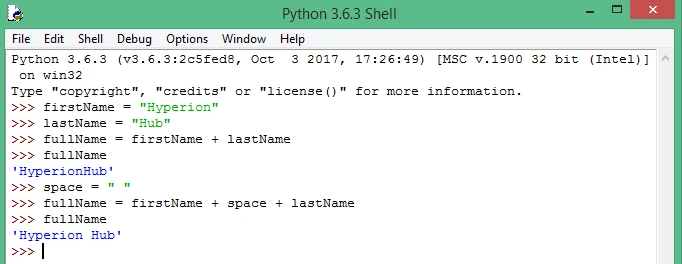
The process of putting contents within a variable is called assignment. We assigned the value of the calculation to the variable second.
So we now know how to write arithmetic statements for Python to compute. We’ve also learnt how to assign a value to a variable through assignment, and later use the value through referencing. Finally, we learnt how to display the contents of a variable by simply writing out the label we gave it and executing that statement.
We also learnt that we can store different types of contents in variables. A string of characters can be stored in them and joined together, through concatenation. When we don’t follow the rules of Python when writing statements in the shell, we get an error message. These messages may seem cryptic at the moment, but as you gain experience with the language, you’ll learn what they mean and how they can help you fix your mistakes.
You’ve now grasped the absolute basics of Python through the interactive shell. Next we’ll learn how to do more interesting stuff with the language.
Comment with your views on this article in the comments section below, and follow Hyperion Hub developments in the future if you’d like to see more articles like these for the South African market. Here’s more information about HyperionDev’s Python short course. Alternatively, you could do the Full Stack Web Development course, which includes Python.
Tutorials
Programming 101 – installing Python
Installing Python - Before you learn how to program, you need to first download and install a copy of Python. This tutorial will show you how.
Before you learn how to program, you need to first download and install a copy of Python on your computer. This tutorial will walk you through that process. These instructions are for installing Python 3 onto a computer running Windows 8 using the stock Internet Explorer browser that comes bundled with the operating system. Note that this process should be identical or very similar if you are running another version of Windows, such as Windows 7 or 10, or a different browser such as Chrome or Firefox.
Downloading and Installing Python
- Firstly, navigate to the Python downloads page here, using your browser.
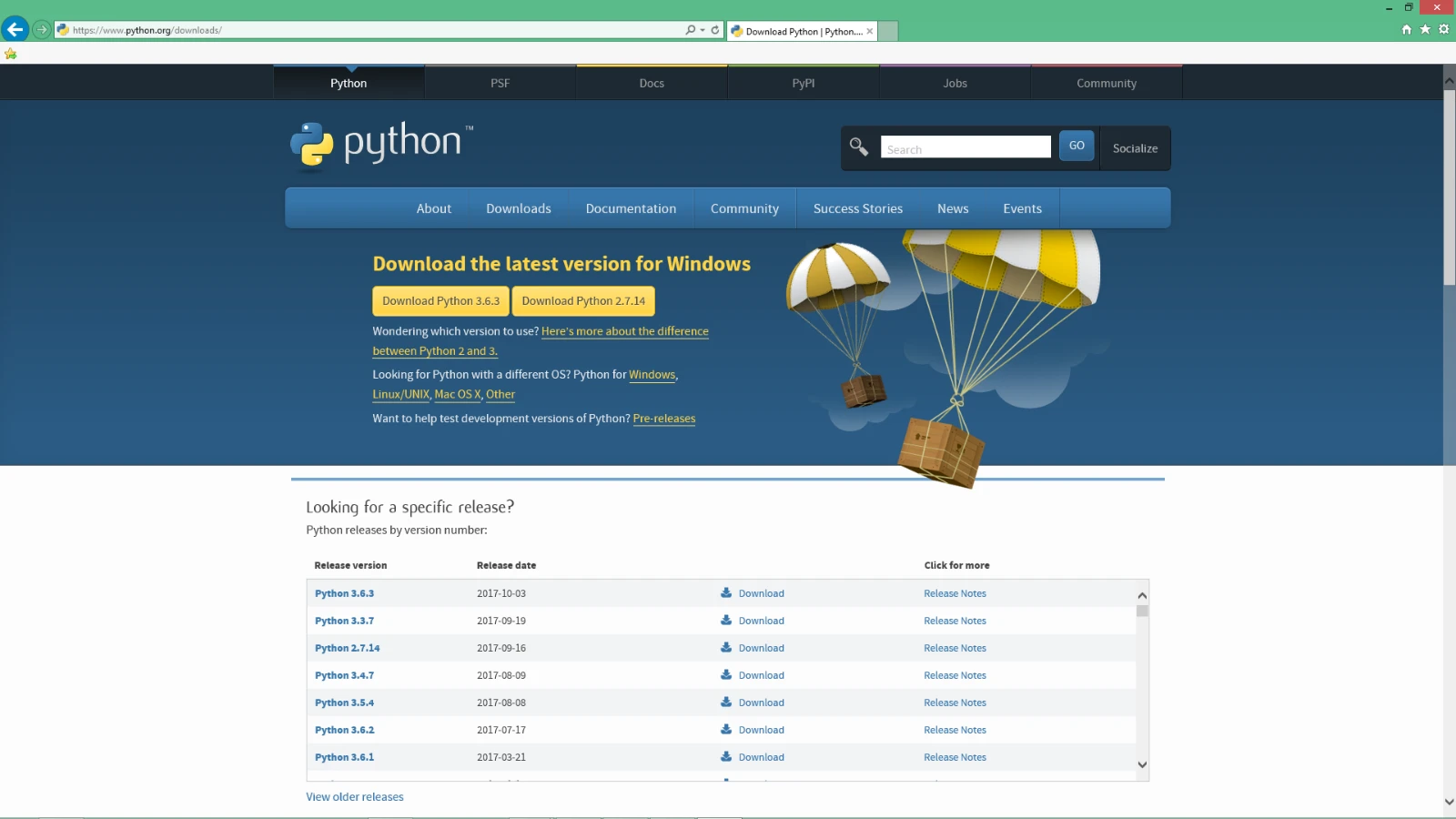
Python downloads page in Internet Explorer.
On the downloads page you are presented with the option of downloading the latest version of Python 2 or Python 3 via the two large yellow buttons. We will be using Python 3 in this series of tutorials. So click on the yellow button on the left to download the Windows installer.
- After clicking on the left download button, Internet Explorer will display a pop-up at the bottom of the window. It gives you the options to run, save or cancel. Select the run option to execute the web installer.

Internet Explorer download pop-up.
- After pressing the run button, Internet Explorer will firstly scan the file for viruses, then it will download and run it. This will result in the dialog box, shown below, to pop-up onto your screen.
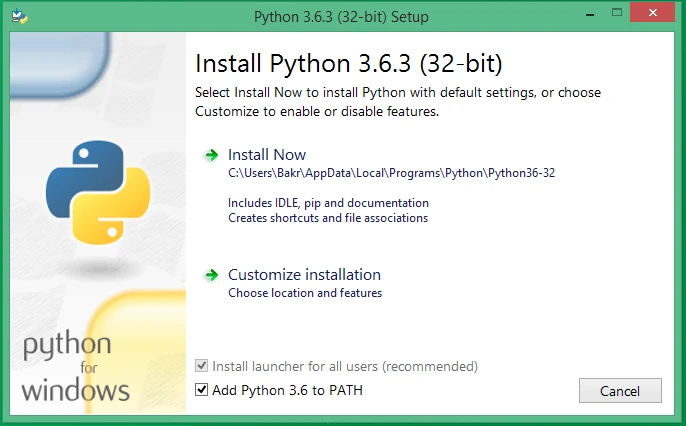
Python installer application.
Before we click on Install Now, you need to ensure that you’ve checked the Add Python 3.5 to PATH option at the bottom of the dialog box.

Ensure option to add Python to the PATH is checked.
Checking this option automatically configures your system so that you can run Python through your terminal without any hassles.
- Now, hover your mouse on the Install Now option and click on it. The setup program will cause Windows to present a dialog box asking if you want to allow the program to make changes to your computer. Press yes to continue with the installation process. When the installation is complete, the setup program will present this success message to you:
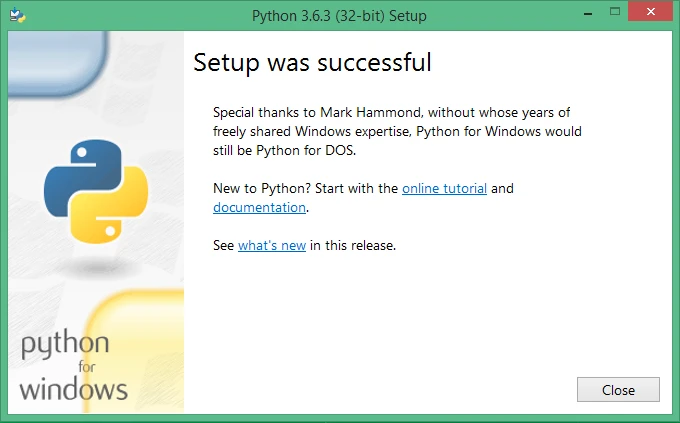
Successful installation message.
You have successfully installed Python! Click on the close button to dismiss the window.
- Python comes bundled with an interactive shell application. This is an environment where you can write Python code, execute it, and immediately see the results of the code you’ve written. To test that we’ve successfully installed Python and everything is working perfectly, we’re going open this shell program and execute one line of code.
Search for “IDLE” in your applications and execute the program named IDLE (Python 3.5 32-bit). This is the shell we’re going to be working in. The decimal number immediately after the name Python tells you the version of Python you downloaded. It may be different if you’re viewing this tutorial after subsequent releases have been made by the Python developers. Running IDLE will present you with the shell window like the one displayed below:
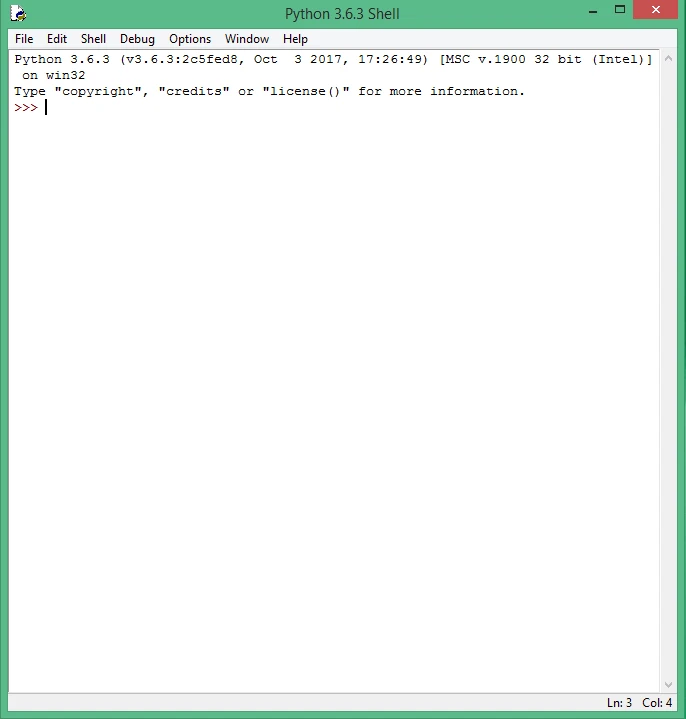
Python interactive shell.
- Type out the following statement in the shell and press Enter:
This line of Python code tells the shell to print out the phrase “Hello world!” (Note that we don’t type out the three “>” characters that preceded the statement. That’s just a convention we use in the tutorials, along with the this font style, to indicate that this is a line of code in the shell). Python will respond by displaying the message Hello world! in blue font below the line of code you write.
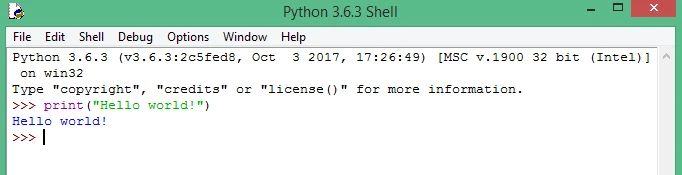
Executing your first line of Python code!
Congratulations! You have not only downloaded and installed Python successfully, but you’ve also executed your first line of Python code.
Comment with your views on this article in the comments section below, and follow Hyperion Hub developments in the future if you’d like to see more articles like these for the South African market. Find out more about HyperionDev’s Python Software Developer course.

Web Development
What is a Full Stack Web Developer?
Full Stack Web Developer - what does a Full Stack Web Developer do. Also, t-shaped employees, and why the are in high demand as Full Stack Web Developers.
Think of a coin. Can you separate the one side from the other? Of course you can’t. Front end and back end web development are a little like that. They are two sides of the same thing. The front-end, or ‘client side’, is everything the user experiences, from the stunning layout to the cool buttons and graphics. The main purpose of the front end is to deliver interactivity and to display content in an appealing way. The back-end, on the other hand, does things like work out calculations, follow business logic, interact with the databases etc. Back end developers need to get to grips with programming languages, databases and server architecture. A full stack developer, however, is able to do both front end and back end web development.
Full Stack Web Developer: Skills Needed
Because a full stack web developer takes you from conception to completion, he or she needs to understand a number of different programming languages. Upwork, a global freelancing platform, lists the skillset of a typical full stack web developer as follows:
Front-End
- Web fundamentals like HTML, JavaScript, and CSS
- CSS preprocessors like Sass or LESS
- JavaScript frameworks like AngularJS, React, or Ember etc., or JS-based build tools like Grunt, Gulp, and Bower
- Libraries like jQuery or Backbone.js
- Front-end (CSS) frameworks like Foundation or Bootstrap
- AJAX
Back-End
- API design and development
- CRUD (Create, Read, Update, Delete)
- RESTful Services
- Web fundamentals like HTML, JavaScript, and CSS
- Server-side languages like PHP, Python, Ruby, Java, JavaScript, and .Net
- Database technologies like MySQL, Oracle, PostgreSQL, and MongoDB.
- Web server technologies like Node.js, J2EE, Apache, Nginx, ISS, etc.
- Frameworks related to their server-side language of choice like: Express.js, Ruby on Rails, CakePHP, etc.
[Here’s a list of the top 10 top web development frameworks in 2017.]
The T-Shaped Model
It’s useful to think of full stack developers in the context of T- and I-shaped professionals (the term was popularized by Tim Brown, the CEO of IDEO). Forbes draws the distinction between the narrow, tight “I” or the extended “T”.
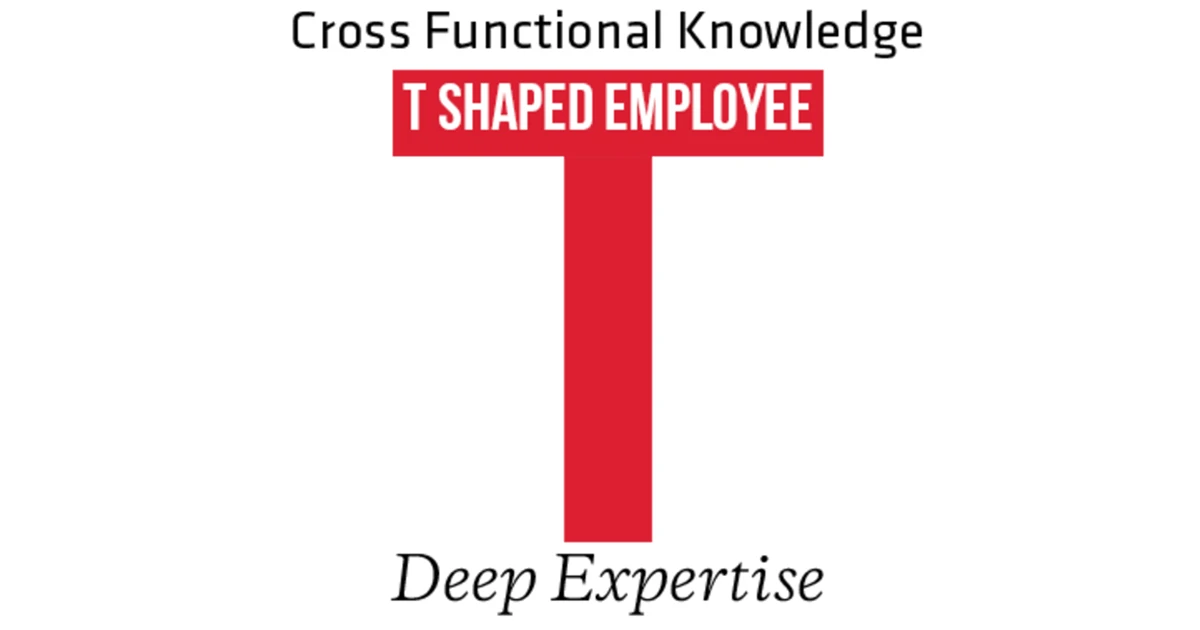
According to TechTarget, a T-shaped employee refers to a person who has “a breadth of general knowledge and soft skills” – this is represented by the horizontal bar of the T. The hard skills part is symbolised by the vertical part. Basically, a T-shaped individual is both a generalist (with people skills), as well as someone who has niche-topic specialities. This is different from the I-shaped employee, who, in the past, was valued by IT departments, because depth of knowledge in just one specific area was prized above anything else.
Not surprisingly, a T-shaped employee is often an ideal developer hire, says Stack Overflow, based on interviews with CEOs, programmers, and recruiters. Justin Cruz, a Senior Software Developer says: “T-shaped developers are the reason that (we are) able to grow at such a rapid pace and take on new challenges. When we are looking for new members for our development teams, we don’t focus on finding someone who is an expert in a particular subject (an iOS or Android developer for example) but rather a full stack developer that can be successful in contributing to a project end to end.” This means we can have very flexible product teams with developers who have the potential to grow in different areas, while still maintaining some expertise.
Full Stack Web Developer: Become a Ninja
The new methodologies – Agile, Lean and DevOps – are defining how software gets developed. They require flexible and more interactive ways of working, where stakeholders understand each other’s roles. To succeed, the team needs everyone all in and as a result, more rounded IT professions, like full stack developers, are in greater demand. Says The Register about full stack developers: “(T)hese rounded individuals are the most in-demand devs – in a modern world that wants staff who can do front end, can make middleware sing and utilise the terminal on their chosen operating system like a ninja, and knows how to test.”
Full Stack Web Developer: Perks
Gareth Dwyer, a 20-something software developer and writer, would definitely be described as T-shaped professional. He’s a full stack web developer who also knows about natural language processing, cloud computing and writing. He mentions “independence” as a key perk of full stack web development. “I don’t need to rely on others,” he says, “I can build an entire project, from beginning to end, with my full stack skills without needing ‘different parts’ from different people.”
Besides independence, full stack web developers are able to work remotely, freelance on various project and earn a lot of cash. Demand for developers is on the up.
If you’re thinking about becoming a full stack web developer, check out Hyperion’s three-month course that specifically prepares you for this exciting and lucrative career. Still a beginner? Check out the PHP & Web Essentials course to get you started on becoming a full stack web developer.
[For interest: read about 10 ways learning programming can change your life.]

Web Development
What is JavaScript?
JavaScript programming language is an object-oriented programming language used by many websites. It is used to make web applications more interactive.
JavaScript, also known as JS, is used to make web applications more interactive, rather than being plain and static pages. It is an untyped, multi-paradigm, object-oriented programming language employed by most websites and supported by most browsers who have built-in JavaScript engines. It forms one of the 3 pillars for content production on the WWW, alongside HTML and CSS. JavaScript requires a host platform from where it can then control its programmatic requirements.

Named in 1995 by Netscape Communications, JavaScript confused many as it was perceived as a spinoff of Java, an altogether different programming language. This was later dubbed as a marketing ploy by Netscape to increase popularity due to the seeming affiliation with Java which was and still is a very popular programming language. The two languages hold some similarities, however Java has static typing and strong check typing. Java is class based whereas JavaScript is object oriented: in Java, variable data types must be declared, whereas the opposite is true for JavaScript, and Java can automatically write to hard disk whereas JavaScript cannot. JavaScript is similar to Java in the sense that it follows most of its expression syntax, naming conventions and basic control flow constructs.
(Learn more about HyperionDev’s Java Programming Essentials course.)
Real World Applications

JavaScript is used to spice up websites and to add effects, display pop up messages, build basic games and more. Since the launch of Node.js in 2009, it has become one of the most popular programming languages, especially for building server-side software. Github created a software development platform called Electron that allows developers to create web applications using JavaScript, as well as HTML and CSS that can run on Windows, Macintosh, Linux and OSX. Microsoft recently released Visual Studio, which was built using Electron, and other companies such as Slack and Brave have built their entire web apps using JavaScript, due to it being able to create both browser side and server side software.
Language Trends
JavaScript is ranked 7th in terms of popularity in 2017 by the TIOBE index; however, Forbes has ranked it #3 in terms of popularity 2017 and Redmonk, that compares languages by discussion on Stack Overflow and usage on Github, has ranked it #1! According to Coding Dojo, the language is used by over 90% of all web pages which means it is highly utilised. In New York, Bloomberg was looking for more JavaScript developers than any other employer.
(Read more about the most in-demand technology jobs in South Africa.)

Software Engineering
What is C++?
What is C++? C++ is a high level, general purpose programming language. It is viewed by many as the best language for building large-scale applications.
C++ is a high level, general purpose programming language. C++ is also object-oriented and is viewed by many as the best language for building large-scale applications.
C++ is known to be a very powerful language, as it allows you to have a lot of control on how you use computer resources, especially memory. Its high speed performance and ability to use resources cheaply enables it to surpass other languages, and thus, it is often used in developing game engines and highly graphic intensive games. It was also designed with the primary intent for use in systems programming and embedded software, with key strengths in software infrastructure and large resource-constrained applications. These include desktop applications, e-commerce platforms and SQL servers.
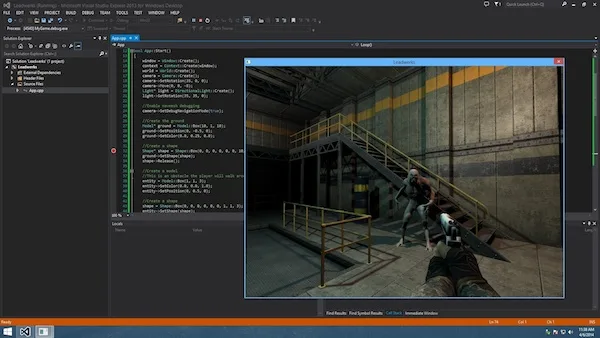
What is C++? Real World Applications

Despite the pros above, C++ is not easy to maintain as it needs a lot of code, which means you need a large team to scale up a C++ application. From a time and financial investment point of view, C++ is not easy to scale. Nonetheless, C++ has built a range of interesting & useful software and applications. Operating Systems are a key example – mostly Microsoft Windows, web browsers such as Chrome, websites such as Amazon and Paypal. Database systems include MySQL and Oracle. Facebook has also used C++ in several high performance and compatibility components, compilers & Virtual Machines, graphical layers, 3D Electronic Arts game engines and many more.
Language Trends
C++ is generally seen as a hard language to learn for beginners; however, due to its demand, it may be a language worth pursuing. The Tiobe Index ranked C++ 3rd globally in terms of popularity for 2017; however it experienced a YoY decrease by 0.48%. It was ranked #6 on the PYPL index.
Here is more information about HyperionDev’s C++ short course.

Software Engineering
Developer Salaries in 2017
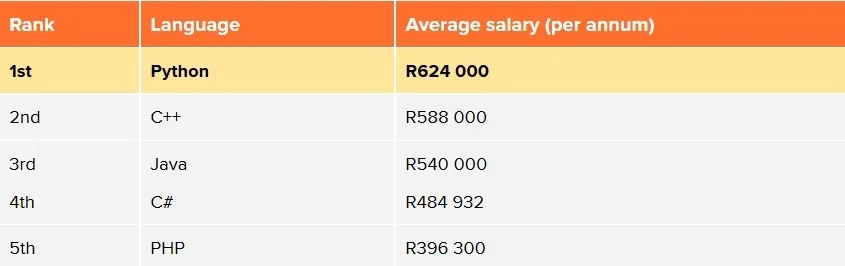
Developer salaries 2017: here are various graphs showing developer salaries for 2017. The most in-demand developer salary in South Africa is Python in 2017.
Are you interested in finding out more about Developers salaries? If so, have a look at the graphs we’ve assembled for the different programming languages.
(Per language in South Africa, 2-4 years experience. Source: Offerzen)
International Job Market
AngelList is the go-to place for startup job postings, so we’ll take a look at the demand for programming skills based on the software developer ads in AngelList, as shown in the chart below.
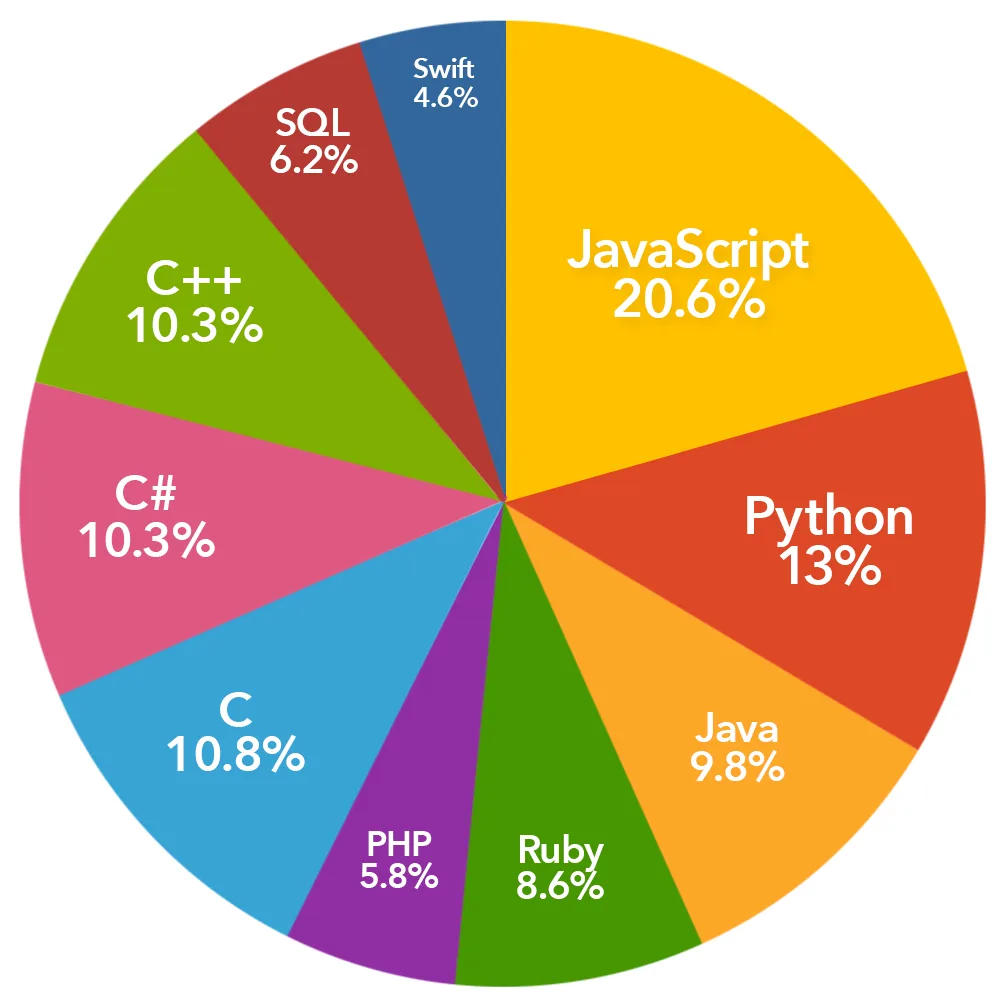
Angel List Job Postings (USA) as of April 2017
Again, JavaScript turns out to be the most in-demand skill, but companies seem to favor Python and Java more than Ruby, PHP, C, or C#.
Salary & Experience by Language
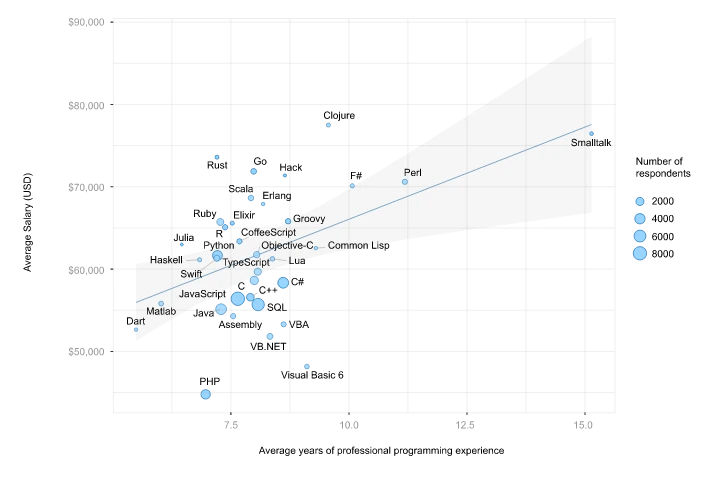
According to the Stack Overflow Survey in 2017, which includes responses from over 64 000 developers worldwide, developers using languages listed below the blue line in this chart such as Go, Rust, and Clojure are being paid more, even given how much experience they have. Developers using languages below the blue line like PHP, however, are paid less even given years of experience. The size of the circles in this chart represents how many developers are using that language compared to the others. Junior developer specialised in Python seem to be earning more than such developer in C++, C# and Java.

Software Engineering
What is C#?
What is C#? C#” is a programming language, created by Microsoft as part of its .NET framework. It is a general purpose, object oriented programming language.
Not to be confused with the music note C-sharp, “C#”, is a programming language created by Microsoft as part of its .NET framework. Run by a development team in Microsoft and headed up by Anders Hejlsberg since 1999, the most recent version of C# was released in 2017, along with Microsoft Visual Studio 2017.

C# is a modern multi-paradigm, general purpose, object oriented programming language. Object-oriented programming is a programming paradigm based on the concept of objects which may contain data. C# is intended to be suitable for writing applications for both hosted and embedded systems, ranging from the very large systems that use sophisticated operating systems, down to the very small systems which have dedicated functions. An interesting aspect about C# is that it is very economical with regard to memory and processing power requirements – thus, most of its applications have a better performance.
What is C#? It is used for Real World Applications
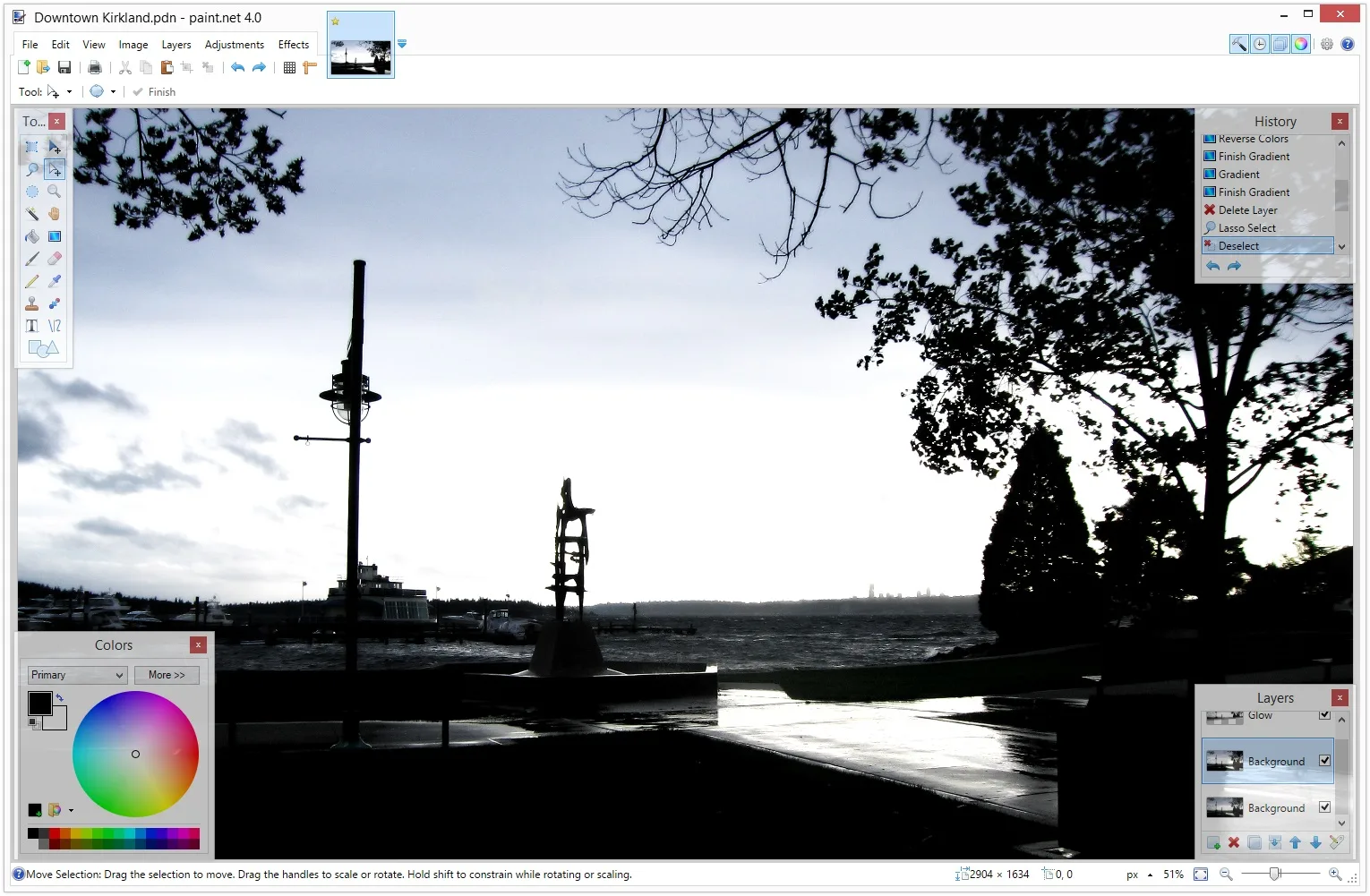
C-sharp is used by hundreds of thousands of programmers and is used in many areas, mostly found in large enterprise applications and desktop applications. One of the most popular applications written in C# is the famous Microsoft Visual Studio program – an integrated, open source development environment used to develop programs for Microsoft Windows. Its main use is to build Microsoft Enterprise software; however, since 2016, it can be used on non-Windows machines. There are also a few open source applications written in C#, such as Paint.NET – an open source graphics editor, and Banshee – an open source media player, as well as many others. It is generally used for web development, game development, and as general Microsoft development.

Software Engineering
The South African Developer Shortage
South Africa developer shortage. Developers are in high demand in South Africa. Internships are very important in the tech industry for new developers.
While South Africa is busy becoming a global economy, driven developers are finding themselves spread thin in a growing market. Given that one in four South Africans is unemployed, it is inevitable that the current tech industry struggles with a skills shortage. One way in which this dilemma is being solved is through South African coder training initiatives such as Hyperion Development, which brings coding to low-income earners outside major cities, as well as providing cushioning for competitive developers to enhance their skill-sets. The Cape Town-based Cape Innovation and Technology Initiative (CiTi) uses e-learning and placement support to train unemployed young people through their CapaCiTi project. Nigeria and Kenya are other powerful African economies where similar start-ups have gathered traction, such as the Lagos-born Andela and Moringa School based in Nairobi.
However, South Africa still has a tough journey ahead in terms of strengthening the link between skills development and job creation: this is where internships can be used as platforms for people who are new to the industry, and actual coding experience can become more valuable than traditional qualifications. After all, you learn through working, and sometimes traditional education simply can’t prepare you for the world of work.
Initiatives like Africa Code Week and #BornToCode are making strides in bringing digital literacy to Africa, which ultimately encourages young people to immerse themselves in the workforce, with long-term goals in mind. Another way to close the gap in the market is by learning what skills are in demand, and then empowering oneself through education. This is where online education has revolutionised the tech industry in countries like the USA and UK, where self-taught developers are quickly absorbed into the workforce right alongside their traditionally-educated peers. HyperionDev offers a number of in-demandonline bootcamps that are helping to fill the tech demand in South Africa.

A difficult task that prospective employees face in South Africa is the disconnect between talented developers and great tech companies. The South African job market still relies heavily on a secretive recruitment process which doesn’t share enough information with applicants about their role, and applicants are consequently faced with many questions to which there are no readily available answers. For instance, will the developer be working from a cramped office cubicle all day for minimum pay, or does the role barely include any programming at all. It will take years for South Africa to be as savvy as the likes of Silicon Valley or London, but there are recruitment initiatives that are trying to bridge the gap by making it easier to access job opportunities in the tech industry.
South African company OfferZen launched specifically to address this problem for developers, and only takes on tech companies that explain what the role of the developer is, as well as providing developers with more information about their job (such as salary) upfront. Other African companies like Kuhustle and Duma also connect developers with businesses, and the popularity of recruiting developers in this way suggests a future shift away from the traditional method of applying blindly to many jobs and hoping for the best.

Career Advice
Traditional vs Online Education in Software Development in South Africa
Online education South Africa: as tech industry expands, there is an increasing demand for qualified developers. Online courses bridge this gap
As South Africa’s tech industry expands, it must also meet the needs of employers and potential employees alike, and that means broadening perspectives on how to educate the next generation of developers. Internationally, online education has become incredibly important in educating people in the digital age, but South Africa still lags behind in terms of how we think of, and treat people, within the tech industry. Institutions take years to update their syllabi with essential learning areas that employers demand, meaning that a lot of what is learned at traditional institutions is outdated at best and obsolete at the worst, while online training providers are constantly shifting and transforming to cater to the learning needs of future developers – a group as diverse and rapidly-evolving as technology itself.
Considering the amount of time it takes to follow a traditional study path, such as at a university or technical college, combined with the financial pressure acquiring a degree places on a student, it is no surprise that South African university drop-out rates are high. The Department of Education and Training publishes an annual report on graduate statistics, and this year revealed that 47.9% of university students do not go on to complete their degrees for various reasons, study fees being the usual culprit.
Statistically, only around one in twenty black students go on to finish their degree, compared with almost one in two white students. Fifty years ago the South African government was spending 16 times more on the education of a very small privileged portion of society, and all one needs to do is read some of the statistics to see how oppressive policies have affected people’s access to education. Overall, owing to Apartheid’s legacy, most people and families of colour in South Africa do not have the ability to afford exorbitant university fees.

Online education can help bridge the gap between these enormous inequalities. Studying a course online is not only more affordable than going to university, but also more accessible, as a student need not factor in other concerns such as transport or university residence costs. There are still many barriers between disadvantaged communities and South Africa’s flourishing tech industry, but one way to reconcile them is through building technological literacy outside of major cities. While access to the Internetis still considered a luxury for many South Africans, someone from an underdeveloped area who may never have the opportunity to go to university still has a number of routes to access online education. Smartphones are also a significant tool for online learning, with recent research showing 34% of South Africans have phones that can access the Internet and applications.
On a global level, support for online learning resources is high. A recent survey asked 20,000 people from 187 countries about how they learned to code, and huge numbers stated that they found online learning more helpful in their path to becoming a developer than through other more traditional learning avenues. They listed websites such as freeCodeCamp (77%), Stack Overflow (62%), W3Schools (54%), and Codeacademy (53%) as beneficial to their learning journey, while only 38% of respondents had completed a Bachelor’s Degree from a traditional tertiary education institution. Of that number, most respondents hadn’t studied a technology-related subject, which solidifies the idea that online learning will make becoming a developer more accessible to people from all walks of life.
Furthermore, the Institute of Race Relations 2016 South Africa Survey shows that there are nearly half a million South Africans with a tertiary qualification from a university or college who are currently unemployed, proving that that traditional education is neither the most effective nor the only manner in which to penetrate South Africa’s modern job market.
It is worth noting that most professional developers have used other forms of education to assist them in their career paths. As seen in the table below, over 90% were self-taught and over 44% using online short courses to assist in developing their skills.

Web Development
What is PHP?
PHP scripting language - PHP is a widely-used and popular scripting language for websites, web applications and online systems.
PHP is a widely-used open source and server-side scripting language that is mainly used for websites, web applications & online systems. A scripting language is a programming language that supports scripts, which are programs written for a special run-time environments that automate execution of tasks which could alternatively be executed one-by-one by a human operator.
Real World Applications
PHP is a general-purpose scripting language primarily designed for web development. PHP is normally used in combination, or integrated with various web template systems, web frameworks and even web content management systems. It is also commonly embedded into HTML code and works quite nicely in validating web forms. One of the strongest and most significant features in PHP is its support for a wide range of web servers and databases and operating systems. Writing a database-enabled web page is incredibly simple using any of the database-specific extensions. One of the most popular combinations of PHP with a web server and database is the famous LAMP stack (Linux, Apache, MySQL, PHP).

In addition to creating dynamic websites, PHP has proven itself incredibly useful by being able to provide a variety of services, such as E-commerce platforms, Project Management tools, generating PDFs, Mailing lists, Image processing; most of Facebook’s applications are built using PHP.
Another interesting capability of PHP is that, with just a script “PHP Watch Movies Script”, you can run your own fully featured movies and tv shows listing website – movie streaming at your fingertips!


Career Advice
Python – Industry’s New Favorite
Python is a powerful and popular programming language. Python is a high level language that is used by many programmers in a wide variety of contexts.
We often think of a Python as a famous dangerous snake. In this article, we will be looking at it from a software development perspective. So what exactly is Python? Simply put: it is a popular programming language, which is similar to a human language – like English or French – but it is used to communicate with computers. Software developers, also sometimes known as coders or programmers, write computer software in programming languages to tell a computer what to do.
Python is a high-level programming language. This means that it’s closer to human language and further from machine language. The advantage of this is that it’s easy to read and simple to implement. It is also open source – free to use, even for commercial applications.
In addition, Python is a good programming language for beginners. As a high level language, it makes it easier for a programmer to focus on what to do instead of how to do it. Writing programs in Python takes less time than in other languages, such as C/C++.
Another interesting aspect of Python is that it is an interpreted language; interpreted languages do not need to be compiled to run. This means that a program called an interpreter runs the code (in this case, the Python code) on any kind of computer, which means it can be used more efficiently and runs much faster.

Python is used by hundreds of thousands of programmers in many areas, including web development, desktop graphical-user-interfaces, scientific computing and even network programming. Some of the most popular applications of Python are Youtube – Youtube’s core functionality is written in Python, and Dropbox – Python powers the largest cloud storage platform, which we use on a daily basis to sync, store and share almost anything. Python also boasts some powerful web frameworks such as Django, which is the engine behind popular websites such as Instagram, The New York Times and the likes.
Thinking of getting ahead of the competition with a career in software development? Learning Python would be a good place to start. Hyperion Development offers a range of Python courses, from beginner to advanced. These courses are internationally recognized and can land you some of the hot jobs in software development in South Africa.

Software Engineering
Developer Salaries: The Battle between Jozi and the Mother City
Developer salaries Cape Town vs Johannesburg - who earns the most. Developers are in high demand in South Africa. However, some regions pay higher.
Across South Africa, there is a high demand for developers, especially in intermediate to senior positions. For most professionals, choosing to work in Johannesburg means a higher salary premium than in Cape Town; however, this may not be true for developers.

Income variation by city
In Johannesburg, the median salary is R274 957, which amounts to R22 913 per month. On average, entry level jobs allow for a monthly salary of R21k, ranging from R10k to R33k, whereas intermediate roles allow for a salary of R30k per month on average – ranging from R18k to R60k. Senior roles translate into a salary range between R25k to R80k per month.
In Cape Town, the median salary per year is R293 191, which amounts to R24 432 per month. On average, entry level jobs allow for a monthly salary of R21k. The range is between R11k and R34k. Intermediate roles command a salary of R33k on average and range from R24k to R51k per month. Lastly, senior developers bring home, on average, a monthly salary of R48k, ranging from R28k to R67k.
Junior Developers

Overall, the median salary in Cape Town is about R20k higher than Johannesburg. Confirming this, Offerzen, a developer recruitment agency, states that entry level developers earn, on average, 38% more in Cape Town. This could be due to many factors, one of which could be the lack of affordability of Cape Town. Even with a higher salary, the cost of living is higher than Johannesburg, and thus the purchasing power of both regions remains relatively similar. There may also be more companies in need of junior developers in Cape Town, due to it being the tech hub of South Africa. This would increase demand leading to more competitive salaries. The skills with the highest paying jobs are Microsoft SQL Server and .NET for this job level.
Intermediate Developers
The minimum salary for developers with 3-5 years experience is higher in Cape Town than in Johannesburg; however, there is more earning potential in Johannesburg, as the top end earns more in this region. The jobs paying the highest salaries in Johannesburg are C++ Programming Language, Java, Linux, and Internet Information Server (IIS), whereas in Cape Town, the highest paying jobs for this level are in Python and Delphi.
Senior Developers

Developers with more than 6 years experience get paid about 10% more in Johannesburg. The cost of living theory is not relevant for this salary bracket. Those that wish to reside in Cape Town will have to choose lifestyle over salary, which many do. The highest paying skills associated with this level are Java and JavaScript.
So wherever you choose to live, know that your earning potential is somewhat dependent on the region. Junior developers have better opportunities in Cape Town, whereas more senior developers have higher earning potential in Johannesburg. Whether you choose lifestyle or income, you are now informed and it’s your move.
Let us know your thoughts and where you would prefer to stay and why. Here’s more information about international developer salaries by region. And if you want to change career or upskill, check out HyperionDev’s software developer courses.

News & Announcements
October 25, 2017
Hyperion Selected to Attend Investec Silicon Valley Trip
Entrepreneurs South Africa, including Riaz Moola from HyperionDev, have been selected to participate in En-novate in Silicon Valley in 2016.
In today’s technology-focused industry, startups and established companies alike are increasingly looking to the mainstays in the technology industry for advice and inspiration. With this in mind, the Investec co-founded startup En-novate takes entrepreneurs from South Africa to other parts of the world to allow them to make global business interactions and to become more globally competitive. In 2016, En-novate is exposing a group of shortlisted startups to an experience in Silicon Valley, California in the United States.
This year HyperionDev was chosen by Investec as one of South Africa’s fastest-growing startups, and its director Riaz Moola was selected to be a part of the En-novate Young Entrepreneurs Silicon Valley trip. Getting a chance to attend the trip was highly difficult, with 10 startups applying for every one place on the trip, making the jostling for a position very competitive indeed. Being able to participate in this experience will be hugely eye-opening allowing entrepreneurs to learn about venture capital ecosystems, and how other startups have scaled up successfully.
Moola will also be part of the first-ever African delegation attending the Silicon Valley Open Doors Conference. This exclusive event allows startups to access Silicon Valley funding from some of the world’s top investors.
Other entrepreneurs selected include Lungisa Matshoba, co-founder of South African mobile-based credit card payment solution Yoco, Claudia Swartzberg, founder of TopDog, Africa’s largest EdTech company, and radio host and personality Gareth Cliff of CliffCentral.com.

The trip will include meeting with Silicon Valley’s top venture capitalist Bill Draper, visits to $2.9 billion-worth social giant Facebook, meetings at Google’s HQ, and a day with Vinny Lingham, one of South Africa’s most successful technology entrepreneurs. There will also be opportunities to engage with startup incubator Blackbox, Silicon Valley Bank, and Sequoia Capital, one of the world’s most prestigious venture capital firms, which has funded the likes of Apple, Google, WhatsApp, PayPal, LinkedIn and YouTube.
Keep up to date with the ongoing stories out of the En-novate Silicon Valley trip by following us on Twitter at @HypDev and searching #SATreps2016, or visit us on Facebook to learn more.
[Read why HyperionDev is the partner of choice for Injini, Africa’s Ed-Tech Incubator.]

Software Engineering
The Programming Language behind most applications – it’s Java
Java programming language. Java is a popular programming language behind many applications. It is one of the most popular programming languages to learn.
Java is a popular programming language.
A programming language is similar to a human language – like English or French – but it is used to communicate with computers. Software developers, also sometimes known as coders or programmers, write computer software in programming languages to tell a computer what to do.
The computer software written in Java can do a range of things. For example, the website you’re reading right now could be built using Java. A programmer can write Java code to implement the logic that tells a computer system (in this case, this website) to show you this article when you come to this link on your web browser.
But Java is even more versatile – it can be used to build mobile applications. For example, if you have an Android phone – many of the mobile apps you use every day such as Uber or Facebook Messenger rely on Java code written by software developers to function.

Just like human languages, there are many different types of programming languages. Some examples of other languages include Python, C++, and C#. Just like human languages, each coding language has its quirks, advantages, and disadvantages.
For example, C++ is considering ‘harder’ to learn than Python or Java. But C++ is more efficient – you can get a computer to do more with fewer ‘words’ of the language. Think about some human languages and how they differ in this way too!

So what can you do if you know ‘how to talk Java?’. You can become a software developer – one of the hottest careers internationally right now. With a bit of practice with Java, you’ll be able to build everything from mobile applications to websites to even your own Artificial Intelligence.
Anyone can learn to code in Java. One of the best ways to learn Java part-time is to take an online course in it. Companies such as Hyperion offer introductory to advanced mentor-led Java courses.

Software Engineering
App Making Made Easy
App making - learn how to make your customized app by taking an app course or by using an app tool, such as Google's App Maker.
Is your brain buzzing with ideas about the next big app, but you don’t know where to start? Or perhaps you want to optimize your business processes and you know an app could solve all your problems. So what’s stopping you? Maybe you feel that you don’t have the skills or the costs of implementation are too high. Well, there are ways around these problems.
The first place to start is the internet, where you can find both app builder tools and online app development courses. These are two ways you can learn to build your app and make it downloadable for all those eager app users.
As far as app builder tools go, Google has released App Maker, a new application added to its Gsuite. This application lets you build customised enterprise apps to serve a very specific purpose within an organization. It boasts a low code app building platform which leverages other apps in your Gsuite, such as Contacts, Groups and Maps, allowing for built-in support. As far as industry standards go, using App Maker is very quick, due to there being built-in templates, drag and drop functions and point and click data modelling. For those with more development expertise, you can customise the app at a deeper level with scripts, as well as HTML, CSS, Jquery and Javascript content. Google Analytics is linked to the live app, helping to monitor usage.

App Maker is targeted at businesses using Gsuite to build a line of business solutions for the entire company that meets very specific needs, such as tracking suspicious login activities or making claim forms digital. This end-to-end platform provides businesses, of all sizes, the opportunity to maximize their efficiency by digitizing daily practices and solving drawbacks without the need of a developer. This new ‘serverless’ development by the Google team will definitely enhance the performance of those businesses using the Gsuite platform.
What if you simply want to create your own app that is scalable, or you want to become a professional app developer? Taking an online course could be the difference between merely having an idea and realising a dream. Earning the Associate Android Developer Certification from Google will provide you with the skills to develop superb mobile applications for the world’s most popular mobile operating system – Android. HyperionDev, in association with Google, offers both an Introductory and an Advanced Mobile Developer three month course. You will learn to build your own app from scratch, and become sought after in your career. App development is currently one of the most in-demand skills in South Africa, as well as being one of the most high paying.


Software Engineering
Developer Demand: Will it Continue to Rise?
The developer demand continues to rise. The demand for developers is much higher than the average rate among other professionals.
Software, says Marc Andreesen, co-founder and general partner of the venture capital firm Andreessen Horowitz, which has invested in many big tech companies like Facebook and Twitter, is eating the world. What does he mean? In an article published in The Wall Street Journal, Andreesen explains that “all of the technology required to transform industries through software finally works and can be widely delivered at global scale”. In addition, software programming tools and Internet-based services, including the Cloud, make it much easier for start-ups to launch new global software packages in many industries. Start-up costs are way lower. The end result: developer demand is growing across the range, from the big guys to small garage start-ups.
Think about it. You wake up in the morning, and what do you do?
- Check your day using Trello, a way to organise your to-do lists and projects.
- Catch an Uber to work or use Google Maps to assess the quickest traffic routes.
- Get to work and organise project with remote employees via Google Hangouts.
- Catch up briefly with your mum or sister via Skype, Viber or WhatsApp.
Of course, the list doesn’t end here. From entertainment (Netflix) to travel (Airbnb) to increasing work productivity by limiting your time on social media (RescueTime), apps and software have infiltrated every aspect of our lives.
Developer Demand: Key Industries
Besides the apps and the software packages you use on a daily basis at work, almost all business (and even professionals) require a web presence these days. Forbes mentions a number of key industries that have demand for developers including:
Business technology companies: These are companies that are willing to invest in developers who can solve core business problems.
Payment companies: Think PayPal, Google Wallet – companies that allow you to pay 3rd parties. They need masses of developers.
Media companies: Companies like Huffington Post and Upworthy need developers to build custom solutions to allow the mass publishing of content.
Academia: Not only are libraries of digital knowledge needed, but many institutions are offering online digital learning. Find MOOCs (on any topic) online from a large variety of organizations here.
Car companies: Think about self-driving cars and how that’s going to impact on the need for developers.
Developer Demand: On the Up
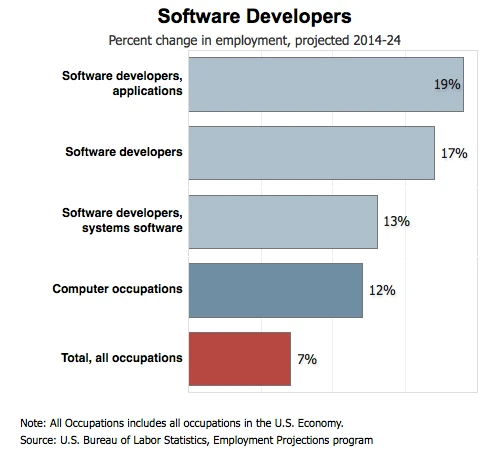
The point is that a developer could just as easily find themselves working for Amazon as for a hospital or a school. The stats confirm that the demand for developers is on the up. According to the US Bureau of Labor statistics, software developer jobs are predicted to grow by 17% from 2014 to 2024. This is much faster than the average for other occupations.
Breaking that down further, application developers are projected to grow 19% – and systems developers by 13%. The US Bureau of Labor statistics explains that the main reason for the rapid growth is due to “a large increase in the demand for computer software”. Because so much software is now offered over the internet, costs are lowered and there is greater customization for businesses.
System developers will be in high demand because of the number of products that use software – e.g. more computer systems are being built into consumer electronics as well as other products, such as cell phones and appliances. Job prospects with be highest for those with the most up-to-date programming tools and for those who are competent in one or more programming languages.
Here’s a graph showing projected developer demand:
The good news is that you can cash in on this demand for developer by upskilling or changing careers. And it’s relatively easy to get there via 6 or 3 months full- or part-time study. If you’re thinking about shifting to a career in development, here are 10 further strategies for helping you achieve that goal.
HyperionDev also offers bootcamps in one of three specializations: (1) Software Engineering (2) Mobile Development and (3) Web Development (including PHP and Web Development Essentials, Introduction to Web Development and Full Stack Web Developer).
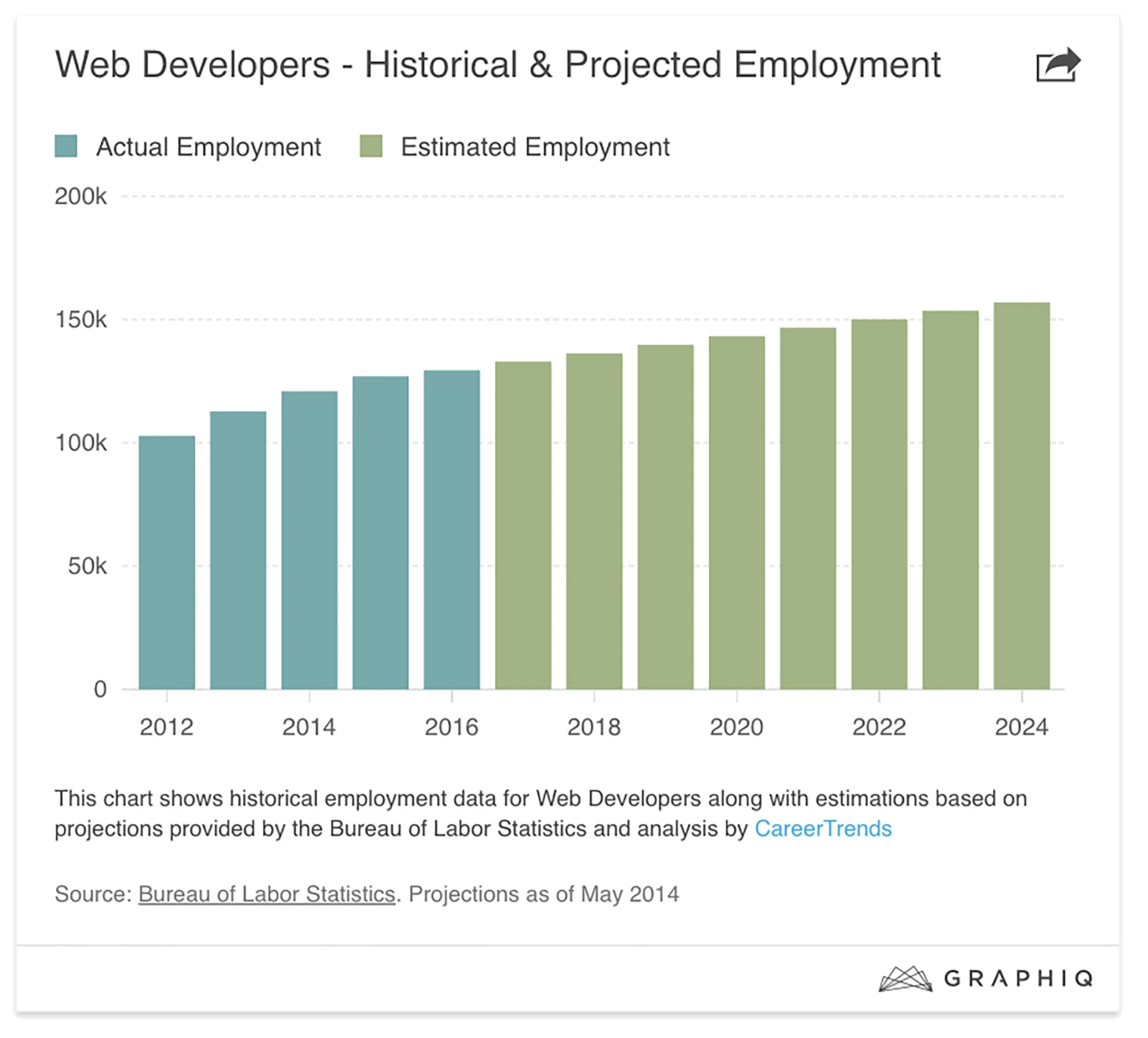
For interest, check out this graph showing historical and projected numbers for web developer demand, one of the three popular bootcamps at HyperionDev:
Lastly, you might be interested to know which job Glassdoor ranks as their best in America, based on the number of job openings, salary and job satisfaction. It’s a Data Scientist. In fact, out of their top ten ‘best jobs’, seven of them are in tech. If you want to enter a lucrative field that will always be in demand, a job in tech is the way to go.
(Read more about HyperionDev’s Data Science course.)

Student Success Stories
Emile Esterhuizen – From Bioprocessing Student to Python Programmer
In our latest Hyperion Success Story we find out from one of our students how taking a Hyperion course has helped them in their lives, studies, and careers.
In our latest Hyperion Success Story we find out from one of our students how taking a Hyperion course has helped them in their lives, studies, and careers.
Tell us a bit about yourself?
I’m now working as a web and mobile developer, but I started my working life as a researcher in Bioprocess Engineering
How did you hear or find out about Hyperion Development?
Through a Google search.
Which Hyperion course did you take and why?
I took the introductory Python course. I had heard about Python through my engineering studies.
How has the course helped you towards your studies, your career or finding a job?
I was looking for a career change and considered Software development as an interesting option. I took a course at Hyperion to help make the decision as to whether or not I should focus on a career in software and it really helped “break the ice”. I found the concepts taught to be approachable and clear, helping to lay the foundation for future learning and working in Software Development.
The core concepts that were taught were more than enough to kick-start learning and the ability to find solutions to inevitable problems encountered. Stackoverflow was no longer just a niche jargon-filled website but a useful tool. Additional reading and learning materials also became a lot more accessible after studying with Hyperion.
I started learning to code with Hyperion in late 2012, and now I’m happily pursuing a full time career in web and mobile development and have even worked as CTO at a Cape Town based digital agency.
Our current courses set up allow students to do work even offline, was this beneficial to you at all?
Yes, it was beneficial.
What did you enjoy most about the course?
I like the fact that the course was simple and approachable but still covered enough content to create something useful.
Read more Success Stories here.

Career Advice
8 Different Types of Software Development Careers
There are many different types of software development careers. Which one is right for you? How should you position yourself in this lucrative field?
It’s no secret that software development careers are lucrative and in demand. Check out these web developer salaries. But where should you position yourself in this field, and what pays favourably? Below we present 8 different career prospects in software development. Salary figures are sourced from PayScale showing aggregated minimum-maximum figures for South Africans who have reported being in each respective career.
1. Software development careers: Front-end developer
As a front-end developer, your job encompasses both the experience and the aesthetics of websites and applications. The first thing a user visiting your site or opening your application will notice is your handiwork in action. This doesn’t include the graphics of the site per-se, which is often left to a graphics designer who doesn’t necessarily code. Instead, the task of the front-end developer is to engineer the flow of the actions, buttons, prompts, links and assets on-screen to make that interaction as pleasant as possible. Apart from UX, a front-end dev often has excellent Javascript knowledge; a key competency for this career. Check out the HyperionDev Full Stack Web Developer course which also includes JavaScript, HTML and CSS, front-end developer languages.
Salary prospects: R119 460 – R358 848 per annum
2. Software development careers: Back-end developer
While the front-end developers are often applauded for successful software projects, the sweating engine-room programmers deserve just as much credit. Back-end development involves the design and implementation of databases, APIs and frameworks, server hosting, cloud setup, content management system implementation, and a whole host of further ‘behind the scenes’ tasks needed to maintain the uptime and successful operation of an application or website. Great examples include designing algorithms, installing Content Management Systems (CMS), configuration of server software such as Amazon EC2 instances. The irony is that if a back-end developer does his job correctly, a user will never notice. For a closer look at the difference between front-end and back-end web development, both important software development careers, check out this article.
Salary Prospects: ~R308 872 per annum (Source – “database developer” benchmark)
3. Software development careers: Full-Stack Developer
A full-stack developer is competent in both back-end and front-end development, and as much as possible in between. This means a working knowledge of servers (AWS, Linux scripting etc.) is required, as well as version control proficiency. Beyond this, full-stack means knowing Apache and Nginx as well as competence in PHP/Ruby and databases languages like SQL. Then there’s the front end: HTML, CSS, XML, Javascript, RWD, and possibly some UI/UX design basic Photoshop to ice the cake. Full-stack careers are increasingly important these days in companies that need multi-talented people, so employment shouldn’t be hard to find. Check out HyperionDev’s Full Stack Web Developer Course.
Salary Prospects: upwards of R480 000 per annum (Source – “Senior full-stack” position)
4. Software development careers: Site Reliability Engineers/DevOps
A SRE ensures that the work of a back-end and front-end developer doesn’t result in a tangled mess of 404 and 500 server errors. SREs ensure everything works over a long period, and if any piece of website or software goes down, they can get it back up as quickly as possibly. SREs are incredibly valued at companies such as Google where YouTube being down for just minutes means millions of dollars in lost revenues. This essential role means a career in DevOps/SRE is popular: big names like Uber, Facebook, MathWorks and HBO are all looking for people in this field.
Salary Prospects: R408,402 – R881,777 per annum
5. Software development careers: Data Scientist
“Big data” is all the rage these days, and whilst consumer-side tech is racing to have anything with a processor in it connect to the internet, that data still has to be mined and interpreted, or else it remains useless. That’s where you as a data scientist come in; you’d assign meaning and order to the chaos of billions of data packets sailing through their networks.
Data scientists span a wide field, because the data you’d analyse spans mathematical computations, physics, statistics, signal processing, biological data, and even climate. It would even include artificial intelligence and cluster computing. From there, it’s all about designing and implementing systems and models which can learn, draw conclusions and perform inference on the data sets. Given say a billion pictures of people’s faces, you could design models to infer the expression, emotion, ages and so on. This career is exciting because just about every type of company needs you – from banks to intelligence agencies. To find out more about whether your job is safe from automation, read this.
Salary Prospects: R120 000 – R320 000 per annum (locally, significantly higher overseas)
6. Software development careers: Embedded Software Developer
Whilst not part of the mainstream software development careers, this is very popular with makerspace movements and the “hobbyist hacker” hardware community. It’s exactly for this reason that start-ups have risen out of this passion and have turned this into a viable career option that’s lucrative. As an embedded developer, you’ll work with embedded ‘low level languages’. These languages run closer to the ‘bare-metal’ of embedded systems (such as the Raspberry Pi, Intel Galileo, Arduino) as it were, with the ability to directly write binary values to I/O pins connected to the CPU. This means that you’re flipping bits, modifying individual memory locations and pretty much deciding everything with a ‘first-principles’ instruction approach.
Salary Prospects: R168,000 – R443,248 per annum
7. Software development careers: Mobile Developer
This type of development is all the rage since smartphones dawned into the public consciousness several years ago. As a mobile developer, you’ll be involved in designing a variety of apps – think mobile games, communication software such as a WhatsApp, and even mobile developers. You’ll also work to set up frameworks that support those apps, and design tools that work with the APIs that the platform offers. Mobile developers often specialise in one particular platform such as iOS, Windows Phone or Android, but there’s increasing scope for designing cross-platform software to make apps work across mobile, desktop, and different smartphone platforms. Check out HyperionDev’s Introduction to Mobile Development course, as well as their Advanced Mobile Developer course, both excellent software development careers.
Salary Prospects: R124 109 – R655 573 per annum
8. Software development careers: Security Developer
As a security developer, you’ll probably end up as a hacker. Wait, what? That’s a type of software development career? Certainly, and it’s a critical field. Penetration testers (“white-hat” ethical hackers that try to find security flaws in systems) and cyber-security experts work together for the good of companies and their systems and data. You’ll develop software to keep important company assets safe from theft, viruses and other malicious attacks, and as a pentester you’ll try to “hack” into the system to find where the vulnerabilities are. In this way, there’s less chance your “black-hat” malicious friends will get into your important data.
Salary Prospects: R156,000 – R533,249 per annum
Looking to get into one of these careers? Hyperion offers part-time, online certifications in many of these areas using the most in-demand programming languages in Southern Africa. Comment below on which career in software development you find most exciting!

Career Advice
How to become a Software Engineer in South Africa
How to become a software developer in South Africa. One of the most respected jobs is that of a software developer. Learn how to become a software developer
One of the most respected positions in the US and UK right now is that of a software developer. Much of the ‘Silicon Valley’ culture has found its way out of San Francisco to dominate some of the best paying and most appealing careers in the West.
This is rapidly becoming the trend in South Africa, driven by the fact that software developers in the country are actually the highest paid in the world according to the 2016 StackOverflow Developer Survey.
That’s right – it’s not just the tiny percentage of software engineers hired by Google to work in Zurich or Mountain View that are making it big, but our own home-grown developers sitting under the shadow of Table Mountain or the Marine Parade of Durban beachfront.
But just how can I become a software engineer or software developer?
It all starts with education. In no other field can you more easily not have a formal qualification in the field, but land yourself a great career. For example, no hospital is going to hire a doctor that doesn’t have years of training in the field of medicine, no court will listen to a lawyer that doesn’t have 5 years training in the legal system, but a tech startup or even corporate will hire a software developer with some knowledge of the technologies they need – that’s how high the demand for programmers is right now.
Having demonstrable experience and a portfolio will have your LinkedIn inbox exploding with messages from recruiters looking to snap you up.
So what are my options for education?
The traditional route – If you’ve got 4 years and the resources, and you’re still young – definitely go for a Computer Science degree, and try get some study abroad experience during that degree. There are many great Computer Science departments in South Africa, which we’ll be sure to cover in another article, and taking your time to understand the theoretical mechanisms behind the field will only stand you in good stead for the years to come, but the truth is, not everyone has the time or opportunity to do a full degree.
The new route – With just 6-12 months of full or part-time education, you can learn focussed skills in software development and cover the fundamentals of Computer Science. Software development is one of the few fields where you don’t need a formal degree or diploma to get a job. Over 90% of software developers are self-taught, with nearly half learning to code online. That’s great news if you want to enter this field. One of the mechanisms for this is to take a online MicroDegree course with Hyperion Development, the largest trainer of software development & Computer Science skills in Africa. You can find out more about online coding bootcamps here.
For example, the Full Stack Web Developer or the Introduction to Software Engineering MicroDegrees will give you the breadth of knowledge of the most popular programming languages (Java/C#/Python) and depth to apply it to build complex web systems using Django and Python.

You’ll also develop a portfolio of exercises you complete on the course – or on your own time, which you must display on Github or a similar hosting platform, along with assistance to find a job in South Africa through the Hyperion Careers platform.
One thing you may want to consider is a free trial before taking anything further. With Hyperiondev, you can get access to beginner courses in Java, Python, C#, C++, PHP (and others). This gives you a feel for the way the MicroDegrees operate, as well as the specific programming language.

Career Advice
Web Developer Salaries by Region: What Can You Expect to Earn
Web developer salaries, what can you expect to earn. Find out about how your region or country has a direct effect on web developer salaries. Top cities for
When I was seven years old I asked my mother for a job. She told me to sweep the leaves in the driveway and put them in refuse bags. Of course I agreed – finally, a paid labour job. I spent all afternoon sweeping and packing, arduous tasks, before she helped me carry the heavy bags to the driveway to be removed later that week. When I’d finally finished, she gave me one Rand, the equivalent of about 7 US cents. Naturally, I complained bitterly, but she wouldn’t change her mind. “You need to know what your labour is worth upfront,” she said to me – well, I’m sure she used simpler language, but that was the essence of the message. It was a lesson well learnt. And as an adult before switching careers into web development, it’s useful to know expected web developer salaries.
Here’s a general rule of thumb: senior developers in a major tech area with 5-10 years experience can expect to earn between $100 000 – $150 000 per year and up. Junior developers with not much experience can expect to earn about half of that. However, here’s the really good news, if you’re thinking about a career change to web development, then: be aware that a web developer’s salary growth and future salary expectations increase much faster than most other jobs. So you might not start out with your ideal salary but after one year of work, your salary grows quickly and significantly. You can sign up for a three-month Full Stack Web Developer part-time course via HyperionDev.
Interestingly, one of the biggest factors affecting web developer salaries concerns where the developer works. “For instance, the median salary in the US is considerably higher than in Canada, Germany, UK or France,” states TechWorm. Based on data from Stack Overflow, a developer who has at least five years experience could, on average, earns $34 000 more in the US than in Canada, Germany or the UK.
If you want to check out your potential salary, have a look at Stack Overflow, which is a popular developer community. Not only does it offer a Q&A for coders, but it also has a new salary calculator that lets you work out what you should be earning as a result of variables like your role, location, education level, experience and areas of expertise. It’s based on a survey that the company conducts annually with about 65 000 developers.

So, for example, if you’re a London-based back-end developer who has 3 years experience, a graduate degree and knows Python, C# and PHP, you could expect, if you were earning at the 50th percentile, to earn a web developer salary of £36 000 per annum. And at the 75th percentile, you’d be getting £44 000. Here’s an interesting graph outlining average software developer salaries by nation. If you want to learn these skills, take a look at HyperionDev’s Web Development or Python course.
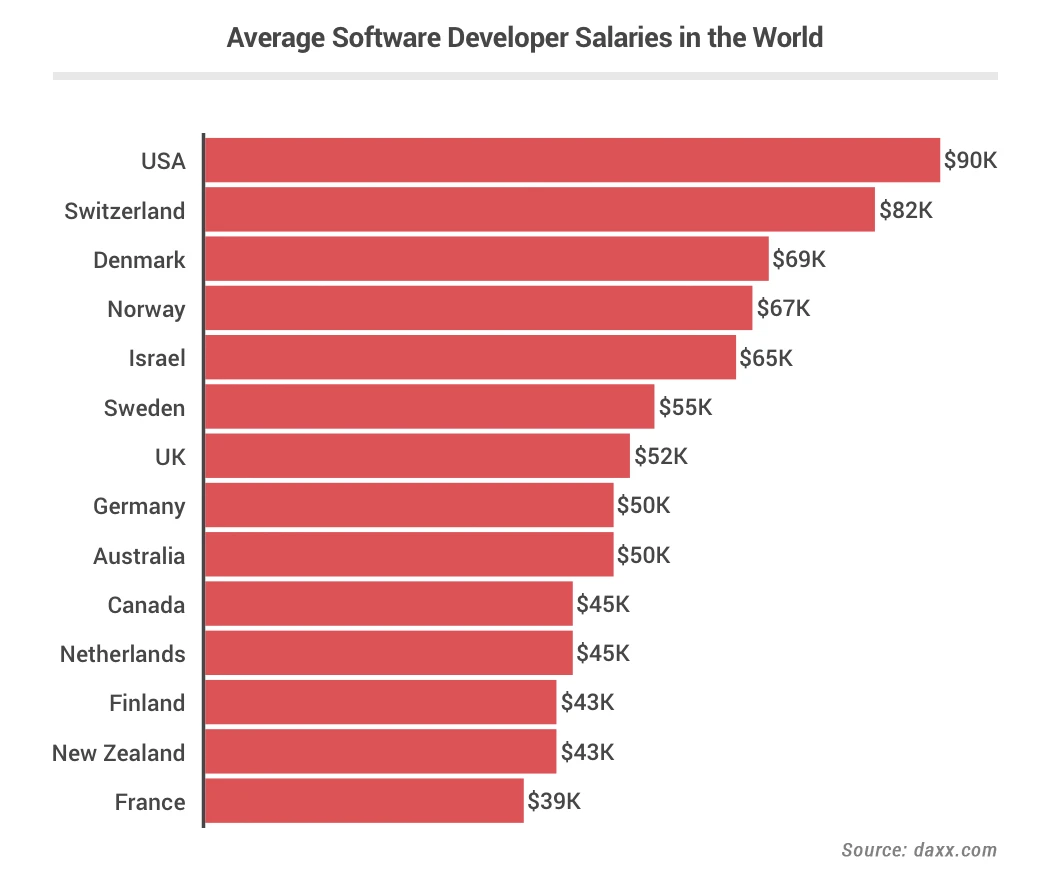
Bear in mind, however, that a software engineer builds (or engineers) software, including desktop, mobile and web applications, whereas a web developer is a software engineer who only builds web application (like Gmail, Facebook, Instagram etc.). A software engineer and a web developer working on a web application are really doing the same work.
So where is it worst to be a web developer? The lowest developer salaries are in these countries: India ($4600), Indonesia, Egypt, Kenya and Argentina. What is the average web developer salary in South Africa? According to PayScale, the average salary for an experienced web developer is R353 749 ($26 414) per annum, and people don’t generally have more than 10 years’ experience.
Web developer salaries are not only influenced by country but also by city. Compare an entry level web developer in Cape Town (R182 711 or $13 733) with Johannesburg (R172 445 or $12 967). What are the top web developers salaries for cities in the US? In descending order, they are San Jose, California ($107 500), San Rafael, California ($104 580), San Francisco ($97 400), Framingham in Massachusetts ($95 350), and Seattle ($91 740). It’s no surprise that California comes out top!
There’s more good news: web developer salaries are continuing to grow. Half the top-paying jobs are in the tech industry, reports CNBC, for September 2017. Also, the supply of tech talent is lower than demand, which places IT workers in enviable positions for negotiating higher wages. The Harvey Nash Tech Survey 2016, which involved 2959 technology professionals from 36 countries, stated that the tech shortage is particularly acute in Europe (56% of technology hiring managers reported shortages), and 44% of hiring managers predict that the shortages will get worse in the future.
So, how best to negotiate those high salaries? Lifehacker proposes two strategies:
1. Strategy One: Noel Smith-Wenkle Approach
Noel Smith-Wenkle was a top job headhunter who used this approach for his clients to get the highest possible salary for them. According to this method, you must never tell the employer how much you want. The organization must name the first number. To avoid naming your number, tell the company that you’re more interested in doing [type of work] at the specific company than the salary when asked how much you want. Even if the company asks you straight out, just say you’ll consider any reasonable offer, and add that the company is in a much better position to make an offer based on what you’re worth. Once the offer is made, if it’s above your minimum, then you take it. If it’s too low, tell them, but not by how much.
2. Strategy Two: Jack Chapman Method
Career coach Jack Chapman, author of the book Negotiating Your Salary: How to Make $1000 a Minute, states five rules for negotiation:
- Only discuss salary negotiations after you’ve been offered the job.
- Let the other side make the first offer.
- When the offer is made, repeat it – and then stop talking. This is called “the flinch”; often your silence prompts a raise. The silence also gives you a chance to think while putting pressure on your potential employer.
- Research the market, the company and the value of your skills. Counter an offer with a well-research response.
- Even after the deal is clinched, carry on negotiating: lock in other benefits, such as extra days leave or a company car etc.
Whichever strategy you follow, think about changing careers and studying one of HyperionDev’s coding courses. They can be done part-time and online. You’ll also have access to on-demand code reviews by our full-time coding educators.

Career Advice
What qualifications do you need to become a developer in South Africa?
What are the various developer qualifications South Africa? What should I study to become a developer? How the National Qualification Framework operates.
There are many routes into the tech industry. The traditional route of studying Computer Science or Engineering at university is now competing with a range of other learning paths, such as short courses, diplomas, certifications, and the ever-expanding world of online education. And as research has shown, developer salaries are worth achieving.
South Africa’s education system operates under the National Qualifications Framework (NQF), which recognises and categorises qualifications into levels of achievement ranging from NQF Level 1 (Grade 9 of high school) all the way to NQF Level 10 (Post-doctoral research degree). Below are qualifications that fit into the NQF in South Africa.

Short courses
Part-time online courses, internationally recognised and good CV-boosters.
FOR DEVELOPERS
There are hundreds of short courses to help you become a developer, some of them specialising in a particular area such as Java or Software Engineering
WHERE TO STUDY
Damelin, UNISA, Hyperion Development, CTI Education Group, Mancosa, Intec College
DURATION
3 – 9 months
COST
R8,000 to R15,000 per course

Higher Certificate NQF Level 5
Skills-based, typically industry-orientated, and could help propel you into the world of technology.
FOR DEVELOPERS
Higher Certificate in IT or Systems Network Engineering
WHERE TO STUDY
Please see a list of all the public Technical Vocational Education and Training Colleges in South Africa here. Note that not all of these colleges will offer an IT-related qualification.
DURATION
1 year
COST
About R20,000 for a full certificate
National Diploma NQF Level 5
These are good qualifications in South Africa, and while they are a lot like degrees, they are more career-centric and practical.
FOR DEVELOPERS
National Diploma in IT or Software Development
WHERE TO STUDY
Cape Peninsula University of Technology, Central University of Technology, Durban University of Technology, Mangosuthu University of Technology, Sol Plaatje University, Tshwane University of Technology, University of Mpumalanga, Vaal University of Technology
DURATION
Usually 2 or 3 years full-time
COST
About R30,000 a year
Tech NQF Level 7
WHY
A practical-focused qualification that is an alternative to Bachelor degrees in South Africa, with less of a focus on theoretical Computer Science or Engineering knowledge.
FOR DEVELOPERS
B.Tech IT B.Tech Software Development
WHERE CAN I STUDY IT
Cape Peninsula University of Technology, Central University of Technology, Durban University of Technology, Mangosuthu University of Technology, Sol Plaatje University, Tshwane University of Technology, University of Mpumalanga, Vaal University of Technology
DURATION
1-year top-up following completion of a National Diploma
COST
Tuition varies upon university, with annual fees between R30,000 and R50,000 or more.
Bachelor’s Degree NQF Level 7
One of the more traditional route to becoming a developer is through studying a BSc, which aims to balance theoretical Computer Science with software development skills.
FOR DEVELOPERS
BSc Computer Science BSc IT
WHERE CAN I STUDY IT
Nelson Mandela Metropolitan University, North West University, Rhodes University, Stellenbosch University, University of Cape Town, University of Fort Hare, University of Johannesburg, University of Kwa-Zulu Natal, University of Pretoria, University of Witwatersrand, University of the Free State, University of the Western Cape, Walter Sisulu University
DURATION
3 years full-time, 4 – 5 years part-time
COST
Annual fees vary between R30,000 and R50,000 or more.

Honours Degree NQF Level 8
Specialises in one subject and is at least 25% research.
WHERE TO STUDY
Nelson Mandela Metropolitan University, North West University, Rhodes University, Stellenbosch University, University of Cape Town, University of Fort Hare, University of Johannesburg, University of Kwa-Zulu Natal, University of Pretoria, University of Witwatersrand, University of the Free State, University of the Western Cape, Walter Sisulu University
DURATION
1-year top-up following completion of a Bachelor’s Degree
COST
Between R30,000 and R50,000
Software Engineering
5 Computer Programming Terms To Know
Five important computer programming terms that you should know: responsive web design, object-oriented programming, agile, compiler/linker and patching
Unsure what a software development-related concept entails? Is it a term commonly used but never explained? Here, we’ll touch on 5 such terms and help you update common computer programming terms.
1. Responsive Web Design(RWD)
Put simply: if you find yourself having to pan and zoom repetitively around a site, then it probably isn’t designed using RWD. Responsive Design is a programming approach that uses a website’s CSS functions to gauge the dimensions of the browser it’s running in, and resize, crop and move assets and text around based on that size. This should be done on-the-fly if a user decides to resize their browser, but is primarily used to allow viewing the same site on multiple devices (PCs, phones, tablets etc.) without having to design a separate “mobile” version of the site.

2. Object-Oriented Computer Programming
This is a computer programming model focusing on objects to be defined instead of actions to be taken (the latter is the traditional “procedural programming” model). To compare it to traditional models, a “program” in traditional methods is just a procedure of logic where input data is processed and outputted in some way. In OOP, the focus is on the objects you want to manipulate rather than the logic needed to do so. Objects may be categorized into generalised “classes”, which include “attributes” (these tell the program the features of the object) and “methods” (the logic used to manipulate objects). Properties such as inheritance allow “type-of” relationships between objects. (i.e. “VW is a type of Car” given a car base class and a VW derived class)
3. Agile Software Development
Certainly a popular term the past few years, the “agile” approach to software development seeks to change the ‘traditional’ paradigm of code design. In the past, rigid steps (as in the Waterfall Model) had to be followed if software was to actually get to market. Code would be written, tested completely, and signed off before the next stage began. Plenty of form-filling and rigidity was the norm here. Agile methods instead championed developers
responding quickly to change, and encouraging changes of plan, having frequent client-developer interactions, and using new methods like pair programming and self-motivation as opposed to set deadlines, to build software.
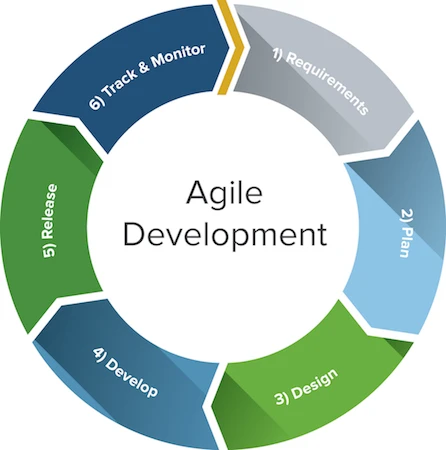
4. Compiler/Linker
Usually a part of an IDE, but can be used on its own. The compiler is the software portion that takes the high-level language you’re coding in and translates it into something lower-level, to be understood by the computer you’re compiling on. This lower-level language is referred to as machine code.
The linker is the helper to the compiler. Once the compiler has generated the machine code from the high-level language, it stores the machine code in some form of generic object. The linker’s purpose is to aggregate the objects generated by the compiler, as well as any dependencies the program needs (read: the includes you added in your file or the libraries it needs to use) into one neat package.
5. Patching
This is common for large software projects. A patch is a piece of code, or some new executable, which is created in response to a deficiency in existing code. Patches often correct bugs discovered by users in software, or could treat vulnerabilities in code which are endangering the security of users. Patches do not have to be the optimal solution, but simply the stop-gap measure for an issue (these are often known as “hotfixes”).
How many of these terms were you already familiar with? Was there anything new you learnt? Comment with your views on this article in the comments section below, and follow Hyperion Hub developments in the future if you’d like to see more articles like these for the South African market. Now that you’ve read this piece, you might be interested in reading front-end vs back-end web development.
About the Author
Matthew de Neef is a final year student studying towards his BSc Computer Engineering degree at UKZN, South Africa. He is a member of Golden Key International Honour Society as well as a student member of the IEEE (South Africa). He originally hails from Wageningen, The Netherlands, but is currently based in Durban, South Africa. He has a passion for technology, and is Hyperion Hub’s Technical Journalist and Content Editor.
Still have questions?
Contact our Admissions Team, and a real person will get back to you.