
Our latest insights
Read the latest insights


Data Science
The difference between a data analyst and a data scientist
These days all companies are able to collect vast quantities of data, which need to be processed properly. What exactly is the difference between a data analyst and a data scientist? Read on to find out this, as well as the demand and salaries for each of these occupations.
Data, it’s frequently claimed, is the new gold. Just like gold, which needs to be fashioned into coins or jewellery to have real value, data needs to manipulated or ‘mined’ to get the most out of it. These days all companies are able to collect vast quantities of data, which need to be processed properly to ensure key insights aren’t missed and advantage is taken of new business opportunities.Data analysts and data scientists are the individuals who do this data mining, but what exactly is the difference between a data analyst and a data scientist? Read on to find out this, as well as the demand and salaries for each of these occupations.
Data analysts: What are they all about?
Data analysts, in essence, translate numbers into everyday English. Every company collects data – e.g. sales figures, market research, transportation costs, logistics, etc. The data analyst needs to take this data and translate it into English to help companies make better business decisions. For example, a company could take its Google Analytics data, from website viewings, and make decisions about which products need to be pushed and which products should be culled. Basically, a company’s data is converted by the data analyst into trends, future growth opportunities and solutions.
What skills and abilities do you need as a data analyst? You need to be able to communicate well, be organised and pay attention to detail. Once you’ve understood the data, you’ll have to communicate it via clear visual, written and verbal communication. One key difference between a data analyst and a data scientist is that an analyst doesn’t really require coding skills in his or her day-to-day activities, but it certainly won’t harm to have them.
Data analysts: Job demand and salaries
Forbes reports on a recent IBM report that found that data analytics (and data science) jobs remain open an average of 45 days, which is five days longer than the market average. This indicates a high demand for these jobs, as there are not many candidates who are able to fill them. By 2020, there will be an increase of 364 000 openings for data professionals in the US to 2,720 000. What industries see the highest demand? Finance, Insurance, Professional Services and IT industries experience 59% of this demand.
And what’s the salary? Glassdoor reports that the annual salary for a data analyst in the US is $65,470 per annum. High salaries are in the region of $92,000 per year.
I want to be a data scientist – What can I expect?
Before we even mention what data scientists do, it’s worth mentioning that The Harvard Business Review calls Data Science the ‘sexiest job of the 21st century’. And Glassdoor ranked data scientist as its top job in the US based on an analysis of three factors: number of job openings, job satisfaction and salary.
In essence, a data scientist analyses data for actionable insights on anything from product development to customer retention to new business opportunities. Similar to data analysts, data scientists process and analyse data, but they do need to possess coding skills. The languages they are likely to know include the following: Python, R, Java and SQL.
As a data scientist, according to a piece on Medium, you’ll have the following responsibilities:
- Frame the problem: You need to work out how to translate the client’s issue into a concrete and well-defined problem – e.g. which products are 20-something customers likely to buy?
- Collect the raw data to solve the problem: You will need to work out what data points are actually worth collecting to solve the problem.
- Process the data: Raw data frequently needs to be cleaned for various problems including errors, missing variables, corruption in the data, etc.
- Explore the data: What are the patterns, trends or correlations?
- Conduct in-depth analysis: Here you will use machine learning, coding, statistical models and algorithms.
- Communicate the results: Here’s where you tell the story of your data, otherwise known as data storytelling, to the various stakeholders. You should now have an accurate machine learning model that can predict the answer to the initial problem.
Data scientists: Job demand and salaries
From January 2015 to January 2018 there was a 75% increase in job postings for data scientists, reports Indeed. Interestingly, there is a growing speciality for a job known as ‘sentiment analysis’, states Bloomberg – basically, this is finding a way to quantify the number of tweets supporting or trashing your company.
The average salary for a data scientist, says Glassdoor, is $120,931 in the US. Top salaries are around the $158,000 mark. If you want to become a data scientist in 2019, check this out for some tips.
In closing, we’ve covered the difference between a data analyst and a data scientist. Both options are excellent careers in terms of job demand, salary and overall satisfaction. If you want to learn data science in 2019 and enter this lucrative and stimulating field, consider signing up for HyperionDev’s online Data Science Bootcamp. You can also trial this course for free.

Student Success Stories
Lizl Success Story: From Data Analyst to Software Developer
Before finding HyperionDev, Lizl was tired of crunching numbers and statistics and wanted to find a career that was a bit more challenging. What attracted her…
Before finding HyperionDev, Lizl was tired of crunching numbers and statistics and wanted to find a career that was a bit more challenging. What attracted her to pursue a career in programming was how much room there is for constant improvement, growth and learning. They say developers are lifelong learners, and we think Lizl fits the definition perfectly. Read on to find out more about Lizl’s experience with HyperionDev, how much she loved our personal mentorship support, and her advice for aspiring developers.
Tell us a bit about what you were doing before you started your bootcamp.
Before I started the course at HyperionDev in 2016, I was working as a Data Analyst. I was looking to change careers, as I did not enjoy the Data Analysis very much. I was reading up on various career paths and development caught my eye, not only because of the availability of jobs in the field, but because of how broad the field is, how there is always room for improvement and growth, and how there is always something more to learn.
What Bootcamp/Course did you do and why?
While looking for a good starting place to learn about development, I came across HyperionDev’s Certified Software Developer MicroDegree. Of all the courses I saw, this course stood out to me. It offered me a good basis in 3 popular languages (Python, Java and C#) and it also taught me about Object Oriented Programming (which has been invaluable knowledge so far). Having a mentor available at all times was great, as well as the freedom to try things on my own first. It helped me gain confidence in my coding, without getting frustrated when I got stuck on an assignment.
Why did you decide to switch to a career in coding?
I love solving puzzles and coding is the ultimate logic puzzle. Yet there is rarely, if ever, only one way of solving the puzzle. In that way, coding is similar to art, where you can add your personal touch to the final product. It is a very rewarding career and even when you reach the “expert” level, there is always more to learn so you can grow.
Has the course helped you achieve your new career goals and objectives?
Absolutely! HyperionDev has given me a strong foundation to build my career on.
Tell us about your experience of the 1:1 mentorship at HyperionDev.
It was great to have a personal mentor. Whether I was stuck on a solution, stuck on a question or just had a general query, my mentor was always there to give timely, relevant feedback.
What part of the course did you enjoy the most?
I most enjoyed the project at the end of each language module. It was fun to put everything I had learnt together.
What advice would you give to people wanting to change careers to become developers?
It’s daunting at first. Companies will often give you a “skills test”, which contains the hardest, most ambiguous questions they can think of. Don’t let it break your spirit. As with any career, it is hard work to match theory to practice at first, but the great thing about the development community is that they love to share knowledge. Once you start getting the hang of things, there will be no stopping you.

Student Success Stories
Aifheli – From IT Diploma Graduate to FNB Java Software Developer
Aifheli has been fascinated with all things related to computers since he was 13 years old. Passion and hard work led him to HyperionDev in search of becoming…
Aifheli has been fascinated with all things related to computers since he was 13 years old. Passion and hard work led him to HyperionDev in search of becoming a software developer. After studying Java, C# and Python for 3 months with HyperionDev, Aifheli accepted a position as Java Software Developer at FNB. Read on to find out more about Aifheli’s journey to coding for one of South Africa’s biggest banks.
Which HyperionDev course did you take? Tell us a bit about your background.
I am 30 years old from Johannesburg, South Africa. I currently work as a Java Software Developer at FNB, one of the top 4 banks in South Africa. I was an unemployed National IT Diploma graduate from Tshwane University of Technology in 2016. I then became part of the Johannesburg cohort on the HyperionDev & CiTi Software Development Training program where I was enrolled on the Certified Software Developer Micro Degree, studying Java, C# and Python for 3 months. Afterwards, I was then recruited into the FNB IT department as a Java Software Developer.
Why did you decide on this course? Were you wanting to start a new career?
I knew from the very first moment I interacted with a computer that I wanted to know all things related to computing and programming. I started my path towards becoming a programmer when I was 13 years old. 16 years later, I am still excited about always learning more. I would mostly say it was passion that drove me to become a software engineer.
Did the course help you achieve your career goals and objectives? If so, how?
Yes, HyperionDev’s course had me complete practical assignments in different programming languages (Java, C#, Python). Since taking this course, I have improved my programming skills when it comes to solving completion errors and defects on system. I feel comfortable and confident about programming after completing the course.
Tell us about your experience of the HyperionDev mentorship – what aspects were particularly helpful?
HyperionDev is a very professional organization that knows how to train students in the necessary languages, frameworks and technologies that are needed to properly prepare them for a career in tech.
What parts of the course did you enjoy the most?
Coding Java.
What advice would you give to people wanting to shift careers to become developers?
Software development is easy – you just need to be someone who is passionate, dedicated and effective.

Software Engineering
July 19, 2018
Software Developers Harnessing the Power of Amazon’s Alexa
Alexa is widely known as a multi-talented lady with a can-do attitude, always at the ready to make life easier. Forward-thinking software engineers are using Amazon’s Alexa to change the way they code.
Alexa is widely known as a multi-talented lady with a can-do attitude, always at the ready to make life easier by taking on those mundane everyday tasks we don’t want to do ourselves. Now it looks like she’s set to expand her skill set and launch a career in software development.
Who is Alexa?
Well, not so much “who” as “what”. Alexa is a virtual assistant tool created by Amazon.com, to accompany the Amazon Echo smart speaker range. It’s a cloud-based voice interaction service that can take instructions and simulate conversations with the user. Alexa can set up to-do lists and alarms, update users on the weather, news, traffic and sports, play music and stream podcasts or audio books.
Alexa can even connect with and control numerous smart devices, acting like a home automation system. Users can install additional apps to extend Alexa’s functionality as well.
Click here to see some examples of Alexa in action.
How is Alexa Changing the way Developers Work?
More recently, some forward-thinking software engineers have been looking at ways to outsource some of their work to Alexa. The virtual assistant could help to increase productivity and workflow by handling simple programming tasks, while the human developers concentrate on more important and complex tasks.
Software engineers work with millions of lines of code per project, and switch between multiple editing tools, each with their own unique syntax and rules. Frustrated with this time-consuming process, a graduate student at the University of British Columbia started experimenting with Alexa as a tool to help streamline things.
“Devy” is the name of Alexa’s new alter-ego, created by UBC software engineer Nick Bradley, with assistance from computer science professors Reid Holmes and Thomas Fritz. Devy is a “Conversational Developer Assistant” (CDA) designed to speed up development workflow.
Bradley, Holmes and Fritz tested Alexa’s abilities to help with the coding process. Could they ask it to complete a development task, the same way they would ask it to play a song or look up a recipe? To do this, they needed to teach Alexa some new key phrases, map different commands, and build a system that could automate commonly used multi-step coding tasks. After testing from engineers at local software companies, they received a lot of positive feedback. The only major drawback seemed to be the use of voice commands, which proved distracting in an open office environment.
While there is still more research and work to be done, innovations like Devy could have far-reaching implications for the way we work. If a virtual assistant can successfully be programmed to make coding less labour-intensive, it could also be programmed to help people in a range of professions, like accounting, medicine and law.
This is an exciting time to be working in the world of software development. To join the ranks of software pioneers like Nick Bradley and his team, get started with an online developer bootcamp at HyperionDev.

Career Advice
A Developer Portfolio: What it Is and How To Get One
For employers, the focus is shifting away from who you’ve worked for, towards what you’ve done. And that’s great news for new developers. It also means that having an effective developer portfolio is more important than it’s ever been.
One vital lesson that budding developers learn (sometimes to their horror) when they graduate and start looking for a job, is that experience means just as much as employment history. Because so many developers are learning the craft at bootcamps and short courses rather than through university degrees, the industry has become more accessible than it’s ever been. For employers, the focus is shifting away from who you’ve worked for, towards what you’ve done. And that’s great news for new developers. It also means that having an effective developer portfolio is more important than it’s ever been.
Developers who have the edge are those who find ways to apply their newfound skills from the get-go. Sometimes that means embarking on a ‘passion project’ that doesn’t pay but gives you a great reference. Build a website for a family or a friend, develop an ecommerce platform for a local small business to try out, or build an online trivia game around a topic you love. Apply your skills, get the job done, then build a portfolio.
What’s In A Developer Portfolio?
A developer portfolio is how you demonstrate your skills rather than just telling people about them. It’s a way of bringing your CV to life. And most importantly, it’s how you introduce yourself to the world. There are three main sections to an effective developer portfolio:
1. About
This section will serve as an introduction to you as a developer – your educational history, your work history, who you are and what you’re passionate about. If you’re not great with words, this may be the time to hire a copywriter to fine-tune your message. Not a spelling or grammar error should be anywhere in sight, so make sure it’s professional but not too wordy. All your portfolio needs to do is get your foot in the door. From there, your natural charm and charisma will shine through (we certainly hope).
2. Projects
This section needs to contain your best work. If you’ve been in the game for a long time, the task of choosing work may be more challenging than if you’re a newbie. Basically what you want to show is diversity. You want your portfolio to appeal to someone who’s looking for a mobile app developer,a web developer or a database manager. Try to show off diversity as much as possible. Today’s best companies are looking for specialist generalists – individuals with a broad range of experience and skills rather than one specific skill-set.
3. Contact
Ultimately what you want is for a lead to see your portfolio and contact you. That’s the ultimate call-to-action. So when it comes to your contact page, make sure that it works like a well-oiled machine. If you use a contact number, make sure it has a professional voice message. If you use an email address, make sure you reply within a few hours. If you use a form, make sure it’s brief and that it uses a captcha (spammers love portfolios). It may be worth putting in an hour or two of research to make sure the UX of your page is up to scratch; you want the user to have an intuitive experience when visiting your portfolio.
4 Top Tools for Building a Developer Portfolio
WordPress
Whether you’re a novice or a seasoned veteran in the development industry, you will probably have heard about the open-course, website creation tool, WordPress. Here’s the lowdown on this crowd-favourite. “WordPress is the fastest growing CMS, with roughly 500+ new sites being built daily in the top 10 million websites on the web (compared to Shopify’s and Squarespace’s 60-80),” according to Karol K. The reality is that if your next gig is a website development one, the CMS you might be using is quite likely going to be WordPress. If you can show that you’re already well-versed in all things WordPress, that’s a huge plus. It happens to be one of those platforms that devs either hate or love. Try it out – it’s a great CMS for a first portfolio.
Wix.com
3.1 million. That’s how many paid subscribers Wix has. Over a relatively short space of time, Wix has proven itself to be an indispensable tool for developers and even non-techies. The plus side is that as a developer, you’ll have the background you need to customise templates beyond what most people can. Wix is great if you’re into animation – they’ve invested millions into perfecting their animation functionalities. Wix websites are responsive so you can make sure your portfolio looks good on desktop and mobile. It’s also free to use, although we recommend upgrading to a paid package so that you can register your own domain name. Make the small investment – it will be worth it.
Squarespace
Over the last decade, Squarespace has emerged as a force to be reckoned with. In a space that’s dominated by the likes of WordPress, Drupal and Wix.com, it’s proving that it’s here to stay. Squarespace requires little to no coding knowledge (although as a dev, you’re at a definite advantage). It has a range of different templates to choose from as well as customisation options that will make sure you don’t produce anything that looks like it comes off a shelf. In a review of Squarespace, Website Builder Expert suggests that: “More than 1 million people pay to keep using Squarespace after its free 14-day trial, and that’s a solid testament to the quality of results it delivers.”
Github
It wouldn’t be strange to have a potential employer ask a developer if they can see his/her Github. It’s become an industry standard for devs across the world. In fact, “In 2017, the GitHub community reached 24 million developers working across 67 million repositories.” In essence, GitHub is where developers store their projects and network with like-minded people. You can contribute to the development of a project, get advice on how to take the next steps with your own projects and gain access to updates as they happen. One key reason why developers love GitHub is “much like using Microsoft Word or Google Drive – you can have a version history of your code so that it is not lost with every iteration.” When things happen in the coding world, they happen on GitHub, so we’d encourage all devs to jump on this bandwagon.
Your portfolio is how you show your future employer what you can do, the work you’re most proud of and how you choose to showcase your skills. Spend time on crafting it, call on some experts to help you out, make it count, because it’s how you put your best foot forward.
We specialise in guiding developers towards better, more fulfilling careers. Chat to an expert at HyperionDev who will give you guidance on how to take the next step in your career.

Career Advice
Top Five Python Programming Books in 2018
Python has seen a huge growth in popularity; it has risen in the ranks as one of the most commonly used programming languages this year. We’ve listed the top five Python programming books to check out if you’re considering learning this language.
Python has seen a huge growth in popularity. According to Stack Overflow’s 2018 Developer Survey, this past year alone, Python has risen in the ranks as one of the most commonly used programming languages, surpassing C# this year. We’ve listed the top five Python programming books if you’re considering learning this language. Here are other good reasons to get stuck into some Python programming books:
- The average salary for a Python developer in the US in 2018 is $92 000, according to Glassdoor. Not bad!
- The language is widely used in Data Science, because of its powerful statistical and numerical packages for data analysis (such as PyBrain, NumPy and MySQL).
- For those unfamiliar with programming languages, it’s a perfect first language to learn: you can study all the main libraries in a number of weeks. One reason for this is that it reads similarly to English, which means it removes a lot of syntax-learning stress from coding beginners. Python handles the complexity for you.
So which of the top five Python programming books should you be checking out?
1. For the beginner who wants a project:
Learn Python in One Day and Learn It Well. Python for Beginners with Hands-on Project. (Learn Coding Fast with Hands-On Project Book 1) by Jamie Chan. This will allow you to get up and running with the basic concepts very quickly. It’s only 174 pages long and reviews say that it’s ‘fun to read’. The book covers the following: what is Python, setting up your computer for Python, Variables and Operators, Data Types, Making your Program Interactive, Making Choices and Decisions, Functions and Modules, Working with Files, and Object Oriented Programming.

2. For the programmer interested in Data Science:
Machine Learning with Python Cookbook: Practical Solutions from Preprocessing to Deep Learning by Chris Albon. The book includes about 200 self-contained solutions for the most common tasks undertaken by a data scientist or machine learning engineer. You can simply copy and paste code. It’s basically a reference guide for people building real machine learning systems. The book is aimed at the machine learning practitioner; it’s not a basic book.

3. For the programmer who wants to automate the boring stuff:
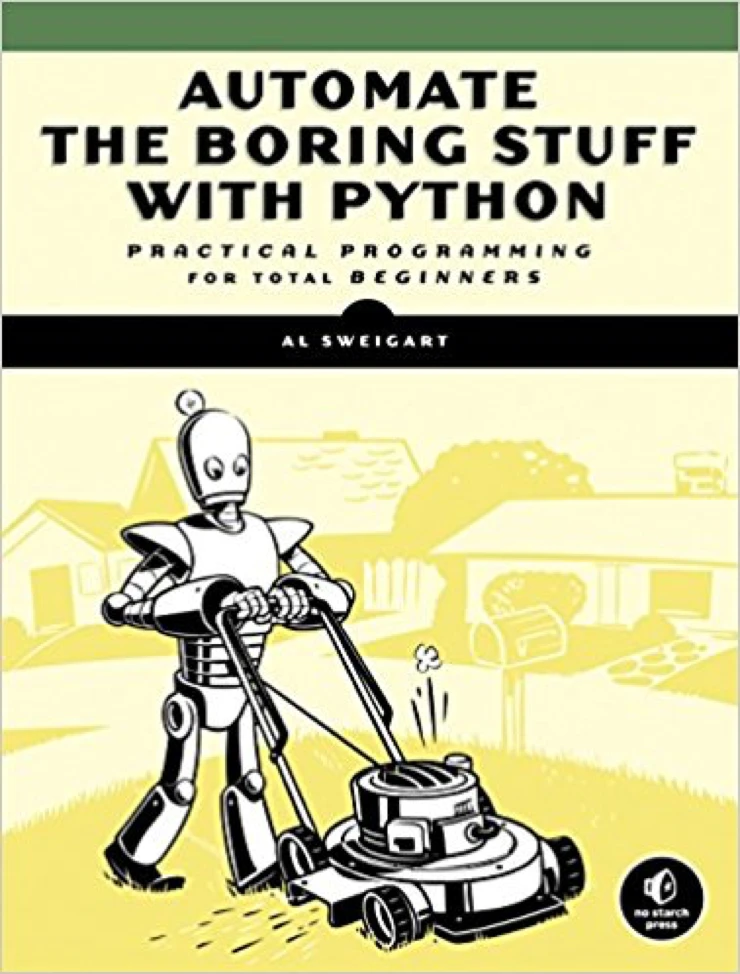
Check out Automate the Boring Stuff with Python: Practical Programming for Total Beginners by Al Sweigart. If you’ve ever spent hours updating multiple spreadsheet cells or renaming files, you’ve got an idea how tedious this can become. This book will teach you how to use Python to write programs that can accomplish tasks in minutes that would take you hours (or days) to do by hand. Also, you don’t need any prior programming experience. Some things you could learn include:
– Search for text in a file or across multiple files
– Create, update, move, and rename files and folders
– Search the Web and download online content
– Update and format data in Excel spreadsheets of any size
– Send reminder emails and text notifications
4. For the programmer who needs a quick reference guide:
Read Python Pocket Reference: Python in Your Pocket, 5th Edition by Mark Lutz. This is the perfect on-the-job reference that can be stuffed in a back pocket. It’s concise with good need-to-know information on Python types and statements, special method names, built-in function and exceptions, commonly used standard library modules, and other prominent Python tools. The book includes tips and techniques to make your Python code work faster.

5. For the beginner who is also keen to know some theory:
Check out Python Programming: An Introduction to Computer Science by John Zelle. This book is at the level of a first-year course in university. It takes a traditional approach to computer science covering problem solving, design, and programming, but uses Python to illustrate these ideas. If you’re keen to understand programming concepts, this book is worth a read.

Here we’ve covered the top five Python programming books. Of course, books are a great way to learn new things, especially programming languages. However, a lot of people find that a book is a good resource but doesn’t much help when one gets stuck. If that’s the case with you, think about enrolling on HyperionDev’s six month online Software Engineering Bootcamp, which includes Python as part of its back-end programming. All courses are mentor-led and include a free trial.

Software Engineering
How to Handle Ethics Issues When You’re Starting Off in Software Development
Because software development has been progressing at such a rate, there are many ethical issues, some more complicated than others, that arise over time. This piece will mention a number of key ethical issues in software development and then we’ll consider some strategies for dealing with these issues.
Progress brings complexity. Think about the introduction of cars – yes, faster and more efficient travel time, but what about pollution and car accidents? Because software development proceeds at such a rate, there are many ethical issues, some more complicated than others, that arise over time. This piece will mention a number of key ethical issues in software development and then we’ll consider some strategies for dealing with these issues.
Ethical Issues in Software Development: What to Expect
InfoWorld mentions a number of important software ethical issues including:
1. How to deal with Log Files
At its simplest, a log file is an automatically produced and time-stamped documentation of various events. An access log, on a web server for example, lists all the individual files a person has requested from that website. These log files can also be used in workplace surveillance. Deleting an email or a file is also not sufficient to erase the trail. Now when it comes to ethics, who has access to those log files? Think about how Facebook can get access to your private life via these log files. How long should Facebook be allowed to keep these files? These are just some of the ethical issues in software development that programmers and companies come into contact with on a daily basis.
2. Protecting Customers’ Data
We all know many website services are just there to collect your data. Take Google for example, here’s the data it’s got on you, states The Guardian: where you’ve been, everything you’ve ever searched (and deleted), an advertisement profile of you, all the apps you’ve used and with whom you use them, your YouTube history. Google actually has an option where you can download all the information about yourself – believe it or not, it would fill millions of Word documents!
What happens if the government or another legal entity requests data on customers from the data you’ve collected? Where does your ethical obligation lie? Have you communicated your policies clearly with your customers, and how have you protected their data?
3. Your Software Makes Use of the Work of Others (Without Paying Them)
Many apps serve up content without paying the creators. Do content aggregators, for example, merely spread content or do they steal the news? Often elaborate rationalisations are employed to defend this rather shaky ethical decision – e.g. these apps are merely ‘sharing’ information. Do ethical software developers need to ask themselves how their code will support everyone in the food chain? If you’re not asking this question, you may be just ignoring potential piracy issues.
These are some specific ethical issues in software development, as discussed above, but here are some other broader, but important, ethical issues to consider, via CodingDojo:
- Who plans to use your software or system?
- What will it be used for?
- What are some of the worst-case scenarios if people bent on foul play get their hand on the technology?
- What safety controls can you put into place to mitigate against this?
- Could your software potentially hurt, control or profile others?
- If you were born a different gender or race, might you feel differently about the system or app you have created?
- Will there be any global effects on the planet?
- Is your system susceptible to bias?
Strategies for Dealing with Ethical Issues in Software Development
The good news is that there is actually a Software Engineering Code of Ethics. It specifies the ethical and professional obligations of software engineers. This code was produced by a multinational task force via input from industrial, government, military and educational professionals. Here are the eight general principles:
Public: Software engineers shall act consistently with the public interest.
Client and Employer: Software engineers shall act in a manner that is in the best interests of their client and employer, consistent with the public interest.
Product: Software engineers shall ensure that their products and related modifications meet the highest professional standards possible.
Judgement: Software engineers shall maintain integrity and independence in their professional judgment.
Management: Software engineering managers and leaders shall subscribe to and promote an ethical approach to the management of software development and maintenance.
Profession: Software engineers shall advance the integrity and reputation of the profession consistent with the public interest.
Colleagues: Software engineers shall be fair to and supportive of their colleagues.
Self: Software engineers shall participate in lifelong learning regarding the practice of their profession and shall promote an ethical approach to the practice of the profession.
Ethical issues in software development are obviously far-ranging and complicated, especially as new technologies, such as Machine Learning and Artificial Intelligence, increasingly come online. We’ve introduced a few important problems and a Software Engineering Code of Ethics. It’s a fascinating area and certainly worthy of more reading and discussion. Lastly, if you’re interested in learning Software Engineering, consider enrolling on HyperionDev’s six-month, online course. You can sign up for a free trial today!

Career Advice
Which are the Top Coding Languages used by Today’s Tech Giants?
The top coding languages used by the world’s tech giants include Java, Python, C, C++, Objective-C and Swift. Today’s tech companies are looking for specialist generalists rather than specialists, so learning more than one language is what sets devs apart from the rest.
Choosing which programming language to learn is an important starting point for developers who want to build a career in what has become one of the most lucrative and growing industries in the world. The top coding languages used by the world’s tech giants include Java, Python, C, C++, Objective-C and Swift. Today’s tech companies are looking for specialist generalists rather than specialists, so learning more than one language is what sets devs apart from the rest.
To start off, let’s have a look at how some of the top languages are stacking up against each other in terms of searches.
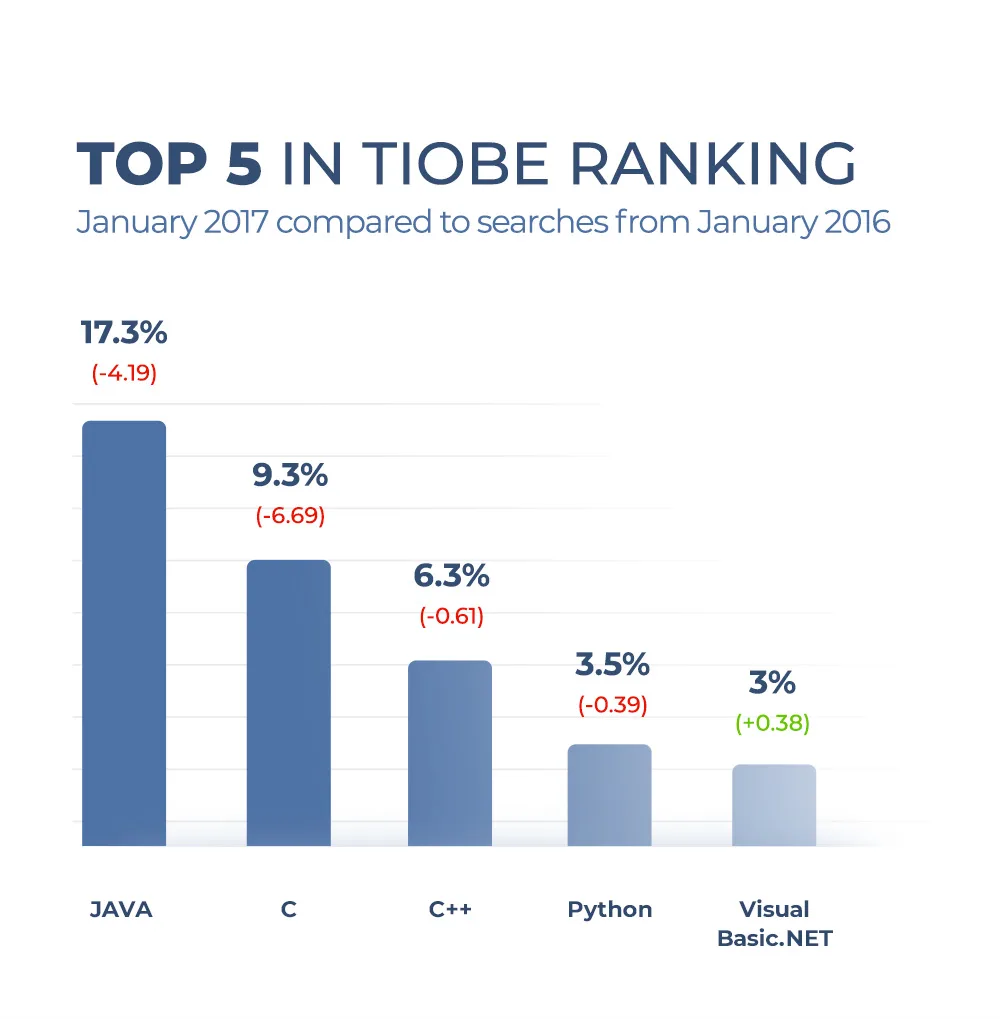
Google: Java, C++, Python
According to Artem Boytsov, Google Trends co-author and product manager, Google “gives its engineers a large degree of freedom in choosing their tools.” But in general, there are three main languages that are used. Low-level server-side software is written in C++, Java is used for higher level server-side, consumer-facing UI code, and “Python is the de facto language of internal infrastructure tools.”
According to ChallengeRocket, “C++ is best known as an efficient and flexible language used for the creation of large systems, such as desktop applications and server platforms.” In terms of potential earnings in this specialisation, developers who are trained in C++ can expect to make up to $102,000 per annum.
In terms of demand, Java was found to be used by about 90% of the world’s top tech companies. The Java slogan “Write Once, Run Anywhere,” clearly still applies. According to ChallengeRocket: “A Senior Java Developer has a real chance for a salary ranging from $74,000 to $130,000.” In Upwork’s opinion, Java seems to have been built for Android development so it’s become a go-to for mobile apps. In many ways, it’s seen as an “easier” more accessible language than some of the others.
Python is not only used by Google, it is used by the likes of NASA too – so in terms of relevancy and demand, it’s right up there with the best of them. ChallengeRocket predicts that, “an annual salary of a Senior Python Developer will fluctuate around the amount of $105,000 and higher. This is due in large part to the popularity of the language and its frequent appearance on lists of requirements in recruitment procedures.”
Apple: Objective-C, Swift
A number of sources, including ChallengeRocket, suggest that the primary language used by Apple developers is Objective-C. According to Ben Jakuben, Objective-C is a great first language to learn and is the main language used to write apps for iPad and iPhone. Then of course, we can’t talk about programming languages used at Apple without mentioning its very own, Swift. As Apple puts it, “Swift is a powerful and intuitive programming language for macOS, iOS, watchOS and tvOS. Writing Swift code is interactive and fun, the syntax is concise yet expressive, and Swift includes modern features developers love. Swift code is safe by design, yet also produces software that runs lightning-fast.”
Payscale breaks down Objective-C developer earnings into three main job descriptions. Today, an iOS Developer can expect to earn around $81,979. An Objective-C Software Engineer will earn approximately $95,508. And thirdly, a Senior Software Engineer can expect to earn an average of $119,470.
Initially, with the emergence of Swift, some experts predicted than Swift would cannibalise the older language, Objective-C. But according to Dice, in 2017 “the number of job postings citing Objective-C outnumbered those naming Swift by nearly eight-to-one.” It seems, at least for now, that these two languages have found a way to coexist. According to a survey conducted by Indeed, “The average salary for a Swift developer” ranges from approximately $101,924 per year for Software Engineer to $117,718 per year for Senior Software Engineer.” This salary information comes from 101,852 data points collected directly from employees, users, and past and present job advertisements on Indeed in the past 36 months.
Microsoft: C#
Although, like the majority of the world’s top tech giants, Microsoft expects its developers to be proficient in a number of languages, what most developers agree on is that Microsoft favours C#. According to Harsh Gupta, a developer who worked with C# for over ten years, “C# is probably the most balanced programming language/platform. It’s fast – fast to write, fast performance, comparable with Java/C++. It’s easy – much simpler syntax than C++, with lots of in-built libraries. It already has a huge open source community to support it. It’s powerful – you can build powerful UI based apps with WPF, run web apps with an ‘embedded web browser,’ or access Java/JavaScript/Python libraries, interface with external hardware using a USB/serial port.. and the list goes on.” In terms of of earnings, C+ developers earn around $89,000.
In an article by Fossbytes, an interesting insight suggested that the top 25 Fortune 500 companies do not favour developers who are proficient in one language only. What is preferred is that developers know more than one language and are eager to keep learning and building their portfolios.
Upskill with a short course or bootcamp in a range of different languages at HyperionDev and build a successful career in development today.

Software Engineering
Become a Tech Entrepreneur in 4 Steps
The rise of the tech entrepreneur has been a big focal point in the business world lately. If you’re hoping to start a career as a tech entrepreneur, here are 4 key steps to help you achieve your goals.
The rise of the tech entrepreneur has been a big focal point in the business world lately, with visionaries like Mark Zuckerberg and Elon Musk inspiring a new generation of aspiring tech whizz-kids. All around the world, young up-and-comers are founding their own hi-tech businesses, which aim to make the world as we know it a better place to live.
If you’re hoping to launch a career for yourself as a tech entrepreneur, there are a few key steps you can follow to help you achieve your goals.
1. Define and Plan
You need to clearly define what your tech business will be offering consumers. Is it a product or a service? Who is your target audience, and how is your product or service designed to help them?
Of course, a great idea is only half the battle – you need to make sure it translates to a needed product or service that your target audience will actually purchase. Do your homework and speak to potential customers, to establish whether there is a genuine need in the market for what you’re looking to offer.
Write up a business plan for your idea, covering the following key points:
- What is the market need?
- How does your idea meet this need?
- Who will you need on your team to produce the product or service?
- How much money will your idea generate?
- How do you intend to spend this money?
- What would the return on investment be for investors in your company?
2. Secure Funding
When starting up your tech business, you may need to find investors or apply for a bank loan to fund your operations. If this sounds a bit daunting to you, another great option for today’s tech entrepreneur is crowdfunding. This is crowdsourced fundraising, where a large number of people all chip in a small amount of money, to help you reach the amount you need. Platforms like Kickstarter and Indiegogo give you the opportunity to fund your products and services by appealing to potential customers all across the globe.
These crowdfunding success stories include some inspiring examples of apps and gadgets that became million-dollar businesses.
3. Build Your Team
In your business plan, you’ll identify the key people you will need in your tech startup. Hiring the right people who share your vision will help your business endeavour to go from strength to strength.
Focus on hiring skilled, trustworthy team members. If you can’t afford to pay them competitively, offer shares in the company to compensate. Offering ownership turns your team from mere employees into engaged stakeholders in the company. It’s an incentive for everyone involved to push the business towards success.
Bonus Tip: You should also consult with a lawyer, to assist you with legal business issues and help you ensure that your intellectual property is protected.
4. Cultivate Leadership Skills
Being a great leader means listening to your teammates and your customers. Be open to feedback and new ideas, and get comfortable with the idea of not always being the smartest person in the room. Be aware of market changes, and stay flexible so that you can adapt your idea to these changes.
Think you’ve got what it takes to be the next hotshot tech entrepreneur making headlines? Delve into the world of coding with HyperionDev, and find out how to turn your billion-dollar idea into a reality.

AI Engineering
Top 10 Ways In Which AI Is Changing Life In The Digital Age
As a product of the digital age, artificial intelligence (AI) is leading the way as an emerging technology. Yes, it has transcended the realm of science fiction. Today, AI is integrated into our everyday objects and routines. It’s working behind the scenes to make life simpler, faster and smarter. Here’s how.
The internet of things has connected everything our lives touch, from our home appliances to the cars we drive and even the clothes we wear. As a product of the digital age, artificial intelligence (AI) is leading the way as an emerging technology. Yes, it has transcended the realm of science fiction. It is no longer a type of technology that is only understood and used by scientists, developers and manufacturers. Today, AI is integrated into our everyday objects and routines. It’s working behind the scenes to make life simpler, faster and smarter. Here’s how.
AI and Smartphone Photography
The Huawei P20 Pro has broken new ground when it comes to the integration of AI into its smartphone photography functionality. The P20 Pro uses world-class artificial intelligence to recognise more than 500 scenarios in 18 categories, and to adjust the lighting and scene parameters to produce the best shot. Real-time scene and object recognition technology means that the P20 Pro can recognise a cat, the ocean, food and fireworks. AI has also changed the game for taking selfies. The latest Beautification AI technology follows the contours of your features and adjusts the 3D Portrait Lighting feature for the most flattering selfies.
AI and Social Networking
Every time Facebook automatically recognises you or one of your friends and suggests a tag, that’s artificial intelligence. This is all made possible through the use of machine-learning algorithms that mimic how the human brain works when it recognises people, places and things. AI technology pervades almost everything about how Facebook works, from how it personalises your newsfeed to ensure that you see posts that interest you, to the targeted ads you are served.
AI and Car Manufacturing
Today, even our cars are connected via the internet. Volvo’s aim is that no fatalities or serious injuries will occur in a new Volvo car by 2020. This ambitious aim is well within Volvo’s reach partially due to the integration of AI into its latest models. It’s S60 for example, is able to identify when a collision is imminent and brake immediately or warn the driver in time to prevent the collision. Its technology can identify cyclists, large animals, other motorists and pedestrians in low visibility settings, to ensure an unmatched level of safety.
AI and Financial Services
According to beebom.com, fraud detection has become faster, more accurate and more effective with the onset of AI. Banks now employ AI to detect when suspicious transactions are taking place in time to notify customers via email or SMS. Scammers are getting smarter, but thankfully so is technology. According to the diagram below, credit card fraud detection now happens at a rate that’s faster than the blink of an eye.

Source: beebom.com
AI and Healthcare
The advent of smartwatches has changed modern-day healthcare as we know it. Studies suggest that “smartwatch data can be used to detect and even predict disease.” This is made possible by the smartwatch’s ability to monitor vital stats like heart rate, skin temperature, number of steps taken per day and quality of sleep. Healthcare for the first time, has been placed in the hands of consumers, thanks to AI.
AI and Remarketing
Have you ever abandoned your cart during an online shopping transaction because you got distracted or decided that buying those new shoes wasn’t a good idea? Online retailers use AI to make sure that the items you viewed, remain top of mind. South African retailers, Spree and Superbalist have invested substantially in this technology – so have global giants Amazon and Walmart. Targeted ads are used to remind you of the items you viewed, as well as similar products. For avid shoppers, these ads are irresistible.

Source: Spree
AI and Smart Assistants
With the launch of the Samsung Galaxy 9 and 9+, everything we’ve come to love about AI has been brought to life through Bixby. This integrated smart assistant recognises the voice of the phone’s owner and performs voice-activated commands like checking the time and weather, scheduling appointments and even pointing the camera at a certain type of food to get a calorie estimation. It can also help users to translate signs in foreign languages while they’re travelling.
AI and the Performing Arts
An arena that is rarely mentioned in the AI space is the performing arts. Ginette Methot of venturebeat reports that Kaiji Moriyama, a world-famous dancer, played the piano on stage without touching a single key. Sensors attached to his back were able to produce the instrument’s sounds by synchronising his body movements with the notes. According to Methot: “Yamaha sees this fusion of body movement and music helping move new art forms forward.”

Source: Engadget
AI and Streaming
Your streaming app of choice knows more about you than you think. Netflix for example, “provides highly accurate predictive technology based on customer’s reaction to films,” according to R.L. Adams of Forbes.com. It uses a wide array of data like your preferred genre, your streaming frequency, your ratings and feedback and your subscription demographics to determine what you may want to watch next. It’s a technology that takes the thinking out of entertainment. As soon as one form of entertainment ends, the next one is lined up.
AI and Smart Homes
Smart homes are the epitome of how much AI has changed life in the digital age. Today, it is possible for homes to be automated in ways that were previously unimagined. Smart homes, connected to an AI system, are able to adjust lighting according to how much light is filtering into the home at certain times of day. Thermostats can turn off and on automatically to control temperature. Curtains can be programmed to open and close at a certain time of day through motorised systems. The possibilities are quite literally endless.
From today’s biggest retail giants to the man on the street, artificial intelligence is being used in ways that were previously restricted to the realm of films. Progress in the digital age is made in leaps and bounds and AI is at the forefront of the current industrial revolution. Whether you’re onboard with what this technology can do or not, you’re already using it in one way or another. Welcome to the next level in digital living.
Learn more about how data science is changing the world as we know it and upskill yourself with a Hyperiondev Data Science microdegree.

Software Engineering
How The Average Developer Salary Differs Between Cities: A US Outlook
There are a number of factors that determine average developer salary in the United States as well as in other parts of the world. An often overlooked factor is location. In this article, we look at the top five highest paying cities for developers in the United States.
There are a number of factors that determine average developer salary in the United States as well as in other parts of the world. These factors include years of experience, the rarity of special skills within a particular coding language and the type of software that is being developed. Consider the difference in salary by developer type – an insight that was gleaned from the 2018 Stack Overflow Developer Survey, as represented in the table below:
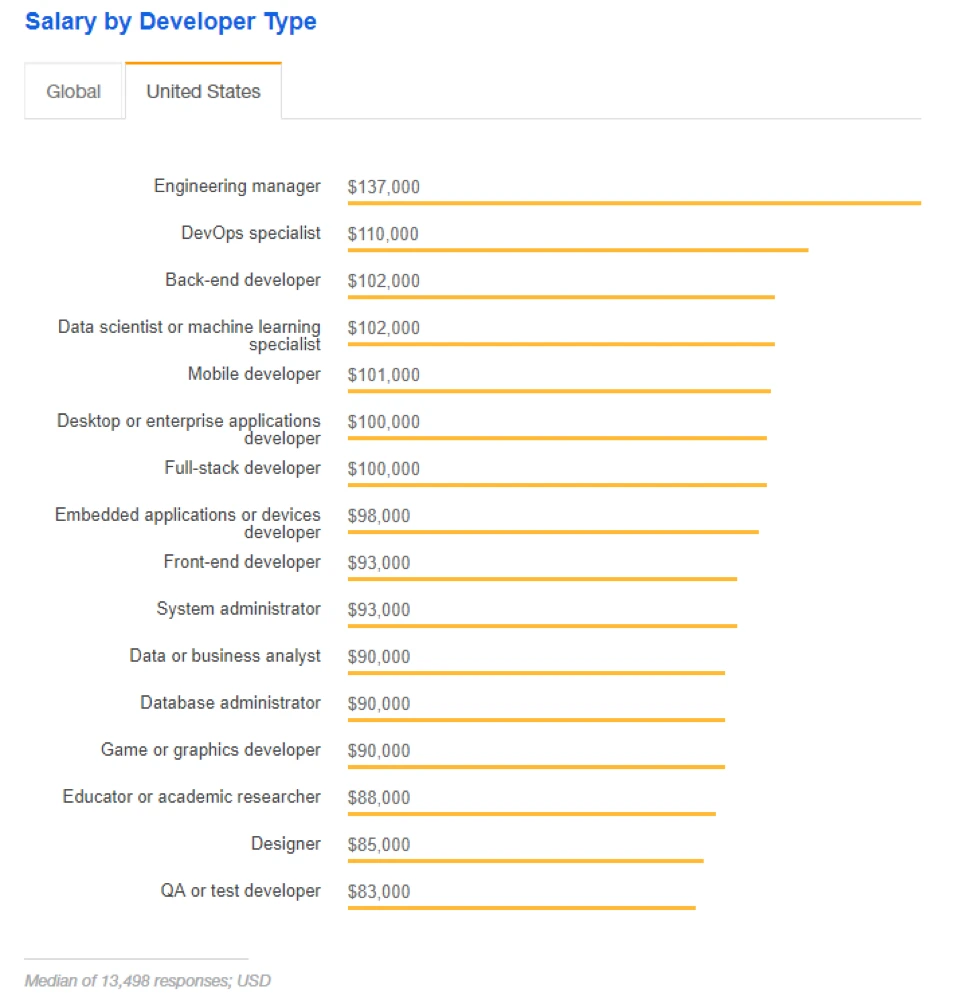
Another, often overlooked factor, is location. Travel between cities and you may find that there is quite a significant difference between average developer salaries. A large determinant of this difference comes down to basic supply and demand. In this article, we look at the top five highest paying cities for developers in the United States.
1. San Jose, California
According to the U.S News list of Best Jobs Rankings, software development makes the top of the list in this burgeoning tech space. In San Jose, the average developer salary is $133,010. Most devs looking into the difference in salaries may wonder how San Jose stacks up against San Francisco, which of course is rumoured to be the highest paying city for this vocation. But, in a recently written article on the topic, Michel J. Coren writes that “the inflated salaries in the San Francisco Bay Area (and New York) can’t compete with the value you get from the cheaper cost of living in cities such as Austin, Seattle, and Denver.” The average salary in San Jose, California is $84,256, which means that software engineers are earning at least 58% more than the average Joe. Lily Ostapchuk, Co-Founder and CPO at Rentberry calculates that tech industry job opportunities in San Jose have grown by 79.6% over the last ten years, leaving demand at an encouraging high.
2. Seattle
Seattle may be known for its coffee but what it’s also known for, is its high demand for developers. With an average developer salary of $132,010, Seattle is just behind San Jose, according to the U.S News list of Best Jobs Rankings. In Seattle, the jobs which are in highest demand are systems analyst, Health IT specialist, database developer and administrator and software engineer. When compared to the average employee, developers in Seattle are not doing bad at all. The average salary in Seattle is currently at $68,142, meaning that developers are earning a staggering 91% more. According to Lily Ostapchuk: “One of the major advantages of Seattle’s tech scene is that the local ecosystem is not reliant on startups only, which helps local professionals achieve success and keep it stable in the long run.”
3. Oakland, California
The number three spot on the list is taken by Oakland, California, where the average developer salary ranges around $131,160. Considering that the average salary in Oakland is $63,577 and that developers earn at least 106% more, Oakland is a great city to build a career as a software engineer. In a recent study by Value Penguin, it became clear that in terms of demand, Oakland has roughly half the number of jobs available for developers when compared to a city like Seattle, although cost of living in the latter city is substantially higher. It’s all about the give and take – which is why when looking to relocate in order to maximise your earnings as a developer, you need to take the bigger picture into account. It’s all about context – commuting costs, basic costs like food and accommodation, the expectation to perform, one’s own capacity for stress – all these factors should play a role when deciding where to apply for a job as a developer.
4. San Francisco
A list of the best paying cities for developers would not be complete without San Francisco. It’s a city designed for tourism but as it were, it’s also a city in which an increasing number of devs are finding lucrative jobs. Developers in San Francisco earn around $131,160, which is 53% higher than the salary of the average employee who works in and around the city. Although the cost of living in San Francisco is admittedly higher, it is one of America’s most recognised technology centres. Lily Ostapchuk suggests that if you “head over to San Francisco to build a mind-blowing career of a software engineer…get ready to pay a fortune for housing.” According to smartasset: “The average rent on a two bedroom apartment in San Francisco is $4,650 – $1,000+ more than the number two city (New York) and $2,000 more than the rest of the biggest cities in the country.” For ambitious developers who want to capitalise on the good salary, it may be a temporary option – a place to work for a few years before heading back home having saved a significant amount. Settling down and building a life there may be bit a more challenging if you’re not already calling San Francisco home base.
5. Anaheim, California
Developers in Anaheim earn an average salary of $118,670. In comparison to what devs earn, the average employee in Anaheim earns 60% less, at around $49 689. At this juncture it’s important to note that the above figures are means, based on factors like demand for jobs over time. What you earn will depend on your level of experience, the company you choose to work for, any added benefits or perks and whether there are opportunities for growth within the company. These are all important factors to consider.
When exploring your options in terms of finding work as a dev, you will most likely come across a number of conflicting sources, each with their own views on which cities rank the highest in terms of average developer salary. This is predominantly because different measures are used for calculating salary. Some sources may present their findings as raw, untouched data while others may manipulate the data to take cost of living, tax deductions or the average number of years spent at a job, into account. In the grander scheme of things, it’s all relative.
For more guidance on how to build a successful career in tech, chat to an expert at HyperionDev – we’d love to meet you at our next information session.

Data Science
Understanding animal adoption through data science
Find out how data science is making a difference for animals in shelters by helping to improve adoption rates, as well as other real-world applications of data science.
Data science is the use of scientific methods, algorithms and systems to extract knowledge and insights from raw information known as data. The idea behind it is to use data to help us understand certain phenomena.
Data science is a multidisciplinary science that uses techniques and theories from the fields of mathematics, statistics, information science and computer science.
Real-world applications of data science
While data science tools are typically associated with helping us improve the way we do business, there are many other practical applications of data analysis models that help to solve problems beyond the boardroom. Some examples of this include:
Disaster risk management: Companies like Kat Risk use high-precision models to predict the risk of weather-related disasters like flooding.
Health care: Data can be used to help improve physical and mental health care. For example, Ginger.io analyses data from users’ mobile devices to form a picture of their emotional state. This behavioural analytics model uses data to provide users and their doctors with meaningful insights.
Child welfare: The non-profit organisation Case Commons creates software that uses predictive algorithms to assist social workers and administrators of social welfare programmes, by showing each child’s projected path.
Wildlife management: Biological consulting companies use data analysis to model the effects of tagging or habitat restoration on wildlife populations, to help optimise these efforts. Initiatives like this help to improve wildlife management and conserve wild animals in their natural habitat.
Data science is making a difference for shelter animals
Data is now being used to help animal shelters in improving the way they operate. Here are two great examples of data science in action:
1. Reducing intake to shelters
Shelters typically operate with very little funding, which they need to care for resident animals, as well as animals in at-risk homes or on the streets. Reducing their intake of animals is critical, and data science can help to make this happen.
Big data can be used to map where the homeless animals are coming from, by compiling lists of where and when animals are most often abandoned. By making informed decisions based on this information, shelters can help to prevent more animals from becoming homeless unnecessarily. For example, they can look at implementing more preventative measures (like spay/neuter programmes or low-cost veterinary care) in areas that have been identified as abandonment hotspots.
2. Improving the adoption rates of shelter animals
Data science is helping shelters with their adoption efforts too. Analysts are using data sets to determine what makes certain dogs or cats more “adoptable”. While age, breed and coat are all contributing factors, data scientists revealed that interestingly, animals that have been given names are also more likely to be adopted. The data also confirmed that certain days of the week lead to more adoptions than others, with the majority of adoptions occurring over the weekend.


Using sound information like this, shelters can become more efficient in helping animals to find loving homes, by making sure each animal is named and sterilised, and focusing their marketing efforts on high-adoption days.
These are just two of the many ways that smart data analysis can make life better for animals, and ensure that more of them become beloved pets adopted into new “forever homes”.
If you’re dreaming of making a difference with a career in data science, then HyperionDev’s online Data Science Bootcamp is just the place to get started. You can also trial this course for free. Register today to begin learning about the true value of understanding and analysing data.

Software Engineering
Smaller Cities Provide More Opportunity for Software Developers
When deciding to become a software developer, you should strongly consider where you should live. Places like Silicon Valley or Manhattan might spring to mind, but it’s possible that smaller cities provide more opportunity for software developers. We explore the top small cities in the US and globally.
When you decide to become a software developer, there are many things to think about: what languages to learn, whether to freelance or get a full-time job, and what starting salary you should accept, etc. But what about where you should live? Places like Silicon Valley or Manhattan might spring to mind, but it’s possible that smaller cities provide more opportunity for software developers. Read on to find out.
Moving Away from the Coast
Here’s the thing: ‘The places with the biggest growth in the sector aren’t on the coasts, but are mostly small and midsize cities in the U.S. interior,’ reports CBSNews. Job-listing company ZipRecruiter analysed job postings for tech jobs over the past year and then ranked the locations that showed the greatest growth. Their findings: the 20 fastest-growing locations in the US were away from the coast and were characterised by:
- Less competition from other applicants.
- A lower cost of living.
- Huge numbers of new jobs.
‘We’re getting to a moment where our largest cities are becoming almost an untenable living situation for young people. They’re so expensive and crowded. In order to live somewhere affordable, you have to live one-and-a-half hours away from the city center,’ said Cathy Barrera, chief economic adviser for ZipRecruiter. Information from the Census Bureau advises that only 30% of income should be spent on housing.
So, which smaller cities provide more opportunity for software developers in the US?
Top Cities for Tech Workers in the US
The cities that make the list tend to have a population between 100 000 and 1.5 million. The median house price is $200 000, which is affordable on a tech salary. Here are the top three fast-growing, and small, cities that offer the best opportunities for tech workers in the US, according to ZipRecruiter:
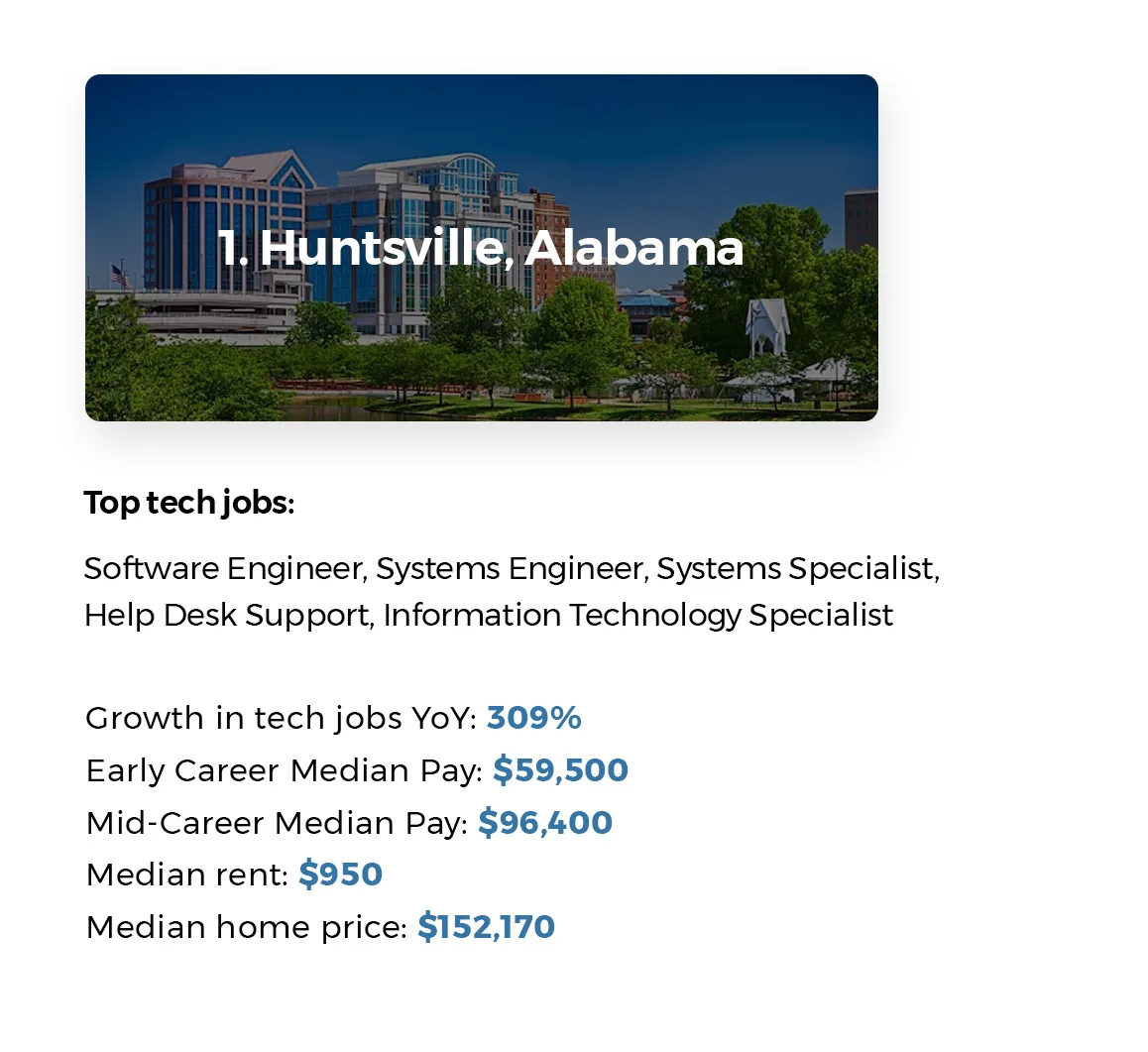
1. Huntsville, Alabama
Originally a sleepy farming town, Huntsville is now the fastest growing metro area in Alabama. It’s regarded as the 7th best city in which to live in the United States, according to a U.S. News Survey based on quality of life and job market.
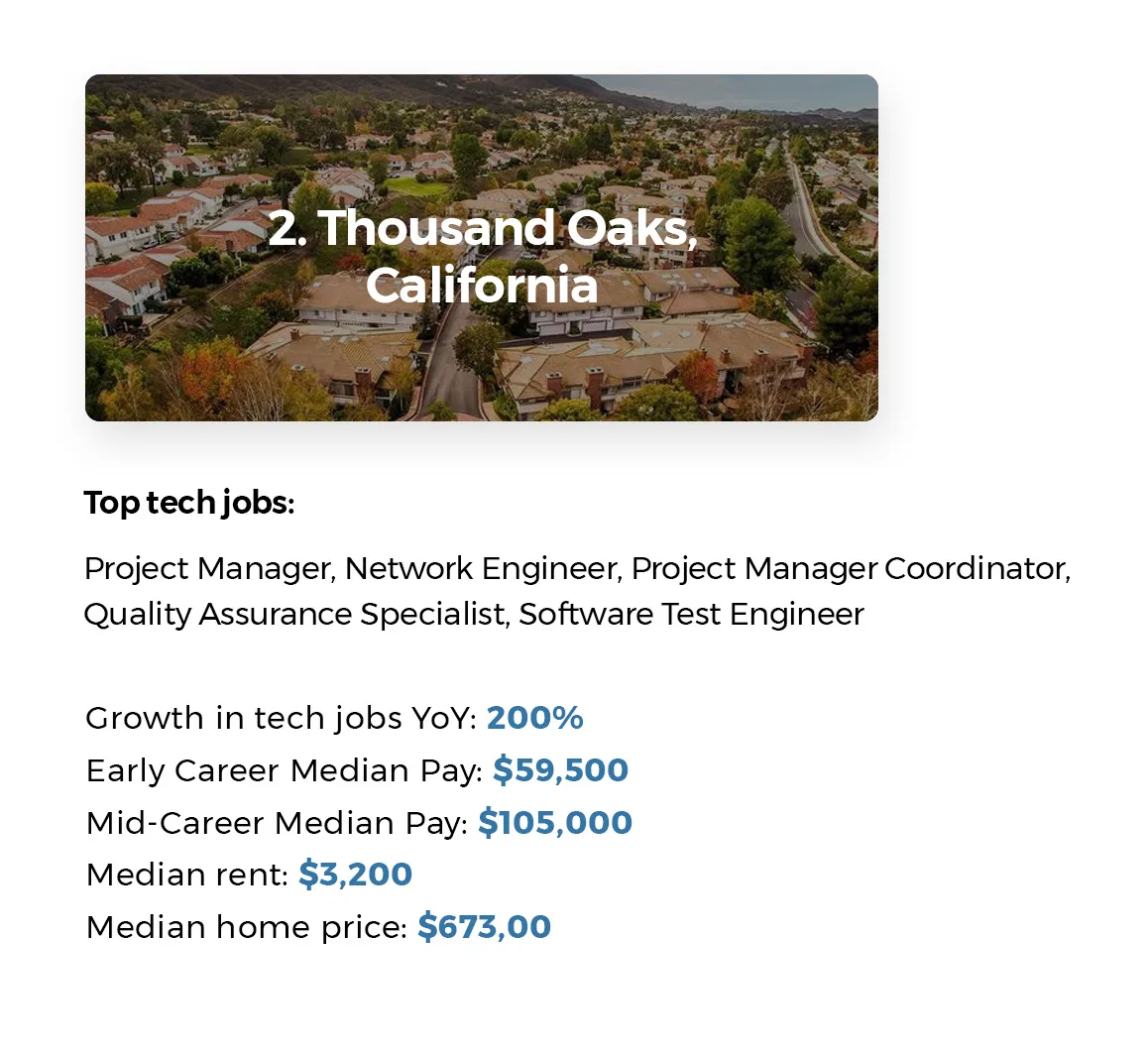
2. Thousand Oaks, California
Thousand Oaks is just 24 kilometres from Los Angeles. It has a population of 128,565 – so not too big.
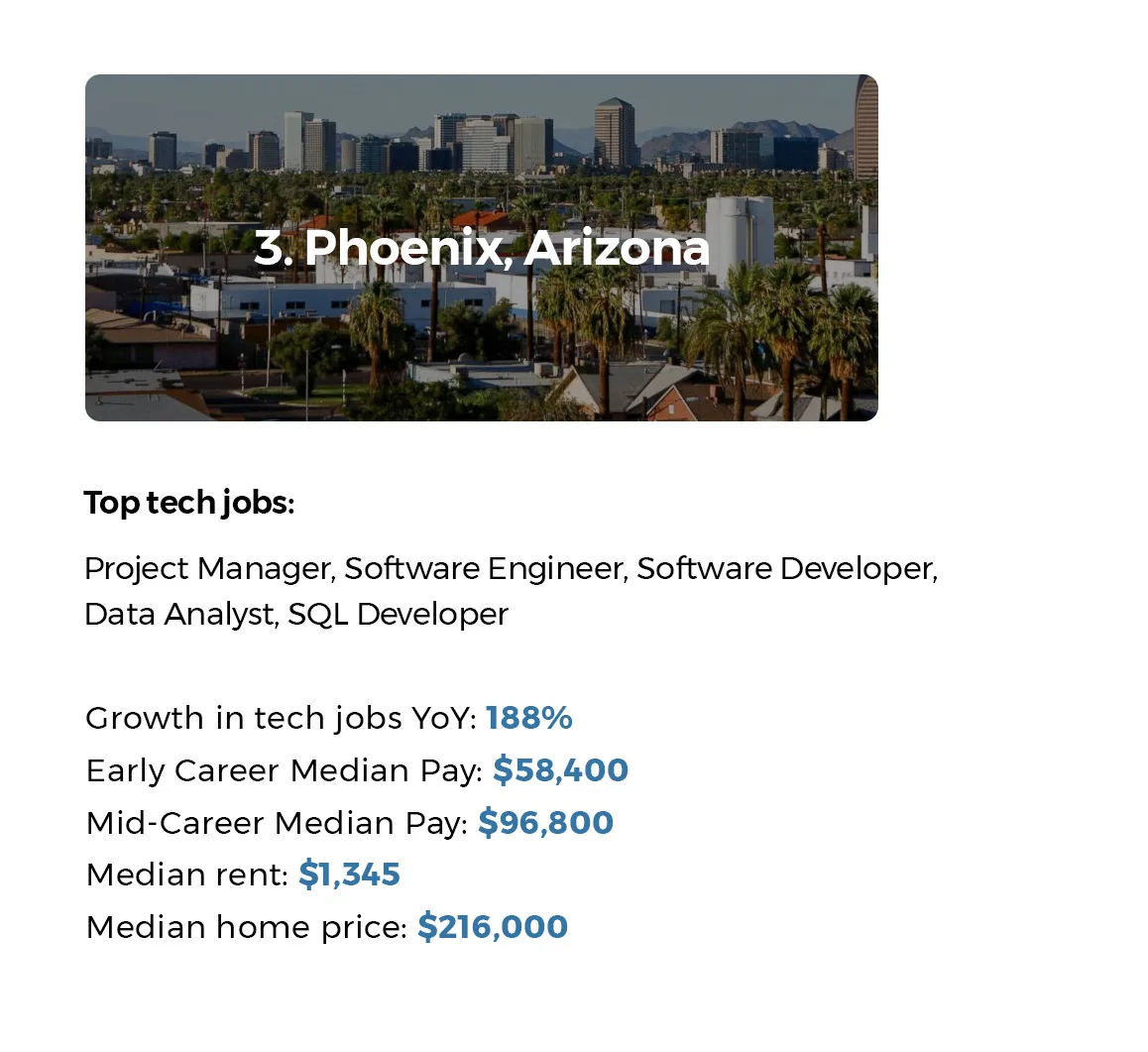
3. Phoenix, Arizona
Phoenix came in at #19 on the U.S. New Survey of top cities, jumping from #44 in last year’s survey. And ahead of San Francisco.
These cities are all in the US, but what global cities provide excellent opportunities for software developers?
Top Global Cities for Tech Workers Worldwide
The website ‘Fast Company’ reports on a study conducted by Expert Market that polled 11 000 startups, investors and other stakeholders. The top twenty global cities were selected based on these factors:
- Time to start business
- Seed funding
- Startup output
- Average salary
- Cost of living
- Average rent
- Paid vacation
- Average commute
Guess which city topped the list? Berlin. Germany’s Silicon Valley, or Silicon Allee as it’s called there, is fairly new. Berlin offers two key advantages: low living costs and massive tech start-up opportunities. Its best asset, however, is its commute time, unlike San Francisco which has a terrible commute of up to 3 hours.
Here are the top ranked cities:
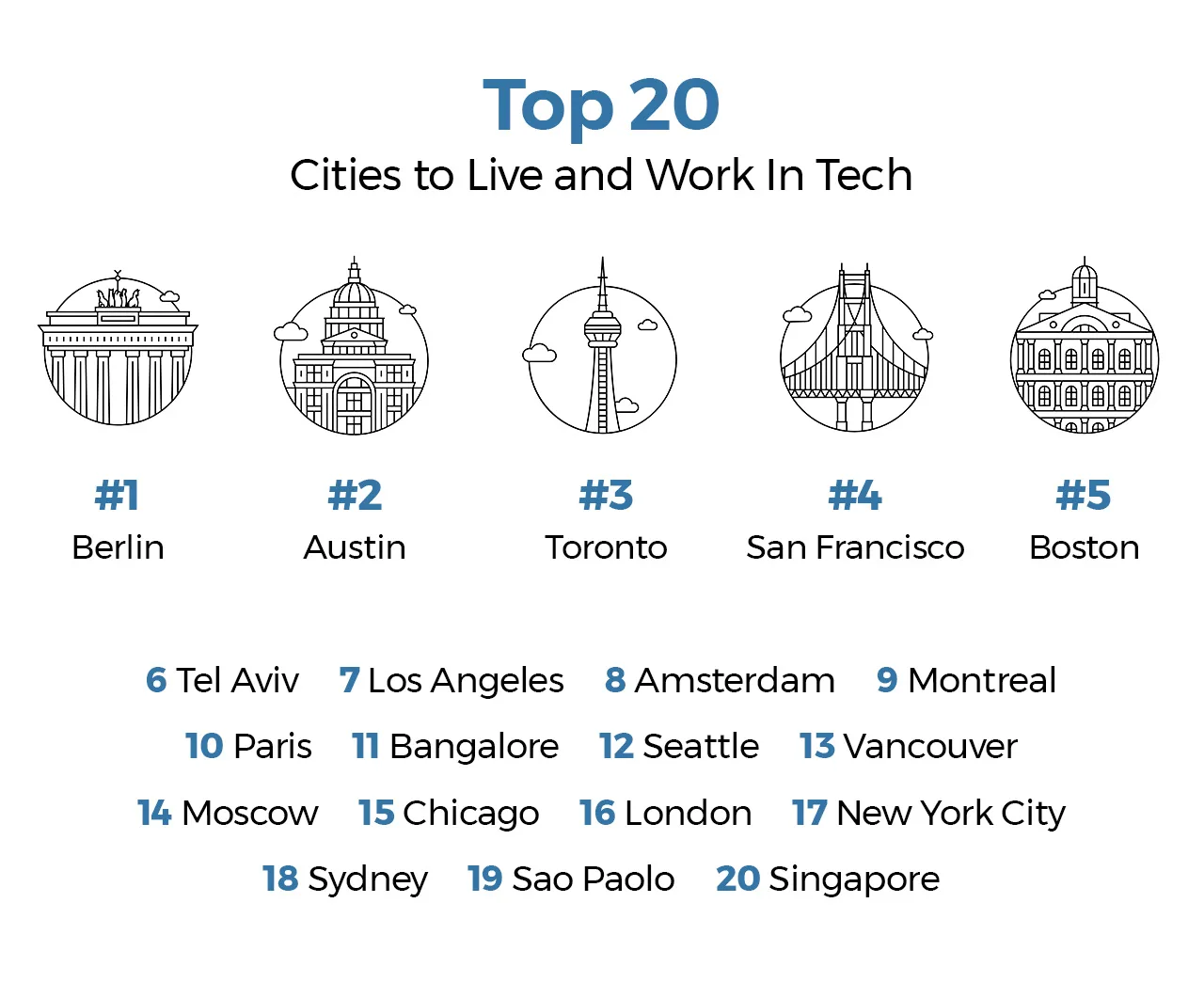
Image Source: https://www.fastcompany.com/3061460/the-best-global-cities-for-working-in-tech
In closing, the city in which you live obviously has an enormous impact on your well-being. You may want to think a little outside the box and not just focus on the big US cities that people associate with tech. It’s a wide world out there and if you’ve got those in-demand tech skills, you can live in a variety of top global destinations. It certainly seems that some smaller cities provide more opportunity for software developers.
Check out HyperionDev’s online, six-month courses including Full Stack Web Development, Software Engineering and Mobile Development. Start your free trial today!

Software Engineering
How To Become a Freelance Software Engineer
What does it mean to become a freelance Software Engineer? We look at some of the advantages and disadvantages, as well as how to get into the industry and what you can expect to earn as a freelance Software Engineer.
Let’s say you’ve finished your coding education and now it’s time to start working. But should you go freelance? A freelancer takes on short-to-medium-term work for one or a number of companies. You can freelance from anywhere of course – your local coffee shop, home or even the beach. This piece looks at what it means to become a freelance Software Engineer, including some of the advantages and disadvantages as well as how to get into the industry, and what you can expect to earn as a freelance Software Engineer.
What Do Freelance Software Engineers Do?
Let’s say you’ve finished your coding education and now it’s time to start working. But should you go freelance? A freelancer takes on short-to-medium-term work for one or a number of companies. You can freelance from anywhere of course – your local coffee shop, home or even the beach. This piece looks at what it means to become a freelance Software Engineer, including some of the advantages and disadvantages as well as how to get into the industry, and what you can expect to earn as a freelance Software Engineer.
Careerlancer states that freelance Software Engineers usually ‘conceive, test, maintain, and even enable provisions for updates and innovations in software’. To break down potential jobs further, as a freelance Software Engineer you could be involved in some of these duties:
- Talking to systems analysts, engineers, and other programmers to design systems, which includes the capabilities, performance requirements and interfaces.
- Improving or modifying existing software to correct errors or adapt to new circumstances.
- Assessing user needs to work out feasibility, bearing in mind time and cost constraints.
- Consulting with customers about software system design.
- Coordinating the installations of new software systems.
- Developing software system testing, as well as drawing up documentation and procedures.
- Training users on new software functionality.
The Advantages and Disadvantages of Becoming a Freelance Software Engineer
The first bit of good news if you become a freelance Software Engineer is the salary. According to Glassdoor, you can expect to earn an average freelancer salary of $104,463 per annum in the United States. In addition, The Bureau of Labor Statistics, which calculates the employment growth for various occupations, projects a startling 24% employment growth for software engineers between 2016 and 2026.
Here are some other benefits of freelance Software Engineering:
- Potential to earn more money – the freelancer has more time at his or her disposal as there’s no commuting. More time means more money!
- Choose projects, clients and technologies that interest you – as a freelance Software Engineer, you’ll probably have a number of potential projects on offer. You get to choose the projects that intrigue you and the technologies with which you want to work.
- Flexible work schedule – you get to choose when and where you work.
- No boss – you’re your own boss!
But as with everything, there are drawbacks too. These might include:
- No secure salary – it’s quite possible for you to have a bad few months. You need to ensure that you save during the cash-heavy months to tide you over the leaner times. And unfortunately, there’s no paid vacation.
- Fears about not finding the next project could stress you out – it can take a while to line up a new project.
- No co-workers – there’s no boss (yay!), but you also might not have co-workers, which could become lonely.
- Need to wear a wide variety of hats – because you’re running your own business, you’ll be doing your own invoicing, sales and administration. Are you comfortable wearing this many hats and can your skillset stretch this far?
If the advantages outweigh the drawbacks for you, then read on about how to break into this lucrative field.
How Do I Get Into Freelance Software Engineering?
If you want to start freelancing as a Software Engineer, here are some tips:
Getting Work
Here are three things you can do immediately:
- Start a blog (backlink it to more visible blogs, and try and get some links from other sites to your blog). Some famous tech blogs include Mashable (‘mashes’ together what techies are talking about on Twitter, Facebook, entertainment, news, etc.), ZDNet (for tech news), TechCrunch (younger but no less influential than ZDNet) and Gizmodo (many relevant posts, a great vibe and some very funny commentators).
- Set up a website and include testimonials. For your website, which is really your portfolio, include fresh, original content for Search Engine Optimisation (SEO) and make sure you include how people can contact you. Include relevant testimonials.
- Network, both online and in-person. As far as networking goes, set up a LinkedIn account and try and meet as many people as you can for a quick coffee. Start with family and friends before working your way outwards. You can also sign up for GitHub, where you can host and review code, manage projects, and build software alongside millions of other developers.
If You Become a Freelance Software Engineer, Watch Out For…
Again, it’s not all roses – here are some potential red flags from Upwork:
- Not having the proper workflow. Project are more likely to go as planned if you have proper workflow, including planning, development and a QA phase (testing and bug fixes).
- Not scoping correctly. Novice freelance software engineers want to please the client rather than providing accurate estimates of cost and time. Remember to add extra time if you’re inclined to be overly optimistic.
- Taking any and all jobs. This can lead to overload, missing deadlines and burnout.
- Undercharging or offering to do jobs for free. Truthfully, clients associate poor quality with low prices. Charge a reasonable rate and value your services.
If you’re keen to freelance as a Software Engineer, consider looking at these sites: Upwork (useful for short- and long-term projects, over 1.5 million clients), Toptal (for seasoned freelancers), Freelancer (if you’re confident about your skills, here you can compete with other freelancers) and Craigslist (surprisingly, includes a great list of freelance jobs).
If you decide to become a freelance Software Engineers, the benefits are clearly enormous. It’s a great way to go if you’ve got the skills. And even if you don’t, you can certainly upskill without a Computer Science degree. If you’re looking to become a freelance Software Engineer in 2018, HyperionDev offers a 6-month part-time Online Bootcamp in Software Engineering. Book a free trial today.

AI Engineering
What is Machine Learning and Why It Matters in 2018
Machine Learning (ML) and Artificial Intelligence (AI) are 2018’s buzzwords, but what is Machine Learning, how does it differ from Artificial Intelligence and why does it matter?
Machine Learning (ML) and Artificial Intelligence (AI) are 2018’s buzzwords, but what is Machine Learning, how does it differ from Artificial Intelligence and why does it matter? At its most basic, both ML and AI are about computers learning things for themselves. In a way, this is similar to what humans do. Think about a newborn who understands nothing – yet as early as six months, a child will start comprehending simple words (much earlier than scientists originally thought). ML and AI is built on this idea of potential or learning, but let’s look at these concepts in more detail.
Artificial Intelligence vs. Machine Learning
Essentially, explains this YouTube video, AI is a broad area of computer science that makes machines seem like they have human intelligence. The idea was first coined back in 1956 by John McCarthy.
A few factors have led to AI becoming the next big thing including:
- Huge amounts of data are now being created every minute (90% of the world’s data has, in fact, been generated in the past two years).
- Increased computer processing; computers can now make sense of all this data.
- Tech giants and venture capitalists are keen to infuse the markets with cash, as they have bought into the idea of AI.
So, what is Machine Learning then? Machine Learning is one way of achieving Artificial Intelligence. It brings together computers and statistics to build algorithms that allow computers to learn new tasks. It allows the computer to use experiences to learn by seeking statistical patterns in the data. An example of Machine Learning would be teaching a computer to distinguish between dogs and cats – for example, working out that cats have shorter noses and dogs come in a larger variety of sizes.
Crucially, it’s the computer and not the programmer who works out the algorithm separating cats from dogs. The more data the computer receives, the more accurate its prediction. Some examples of ML include the following: text and speech recognition, spam filters, online shopping recommendations and credit card fraud detection.
Why Machine Learning Matters in 2018
Machine Learning has been referred to as ‘statistics on steroids’. It’s a disruptive technology that’s expected to grow in leaps and bound in 2018. Let’s look at some potential trends.
1. Machine Learning App Development for Robotics
The merging of ML and robotics will lead to increased capabilities in 2018. Managing distribution centres, such as those of Amazon, will utilise ML and robots to help address logistical issues.
2. Machine Learning for Content Development
Firstly, expect much more advanced chatbots. And secondly, ML will be able to create content for businesses to communicate with their clients – editing will also be automated. ML apps will also be able to do extensive research prior to any content development.
3. Machine Learning for Predictive Marketing
ML apps will be able to analyse click-through rates of emails, analyse marketers’ discussions with clients and engage with other predictive marketing functions.
4. Image Recognition on Social Media
Automated tools will have the potential to scan massive data-sets on various social media platforms, such as Instagram or Twitter, to identify unique patterns.
5. DevOps for Data Science
IoT devices – that is, physical devices that have connectivity – are generating vast amounts of data, but the environment is complex for developers because there are two environments: cloud-based, which refers to apps or services that are available to users on demand via the Internet from another provider’s servers, and local. DevOps will address this issues via ML and Data Science.
So now you know what Machine Learning is and where it’s heading, how can you get involved in this exciting field?
How Do I Get Into Machine Learning in 2018?
An article in Medium states that Python, according to Data Scientists, ‘leads the pack’ with 57% of Machine Learning developers using it. One important reason is that powerful statistical and numerical packages exist in Python for data analysis (such as PyBrain, NumPy and MySQL). Anyone comfortable with the Python programming language can use it as a tool to organize, process, and visualize data. Although plenty of other programming languages are useful in the field of data science, such as SQL and R, Python is one of the more versatile, with over 125,000 third-party Python libraries available as a resource. Of course it depends on your project, but Python is probably a good place to start.
In conclusion, we’ve covered what Machine Learning is and how it forms a subset of Artificial Intelligence. We’ve looked at some important Machine Learning trends and we’ve discussed why learning Python might be a good place to start. If you want to learn Python in 2018, HyperionDev offers a six month online Software Engineering Bootcamp, which includes Python as part of its back-end programming.
Career Advice
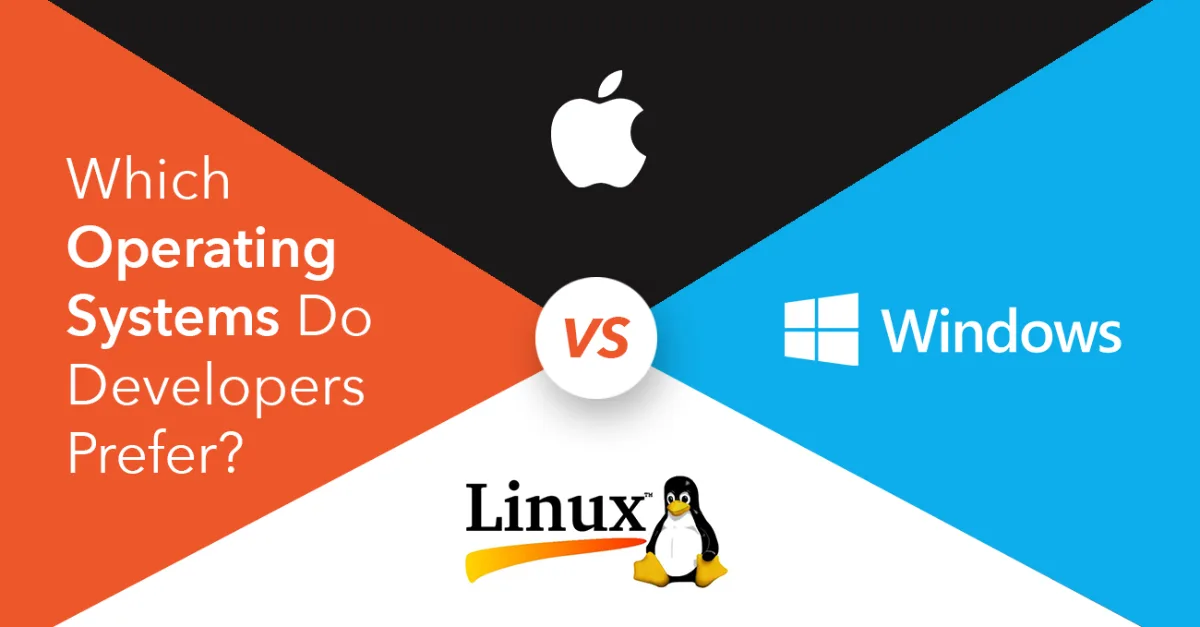
Which Operating Systems Do Developers Prefer?
As a developer, one of the primary decisions to make is which operating system (OS) to use. Let’s look at three major operating systems - the pros, the cons and what to consider when choosing which OS to use as a dev.
As a developer, one of the primary decisions to make is which operating system (OS) to use. Just a few years ago, there were a mere handful. Today, with the onset of the digital age, operating systems abound. And the list is growing. Let’s look at three major operating systems – the pros, the cons and what to consider when choosing which OS to use as a dev.
What Is an Operating System (OS)?
According to technopedia, an operating system is “a software that allows a user to run other applications on a computing device…the vast majority of applications are written for an OS, which allows them to take advantage of common libraries and not worry about specific hardware details.”
In layman’s terms, an OS is the means by which users of computing devices like desktops, tablets and smartphones can “communicate” with that device, without necessarily knowing how to “speak” the device’s language. Without an OS, processing anything using a computing device would look like something out of The Matrix, with endless lines of code – it would only make sense to programmers.
Think Microsoft Windows (Windows 10, Windows XP for example), macOS (Apple) and Android. These are just three examples of an operating system.
Which Operating Systems are the World’s Developers Using?
The 2018 Stack Overflow Developer Survey asked 100 000 developers from over 150 countries to complete a 30-minute survey.
One of these questions was what time developers wake up in the morning. The result? Most devs wake up between 07H00 and 08H00, which negates the stereotype of the caffeine-addicted, nocturnal vampire-esque dev. Although we’re sure those exist too.
Another key question the survey asked was which operating system developers are using for desktop development. Windows led the way, followed by macOS and then Linux, demonstrating that just as in recent years, Microsoft is still leading the pack. Apple, Microsoft and Linux seem locked in an eternal battle of wills, but the defining gap between them, is slowly closing.
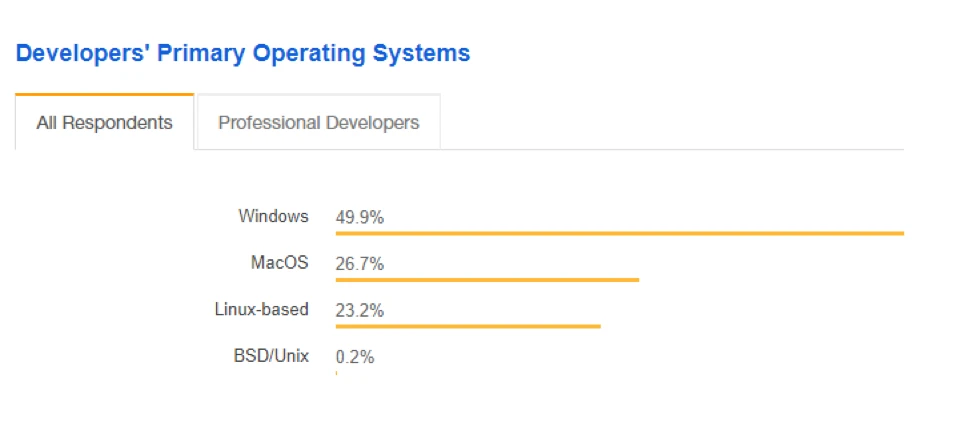
Source: 2018 Stack Overflow Developer Survey
Why Some Developers Prefer macOS:
According to Macworld, for the last 15 years, the Apple OS has been built on top of Unix, which, according to Jessica Su, a CS PHD Stanford student, was a significant development for programmers. Why? Because according to Su, “It lets you run programs in almost any language without using a specialised IDE.” Most tech companies require their employees to work on Unix-based systems, so working with macOS, may increase the career prospects of developers.
Software developer, Christopher Miles, argues that programmers and coders love macOS because of the build quality of Apple machines. According to Macworld, a big plus for macOS is its cross-platform compatibility. Running macOS on a Windows PC is a near impossibility for most, but on Mac, you can easily install Windows or Linux. This means that “if you have a Mac, you can create and test software for Windows and Linux from inside it.”
Why Some Developers Prefer Windows:
According to RJ Systems, there are a number of advantages of using Windows as a developer. One of these advantages includes ease of use – everyone grew up using Windows and the interfaces that we worked with back in the day, are still recognisable today.
Evidently, Windows is doing everything it can to retain its loyal base of developers. Developer Mode in Windows 10 allows programmers to test apps, change settings and navigate some advanced features that aren’t accessible to everyday users. Essentially, Windows Developer Mode is an OS extension or value-add function that brings a unique user experience element to Windows for developers. Finally, a developer interface that makes sense in terms of functionality and in terms of its aesthetics. A wide range of support is provided for developers, which is a big pro, and one of the main selling points that attracts devs to the Windows OS.
Linux: A Worthy Alternative?
Ofir Chakon, data hacker, entrepreneur and engineer, dedicated an entire blog post to his experience of switching from Windows to Linux. His conclusion? Linux is his OS of choice as a developer, for a number of reasons. Referring to the Linux distribution, Ubuntu, Chakon suggests that:
- Linux runs faster than both Windows 8.1 and 10. After switching to Linux, Chakon’s processing speed increased exponentially.
- The fact that Linux is a free, open-source software is something that many devs list as an advantage. Open-source software is tested, tested and tested again by a wide range programmers so it’s easy to tap into a support network for answers to questions you may have. Valuable opinions are openly and freely shared and the open-source community develops organically.
- According to Chakon: “If you are a developer, the terminal is the sweet spot. It’s a huge productivity booster. By using the terminal, automation becomes a game changer.”
- Most servers are Linux-based so it makes sense to use a Linux-based OS.
Where To Next?
There is no easy answer to the question: which OS should developers use? As with most things related to programming, it’s all relative. Which OS developers choose to use will depend on their choice of occupation, the functionality requirements of the platform they are building, and their level of experience.
Speak to an expert at HyperionDev if you want to upskill yourself as a developer and learn more about the pros and cons of different operating systems.

Career Advice
Four Strategies To Follow Before You’ve Written Your First Line Of Code
As soon as you start your coding journey, everything that needs to be done can be daunting. But to help you prepare, here are some strategies to follow before you’ve even written your first line of code.
It’s daunting to become a coder. There’s so much to learn and there appears to be a multitude of people who have been coding for years. Take heart, however, a full third of professional developers on Stack Overflow, which interviewed over 100 000 developers, only learnt to code within the past five years. Basically, it’s never too late to learn to code. But to help you prepare for your coding journey, here are some strategies to follow before you’ve even written your first line of code.
1. Operationalise Your Goals
This is an important initial step. Decide on your goals. Make them tangible and project-based. Hongkiat mentions these potential projects:
- Build a calculator using CSS and JavaScript. These languages are certainly worth learning, because they form a core part of a Full Stack Web Developer course.
- Make a responsive website using HTML, CSS and JavaScript. A responsive website is capable of responding to a user’s behaviour and environment based on screen size, platform and orientation.
- Practise your back back-end programming languages, such as PHP, Ruby and Python, by building a dynamic website. You can read more about the difference between front-end and back-end web development here.
- Using JavaScript, create a 2D breakout game.
2. Decide Which Programming Language You Want to Learn First
Your goal should help you decide which programming language you want to learn first. However, you may choose first to decide on the programming language and then set a goal for yourself.
It’s probably a good idea to start with something simple like HTML or CSS. Both are used frequently in the developer world. This graph, showing the most commonly-used programming languages, comes from the 2018 Stack Overflow Developer Survey.
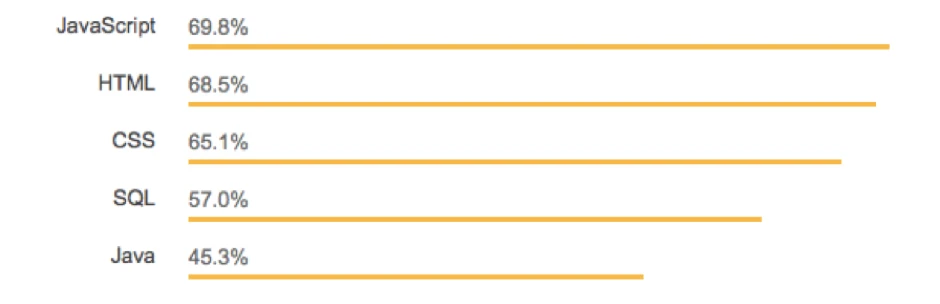
Image Source: https://insights.stackoverflow.com/survey/2018/#technology
HTML and CSS are widely used and supported by all browsers, and you can still do cool projects with them like formatting your blog post or email, or creating CSS animations.
You might also consider learning Python. Python is probably the most used programming language in Data Science, a growing and popular field. It’s also a relatively easy language to learn, because it reads similarly to English.
3. Install the Correct Programs
This isn’t as simple as it sounds. Before you’ve written your first line of code, you need to install the right programs on your machine. There are a variety of options such as:
- Installing a simple code editor, which is a software package that has features that allow for writing code. You could choose between one of these three code editors for different operating systems: Notepad++ (a popular code editor for Windows), DroidEdit (a free app for writing code on your Android phone or tablet), and TextWrangler (a code editor for Macs).
- Using an Integrated Development Environment (IDE). This is more advanced than a code editor, because it incorporates other tools such as libraries, a compiler and a debugger. Examples of IDEs include Microsoft Visual Studio, NetBeans and Eclipse.
- Installing a Software Development Kit (SDK), which is a bundle of software tools that lets you create applications for specific platforms or frameworks – e.g. an app for an Android smartphone would use the Android SDK.
4. Find the Right Resources
There are many developer resources out there that programmers use when they get stuck. A good place to start is Stack Overflow, which attracts over 50 million developers on a monthly basis. You can ask your programming questions there, and you are almost guaranteed to have an avid user answer your question soon. Reddit Programming is also a good spot to bookmark and check out prior to writing your first line of code. You could also look at Experts Exchange, a paid site, and Quora, which is a Q&A sites on any topic. You will find that the developer and programming world has an incredible community of support through resources and forums like these.
In conclusion, once you’ve followed these four steps, you’ll be excellently positioned to start writing and learning coding. You may also want to consider enrolling for one of HyperionDev’s six-month Bootcamps in Web, Mobile or Software Development. You can try each of them out with a free trial.

AI Engineering
How AI is Changing the Education Industry
AI was developed to see if a machine could learn in order to pass this knowledge onto others. AI has recently made its way into schools and universities to assist teachers and learners on a daily basis. Lets take a look at how AI is changing the education industry.
You may have heard the term Artificial Intelligence or AI before. AI is the process of using technology to create intelligent machines that can perform tasks that humans normally perform. Some of these tasks are: Speech recognition, learning, planning and problem solving. AI was developed to see if a machine could learn in order to pass this knowledge onto others. Machines retain information and become smarter over time and are not susceptible to memory loss, information overload or sleep deprivation, like humans are. AI soon made its way into schools and universities to assist teachers and learners on a daily basis. And now, let us take a deeper look into how AI is changing the education industry.
How has AI changed education?
Since AI has been around, it has changed the education industry in many ways. Some of these are:
Administrative processes made simpler
A big part of the educational process is admin. Educators have to keep track of attendance, record results, generate reports and keep track of students’ progress. This is a cumbersome task as each task needs to be performed multiple times. AI can be used to automate reports or inform the teacher of the students’ progress. For example, performance indicators could be set against which a student’s results could be evaluated to inform the teacher on which students need extra help. In the near future AI will also be able to mark not only multiple choice tests but written responses as well. This allows educators to focus on teaching and not on administration. This is only one of many examples of how AI is changing the education industry.
Virtual teachers outside of the classroom
When you are sitting in a class with 20 or so other students, it is hard to get the attention you need. Most students have access to a smartphone or a computer and these devices have access to loads of tools and resources which can be used to learn. Most phones have their own built-in AI in the form of a virtual assistant. You can ask a question to your phone and get an answer right away. For example, Samsung devices have Bixby and iPhones have Siri which are both AIs. So, through Artificial Intelligence, students can have virtual teachers when they are not in the classroom.
Personalised learning content
Textbooks often rely on computers for supplementary content. There is often a disconnect between the two. With AI, the text and the supplementary content can be integrated into one. This will make it possible for students to engage with study material that is individualized and suited to their needs. AI is also being used to condense text books into study guides to make learning quicker and more effective as well as provide chapter summaries, practice tests and flashcards.
While classrooms introduce students to new ideas and principles, there are multiple ways to learn. Some students may prefer visuals, while others learn best via audio methods. Incorporating AI into the learning process allows students to choose the learning style that suits them best.
We learn better by actually experiencing the concept first hand. An integral part of education is hands on learning but this can be time consuming and not easy to manage with a large group. Using Augmented Reality, or better known as AR, that is already on mobile devices, students can engage with various fields such as the human body or microscopic cells. Integrating AI into AR can provide learning in a fun way and is yet another example of how AI is changing the education industry.
The introduction of Artificial Intelligence into education is still new but already there are start-ups that are improving education by use of AI. There are many benefits to having AI in education. From virtual lessons and study guides to administration, it is clear that students, teachers and administrators will all benefit from Artificial Intelligence in education. As times goes on and as AI advances, these benefits will advance. Want to make your own AI? You can learn how to by taking one of HyperionDev’s part-time online coding bootcamps.

Career Advice
Why Are Computer Science Degree Dropout Rates So High?
Computer science degree dropout rates are getting higher with each passing year. While computer science as an industry is growing, dropout rates amongst students seem to be increasing. Let’s look at some opinions on why computer science degree dropout rates are so high.
It’s an international phenomenon – computer science degree dropout rates are getting higher with each passing year. It’s quite paradoxical. While computer science as a vocation is growing exponentially, dropout rates amongst students who enrol in computer science as a degree, seem to be steadily increasing. According to the graph below, the number of computer science degrees being completed, seemed to boom around 1985 and 2003 – 2004. Since then, the decline has been undeniable. Let’s look at some opinions on why computer science degree dropout rates are so high.
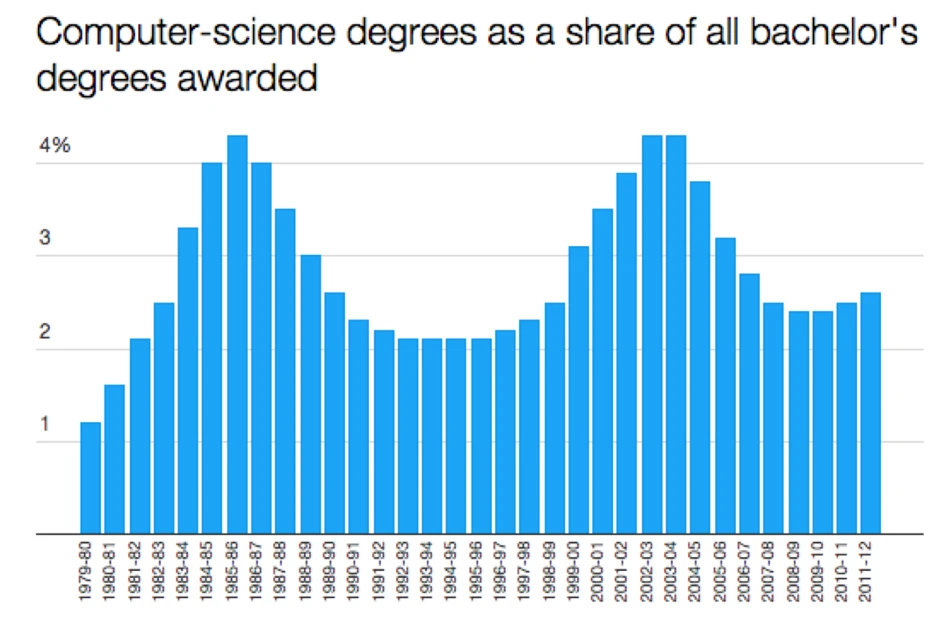
Unrealistic Expectations
McGoldrick and Huggard, two computer science lecturers at Trinity College in Ireland, point to misguided perceptions as the root cause of high dropout rates in the computer science department. Students choose computer science for several reasons, and the reality is that not all of those reasons are firmly grounded in fact. There’s a big disconnect, for example, between wanting to develop cool computer games because you’re good at playing them, and the skills involved in building those games, Computer science is just that – a science. And a good proportion of students simply do not appreciate the technicality of the subject. Nor are they willing to trade in their glamourised dreams of what computer science is, for the hard work and late hours that it often demands.
The Rapid Evolution of Knowledge
Joe Trubisz, an independent researcher and former college instructor suggests that computer science degree dropout rates are high due to the ever-evolving nature of knowledge on the subject. He suggests that students with hands-on experience in the field quickly realise that the knowledge and skills that are being transferred at a degree level, become almost obsolete in a year or two. The reality is that the skills you need to succeed in the field of computer science in the real world is often significantly different from what is taught at universities.
Fluctuating Demand
Demand for computer science graduates has fluctuated over time. According to Jonah Newman, “The peak in computer-science degrees, in 1985, came about four years after the introduction of IBM’s first personal computer and during the heyday of the Apple II.” A similar boom occurred during the early noughties. With a range of new IT-related fields developing alongside each other, job opportunities for computer science graduates have fluctuated. As a result, the families of students (who may be funding their studies) may become more inclined to enrol their relatives in programmes with a more stable market. Parental pressure has proven to be a big determiner of whether students remain enrolled in a programme or not. For some, computer science as a degree programme may be too much of an investment into an industry that is always changing.
Here’s How Not To Become Part of the Statistics
HyperionDev offers 6-month, part-time bootcamps in Web, Mobile or Software Development with daily mentor support. These bootcamps offer current, real-time information on the industry as it exists today. What you learn, is what you need to succeed in the world of computer science today. At these bootcamps, you will gain insights that are practical and actionable. Whether you’re looking to upskill or make a strategic career move, bootcamps are a great place to start.
A relatively short time commitment allows you the freedom to decide whether computer science is the industry for you. Bootcamps give you an intensive view into the computer science space. They empower students to be proactive about ongoing learning so that they stay ahead of the curve and evolve as developers and programmers.
Riaz Moola, founder and CEO of HyperionDev suggests that “opportunities abound in the computer science space, especially locally. And as the market begins to take shape and evolve, so must the way we approach the educational side of things. The focus has shifted away from degrees and once-off learning and towards shorter-length, transformative experiences that people undertake to upskill themselves as their careers progress.”
HyperionDev bootcamps are designed to equip students with knowledge and skills that will give them the upper hand in an industry that is always on the move. Click here to take your place in the burgeoning world of computer science.
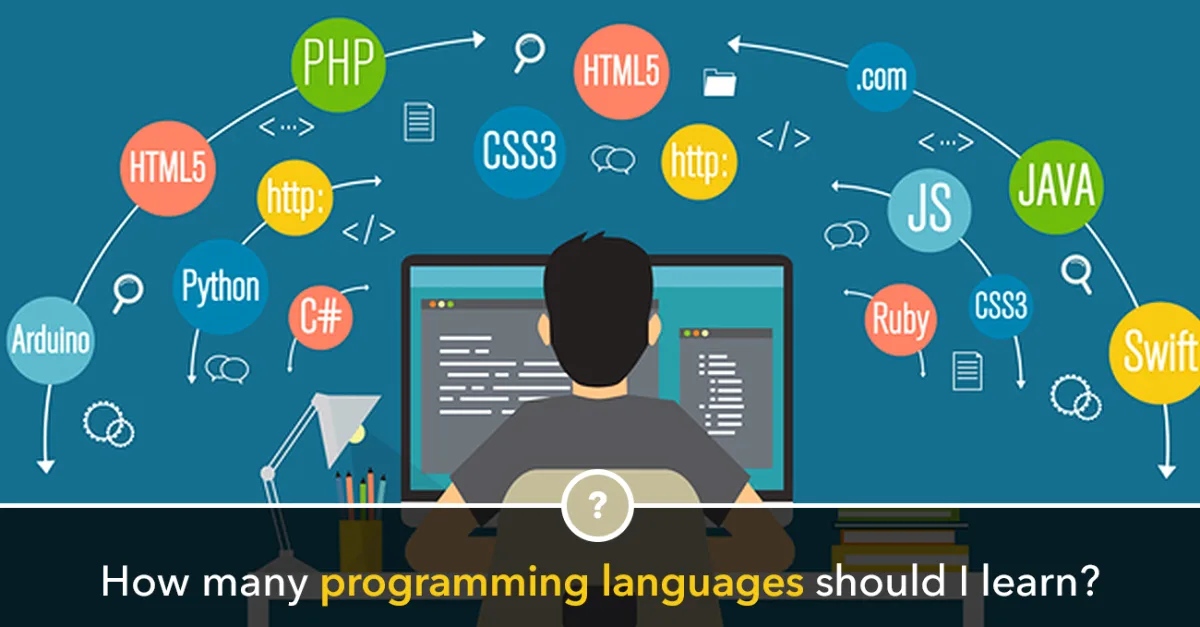
Career Advice
How many programming languages should I learn?
One of the most common but difficult questions that developers have to answer is whether it’s better to learn multiple programming languages, or master one. We explore the pros and cons associated with either decision by answering 3 golden questions!
One of the most common but difficult questions that developers have to answer is whether it’s better to learn multiple programming languages, or master one.
The reason that this is such a tough question is that there are pros and cons associated with either decision. Mastering one language, particularly one that is both rare and in demand, makes you a sought-after asset.
On the other hand, having a basic understanding of the most popular coding languages makes you versatile enough to assist on a broader array of projects.
And that’s just the surface. The debate forces you to think about your salary, personality, and career ambitions, and the shifting tech landscape.
It’s easy to be overwhelmed, and asking colleagues for advice probably just makes you more indecisive. But even though it’s uncomfortable, this is arguably the most important choice you’ll make, because it sets up your whole career.
That’s why we’ve compiled the three golden questions you need to answer so that you make the right choice for you.
What languages are in demand?
Although there are hundreds of programming languages, with more being developed constantly, some are more popular than others, and have been for some time.
Familiar programming languages like Java, C++ or Python are versatile and almost universal, which makes them appealing to clients and developers alike.
Newer languages like Kotlin or Elixir might allow you to solve new problems (and can be exciting to learn), but most projects are still reliant on the most-popular languages.
This means that having a functional understanding of these programming languages makes you eligible to work on more projects – which means more experience, and a bigger salary.
To put it bluntly, it might be fun to become an expert in an obscure language, but you might struggle to find opportunities to use it.
Are you a lifelong learner?
Most developers are life-long learners – it’s partly why they choose a profession that is constantly growing and changing.
Choosing to specialise in one language means you will learn everything that there is to know about that language, but eventually, you might run out of things to discover. Being the authority is a great accomplishment, but can become tedious.
Learning multiple programming languages means that you are constantly forced to tackle new challenges. These ongoing lessons keep things fresh, but it can be a frustrating process, particularly if you’re not patient.
Either route will require you to learn, and it’s important to understand that you will have to learn about new technology to really excel, but if you need constant stimulation, then learning multiple languages is probably a better option for you.
What do you want out of your career?
It may seem a little profound, but your ambitions for your career are crucial for deciding whether or not to become a specialist. Essentially it comes down to a question of income.
As a recent survey on StackOverflow illustrates, there’s a clear difference between the programming languages developers most want to learn and work with, and those that will earn you the best salary.
This discrepancy reflects a deeper question. Working in newer, different programming languages is more appealing to developers who want to experiment and push themselves, but they don’t necessarily pay as well – which is why most developers become proficient in multiple languages to boost their income.
The alternative is to specialise in a programming language that you know will earn you more money, but is less likely to push you once you’ve mastered it.
The verdict
Becoming a developer is an exciting career path that will always present you with new challenges and opportunities.
The decision to become a specialist in the modern climate is a risky one; while you may earn a better salary, you risk problems around demand for your skillset, a lack of mental stimulation, and the chance that your chosen language falls out of favour.
Learning multiple languages qualifies you for a broader range of projects, meaning you are always learning. You will have more choices to address problems, and are more likely to work on a satisfying range of tasks. You might struggle to get to a point where your salary is stable though, as you are essentially competing with a broader pool of devs with more experience in the language required.
Ultimately the decision is up to you, but the data suggests that spending your time becoming proficient in multiple languages is your best bet.
Thankfully, there are a number of courses available through HyperionDev that can get you started – including a full-stack web developer bootcamp that will get you fluent in multiple languages in no time.

Web Development
Should I become a web developer or mobile developer?
Two fields that have become increasingly relevant and in-demand in recent years are Web Development and, more recently, Mobile Development. So, which career path should you choose- a web developer or mobile developer?
The rapid advancement of technology in the last few decades has led to tremendous growth and an abundance of job opportunities in the tech sector. Two fields that have become increasingly relevant and in-demand in this period are Web Development and, more recently, Mobile Development. According to LinkedIn’s “Most Promising Jobs of 2018”, both these fields are ranked among the top ten most sought after skills of 2018. Considering the perpetually changing landscape of technology, both these skill sets offer exciting, versatile, and progressive roles, with only more to come as all things digital are becoming more and more prevalent and ingrained in our daily lives. So, how will you choose which career is the one for you- web developer or mobile developer?
Web Developer
What does the role entail?
Web Developers are tasked with the design and maintenance of websites or web-based applications. Your skillset as a web developer can be applied in various capacities. You will mainly be designing and setting up new websites for clients (making sure that the site is adaptable to various devices and functional on all web browsers) and maintaining and updating already-active websites.
Demand/Growth for web developers
According to statistics sourced by the US Department of Labor, employment of web developers are projected to grow 15% from 2016 – 2026, considerably faster than the average of most jobs. This rapid growth is contributed to the “growing popularity of mobile devices and ecommerce”.
Salary expectation
According to data sourced from PayScale, an international salary aggregator, here’s what you can expect to earn as a web developer in the US:
- Entry-level web developers (0-5 years of experience) can expect to earn a median salary of $51,000 per annum.
- Mid-level web developers (5-10 years of experience) can expect to earn a median salary of $64,000 per annum.
- Senior-level web developers (10+ year of experience) can expect to earn a median salary of $70,000 per annum.
Additionally, PayScale also adds that specializing in the ASP.NET Framework and SQL can possibly add 14% and 9% respectively to the proposed salary.
Mobile Developer
What does the role entail?
Akin to web development, the moniker “mobile development” denotes a plethora of various job descriptions, each boasting its own distinctive pay scale and required skills. In a nutshell, a mobile developer is responsible for the development of applications for various mobile devices.
Demand/Growth for web developers
According to statistics sourced by the US Department of Labor, employment of mobile developers (which falls under the “software development” category), are projected to grow 24% from 2016 – 2026, with those specializing in applications even seeing as much as 31% growth. The job applicants mostly considered for this role are individuals who are proficient in more than one programming language (HTML, C++, Java, SQL, etc.).
Salary expectation
According to data sourced from PayScale, an international salary aggregator, here’s what you can expect to earn as a mobile developer in the US:
- Entry-level mobile developers (0-5 years of experience) can expect to earn a median salary of $54,000 per annum.
- Mid-level mobile developers (5-10 years of experience) can expect to earn a median salary of $85,000 per annum.
- Senior-level mobile developers (10+ year of experience) can expect to earn a median salary of $98,000 per annum.
Additionally, PayScale also adds that specializing in either iOS or Android application development can add an extra 14% and 7% salary increase, respectively.
Conclusion
As you can see, both web and mobile development are future-centric roles that can lead to lucrative and meaningful opportunities. So either becoming a web developer or mobile developer will most likely provide a fruitful career path for you.
If you feel that web development is a career that you’d like to pursue, why not join our Full Stack Web Development Bootcamp? Or maybe you’re more interested in getting into mobile development? Then our Mobile Developer Bootcamp should be perfect.

Software Engineering
The Five Best Workplace Habits of Software Engineers
Software Engineering is a career on the rise, but what separates the good software engineers from the great ones? Here we list five of the best workplace habits of software engineers.
Software Engineering is a career on the rise. The Bureau of Labor Statistics, which calculates the employment growth for various occupations, projects a startling 24% employment growth for software engineers between 2016 and 2026. This is much faster than the 7% average for other occupations. It’s clear Software Engineering is a desirable career, but what separates the good software engineers from the great ones?
Here we list five of the best workplace habits of software engineers.
1. Broken Windows – and why you must fix them
Medium mentions the ‘Broken Windows Theory’, which states that ‘if there is a disorder in a neighbourhood for a substantial period of time, the mess will only get worse. If an abandoned building is left with a broken window, there’s a much higher chance that the building will be vandalised and more broken windows will appear.’ The best software engineer fixes things related to the code that might not be directly connected to the task at hand – for example, a poorly-named variable or an API shortcoming. This excellent workplace habit of software engineers sets the tone for any project.
2. Version Control
Sonio Recio, a software engineer writing for HackerNoon, notes the importance of version control, which is the management of changes to software. ‘Using git,’ he says, ‘was the most important discovery I explored in my entire life as a Software Engineer. It saved me a lot of headaches.’
Git is a version control system for tracking changes in computer files and co-ordinating work on those files among a number of people. It’s mostly used for managing the source code in software development. It’s free and open source.
Two added advantages of version control include: (1) Remote work becomes easier and more successful. If you’re working across different time zones, monitoring changes from different team members is vital and (2) You can display your opensource projects on Github for others to view. This will give you a chance for collaboration and improvement.
3. Regular Upgrades
You’ve probably heard the saying, ‘If all you have is a hammer, everything looks like a nail’. When it comes to writing code, this certainly holds true. The same problems can be solved in different ways with different programming languages. Learning multiple languages helps you expand your thinking and enlarge your mindset. The best software engineers learn one or more new languages every year. If you don’t know Python, this might be a good language to learn next – check out reasons to learn Python in 2018.
4. Find And Be A Mentor
There are things to be learnt from both being and having a mentor. The benefits of mentoring include:
- Learning to listen actively rather than passively.
- Increasing one’s sense of self-worth through sharing knowledge
- Strengthening interpersonal relationship skills.
- Re-energising.
- Greater personal satisfaction.
If you’re looking for a mentor, find someone you aspire to be like and someone you respect. Remember to ask your mentor to give you constructive feedback and understand that feedback can sometimes be hard to hear. Remain open-minded. Your mentor should push you and teach you new ways of thinking about software engineering projects.
5. Coding As A Last Resort
This may sound counter-intuitive, but the best workplace habits of software engineers don’t automatically translate to coding your way out of every problem. Remember: every time you write a line of code, you introduce the possibility of a potential point of failure in the system. Of course when faced with a problem, software engineers are tempted to open their favourite Integrated Development Environment and start hammering away. But for the best software engineers, writing code is a last resort. Instead, a great software engineer needs to get to grips with the business problem and when he or she has a good handle on it, then the engineer must try to leverage third party libraries or open source solutions.
In conclusion, we’ve mentioned the five best workplace habits of software engineers. You may have some of your own. Add them to the comments below.
HyperionDev offers a 6-month part-time Online Bootcamp in Software Development. Book a free trial now!
Software Engineering
Web Frameworks 101: Common Questions about Web Frameworks
Web frameworks have made life easier for developers, essentially transforming the programming industry. What are web frameworks, and how do they make an impact? We answer some common questions about web frameworks.
Web frameworks have made life easier for developers, essentially transforming the programming industry. What are web frameworks, and how do they make an impact? Below, we answer some common questions about web frameworks, such as what are their key functions, what are the different types of frameworks, and what are their benefits?
What is a Web Framework?
A web framework is a software tool created to support the development and deployment of a web application, like a website. Every unit of a web application is comprised of code, and a web framework automates this code.
A web framework provides a basic structure and facilitates a standardised way of building the application, so the developer doesn’t need to write their own code.
Early web development required all applications to be hand-coded using HTML. This meant that only the developer of an application could make changes to it, or deploy it. In the mid-nineties, the first web frameworks and new web-specific languages started making web application development easier and more accessible.
Today, every popular programming language used today has multiple web frameworks for developers to choose from.
What are the Key Functions of Web Frameworks?
Web applications typically provide URL routing, database manipulation, templating, and basic security.
URL Routing:
A website or web application is typically required to support multiple URLS, besides the original landing page. A web framework supports the organisation of these URLs, and defines which code will be retrieved when a user clicks on a specific URL.
Database Manipulation:
All web applications store some amount of data (such as user accounts, images, video content etc) within a database. Web frameworks facilitate the manipulation and design of these databases. This helps to define how different elements on the site are structured, and how they relate to each other.
Templating:
Templating is the organisation of the data returned by the web application. It allows developers to organise their HTML output (or other types of data output) in a more comprehensive, structured way.
Security:
Web application frameworks provide a basic level of security, to help protect the application against common online security threats like hackers.
These are just a few of the key functionalities provided by web frameworks.
What are the Different Types of Web Frameworks?
Frontend:
The frontend is the user side, or client side. A frontend framework deals mostly with the external part of a web application; it’s what the end users will see when they open the application.
Backend:
The backend is the server side; the “behind the scenes” stuff that end users don’t see. There are a few different classifications of backend frameworks:
- Server side frameworks, which have limited functionality, suitable for creating simple pages and forms.
- Client side frameworks, where the work takes place inside the browser, allowing the developer to improve and implement new user interfaces.
- Cross-functional (full-stack) frameworks, which cover nearly all the needs of both the client side and the server side.
What are the Benefits of using a Web Framework?
Developers benefit from improved efficiency, affordability and support when using a web application framework.
Efficiency:
Web frameworks help to automate and simplify complex tasks. A task that would normally require hours of time and hundreds of lines of hand-written code can be completed in minutes, using the pre-built functions of the framework. This makes the development process faster and more efficient.
Affordability:
Most major web frameworks are available free of charge. A free (open source) framework can be used to build commercial websites without bridging any licensing restrictions. This helps to reduce the cost of development, both for the programmer and the client.
Support:
Web frameworks are usually supported by “how-to” documents, support teams or community forums, to help every developer get the most out of the tool. The most popular web frameworks have strong communities behind them, and these users are able to identify and report possible vulnerabilities to the support team. This adds to the security already provided by the frameworks.
Are there Disadvantages to Web Frameworks?
There are also a few limitations and drawbacks to using web frameworks. When working within a framework, developers cannot move outside the limits of its core behaviour, and must therefore be careful to choose the right framework for their specific application. In addition, developers learn to rely on the framework itself, without learning the coding language behind it. This can be limiting for professional developers looking to expand their skill set.
It’s also important to note that some frameworks (e.g. JavaScript frameworks) might slow down the performance of an application, which will be very noticeable to mobile users. With the ongoing rise in mobile Internet use, it’s important to choose a framework that can deploy an application efficiently across all devices.
Overall, the advantages of using the right web framework for an application outweigh the possible disadvantages, for clients and developers.
Learn about Web Frameworks and More Online
HyperionDev offers aspiring developers the chance to kick-start their careers, by participating in a six-month online bootcamp. These part-time courses cover full stack web development, mobile development or software engineering, with daily mentor support and free resources provided.
With this industry-leading education, you can start your future in the exciting world of online development. Register for a free trial, to get a sample of what’s on offer.

Career Advice
10 Useful Questions About Programming
It may be difficult to ask a question that could be seen as stupid or obvious. That’s why we’ve put together 10 questions about programming, and of course their answers, from the basics to more advanced. Have a read through them; we can (almost) guarantee you’ll learn something.
It may be difficult to ask a question that could be seen as stupid or obvious. That’s why we’ve put together 10 questions about programming, along with their answers, from the basics to more advanced. Have a read through them; we can (almost) guarantee you’ll learn something.
1. What is programming?
Programming, or coding as it’s sometimes called, is the process of creating software. Software is really a set of instructions that a computer needs to follow. Computer programming is a little like writing a recipe for your computer. Software comes in many forms, from games to apps on your phone, but all software is made up of lines of code.
When programmers create software, they follow a number of steps, including planning (this is called design or architecture), testing (checking whether the code works) and debugging (fixing source code).
2. What is a code editor?
A code editor is where you’re likely to write your code. You can’t write code using a word processor, because word processing software contains formatting. You could use a basic text editor, like notepad which comes pre-installed on most computers, but a code editor software package makes coding easier due to their handy features.
Here are three free code editors for different operating systems:
Notepad++ – a popular code editor for Windows.
DroidEdit – a free app for writing code on your Android phone or tablet.
TextWrangler – a code editor for Macs.
3. What is an Integrated Development Environment?
An Integrated Development Environment (IDE) is a step up from a code editor. Although an IDE includes a code editor, it also incorporates other tools to automate various tasks such as a debugger, various code libraries and a compiler (a software program that turns high-level code written by a programmer into a machine language or binary code). Many IDEs can support multiple computer languages, although you must check that the IDE you select is correct one for the language you are learning. Examples of IDEs include Microsoft Visual Studio, NetBeans and Eclipse.
4. What is a Software Development Kit?
A Software Development Kit (SDK) is a bundle of software tools that lets you create applications for specific platforms or frameworks – e.g. an app for an Android smartphone would use the Android SDK. SDKs can include an Integrated Development Environment, as well as libraries, tutorials and simple coding examples.
5. What happens on the back-end when I type a website into my browser?
Let’s say you type www.google.com into your browser, what happens then? Firstly, a request goes to Google’s remote server. Your browser then gets the response, interprets the code and displays the Google page.
The Google server (or remote server) is an API (Application Programming Interface) for your web browser (or client). Whenever you visit a website, your browser interacts with the remote server’s API. An API isn’t a remote server, however – it is the part of the server that receives requests and sends responses.
6. What’s the difference between the front-end and the back-end of a website?
Think about your house – the part of the house that others see, the yellow walls for example or the paintings you’ve hug up, equates to the front-end of the website. Now think about the parts of the house that are not immediately visible, the wiring and plumbing for example – that’s like the back-end of your website, where you’ll get your databases, APIs and server-side programming.
7. How do I deploy a website?
Here are four steps you need to follow:
- Choose a domain name – these are user-friendly addresses of websites. Search for available names on Whois.
- Find a web hosting company – this company stores your website on their server.
- Register your domain name – your web hosting company could probably help you with this.
- Upload your website onto the web hosting company’s server.
8. What is a Data Scientist?
A Data Scientist analyses data for actionable insights on anything from product development to customer retention to new business opportunities. The stages involved include:
- Framing the problem – e.g. Which customers are likely to buy a particular product?
- Collecting raw data to solve the problem
- Processing the data – including cleaning the data for errors, missing variables and corruption
- Exploring the data – looking for patterns, trends and correlations
- Communicating the results to various stakeholders
9. What is the difference between Artificial Intelligence and Machine Learning?
Both terms come up frequently when discussing Big Data, analytics and broader technological changes sweeping the world. In short, Artificial Intelligence (AI) is a broad concept of machines carrying out ‘smart’ tasks, whereas Machine Learning (ML) is an application of AI, where machines are given access to data and are then capable of learning for themselves.
10. And lastly, how can I become a programmer?
The good news is that 87% of developers are at least, in part, self-taught. Most have taught themselves a new language, framework, or tool outside of any formal education. Online education is more common (48,6%) than full-time face-to-face learning (10,5%), states the 2018 Stack Overflow Developer Survey.
Two online options include studying via a Massive Open Online Course (MOOC) – these are generally free and rely on video-based learning. However, the lack of support can leave one feeling stranded. Alternatively, think about an online coding bootcamp such as those offered by HyperionDev. Online bootcamps are structured, mentor-guided learning platforms that replicate the in-class experience. You should expect to devote between 5 to 30 hours per week to the course. Find out more about HyperionDev’s six-month Bootcamps in Web, Mobile or Software Development.
We hope you’ve enjoyed these 10 questions about programming and that you are now more familiar with a number of basic programming issues.
Still have questions?
Contact our Admissions Team, and a real person will get back to you.