
Career Advice

Career Advice
What does it mean to become a code reviewer
Code reviewing performs a vital function by looking for things like bugs, security issues and performance problems. Read about how to become a code reviewer, as well as the salary you can expect for this role.
Code reviewing is a vital part of the coding process. It’s basically a software quality assurance activity during which a person reviews the source code of any program looking for things like bugs, security issues, coding standards and performance problems.If you want to become a code reviewer, here are some important things worth thinking about.
Some broad level code reviewing considerations might include: Is the code readable, uniform and understandable? In addition, is the code correct? Or, are there performance problems, security vulnerabilities or malware? There could be both accidental errors (e.g. typos), as well as structural errors (e.g. dead code, logic or algorithm bugs, performance or architecture concerns), explains an article in Medium.
The overall impact
Nigel Munoz, a former full-stack engineer at TheMuse and a current freelance software engineer, states that a code reviewer needs to think about how a ‘change affects the larger and smaller picture.’ When considering the bigger picture, the adept code reviewer will search for code that is repeated, non-modular or doesn’t adhere to recent standard conventions.
According to Code Project, the main areas a code reviewer focuses on are the following:
- General unit testing
- Comment and coding conventions
- Error handling
- Resource leaks
- Thread safety
- Control structures
- Performance
- Functionality
- Security
Nothing too big or too small
Sam Donow, a core developer at Hudson River Trading, believes that ‘there is nothing too big or too small to comment on.’ Small improvements can lead to much bigger improvements in other parts of the codebase.
What to look for
Valerie Moyo, aged 25, works as a code reviewer for CoGrammar. She facilitates the learning process of students who are enrolled on one of HyperionDev’s bootcamps – Software Engineering, Full Stack Web Development or Mobile Development – by guiding them towards writing code that meets good coding practices. “I’ve always believed that anyone could code,” says Valerie. “I have a passion for teaching, so when I read up what it meant to become a code reviewer I knew that CoGrammar was the right place. I then pursued code reviewing as a potential career path.”
She looks for three things when code reviewing her students’ work:
Code correctness
This is about writing code that is structured correctly and conforms to the syntax (or structural) rules of a programming language.
Code style
This aspect looks at whether the code is readable, modularized and well-documented.
Code efficiency
Code efficiency is about ensuring that the code is implemented in a manner that requires fewer computational resources. This process can be rather complex when reviewing code as it involves determining the efficiency of your code using tools such as the Big(O) notation. However, the idea is that your code performs reliably, faster and optimally especially when developing programs for large-scale applications.
Never forget security considerations
Proposed changes can have an impact on more than just the codebase. For example, if a new feature includes user entry, then as a code reviewer you would want to check out whether other security vulnerabilities have been introduced.
Testing
Ensure you ‘review the tests with the same importance as the rest of the code,’ says Abhishek Pillai, a tech lead at Teachers Pay Teachers on TheMuse. This will prevent new bugs and function as a form of documentation for anyone else working on the software in the future. However, you can’t entirely rely on tests as a code reviewer. Just because you ran tests it does not mean there are no bugs.
If you become a code reviewer, what can you expect to earn? According to Glassdoor, the average annual US salary for a code reviewer is $104,348. It’s clearly money well spent for companies, though. A study at one of the organisations at AT&T found a 14% increase in productivity and a 90% decrease in defects after the introduction of code reviewing.
In closing, code reviewing clearly provides a vital benefit to programmers. Essentially it’s an extra pair of eyes on the code to find errors, some of which can be very subtle. If you’re interested in becoming a code reviewer, check out CoGrammar.
Career Advice
What to expect on your free trial with HyperionDev
If you’re keen to become a programmer, sign up for a free trial. Check out our free trial software development courses in Full Stack Web Development, Software Engineering or Mobile Development.
They say there’s nothing in life for free, but that’s actually not true. It’s possible to change your career to the lucrative field of programming. And the best part? You can enrol on a free trial software development course with HyperionDev.
Not only do programmers receive higher-than-average salaries, they often enjoy perks such as flexible hours, remote days, extended leave and international travel. The HyperionDev free trial provides a fantastic opportunity to check out whether this is the right career step for you with no commitments. We’ll now take you step-by-step through the process of your free trial and what you can expect.
Signing Up: Free Trial Software Development Course
The top right hand corner of the HyperionDev website has an ‘Enroll Now’ link. Via this link you can choose your career ambition: Full Stack Web Development, Software Engineering or Mobile Development. (Read more here about the difference between Software Engineering and Web development.) You can also select a ‘not yet sure’ option. Alternatively, you can sample all of the bootcamps for an unlimited time and you can upgrade to the full experience whenever you’re ready.
Free Trial: What You Can Expect
Once you’ve signed up for your free trial, you can expect to encounter the following:
To Start Coding Early and To Write Code Regularly
The aim of the bootcamps (and the free trial software development course of your choosing) is to get you coding right away. You’ll complete a number of tasks (as well as a capstone projects once you sign up for the full course). You’ll also need to complete compulsory coding exercises.
Hand-Reviewed Code
Your code will be reviewed by a human. This is a key difference between HyperionDev and other bootcamps. This means that the quality of your code is reviewed, which can’t happen with an automated code review.
If you upgrade to a bootcamp, you’ll be assigned your own personal mentor who will review your code within 48 hours of submission. Learning 1:1 via a mentor has a number of specific advantages, including:
- Making you truly fluent as a developer (automated code checking is equivalent to a spell check for writing; you can’t write a world-class essay with just good spelling – you need the right tone, fact, grammar and style; a mentor will help you achieve this).
- Ensuring you receive on-demand help when you’re stuck or frustrated.
- Exposing you to the industry standard from day one. Developers in the real world have their work assessed by senior developer though the technique of code review. HyperionDev utilises this technique from the first day.
Free Trial: What You’ll Cover
In the Full Stack Web Developer free trial, you’ll cover the following:
- Industry Knowledge (including where to begin with coding, why you should learn how to code, software development as a career, ‘The Coder Mindset’, choosing the right programme and joining the HyperionDev online community)
- Creating an online portfolio (including the reasons for creating such a portfolio, tools to get started, HTML basics and submitting your portfolio)
In the Software Engineering free trial, you’ll cover the following:
- Industry Knowledge
- Introduction to Python (including an introduction to variables, casting, programming with numbers, working with strings, an introduction to algorithms and if statements)
In the Mobile Developer free trial, you’ll cover the following:
- Industry knowledge
- Java for Android Developers (including an introduction to Android and Java, variables, variable arithmetic, working with variables, order of operations, errors, casting, getting input from the user, if statements and putting it all together)
Now that you know what the free trials are about, think about signing up for a free trial software development course via HyperionDev. There are many advantages to a free trial including:
- Checking out, at no cost, whether you enjoy a particular area of programming.
- Swapping between the different bootcamps and getting an extensive overview of all the fields.
- Learning some initial concepts which you can then extend on your own or via bootcamp upgrade. Remember, with the upgrade you’ll have access to your own personal mentor.
HyperionDev offers online coding bootcamps in Full Stack Web Development, Mobile Development or Software Engineering.

Career Advice
Engineering and tech dominate the top entry-level jobs in 2018
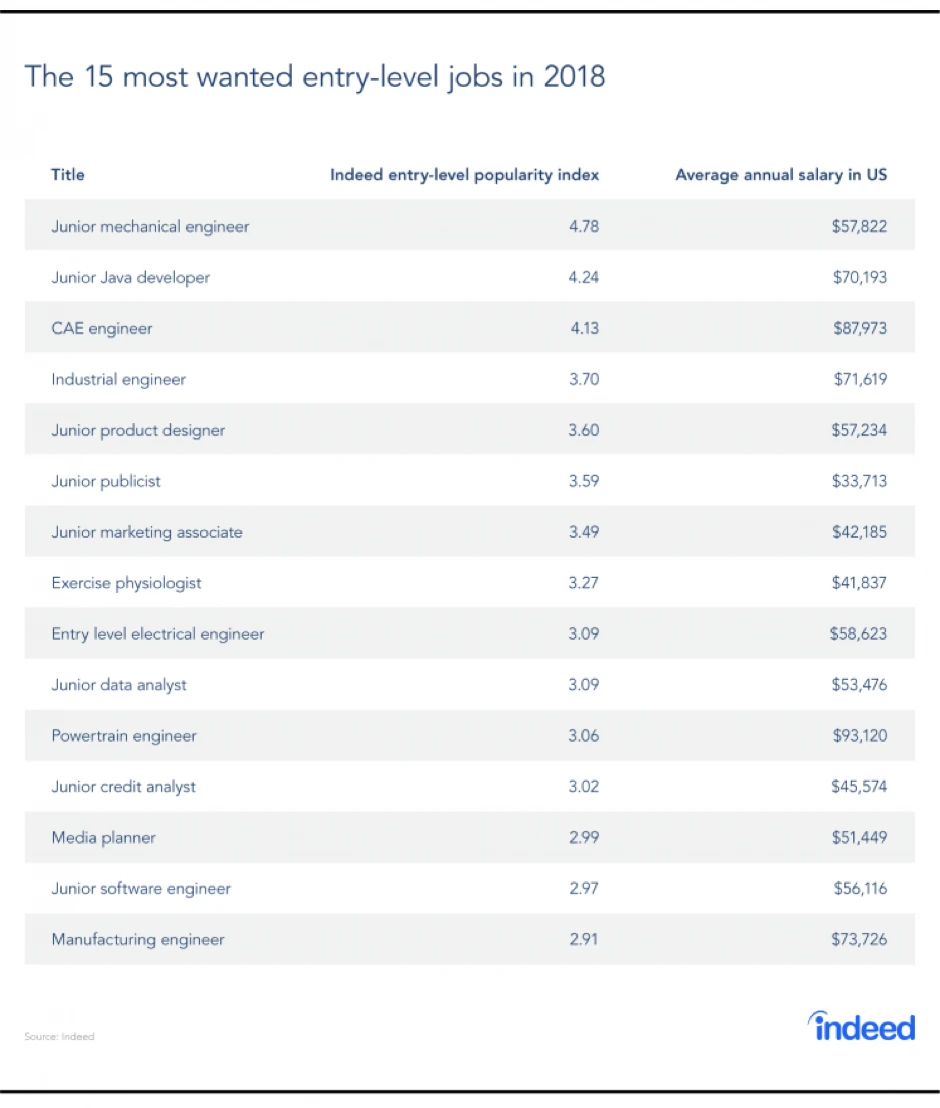
A recent study by Indeed looked at the top entry-level jobs in the US for 2018. The results spoke volumes. Engineering and tech jobs are evidently amongst the most sought-after jobs in the US. Let’s take a closer look at the findings.
There’s never been a more exciting time to be entering the workforce as a techie. Whether you’re into software engineering, web development or the data analysis field, if you know something about the technical world, your prospects of building a long-lasting career are higher than ever. The prevailing employment trends in the US are predominantly reflective of the current global environment, and so a recent study by Indeed looked at the top entry-level jobs in the US for 2018. Part of the report included a “popularity index” score, which illustrates the popularity of a particular job amongst entry-level job-seekers. The results spoke volumes. Engineering and tech jobs are evidently amongst the most sought-after jobs in the US, followed closely by jobs in a few rather surprising industries. Let’s take a closer look at the findings.
Source: Indeed
The Two Most Popular Entry-Level Tech Jobs
Among the top 15 most wanted entry-level jobs in 2018, we’ve chosen to hone in on two of the most pertinent in terms of technical skill.
Junior Java Developer
Java (not to be confused with JavaScript) is up there with the top programming languages in the world. For many developers, it is the catalyst for a flourishing career. Indeed puts the average salary for a Junior Java Developer at $70 193. A number of other sources agree. According to ZipRecruiter, “A Junior Java Developer annual salary ranges from $25,000 to $102,000 nationally.” This puts the national average at $72 698. Number of years in the industry, relevant qualifications and experience play a big role in determining where you’ll fall on the scale. As a Junior Java developer, you will collaborate with other software engineers and web developers to build applications, websites and software products through a complex process of problem-solving. Java developers are involved with the entire development life cycle of a product, so their skills are highly sought-after in a range of different contexts. According to technojobs, some of a Java Developer’s main roles and responsibilities include:
- Conducting software analysis, programming, testing and debugging
- Developing, testing, implementing and maintaining application software
- Recommending changes to improve established java application processes
- Developing technical designs for application development
- Developing application code for java programs
Junior Software Engineer
In summarising the role of a software engineer, Try Engineering provides this description: “Computer software engineers apply the principles and techniques of computer science, engineering, and mathematical analysis to the design, development, testing, and evaluation of the software and the systems that enable computers to perform their many applications.” The average salary of a Junior Software Engineer is $56 116 according to Indeed. According to ZipRecruiter, this average is a bit higher, coming in at between $30,000 to $90,500 nationally, making the national average $63 606.
There are a range of different kinds of software engineers from computer applications software engineers to systems software engineers – each fulfilling a specific role that involves strong programming skills as well as a penchant for mathematical problem-solving and data analysis. As Robert Walters puts it, “software engineers are innate problem-solvers, good at collaboration and keen to see an issue through to successful completion.”
According to Monster, these are some of the responsibilities of a software engineer:
- Determining operational feasibility by evaluating analysis, problem definition, requirements, solution development, and proposed solutions
- Documenting and demonstrating solutions by developing flowcharts, layouts, diagrams, charts, code comments and clear code
- Updating job knowledge by studying state-of-the-art development tools, programming techniques, and computing equipment; participating in educational opportunities; reading professional publications; maintaining personal networks; participating in professional organizations
- Providing information by collecting, analysing, and summarizing development and service issues
- Developing software solutions by studying information needs; conferring with users; studying systems flow, data usage, and work processes; investigating problem areas; and following the software development lifecycle
The Most In-Demand Skills of 2018
Interestingly, a 2018 report by Linkedin demonstrated once again that engineering and tech are at the top of the charts when it comes to the entry-level playing field. Check out this list of the most in-demand skills needed by companies in 2018.
- Cloud and Distributed Computing
- Statistical Analysis and Data Mining
- Middleware and Integration Software
- Web Architecture and Development Framework
- User Interface Design
- Software Revision Control Systems
- Data Presentation
- SEO/SEM Marketing
- Mobile Development
- Network and Information Security
Not only are engineering and tech jobs amongst the most popular, they are also significantly lucrative. Companies need skills – skills to differentiate them in a market that is made up of a few huge players and millions of smaller players all vying for a position amongst the greats. The encouraging thought for entry-level job-seekers is that while in previous years it would take years to develop the skill-set to thrive as a developer, these days, it’s not necessarily the case. As the Zuckerbergs of the world continue to demonstrate, a dedicated investment into honing your skill through practice, self-empowerment and a smart, proactive approach to education is what it takes to make it big in an industry that’s waiting to embrace raw talent and sheer determination.
Thinking of starting a career in tech? We can help. Try one of our bootcamps – we’ll give you the fuel you need to get your coding career off the ground.

Career Advice
7 things you should never say to a programmer
Programmers are powerful with their ability to create software. Make sure you say the right things at the right times to them. Here are 7 things you should never say to a programmer.
Programmers are a special breed. They can induce deep sleep in their dinner party companions by saying things like this, ‘So I was trying to debug this gnarly crash in the serialization library code, and after I added whole bunch of printf’s I grok’ed the sources and it was using a global buffer without any kind of locking, so *obviously* it was never going to be thread-safe,’ states Richard Cownie, on Quora. They may sometimes be boring, but they’re also immensely powerful, able to turn an idea into a computer program or app that revolutionises the world. In order to better understand their powerful thought process day-to-day, it’s important to consider what questions are suitable or relevant to ask a programmer. So here are some things you should never say to a programmer.
- ‘Can you explain your code?’
If you’re not a programmer, then ‘no’, that’s not possible. If you’re not aware of the concepts of programming, then you just won’t get it. However, if you’re interested in learning a little bit about programming in order to see if it’s the right field for you, consider signing up for a HyperionDev free trial in Full Stack Web Development, Mobile Development or Software Engineering.
- ‘Can women code?’
You wouldn’t say that, right? Course not. Techworm notes that the first computer programmer in the world is thought to be Ada Lovelace – she published an algorithm to be processed on the first modern computer. Read about more famous female programmers here.
- ‘My laptop isn’t working. Can you fix it?’
Programming, or coding as it’s sometimes called, is the process of creating software. Software is really a set of instructions that a computer needs to follow. Computer programming is a little like writing a recipe for your computer. Software comes in many forms, from games to apps on your phone, but all software is made up of lines of code. The hardware of the machine, including the CPU, keyboard and mouse, are totally different. Although some programmers may well have picked up knowledge about the tangible components of a PC, it’s unrealistic to expect all programmers to know computer hardware and to be able to repair machines.
- ‘Can you teach me programming?’
Many people are keen to enter the exciting world of programming, because salaries are high and jobs are in demand. However, it’s not a skill you can pick up overnight. It’s therefore unrealistic to expect a programmer to get you up to speed.
When it comes to learning coding, the good news is that you can teach yourself. Says 2018’s Stack Overflow Developer Report, ‘(A)lmost 90% of all developers say they have taught themselves a new language, framework or tool outside of their formal education.’ However, if you’re keen not to waste time and you want someone to be around to help you when you get stuck, consider a mentor-led bootcamp instead.
- ‘Maybe you should leave your computer alone – it’s the weekend.’
The Stack Overflow Developer Report states that over 80% of developers code as a hobby. Interestingly, those who are parents or have other caretaking responsibilities, those who exercise daily, or those who spend the most time outside were somewhat more likely to code as a hobby than other developer profiles.
- ‘Don’t you get bored sitting in front of a computer all day?’
Tech work can be incredibly varied. The 50 Best Jobs in America report, published by Glassdoor, found that 40% of these ‘best jobs’ are in tech. The report looked at factors such as salary, job demand and job satisfaction. Of those jobs in tech, many of them involve training, marketing, dealing with people or organisational skills.
Think about a front-end engineer, job #5 in tech, who well definitely use code but will also deal with a wide variety of people from customers to content writers. Every company uses tech and needs tech-savvy people in their workplace.
- ‘Why isn’t the Internet working?’
Similarly to point #3 above, just because someone can make beautiful websites or awesome software, it doesn’t mean that he or she can get the router working again. Tech is a massive field; there are many specialities in it. Think of medicine. You wouldn’t ask your dermatologist for something to help you with anxiety.
We’ve mentioned 7 things you should never say to a programmer. Can you think of any more you’d like to add? If you’re keen to become a programmer, HyperionDev offers online coding bootcamps in Full Stack Web Development, Mobile Development and Software Engineering. You’ll get your own personalised mentor to help you whenever you get stuck.

Career Advice
Which programming languages are the most common for freelancers?
If you’re keen to become a freelance programmer, consider learning JavaScript, Python or Java. Learn why these languages are the most common for freelancers.
According to a recent article in Forbes, 59% of hiring managers are using ‘flexible’ talent – i.e. freelancers and other temporary talent. In addition, most companies believe this trend will significantly increase over the next decade. There are hundreds of programming languages out there, but which are the most common programming languages for freelancers? Put differently, how best can you future-proof your career as a freelance developer? Read on to find out.
JavaScript
JS or JavaScript is used to make web applications more interactive, rather than just being static, plain pages. It’s used by 94,5% of all websites. And here’s the kicker: you can use JavaScript for both client-side scripts, which integrate seamlessly into HTML, and for server-side code by using a cross-platform runtime engine like Node,js. For freelancers, this it useful, because it means you can find work as both a front-end or back-end web developer, though JavaScript is more commonly used for front-end projects.
‘We are always hiring developers with knowledge of this language,’ says Damien Filiatrault, the Founder and CEO at Scalable Path on Quora. ‘I believe its market share will continue to increase over the next half-decade. There is just so much momentum here that even if the tide changes, legacy systems mean JavaScript will still be dominant in five years. JavaScript-based frameworks are also, logically, really popular. Having experience in one of the above could double your hourly rate.’
According to the PYPL, Popularity of Programming Language Index, which looks at how often language tutorials are searched on Google, JavaScript takes third place (data from September, 2018).
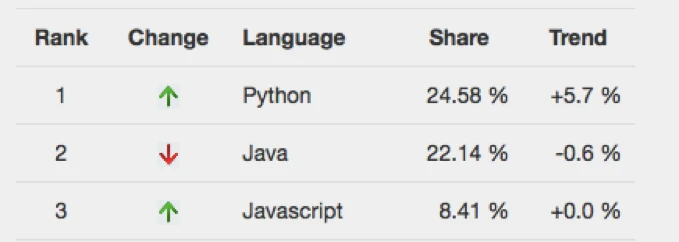
Image Source: http://pypl.github.io/PYPL.html
Python
According to Stack Overflow’s Blog, Python has ‘a solid claim to being the fastest-growing major programming language’. In addition, according to the 2018 Developer Survey, it’s also considered the most wanted language for the second year in a row, meaning developers who do not yet use Python say they intend on learning it soon. This is confirmed by Ashish Kedia, a Web Solutions Engineer at Google, who says, ‘In my opinion, Python and JavaScript are two most popular languages as of today in the freelancing world.’
A good reason for Python being one of the most common programming languages for freelancers concerns its relationship with big data: Python is probably the most used programming language in Data Science. Powerful statistical and numerical packages exist in Python for data analysis (such as PyBrain, NumPy and MySQL). Anyone comfortable with the Python programming language can use it as a tool to organize, process, and visualize data. Even if programmers are not in a Data Science field, Python is still useful to them because most programmers deal with data, in one way or another, in their day-to-day work. And salaries confirm the in-demand nature of Python – the average US Python freelancer developer salary per annum, according to ZipRecruiter, is $105,224.
Java
The Freelancer website states that ‘Java’s demand has risen sharply in the past few years, mainly due to the growth of Android phones.’ Android apps are built with Java, which means that if you’re interested in freelancing as an app developer, this is a language you should definitely learn. In addition, Java is also a very useful programming language, because it’s used on multiple platforms and for different types of programming, including web development and embedded programming (which refers to a specific type of programming that doesn’t operate on traditional operating systems).
Java is also a popular language. The TIOBE index looks at the popularity of various programming languages. This is determined by looking at the following variables: number of skilled engineers in a particular language world-wide, courses offered in that language and third party vendors. This information is combined with popular search engine results for the different languages on Google, Bing, Yahoo!, Wikipedia, Amazon, YouTube, etc. For April 2018, same as April 2017, Java was ranked as the most popular language.

Source: https://www.tiobe.com/tiobe-index/
In closing, JavaScript, Python and Java are probably the most common programming languages for freelancers who want to be in high demand. The good news is that you can learn them all via HyperionDev’s online, mentor-led bootcamps. The Software Engineering Bootcamp includes Python as part of its back-end programming. If you’re keen to learn Java, consider doing either a Software Engineering bootcamp or a Mobile Developer Bootcamp, both offer Java. And JavaScript is covered in the Full Stack Web Developer course. Become a freelance programmer with any of these valuable programming skills.

Career Advice
3 examples of tech that is changing the world for the better
In the digital age, the world is moving at lightning speed. Cutting-edge tech is at the forefront of groundbreaking revolutions in a number of fields. In this post we explore three examples of tech that is changing the world.
The personal PC, the mass-market mobile phone, X-ray machines – these everyday forms of technology were once industry breakthroughs that made a positive impact on the world and changed the way we relate to each other. In the digital age, the world is moving at lightning speed. Cutting-edge tech is at the forefront of groundbreaking revolutions in a number of fields. In this post we explore three examples of tech that is changing the world.
The MR Linac Machine: A Breakthrough for Cancer Treatment
A project that began six years ago has culminated in the clinical trial of the MR Linac Machine – a radiotherapy delivery system that is set to change the way cancer tumours are treated. Barry Dolling (65), the first patient to try this machine, was diagnosed with prostate cancer in April. The machine, called a “dream come true” for radiologists generates magnetic resonance images (MRI) while simultaneously delivering X-ray radiation beams. Because many cancer tumours shift during radiotherapy, there can be significant damage caused to healthy tissue during treatment. However, with the MR Linac Machine, tumours can be monitored and honed in on in real-time, with treatment being administered to a more accurate degree than ever before. This clinical trial is taking place at The Royal Marsden Hospital and Institute of Cancer Research (ICR) in London, which is one of seven centres in the world to have installed the machine, enabled by a £10 million grant from the Medical Research Council.
Gaming as an Educational Tool
Gaming was once seen as the antithesis of learning. But what was once regarded as a distraction, is now becoming one of the world’s most powerful learning tools. Children are using tablets and mobile devices as learning platforms, particularly in the foundation phase, which are a child’s most developmental years. Maths and language games are being used to teach children indispensable skills in an engaging and entertaining way that is very different from the way familiar slog of homework that we may be familiar with. On this topic, Ian Kay says: “The use of personal devices is growing in the classroom and the days of ‘chalk and talk’ are becoming a thing of the past.” An example of this kind of technology in action is Nearpod, which allows teachers to import lessons from any file type and begin adding interactive elements like web-links or video snippets. Educators can then synchronise and send their prepared lessons to all student devices, conduct the lesson simultaneously and monitor students’ progress as they learn.
New Developments in the Recycling Industry
The need to recycle is becoming more and more pressing, given the prevalence of a number of environmental crises. Where once people thought of environmental issues as being the responsibility of governments and global institutions, a shift is being made towards understanding that every human being needs to play a part in taking better care of the world. A number of startups in Silicon Valley and elsewhere all around the world are taking up this cause and finding new ways to boost recycling. For example, Clarke is a recycling robot that makes use of artificial intelligence to recognise and sort food and beverage containers in preparation for recycling. Clarke has been deployed in a municipal waste facility in Denver, Colorado where it serves its purpose as a trash-sorter with nothing short of AI perfection. This cutting-edge tech is diverting plastics from landfills in a way that is 50% faster than it would be if the process were to be managed by humans.
Be a Part of the Tech Revolution
Technology was once a concept that was beyond the reach of the masses and reserved for an elite few. Thankfully times have changed. Now, the power lies in the hands of ordinary people – the kind of people who may not have had the opportunity to emerge as societal leaders in the past. Today, technology is a tool for empowerment and development on a global scale. And there are countless examples of how this is being done. Think about drones delivering medicine to rural areas, or self-driving cars that will decrease accident-related fatalities, or scientifically advanced ways of promoting sustainable agriculture. The future is indeed a bright one.
As an aspiring dev, you have the chance to become a part of the industry that is playing a pivotal role in the evolutionary process of mankind. Super cool right? We think so. Attend one of our bootcamps and set the course for your next career move.

Career Advice
A day in the life of a code reviewer
Have you ever considered becoming a code reviewer? Find out what code reviewing is all about, and what makes this job challenging but exciting.
Code reviewing is a vital part of the coding process. It’s basically a software quality assurance activity during which a person reviews the source code of any program. When it comes to code reviewing, what are the broad level considerations?
- Better code quality: Is the code readable, uniform and understandable?
- Defects: Is the code correct? Or, are there performance problems, security vulnerabilities or malware? There could be both accidental errors (e.g. typos), as well as structural errors (e.g. dead code, logic or algorithm bugs, performance or architecture concerns), explains an article in Medium.
- Finding better solutions: A good code review will generate ideas for new and better solutions to the specific problems at hand.
A code reviewer is ultimately helping with knowledge transfer to the author of the code. Valerie Moyo, aged 25, works as a code reviewer for CoGrammar. What does she get up to on a day-to-day basis, and what tips can she offer for new coders?
Valerie has a Masters in Computer Science. This is fairly unusual for a coder. According to the 2018 Stack Overflow Developer Survey, only 1,2% have a PhD in computer science (or a related field), whereas most developers, 69% to be precise, are self-taught.
Her job as a code reviewer involves facilitating the learning process of students who are enrolled on one of HyperionDev’s bootcamps – Software Engineering, Full Stack Web Development or Mobile Development – and guiding them towards writing code that meets good coding practices. ‘I’ve always believed that anyone could code,’ says Valerie. ‘I have a passion for teaching, so when I read up about what code reviewing involved, I knew that CoGrammar was the right place. I then pursued code reviewing as a potential career path.’
Code Reviewing: What Do You Look For?
Valerie explains that there are three things she looks for when code reviewing her students’ work:
(1) Code Correctness
This is about writing code that is structured correctly and conforms to the syntax (or structural) rules of a programming language.
(2) Code Style
This aspect looks at whether the code is readable, modularized and well-documented.
Here’s an example of code correctness and style, using a JavaScript program that simply adds two numbers together and displays the result.
You would write something like this:
To generalise your program, you would need to avoid using hard-coded values and find a way of storing those two numbers and using them in the calculation – that way, if you want to change the numbers to add, you would change them at one place in your program as opposed to several places throughout your program. Although this example is simple, imagine if you hard-coded values in a program with thousands of lines of code! Therefore, the program needs to be improved by creating two variables, which allow you to store values, before performing the addition and displaying the result via the console.
Although this code is correct, you can improve the code correctness by removing the hard-coded addition and storing the result of the addition in a variable as follows:
Now we want to improve on code style by using variable names that are meaningful and descriptive – to improve readability.
Although this is a trivial example, it illustrates the general process we follow when reviewing code and ensuring that code meets best practice.
(3) Code Efficiency
Code efficiency is about ensuring that the code is implemented in a manner that requires fewer computational resources. This process can be rather complex when reviewing code as it involves determining the efficiency of your code using tools such as the Big(O) notation. However, the idea is that your code performs reliably, faster and optimally especially when developing programs for large-scale applications.
The Challenge of Code Reviewing
Code reviewing is a challenging yet fulfilling job. Says Valerie: ‘I really enjoy working with students who are learning to code for the first time. It’s intriguing to follow their thought processes. Sometimes, this even helps me to look at something differently. As a code reviewer, you must be prepared to review code that follows a completely different thought pattern or process from your own, which I do, because I enjoy discovering different ways of doing the same thing.’
In conclusion, code reviewing is not without its tricky components. ‘Developing a programming mindset can be challenging for novice programmers,’ says Valerie, ‘and I need to be able to deal with any frustration that may arise from this. If a student is overwhelmed and frustrated, I must be patient and gentle during those moments.’ If you want to become a code reviewer, Valerie advises that you have a ‘passion for teaching and learning’ as well as ‘patience’. Of course you also need to know the ins and outs of coding. Lastly, check out CoGrammar, where people can apply to become code reviewers.
Career Advice
Top 5 programming projects for new coders
Improve your coding skills by doing one of these programming projects for new coders. This is the best way to extend your coding repertoire. Choose the language or languages you want to work on, including Python, JavaScript, HTML and CSS.
After learning the basics of how to code, the recommendation is that you get cracking with actual coding. ‘The easiest way to get better at programming for beginners is to program,’ says Aishwariya Ramachandran, a Software Developer at Oracle, on Quora. You’ve got to start making something real, but what? The best projects push the boundaries of what you know, resulting in being a kind of crash coding course itself. Here we list the top five programming projects for new coders.
1. Dice Rolling Simulator
This is a great mini project for the Python beginner from KnightLab, part of Northwestern University’s community of designers, developers, students and educators.
Goal: You want to write a program that simulates rolling dice. When the program is up and running, it randomly chooses a number between 1 and 6 (or whatever integers you prefer). The program should both print the number and then enquire whether you’d like to roll again. You’ll need to set the minimum and maximum number produced. Therefore, the program should be able to randomly grab a number between that range.
If you already have programming experience, concepts used in this project should be familiar to you. Print, for example, is similar to JavaScript’s console.log.
If you get stuck, here’s a YouTube video to help you out. Good luck!
- Create A To-Do List
This is definitely one of the top five programming projects for new coders, because you get to extend yourself using three popular programming languages: HTML, CSS and JavaScript.
Goal:Build a to-do list app using a simple UI or user interface. You’ll include buttons, animation, user interaction and events. Afterwards, integrate your to-do list into your website.
If you want some more detail on the project and also how to do it, check out this YouTube video. The Code repository can be found here: https://github.com/themaxsandelin/todo, and here’s a link to the design files: https://www.dropbox.com/sh/yq0qm8xtfg.
- Develop a Weight-Conversion Tool
Here you’ll get experience with Bootstrap, a framework for the design and layout of content on a page. It’s an open source toolkit for developing with HTML, CSS and JavaScript. (Watch this beginner tutorial on Bootstrap.)
Goal: Design a simple weight-conversion app using JavaScript and Bootstrap for the UI. Your app should be able to convert pounds to grams and kilograms to ounces. With projects like this, you can include as much or as little functionality as you like.
And if you’re stuck, have a look at this YouTube video on how to carry out this project.
- Make a Social Networking Site
The fourth of our top five programming projects for new coders is creating a data-driven web application, like a social networking site.
Goal: The social networking site you create will need a database to contain profiles, a script to generate profile pages, and some capacity for user interaction. Here’s a book to help you out: Learning PHP, MySQL, JavaScript and CSS, which demonstrates how to make a social networking site with PHP.
Here’s a YouTube video to help you, if you get stuck.
- Web Scraping with Python
Web scraping (also known as ‘web harvesting’ or ‘web data extraction’) is a form of copying, in which specific data is gathered and copied from multiple websites.
Goal: Python is a great programming language for automating boring tasks. Here you’ll use Python, plus a Python library called Beautiful Soup, to extract data from HTML and XML documents. You can even export the data you’ve scraped into a .CSV file, so that you can use Excel to make graphs, charts, etc. This project is also suited to a newbie who has no experience with Python.
Watch this YouTube video for more details on how to do this project.
This article has outlined the top five programming projects for new coders. Pick one and get cracking. If you want to brush up on your coding skills before starting, consider signing up for an online coding bootcamp in Full Stack Web Development, Mobile Development or Software Engineering. You’ll get your own personalised mentor to help you whenever you get stuck.

Career Advice
How to ask the right questions at your next tech interview
There are always those last few minutes of a tech interview reserved for your answer to the question: “Do you have any questions?” Here’s why we think you should always ask questions and why it’s got nothing to do with over-confidence and everything to do with making an informed decision about your career prospects.
So you’ve made it through the gauntlet of questions flung at you by your keen interviewer for an exciting developer role. You’ve managed to demonstrate your expertise in the required coding language, you’ve spoken as honestly as you dared about your strengths and weaknesses and you’ve communicated the fact that you believe you have what it takes to get the job done. Then there are those last few minutes of a tech interview reserved for your answer to the question: “Do you have any questions?” Do you say no and run the risk of coming across as being disinterested, or do you say yes and run the risk of sounding arrogant? Here’s why we think you should always ask questions and why it’s got nothing to do with over-confidence and everything to do with making an informed decision about your career prospects.
It’s A Matter of Perspective
Here’s what Angela Zhang had to say on the topic: “If your interviewers get easily offended by genuine questions, you probably don’t want to work with them anyway.” We agree. In fact, most tech interviewers associate people who ask questions with good qualities like courage, diligence and assertiveness.
And here’s a perspective you may not have thought about yet. You are being interviewed as a potential employee but you’re also interviewing the person on the other side of the table, as a potential employer. What you should take the chance to uncover, is whether the company you’re interviewing for, is the kind of company that resonates with you on both a professional and personal level. You need to find out whether the company’s values align with your own set of values, whether you can see yourself as being part of their overall mission and if the way they relate to their employees is in line with how you would like to be viewed and treated as an employee. And you won’t be able to discover these kinds of aspects unless you ask the right type of questions at the end of your tech interview.
Furthermore, put yourself in the position of the interviewer, who will possibly be seeing a number of potential candidates for the same role. If you’re going to make a lasting impression, you need to stand out as someone who is really interested in the future of the company – a forward-thinker, someone with an enquiring mind. So go on, put your best foot forward and use the last few minutes of an interview to really seal the deal.
Ask the Question: How Does Your Team Tackle Challenges?
Tech companies vary in their approach to coding problems. Some are extremely agile and believe in the power of good ol’ trial and error, while others are more risk-averse and tend to look at a problem from all angles before coming up with a solution. As Kat Boogaard puts it: “Do they foster an ‘experiment and fail fast’ culture? Or, do they prefer to sit down, analyse the circumstances, and come up with a detailed plan before taking action?” There’s certainly no right or wrong answer here, but this question is a way to test whether the company’s problem-solving methodology aligns with your own person approach to solving problems.
Ask the Question: How Do the Design and Development Teams Work Together?
Too often, in agency environments, there seems to be a large rift between the creative and development teams. And we all know where lack of communication leads – nowhere, or worse. So asking this question will give you a good idea of how the gap between these two essential parts of a team is bridged. Do the teams meet on a weekly basis? Are there strong tech and creative directors at the company who communicate with each other? These are important factors to consider. According to Simon Ensor, managing director of London-based digital agency, Yellowball, “web developers need to be involved in a website project during the design phase.” In order for this to happen, there can’t be an “us” vs “them” culture in a company. This question will help you to decide whether a spirit of good and open communication is being fostered in a company.
Ask The Question: Does Your Company Focus On Developing its Employees?
As a coder, you’ll always be learning. And it’s crucial to your career that you do. Companies that understand that further development is central to the performance of their coders, are the kind of companies that have structures in place to aid continuous learning. According to Angela Zhang: “Learning is one of the highest ROI things you can do in the long run.” Mentorship is the golden thread in the world’s most successful companies, so look out for mentorship programmes. Also, keep an eye out for the ways in which a company is investing in their staff through optional training.
The bottom line is, go ahead and put the last few minutes of an interview to good use. It’s your time to decide whether the company you’re interviewing for, is a good fit, culturally, professionally and operationally. Every job is a potential stepping stone to coding greatness, so make sure you have enough information to make a good decision.
Interested in building a career as a coder? We can show you how. Contact us today and we’ll connect you with a mentor who will share some pearls of wisdom with you. We look forward to getting to know you.

Career Advice
Can I use YouTube coding tutorials to teach myself programming?
If you’re looking to dive into programming, YouTube coding tutorials can help you to start building your fundamental knowledge.
If you’re looking to dive into programming and get a crash course on the basics, YouTube coding tutorials can help you to start building your fundamental knowledge.
Here are a few YouTube tutorial channels that come highly recommended for beginner coders:
- Treehouse
Treehouse is the official YouTube channel of teamtreehouse.com, a learning resource aimed at providing affordable tech education.
Treehouse tutorials cover topics like front-end and back-end development, machine learning, and languages from Python and C# to Java and Ruby. There’s also some handy industry advice for beginners, like an explanation of the different roles in tech companies, and guidance on which languages to learn first. Friendly faces present the content in a user-friendly way that’s easy to understand.
Channel statistics: 484 videos | 213,380 subscribers
- LearnCode.academy
LearnCode.academy offers a wealth of coding and website design tutorials for beginners, covering topics like JavaScript, jQuery, HTML and more. Channel founder Will Stern also offers helpful career development advice, outlining the career paths that coders can take, and explaining the order in which they should learn things.
Channel statistics: 149 videos | 520,362 subscribers
- Codecourse
Codecourse is a UK-based channel that’s all about helping coders to accomplish specific results using their skills. With these YouTube coding tutorials, you can learn to build your own apps, bots, games and social networks.
Channel statistics: 1,190 videos | 306,938 subscribers
- DevTips
DevTips, a partner channel to LearnCode.academy, is a little more advanced. It’s useful for web designers looking to learn more about coding CSS, HTML5 and other relevant skills. There’s also a series on building an online business, ideal for those aspiring tech entrepreneurs out there.
Channel statistics: 324 videos | 300,499 subscribers
- Derek Banas
Derek Banas is a tech professional with a channel dedicated to helping fellow coders (especially newbies) in learning new skills. His most popular tutorials include titles like the “Learn JavaScript in 30 Minutes” series, and “Learn Ruby in One Video”.
Derek Banas’ channel gives you a great way to get comprehensive information on popular coding languages in succinct, compact lessons.
Channel statistics: 977 videos | 864,445 subscribers
Tutorials Can Only Take You So Far
YouTube coding tutorials like these are very useful, but they won’t be enough for you to become a full-time developer. To get hired in this highly competitive industry, you’ll need a structured curriculum that gives you a well-rounded understanding of code, as well as an official qualification. YouTube videos also can’t give you personal attention or push you in the right direction when needed – you need a mentor to do that.
The good news is you don’t need to commit to an expensive multi-year course on a university campus to get qualified as a developer. Sign up for a part-time online coding bootcamp, for an efficient learning experience within a six-month window.
Coding bootcamps are based on a proven educational model. The curriculum is built in partnership with world-leading tech firms.
The online format means you can easily learn at home or on the go – all you need is an Internet connection. This saves you so much travel time, and is also much more cost-effective than on-campus learning.
Personalised Learning with Real-World Applications
The bootcamp gives you hands-on experience, with numerous opportunities to write code that addresses real-world problems. Your work is then reviewed by specialist code mentors, and returned with personal feedback, to help you on your learning journey. This professional code review saves you the time and hassle of struggling with unknown errors or unexpected bugs.
In addition to an expertly tailored curriculum, your online bootcamp experience will also include personal mentorship. Full-time coding specialists provide insight and coaching to help their students reach their full potential. Take your coding knowledge to the next level, with a mentored online coding course.

Career Advice
Top Five Tips From Experienced Programmers To Beginner Programmers
Anybody can learn to program at any age. Read through our five top tips from experienced programmers to get you started on your programming journey.
Learning to code can be hard – you’re going to hit brick walls and become stuck. There’s a learning process that takes place. However, there are ways of making the process smoother. Here we’ve collected five tips from experienced programmers to make your journey easier and more rewarding.
The Best Tips From Experienced Programmers
- Before You Even Start Programming, Understand the Project
You should plan your code away from the computer. This will help you ‘build a clear mental model before you start,’ states Mitch Pronschinske, the former Managing Editor of TechBeacon who puts forward 50 tips from veteran software engineers. If you don’t have this initial outline, the content can become very messy. You want to focus on first representing the problem before jumping into the technical issues of syntax, languages, etc.
- Write As Much Code As Possible
This is one of those tips from experienced programmers that you’ll hear frequently. ‘The easiest way to get better at programming for beginners, is to program,’ says Aishwariya Ramachandran, a Software Developer at Oracle. She continues: ‘Reading a code example and thinking “yeah, this makes sense. I could totally write this” is not effective. If you’re so sure you understand, try and write it from memory. You’ll be surprised at how often you can’t. Spend time in your IDE, and make things to work.’
And also, when it comes to deciding which language to learn first, expert programmers advise you not to worry about finding the perfect first language. The important thing is to just start coding.
- When You Get Stuck…
Getting stuck happens frequently when you are programming. Here’s some advice about how to deal with this problem.
Rather than reading about a problem, watch tutorials. This will let you visually see how someone is doing something, which will let you replicate that, and most of the time, they will also talk you through it. This almost feels like you are working on the problem or issue together, instead of tackling it alone. There are thousands of coding tutorials on YouTube, so there is a good chance you will be able to find what you need.
Alternatively, you could think about finding a programming mentor. Chris Myers, a startup founder and CEO of a financial management solutions company, says on Forbes that if he could give young professionals one piece of advice it would be to find a mentor. ‘I firmly believe that mentorship is the best path to career success, hands down,’ he says.
Coding mentors are particularly useful, because they assist with:
- Coding best practice – a coding mentor helps you avoid common stumbling blocks and learn best industry practices.
- Constructive feedback – comments and criticism should be specific, timely, understanding and positive.
- Individual attention – mentoring should provide 1:1 or personalised feedback. HyperionDev offers mentor-led, programming bootcamps.
- Write Readable Code
Don’t underestimate the importance of readable code, explains Usman Shaukat, expert web developer. ‘Your code is your introduction,’ she says. You need to write code which has meaningful variable and function names, follows a coding standard and is properly indented.
- When You Get Things Wrong…
Understand that you will make mistakes. Experienced programmer Ashif Shereef on Quora says: ‘You will make mistakes. Just don’t be embarrassed. We have buggy apps that come right out of Google engineering team, Exploding SpaceX rockets, failing amazon servers, detonating samsung notes and iPhones that fail to recognize the face of Apple’s software chief Craig Federighi, standing before a 1,000-person stage where each leather seat reportedly cost $14,000. Programming is a constant process of learning.’ You will make mistakes and when you do, own them and evolve your way out of them.
How can you fix your mistakes? Quite simply, ask for help. Instead of spending hours trying to solve a problem on your own, rather find help. There are several different individuals, forums and message boards that are full of people willing to help you with your programming-related problems.
Two techie sites worth getting to know are Stack Overflow and GitHub. Use Stack Overflow for research and to get solutions to your programming problems, but at the same time you can meet some of your fellow developers.
Simultaneously, get set up on GitHub, where you can host and review code, manage projects, and build software alongside millions of other developers. Add your existing code to share with prospective employers or start new projects to keep yourself relevant. GitHub accounts are free, and it’s the best place to swap ideas and code with other programmers online. Both Stack Overflow and GitHub are great for building your reputation as a serious coder.
This article outlined five tips from experienced programmers. One of the great things about programming is the active community who are frequently willing to lend a helping hand. If you’re keen to find out more about learning coding, HyperionDev offers online coding bootcamps in Full Stack Web Development, Mobile Development or Software Engineering. You’ll get your own personalised mentor to help you whenever you get stuck.

Career Advice
Programming Mistakes that Could Cost You Your Job
Programming mistakes are only to be expected when you’re starting out in your field, but there are some errors that cost you your reputation and your job.
Even the best of us have our off-days and make poor decisions at work. Programming mistakes are only to be expected when you’re starting out in your field, and that’s okay; that’s why processes like code review are in place, to catch errors before they do any damage. However, there are a few “unforgivable” programming mistakes that go beyond simple coding errors, and could cost you your reputation and your job.
Here are the most common mistakes that can get developers fired on the spot:
- Gross Negligence
As we said, mistakes happen, and they can happen to anyone. But there’s a difference between an honest programming mistake that comes from lack of experience, and an error caused by negligence, arrogance or bad practices.
Negligence is “a lack of diligence or care”, and it can have far-reaching effects. For example, if you deploy code without testing it or checking it for bugs, it could impact important data (such as customer billing data). As a programmer, you would be fired for putting the erroneous code into production without doing your due diligence and testing it first.
Failure to back up your data consistently is also considered extremely negligent. You may not be fired for simply deleting or losing data, but you certainly could be dismissed for losing it irretrievably because you haven’t been consistent with backups.
- Lying & Cover-Ups
Let’s be honest, admitting to a mistake can be really embarrassing. However, hiding a mistake or attempting to fix it yourself, instead of escalating the issue correctly, will land you in a world of trouble. Employers are far more willing to forgive a mistake if you take accountability and handle it correctly – they are far less likely to forgive a lie.
One senior developer shares his personal experience: “I pulled a 36 hour shift with no sleep because of data warehouse production on call support rotation. I had gone into the office the following morning to clean up everything after being up all night. I had three instances of SQL Plus running on UNIX and I truncated the data out of what I thought was a development table, which turned out to be a production table. I was terribly embarrassed, but I immediately told my manager what I had done.”
Thanks to his immediate escalation and willingness to own up to his programming mistake, the issue was resolved quickly and painlessly. “It took the DBA about 15 minutes to restore the table and I was teased by co-workers for about a week. Had I lied about it I would have been fired. From that point on I set up environment variables so that I always knew immediately whether I was in development or production.”
- Misuse of Company Resources
It’s not unusual for developers to take on side projects and freelance clients outside of their day job. This is something that’s normally accepted by employers, depending on the restraint of trade clauses in the developer’s contract. Where it becomes an issue is when developers begin to use company time and resources to complete projects for outside clients. Employers typically consider this to be theft (i.e. theft of the time you’re contractually obligated to dedicate to company work).
- Violating Confidentiality
Developers are often in a position to be trusted with sensitive data, closed source code and copyrighted information. Unfortunately, some individuals abuse this trust, sharing, leaking or even selling confidential data.
Sharing intellectual property with a competitor will certainly get you fired, and could even lead to you being arrested and charged with fraud.
Personal Accountability vs Company Responsibility
While a programming error made by an individual can cost the whole organisation dearly, it can also highlight an underlying issue with the company’s structure or processes. One recent example is that of an unfortunate junior developer whose copy-and-paste error accidentally erased all data from the company’s production database – their very first day on the job!
After being immediately fired, the poor rookie shared their tale of woe online. The development community rallied around them in support, agreeing that while they made one mistake, their ex-employer made several. First, the company didn’t back up their database. They had sloppy system organisation and poor security measures in place. And rather than recognising and rectifying those issues, they fired the person who inadvertently revealed them.
Just as it’s important to do your due diligence as a developer, employers need to do their own by ensuring they have the proper processes and practices in place.
John Byrd, CEO of Gigantic Software, says: “I don’t fire programmers for one-off technical mistakes. If one mistyped command destroys production or development, then your process has failed, not the employee. If you have a programmer that is constantly making expensive mistakes, your hiring process is broken.”
Instead, Byrd listed lying, theft, harassment, use of illegal substances, and misuse of company intellectual property as fire-able offenses. This behaviour is, of course, not limited to the development industry, and is considered unacceptable across the board.
In short, the best way to prevent programming mistakes from derailing your career is to cultivate a combination of technical know-how, good practices, and ethical integrity. A mentor-led online coding course will help you to develop this unique and valuable skill set.

Career Advice
No College Degree? No Worries. Three Top Tech Companies That Want You!
Today's high demand for tech workers has resulted in skills-based hiring rather than offers made on the basis of credentials of degrees. Read on to find out which companies are willing to give you a tech job without a degree.
You may think you need a college degree to get a job at a good company. Not true. In fact, CNBC reports that ‘as the number of tech jobs has climbed, far outpacing the number of applicants, companies like IBM have turned to talent with non-traditional educational backgrounds’. According to the Bureau of Labor Statistics, technology occupations are projected to grow 13% from 2016 to 2026, which equates to 557,100 new jobs. This high demand for tech workers has resulted in skills-based hiring rather than offers made on the basis of credentials of degrees. And IBM is not the only company; there are many companies offering tech jobs that don’t require a degree. Check out this list via Glassdoor of top companies that want your skills, regardless of whether you have the official credentials. Want a tech job without a degree? Here are the top three tech companies in the list. We’re sure you’ll recognise them all!
Size:85,050 employees
Hiring For: Product Manager, Recruiter, Software Engineer, Product Marketing Manager, Research Scientist, Mechanical Engineer, Developer Relations Intern, UX Engineer, SAP Cloud Consultant, Administrative Business Partner & more.
Tips: Here’s a video put together by Google on how to prepare for a technical role at this company. As far as coding goes, you’ll be expected to know at least one programming language really well, preferably C++, Java, Python, Go, or C.
Company Size: 123 000 employees
Hiring For: Genius (a tech support role located in most Apple stores), Design Verification Engineer, Engineering Project Manager, iPhone Buyer, Apple Technical Specialist.
Tips? The good news about Apple is that you to get a tech job without a degree there, including as a Software Engineer, ‘equivalent work experience’ is fine by them. Following a non-traditional career path works fine for this premium technology company. And truthfully, anything else would be hypocrisy considering that Apple co-founder Steve Jobs never graduated from college.
Company Size: 380,300 employees
What the Company Says: ‘We have thousands of open positions at any given moment, and we intend to hire about 25,000 professionals in the next four years in the United States,’ says Ginni Rometty, the President and CEO of IBM. She states that a traditional college degree may not be required. ‘In fact, at a number of IBM’s locations spread across the United States, as many as one-third of employees don’t have a four-year degree. What matters most is that these employees – with jobs such as cloud computing technicians and services delivery specialists – have relevant skills, often obtained through vocational training.’
Sam Ladah, IBM’s head of talent, calls them ‘new-collar jobs’ in Fast Company. ‘We consider them based on their skills,’ he says. It’s about their technical knowledge, and not their degree or educational background. ‘We’ve been very successful in hiring from [coding] bootcamps,’ says Ladah.
Ladah’s comments are not surprising. Becoming a software developer doesn’t have to entail putting your life on hold for three to four years. You can find a tech job without a degree. In fact, a recent survey of over 1000 Human Resource managers conducted by Indeed, a well-known job site, found that 72% of graduates from bootcamps are ‘just as prepared’ and likely to be high performers as those holding degrees. In addition, 12% of HR managers surveyed thought bootcamp graduates are more prepared and more likely to be high performers than those with Computer Science degrees.
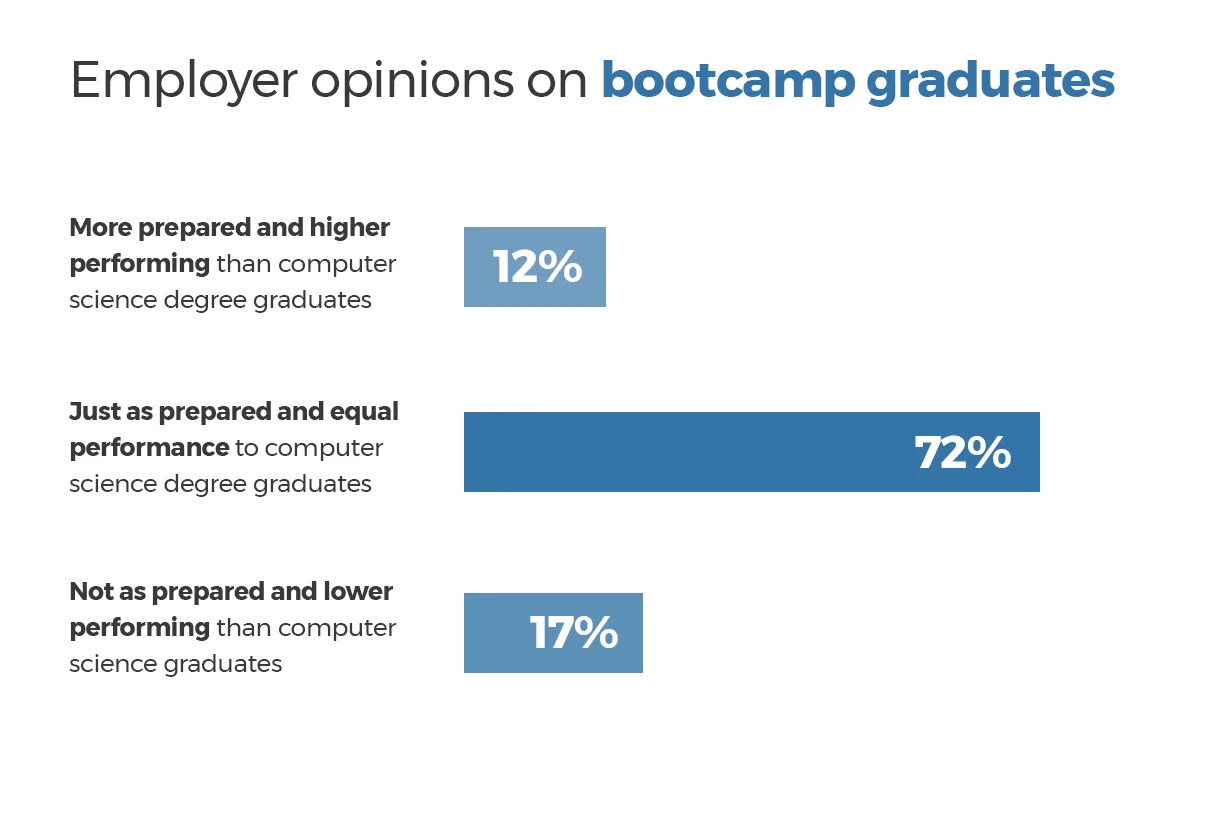
Image Source: http://blog.indeed.com/2017/05/02/what-employers-think-about-coding-bootcamp/
If you’re not keen on four years of studying, consider a bootcamp, where, according to Business Insider, the sole goal is ‘to take in students with minimal coding knowledge and shoot them back out a few months later as employable software engineers’. HyperionDev offers six-month, part-time online coding bootcamps in Full Stack Web Development, Mobile Development or Software Engineering. HyperionDev will help you get a tech job without a degree. Enroll today!
Web Development
Everything You Need to Know about the MERN Stack
Learn more about the MERN stack, a JavaScript development framework that’s designed to make the development process smoother.
The MERN stack is becoming increasingly popular and is a powerful stack to work in. If you’re able to build and deploy good MERN applications, it will greatly help your career prospects as a developer.
What is the MERN Stack?
A stack is the combination of technologies used to create a web application. Any web application will be made using multiple technologies (frameworks, libraries, databases etc).
The MERN stack is a JavaScript stack that’s designed to make the development process smoother. MERN includes four open-source components: MongoDB, Express, React, and Node.js. These components provide an end-to-end framework for developers to work in.
A Closer Look at MERN Stack Components
- MongoDB: A cross-platform document database
MongoDB is a NoSQL (non-relational) document-oriented database.
While conventional relational databases have a typical schema design based on columns and tables, MongoDB is schema-less. Data is stored in flexible documents with a JSON (JavaScript Object Notation)-based query language. The content, size, and number of fields in the documents can differ from one to the next. This means that the data structure to be changed over time.
MongoDB is known for being flexible and easy to scale. You can see multiple examples of real-life MongoDB applications here.
- Express: A back-end web application framework
Express is a web application framework for Node.js, another MERN component. Instead of writing full web server code by hand on Node.js directly, developers use Express to simplify the task of writing server code. There’s no need to repeat the same code over and over, as you would with the Node.js HTTP module.
The Express framework is designed for building robust web applications and APIs. It’s known for its fast speed and minimalist structure, with many features available as plugins.
- React: A JavaScript library for building user interfaces
React was originally created by a software engineer at Facebook, and was later open-sourced. It is maintained by Facebook, as well as a community of development companies and individual developers.
The React library can be used for creating views rendered in HTML. React views are declarative. This means that developers don’t have to worry about managing the effects of changes in the view’s state (the object that determines how components behave) or changes in the data.
Instead of relying on templates to automate the creation of repetitive HTML or DOM (Document Object Model) elements, React uses a full-featured programming language (JavaScript) to construct repetitive or conditional DOM elements.
With React, the same code can run on both the server and the browser.
React anchors the MERN stack. In a way, it’s the defining feature of the stack. It’s the one component that differentiates MERN from MEAN, another popular JavaScript stack that uses AngularJS (a front-end web application framework) instead of the React library.
- Node.js: A cross-platform JavaScript runtime environment
Node.js was initially built for Google Chrome, and later open-sourced by Google in 2008. It is built on Chrome’s V8 JavaScript engine. It’s designed to build scalable network applications, and can execute JavaScript code outside of a browser.
Node.js works without an enclosing HTML page, instead using its own module system based on CommonJS, to put together multiple JavaScript files.
The Benefits of the MERN Stack
The main advantage for developers using the MERN stack is that every line of code is written in JavaScript. This is a programming language that’s used everywhere, both for client-side code and server-side code. With one language across tiers, there’s no need for context switching.
For tech stack with multiple programming languages, developers have to figure out how to interface them together. With the JavaScript stack, developers only need to be proficient in JavaScript and JSON.
Overall, using the MERN stack enables developers to build highly efficient web applications.
Learn MERN Stack Development Online Today
This comprehensive full stack web development course will soon have you building your own dynamic web applications. The online bootcamp covers all the MERN stack components – JavaScript, MongoDB, Express, React and Node.js. You’ll also learn other in-demand languages like HTML, CSS, Python and Django.
This part-time online learning curriculum is the ideal way to get to grips with the MERN stack and future-fit your web development career.

Career Advice
The Growth of Coding Bootcamps
Course Report has just published its latest 2018 report on coding bootcamps. We dive deep into coding bootcamps in 2018 and how they’re faring, including the number of students, the average cost of bootcamps, which languages are most frequently taught, and more.
Course Report has just published its latest 2018 report on coding bootcamps. To get these results, they polled every full-time, in-person bootcamp, including online bootcamps, in the US and Canada with courses in web and mobile development. Read on to find out about coding bootcamps in 2018 and how they’re faring, including the number of students, the average cost of bootcamps, which languages are most frequently taught, and more.
Coding Bootcamps in 2018: Student Numbers
One of the key findings is that there has been massive growth in coding bootcamps in 2018. Check out these figures.
- There will be a 20% growth in students to an estimated 20,316 graduates in 2018 (up from 16,687 in 2017). 1,846 of these students graduated from online coding bootcamps – that’s a 173% growth rate in the number of students attending online coding bootcamps between 2017 and 2018.
- There is also a big growth in corporate training, which is up 111% from 2017. This translates into an additional 16,593 students from the corporate environment. Clearly, corporates are finding that upskilling their employees via coding bootcamps is a worthwhile avenue to pursue. A key reason corporates choose bootcamps for this upskilling, explains the Report, is because bootcamps iterate quickly and know how to teach the newest programming languages.
Here’s a table showing the total number of bootcamp graduates in 2018 (to compare: In 2017, there were 93,247 undergraduate computer science graduates from US universities in 2017. Bootcamps appear to be catching up. Read more about how long it takes to learn to code, and why you don’t necessarily need a degree.)
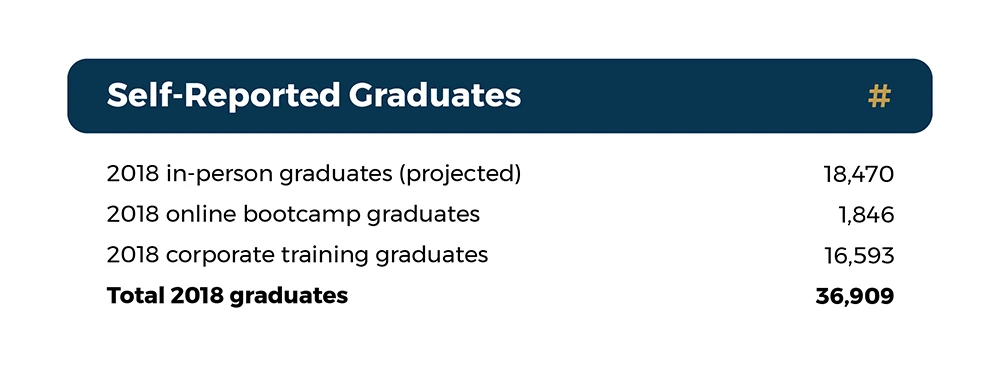
Image Source: https://www.coursereport.com/reports/2018-coding-bootcamp-market-size-research
Coding Bootcamps in 2018: Costs and Duration
When it comes to costs, as expected there’s a range, from free to $24,000 – the average tuition fee, however, is $11,906. In 2018, sixteen bootcamps offered deferred tuition or engaged in an income-sharing agreement with students. Read more about innovative ideas for financing your bootcamp.
Here’s a table showing tuition range.
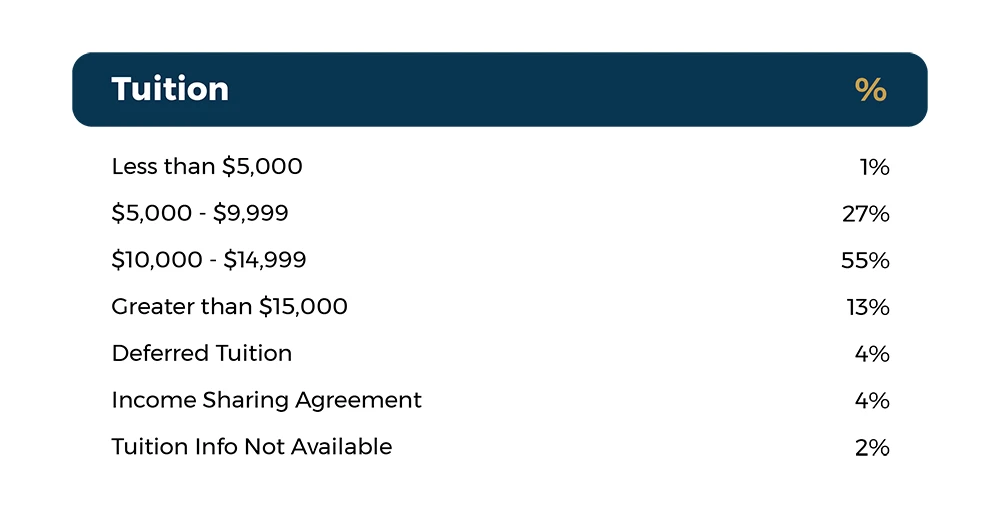
Image Source: https://www.coursereport.com/reports/2018-coding-bootcamp-market-size-research
As far as duration goes, there is a wide range from 4 to 104 weeks, with an average of 14,3 weeks. However, most courses are in the 12 week range. Remember: the report looked at full-time courses where students are expected to put in at least 40 hours per week. Online bootcamps tend to be longer at an average of 15.4 weeks and cheaper, with an average cost of $11,100.
Coding Bootcamps in 2018: Teaching Languages and Career Paths
The bottom line here is that many courses, 51% to be precise, use JavaScript as their primary teaching language for Full-Stack Web Development – even established bootcamps are altering their curricula to emphasise JavaScript.
Here’s a graph showing the top Full-Stack Web Development teaching languages:
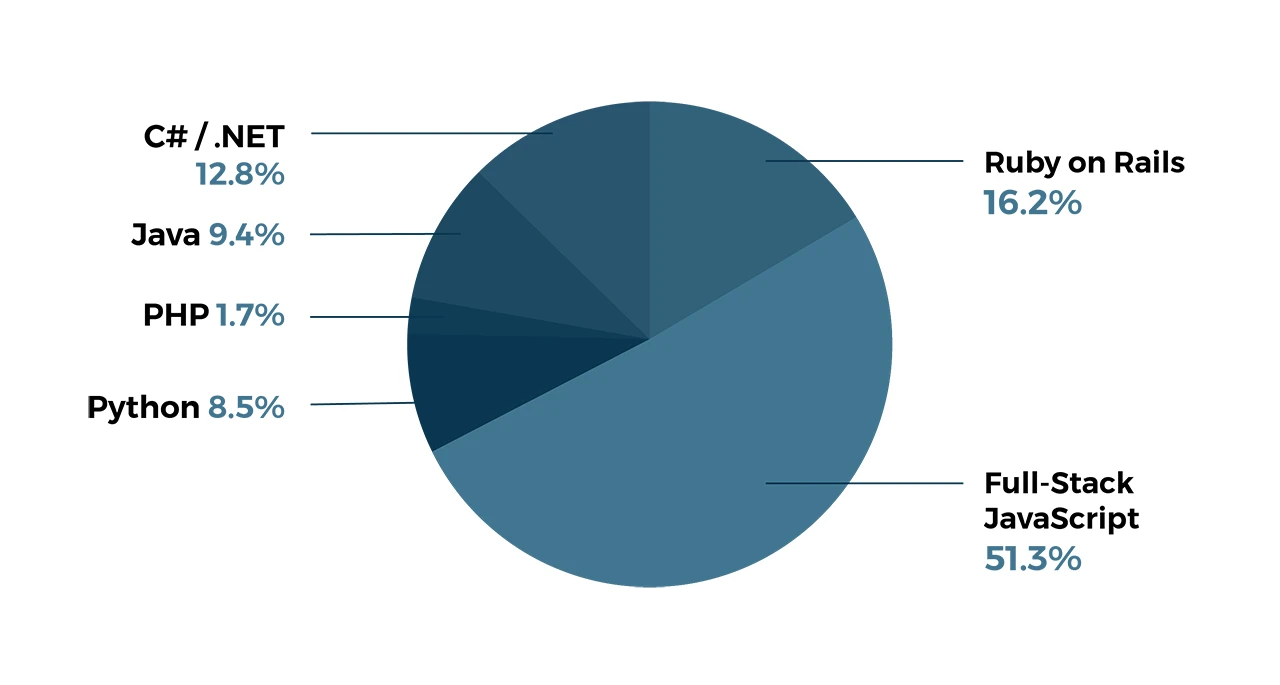
Image Source: https://www.coursereport.com/reports/2018-coding-bootcamp-market-size-research
As far as mobile development bootcamps go, there are three main languages taught: iOS with Swift, iOS with Objective-C and Java. Here’s the graph.
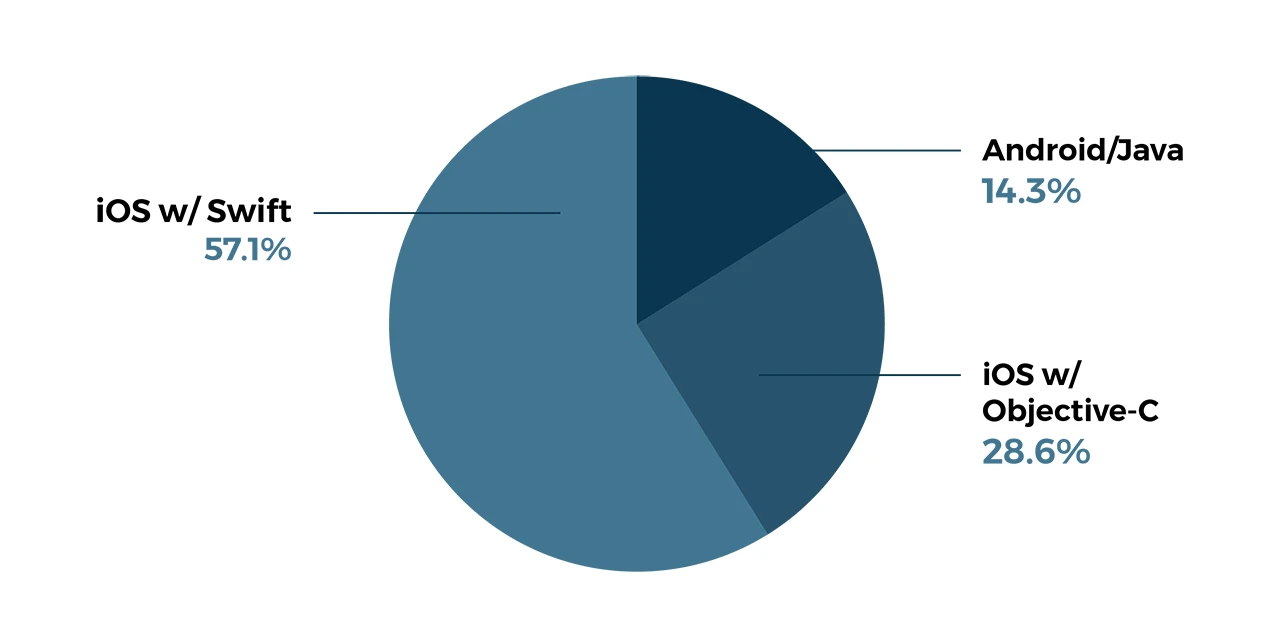
Image Source: https://www.coursereport.com/reports/2018-coding-bootcamp-market-size-research
Lastly, when it comes to potential career tracks, Full-Stack Web Development remains tops. 91% of coding graduates learn these skills. Mobile graduates follow behind at 5,1%. Check out the graph below.
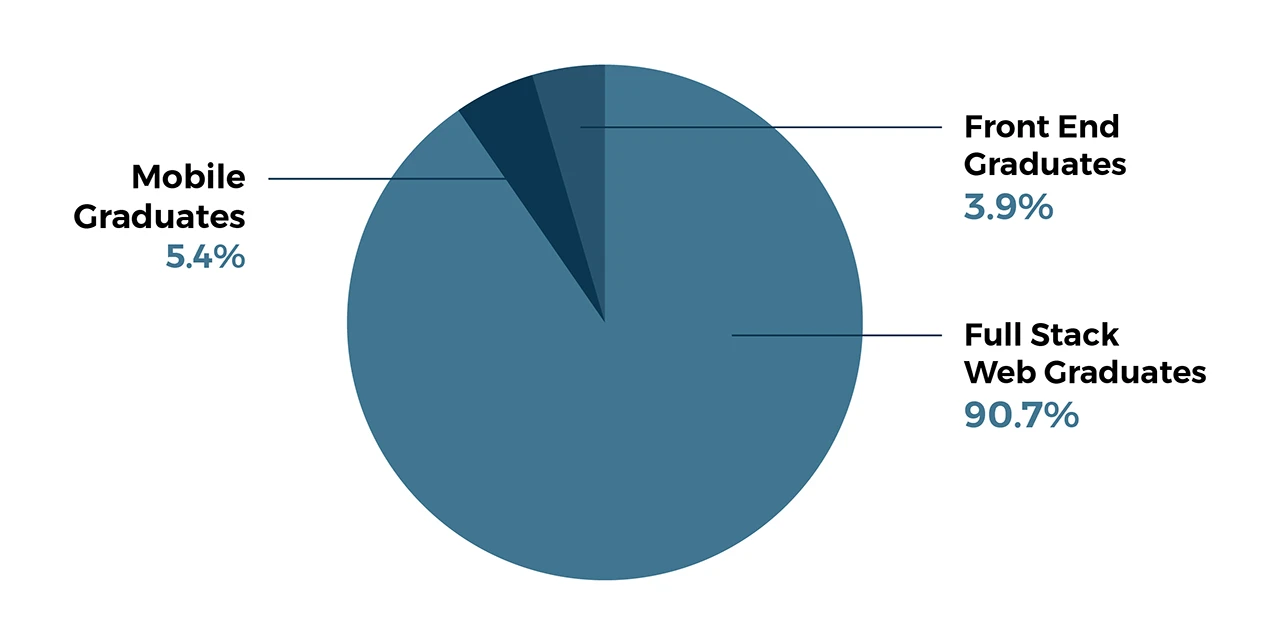
Image Source: https://www.coursereport.com/reports/2018-coding-bootcamp-market-size-research
In closing, coding bootcamps in 2018 are flourishing. Many students are choosing this option as the ideal way to learn valuable coding skills. If you’re thinking of signing up for a bootcamp, you may want to read this piece on five ways you can prepare for this exciting educational experience. If you’re wanting to learn how to code, consider signing up for one of HyperionDev’s six-month, part-time online coding bootcamps in Full-Stack Web Development, Mobile Development and Software Engineering. You’ll get your own personalised mentor to help you whenever you get stuck.

Career Advice
How To Negotiate Your First Salary As A Developer
Learn valuable strategies for negotiating your salary after you’ve been offered your first developer job. Proper negotiating techniques are vital when it comes to getting the best salary you can.
You’ve finished your bootcamp, been offered your first job as a developer, and now it’s time to close the salary deal. Salary negotiation is vitally important. ‘You should try to negotiate your salary for a few reasons,’ says Ramit Sethi, New York Times bestselling author of I Will Teach You to Be Rich on the Forbes website. ‘The first is that a single $5,000 raise in your 20s, if you properly invest it, can be worth more than a million over the course of your career. And that’s just one raise. People who negotiate tend to negotiate over and over again’, leading to increasingly higher salaries. The issue then is, how to negotiate your first salary as a developer, and this piece will give you a number of tips to ensure you negotiate as powerfully as possible.
Before outlining these strategies, here’s the good news: the salaries for developers are high. Techworld reports on salaries you can expect for web, mobile and software developers in various cities around the world, based on 2018 data from Payscale.com. In the US, for example, the salaries are as follows:
Mobile developer – $45,666 – $111,422
Software developer – $46,633 – $107,083
Web developer – $33,765 – $87,099
Let’s now look at how to negotiate your first salary as a developer.
Two Strategies for Salary Negotiation
Lifehacker proposes two key strategies to salary negotiation:
- Strategy One: The Noel Smith-Wenkle Approach
Noel Smith-Wenkle was a top job headhunter who used this approach for his clients to get the highest possible salary for them. According to this method, you must never tell the employer how much you want. The organization must name the first number. To avoid naming your number, tell the company that you’re more interested in doing [type of work] at the specific company than the salary when asked how much you want. Even if the company asks you straight out, just say you’ll consider any reasonable offer, and add that the company is in a much better position to make an offer based on what you’re worth. Once the offer is made, if it’s above your minimum, then you take it. If it’s too low, tell them, but not by how much.
- Strategy Two: The Jack Chapman Method
Career coach Jack Chapman, author of the book Negotiating Your Salary: How to Make $1000 a Minute, states five rules for negotiation:
- Only discuss salary negotiations after you’ve been offered the job.
- Let the other side make the first offer.
- When the offer is made, repeat it – and then stop talking. This is called “the flinch”; often your silence prompts a raise. The silence also gives you a chance to think while putting pressure on your potential employer.
- Research the market, the company and the value of your skills. Counter an offer with a well-researched response.
- Even after the deal is clinched, carry on negotiating: lock in other benefits, such as extra days leave or a company car etc.
These are good strategies for how to negotiate your first salary as a developer, but there are other issues worth keeping in mind. Let’s look at a couple of these.
Know the Industry Standards
Sethi, the NYT best-selling author mentioned above, notes that ‘80% of the work of negotiating should be done even before you walk into the room’. You need to know the general range of salary for the positions you’ve just been offered. Check out sites like Payscale.com, Glassdoor.com, and Salary.com. You may want to print out this research and bring it with you to the meeting. If you can, find someone who has worked previously at the company and can give inside information about the kinds of salaries on offer there. Remember, information puts you in a stronger bargaining position.
Show Your Worth
Here’s an important tip for how to negotiate your first salary as a developer – show your worth. How do you do that as a developer? Quite simply, you need a developer portfolio. For most employers, the emphasis has shifted – it’s not where you’ve studied or who you’ve worked for, but what you can do. To negotiate a top first salary, you need an excellent portfolio, which would be both diverse and include your best work. Top tools for building that developer portfolio would include WordPress, Wix.com, Squarespace and GitHub.
Being offered your first job is one of those big life moments. It can be exciting and terrifying simultaneously. Make sure you put your best foot forward and negotiate your first salary using the strategies and tips we’ve discussed.
If you’re keen to be in the position for great job offers, consider signing up for a HyperionDev coding bootcamp in either Full Stack Web Development, Mobile Development or Software Engineering. Each bootcamp is part-time and lasts six-months. In addition, you’ll get your own personalised mentor for those times when you get stuck or need some more help. Good luck with your job journey and salary negotiations.

Career Advice
5 Reasons to Consider a Bootcamp If You’re Unemployed
Should you consider a bootcamp if you’re unemployed or you don’t have sufficient work in your current industry? We explore salaries and job demand of developers today.
A friend of mine had been in the film industry for years, but that industry had experienced an unfortunate downturn, which meant she wasn’t getting the freelance work she needed to live comfortably. She was thinking of studying something else, she explained to me over a coffee we had a few months back, possibly tour guiding. I told her what I knew about learning programming, the various job opportunities out there and what the industry entails. I had no intention of changing her mind, but I ended up doing exactly that. She texted me a week back to thank me profusely. She had finished her online bootcamp and had recently landed her third coding freelance job. She ended the text by saying, ‘It was the best decision I ever made.’ Should you consider a bootcamp if you’re unemployed or you don’t have sufficient work in your current industry? Read on to find out.
Excellent Salaries
A key reason for considering a bootcamp if you’re unemployed is the salary on offer. The USA Today reports that that ‘More of the country’s highest-paying jobs are in technology, and they all require specialized training – but not necessarily an advanced degree. In return, workers can expect a salary of $100,000 or beyond.’
13 of the 25 highest-paying jobs are in tech, explains Glassdoor, a jobs and recruitment site. These include software development manager ($108,879), software engineering manager ($107,479) and Software Architect ($105,329).
Amanda Stansell, an economic research analyst at Glassdoor states: ‘For many years tech roles have dominated this list. This reinforces that employers are willing to pay top dollar for these positions.’ Stansell goes on to say: ‘You can get many of these jobs by attending a coding boot camp or by learning different coding languages.’
High Demand
If you’re unemployed, either because you’re between jobs or you’re struggling to secure your first job, you ideally want to be in an industry where there is high demand for your skills. Luckily, tech job demand continues to outpace supply.
Last year, the market grew about 2%, according to an annual report released by The Computing Technology Industry Association(CompTIA), one of the IT industry’s top trade associations.That equates to about 7.3 million workers. It seems clear that the digital economy is flourishing and tech jobs are in high demand.
Remember: tech jobs are not just in tech organisations. These days all industries require a tech presence of some kind. Take retail, says Stansell, they ‘need skilled tech workers to research and analyze data to further their business practices.’
More Time
When you’re unemployed, you likely to be low on money but time should be one resource you’ll have in abundance. You can turn this to your advantage if you’re wanting to learn programming quicker than someone who is learning part-time while holding down a job. Unfortunately, it’s impossible to say how long it will take you to learn to code. It of course depends on a number of variables, such as how proficient you want to be, how many languages you want to learn and much much time you can spend each day learning.
This year’s report on coding bootcamps by Course Report does provide some guidance, however. Most full-time bootcamps are in the 12 week range, where students put in at least 40 hours per week. Online bootcamps tend to be slightly longer at an average of 15.4 weeks.
Freelance and Remote Work Opportunities
If you’re unemployed another reason to enrol on a bootcamp is that you can almost start working straight away. Many companies offer remote and freelance working opportunities. Not only can you work from anywhere – the beach, the local coffee shop, your home – but the average freelance salary is even higher than a permanent salary: According to Glassdoor, you can expect to earn an average freelancer salary of $104,463 per annum in the United States. Many remote companies offer fantastic perks and benefits.
Here are some tips to start your freelance career. Remember, you can start implement these things as soon as you enrol on a bootcamp:
- Start a blog – backlink it to more visible blogs, and try and get some links from other sites to your blog
- Set up a website and include testimonials – include fresh, original content for Search Engine Optimisation (SEO) and make sure you include how people can contact you. Include relevant testimonials.
- Network, both online and in-person – as far as networking goes, set up a LinkedIn account. You can also sign up for GitHub, where you can host and review code, manage projects, and build software alongside millions of other developers.
Pay for Your Bootcamp
This final point concerns a potential obstacle that you may think stands in your way if you’re keen to enrol on a bootcamp, but you’re unemployed. You may think you can’t afford it. However, there are a number of ways of financing your bootcamp, including:
- Checking out if the bootcamp offers a scholarship – remember, there is no harm in asking. The worst thing that can happen is that you’ll be met with a ‘no’.
- Crowdfunding – this can done online. Digital Trends lists some of the best crowdfunding sites online including Indiegogo and GoFundMe.
- Choose a different payment plan – many bootcamps offer options, from paying the full amount at a slightly discounted rate upfront to paying off the course over the duration of study. Make sure you speak with someone about all the options available.
In closing, we’ve listed a number of reasons you may well want to consider a bootcamp if you’re unemployed. HyperionDev offers online coding bootcamps in Full Stack Web Development, Mobile Development and Software Engineering. You’ll get your own personalised mentor to help you whenever you get stuck.

Career Advice
How to get Promoted from a Junior Software Engineer Role
Top tips for fast-tracking your software engineer career, to make sure you’re first in line for that sought-after promotion.
After starting your software engineer career in a junior position, you’ll soon be looking ahead and hoping for a more senior role. A promotion means more challenges, more responsibility, and of course, more money at the end of the month. So how do you go about fast-tracking your progress, and making sure you’re first in line for that sought-after promotion?
Improve the Quality of your Code
High-quality code must be easy to read and understand. It should follow the standards of the coding language used to write it, and should have minimal (if any) bugs. Here are some simple tips to help get you there:
Use a code linter: A linter is a tool that analyses your code, to flag any programming or stylistic errors. A linter will warn you if your code is not compliant with the specifications and standards of the language you’re using. This helps to solve (and prevent) so many potential problems.
Comment your code in a meaningful way: Leaving comments on your code can be helpful to future developers, but make sure you don’t overdo or underdo your commenting. Too many comments leave the code cluttered and clumsy, while a lack of comments leaves no direction for other developers. Try to add comments only when they add value.
Test, test, test: In order to prove that your code actually does what it’s intended to do, you need to provide a sufficient amount of testing. Test-driven development (TDD) means thinking about test cases (expected cases, edge cases, failure cases) before you even get to your laptop and start writing your code. A TDD mentality helps you to get started with a clear idea of what your code needs as input, and what it should produce as output.
Code review: Code review tests how well your code can be understood by others. If someone else is able to read and understand your code easily, that’s a very good indicator of quality. It’s also important to have a new pair of eyes and a fresh unbiased perspective, after you’ve been working on a project for weeks or months.
Expand on Your Languages
Becoming proficient in more widely-used programming languages will help set you up to advance your software engineer career. Here are a few languages you should be sure to brush up on:
Java: Long-established and widely trusted, Java is a “write once, run anywhere” (WORA) platform used by around 90% of the world’s leading tech companies.
Python: Favoured by Google and NASA among others, Python is a must-learn language for coders looking to stay relevant and work their way up the ladder.
C++: This language has a good reputation for its efficiency when it comes to creating large-scale systems, like desktop applications and server platforms.
Work on Other Promotable Skills
Aside from the technical know-how, there are plenty of non-coding skills that will get you noticed by your supervisors, for all the right reasons. These qualities are highly prized in the development field:
- Good time management, which shows an ability to deliver projects on time
- Punctuality, which shows respect for your team and ties into good time management
- Strong communication skills
- Accountability, the willingness to take responsibility for the quality of your work
- Knowledge sharing, acting as a team player and helping others to succeed
- The ability to keep a clear head under pressure, showing you’ll be able to handle yourself when projects get stressful
- The ability to lead a team and work independently when needed
Never Stop Learning
Coders are expected to be lifelong learners, and rightfully so, considering the tech industry is continually evolving. Be open to learning from others, and take note especially of the advice you get from more experienced developers.
If you’re looking to improve your coding skill set or learn a new programming language, enroll in an online coding bootcamp to continue your learning journey. These valuable qualifications will help your software engineer career reach new heights.

Career Advice
Why Human Code Review Works Best in Online Coding Education
Human code review. It’s like Marmite - you either hate it or you love it. Either way, it’s a necessary and useful step in the web development process, especially if your approach is agile and you’re open to frequent, fast iterations.
Human code review. It’s like Marmite – you either hate it or you love it. Either way, it’s a necessary and useful step in the web development process, especially if your approach is agile and you’re open to frequent, fast iterations. Coders are not the only people who derive significant benefits from peer review – copywriters, accountants, and even lawyers have found it to be an invaluable tool. It provides a “second pair of eyes” to look over how an issue has been resolved and ask some fundamental questions before you push the “go live” button. In the educational context, we believe that human code review is indispensable. Here’s why:
Who Needs Human Code Review?
Human code reviewers ask questions like:
- Are there inconsistencies or logic errors in the code (a.k.a “gremlins that have crept in”)?
- Are the existing automated tests sufficient in their ability to account for any changes in the code?
- Are style guidelines being followed correctly?
As Palantir Technologies, suggests, code reviews are not only essential for newbies, they are helpful for even the most senior member of a team. This is because code reviews are not only about fishing out flaws and finding ways to improve on code. It’s about “mentorship and collaboration, and minimally diversifying the understanding of code in the code base.”
Human Code Review is a Two-Way Street
There seems to be a misconception amongst devs that code reviewers are laborious nitpickers who are out to poke holes in their code. We’d like to debunk this myth once and for all. It might surprise you to learn that code review is a two-way process – the reviewer benefits as much from the interaction as the coder does. This is because the process is a learning curve, created by the sharing of knowledge. The coder in question may use a technique or algorithm that reviewers can learn from. Likewise, reviewers may be familiar with newer programming techniques that may speed up the coding process or make it more efficient. No one wants to waste time going around in circles when the solution is a quick fix. That’s where experienced reviewers come in. As an educational tool, code reviews are the best way to find out whether you’re on the right track.
Be Prepared for the Working World
In the big wide world of web development, life is fast-paced and often, there is little room for error. As a web developer, you may find yourself in charge of large corporate databases or apps. Think about the development team behind the world’s largest stock exchanges. Now that’s some real pressure. That’s why human code review is so integral to the education process – it fosters a sense of accountability that will prepare you for the workplace. Your career as a web developer will require you to take initiative, make decisions on your feet and code until it becomes second nature. The code review process prepares you for the kind of environment where you are always improving and brushing up on your skills. For a coder, the learning process never ends.
Develop an Efficiency-First Mindset
If you’ve chosen the route of online coding education as a way to kickstart your career as a web developer, at some point you will be exposed to automated code reviewing tools. Feel free to use them, but as José Castro advises, automated review systems simply cannot replace human reviewers. Instead, it’s meant to save reviewers valuable time “by spotting those issues that are recurrent and can be spotted automatically; these can be coding style issues, performance, code complexity, etc.” A number of experts on the subject agree that nothing can replace a good set of attentive human eyes. Human code review is about achieving quality in the long term – it won’t only provide you with a quick fix, it will give you the opportunity to learn where you went wrong and why. As you become accustomed to the process of “code, review, repeat” you’ll find a rhythm that will accelerate your workflow and improve the quality of your code. The axiom, “quality over quantity,” has never been more apt.
Automated tools are effective, but human or manual code review is still the last port of call in the biggest dev houses across the world. A more experienced developer will understand the pitfalls of solving problems using code, in a way that a machine simply can’t. There’s no artificial replacement for human experience.
We believe in the power of human code review to produce students that thrive as career developers. In fact, we’ve based our whole new business model on it. Connect with us and find out how you can become a code reviewer with Cogrammar.

Career Advice
Five of the Best Remote Companies to Work For
The number of remote workers is definitely on the rise. Many people actually learn coding, so they can work remotely. What are some of best remote companies to work for? Let’s have a look.
A Swiss-based study found that 70% of professionals work remotely at least one day a week, while 53% engage in remote work for at least half the week. The number of remote workers is definitely on the rise. US market research firm Gallup found an increase in remote workers between 2012 and 2016, from 39 to 43 percent respectively. Many people actually learn coding, so they can work remotely. What are some of best remote companies to work for? Let’s have a look.
Started in 2005, this company is behind WordPress, Vault Press, Cloudup and others. Says the company website: ‘Everyone works from the location they choose.’ Consequently, workers are spread out over more than 50 countries. The way it operates is that you interview with Automatic and if you’re accepted, you’ll work together on a contract project lasting two to six weeks to see how you work together. Once a year the whole country meets up in different venues around the world for seven days.
Some perks include open vacation time (no set number of days per year), an allowance for a home office setup, open parental leave, paid two to three-month sabbaticals every five years and a branded laptop at your four-year anniversary.
This social media management company has a fully remote team in 15 countries, 11 time zones and 42 cities. They have a a 45-day contract period to see how things go and they are especially interested in people who have worked as freelancers or on startups.
Expect multiple Buffer international retreats every year where the whole team gets together – their most recent trip was to Cape Town, South Africa. (You can even check out their video of their latest trip here.) Additional perks include: a free MacBook, company equity and paid family leave, as well as a monthly allowance for education.
This is a fully distributed company that has over 130 employers who work remotely from more than 15 countries. They offer web-based services that help companies automate the tedious and repetitive parts of their work. Zapier has even published a book on working remotely, titled The Ultimate Guide to Remote Work, which can be downloaded for free.
Perks include 14 weeks of parental leave, unlimited paid time off and up to $10 000 for relocating elsewhere (but this is only if you’re moving away from the Northern California Bay Area), healthcare, a retirement plan, profit sharing, computer and software setup, and two annual company retreats per year.
This is an analytics company that helps businesses understand their web and mobile site visitors. Over 216,273 companies in 184 countries use Hotjar to improve their sites. Although headquartered on the island of Malta, the company operates on a fully remote basis.
Perks include the following: 40 days of planned annual leave, €4000 home office budget, €2000 per year holiday budget, €2000 per year working together budget, €1000 per year personal development budget, €200 per month working space allowance, €200 per month wellbeing allowance, 16 weeks paid parental leave, a fitbit and a free Kindle paperwhite.
David Darmanin, the CEO of Hotjar, explains the biggest obstacle to remote work: ‘The main one is lack of face time and building one-on-one rapport. We overcome this by using tools like hangouts and hipchat video… but more importantly we do company retreats every 6 months in different places around the world. Our last event was a skiing trip in Utah.’ And the biggest advantage – the ability to hire the best people from anywhere in the world.
This company offers live chat software and has its own specific culture based on the following: ‘Chill out, Help each other grow, Assume good faith, Make it happen, Practice empathy, and Speak your mind.’
Some interesting perks offered by this distributed company include an unplugged vacation bonus, where workers are given a $1000 bonus for taking at least five days off without checking in with the company. They also offer charitable donation matching. More routine perks include flexible scheduling, internet/coworking stipends, professional development budget and 12 weeks of paid parental leave.
Listed above are five of the best remote companies to work for. There are other benefits to working remotely besides the perks offered by the various companies such as:
- A Canada Life Survey found that remote workers perceive themselves to be more productive – they rank their productivity at 7.7 out of 10, compared with a score of 6.5 given by those in open plan offices.
- Studies have found that remote workers have lower stress levels.
- More time for exercise and you can wear what you like, states The Telegraph.
- It’s better for the environment. Forbes states that the average commute in the UK is between 60-80 minutes. Remote work reduces our carbon footprint and allows companies to be more green.
- And for the company, it’s likely to reduce costs – think about lower leases, reduced expenditure for furniture, equipment and office supplies.
In closing, this piece has outlined the benefits of remote work and some of the best remote companies to work for. If this kind of work appeals to you, think about signing up for one of HyperionDev’s six-month, part-time online coding bootcamps in Full Stack Web Development, Mobile Development and Software Engineering. You’ll get your own personalised mentor to help you whenever you get stuck and coding skills are always in high demand at these remote companies.

AI Engineering
Facial Recognition Technology: Pros & Cons
Facial recognition technology is an exciting, innovative branch of biometrics, but it is not without its disadvantages. We explore the pros and cons in this piece on facial recognition technology.
Facial recognition systems were considered the stuff of sci-fi novels and spy movies for many years, until they became an everyday reality. Is this technology ushering us into a more connected way of living, or is it an invasion of our most basic rights to privacy?
What is Facial Recognition Technology?
Facial recognition is a type of biometric technology, meaning it applies statistical information to biological data. Other types of biometrics include voice recognition, fingerprint matching and retina scanning.
Facial recognition software has the capability to identify a person, or verify their identity, by analysing a digital image of their face. The technology works by mapping that person’s facial features, and saving this unique information as a “fingerprint”. The software can compare an image of a person’s face to the information saved in the database, to confirm their identity.
Did you know? The human face has a total of 80 “nodes” that can be used in facial recognition, but it only takes 14-22 nodes to identify a person’s face.
This type of technology is mostly used for security and data protection purposes, but other uses are becoming more widespread. Let’s say you share a snap of you and your besties on Facebook. The social network’s algorithms will recognise your friends’ faces based on their own profiles, and suggest that you tag them in the photo. This is just one small example of how facial recognition is becoming part of our daily lives.
Advantages of Facial Recognition
Security: Most obviously, facial recognition systems can help to improve security for businesses, which is especially useful for those dealing with sensitive and confidential information. A biometric security system ensures that every individual entering a building or area is recognised and accounted for. Trespassers can be quickly and easily identified.
Cost-efficiency: Because facial recognition technology is automated, it also reduces the need for security guards to personally verify a match. This means businesses can save costs on hiring security staff and other security measures.
Safety: Automated security processes also mean that fewer security personnel would be put in potentially dangerous situations.
Convenience: With our personal information becoming more and more digitised, facial recognition can help us on an individual level too. Using biometrics instead of a password to secure a smartphone or laptop can keep our device safe from prying eyes. It’s also easier than memorising multiple passwords and PIN numbers.
Connection: There are some exciting possibilities for facial recognition on a social level too. Imagine meeting a room full of strangers, and having an easy, almost immediate way to find out more about them, seeing what you have in common with each one.
Of course, there’s a fine line between what some people would see as harmless or beneficial, and what some would find highly intrusive.
Disadvantages of Facial Recognition
With facial recognition becoming ever more prevalent in day-to-day life, there is a big concern about the impact it could have on personal privacy.
Exposure: Insiders speculate about potential situations like using facial recognition to determine who around you belongs to a certain cultural or religious group, or who has a criminal record. This application might make the user feel safer or better informed, but it would be invasive to those on the receiving end.
Safety: In an era where online bullying has become prevalent, this type of technology could also leave more people vulnerable to stalking and harassment in the real world.
Legislation: There are concerns that biometrics are progressing too rapidly for regulators, legislators, and the judicial system to set up standardised rules and precedents around their use. For example, in the USA, the Fifth Amendment protects people from giving up information that could incriminate them. This would include information like a password or PIN. However, a thumbprint or your face shape isn’t a piece of information you know; it’s something you are. So, is facial recognition covered by the Fifth Amendment?
An Innovative New Era for the Tech World
Despite the very real downsides to facial recognition and other biometrics, there is no doubt they are extremely exciting fields of research.
If you envision yourself coding secure, industry-leading technology like this one day, your first steps should be to get familiar with the programming languages that are most useful for facial recognition applications. These languages include Python, which is great for image processing and motion detection functions, and Java, which allows you to manually code your own functions.
Sign up for a HyperionDev coding bootcamp, to start learning all you need to know about coding cutting-edge software in Python, Java and other in-demand programming languages.
Career Advice
Is JavaScript a Hard Programming Language to Learn?
Are you thinking about learning JavaScript in 2018? You probably should be. The State of the Developer Nation report found that JavaScript is the most popular programming language, used by 9.7 million developers. So is JavaScript a hard programming language to learn? Read on to find out.
Are you thinking about learning JavaScript in 2018? You probably should be. The State of the Developer Nation report, which analysed more than 21,700 developers in 169 countries, found that JavaScript is the most popular programming language, used by 9.7 million developers. So is JavaScript a hard programming language to learn? Read on to find out.
Why is JavaScript so Popular?
What is JavaScript and why is it such a popular language? JS is a scripting language, which means it supports scripts – such languages are often interpreted (rather than compiled). In essence, this means you can make changes to your code and run it again straight away to see the effect of your changes – you don’t need to recompile the code. JS is primarily used to build and control dynamic website content like animated graphics, interactive forms and scrolling videos.
Here are some reasons why JS is such a popular language:
- It’s on every platform imaginable, including browsers, mobile and desktop applications, IoT devices, etc.
- It’s a great foundational language for newbies. Script languages are generally easier to learn than compiled languages like C++, states Business News Daily.
- Many of the world’s top websites and apps – including Paypal, Netflix, LinkedIn and Uber – all run on JavaScript, or more precisely Node.js, the JavaScript environment that executes the code.
- JavaScript frameworks— or collections of JS code libraries – are frequently used. This allows developers to perform routine tasks without rewriting code every time.
- According to The Hard Refresh, Indeed lists more than 28,000 JavaScript developer jobs, while Glassdoor lists the average JavaScript developer salaries at $72,500 per year. Not too bad!
These are all great reasons, but is JavaScript a hard programming language to learn? And how long will it take you to pick it up?
Learning JavaScript in 2018
Although JavaScript is a step up from HTML and CSS, which you can learn in under a month, you should still be able to master JS in a matter of months, not years, especially if JS is not the first programming language you’re learning. Ideally, you want to first learn HTML and CSS before moving onto JS. Remember: JS is programming and not a markup language. In JS, each command defines an individual action. While JS is more complicated than HTML, a markup language, you can actually start writing useful JS quicker than with HTML. The reason for this is that to use a markup language properly you need to know all of it, otherwise you can’t mark up pages correctly. However, with a programming language you can still write programs with the part you do know, but you do need to know that part properly.
Arielle Kimbarovsky, Digital Marketer at UX design and mobile application development agency Codal, says on the Hard Refresh: ‘One critical thing to keep in mind when learning JavaScript (regardless of your own learning needs or style) is to resist the temptation to go too fast and speed through the fundamentals… JavaScript is a language that builds on itself. This makes more involved JavaScript code a lot harder to write and understand if you don’t have a solid handle on the basics.’
The good news with coding is that you can teach yourself. ‘Almost 90% of all developers say they have taught themselves a new language, framework or tool outside of their formal education,’ says 2018’s Stack Overflow Developer Report. Alternatively, you can learn online via a mentor-led bootcamp, where you receive expert advice when you get stuck. HyperionDev’s bootcamps are an example of this kind of mentor-led learning. The Full Stack Web Developer bootcamp would cover JavaScript among other languages.
You’ll need to consider the following when deciding if you want to go it alone or sign up for a class:
- Do you have prior coding experience?
- Are you able to set up your own curriculum?
- Can you cope psychologically with feeling stuck or in despair, because you don’t understand something? If don’t like those feelings, you may well want to consider a mentor-led course.
- What are your time commitments? It’s likely that studying alone will take longer than a structured course.
- Is a network of fellow programmers important to you?
- How easy will you be able to look for work without the support of an institution?
Whatever you decide, know that there are resources out there for learning JS including:
- Developer forums like Stack Overflow, Codepen and Github.
- Online tutorial – Coursera.
In conclusion, in answer to the question, is JavaScript a hard programming language to learn? the response is ‘no’. In fact, ThoughtCo. states: ‘In many ways, JavaScript is one of the easiest programming languages to learn as your first language.’ Because it’s an interpreted language within the web browser, you can write small pieces of code at a time while testing it in the web browser as you go. If you’re keen to learn JavaScript, consider signing up for HyperionDev’s online, part-time Full Stack Web Developer bootcamp.

Career Advice
Coding for Beginners: Our Advice On What to Master First
So you’ve decided that coding is definitely something you want to dive into - the job prospects look fantastic and the industry is booming. Here’s our advice on coding for beginners, and particularly, our perspective on the fundamentals that you should aim to master as soon as possible.
So you’ve decided that coding is definitely something you want to dive into – the job prospects look fantastic, the industry is buzzing and you’re fascinated by what goes on in the backend of the internet. But what next? Firstly, every aspiring dev enters the coding arena with a different level of experience – some already have an understanding of the basics, while others are literally starting at the very beginning. Your first port of call? Be cognisant of where you are as a first-starter and be patient with yourself – learning how to code requires an investment of time and resources, especially mental ones. Put on your proverbial seatbelt, because it’s going to be an interesting ride. Here’s our advice on coding for beginners, and particularly, our perspective on the fundamentals that you should aim to master first.
Get to Grips with Frameworks and Libraries
According to Rainer Hahnekamp, one of the first things that beginner coders need to learn is that code already “exists in the form of a library or a framework.” Understanding this will save you precious hours writing a buggy version of a library instead of consulting the right, existing library in the first place. Well-known libraries include Moment.js, Jackson, Lodash and Apache Commons. What Hahnekamp argues, is that it is important for beginner coders to shift their mindset away from developing everything from scratch, to exploring and using libraries.
So what’s the difference between a library and a framework? Put simply, a library is a “file containing re-usable code that can usually be shared among multiple applications.” On the other hand, a framework “can be everything you use in application development.” Some of the most popular frameworks include: Twitter’s Bootstrap, ZURB’s Foundation, Front-end Boilerplate or Themosis.
An alternative, interesting perspective on how rookies should approach coding is presented by Alex Devero, who argues that sometimes devs are faced with the decision about whether to learn a language or use a framework instead. What Devero learnt was that if you have a specific idea in mind for what you want to build, and you’re pressed for time, a framework might just be your best bet. However, you’ll need to bear in mind that that’s not a “one size fits all” solution. Best practice is to put the time and effort into learning a language. Once you’ve mastered it, you can turn to libraries and frameworks for “shortcuts.” In the long term, becoming a dev is about getting through the initial learning process, investing in some good trial and error and along the way, learning from the experience of others.
Find a Mentor
At the beginning of your coding journey (and even years into your career), you will most likely have moments of bewilderment – moments akin to what writers go through with “writer’s block.” In those moments, devs with mentors are able to sidestep curveballs and find solutions much faster than those without mentors. Knowledge and skills transference is one of the key benefits of the mentorship – you may find that the learning process becomes so much more efficient when feedback and help is easily accessible.
Coding can be daunting, and intimidating, so having a mentor is an indispensable tool for overcoming hurdles, of which there will be many. We know it can be a bit scary – approaching a mentor can be compared to asking someone on a date. But once you get passed the initial ice-breaker stuff, you’ll find that your mutual love for problem-solving will bridge any other uncomfortable gaps. Here’s one thing you may not realise – mentors benefit just as much as mentees do. Having a mentee to assist and advise, keeps mentors on their toes and makes sure they’re always operating in beta mode. In our experience, coders who mentor are always on top of their game.
Master the Mindset
Coding requires mental stamina. Remember that. And the coding mindset is less about book learning and more about practical experience. Every experienced dev will tell you that they spent late nights pondering problems and trialing lots of solutions before they felt like they were close to creating something that worked, even at half the capacity they needed it to. Time is your most precious resource. And practice, practice, practice, has never been more relevant to the process of learning how to code. A word of advice? Develop an allergy to being too hard on yourself. The quicker you can get used to failing, the easier it will become to start succeeding. As Yi-Jirr Chen puts it: “It’s OK to fail. Coding is all about failing and fixing things, and about learning how to do things better. If you don’t build things and work on areas that you know you are weak on, you’ll never get better.”
As a coding newbie, the best advice anyone can ever give you, is to get stuck into the nitty-gritty as quickly as possible. The process of learning how to code should be an immersive one. Talk to people, ask for advice, read as much as you can and start building a support network for yourself. Thankfully, there are so many resources out there for aspiring devs, that choosing coding as a career has never held better prospects.
If you’re a coding beginner, you’ve come to the right place – our mentors are ready and willing to provide you with invaluable guidance on what your next steps should be. Connect with a mentor – we look forward to meeting you.

Career Advice
Developers in 2018: How Coding Became Cool
It used to be the case that developers were regarded as geeks who sat behind their computer screens all day speaking in tech, but that has definitely changed. Coding has become cool and the image of developers in 2018 is trendy. Here are some reasons coding has become cool.
It used to be the case that developers were regarded as geeks who sat behind their computer screens all day speaking in tech, but that has definitely changed. Coding has become cool and the image of developers in 2018 is trendy. In fact, The Harvard Business Review calls Data Science the ‘sexiest job of the 21st century’. Here are some reasons coding has become cool.
Become a Game Designer
As a coder, you can become a game designer and games are cool. Game designers are responsible for developing storylines, puzzles, challenges and level divisions in games. They may well need to collaborate with content developers, artists, programmers and other technical coworkers. However, the central figure is the designer who comes up with the overall concept of the game. The designer is responsible for setting the rules of the games and creating a particular atmosphere for the players.
According to Learn.Org, game designers need a wide range of skills including the following:
- Capacity to work in a fast-paced environment
- Excellent problem-solving skills
- Ability to strategise on the job – e.g. exploring potential moves in a game
- Vivid imagination – good games need fascinating plots, settings and characters
- Ability to collaborate in teams
- Coding skills
You Can Create Cool Stuff
Coding lets you unleash your creativity and entrepreneurial spirit. Knowing how to code means you can create a website to get your business idea off the ground. Or if you’ve had a brilliant app idea, you can make it happen. Coding is one of the easiest ways to solve practical problems without needing large machines or lots of raw materials – you only need a computer and preferably an internet connection. The end product just depends on your coding skill and how good your idea is, and not other hard-to-control factors.
Here are some fun coding project ideas:
- A web app using HTML, CSS and JavaScript – for example, a game or quiz, a calculator, a colour picker or a word counter.
- A data-driven web application like a social media site.
- Some web-based animation – although Flash and JavaScript have been used for years for creating web-based animation, this is falling away. CSS animation has stepped in to fill the gap.
The Tech Community is Awesome
One of the key reasons coding has become cool is that the tech community is great. There are many reasons to join a tech community, whether it’s online or in real life, including: interacting with like-focused individuals, increasing your visibility and chance of finding work, learning the latest tech knowhow, problem solving in real time and learning from experts.
Here are some online tech communities worth checking out:
- Stack Overflow – this is one of the biggest software communities on the internet.
- GitHub – this is mostly for version control, but it’s also a ‘Developer’s Disneyland’, because you can access the code of many world-famous apps.
- Google Developers – this is a platform created by Google to build software using Google’s products such as Google Maps.
- Developers Facebook – this is similar to the Google platform, but you use Facebook’s API and integrate your apps into Facebook.
Because The Job Demand is High and You’ll Get Paid Well
Coding has become cool because coders are in demand and the salaries are good. The average US salary for a front-end web developer, for example, is $88,680, states PayScale, with salaries rising for senior developers to $119. There is also a 20% US job growth rate up to 2022 for these developers, claims TEACH magazine.
Software Engineering is predicted to grow at a startling 24% employment growth between 2016 and 2026, according to the Bureau of Labor Statistics. In essence, tech jobs are on the rise. According to Modis, there’s an anticipated 12% growth in tech employment by 2024 (compared with 6,5% projected growth in other industries). By 2024, there will be 48,500 additional tech jobs.
There are many reasons coding has become cool. From having excellent job opportunities to solving real-world problems, coding is a skill that opens so many doors. If you’re wanting to learn how to code, consider signing up for one of HyperionDev’s six-month, part-time online coding bootcamps in Full Stack Web Development, Mobile Development and Software Engineering. You’ll get your own personalised mentor to help you whenever you get stuck.
Still have questions?
Contact our Admissions Team, and a real person will get back to you.