
Career Advice


Career Advice
Find Your Developer Niche And Stand Out
The great thing about becoming a developer is that once you’ve learnt coding skills, there are so many ways of applying them. It’s important to work out what kind of developer you want to be. This piece will help you find your developer niche. Let’s start by taking a deeper dive into the kinds of developers out there.
The great thing about becoming a developer is that once you’ve learnt coding skills, there are so many ways of applying them. It’s important to work out what kind of developer you want to be. This piece will help you find your developer niche. Let’s start by taking a deeper dive into the kinds of developers out there.
The Options: What Kind of Developer Should I Be?
There are a wide variety of different kinds of developers in high demand. Here are some of the alternatives:
Web Developers – the Creative
Of course we’ve all heard of web developers, but this developer field can be further subdivided into back-end, front-end and full stack web developers.
The front-end, or ‘client side’, is everything the user experiences, from the stunning layout to the cool buttons and graphics. The main purpose of the front-end is to deliver interactivity and to display content in an appealing way – ideally, you’re a pretty creative kind of developer if you want to follow this route. The back-end, on the other hand, does things like work out calculations, follow business logic, interact with the databases etc. Back-end developers need to get to grips with programming languages, databases and server architecture – you’re a logical, rational type. A full stack developer, however, is able to do both front-end and back-end web development.
The good news is that the demand for web developers is continuing to grow: the Bureau of Labor Statistics notes that the projected growth for this field is 15% from 2016 to 2026, much faster than the average for all occupations.
App Developer – the People Person
The average US annual salary for Android Developers is $97,986, according to Glassdoor. Because Android dominates the smartphone market – at 86% of the total market share, according to Gartner – and it’s a free and open operating system, it’s no surprise then that many developers want to start developing for the Android platform. There’s also high demand for app developers: according to an article in Forbes, the 13 top tech skills include Mobile Application Development.
What kind of developer do you need to be to become an app developer? Ideally, you would be someone who is meticulous, capable of absorbing a lot of information fast, a people person who can attend client meetings and a proficient coder in multiple programming languages, including Java, HTML5, Objective-C, C++, C#, Python and Swift.
Software Engineer – the Super Rational
As a software engineer, you’re creating software. So if you’re someone who wants to develop cool video game computer software or you want to make the software run faster on different computers or those that have different operating systems, you should think about software engineering. You’re basically using computer skills to solve problems with software and software is everywhere.
To become a software engineer, you need to be an analytical person capable of:
- Deductive and inductive reasoning
- Mathematical reasoning
- Original thinking
- An understanding of what people want from their computers
Besides the developer specialities we’ve mentioned, there are of course many other kinds of developers – such as cyber security specialists, data scientists, big data specialists, devops developers, etc. How then do you find your developer niche? In essence, it’s about getting to know yourself better.
Your Developer Niche: Getting to Know Yourself
To find your ideal career path, you need to understand both your strengths and your weaknesses, as well as your passions and your basic personality.
To work out your strengths and weaknesses, write down all the activities in which you participate every day. Studies have shown journalling is an excellent method for becoming more self-aware and reflective. Now rank each of these activities, from 1-5, in terms of competency and enjoyment. This will help you decide on your strengths and weaknesses.
In addition, try the following:
- Try something new. You won’t discover your ability to code, if you don’t try coding, for example. Think about enrolling on a free bootcamp prep via HyperionDev.
- Watch for signs of excitement, states Entrepreneur. When you do things you are good at, your excitement becomes more apparent – your pupils dilate, for example, or your speech is faster and more fluid.
- Ask others what you’re really good at. You may find yourself surprised. Sometimes we don’t perceive ourselves objectively.
And lastly, take a personality test to get a better sense of your natural proclivities or personality. Two popular tests include the Myers-Briggs, which divides people into sixteen personality types based on research by the famous psychologist Carl Jung, and the Keirsey Temperament Sorter, which separates people into various temperaments.
In closing, this piece has looked at finding your developer niche. The wonderful thing about coding is that there are so many career possibilities – and so many kinds of developers – from the super analytical to the very artistic. If you’re keen to change careers to coding, consider signing up for one of HyperionDev’s six-month, part-time online coding bootcamps in Full Stack Web Development, Mobile Development and Software Engineering.

Career Advice
Top Coding Tools for Beginners to Look Out For
Here are a few recommendations for the best coding tools, learning opportunities and resources to improve your productivity when you’re starting to code.
As a beginner in the programming world, you might feel a little overwhelmed by the thousands of coding tools and resources out there. Some will make your life much easier, while some are not especially useful, and others might actually slow you down. Finding the right tools can boost your productivity, and make your learning curve as a beginner coder more manageable.
Here are a few recommendations for the best coding tools to get you started:
Text Editors
A text editor is an essential coding tool. It’s a programme that types simple text, without the formatting of a word processor programme. With no margins or line breaks, these editors are ideal for typing up clean lines of code in a variety of programming languages.
Sublime Text is a cross-platform text editor that works for Mac, Windows and Linux. It’s a great first-time text editor for new coders, allowing for an easy transition from ordinary word processor programmes.
Notepad++ is an open-source code editor for Windows, which can support several coding languages. It includes lots of helpful features for newbies, including a built-in FTP plugin that lets you open and edit your files directly on your web server.
Brackets will appeal to Adobe fans; it’s created by Adobe and designed for seamless integration with the other products in their suite. It has minimal design but powerful features, such as a live preview functionality, and a tool that allows you to extract data directly from your PSD files. Brackets also runs across Windows, Mac and Linux.
Atom, developed by GitHub, is another text editor that comes highly recommended for beginner coders. It’s an intuitive cross-platform editor, and includes various open-source packages for easy customisation (much like WordPress themes).
Chrome Extensions
Google Chrome is the biggest web browser, and there are many extensions available for developers working in Chrome. An extension is a small software programme that you can install to customise Chrome functionality to suit your needs.
Web Developer is an extension especially for developers and designers; it adds a toolbar button to the browser, with a number of handy day-to-day development tools. With Web Developer, you can write and edit HTML and CSS, disable and enable cookies, mark links as visited or unvisited, and display important image attributes. The extension also makes it easy to outline objects on a web page.
Window Resizer for Developer allows you to resize your browser to various sizes, which is great for creating responsive designs that must run over multiple platforms (including mobile).
Lorem Ipsum Generator allows you to add dummy text to your website layout, quickly and easily.
WhatFont helps you to identify which fonts have been used on a website, by simply hovering over them.
ColorZilla allows you to copy exact colours from a website, straight onto your clipboard.
General Learning
To develop solid coding skills and fast-track your entrance into the world of development, sign up for an online coding bootcamp with HyperionDev. You can upskill with a short course in just three months, and learn an in-demand coding language like Python, Java, C# or C++.
Mentoring also plays a big role in your growth as a developer. One-on-one time with an experienced mentor is an invaluable coding tool for those finding their feet. HyperionDev provides mentoring and on-demand code review as part of the learning experience.
Career Preparation
When it’s time to market your skills to prospective employers, there are some great tools specifically designed to guide you through the application and interview process in the tech space.
Interview Cake is a website that gives you the chance to practice answering programming language-specific interview questions. It also gives you a guide to the typical interview formats used by today’s major tech firms.
Break Into Tech gives job-seekers some expert advice on creating a résumé and cover letter, as well as how to ace tech industry interviews. The system was created by a former LinkedIn and Apple employee, who also offers individual coaching calls and application reviews.
Coding tools, expertly designed courses and interview preparation resources like this give you a better chance of getting ahead in an increasingly competitive industry.

Career Advice
5 Signs It’s Time To Switch Careers
Did you know that people are likely to change careers five to seven times during their working life? Here are five signs that it might be time for you to switch careers into tech.
When your alarm went off this morning, you pressed the snooze button four times. You just couldn’t get moving. Eventually, you dragged yourself out of bed, downed two cups of coffee, sat in traffic for an hour and stumbled into the office. The cheerful hello’s of your colleagues made you want to scream and the sight of the boss resulted in your feeling ill. The thought of sitting at your desk, watching the clock inch its way forward, made you want to run out the building and just go anywhere else. Could it be time to switch careers?
According to Entrepreneur, people are likely to change careers five to seven times during their working life. Here are five signs that it might be time for you to switch careers.
1. The Company Is Driving You Crazy
It could be your work environment that’s making you see red. Perhaps it’s the limited scope of your job or you’re not being utilised to your full potential.
The National lists a number of signs that the time is right to jump ship including:
- Your skills and responsibilities are not a good match with your abilities.
- The salary, even if it’s large, is not enough.
- You’re not being used to your full potential.
- There is no room to grow.
- You feel overworked and under-compensated.
- You’ve lost your passion and enjoyment for your work.
It’s often easier to continue in a straight line than to shift direction. But think about it: you won’t know what is around the next corner if you don’t make that turn. Perhaps now is the right time to think about what you really want from a job. If your current work is not the right fit for you, it might be time to jump ship.
2. You’re Worried About Automation
Automation is likely to hit certain industries hard. If you’re in bookkeeping, for example, you have a 97.6% chance of being automated. Software developers, on the other hand, only have around a 12.8% chance. Check out this nifty guide to assess the likelihood of your job being automated. It could be time to switch careers if you’re in an industry that’s likely to be automated.
3. Economic Reasons
Besides automation, some industries get hit hard during economic downturns. Says Entrepreneur: ‘A job in finance was lucrative in 2003. By 2008, not so much. If an economic or technological change has negatively impacted your current field, a change may be in order whether you were looking for it or not.’ The good news is that software developer jobs are predicted to grow by 17% from 2014 to 2024, according to the US Bureau of Labor Statistics. This is much faster than the average for other occupations, which is at 7%.
4. Poor Match Between Your Talents And Your Job
Perhaps you’re a teacher who doesn’t enjoy high-intensity personal interactions, or an engineer who is bored by analytical work. If your talents and interests don’t match your field of work, it could well be time to switch careers.
Here are some ways to discover your talents and interests:
- You won’t discover you have a musical talent, if you never try an instrument. Attempt to try something new every week. If you want to try out coding, think about enrolling on a free bootcamp prepl via HyperionDev.
- What is easy for you to do? Ask others what you are good at – these are likely to be your talents. Think about what you loved doing as a child.
- Think of successes you have had, even if they are minor. For example, perhaps you organised a fantastic surprise party for your best friend – and it could be that you have a talent at event planning.
- Take a personality test to get a better sense of your natural proclivities. Two popular tests include the Myers-Briggs, which divides people into sixteen personality types based on research by the famous psychologist Carl Jung, and the Keirsey Temperament Sorter, which separates people into various temperaments.
5. And When Not to Switch Careers
It’s all very well to know when to switch careers, but here are a few good reasons why it might not be a good time to switch careers, according to Business Insider:
- It’s the end of the year. This has to do with hiring logistics. A lot of people who make hiring decisions are away and you’ll need to be more patient waiting for job interviews and callbacks.
- You’re house hunting. This is also a major life decision, and you won’t be able to devote enough time and care to a job AND a house search.
- It’s right before a monumental change like pregnancy or marriage.
- You’re over or under worked – this might not be a sufficient reason. Rather analyse how you’re managing your time, and then plead your case to the boss.
In closing, we’ve covered a number of key reasons about when to switch careers and when you shouldn’t make the leap. If you’re keen to change careers to coding, consider signing up for one of HyperionDev’s six-month, part-time online coding bootcamps in Full Stack Web Development, Mobile Development and Software Engineering.

Career Advice
Become a Developer: Five Pros and Cons
You’re thinking of becoming a developer, but what can you expect after you’ve finished a coding bootcamp? We’ll give you the lowdown on the pros and the cons of programming.
You’re thinking of becoming a developer, but what can you expect after you’ve finished a coding bootcamp? We’ll give you the lowdown on the good and the ugly, the pros and the cons of programming. Read on to find out more.
Becoming a Developer: The Pros
1. Salary
Developers earn very good salaries. According to PayScale, a developer can earn an average annual salary in the US of $102,592 (Glassdoor pegs it at $115 000). In addition, the 2018 State of IT report states that 87% of companies expect their technology budgets to get larger or stay the same next year. That’s great news for salaries.
Here’s a list of the six top jobs and their corresponding salaries, via Indeed.com:
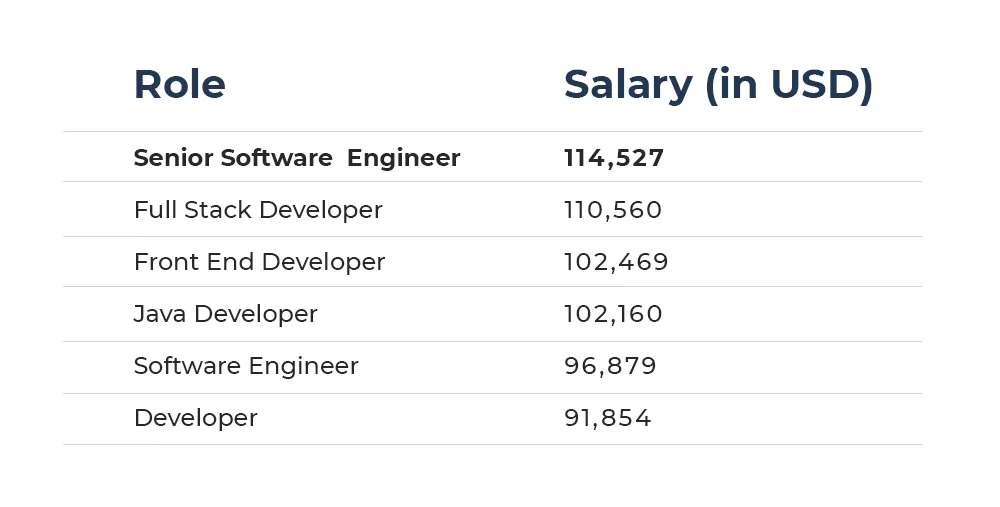
Image Source: https://www.c-sharpcorner.com/article/top-software-job-trends-in-2018/
2. Demand
According to the US Bureau of Labor Statistics, software developer jobs are predicted to grow by 17% from 2014 to 2024. This is much faster than the average for other occupations, which is at 7%. The US Bureau of Labor Statistics explains that the main reason for the rapid growth is due to ‘a large increase in the demand for computer software’.
Here’s a table containing the number of jobs available for the the top 5 programming languages, via Indeed.com.
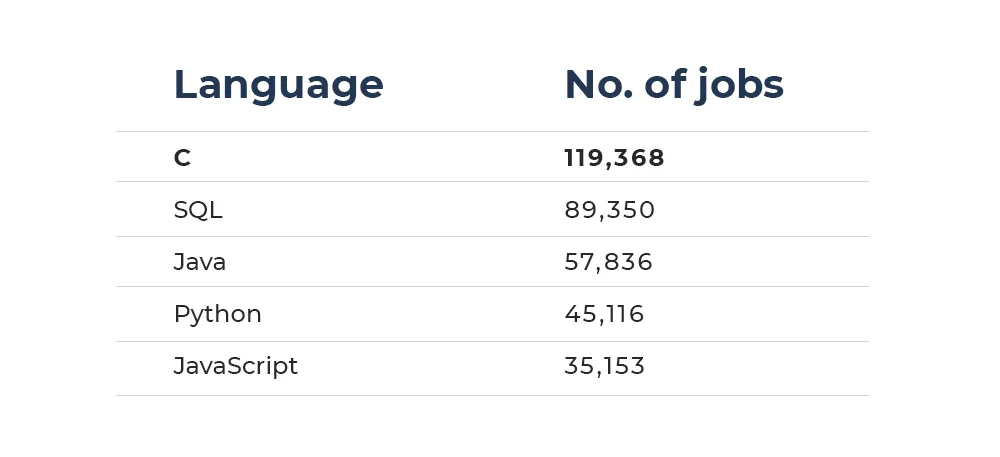
Image Source: https://www.c-sharpcorner.com/article/top-software-job-trends-in-2018/
3. Never Too Late to Become a Developer
You might think that programmers are all youngsters who have been coding away since elementary school, but that’s not true. According to the 2018 Stack Overflow Developer report, which surveyed over 100 000 developers, 25% of programmers are over the age of 35.
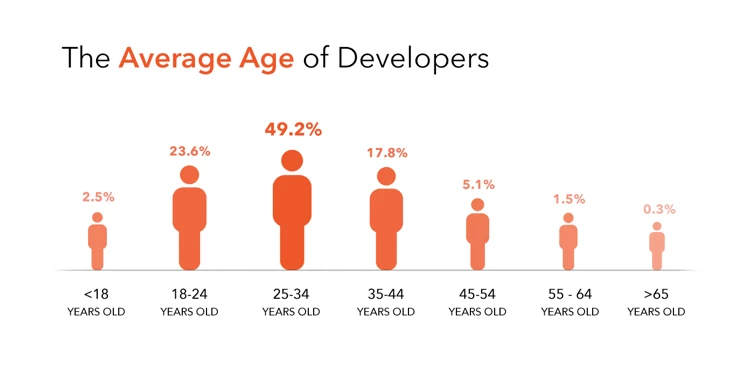
In addition, a full third of professional developers on Stack Overflowonly learned to code within the past five years, so presumably a fair number of those older developers probably learnt coding fairly recently. In fact, almost 12% of developers who work in the industry only learnt to code in the past two years. Becoming a developer can happen at any age!
4. You Can Freelance
Not only can you work from anywhere – the beach, the local coffee shop, your home – but the average freelance salary is even higher than a permanent salary: According to Glassdoor, you can expect to earn an average freelancer salary of $104,463 per annum in the United States. Enjoy the benefits of the freelance lifestyle: choose projects, clients and technologies that interest you, flexible work schedules and no boss!
5. A Combination of Team and Individual Work
T-shaped employees are often an ideal developer hire, says Stack Overflow, based on interviews with CEOs, programmers, and recruiters. According to TechTarget, a T-shaped employee refers to a person who has ‘a breadth of general knowledge and soft skills’ – this is represented by the horizontal bar of the T. The hard skills part is symbolised by the vertical part. Basically, a T-shaped individual is both a generalist (with people skills), as well as someone who has niche-topic specialities. This person is best, because many tech jobs involve a combination of team and individual work.
What about the cons of becoming a developer? Let’s look at a few of those.
Becoming a Developer: The Cons
1. Competition
Because the salary and the job conditions are good – so good, in fact, that Software Engineering was seen as the ‘best STEM job’ and ‘best Technology job’, according to the U.S. News & World Report – there will be competition for jobs. However, as mentioned, job demand is high. To separate yourself from the rest, consider completing an online coding bootcamp, which will broaden your skill set by learning more programming languages and technologies.
2. Too Much Sitting
This might not sound like a con, but it is. Business Insider reports that a sedentary lifestyle is not only bad for the heart and the waistline, but also increases the risk for cancer and diabetes. You can counteract this con by taking frequent breaks and working exercise into your schedule.
3. You’re Always Learning
This can be stressful for some people, because there’s always more to know, and different ways of doing things. Says Stack Overflow: ‘Developers are lifelong learners; almost 90% of all developers say they have taught themselves a new language, framework, or tool outside of their formal education. Among professional developers, almost half say they have taken an online course like a MOOC, and about a quarter have participated in a hackathon.’
4. Stress
It’s well-known that coding can be stressful. Says Nasreen Mahomed, a Junior Software Developer: ‘Like most jobs, the stress waxes and wanes. Live pushes are certainly pressurised times. If there are problems, you need to keep a cool head and fix it quickly. You have to be able to work well under pressure.’
5. The Hours Can Be Long
There are times when you’re rolling out a project and you’ll be required to work weekends or overtime. Also, if you run into problems and a system goes down, you may be expected to work extra time. However, if you enjoy the work, this shouldn’t be too much of a sacrifice.
In this article we’ve listed the pros and cons of becoming a developer. It certainly seems that the pros – including high salaries, potential freelance work and increasing demand – outweigh the cons. If you’re needing to learn how to code or update your coding knowledge, consider signing up for one of HyperionDev’s six-month, part-time online coding bootcamps in Full Stack Web Development, Mobile Development and Software Engineering.
Career Advice
How to Get Hired as a Silicon Valley Developer
There is a huge presence of tech companies and a large demand for developers in Silicon Valley. As an aspiring Silicon Valley developer, what skills do you need to get hired?
The allure of working as a Silicon Valley developer is universal. Every coder, from the newbie to the seasoned software architect, knows about Silicon Valley, the San Francisco technology hub. Home to the world’s leading tech companies (Apple, Google and Facebook) as well as plenty of start-ups, Silicon Valley is a dream destination for many developers looking to launch their international careers.
As an aspiring Silicon Valley developer, what skills do you need to get hired?
Meet a Need in the Job Market
Recent research by Indeed reports that overall job postings in San Francisco’s Bay Area are down compared to previous years. Job growth in Silicon Valley has been declining since 2015, so there are less positions available, and that means you’ll have plenty of competition when trying to land a role there.
Forbes lists the following positions as the current top ten jobs in demand by Silicon Valley companies:
- Software engineer
- Front-end developer
- Full-stack developer
- Product manager
- Development operations engineer
- Software architect
- Java developer
- Software test engineer
- Senior product manager
- Engineering programme manager
If you have any of the above coding and development qualifications, you’ll have a much better chance of landing that dream job in sunny California. HyperionDev has a range of online coding bootcamps available, to get you started. These flexible courses cover front-end and back-end development, as well as software engineering.
Speak the Right (Coding) Language
It’s important that you learn the most in-demand programming languages for front-end and back-end development.
According to a recent Developer Skills Report survey, most employers in tech look for developers proficient in Java and/ or Javascript. On the other hand, a growing number of developers are focusing on languages created by Silicon Valley tech firms. Go, created by Google, is the most popular, followed by Rust (backed by Mozilla) and Swift (developed by Apple). This shows how Silicon Valley technology is driving a shift in the languages prioritised by developers.
Develop Your Soft Skills
While technical skills are important, major firms also look for employees who will be strong team players. It’s important that you’re able to build a good rapport with your team members, and share knowledge with them. You may also be required to communicate with clients on behalf of the company, which makes you responsible for upholding your company’s reputation.
Good developers have sound technical knowledge, but great developers are those who are always willing to learn more. Great developers don’t just excel behind the keyboard; they’re also able to apply their problem-solving know-how to real-life situations. Top companies are looking to employ great developers, so be sure to cultivate soft skills like active listening, empathy, open-mindedness and approachability.
Up Your Networking Game
Sometimes the old saying, “It’s not what you know, it’s who you know” rings true. If you are job-hunting in a competitive area like Silicon Valley, it helps to have connections. Get to know other people in the local tech industry by attending Bay Area meetups, conferences and other networking events. You might meet your perfect employment match, or find like-minded people to collaborate with on a project – at the very least, you’ll make a few new friends in the industry.
Face-to-face connections are ideal, but not always feasible. If your location makes it difficult to attend meetups in person, you can also take advantage of digital networking options, and stay active on industry forums and chat groups.
Demonstrate Your Passion
If you’re looking to make an impact on a prospective Silicon Valley employer, it pays to have a well-rounded portfolio of work. If you can showcase your passion and skill outside of a 9-to-5 job, that’s something tech firms will notice and appreciate.
Work on notable side projects that will build your skill set and improve your employability. Build a creative app, design a piece of open source software, or take on pro-bono website work for a local NGO.
Looking for inspiration? Sign up for a HyperionDev bootcamp and get a chance to learn from an industry mentor. You’ll gain invaluable technical skills, while the mentorship process will also help you to hone your interpersonal skills, and give you some ideas for creative and productive side projects. If you’ve got your heart set on being a Silicon Valley developer, this is the place to start!

Career Advice
5 Networking Tips for Moving Into the Coding Industry
Although tech jobs are in high demand, you want to make sure your post-bootcamp options are as good as possible. Read on to find out the best networking tips for coders.
Once you’ve finished your bootcamp, you’ll want to land a job. Mark, 32, completed a Full Stack Web Developer Bootcamp and found work with a small tech startup. He says: ‘I was advised to start networking before my bootcamp finished. This was excellent advice, because I already had three offers lined up before I’d finished my final project. I chose the company that seemed to best suit my personality: laidback and informal, and so far, I really feel I’ve made the right decision for me.’ Although tech jobs are in high demand, you want to make sure your post-bootcamp options are as good as possible. Read on to find out the best networking tips for coders.
1. Five A Day
With networking, it’s obviously important that you meet new people and extend your circle of contacts. With this in mind, set yourself a goal regarding the number of people you want to contact on a daily basis who could help you move into the coding industry. In an article on The Hard Refresh, introverted Carrie Watkins states that her ‘introverted tendencies raised their quiet and unassuming heads within weeks of starting’ her project, which was to contact a number of key players in her industry. Her goal was to contact five prominent people in tech a day.
How did she get past her introverted personality? By doing the following:
- Ensuring the reach-out was about that person. She had to help the people she was contacting in some way – by, for example, giving their words a boost on social media, thanking them for their excellent work or offering them a person or an idea that would be useful for their line of work.
- Putting reminders on her calendar for the afternoon so that she couldn’t forget about her networking goal of contacting five people a day, otherwise it was too easy for her to ‘forget’ about something she found hard.
- Keeping emails short, as well as entertaining and helpful.
- Using Twitter and LinkedIn to get a little background on the person being contacted.
- Mixing it up – using a variety of ways to contact people include email, Twitter, LinkedIn or asking to meet in person.
2. Ask the Professionals
One of the key networking tips for coders is to speak to the people who specifically service the tech industry’s employment vacancies- the recruitment consultants. A good consultant should be able to provide insider knowledge about various companies, and what it’s like to work there. They should also be able to help you with the interview process and it might be easier for you to negotiate via a third party should you receive a job offer via a recruitment consultancy.
3. Social Media as a Search Engine
Think about social media in relation to searching for work – consider all the additional people to whom you’re exposed: acquaintances, old friends, friends of friends. Connections and personal relationships will always help you when looking for work. Here are networking tips for coders on how to leverage your social media connections:
- Spruce up your profile. Google yourself to see how you will appear to potential employers. Remove what doesn’t look professional.
- Add profile content and contribute to social media conversations that are relevant to coding.
- Look for 5-10 companies you would like to work for. Start following them on Twitter and Instagram. You’ll pick up a lot about their company culture and the kind of employees they want. Start tailoring your social media presence to make yourself attractive to them.
- Use Hashtagify, a free web service. You can now search Twitter subjects by their hashtags. Look up #techjobs.
- Connect potential employers on a platform like LinkedIn – it’s considered less overbearing than emailing. LinkedIn accounts are also easier to find than email addresses.
4. Face-to-Face
It can be tempting to just engage in digital networking, but face-to-face networking offers a number of advantages including the ability to read the body language of the person and react appropriately to that. This allows one to develop very strong personal connections.
Look for tech conferences, networking events and tech meetups in your area. It’s worth looking for tech events on Facebook as well. Check out this 2018 tech conference directory on the web – see if there’s anything in your part of the world. Or try The TechMap, which includes meetups, seminars, user groups, hackathons and tech events in your area.
5. Tech Online Sites
You’re looking for work in tech. This means you should frequent sites where other developers hang out. They are likely to be the first to hear about potential openings in their companies.
Two techie sites worth getting to know are Stack Overflow and GitHub. You can use Stack Overflow for research and to get solutions to your programming problems, but at the same time you can meet some of your fellow developers. Simultaneously, get set up on GitHub, where you can host and review code, manage projects, and build software alongside millions of other developers. Add your existing code to share with prospective employers or start new projects to keep yourself relevant. GitHub accounts are free, and it’s the best place to swap ideas and code with other programmers online. Both Stack Overflow and GitHub are great for building your reputation as a serious coder.
In closing, we’ve listed five networking tips for coders. If you can, try and incorporate them all. You never know which networking route will land you the best job offer. If you need to polish your coding skills before starting to network, consider signing up for one of HyperionDev’s six month, online coding bootcamps in Full Stack Web Development, Mobile Development and Software Engineering. They all include a free trial and come with mentor support.

Career Advice
What Kind of Companies Do Coders Work For?
Software developers work in a diverse range of industries, including media, finance, technology, healthcare, etc, as well as various sizes. What are the advantages and disadvantages of working for these different companies?
Once you’ve finished your coding bootcamp, you’ll be keen to find a job. The good news is that tech jobs are in high demand. According to a recent report from IT and networking company Cisco and market intelligence firm IDC, reported in Business Insider, the global economy by 2027 will have added more than five million jobs in information technology. With all these job opportunities around, what kind of companies do coders work for and what are the implications for coders?
According to the 2018 Stack Overflow Developer Survey, which analysed responses from 101,592 developers from 183 countries around the world, software developers work in a diverse range of industries, including media, finance, technology, healthcare, etc. And although they work in companies of all sizes, from small to very large enterprise organisations, most US software developers work in larger companies (compared with the rest of the world). More experienced developers are more likely to work at bigger companies – for example, a developer with 30 years of experience is twice as likely to work at an organisation with more than 5000 employees than someone with only 2 years of experience.
Here’s a breakdown of the percentage of developers at differently-sized companies.
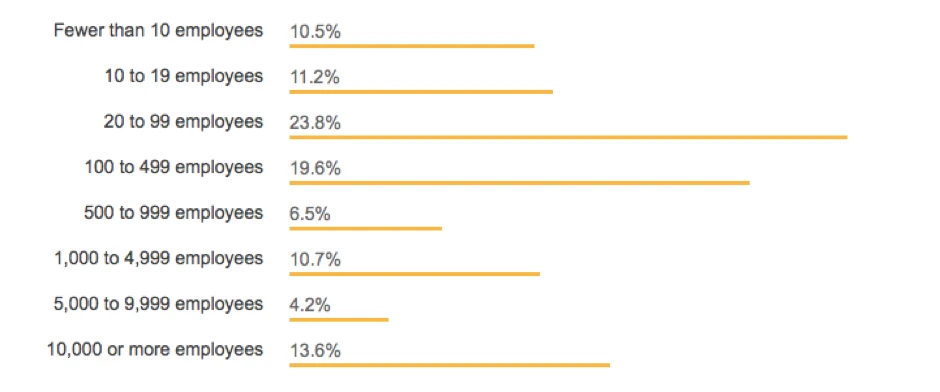
Image Source: https://insights.stackoverflow.com/survey/2018/#work-company-size
What kind of companies do coders work for? It seems all kinds, but what are the relative advantages (and disadvantages) of working for these different companies?
Large Companies
Large companies offer the following advantages (or disadvantages), depending how you view these characteristics.
- Generally, these are successful companies – that’s how they became large in the first place. This provides job security and a reliable income.
- There’s a potential to learn a lot, because there are likely to be people there who really know the systems at work and are experienced.
- You become part of a large community of people and this can be of value in future networking.
- Perks – some perks can be quirky or unusual like access to a company yacht, in-office yoga and massages, communal workout sessions and group cooking classes.
The pace tends to be slower and less risky. One of the biggest differences between working at a larger company versus a startup or smaller firm is the ‘rate at which things change,’ explains an article in Medium. At a large company you’ll likely to do the same set of tasks until you’re promoted. The job description is pretty clearly mapped out, which makes the work fairly repetitive and predictable.
What about startups? What is it like to work at one of those? Read on to find out.
Startups: What Can You Expect?
Even if the stability and salaries are likely to be lower, startups and smaller companies offer definite benefits including:
- In general, the smaller the startup, the more frequently you’ll be taking on new responsibilities. This makes it easier for you to prove yourself and move up the ladder, because there is less competition from peers.
- You’ll work more closely with senior management.
- If you have an idea or a proposal, it’s more likely to be taken on board. Basically, you’re more likely to steer the direction of the company and this gives you a sense of ownership in your work and that of the team. In addition, a startup is more likely to pivot (i.e. when the business model is not working and the team then pivots to Plan B).
- Money is likely to be tight at startups. This isn’t necessarily a bad thing, because you’ll learn to be frugal, a vital business skill. You’ll find meaning in creating rather than consuming.
- Interesting, millennials tend to thrive in startups – perhaps because the atmosphere tends to be more casual and the hours more flexible.
- On the downside, the workload can be heavier, because startups need to move quickly and there aren’t other people to take your place if you’re not around – stress and burnout are real possibilities.
In closing, what kind of companies do coders work for? All sorts. That is perhaps the best thing about becoming a developer: the multiple work environments and options available out there. If you’re interested in learning coding skills, check out one of HyperionDev’s six month, online coding bootcamps in Full Stack Web Development, Mobile Development and Software Engineering. You can try out any of these courses for a free trial before upgrading.

Career Advice
Tips On Finding Remote Coding Jobs After A Bootcamp
If you’ve just completed a coding bootcamp, you may feel ready and able to go out there and conquer the world. If you are, firstly congrats - you’ve taken an inspiring leap forward. But there’s work to be done if you’re going to find remote coding jobs that work for you. And it’s not all cocktails and beaches.
Working remotely. It’s the dream right? Digital nomads fill their Instagram feeds with images that look something like this: a laptop strategically placed next to a cocktail against the background of an idyllic beachscape with white sand and blue water. Pop a good filter over that and they’ve captured everyone’s ideal picture of remote coding jobs. If you’ve just completed a coding bootcamp, you may feel ready and able to go out there and conquer the world. If you are, firstly congrats – you’ve taken an inspiring leap forward. But there’s work to be done. And it’s not all cocktails and beaches.
Is Working Remotely For You?
That is indeed the question. And don’t be intimidated if you can’t answer the question right away or if you’ve jumped right into the job search without thinking about it. Now’s your chance to find out whether remote working is for you.
Ask yourself:
Do I enjoy forming relationships with the people I work with?
When you work remotely, there’s no such thing as “Friday drinks” or “lunch with the guys/girls” or having a paper jet flying competition. You won’t have the chance to immerse yourself in company culture and reap the benefits of forming relationships with colleagues. For some social butterflies, this is a deal breaker. For others, the chance to work sans office politics couldn’t come soon enough. Remember, if you choose to work remotely from a collaborative space, you will inevitably form good relationships with your freelance colleagues so there are ways to surround yourself with people who uplift and inspire you even if you’re a lone ranger.
Are you mature enough to handle working remotely?
Maturity has absolutely nothing to do with age. You can be fresh out of high-school and be able to take initiative, ask for help when it’s needed and manage your time so you can meet your deadlines. Conversely, you could be in your 40’s and still have snooze alarm syndrome. Working remotely means being a self-starter and not needing to be micro-managed. That’s a huge plus but it’s also a big responsibility. Your employer will expect you to deliver efficiently and on time. If you’re mature enough to manage your own schedule and set priorities, then you’ll be a great remote worker.
Do you have nerves of steel?
In an office, if you get stuck or the Wifi crashes or you need help with a coding dilemma, help is only a desk away. But when you work remotely, you’ve got to use your initiative to solve problems. A fellow worker may be too busy to take your call or not at their desk when your email lands in their inbox, and you may need to make decisions on demand. For that, you need to have a good head on your shoulders and be prepared to do whatever it takes to find the help you need in a proactive and constructive way.
Tips On Finding Remote Coding Jobs
1. Talk to the Decision-Makers
Felix Feng spent three months applying for jobs after coding bootcamp and learnt some important lessons in the process. One of them was that often, applying through third-party job boards means that your application gets lost in a black hole of admin. Taking a more direct, personal approach is often the key to getting your foot in the door. If you use a job board, try to find out which company the job advertised is for, then call them and get the email address for the head of recruitment, or better yet, the head of the department you want to work in, and send them a direct email to introduce yourself. Decision-makers will give you a simple yes or no. No time wasted.
2. Brush Up Your Social Media Profiles
Here’s something you can do right now. Login to your Linkedin profile and remove that cheesy-grinned, blurred profile image of you from five years ago. Replace it with a professional-looking one that says “I’m responsible, diligent and eager to get started,” as opposed to “I’m good-looking and I’ve spent a lot of time tanning in Thailand as you can see from this picture.” Make sure that all your professional details are correct – it’s all about the fine details.
3. Prepare To Put In Some Free Hours
One thing you would have learnt if you ever received sales training, is that the worst thing a prospective buyer can say is “no.” Picture yourself surviving that little hint of rejection and you’ll be just fine. Instead of waiting for employers to come to you, go to them. Email the MD or department head at the place you’d love to work for and pitch them. Invest in putting together a good CV and portfolio and volunteer to show them what you can do by means of a coding test or small pilot project in which you will participate for free. People who land their dream jobs are go-getters who’ve put in their fair share of free hours.
Working remotely is not for everyone, but then neither is the typical 9 to 5. It’s all a matter of perspective. The fact is that many developers who enjoy their own company, their own space and their own time schedule, find remote working to be absolute bliss. Think about it, weigh up the pros and cons, then take constructive action – there’s no time like the present.
Considering changing your career path or heading into the big wide world of coding? Sign up to find out more about HyperionDev’s coding bootcamps and how we can enable your next career move.

Cyber Security
5 Essential Cyber Security Tips for Bootcamp Students
In this age of technology, we are all a target for hackers. Follow these five essential cyber security tips and you should be on your way to making your digital life secure.
A few months back my father had $10 000 worth of Bitcoin stolen from his cyber wallet. How did this happen? Quite simply, he’d responded to an ‘official’ email that queried his account. No, he hadn’t sent any account details or divulged anything, but the simple act of responding to what was, in hindsight, a phishing email led to this terrible theft. ‘I felt terrible,’ he said. ‘I’m computer literate and I thought I’d never fall for a scam, but I did. Besides the cash loss, I just felt dumb.’ The first cyber security tip worth remembering, which certainly applies to my dad and should be a guiding principle for all, is this: you are a target to hackers, explains the UC Berkeley site. Don’t think ‘it can’t happen to me’; we are all at risk, particularly if you’re a bootcamp student and studying programming. You’ll be using your computer for all kinds of new things. Follow these five essential cyber security tips and you should be on your way to making your digital life secure.
#1 Tip: Keep Software Updated
It’s vital that you keep your programs and operating systems updated. This will include the latest security updates. Here are things you can do:
- For your operating system, turn on ‘Automatic Updates’.
- Use common web browsers – for example, Chrome or Firefox – that receive automatic and frequent security updates.
- Keep browser plug-ins like Flash or Java current.
- Use a software updater to ensure all your software is on on the latest versions. Here’s a list of 11 free software updaters.
#2 Tip: Practise Proper Password Management
This seems obvious, but think how often one reuses the same password for multiple programs and / or devices. This is a cyber security tip that comes via Dell who do a lot of security training with team members, and it’s especially relevant to small businesses, which are particularly at risk when it comes to security. In fact, many bootcamp graduates will end up as freelancers running their own businesses. 60% of small businesses will go out of business within six months of a cyber-attack, according to the National Cyber Security Alliance.
Here are some password tips, from Wired:
- Use a password manager – like 1password or LastPass.
- Go long: if your password is in the 12-15 character range, it’s much harder for a hacker to guess it.
- Space out special characters throughout the password. Don’t just dump them at the beginning or the end, because everyone does that.
- Don’t trust your browser to remember your passwords. It’s tempting and convenient, but the underlying security might not be so good.
- Add 2-factor authentication: this is safer. Basically, you get sent a code via your phone or some other software solution whenever you login. It offers double protection.
#3 Tip: Click with Care
Don’t visit unknown websites or download software from sources that are not trusted. These sites could easily contain malware that automatically, and without your knowledge, compromises your device. Don’t click on unexpected links or attachments.
#4 Tip: Surf with Care on a Public Wi-Fi
Although it’s tempting to surf on a free public Wi-Fi, CNBC reports on the dangers, based on a study by cybersecurity company Coronet, including the fact they they are ‘unencrypted, insecure or improperly configured.’ This makes it easier for hackers to access your devices, steal passwords, install malicious software and download your emails. Airports, with their public Wi-Fi systems, are particularly dangerous. In their study, Coronet found that the worst airport for cybersecurity was San Diego International.
With a public Wi-Fi, the two main risks are the following:
- Device – a malicious public Wi-Fi network resembles any other network, but when you click ‘accept terms and conditions’, you could be installing malware.
- Phishing – on a dangerous network, a hacker can make a mirror webpage in which you enter your details onto the hacker’s site.
If you have to use a public Wi-Fi, make sure your systems are up to date on your device, including software to protect you from malicious networks. Listen to any warnings you might receive from this software.
#5 Tip: Mobile Device
Cyber security tips are also vital when it comes to using mobile devices. Many bootcamp students may well access some of their material via their mobile phones. So how best can you ensure you use your mobile device safely and are protected? Here are some tips.
- Lock your device with a PIN or password. Don’t leave it unprotected in public.
- Apps should only be installed from trusted sources.
- Keep the operating system updated.
- Don’t open links or attachments from sources you don’t know.
- Don’t store personal information on your phone.
- Find out if your device can use data encryption – it probably can.
- Back up data.
- Use a phone locator to prevent loss or theft – for example, Apple’s Find My iPhone or Android’s Device Manager.
In closing, this piece has outlined five vital cyber security tips. They are certainly worth following. If you’re keen to access more free resources about software development, check out HyperionDev’s blog. HyperionDev also offers six month, online coding bootcamps in Full Stack Web Development, Mobile Development and Software Engineering. Each of them includes a free trial.

Career Advice
How Long Does it Take to Learn to Code?
How long does it take to learn to code? We explore the difference between four years and six months. Learn to code with structured online training bootcamps and personalised mentorship.
If you’re looking to enter the exciting and innovative world of web development, one of the first things you need to do is learn to code. How long will it take you to learn a new programming language?
This is akin to asking, “How long is a piece of string?” as there’s no definitive answer. Your speed will depend on which coding language you’re learning, the structure of the course you’re taking, and the time and effort you’re able to put in.
The “traditional” educational path for those learning to code is a computer science degree. A bachelor’s degree in computer science would typically take as long as four years to complete, with full-time classes being held on campus. A postgraduate degree could take up to another four years, while a master’s degree could take a further one to two years.
While a traditional computer science degree may be the right choice for some aspiring coders, others will find it too time-consuming and costly. This is especially true if you’re already working, and looking to improve your skill set or to switch careers. You may not have the time or availability to commit to on-campus classes, and you likely won’t want to wait several years before making that next career move.
Luckily, there are well-structured online learning options out there that will help you learn to code quickly and easily – becoming proficient in as little as six months.
A New Way of Learning
HyperionDev.com has created a selection of online coding courses that facilitate a quick and efficient learning curve for aspiring programmers. These are six-month, part-time courses with daily mentor support.
The bootcamps give you so much more flexibility than a full-time degree programme, allowing you to learn code in a fast, agile way. Instead of attending classes on campus, you can learn at home or on the go, making it a much more convenient learning experience.
It’s also important to note that while degree programmes teach a lot of theory, HyperionDev bootcamps put that theory into practice immediately. You’ll get the opportunity to do real hands-on, practical work, and learn from experience.
Benefits of an Online Coding Bootcamp
There are many ways you will benefit from the coding bootcamp experience:
- Courses are based on a proven educational model
- Course content is built in partnership with world-leading tech firms
- Online training allows you to learn at home, saving you travel time and expense
- You get the chance to write code that solves real-world problems
- Work is reviewed by specialist code mentors and returned with tailored feedback
- Code review prevents time-consuming struggles with error messages and bugs
- Mentorship adds a personal touch and a tailored learning experience
Mentorship and Coding
HyperionDev bootcamp courses include mentoring, with full-time specialist code educators available to help students excel.
Your mentor will build a personal relationship with you, and ensure you learn to code in an efficient, intelligent way that meets today’s industry standards. A mentor can even tailor course content to your interests, making the learning experience a more engaging one.
HyperionDev mentors are the world’s first dedicated team of coding educators.
Where Will Your Qualification Take You?
Graduating from a bootcamp will open up a variety of interesting career paths, including:
- Software development
- Web development
- Computer programming
- Database administration
- Computer systems analysis
- Computer network architecture
- Information security analysis
So, to answer our original question, how long does it take to learn to code? With an online coding bootcamp, it can take you just six months. If you’re considering switching jobs or launching your career in programming, sign up for a bootcamp in web, mobile or software development, and learn to code like a pro.

Career Advice
3 Reasons Why Coding is Hard (And What to Do About It)
There is no such thing as an “instant coder” so let’s smash that stereotype while we still can. What does exist however, are coders who invest resources and lots of hours burning the midnight oil, in order to master the craft. In this article we look at why coding is hard and what to do about it.
Remember that boy or girl who picked up a computer and started to build cool things with code using nothing but intuition and logic? That person that seems to understand how the internet of things works without investing time and resources into learning the ropes?
No? You won’t be able to remember that person because he/she simply doesn’t exist. There is no such thing as an “instant coder” so let’s smash that stereotype while we still can. What does exist however, are coders who invest resources and lots of hours burning the midnight oil, in order to master the craft. In this article we look at why coding is hard and what to do about it.
Learning to Code Is Like Learning a Language
C++, Java, Python, Objective-C – these are just four languages that happen to be among the most popular programming languages in the world. There are hundreds more. And learning a coding language is like learning a foreign language – quite literally. “So where should I begin?” you may ask. Learn with an end -goal in mind. Maybe you want to build mobile apps or become a game developer. Or maybe you want to start your own website-building agency or even work for Google. Whatever your end goal is, find which languages you’ll need to learn and start there.
But to make sure you manage your expectations, let’s clear one thing up – learning to code is not a straight-forward process. And perhaps that’s why so many devs fall short at the beginning of their journeys. Too many devs compare coding to other qualifications, where for example, you learn the theory, you do some practicals, you complete an internship and you get a job. That’s not how it works for coders (generally speaking). As a coder, you’ll go through ups and downs, through rabbit holes and up worm tunnels to pave your own way to a career. In other words, you may learn a language in part, then move onto the next, then dabble in some other language only to return to the first. Be flexible – it will set you in good stead to learn what you need to in order to succeed in the long term, where it matters most.
Learning to Code is Time-Consuming
Many aspiring developers walk away from a bootcamp or tutorial proclaiming that coding is a world reserved for geniuses and the whole thing is unfair. Actually, most devs who “fail” at coding, do so because they are not prepared to put in the time and research that it takes to learn. Attending a bootcamp is great place to start, but the work does not end there. Unlike other learning programmes, coding isn’t a qualification you can get and walk straight into a job, never to learn any theory again. Coding requires ongoing learning. So in conjunction with a bootcamp, you’ll want to try tutorials, engaging with other devs on github, spending time on other forums like Quora and spending time on basic trial-and-error.
Confidence vs Competence
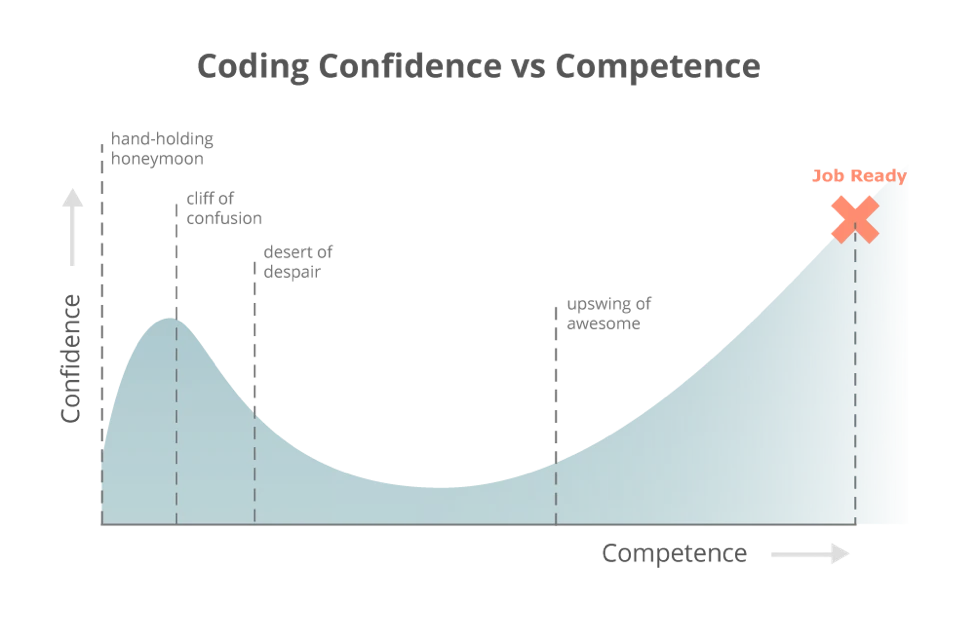
Source: Thinkful.com
Consider the above graph that illustrates a theory by Erik Trautman. The theory itself is quite involved, but the above graph is a snapshot of his main hypothesis, which is that “your confidence is highly correlated with your happiness and…the point where your confidence and capabilities match is the best proxy for the sweet spot when you’re officially job ready.”
In short, The Hand-Holding Honeymoon is the phase in which you are actively engaged with the learning process and being guided by a a mentor who teaches you things that “seem tricky but are totally do-able with their intensive support.” At this point, everyone that learns to code, believes they will be able to build cool stuff. The second phase (the Cliff of Confusion) is the proverbial “brick wall” you hit after your first bootcamp or tutorial. You try building a product only to realise that you don’t yet have all the knowledge you need. Googling it doesn’t help much because how do you describe a problem you can’t diagnose? Frustration ensues. The Desert of Despair is the emotional and mental slump that many aspiring devs fall into when resources are hard to find and moving forward seems like a slog. Many will venture no further when they hit this point. But wait, there is hope. The Upswing of Awesome happens when devs learn how to educate and empower themselves. Devs who reach this stage do so because they’ve tapped into global communities, used their mentors and poured hours and hours into trial and error. Keep pushing forward and eventually you’ll be job-ready and prepared to put in the legwork to build a viable career.
For some, building a career in coding takes months, while for others it takes years. What it comes down to is experience and hardcore grit. As an aspiring developer, you need to be prepared to experience moments of confusion, frustration and general hair-pulling craziness. But on the other side of those feelings, are feelings of satisfaction and the kind of “Eureka” moments that make it all seem worthwhile. Our tip? Start with the basics and put in extra hours – time is your most valuable commodity.
HyperionDev offers a mentor-led coding bootcamp. Start today with a free bootcamp trial including sample content and mentor support.

Career Advice
A Developer Portfolio: What it Is and How To Get One
For employers, the focus is shifting away from who you’ve worked for, towards what you’ve done. And that’s great news for new developers. It also means that having an effective developer portfolio is more important than it’s ever been.
One vital lesson that budding developers learn (sometimes to their horror) when they graduate and start looking for a job, is that experience means just as much as employment history. Because so many developers are learning the craft at bootcamps and short courses rather than through university degrees, the industry has become more accessible than it’s ever been. For employers, the focus is shifting away from who you’ve worked for, towards what you’ve done. And that’s great news for new developers. It also means that having an effective developer portfolio is more important than it’s ever been.
Developers who have the edge are those who find ways to apply their newfound skills from the get-go. Sometimes that means embarking on a ‘passion project’ that doesn’t pay but gives you a great reference. Build a website for a family or a friend, develop an ecommerce platform for a local small business to try out, or build an online trivia game around a topic you love. Apply your skills, get the job done, then build a portfolio.
What’s In A Developer Portfolio?
A developer portfolio is how you demonstrate your skills rather than just telling people about them. It’s a way of bringing your CV to life. And most importantly, it’s how you introduce yourself to the world. There are three main sections to an effective developer portfolio:
1. About
This section will serve as an introduction to you as a developer – your educational history, your work history, who you are and what you’re passionate about. If you’re not great with words, this may be the time to hire a copywriter to fine-tune your message. Not a spelling or grammar error should be anywhere in sight, so make sure it’s professional but not too wordy. All your portfolio needs to do is get your foot in the door. From there, your natural charm and charisma will shine through (we certainly hope).
2. Projects
This section needs to contain your best work. If you’ve been in the game for a long time, the task of choosing work may be more challenging than if you’re a newbie. Basically what you want to show is diversity. You want your portfolio to appeal to someone who’s looking for a mobile app developer,a web developer or a database manager. Try to show off diversity as much as possible. Today’s best companies are looking for specialist generalists – individuals with a broad range of experience and skills rather than one specific skill-set.
3. Contact
Ultimately what you want is for a lead to see your portfolio and contact you. That’s the ultimate call-to-action. So when it comes to your contact page, make sure that it works like a well-oiled machine. If you use a contact number, make sure it has a professional voice message. If you use an email address, make sure you reply within a few hours. If you use a form, make sure it’s brief and that it uses a captcha (spammers love portfolios). It may be worth putting in an hour or two of research to make sure the UX of your page is up to scratch; you want the user to have an intuitive experience when visiting your portfolio.
4 Top Tools for Building a Developer Portfolio
WordPress
Whether you’re a novice or a seasoned veteran in the development industry, you will probably have heard about the open-course, website creation tool, WordPress. Here’s the lowdown on this crowd-favourite. “WordPress is the fastest growing CMS, with roughly 500+ new sites being built daily in the top 10 million websites on the web (compared to Shopify’s and Squarespace’s 60-80),” according to Karol K. The reality is that if your next gig is a website development one, the CMS you might be using is quite likely going to be WordPress. If you can show that you’re already well-versed in all things WordPress, that’s a huge plus. It happens to be one of those platforms that devs either hate or love. Try it out – it’s a great CMS for a first portfolio.
Wix.com
3.1 million. That’s how many paid subscribers Wix has. Over a relatively short space of time, Wix has proven itself to be an indispensable tool for developers and even non-techies. The plus side is that as a developer, you’ll have the background you need to customise templates beyond what most people can. Wix is great if you’re into animation – they’ve invested millions into perfecting their animation functionalities. Wix websites are responsive so you can make sure your portfolio looks good on desktop and mobile. It’s also free to use, although we recommend upgrading to a paid package so that you can register your own domain name. Make the small investment – it will be worth it.
Squarespace
Over the last decade, Squarespace has emerged as a force to be reckoned with. In a space that’s dominated by the likes of WordPress, Drupal and Wix.com, it’s proving that it’s here to stay. Squarespace requires little to no coding knowledge (although as a dev, you’re at a definite advantage). It has a range of different templates to choose from as well as customisation options that will make sure you don’t produce anything that looks like it comes off a shelf. In a review of Squarespace, Website Builder Expert suggests that: “More than 1 million people pay to keep using Squarespace after its free 14-day trial, and that’s a solid testament to the quality of results it delivers.”
Github
It wouldn’t be strange to have a potential employer ask a developer if they can see his/her Github. It’s become an industry standard for devs across the world. In fact, “In 2017, the GitHub community reached 24 million developers working across 67 million repositories.” In essence, GitHub is where developers store their projects and network with like-minded people. You can contribute to the development of a project, get advice on how to take the next steps with your own projects and gain access to updates as they happen. One key reason why developers love GitHub is “much like using Microsoft Word or Google Drive – you can have a version history of your code so that it is not lost with every iteration.” When things happen in the coding world, they happen on GitHub, so we’d encourage all devs to jump on this bandwagon.
Your portfolio is how you show your future employer what you can do, the work you’re most proud of and how you choose to showcase your skills. Spend time on crafting it, call on some experts to help you out, make it count, because it’s how you put your best foot forward.
We specialise in guiding developers towards better, more fulfilling careers. Chat to an expert at HyperionDev who will give you guidance on how to take the next step in your career.
Career Advice
Top Five Python Programming Books in 2018
Python has seen a huge growth in popularity; it has risen in the ranks as one of the most commonly used programming languages this year. We’ve listed the top five Python programming books to check out if you’re considering learning this language.
Python has seen a huge growth in popularity. According to Stack Overflow’s 2018 Developer Survey, this past year alone, Python has risen in the ranks as one of the most commonly used programming languages, surpassing C# this year. We’ve listed the top five Python programming books if you’re considering learning this language. Here are other good reasons to get stuck into some Python programming books:
- The average salary for a Python developer in the US in 2018 is $92 000, according to Glassdoor. Not bad!
- The language is widely used in Data Science, because of its powerful statistical and numerical packages for data analysis (such as PyBrain, NumPy and MySQL).
- For those unfamiliar with programming languages, it’s a perfect first language to learn: you can study all the main libraries in a number of weeks. One reason for this is that it reads similarly to English, which means it removes a lot of syntax-learning stress from coding beginners. Python handles the complexity for you.
So which of the top five Python programming books should you be checking out?
1. For the beginner who wants a project:
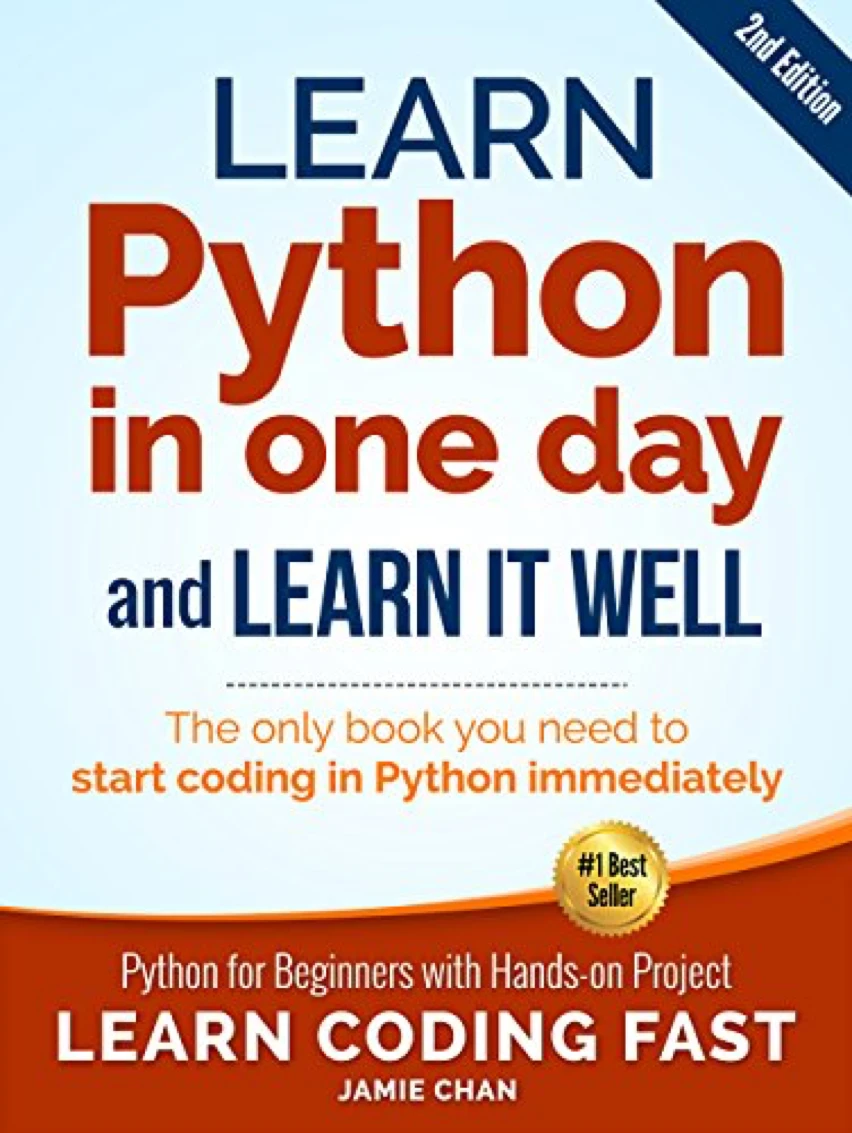
Learn Python in One Day and Learn It Well. Python for Beginners with Hands-on Project. (Learn Coding Fast with Hands-On Project Book 1) by Jamie Chan. This will allow you to get up and running with the basic concepts very quickly. It’s only 174 pages long and reviews say that it’s ‘fun to read’. The book covers the following: what is Python, setting up your computer for Python, Variables and Operators, Data Types, Making your Program Interactive, Making Choices and Decisions, Functions and Modules, Working with Files, and Object Oriented Programming.
2. For the programmer interested in Data Science:
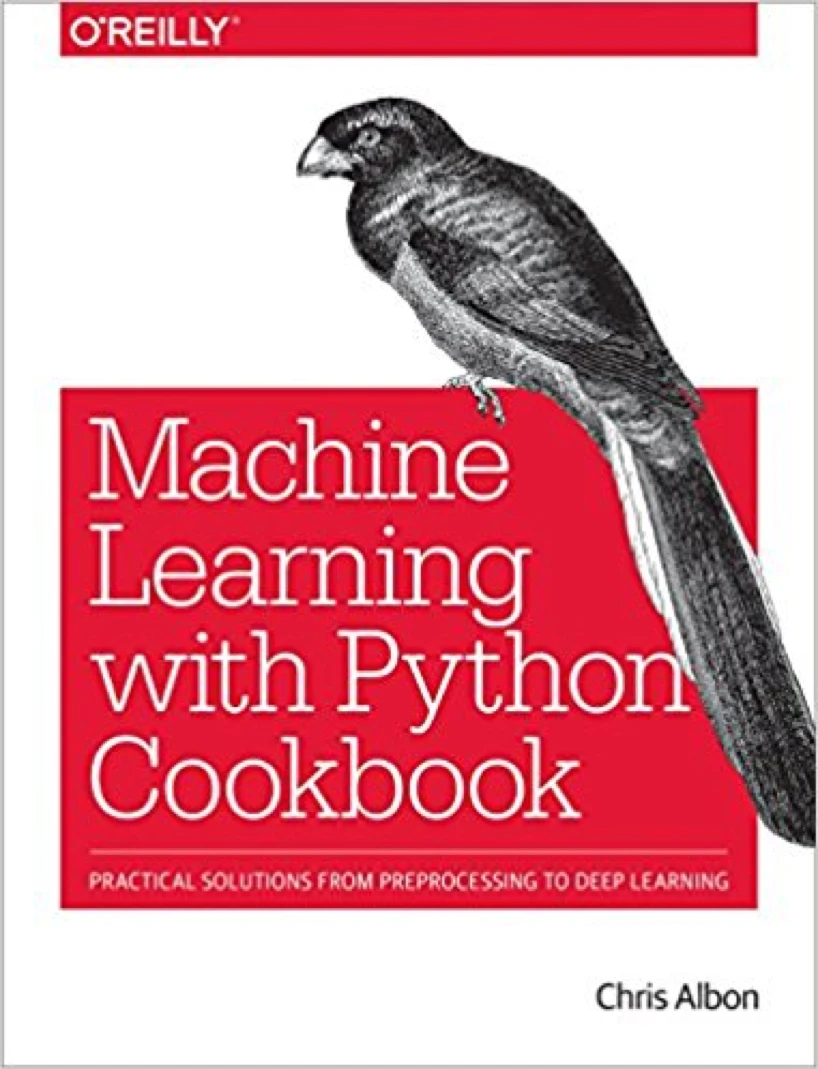
Machine Learning with Python Cookbook: Practical Solutions from Preprocessing to Deep Learning by Chris Albon. The book includes about 200 self-contained solutions for the most common tasks undertaken by a data scientist or machine learning engineer. You can simply copy and paste code. It’s basically a reference guide for people building real machine learning systems. The book is aimed at the machine learning practitioner; it’s not a basic book.
3. For the programmer who wants to automate the boring stuff:
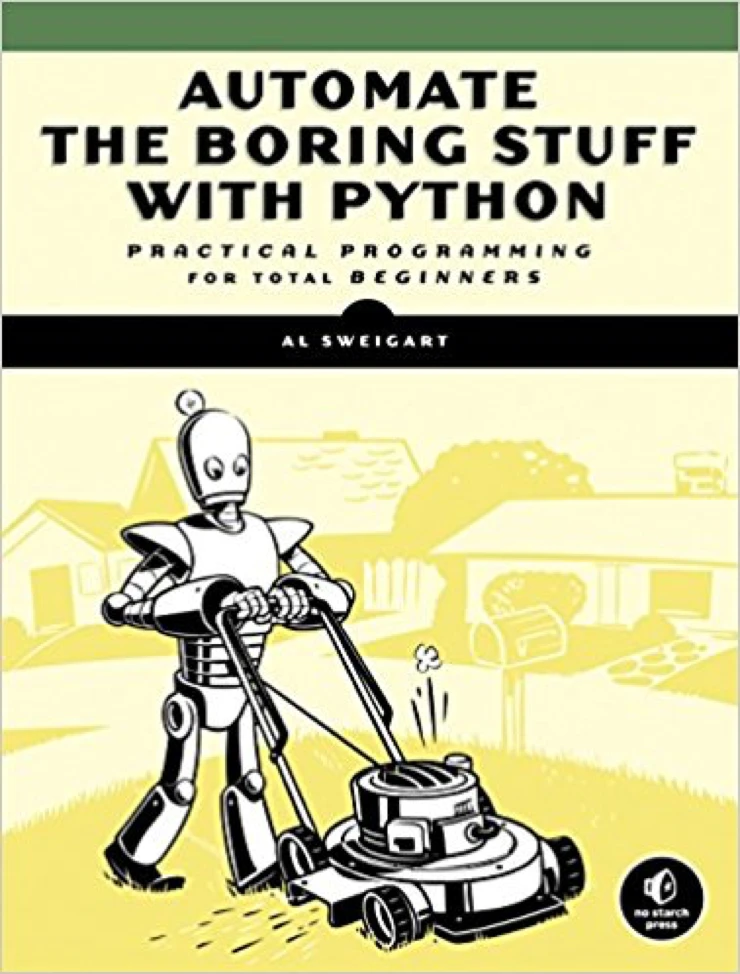
Check out Automate the Boring Stuff with Python: Practical Programming for Total Beginners by Al Sweigart. If you’ve ever spent hours updating multiple spreadsheet cells or renaming files, you’ve got an idea how tedious this can become. This book will teach you how to use Python to write programs that can accomplish tasks in minutes that would take you hours (or days) to do by hand. Also, you don’t need any prior programming experience. Some things you could learn include:
– Search for text in a file or across multiple files
– Create, update, move, and rename files and folders
– Search the Web and download online content
– Update and format data in Excel spreadsheets of any size
– Send reminder emails and text notifications
4. For the programmer who needs a quick reference guide:
Read Python Pocket Reference: Python in Your Pocket, 5th Edition by Mark Lutz. This is the perfect on-the-job reference that can be stuffed in a back pocket. It’s concise with good need-to-know information on Python types and statements, special method names, built-in function and exceptions, commonly used standard library modules, and other prominent Python tools. The book includes tips and techniques to make your Python code work faster.

5. For the beginner who is also keen to know some theory:
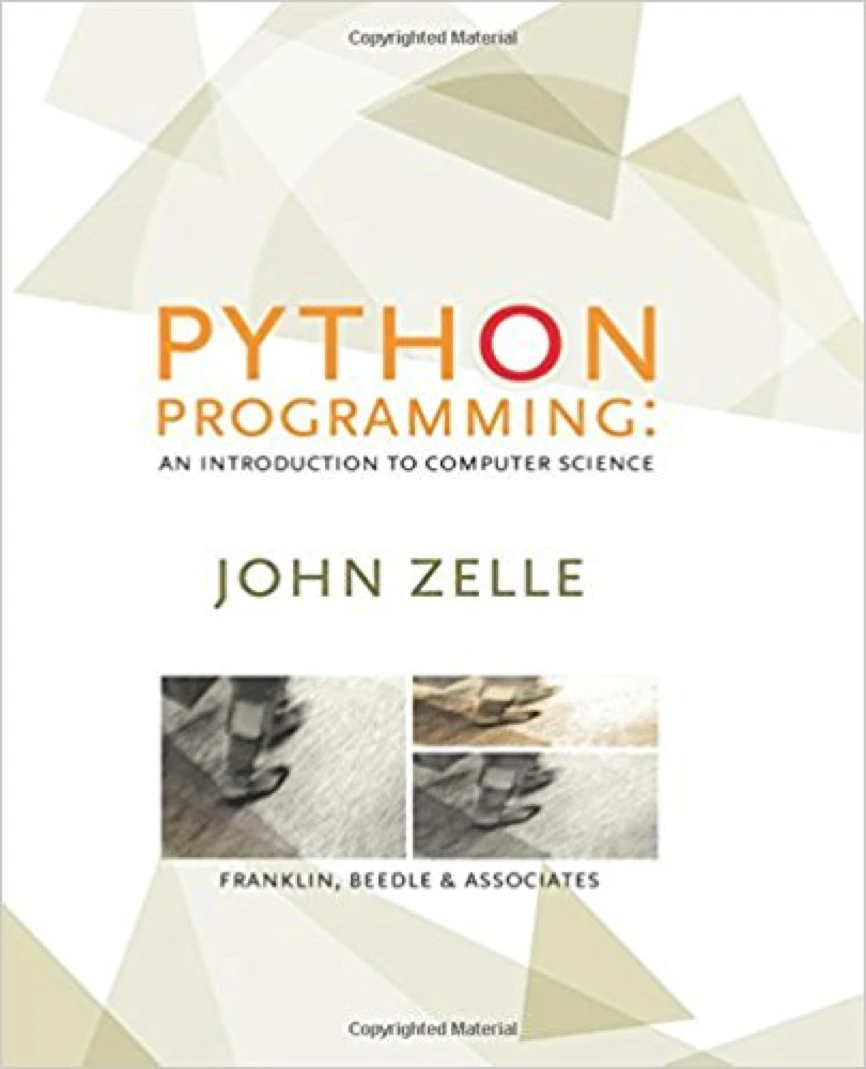
Check out Python Programming: An Introduction to Computer Science by John Zelle. This book is at the level of a first-year course in university. It takes a traditional approach to computer science covering problem solving, design, and programming, but uses Python to illustrate these ideas. If you’re keen to understand programming concepts, this book is worth a read.
Here we’ve covered the top five Python programming books. Of course, books are a great way to learn new things, especially programming languages. However, a lot of people find that a book is a good resource but doesn’t much help when one gets stuck. If that’s the case with you, think about enrolling on HyperionDev’s six month online Software Engineering Bootcamp, which includes Python as part of its back-end programming. All courses are mentor-led and include a free trial.

Career Advice
Which are the Top Coding Languages used by Today’s Tech Giants?
The top coding languages used by the world’s tech giants include Java, Python, C, C++, Objective-C and Swift. Today’s tech companies are looking for specialist generalists rather than specialists, so learning more than one language is what sets devs apart from the rest.
Choosing which programming language to learn is an important starting point for developers who want to build a career in what has become one of the most lucrative and growing industries in the world. The top coding languages used by the world’s tech giants include Java, Python, C, C++, Objective-C and Swift. Today’s tech companies are looking for specialist generalists rather than specialists, so learning more than one language is what sets devs apart from the rest.
To start off, let’s have a look at how some of the top languages are stacking up against each other in terms of searches.
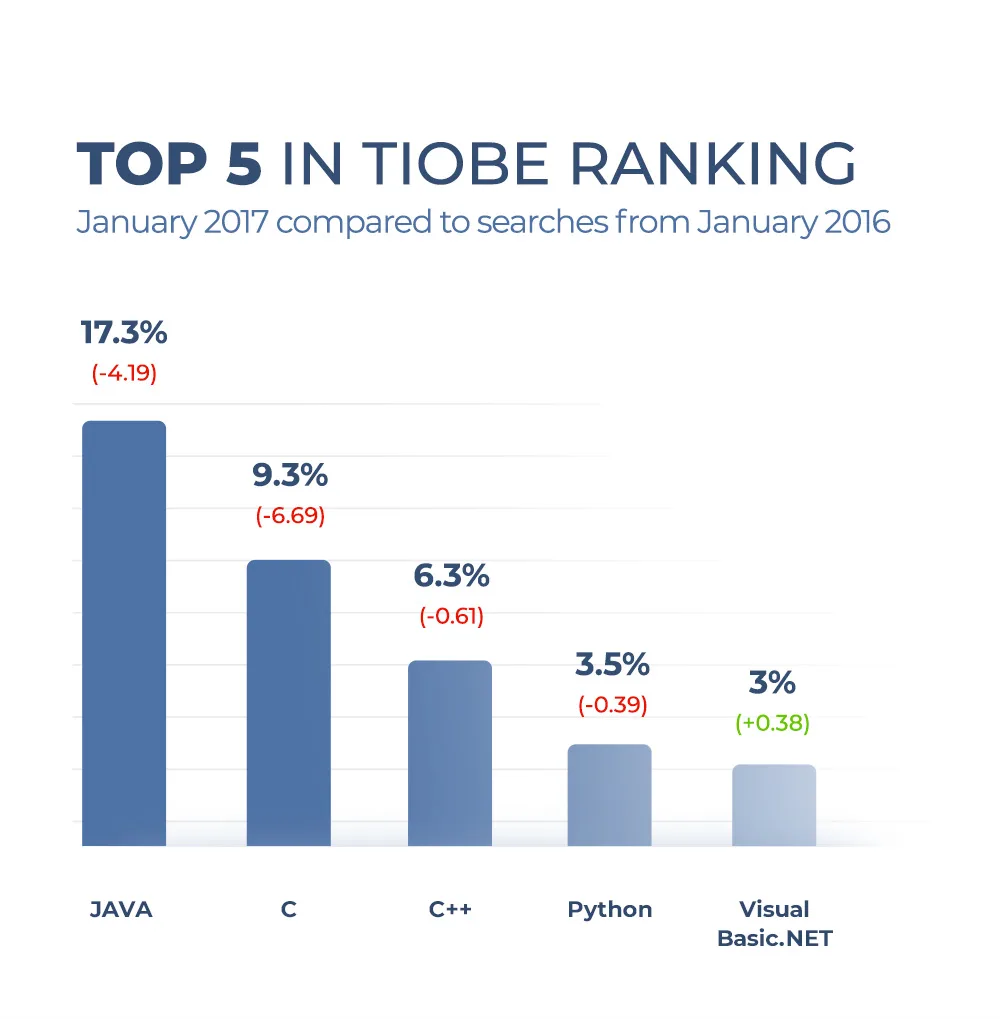
Google: Java, C++, Python
According to Artem Boytsov, Google Trends co-author and product manager, Google “gives its engineers a large degree of freedom in choosing their tools.” But in general, there are three main languages that are used. Low-level server-side software is written in C++, Java is used for higher level server-side, consumer-facing UI code, and “Python is the de facto language of internal infrastructure tools.”
According to ChallengeRocket, “C++ is best known as an efficient and flexible language used for the creation of large systems, such as desktop applications and server platforms.” In terms of potential earnings in this specialisation, developers who are trained in C++ can expect to make up to $102,000 per annum.
In terms of demand, Java was found to be used by about 90% of the world’s top tech companies. The Java slogan “Write Once, Run Anywhere,” clearly still applies. According to ChallengeRocket: “A Senior Java Developer has a real chance for a salary ranging from $74,000 to $130,000.” In Upwork’s opinion, Java seems to have been built for Android development so it’s become a go-to for mobile apps. In many ways, it’s seen as an “easier” more accessible language than some of the others.
Python is not only used by Google, it is used by the likes of NASA too – so in terms of relevancy and demand, it’s right up there with the best of them. ChallengeRocket predicts that, “an annual salary of a Senior Python Developer will fluctuate around the amount of $105,000 and higher. This is due in large part to the popularity of the language and its frequent appearance on lists of requirements in recruitment procedures.”
Apple: Objective-C, Swift
A number of sources, including ChallengeRocket, suggest that the primary language used by Apple developers is Objective-C. According to Ben Jakuben, Objective-C is a great first language to learn and is the main language used to write apps for iPad and iPhone. Then of course, we can’t talk about programming languages used at Apple without mentioning its very own, Swift. As Apple puts it, “Swift is a powerful and intuitive programming language for macOS, iOS, watchOS and tvOS. Writing Swift code is interactive and fun, the syntax is concise yet expressive, and Swift includes modern features developers love. Swift code is safe by design, yet also produces software that runs lightning-fast.”
Payscale breaks down Objective-C developer earnings into three main job descriptions. Today, an iOS Developer can expect to earn around $81,979. An Objective-C Software Engineer will earn approximately $95,508. And thirdly, a Senior Software Engineer can expect to earn an average of $119,470.
Initially, with the emergence of Swift, some experts predicted than Swift would cannibalise the older language, Objective-C. But according to Dice, in 2017 “the number of job postings citing Objective-C outnumbered those naming Swift by nearly eight-to-one.” It seems, at least for now, that these two languages have found a way to coexist. According to a survey conducted by Indeed, “The average salary for a Swift developer” ranges from approximately $101,924 per year for Software Engineer to $117,718 per year for Senior Software Engineer.” This salary information comes from 101,852 data points collected directly from employees, users, and past and present job advertisements on Indeed in the past 36 months.
Microsoft: C#
Although, like the majority of the world’s top tech giants, Microsoft expects its developers to be proficient in a number of languages, what most developers agree on is that Microsoft favours C#. According to Harsh Gupta, a developer who worked with C# for over ten years, “C# is probably the most balanced programming language/platform. It’s fast – fast to write, fast performance, comparable with Java/C++. It’s easy – much simpler syntax than C++, with lots of in-built libraries. It already has a huge open source community to support it. It’s powerful – you can build powerful UI based apps with WPF, run web apps with an ‘embedded web browser,’ or access Java/JavaScript/Python libraries, interface with external hardware using a USB/serial port.. and the list goes on.” In terms of of earnings, C+ developers earn around $89,000.
In an article by Fossbytes, an interesting insight suggested that the top 25 Fortune 500 companies do not favour developers who are proficient in one language only. What is preferred is that developers know more than one language and are eager to keep learning and building their portfolios.
Upskill with a short course or bootcamp in a range of different languages at HyperionDev and build a successful career in development today.
Career Advice
Which Operating Systems Do Developers Prefer?
As a developer, one of the primary decisions to make is which operating system (OS) to use. Let’s look at three major operating systems - the pros, the cons and what to consider when choosing which OS to use as a dev.
As a developer, one of the primary decisions to make is which operating system (OS) to use. Just a few years ago, there were a mere handful. Today, with the onset of the digital age, operating systems abound. And the list is growing. Let’s look at three major operating systems – the pros, the cons and what to consider when choosing which OS to use as a dev.
What Is an Operating System (OS)?
According to technopedia, an operating system is “a software that allows a user to run other applications on a computing device…the vast majority of applications are written for an OS, which allows them to take advantage of common libraries and not worry about specific hardware details.”
In layman’s terms, an OS is the means by which users of computing devices like desktops, tablets and smartphones can “communicate” with that device, without necessarily knowing how to “speak” the device’s language. Without an OS, processing anything using a computing device would look like something out of The Matrix, with endless lines of code – it would only make sense to programmers.
Think Microsoft Windows (Windows 10, Windows XP for example), macOS (Apple) and Android. These are just three examples of an operating system.
Which Operating Systems are the World’s Developers Using?
The 2018 Stack Overflow Developer Survey asked 100 000 developers from over 150 countries to complete a 30-minute survey.
One of these questions was what time developers wake up in the morning. The result? Most devs wake up between 07H00 and 08H00, which negates the stereotype of the caffeine-addicted, nocturnal vampire-esque dev. Although we’re sure those exist too.
Another key question the survey asked was which operating system developers are using for desktop development. Windows led the way, followed by macOS and then Linux, demonstrating that just as in recent years, Microsoft is still leading the pack. Apple, Microsoft and Linux seem locked in an eternal battle of wills, but the defining gap between them, is slowly closing.
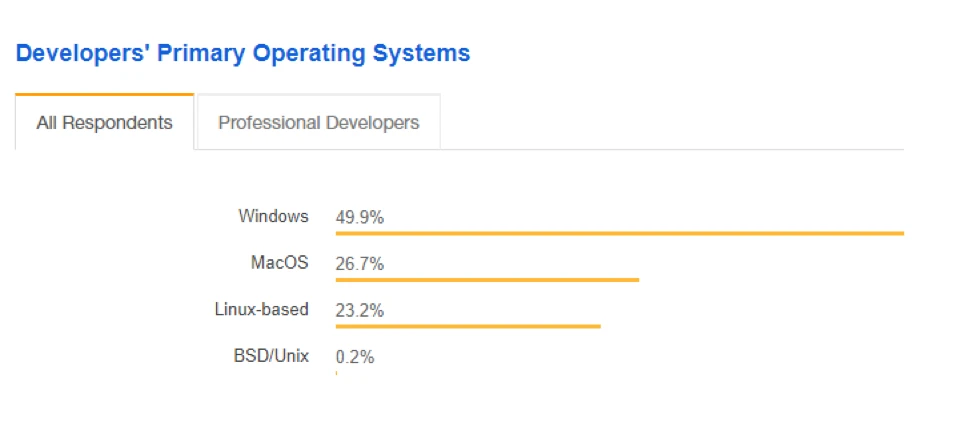
Source: 2018 Stack Overflow Developer Survey
Why Some Developers Prefer macOS:
According to Macworld, for the last 15 years, the Apple OS has been built on top of Unix, which, according to Jessica Su, a CS PHD Stanford student, was a significant development for programmers. Why? Because according to Su, “It lets you run programs in almost any language without using a specialised IDE.” Most tech companies require their employees to work on Unix-based systems, so working with macOS, may increase the career prospects of developers.
Software developer, Christopher Miles, argues that programmers and coders love macOS because of the build quality of Apple machines. According to Macworld, a big plus for macOS is its cross-platform compatibility. Running macOS on a Windows PC is a near impossibility for most, but on Mac, you can easily install Windows or Linux. This means that “if you have a Mac, you can create and test software for Windows and Linux from inside it.”
Why Some Developers Prefer Windows:
According to RJ Systems, there are a number of advantages of using Windows as a developer. One of these advantages includes ease of use – everyone grew up using Windows and the interfaces that we worked with back in the day, are still recognisable today.
Evidently, Windows is doing everything it can to retain its loyal base of developers. Developer Mode in Windows 10 allows programmers to test apps, change settings and navigate some advanced features that aren’t accessible to everyday users. Essentially, Windows Developer Mode is an OS extension or value-add function that brings a unique user experience element to Windows for developers. Finally, a developer interface that makes sense in terms of functionality and in terms of its aesthetics. A wide range of support is provided for developers, which is a big pro, and one of the main selling points that attracts devs to the Windows OS.
Linux: A Worthy Alternative?
Ofir Chakon, data hacker, entrepreneur and engineer, dedicated an entire blog post to his experience of switching from Windows to Linux. His conclusion? Linux is his OS of choice as a developer, for a number of reasons. Referring to the Linux distribution, Ubuntu, Chakon suggests that:
- Linux runs faster than both Windows 8.1 and 10. After switching to Linux, Chakon’s processing speed increased exponentially.
- The fact that Linux is a free, open-source software is something that many devs list as an advantage. Open-source software is tested, tested and tested again by a wide range programmers so it’s easy to tap into a support network for answers to questions you may have. Valuable opinions are openly and freely shared and the open-source community develops organically.
- According to Chakon: “If you are a developer, the terminal is the sweet spot. It’s a huge productivity booster. By using the terminal, automation becomes a game changer.”
- Most servers are Linux-based so it makes sense to use a Linux-based OS.
Where To Next?
There is no easy answer to the question: which OS should developers use? As with most things related to programming, it’s all relative. Which OS developers choose to use will depend on their choice of occupation, the functionality requirements of the platform they are building, and their level of experience.
Speak to an expert at HyperionDev if you want to upskill yourself as a developer and learn more about the pros and cons of different operating systems.

Career Advice
Four Strategies To Follow Before You’ve Written Your First Line Of Code
As soon as you start your coding journey, everything that needs to be done can be daunting. But to help you prepare, here are some strategies to follow before you’ve even written your first line of code.
It’s daunting to become a coder. There’s so much to learn and there appears to be a multitude of people who have been coding for years. Take heart, however, a full third of professional developers on Stack Overflow, which interviewed over 100 000 developers, only learnt to code within the past five years. Basically, it’s never too late to learn to code. But to help you prepare for your coding journey, here are some strategies to follow before you’ve even written your first line of code.
1. Operationalise Your Goals
This is an important initial step. Decide on your goals. Make them tangible and project-based. Hongkiat mentions these potential projects:
- Build a calculator using CSS and JavaScript. These languages are certainly worth learning, because they form a core part of a Full Stack Web Developer course.
- Make a responsive website using HTML, CSS and JavaScript. A responsive website is capable of responding to a user’s behaviour and environment based on screen size, platform and orientation.
- Practise your back back-end programming languages, such as PHP, Ruby and Python, by building a dynamic website. You can read more about the difference between front-end and back-end web development here.
- Using JavaScript, create a 2D breakout game.
2. Decide Which Programming Language You Want to Learn First
Your goal should help you decide which programming language you want to learn first. However, you may choose first to decide on the programming language and then set a goal for yourself.
It’s probably a good idea to start with something simple like HTML or CSS. Both are used frequently in the developer world. This graph, showing the most commonly-used programming languages, comes from the 2018 Stack Overflow Developer Survey.
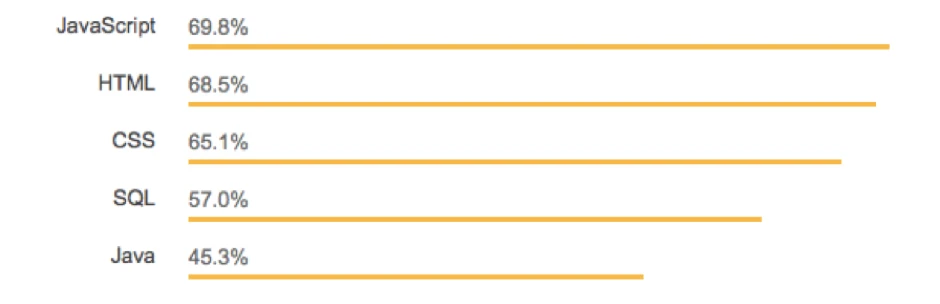
Image Source: https://insights.stackoverflow.com/survey/2018/#technology
HTML and CSS are widely used and supported by all browsers, and you can still do cool projects with them like formatting your blog post or email, or creating CSS animations.
You might also consider learning Python. Python is probably the most used programming language in Data Science, a growing and popular field. It’s also a relatively easy language to learn, because it reads similarly to English.
3. Install the Correct Programs
This isn’t as simple as it sounds. Before you’ve written your first line of code, you need to install the right programs on your machine. There are a variety of options such as:
- Installing a simple code editor, which is a software package that has features that allow for writing code. You could choose between one of these three code editors for different operating systems: Notepad++ (a popular code editor for Windows), DroidEdit (a free app for writing code on your Android phone or tablet), and TextWrangler (a code editor for Macs).
- Using an Integrated Development Environment (IDE). This is more advanced than a code editor, because it incorporates other tools such as libraries, a compiler and a debugger. Examples of IDEs include Microsoft Visual Studio, NetBeans and Eclipse.
- Installing a Software Development Kit (SDK), which is a bundle of software tools that lets you create applications for specific platforms or frameworks – e.g. an app for an Android smartphone would use the Android SDK.
4. Find the Right Resources
There are many developer resources out there that programmers use when they get stuck. A good place to start is Stack Overflow, which attracts over 50 million developers on a monthly basis. You can ask your programming questions there, and you are almost guaranteed to have an avid user answer your question soon. Reddit Programming is also a good spot to bookmark and check out prior to writing your first line of code. You could also look at Experts Exchange, a paid site, and Quora, which is a Q&A sites on any topic. You will find that the developer and programming world has an incredible community of support through resources and forums like these.
In conclusion, once you’ve followed these four steps, you’ll be excellently positioned to start writing and learning coding. You may also want to consider enrolling for one of HyperionDev’s six-month Bootcamps in Web, Mobile or Software Development. You can try each of them out with a free trial.

Career Advice
Why Are Computer Science Degree Dropout Rates So High?
Computer science degree dropout rates are getting higher with each passing year. While computer science as an industry is growing, dropout rates amongst students seem to be increasing. Let’s look at some opinions on why computer science degree dropout rates are so high.
It’s an international phenomenon – computer science degree dropout rates are getting higher with each passing year. It’s quite paradoxical. While computer science as a vocation is growing exponentially, dropout rates amongst students who enrol in computer science as a degree, seem to be steadily increasing. According to the graph below, the number of computer science degrees being completed, seemed to boom around 1985 and 2003 – 2004. Since then, the decline has been undeniable. Let’s look at some opinions on why computer science degree dropout rates are so high.
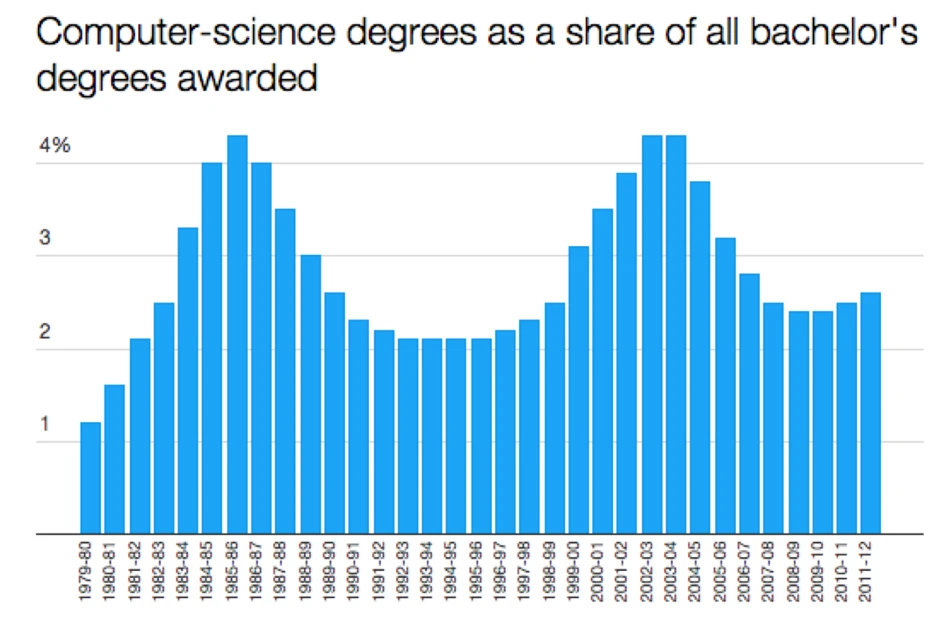
Unrealistic Expectations
McGoldrick and Huggard, two computer science lecturers at Trinity College in Ireland, point to misguided perceptions as the root cause of high dropout rates in the computer science department. Students choose computer science for several reasons, and the reality is that not all of those reasons are firmly grounded in fact. There’s a big disconnect, for example, between wanting to develop cool computer games because you’re good at playing them, and the skills involved in building those games, Computer science is just that – a science. And a good proportion of students simply do not appreciate the technicality of the subject. Nor are they willing to trade in their glamourised dreams of what computer science is, for the hard work and late hours that it often demands.
The Rapid Evolution of Knowledge
Joe Trubisz, an independent researcher and former college instructor suggests that computer science degree dropout rates are high due to the ever-evolving nature of knowledge on the subject. He suggests that students with hands-on experience in the field quickly realise that the knowledge and skills that are being transferred at a degree level, become almost obsolete in a year or two. The reality is that the skills you need to succeed in the field of computer science in the real world is often significantly different from what is taught at universities.
Fluctuating Demand
Demand for computer science graduates has fluctuated over time. According to Jonah Newman, “The peak in computer-science degrees, in 1985, came about four years after the introduction of IBM’s first personal computer and during the heyday of the Apple II.” A similar boom occurred during the early noughties. With a range of new IT-related fields developing alongside each other, job opportunities for computer science graduates have fluctuated. As a result, the families of students (who may be funding their studies) may become more inclined to enrol their relatives in programmes with a more stable market. Parental pressure has proven to be a big determiner of whether students remain enrolled in a programme or not. For some, computer science as a degree programme may be too much of an investment into an industry that is always changing.
Here’s How Not To Become Part of the Statistics
HyperionDev offers 6-month, part-time bootcamps in Web, Mobile or Software Development with daily mentor support. These bootcamps offer current, real-time information on the industry as it exists today. What you learn, is what you need to succeed in the world of computer science today. At these bootcamps, you will gain insights that are practical and actionable. Whether you’re looking to upskill or make a strategic career move, bootcamps are a great place to start.
A relatively short time commitment allows you the freedom to decide whether computer science is the industry for you. Bootcamps give you an intensive view into the computer science space. They empower students to be proactive about ongoing learning so that they stay ahead of the curve and evolve as developers and programmers.
Riaz Moola, founder and CEO of HyperionDev suggests that “opportunities abound in the computer science space, especially locally. And as the market begins to take shape and evolve, so must the way we approach the educational side of things. The focus has shifted away from degrees and once-off learning and towards shorter-length, transformative experiences that people undertake to upskill themselves as their careers progress.”
HyperionDev bootcamps are designed to equip students with knowledge and skills that will give them the upper hand in an industry that is always on the move. Click here to take your place in the burgeoning world of computer science.
Career Advice
How many programming languages should I learn?
One of the most common but difficult questions that developers have to answer is whether it’s better to learn multiple programming languages, or master one. We explore the pros and cons associated with either decision by answering 3 golden questions!
One of the most common but difficult questions that developers have to answer is whether it’s better to learn multiple programming languages, or master one.
The reason that this is such a tough question is that there are pros and cons associated with either decision. Mastering one language, particularly one that is both rare and in demand, makes you a sought-after asset.
On the other hand, having a basic understanding of the most popular coding languages makes you versatile enough to assist on a broader array of projects.
And that’s just the surface. The debate forces you to think about your salary, personality, and career ambitions, and the shifting tech landscape.
It’s easy to be overwhelmed, and asking colleagues for advice probably just makes you more indecisive. But even though it’s uncomfortable, this is arguably the most important choice you’ll make, because it sets up your whole career.
That’s why we’ve compiled the three golden questions you need to answer so that you make the right choice for you.
What languages are in demand?
Although there are hundreds of programming languages, with more being developed constantly, some are more popular than others, and have been for some time.
Familiar programming languages like Java, C++ or Python are versatile and almost universal, which makes them appealing to clients and developers alike.
Newer languages like Kotlin or Elixir might allow you to solve new problems (and can be exciting to learn), but most projects are still reliant on the most-popular languages.
This means that having a functional understanding of these programming languages makes you eligible to work on more projects – which means more experience, and a bigger salary.
To put it bluntly, it might be fun to become an expert in an obscure language, but you might struggle to find opportunities to use it.
Are you a lifelong learner?
Most developers are life-long learners – it’s partly why they choose a profession that is constantly growing and changing.
Choosing to specialise in one language means you will learn everything that there is to know about that language, but eventually, you might run out of things to discover. Being the authority is a great accomplishment, but can become tedious.
Learning multiple programming languages means that you are constantly forced to tackle new challenges. These ongoing lessons keep things fresh, but it can be a frustrating process, particularly if you’re not patient.
Either route will require you to learn, and it’s important to understand that you will have to learn about new technology to really excel, but if you need constant stimulation, then learning multiple languages is probably a better option for you.
What do you want out of your career?
It may seem a little profound, but your ambitions for your career are crucial for deciding whether or not to become a specialist. Essentially it comes down to a question of income.
As a recent survey on StackOverflow illustrates, there’s a clear difference between the programming languages developers most want to learn and work with, and those that will earn you the best salary.
This discrepancy reflects a deeper question. Working in newer, different programming languages is more appealing to developers who want to experiment and push themselves, but they don’t necessarily pay as well – which is why most developers become proficient in multiple languages to boost their income.
The alternative is to specialise in a programming language that you know will earn you more money, but is less likely to push you once you’ve mastered it.
The verdict
Becoming a developer is an exciting career path that will always present you with new challenges and opportunities.
The decision to become a specialist in the modern climate is a risky one; while you may earn a better salary, you risk problems around demand for your skillset, a lack of mental stimulation, and the chance that your chosen language falls out of favour.
Learning multiple languages qualifies you for a broader range of projects, meaning you are always learning. You will have more choices to address problems, and are more likely to work on a satisfying range of tasks. You might struggle to get to a point where your salary is stable though, as you are essentially competing with a broader pool of devs with more experience in the language required.
Ultimately the decision is up to you, but the data suggests that spending your time becoming proficient in multiple languages is your best bet.
Thankfully, there are a number of courses available through HyperionDev that can get you started – including a full-stack web developer bootcamp that will get you fluent in multiple languages in no time.

Career Advice
10 Useful Questions About Programming
It may be difficult to ask a question that could be seen as stupid or obvious. That’s why we’ve put together 10 questions about programming, and of course their answers, from the basics to more advanced. Have a read through them; we can (almost) guarantee you’ll learn something.
It may be difficult to ask a question that could be seen as stupid or obvious. That’s why we’ve put together 10 questions about programming, along with their answers, from the basics to more advanced. Have a read through them; we can (almost) guarantee you’ll learn something.
1. What is programming?
Programming, or coding as it’s sometimes called, is the process of creating software. Software is really a set of instructions that a computer needs to follow. Computer programming is a little like writing a recipe for your computer. Software comes in many forms, from games to apps on your phone, but all software is made up of lines of code.
When programmers create software, they follow a number of steps, including planning (this is called design or architecture), testing (checking whether the code works) and debugging (fixing source code).
2. What is a code editor?
A code editor is where you’re likely to write your code. You can’t write code using a word processor, because word processing software contains formatting. You could use a basic text editor, like notepad which comes pre-installed on most computers, but a code editor software package makes coding easier due to their handy features.
Here are three free code editors for different operating systems:
Notepad++ – a popular code editor for Windows.
DroidEdit – a free app for writing code on your Android phone or tablet.
TextWrangler – a code editor for Macs.
3. What is an Integrated Development Environment?
An Integrated Development Environment (IDE) is a step up from a code editor. Although an IDE includes a code editor, it also incorporates other tools to automate various tasks such as a debugger, various code libraries and a compiler (a software program that turns high-level code written by a programmer into a machine language or binary code). Many IDEs can support multiple computer languages, although you must check that the IDE you select is correct one for the language you are learning. Examples of IDEs include Microsoft Visual Studio, NetBeans and Eclipse.
4. What is a Software Development Kit?
A Software Development Kit (SDK) is a bundle of software tools that lets you create applications for specific platforms or frameworks – e.g. an app for an Android smartphone would use the Android SDK. SDKs can include an Integrated Development Environment, as well as libraries, tutorials and simple coding examples.
5. What happens on the back-end when I type a website into my browser?
Let’s say you type www.google.com into your browser, what happens then? Firstly, a request goes to Google’s remote server. Your browser then gets the response, interprets the code and displays the Google page.
The Google server (or remote server) is an API (Application Programming Interface) for your web browser (or client). Whenever you visit a website, your browser interacts with the remote server’s API. An API isn’t a remote server, however – it is the part of the server that receives requests and sends responses.
6. What’s the difference between the front-end and the back-end of a website?
Think about your house – the part of the house that others see, the yellow walls for example or the paintings you’ve hug up, equates to the front-end of the website. Now think about the parts of the house that are not immediately visible, the wiring and plumbing for example – that’s like the back-end of your website, where you’ll get your databases, APIs and server-side programming.
7. How do I deploy a website?
Here are four steps you need to follow:
- Choose a domain name – these are user-friendly addresses of websites. Search for available names on Whois.
- Find a web hosting company – this company stores your website on their server.
- Register your domain name – your web hosting company could probably help you with this.
- Upload your website onto the web hosting company’s server.
8. What is a Data Scientist?
A Data Scientist analyses data for actionable insights on anything from product development to customer retention to new business opportunities. The stages involved include:
- Framing the problem – e.g. Which customers are likely to buy a particular product?
- Collecting raw data to solve the problem
- Processing the data – including cleaning the data for errors, missing variables and corruption
- Exploring the data – looking for patterns, trends and correlations
- Communicating the results to various stakeholders
9. What is the difference between Artificial Intelligence and Machine Learning?
Both terms come up frequently when discussing Big Data, analytics and broader technological changes sweeping the world. In short, Artificial Intelligence (AI) is a broad concept of machines carrying out ‘smart’ tasks, whereas Machine Learning (ML) is an application of AI, where machines are given access to data and are then capable of learning for themselves.
10. And lastly, how can I become a programmer?
The good news is that 87% of developers are at least, in part, self-taught. Most have taught themselves a new language, framework, or tool outside of any formal education. Online education is more common (48,6%) than full-time face-to-face learning (10,5%), states the 2018 Stack Overflow Developer Survey.
Two online options include studying via a Massive Open Online Course (MOOC) – these are generally free and rely on video-based learning. However, the lack of support can leave one feeling stranded. Alternatively, think about an online coding bootcamp such as those offered by HyperionDev. Online bootcamps are structured, mentor-guided learning platforms that replicate the in-class experience. You should expect to devote between 5 to 30 hours per week to the course. Find out more about HyperionDev’s six-month Bootcamps in Web, Mobile or Software Development.
We hope you’ve enjoyed these 10 questions about programming and that you are now more familiar with a number of basic programming issues.
Career Advice
Java vs. Python: Which Language Should You Learn in 2018
Both Python and Java are popular and in-demand programming languages, but which one should you learn first? You’d want to consider things like which language is easier to learn, which offers the better salary and whether the language is in high demand or not. Let’s take a closer look at Java vs. Python in 2018.
Python and Java, you’ve probably heard of them both. They are both popular and in-demand programming languages, but which one should you learn first? You’d want to consider things like which language is easier to learn, which offers the better salary and whether the language is in high demand or not. Let’s take a closer look at Java vs. Python in 2018.
Most Popular Introductory Teaching Language
It used to be that Java was the first language taught to new developers. No more. The Massachusetts Institute of Technology (MIT) and the University of California, Berkeley, both of which have top-ranked Computer Science departments, have recently switched their introductory courses to Python. Eight of the the top CS departments in the US have also followed this example.
Here are some reasons this could be the case:
- Python is a relatively easy language to learn. It reads similarly to English, which means it removes a lot of syntax-learning stress from coding beginners. Python handles the complexity for you. Let’s look at how you say, ‘Hello World’ in Java vs. Python, and you’ll see what we mean.
- Many of the most exciting technologies these days rely heavily on Python. These include machine learning, artificial intelligence (AI), big data, robotics and cyber security.
- It’s also great for back-end web development, video game development, desktop GUIs (Graphic User Interfaces) and Software Engineering.
- It required minimal setup to get started.
When it comes to Java vs. Python in 2018, it seems like Python is pulling ahead, but read on to find out why it’s not so clear cut.
Most Popular Language
The TIOBE index looks at the popularity of various programming languages. This is determined by looking at a number of variables including the number of skilled engineers in a particular language world-wide as well as the courses offered in that language. This information is combined with popular search engine results for the different languages on Google, Bing, Yahoo!, Wikipedia, Amazon, YouTube, etc. For June 2018, same as June 2017, Java was ranked as the most popular language.
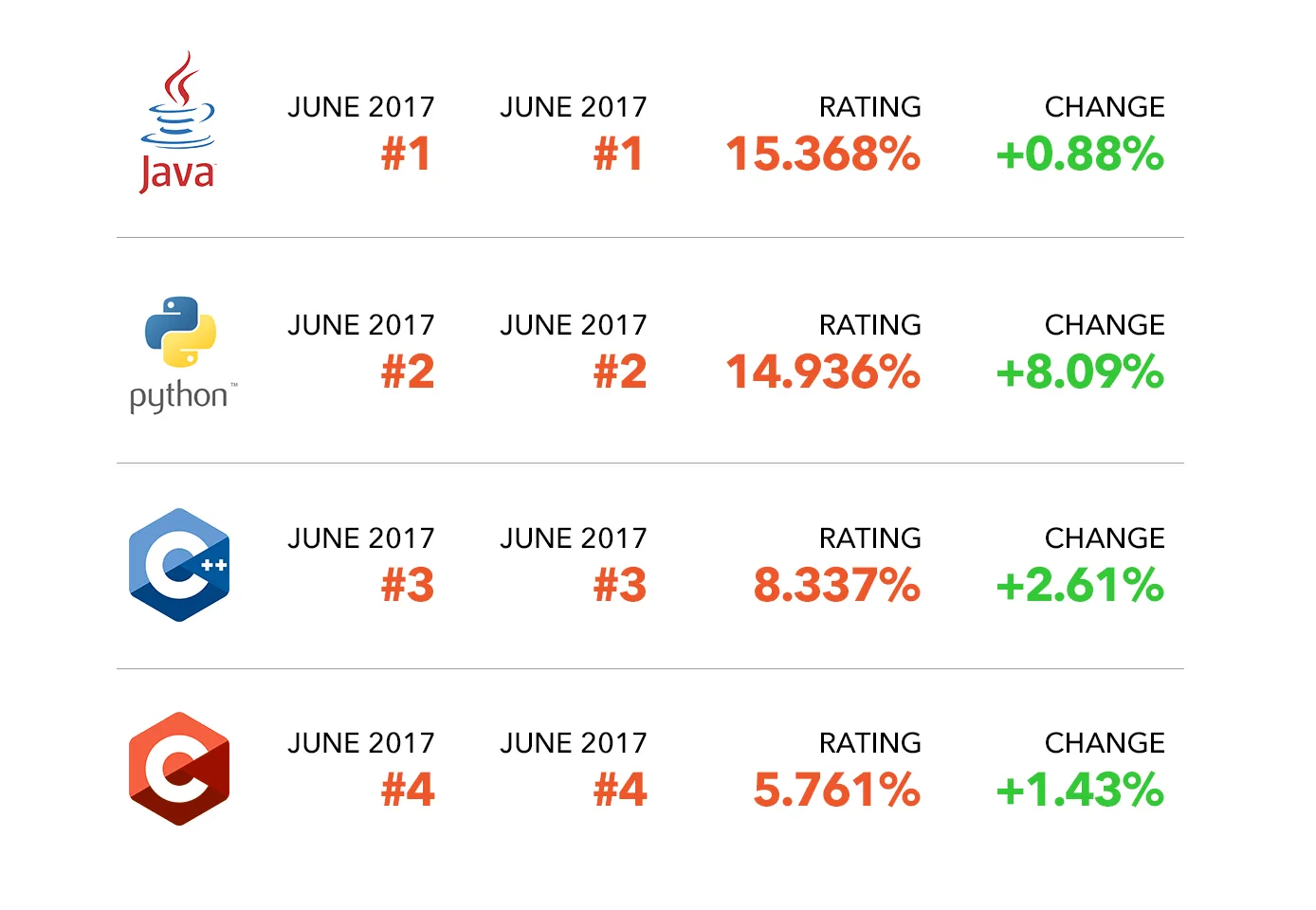
Image Source: https://www.tiobe.com/tiobe-index/
Some benefits of Java include:
- The language is over 20 years old and used by billions of devices and millions of developers.
- You can write code once and it can then run on any operating system, which makes it very scalable. Java is run on many hardware and operating systems through the Java Virtual Machine.
- Many Fortune 500 companies, up to 90%, are using Java as their server-side programming language.
- There is an excellent Java community and documentation.
So far, it seems to be a draw: both languages have benefits. Certainly Python is worth learning as a beginner and Java has massive popularity and utility. Let’s see how the languages compare if we look at job demand and salary.
Job Demand: Java vs. Python in 2018
Indeed, the world’s largest job search engine, gives one a good indication of the most in-demand jobs. Stackify took the 50 most popular jobs from the TIOBE index and searched for them on Indeed. Here are top five most in-demand languages as far as job vacancies go. Java tops the list, though Python is not far behind.
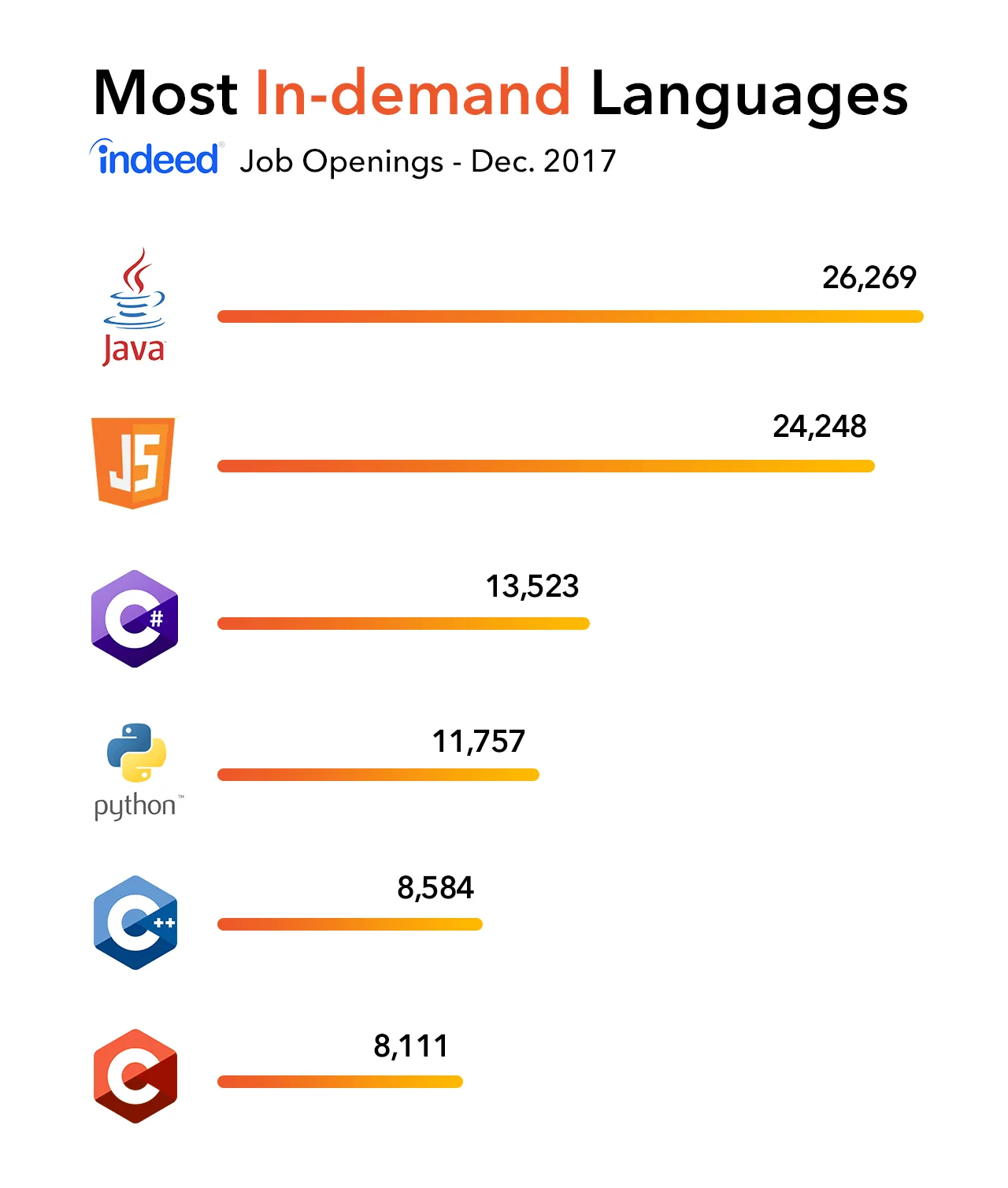
Image Source: https://stackify.com/popular-programming-languages-2018/
Salaries: Java vs. Python in 2018
How do Java salaries compare with those offered to Python developers? Read on to find out.
According to Indeed, the average Java salary in the US is $101,077 per annum, as of June 2018. This is based on salary estimates from 14,973 employees over the past 36 months. A Java developer at Apple would earn, on average, $114,212 per annum. However, a Python developer would come out with an even healthier salary of $114,490 per annum, on average. And if you secured a job at the Bank of America as a Python developer, you’d emerge with a whopping $153,895 per annum!
In closing, it’s hard to draw a definitive conclusion when it comes to Java vs. Python in 2018. Python salaries appear slightly better, but Java jobs seem to be in higher demand. Whereas Python is easier to learn, Java has a higher popularity ranking.
If you’re interested in learning Java, consider signing up for HyperionDev’s Mobile Developer Bootcamp, which is taught online via mentor support. You can become a fully functional Android developer in six months. If it’s Python you’re after, check out HyperionDev’s Full Stack Web Developer Bootcamp. Alternatively, if you’re keen to learn both Python and Java, why not sign up for the HyperionDev Software Engineering Bootcamp which covers both. Both Full Stack Web Development and Software Engineering are taught online over six months and are fully supported by expert mentors.

Career Advice
5 Best Programming Books for Beginners
When you’re starting off in a new career in the developer world, all the information you need to know can get quite overwhelming. It’s always best to be doing some additional reading in parallel with your online course or coding bootcamp. We've rounded the top 5 programming books for beginners in 2018.
When you’re starting off in a new career in the developer world, all the information you need to know can get quite overwhelming. It’s always best to be doing some additional reading in parallel with your online course or coding bootcamp, or even when you’ve already transitioned into your new career! We’ve rounded up the best programming books for beginners, ranging from problem-solving tactics to technical books on JavaScript and Python languages.
1. Eloquent JavaScript: A Modern Introduction to Programming by Marijn Haverbeke
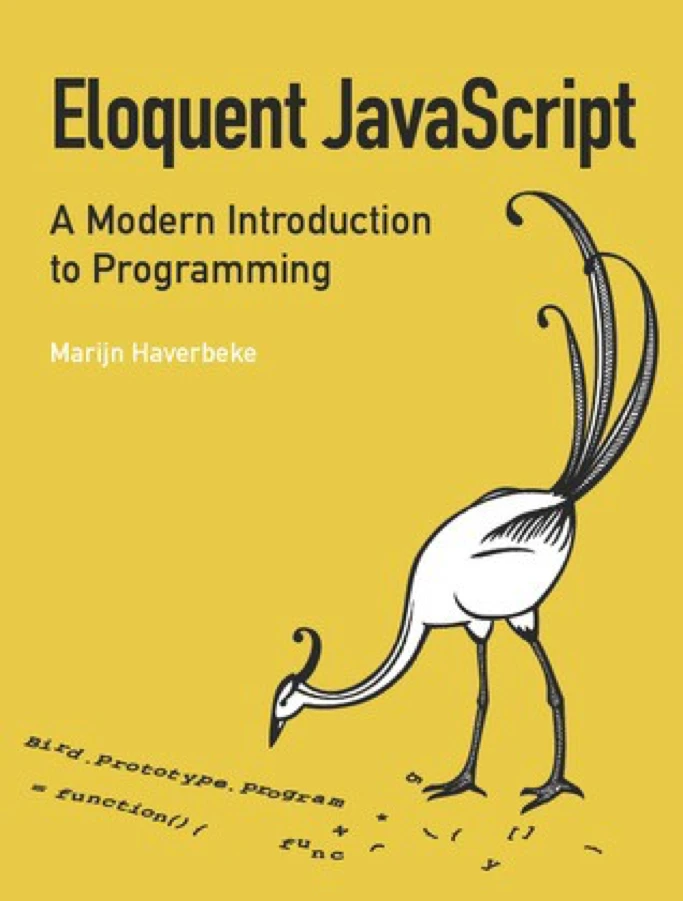
JavaScript is the most commonly used programming language for web development. Its ease of use and versatility make it easy to develop dynamic and interactive websites. When you’re starting off in the web development world, it’s a great idea to read up on some technical programming information regarding this popular programming language.
Eloquent JavaScript: A Modern Introduction to Programming is one of the best programming books for beginners and is even available for free to read online. This book is divided into three parts: basics of JS, how it’s used on browsers, and how to use Node.js.
Get this book here.
2. Programming Pearls by Jon Bentley

Successful developers are constantly optimizing their problem-solving skills. The second edition of Programming Pearls by Jon Bentley teaches the basics and best practices of solving problems by focusing on a range of programming tasks, such as “sorting numbers, creating anagrams, or counting the words in a block of text.” This book will assist you in learning to think like a programmer, so it’s considered to be one of the best programming books you can read when starting out in the programming industry.
Get this book here.
3. Learning Python: Powerful Object-Oriented Programming
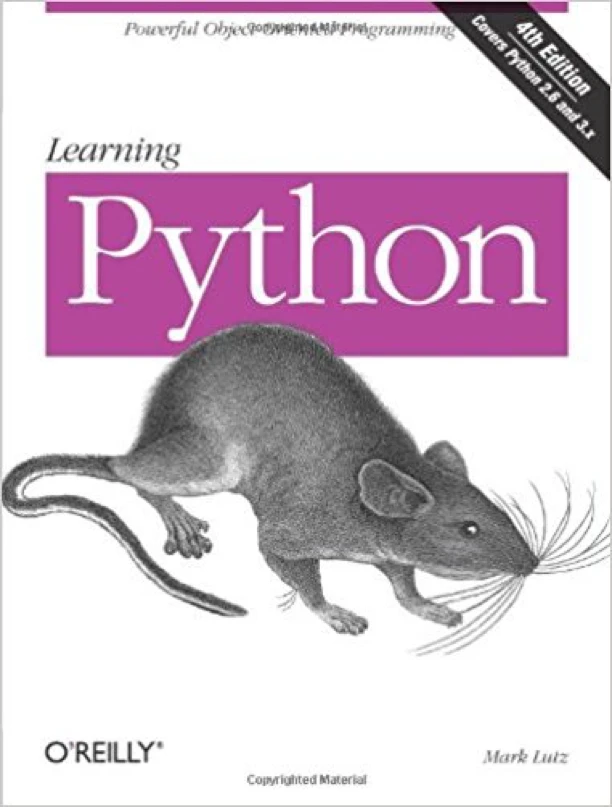
Python is quickly becoming one of the fastest-growing programming languages. Naturally, you should add a book filled with Python tutorials to your list of the best programming book reads if you’re starting off in the programming industry. Learning Python: Powerful Object-Oriented Programming will walk you through both the basics and advanced applications of Python, while supplying easy-to-follow tutorials to guide you through your learning process.
Get this book here.
4. The Upside of Stress- Kelly McGonigal

Stressful work situations are common when working as a developer. You may find yourself working long hours trying to debug several lines of code or trying to solve many other problems with your website, user interface or back-end database. This book can help you see stress differently, in more of a positive and inspiring manner. The Upside of Stress uses real-life examples and techniques that can help you turn your overwhelming stress into optimised focus and energy.
Get this book here.
5. The Complete Software Developer’s Career Guide by John Sonmez
Once you’ve sharpened your problem-solving skills as a developer and implemented your knowledge on a few programming languages, it’s time to actually get out there and start interviewing for your new developer job. This book, The Complete Software Developer’s Career Guide, will go through a range of topics, such as the technical skills required for a developer career, the pros and cons of coding bootcamps, and how you can teach yourself how to code. Sonmez also discusses what it’s like working as a developer and how you can best advance your career in the programming industry.
Get this book here.
It’s a known fact that developers are lifelong learners. When starting a new career as a developer, it’s always a good idea to read more and educate yourself as much as possible. With so many resources out there, it’s important to read only the best programming books available, especially the technical books on JavaScript and Python. If you’re interested in studying JavaScript and Python through an online coding bootcamp, check out HyperionDev’s 6-month courses, specifically the Full-Stack Web Development course, which delves deep into both programming languages.

Career Advice
The Top Ten Tech Careers in 2018
We look at data on number of job openings, salary and overall job satisfaction ratings to bring you the top ten tech careers in 2018.
Every company is a tech company these days. This is according to Dr. Andrew Chamberlain, Glassdoor’s chief economist, who explained his position to Business Insider. ‘(T)hey all need people who know how to collect, organize, and analyze data to help them make better, more informed business decisions,’ said Chamberlain whose company recently published the 50 Best Jobs in America report. That means all companies require tech skills in 2018, but what exactly are the top ten tech careers in 2018, according to Glassdoor?
Top Tech Jobs in 2018: Staying Ahead of Automation
The Glassdoor report combines three factors to work out its top-job rankings: number of job openings, salary and overall job satisfaction rating. Not all the jobs on the Glassdoor’s report are tech jobs, but there has been a definite increase in the number of jobs in this industry: 20 out of the 50 jobs in this year’s list are in tech compared with 14 out of 50 in the previous year.
Here are the top ten tech careers in 2018. For a job to be considered, it has to receive both 100 salary reports and 100 job satisfaction ratings over the past year from US-based employees.
# 1 Data Scientist
Topping the list at number one is Data Scientist. The Harvard Business Review calls Data Science the ‘sexiest job of the 21st century’.
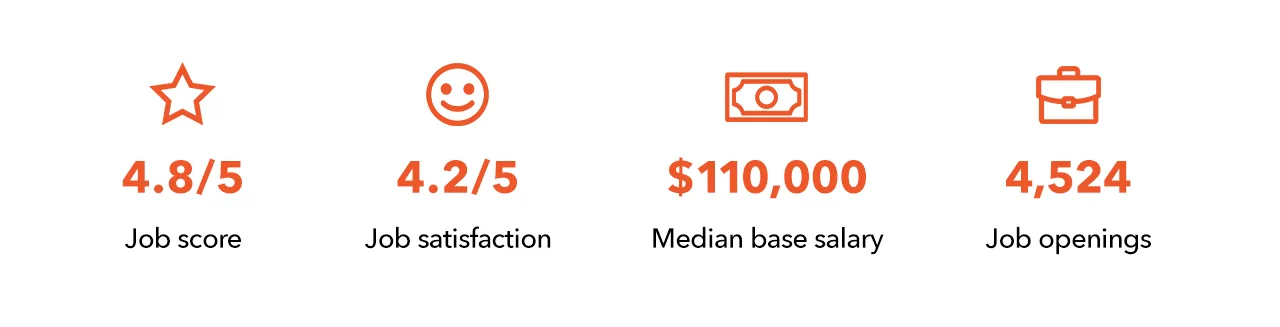
Data Scientists (and many other top tech jobs) are at a lower risk for automation, stated the Glassdoor report. Automation is likely to hit certain jobs hard. Bookkeepers, for example, have a 97.6% chance of being automated. ‘The key skills that are helping workers stay ahead of automation are creativity, judgment and flexibility,’ says Chamberlain. In tech, this would include data science, which requires creative problem-solving ability. Check out this nifty guide to assess the likelihood of your job being automated.
# 2 DevOps Engineer
Gareth Dwyer, software and operations developer at HyperonDev, explains that a DevOps engineer is ‘a software developer who also knows how to do server configuration and management, and therefore doesn’t rely on a system administrator for operating system, platform and hardware support.’ DevOps straddle deployment and network operations as well as scripting and coding.
# 3 Mobile Developer
Scott Stiner of UM Technologies and part of the Forbes Technology Council says in a Forbes piece: ‘Mobile application developers will continue to be in high demand, just as they have been the past few years. The demand will become greater in 2018, though, and successful app developers should be fluent in multiple programming languages, including Java, HTML5, Objective-C, C++, C#, Python and Swift. Also, app developers with UX and UI design skills can offer much more value for project management.’
App developers are partly in high demand because app revenue is climbing hugely. Worldwide revenue growth in 2020 is projected at 188.9 billion US dollars (compared with 88.3 billion dollars in 2016).
# 4 Product Manager
With so many new tech products on the market, companies need a technical, organised and logistics-driven employee who can manage it all. It’s essentially an organisational role that guides the strategy, roadmap and feature definition for either a product line or a product.
# 5 Front End Engineer
At its most basic, front-end engineers tend to write code that runs on a user’s browser, which translates into knowing HTML, CSS, JavaScript and various APIs. HTML, CSS and JavaScript are frequently used in the developer world. Check out this graph, which shows commonly used programming languages, from the 2018 Stack Overflow Developer Survey.
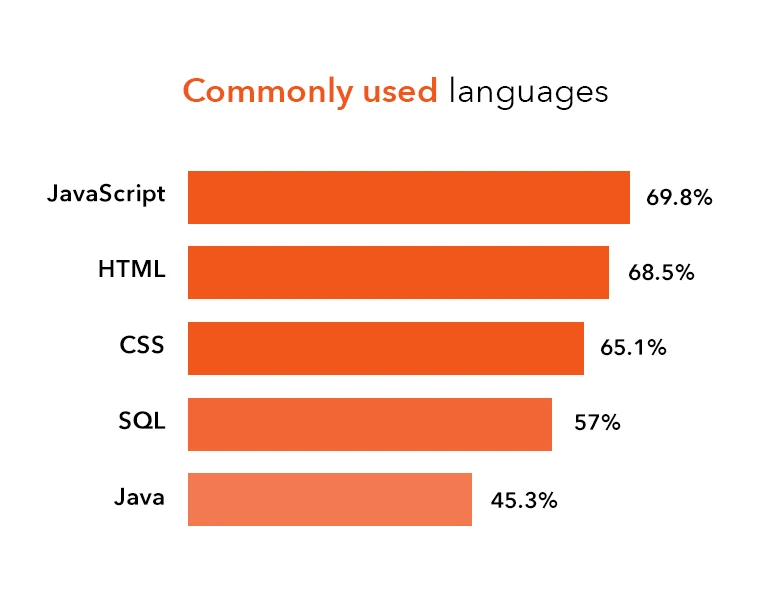
# 6 Site Reliability Engineer
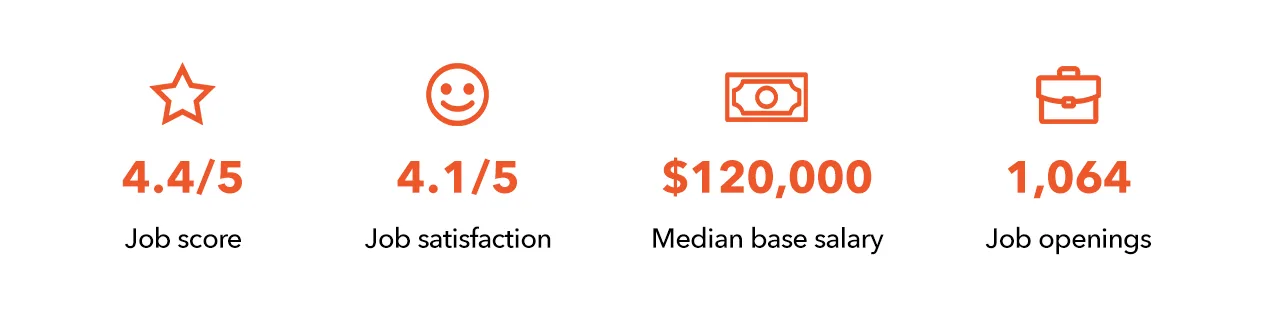
During a live push (when software goes live), things frequently go wrong. That’s where site reliability engineers come in. They spend all their time monitoring application performance, reviewing error logs and troubleshooting software defects.
# 7 Analytics Manager
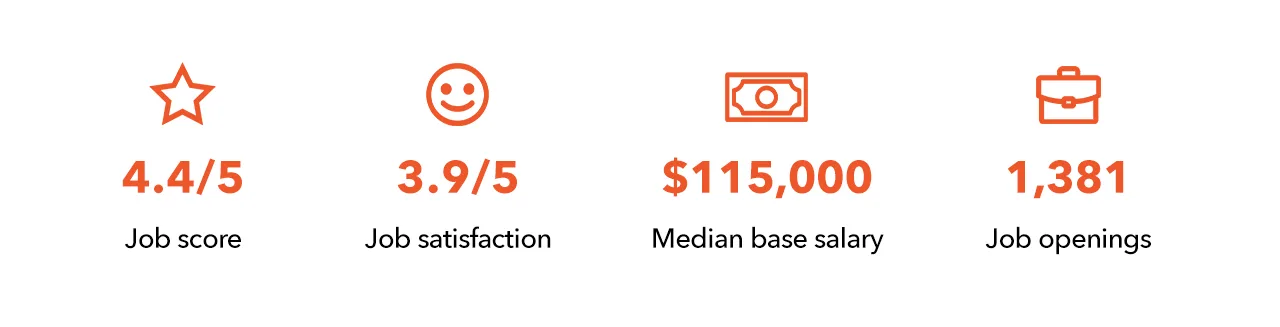
Analytics Managers, according to Social Science Careers, are business professionals who have technical skills, industry understanding and knowledge of customers in order to make informed business decisions. They will translate raw data into meaningful information – for example, which products you should put on sale for the upcoming season.
# 8 Software Engineer
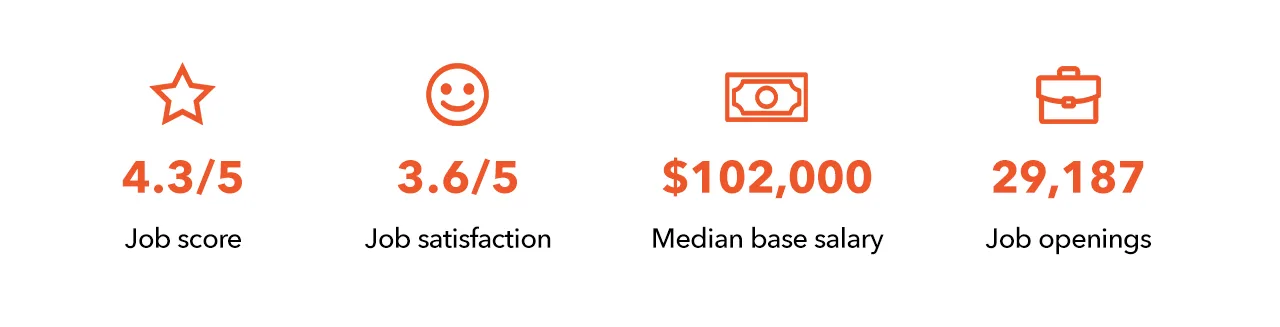
Software Engineerscreate the technologies that we interact with every day, from the app that wakes you up in the morning to social media and music platforms. ‘Software affects almost every aspect of our daily lives. You cannot go a day without encountering some sort of software; software is everywhere,’ states Dr. Melanie Willett, content writer at HyperionDev.
# 9 Hardware Engineer
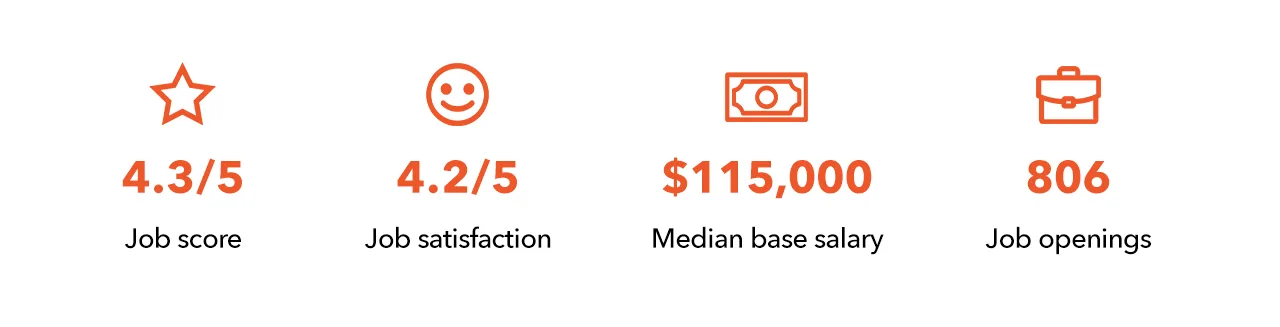
Hardware engineers typically work in research labs that build and test various new versions of computer models. Their day-to-day typically includes researching, designing and developing computer systems and their components (circuit boards, routers, etc.).
#10 Quality Assurance Manager
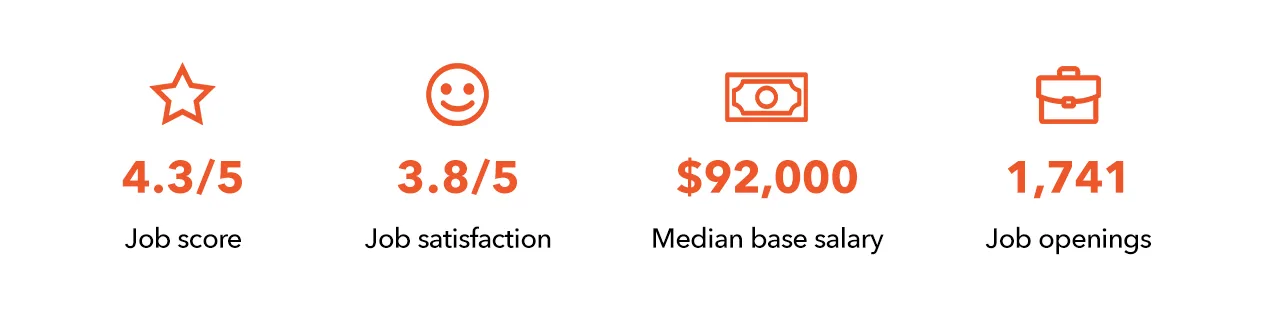
The duties of a quality assurance manager will obviously differ between industries but at its simplest, the job involves ensuring that tech products are operating as they should. Some typical duties could include determining in-house quality standards and procedures, setting customer service standards, writing management and technical reports, and training.
Conclusion
So those are the top ten tech careers in 2018. But remember, the great thing about a tech job is that there is such variability in potential jobs, from solely coding and marketing via data analysis to dealing only with customers and people. As a result, there’s sure to be a tech job that suits your aptitudes and personality. Enrol on a HyperionDev free trial to find out more about Web, Mobile or Software Development.

Career Advice
It’s Never Too Late to Learn to Code
Software Developer jobs are predicted to grow by 17% from 2014 to 2024. Is it too late to jump on the "coding bandwagon"? We explore all the aspects and advantages of learning coding at an older age.
According to the US Bureau of Labor Statistics, software developer jobs are predicted to grow by 17% from 2014 to 2024. This is much faster than the average for other occupations, which is at 7%. The US Bureau of Labor statistics explains that the main reason for the rapid growth is due to ‘a large increase in the demand for computer software’. But is it too late at [enter your age here] to jump on this bandwagon and learn to code?
Definitely not. Firstly, let’s look at demographics. 25% of programmers are over the age of 35, according to the 2018 Stack Overflow Developer report, which surveyed over 100 000 developers.
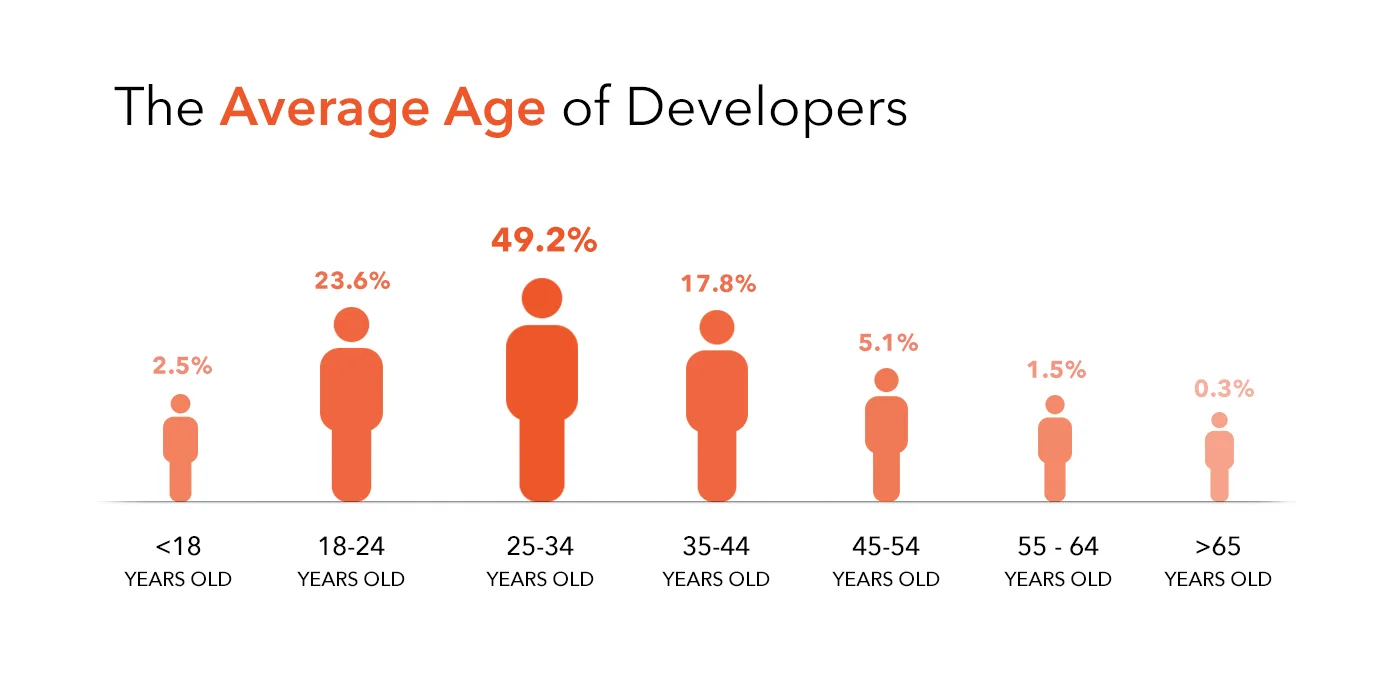
But here’s the kicker: a full third of professional developers on Stack Overflow only learned to code within the past five years, so presumably a fair number of those older developers probably learnt coding fairly recently. In fact, almost 12% of developers who work in the industry only learnt to code in the past two years.
It’s not all roses, however. The tech industry has long been accused of ageism. Mark Zuckerberg, Facebook’s CEO, said, for example, that, ‘young people are just smarter.’ And the demographics in certain kinds of companies are definitely skewed towards the younger generation. For example, Fortune notes that the median age at Twitter is only 28, and at Facebook and Google it’s 29 compared with a median age of 42.4 for the US labour force. However, other companies, such as computer hardware and business software ones, are certainly filled with many people in their 30s and 40s – for example, the median age of workers at Oracle is 38, states PayScale.
It’s clear people are learning coding at an older age and securing jobs in certain kinds of tech companies, but what’s it like to learn coding when you’re a little older? Here’s the good news: there are many advantages.
The Advantages of Learning Coding at an Older Age
Here are some of the advantages, according to a piece in Medium.
- You have experience. This is likely to translate into real-life problem-solving creds.
- Your emotional intelligence is likely to be higher. In fact, a study published in Berkeley News found that emotional intelligence peaked in one’s 60s. People in this age group appear to be better than their younger counterparts at seeing the positive in a stressful situation. This is certainly a skill for a software project where you have to work with others and things might not work out as planned. (Read more about a day in the life of a junior software developer.)
- You contribute to diversity. A study published by Indeed showed that 77% of people working for tech companies noted the importance of a diverse company.
- You understand the rewards of patience and persistence, vital skills for coding, better than your younger co-workers.
Tips for Older People Wanting to Learn Coding
Let’s look at some tips for learning coding at an older age.
- A Quora visitor advises that you join all the programming websites you can including Topcoder, SPOJ, Hackerrank, CodeChef, CodeForces, etc. Keep the same handle,or username,on all these sites. In this way, if someone Googles your username, all your profiles will be seen.
- Complete an actual project. Have a look at codeconquest for some great coding project ideas.
- Find a mentor – your mentor could of course be younger than you. ‘I firmly believe that mentorship is the best path to career success, hands down,’ says Chris Myers, a startup founder and CEO of a financial management solutions company, in Forbes. You may wish to enrol on a bootcamp or course where mentorship is built into the program – for example, HyperionDev offers online, coding bootcamps built around this idea.
- Don’t underestimate what you do know. Whatever you’d done previously should help make you a more enticing and unusual candidate – unlike the typical 22-year-old who has only studied coding and has no real-world experience. People who blend a variety of seemingly disparate skills are often in high demand, because they now have a unique professional profile – for example, a software developer who has done a fashion degree may seem like a strange profile, but is actually the ideal candidate to fill a developer role at a global retail company.
In closing, it’s never too late to learn coding; there’s no upper limit. In fact, an 82-year-old Japanese woman recently taught herself coding and created an iOS app, which has been downloaded over 50 000 times! Unsurprisingly, she learnt via mentorship. The bottom line: if you’re keen to become a developer, go for it, no matter your age.
HyperionDev offers three 6-month part-time Online Bootcamps in Web, Mobile and Software Development. Book a free trial now!

Career Advice
Can I Learn to Code on My Own?
When people decide to switch to a career in coding, there a few different options for education: self-teaching or mentor-led online bootcamps. Here are 5 questions that will help you when deciding - "Can I Learn to Code on My Own?"
Many people start working in one field only to find themselves changing careers to something completely different – for example, from restaurant owner to doctor, or from marketing specialist to web developer. If you’re keen to enter the lucrative field of coding, is this something you can pick up on your own? Here are five questions worth asking now to answer the question, ‘Can I learn to code on my own?’.
When it comes to learning coding, you can teach yourself. Says 2018’s Stack Overflow Developer Report, ‘(A)lmost 90% of all developers say they have taught themselves a new language, framework or tool outside of their formal education.’ You would then use online resources, which could include tutorials such as Google’s Python Class, or video-based learning like Udacity’s free Introduction to Computer Science. Alternatively, you can learn online via a mentor-led bootcamp, where you receive expert advice when you get stuck. HyperionDev’s bootcamps are an example of this kind of mentor-led learning.
To decide whether you’re better off doing it all yourself or whether you’d benefit from mentor-led learning, consider the following five questions, as put forward by Course Report:
1. Do you have prior coding experience?
Those with a computer science background or a knowledge of programming will find it easier to fly solo and teach themselves another language. If your knowledge is fairly minimal, you’ll learn quicker with a coding bootcamp. (Quick recap: an online coding bootcamp is a structured, mentor-guided learning platform that replicates an in-class experience. You’ll find that you need to put aside between 5 and 30 hours per week to study coding this way.)
2. Will you be able to set up your own curriculum?
If you don’t have a mentor, you’ll need to decide what you should and shouldn’t be learning. You will need to put together your own curriculum. Can I learn to code on my own? You can, if you feel comfortable drawing up your own learning plan that will meet the needs of potential employers.
However, if you don’t feel comfortable putting together your own curriculum, there are definite benefits to enrolling on a mentor-led online bootcamp. You’ll know that the structure of the course has been carefully devised to reflect the latest industry standards.
3. What is your learning style?
In the past when you’ve given yourself a project or a self-study, have you finished and stayed motivated? MOOCs (or ‘massive online open courses’) tend to have less than a 15% completion rate.
Most people learning to code will go through a number of psychological stages. Think about how you’d cope with each of these stages bearing in mind your learning style. The Footnotes, a career portal website, outlines these stages:
The Honeymoon: This is the first magical introduction to code.
The Cliff of Confusion: You’re getting a little stuck and need help. If you’re on a bootcamp, you’ll make good use of your mentor during this phase. Says Masood Gool, Lead Mentor at HyperionDev: ‘Learning to program can be a daunting task. Sometimes you may feel you’ve been thrown in the deep end. Coding mentors are there to smooth this process, provide individualised feedback and guide you along the path to success. This allows you to customise your learning path to achieve your goals.’
The Desert of Despair: This is a fairly long and lonely stage. You’re sitting alone and you’re really stuck. Again, if you chose the route of a mentor-led online bootcamp, this is the time to speak to your mentor to guide you through this hellish desert.
The Upswing: Things are now starting to come together. Enjoy it. You’ll build even more confidence with practise. Eventually, you’ll have great pride in the work you do and the code you write.
4. What are your time and commitment pressures?
You may reach the same end point whether you choose a solo study option or a mentor-guided program, that is, becoming a successful developer, but you also need to think about time. The chances are that it will take you longer if you’re doing it by yourself. It’s a matter of calculating how much it will cost you (e.g. lost salary) to take longer to qualify. Here’s a nifty Return on Investment (ROI) Bootcamp Calculator to help you visualize how your time and commitment investments will play out over the upcoming years.
5. Is a network of fellow programmers important to you?
Do you have a group of people you can consult for support or opportunities? If not, a mentor-guided online experience will help set you up with your fellow classmates who will be of use to you in your coding career.
Conclusion
Think about these questions honestly. Perhaps write down the answers to structure your thinking. Your responses should answer the question, ‘Can I learn to code on my own?’. If you decide that you’d prefer a mentor-led online course, HyperionDev offers three 6-month part-time Online Bootcamps in Web, Mobile and Software Development. Book a free trial now!
Still have questions?
Contact our Admissions Team, and a real person will get back to you.