
Our latest insights
Read the latest insights


Software Engineering
A Day in the Life of a Junior Software Developer: Nasreen Mohammed
A day in the life of a junior software developer - on a day-to-day basis, what do junior developers actually do? It’s a career that requires problem-solving, creativity, analytical skills, as well as knowledge of current technical tools and practices.
The national average in the US for junior software developers is $64,949 per annum, states Glassdoor. Not only are their salaries really good, but developers are also in high demand. According to the US News 2018 rankings, ‘software developer’ was announced as the #1 job this year. It’s a career that requires problem-solving, creativity, analytical skills, as well as knowledge of current technical tools and practices. But on a day-to-day basis, what do junior developers actually do?
Introducing Nasreen
Nasreen Mahomed works at a tech company as a junior software developer. She, together with her teammates, is responsible for ensuring the smooth running of the company’s content management system. Because it’s a smaller company, she needs to know how to do everything on the system. Says Nasreen: ‘Every day is different. We don’t have a routine. Most days are spent fixing other people’s code, because the system is already up and running. We’re not putting it together from scratch.’
Besides fixing software code, Nasreen and her colleagues are involved in fortnightly sprints. The term ‘sprint’ is a software development term that comes from Agile Project management, a method of using short development cycles for constant improvement. Sprints begin with planning meetings to decide on the highest-priority features that need to be implemented.
‘We have a test server,’ explains Nasreen, ‘and so every two weeks we do a live push from the test server to the live server. In those two weeks, we’re expected to makes lots of fixes to the site that can then go live.’ She cautions that, as a software developer, you have to be able to work well under pressure. ‘Like most jobs, the stress waxes and wanes. Live pushes are certainly pressurised times. If there are problems, you need to keep a cool head and fix it quickly.’
Coding Degree vs. Coding Bootcamp
Even though Nasreen studied computer science at university, many of her colleagues did not. Mostly, they completed bootcamps or, if they were particularly comfortable with independent learning, taught themselves. ‘The thing about a university education,’ says Nasreen, ‘is that you learn one programming language very intensely. However, my job environment is not like that. I’m frequently fixing other people’s code, and not starting projects from the ground up. I need to be able to do lots of different things.’
Typical day-to-day tasks for Nasreen might include the following:
- Deploying new code that must be added to existing systems.
- Testing – application features should be tested before going live.
- Meeting with relevant people, including other programmers, managers, and other divisions of the company – e.g. marketing or human resources.
- Staying up to date via RSS feeds or online community sites.
- Being familiar with a variety of technologies including, though not limited to: Java, Python, web programming languages like JavaScript.
What does Nasreen recommend?
She recommends a coding bootcamp to provide a broad overview of the software industry, as well as a set of applicable skills. ‘Once you finish your training, you will learn a lot on the job,’ Nasreen explains. ‘Frankly, I never stop learning. I spend a great deal of my time doing research, particularly on Stack Overflow, an online community for programmers to share their programming knowledge.’
Even though coding can be a high-pressure environment, Nasreen is very happy with her chosen career. ‘At the end of the day I feel satisfied,’ she states. ‘The work is stimulating, my skills are in high demand and I know I’m making a real difference to customers’ experiences via my coding abilities. It’s also very gratifying to see instant results after we’ve completed a sprint and a live push. You get the opportunity to see that something has worked.’
HyperionDev offers a 6-month part-time Online Bootcamp in Software Engineering. Book a free trial now!
If you’re keen to know more about the typical day in the life of a software developer, check out this video.

Software Engineering
Best Android App Development Courses for 2018
Android App Development Courses - are you interested in becoming an Android or mobile developer in 2018? If so, have a look at the best Android App Development Courses.
No wonder you’re interested in Android app development courses in 2018, because professionals in this field earn excellent salaries. The average base pay for an Android app developer is $97, 986 per annum, according to Glassdoor.
Besides the high salaries, why else should you be interested in learning to design and develop Android apps?
- Android has overtaken Windows as the world’s most popular operating system (or OS). This means that as an Android app developer you can develop apps for more than 2 billion monthly active users.
- Developing apps in Android is generally cheaper than other platforms, states AndroidxCommunity. So there’s no big investment on your part and your project is likely to be more profitable.
- It’s easy to integrate Android apps with popular social media platforms.
- Android has an open source OS. It was developed by Google and is designed for touchscreen devices like smartphones, tablets, smart watches and Android TV. Android apps tend to be written in Java and you purchase them via Google Play. Many smartphones, including Samsung Galaxy, LG, Sony, Moto X, HTC, Google Nexus and Google Pixel, use the Android OS.
Android App Development Courses
In these courses, you’ll learn the skills required to become a mobile developer. You’ll learn things like Java and Java applications, Android Studio, UI design, networking and data structures, and how get an application on the Google Play store.
Here is a list of the five best Android app development courses in 2018:
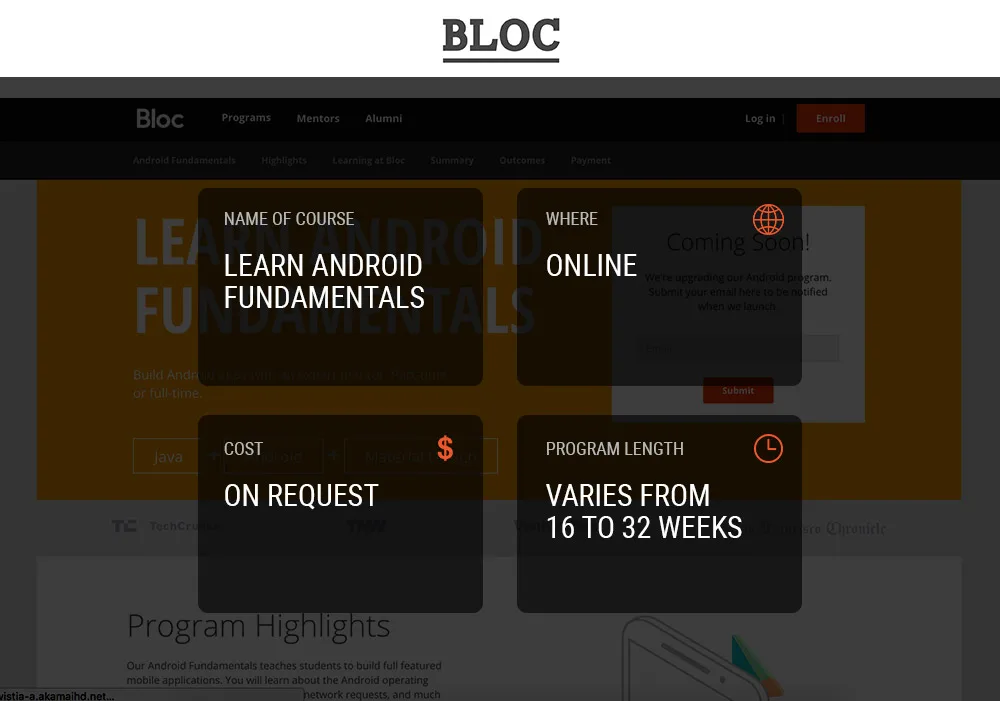
Bloc is one of the leaders when it comes to online coding education. Their Android Fundamentals course teaches students to build full featured mobile applications. You’ll learn about the Android operating system, views, resources, databases, network requests, and more.
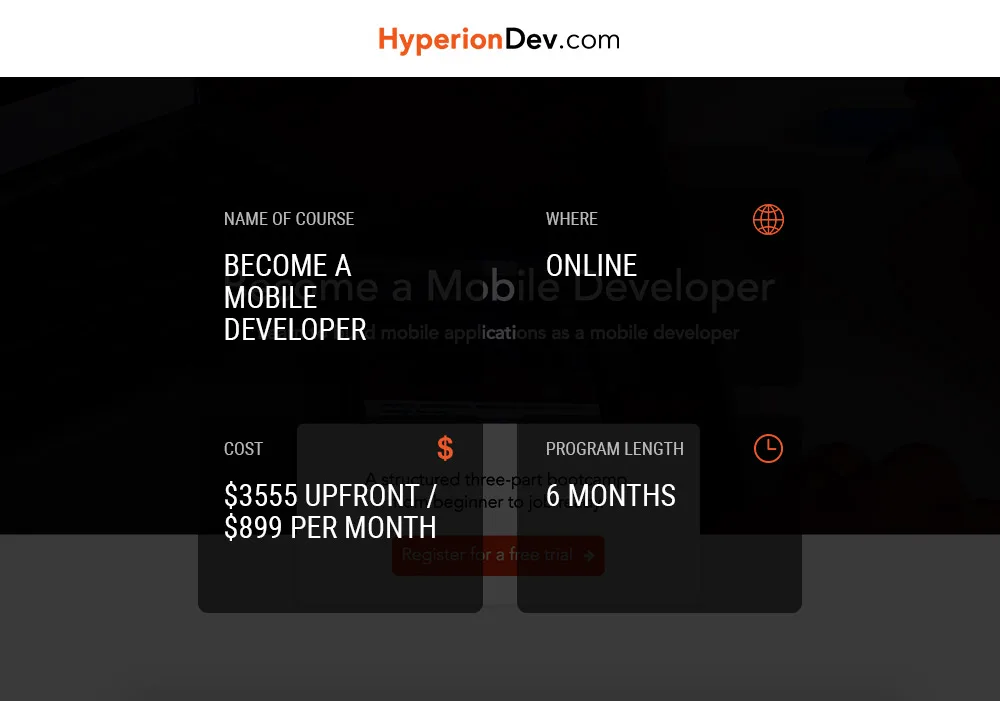
Personalised mentorship and strategic alliances with the world’s leading tech firms place HyperionDev at the top of their league. Their Become a Mobile Developer course includes three components: (1) Java Programming Essentials (2) Introduction to Mobile Development, and (3) Advanced Mobile Development. You’ll cover Java, Android Studio, fragments, loaders and widgets.
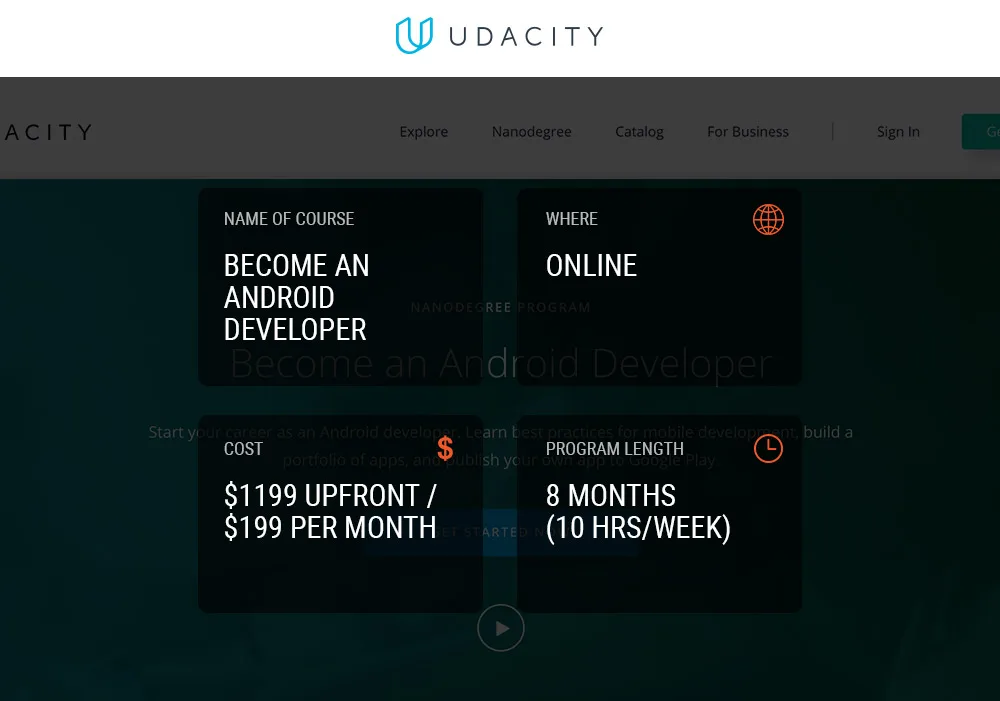
Udacity offers a Nanodegree program, built in partnership with Google, to train Android Developers. For this course, you should have at least 1-2 years of experience in Java or another object-oriented programming language prior to enrolling. You will learn to build apps in Android Studio. You’ll end up with your own app on Google Play and a portfolio of projects to show prospective employers.
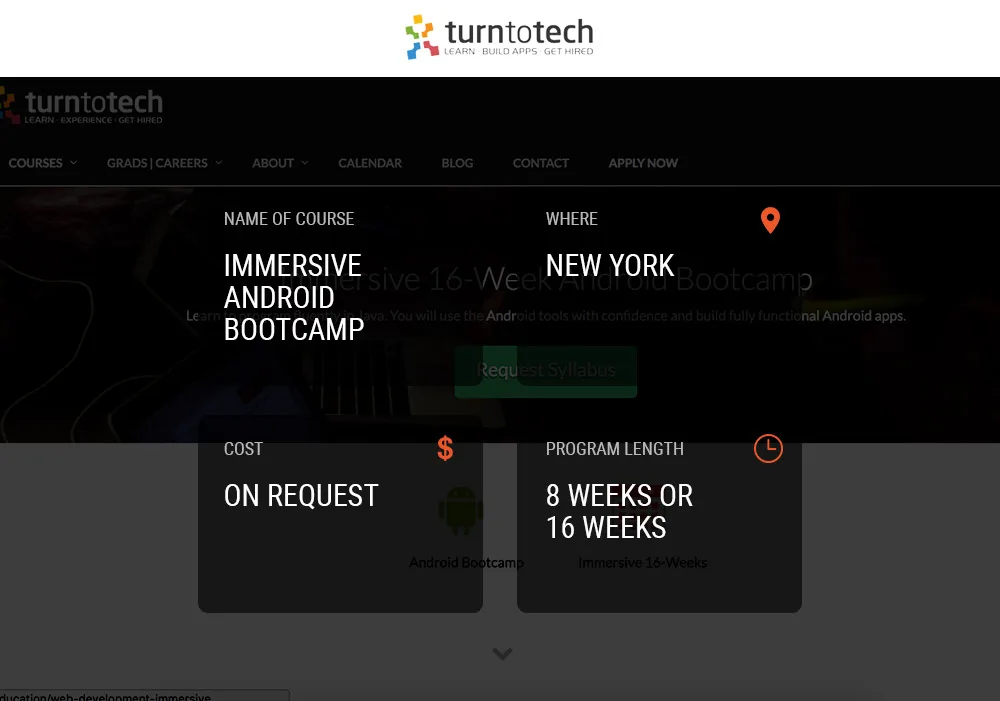
TurnToTech is a New York based mobile bootcamp where you can learn project-based courses for Android and iOS development. Their Android Bootcamp teaches you the programming fundamentals, including Java fundamentals, object oriented programming for Android, as well as Android Frameworks. You’ll also be involved in an internship project.
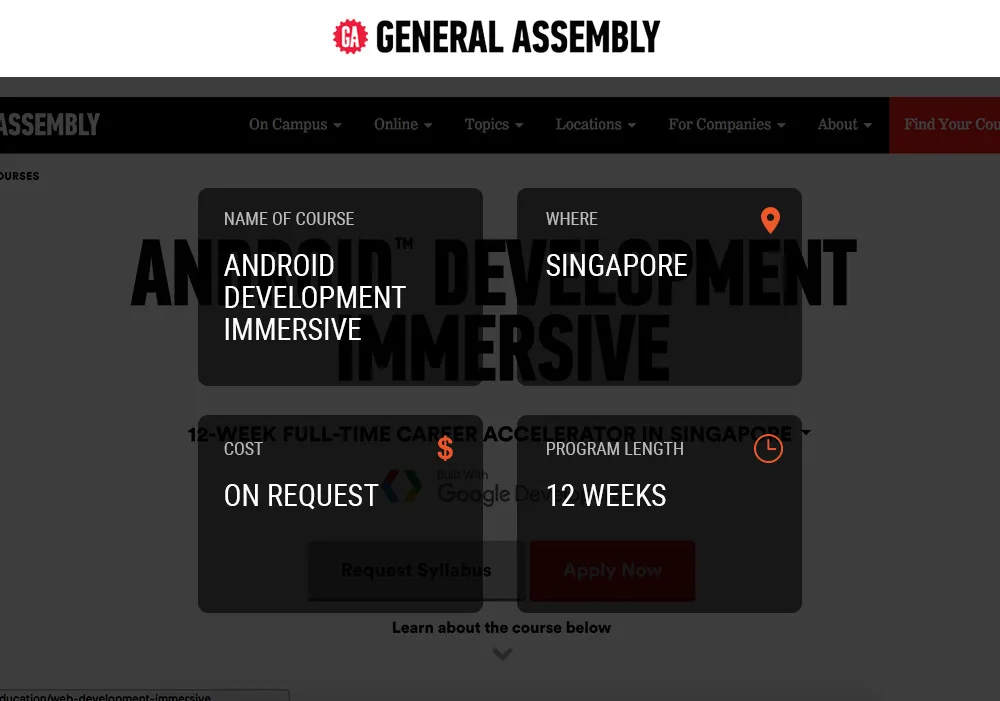
General Assembly offers training in tech, data, design and business, both online and via their 20 physical locations worldwide. Learn UI fundamentals, Material Design, Java, XMS, API, and more on their Android course. You will learn to build interactive Android apps using Java and the Android SDK.
Whichever Android app development course you choose, whether online or face-to-face, know that you’re entering a lucrative and stimulating career. Apps make our phones exciting and you’ll be part of this future.
Career Advice
How to Become a Web Developer
Here are all the basic building blocks, important programming languages, and other tips you'll need to succeed in web development.
You’ve decided it’s time for a career change in 2018. Even if you’ve never programmed before, you can become a web developer this year. It may feel overwhelming, but it need not be. This article will provide an overview on how to become a web developer by looking at the technologies, programming languages, frameworks and skills you need to know.
Briefly, full-stack web development covers both front- and back-end programming. The main function of the front-end is to deliver interactivity and to display content in an appealing way, whereas the back-end is involved with things like working out business logic, interacting with the databases, etc.
So where to start? Here’s how to become a web developer:
The Basics
Almost any course or online tutorial will start with the basic building blocks of a web page. These are HTML and CSS.
HTML
HTML stands for Hyper Text Markup Language and it describes the structure of web pages. You use tags to represent HTML elements. With HTML, you can determine the placement of paragraphs, headings, data tables, embedded images and video.
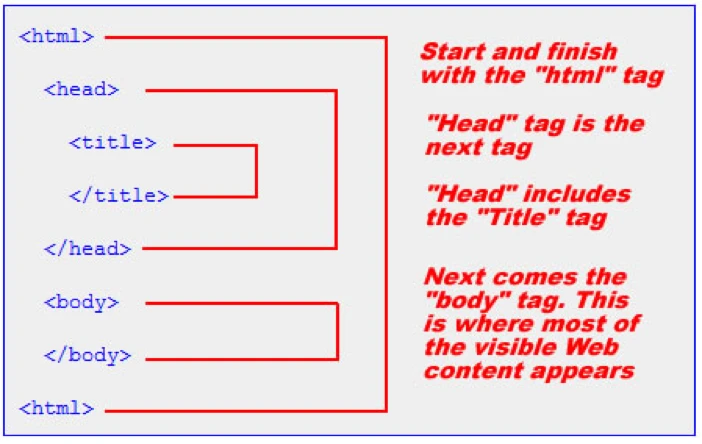
Source: https://htmlbasicsandhowtoos.weebly.com/
CSS
CSS or Cascading Style Sheets adds styling, such as fonts, colours or layouts to your website. It’s not a markup language like HTML or a programming language, which we’ll discuss later, it’s a style sheet language. For example, CSS lets you write code to make all the headings on your page blue; you would only need a single instruction for that instead of hand coding each heading separately.
Once you’ve mastered the basics, it’s time to move on to more complicated programming languages.
Intermediate Steps
JavaScript
You will need to learn JavaScript, a scripting or programming language that lets you implement complex things on a web page. JavaScript allows a website to do more than just display static information. It means you can have content updates, interactive maps, animated 2D/3D graphics, scrolling video, etc.
Interestingly, JavaScript is one of the top paying technologies in the US – at $90 000 per annum, according to the 2017 Stack Overflow survey. It runs on the browser and works as both a server-side and a front-end language.
Do I need to learn the back-end?
Certainly if you’ve set your sights on becoming a full-stack web developer, you will also cover back-end languages like Python, Ruby, Java and PHP. Back-end languages are vital, because they manage user authentication, manipulate database operations and ensure the logic of the application.
When it comes to back-end languages, Python is one of the fastest-growing languages in high-income countries such as the UK, US, Germany and Canada. This language saw a 27% year-on-year growth as the most visited search on Stack Overflow.
In addition to programming languages, you will also need to know about databases and storage. There is likely to be data on your website that needs to be accessed. Languages covered here might include SQL or MongoDB.
Adding Frameworks
What is a framework?
As a web developer, you’ll work with programming languages and frameworks. But what’s the difference? A programming language involves our communicating with computers and telling them what to do by speaking their syntactic language. Frameworks are collections of programs, which improve performance, extend capabilities and introduce coding shortcuts via libraries. This means developers don’t have to hand-code everything from scratch.
UpWork offers this great analogy: let’s say you want to make a sandwich – it’s much easier to purchase pre-baked, sliced bread than to make your own. Frameworks are like sliced bread. They are there to make the process faster. But remember, it’s not an either-or situation; as a developer, you’ll work with both programs and frameworks.
Examples of frameworks for everyday use as a web developer:
- Bootstrap: A framework for the design and layout of content on a page. It’s an open source toolkit for developing with HTML, CSS and JS (JavaScript). (Watch this beginner tutorial on Bootstrap.) Another popular open-source framework for JavaScript is Angularjs, which is a front-end framework.
- Django: This is an open source, back-end Python framework, which offers convenience, good functionality, documentation and reliable community support. (Here’s a Django tutorial for beginners.)
- Ruby on Rails: This is probably the main full-stack competitor to Django. It’s also open source and server-side, though written in Ruby.
Levelling Up: Advanced Web Development
Part of web development includes knowing high-level concepts like web architecture, especially if you’re creating more complex web applications. Here you’d want to know how to ‘structure your code, how to separate your files, where to host your large media files, how to structure the data in your database, where to perform certain computational tasks (client-side vs server-side), and much more,’ states Daniel Berowski, writing for Medium.
You’d also want to know about Git, which is a version control system for tracking changes in computer files and coordinating work on those files among a number of people. It’s mostly used for managing the source code in software development. It’s free and open source.
Now Get Started
You’ve read about how to become a web developer, so it’s clear that the path is fairly extensive. There is always something new to learn. Even experienced web developers are constantly updating their skills and knowledge, but it’s never too late to start.
If you’re interested in becoming a full-stack web developer, HyperionDev offers an online, part-time six-month course. You’ll cover much of what has been discussed in this article including HTML, CSS, Javascript, Node.js, MongoDB, Express, React, Python, and Django, as well as a lot more. Download the syllabus here.

News & Announcements
March 6, 2018
Applications for Injini’s Second Cohort Are Now Open
Are you an EdTech start-up in the African education space? If so, Injini, Africa's first EdTech incubator, in conjunction with CiTI is offering $50K.
Are you a tech start-up in the African education space? If so, here’s an exciting opportunity. Injini, Africa’s first EdTech incubator supported by the Cape Innovation and Technology Initiative (CiTi), is looking for start-ups ready to make an impact in African education using technology.
They will select eight companies from across the African continent to join their EdTech incubator programme in Cape Town from July to December, receiving $50k direct funding as well as five months of specialist mentoring, support, scale up and funding introductions.
Does Your Start-up Qualify?
Injini accepts a wide array of applicants, with previously funded start-ups ranging from e-book online stores to mobile apps focused on teaching Zulu and Xhosa.
The EdTech incubator is interested in companies and entrepreneurs that are:
- Working in any field of education, from numeracy to languages to vocational skills
- Working with any age of learners, from pre-school to adults
- At almost any stage of maturity, from new start-up to successful business ready to scale
The 5-month program, including follow-on support, builds on CiTi’s expertise in local business incubation with a strong emphasis on trialling ideas and measuring impact.
HyperionDev & Injini’s Collaboration in EdTech
HyperionDev, a leading worldwide educational provider, has built an online course platform that teaches students programming and tech skills. They have partnered with the world’s leading tech firms such as FaceBook and Google. HyperionDev is pleased to be working in partnership with Injini by offering mentor support and guidance to the eight selected start-ups.
“It’s great to be applying our knowledge and educational know-how to start-ups that are sure to make a difference in the African educational tech sector,” says Riaz Moola, HyperionDev’s co-founder.
In addition, four HyperionDev graduates have been placed with Injini start-ups: two as Full Stack Web Developers and two in Mobile Development. Says Sobane Motlomelo, Head of Student Success at HyperionDev: “We help match the relevant graduates to the right Injini roles based on their skill sets and the role specs. These internships really boost the abilities and competencies of our students and help them rapidly transition into full time roles right away!”
Injini applications are open now and close 3rd April. Apply today: www.injini.co.za/apply

Student Success Stories
HyperionDev Success Stories: Simon Shilo
Success Story - Simon Shilo success story: From Student and Tutor to Mobile Developer and Data Scientist. Ex-HyperionDev student Simon Shilo tells his story.
Simon Shilo was a part-time tutor when he stumbled upon HyperionDev’s programming courses. He recognised his potential for coding and software development and he took the leap to pursue it further. Today, he’s a Data Science trainee, developing apps for a variety of industries across the board. Check out Simon’s story below to see more of what he’s up to you and what were his favorite parts of his HyperionDev course.
Tell us a bit about yourself and your current occupation.
Hi, my name is Simon Shilo. I’m 27 and I stay in Cape Town. Before doing a course with HyperionDev, I was an undergraduate student studying Material Science and Metallurgical Engineering at the University of Pretoria. I was also a part-time tutor. Now I’m a Data Science trainee. I’m also co-developing apps, one for education for improved UX in tutoring mathematics and another for online shopping. Watch this space!
I did a C++ beginner and advanced course with HyperionDev. I took it part-time over three months. It’s one of the short courses.
Why did you decide on this course?
I felt that I had potential in coding and I really wanted to take it further. I knew computer science and computer languages are in great demand in the workplace. I wanted to get involved with that.
Has the course helped you achieve your new career goals and objectives?
Absolutely. Not only have I landed a job, the course also meant it was much easier for me to learn other object-oriented languages like Java and Javascript.
Tell us about your experience of the 1:1 mentorship at HyperionDev.
I have to say I really found the mentoring process very encouraging. The learning felt much, much deeper than anything I would have achieved by myself.
What part of the course did you enjoy the most?
I really loved the capstone project at the end of the course. This project involved applying everything I had learnt. We were asked to build a pseudo calculator for primary school children for our project. Based on this project and the course in general, I’m definitely thinking of doing a follow-up course and pursuing more knowledge in the developer field.
What advice would you give to people wanting to change careers to become developers?
My main piece of advice is that you must be bold. Don’t be afraid of taking chances. It will pay off for you. And just do your best.

Career Advice
Preparing for a Software Engineering Interview
A software engineering interview is unlike any other interview you will do. The main attribute interviewers are looking for in the software engineering interview process is your ability to code. In this example, we use Python to help you prepare for your software engineering interview.
Interviewing for a Software Engineering position is unlike the interview process for most other professions. Some parts are similar, in that you will likely be questioned about your previous employment and education, and asked competency questions to test your situational judgement and experiences. However, the main attribute interviewers are looking for in the process is your programming ability. You will need to demonstrate that you can think quickly and solve technical or logical problems presented to you. This often involves talking through code on the phone or a video call, or writing up a solution on a whiteboard. You can usually code in any popular programming language such as Java or C++. In order to help you with your software engineering interview, we will be using the Python programming language, as it is easy to read, and has minimal syntax, making it ideal for interview situations.
During these technical stages of the software engineering interviews, it is almost guaranteed that you will be asked questions about data structures such as stacks, trees, and hash maps. You may also be asked about algorithms, which are often ideally solved by using a particular data structure. Here we will be looking at one such data structure – linked lists. What are they, why are they used, and how are they implemented?
So let’s start with the basics. What exactly is a linked list? A linked list is a chain of connected nodes, and nodes are objects consisting of a value and a pointer to another node. The diagram below helps visualise this concept.

Defining Classes
To implement a linked list, the first thing to do is to create a Node class, which will hold the data of the node and a pointer to the next node in the chain.
class Node:
def __init__(self, data=None, next=None):
self.data = data
self.next = next
As the linked list itself is just a chain of nodes, to store the list we essentially just need a reference to the first node. Our LinkedList class is created below to store the head of the list.
class LinkedList:
def __init__(self):
self.head = None
Printing a Linked List
One of the most basic functions required of our linked list is the ability to print it. Printing the values of a linked list will be particularly useful when testing that other operations are performing as expected. An iterative method can be used to traverse through each node of the list and print out their values.
def print_list(self):
node = self.head
while node != None:
print(node.data)
node = node.next
Inserting Nodes
Two further key functions are inserting and deleting a node to and from the linked list. Let’s start with inserting a node. A node could be inserted at the head of the list, at the tail of the list, or somewhere inbetween. The simplest of these options is at the head of the list.
def insert_at_head(self, data):
self.head = Node(data, self.head)
In this single line we create a new Node object with the data passed in, and it points to the current head node. Our new node is then assigned as the head of the linked list. So our list is now headed by the new node, which points to the old head, where the list continues as previous.
Inserting a node at the tail of the list requires a little more effort.
def insert_at_tail(self, data):
# if empty list, insert as head node
if self.head==None:
self.head = Node(data, None)
else:
current_node = self.head
while current_node.next != None:
current_node = current_node.next
current_node.next = Node(data, None)
If the list is currently empty, then the tail and head are the same node, so we insert our one node as the head of the list. If the list is not empty, we iterate through the nodes until we reach the current tail. We then point this tail node to our new node, therefore appending it onto the end of the list.
We can also insert a node at a specific index (a numeric position in the list). To do this, we again first check for an empty list, in which case we insert as the head node. If the list is not empty, we want to iterate through the nodes in the list until we reach the desired index position. If we reach the end of the list before our index, then the position is out of range and no nodes are inserted. If we do reach the desired index in the linked list, we set the node at the penultimate index position to point to our new node, and set our new node to point to the previous node’s pointer.
def insert_at_index(self, data, index):
# if empty list, insert as head node
if self.head==None:
self.head = Node(data, None)
return
i=0
current_node = self.head
while i<index:
# if index out of range, do not insert
if current_node.next==None:
return False
current_node = current_node.next
i+=1
current_node.next = Node(current_node.data, current_node.next)
current_node.data = data
Deleting Nodes
For deleting a node at a specific index, the approach is similar to inserting. We again iterate through the linked list until our desired index position, but this time as well as keeping track of the current node, we also need to keep track of the previous node. This is because once our desired index position is reached, we set the previous node to point to the current node’s pointer. This essentially makes the chain skip over the current node, and it is deleted as nothing references it any more.
def delete_at_index(self, index):
# if index negative, do not delete
if index<0:
return False
i=0
prev_node = None
current_node = self.head
while i<index:
# if index out of range, do not delete
if current_node.next==None:
return False
prev_node = current_node
current_node = current_node.next
i+=1
if prev_node==None:
self.head = current_node.next
else:
prev_node.next = current_node.next
Testing
Below are some testing examples to make sure our linked list is performing as expected. Whenever you are coding up data structures, be sure to think about edge cases such as non-positive integers and values out of range.
list1 = LinkedList()
print(“Empty list:”)
list1.print_list()
print(“Node inserted at head:”)
list1.insert_at_head(‘hello’)
list1.print_list()
print(“Node inserted at head:”)
list1.insert_at_head(5)
list1.print_list()
print(“Node inserted at tail:”)
list1.insert_at_tail(‘end’)
list1.print_list()
print(“Node inserted at index 2:”)
list1.insert_at_index(11,2)
list1.print_list()
print(“Node inserted at index 0:”)
list1.insert_at_index(‘start’,0)
list1.print_list()
print(“Node inserted out of range:”)
list1.insert_at_index(‘Should not see this’,100)
list1.print_list()
print(“Node deleted at index 1:”)
list1.delete_at_index(1)
list1.print_list()
Why Linked Lists?
Now that we know the basics of linked lists, its worth considering why they would be used. The main advantage is the fact that they are a dynamic data structure, where memory is only allocated as needed, unlike arrays which have a predetermined size. They are also useful for implementing further data structures such as stacks and queues, where access to the head and tail nodes is valuable.
One disadvantage to using linked lists is that you use extra memory by storing both the data and a pointer for each node. To access a particular node in the list can require a full traversal, which is another downside in terms of time complexity.
In software engineering interviews, the topic of time complexity will often come up as an important consideration when evaluating your code. Linked lists have varied time complexities for insertion and deletion. Inserting at the head of the list is only O(1), but traversing a list takes O(n) time, and is required for inserting or deleting at a particular index, a node lookup, and more complicated operations.
Sample Interview Question
An example of a question you may be asked in an interview is how to reverse a linked list. Try to solve this on your own first, then check with our solution below to see if you used the same approach.
def reverse(self, node):
if node==None or node.next == None:
self.head = node
return
self.reverse(node.next)
node.next.next = node
node.next = None
There are different ways to approach this kind of question – so don’t worry if yours is different! Here we went for a recursive solution. We are passing in a node, which in the initial function call will be the head of the list. Then we have the base case, where we check whether we have reached the end of the list (the last node), in which case set the head node as the node passed in – this is essentially ‘reversing’ a single node.
If we have not yet reached the base case, we then have our recursive call, which reverses the list starting from the next node. The final two lines are the actual reverse, where we set our node’s next node to point back to our node, and our node to point to None, as we are at the end of the list.

What Next
Some ideas to think about for extending your knowledge of linked lists:
- So far we have been working with a linked list that is only connected in one direction – this is known as a singly linked list. There also exists a data structure called doubly linked lists, where each node has pointers to both the next node and the previous node. What would you need to add to implement this functionality?
- It might be useful to store other attributes of the linked list in the class, such as a pointer to the tail node, or a counter for the length. How could these aid our functions?
- If we wanted to lookup a particular node in the linked list, what would be the best-case and worst-case time complexity for this operation?
Check back soon for another post on data structures and algorithms which may be the key to success at your next Software Engineering interview!

Software Engineering
Why You Should Learn Python in 2018
Learn Python in 2018 - this article explains the benefits of Python and how it is one of the most popular languages used for mining big data.
So you’re thinking about learning to code in 2018. It’s proven that a career in coding is both fulfilling and in-demand. But what programming language should you learn? Quite simply: Python. Below, we explore why you should learn Python in 2018.
Python’s Recent Spike in Popularity & Growth Trends
To start off, it’s important to note Python’s recent growth in popularity. The language’s growth in interest over the last few years is hard to ignore and yet stumping data scientists. Not long ago, it was thought to already be a dead language.
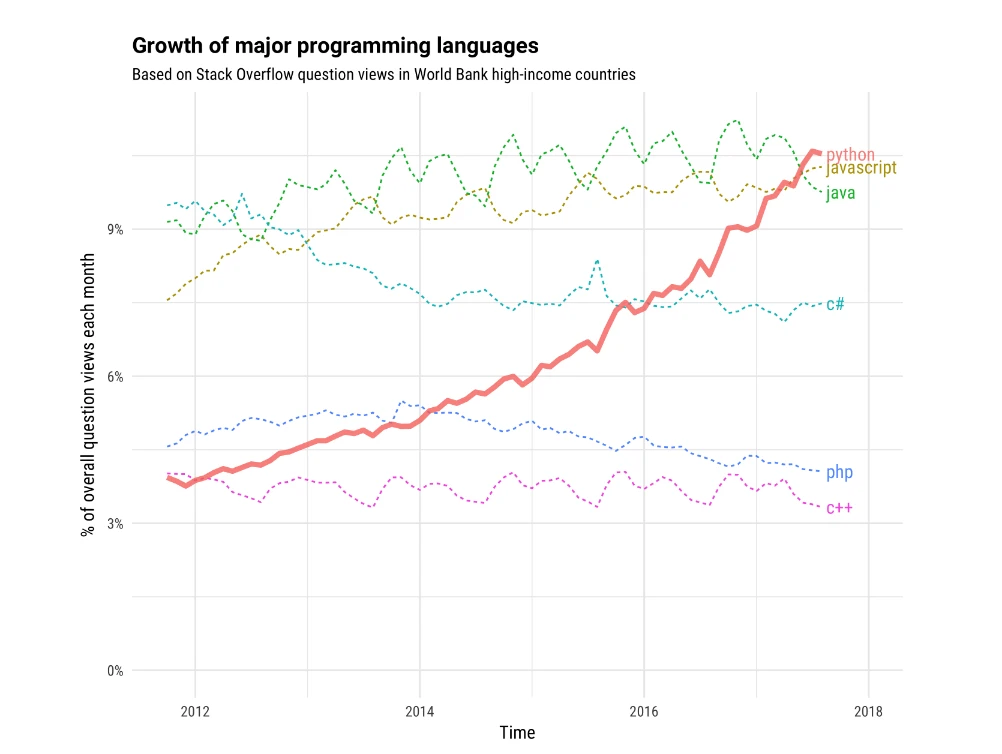
According to Stack Overflow’s 2018 Developer Survey, this past year alone, Python has risen in the ranks as one of the most commonly used programming languages, surpassing C# this year, much like it had surpassed PHP last year, visible in the chart above. It’s also considered as the most wanted language for the second year in a row, meaning developers who do not yet use Python say they intend on learning it soon. It’s safe to say Python is the fastest-growing major programming language.
So what’s the main reason for this recent spike in Python interest?
Interestingly enough, there is an equal rise of interest in data science and machine learning. Python and data science go hand-in-hand. Quora supports this by advancing reasons why Python is the language of choice for data scientists. Additionally, you’ve probably heard the saying, ‘Data is the New Gold.’ And when it comes to data, Python is probably the most used programming language in Data Science.
Why is Python used so widely in data science? One important reason is that powerful statistical and numerical packages exist in Python for data analysis (such as PyBrain, NumPy and MySQL). Anyone comfortable with the Python programming language can use it as a tool to organize, process, and visualize data. Even if programmers are not in a Data Science field, Python is still useful to them because most programmers deal with data, in one way or another, in their day-to-day work.
Although plenty of other programming languages are useful in the field of data science, such as SQL and R, Python is one of the more versatile, with over 125,000 third-party Python libraries available as a resource.
Let’s get into the specifics
Python Fast Facts
Average Salary: $107 000
Top Job Locations: New York City, Mountain View, San Francisco
Top Employers of Python Programmers: Intel, Amazon, Dell
Python was used to build: Instagram, YouTube, Spotify
So, what’s Python all about? It’s a programming language developed in 1991 which, according to Inc., is used for:
- Web development: it’s great for back-end web development (if you’re unsure about the difference between front-end and back-end web development, read this)
- Video game development
- Desktop GUIs (Graphic User Interfaces)
- Software development/engineering
The Benefits of Python
- It’s an easy language to learn. Responses to questions about Python on Software Engineering Stack Exchange, a Q&A answer site, indicate that it’s one of the first languages newbie developers should learn, because it’s simple to read. In fact, it reads similarly to English, which means it removes a lot of syntax-learning stress from coding beginners. Python handles the complexity for you.
- It contains object-oriented (OO) concepts. Basically, in Object-Oriented Programming, objects contain data, or attributes, and interact with other objects via procedures. Other well-known OO languages include Java, C++, C#, PHP, Ruby, Perl, etc.
- Python has a large library of great tools and functionality that makes building things relatively easy. A library is a collection of resources used by software programs to develop software. This could include configuration data, help data, message templates, pre-written code, documentation, etc.
- Python is one of the top four languages for building IoT, or Internet of Things, solutions. IoT is really about connecting things – such as coffee makers, washing machines, lamps, etc. – to one another via the Internet, explains Forbes. Most things that have ‘on’ and ‘off’ switches can be part of IoT.
- Community help exists for Python. As you become a coder, you’ll realise how important the developer community is, and how the larger the community, the more likely you’ll get help when you need it. Python has the 5th largest StackOverflow community, a popular Q&A programming site.
- Python appears to be the fastest-growing language, particularly in high-income countries such as the UK, UK, Germany and Canada. In June 2017, Python was the most visited tag from high-income countries on Stack Overflow – with 27% year-on-year growth.
In closing, if you’re keen to learn coding this year, it’s a great idea to learn Python in 2018. HyperionDev offers a six month online Software Engineering Bootcamp, which includes Python as part of its back-end programming.

Career Advice
How Elon Musk Got Into Programming
Thinking about taking the first step towards becoming a developer? Watch how and why Elon Musk got into computer programming at a young age.
Thinking about taking the first step towards becoming a developer? Watch how and why Elon Musk got into computer programming at a young age.
https://www.youtube.com/watch?v=Wye6mK1OiJ4&rel=0
Want to start your own journey towards becoming the next Elon Musk? HyperionDev offers multiple online coding bootcamps that will help you with the next big step in your career path. Choose between web development, mobile development and software engineering, and start coding today!

Career Advice
Become a Software Engineer Without a Degree
Become a Software Engineer without a degree - you can become a software engineer without doing a degree. Here are a variety of strategies you can adopt.
Software Engineering is the top job title for 2018, according to the U.S. News & World Report, which compiled a list of the top 100 jobs. Factors like current salary, future job market opportunities, anticipated growth, stress and work-life balance are all assessed before drawing up the rankings table. Not only did Software Engineering come out the best, it was also awarded the ‘best STEM job’ and the ‘best Technology job’ of 2018.
But there is good news: you can become a Software Engineer without a degree. There are strategies you can adopt which will result in your learning the skills required to do the job. Here’s how.
Get Coding
When it comes to getting a job as a Software Engineer, the most important thing is to show what you can do, explains Nick Larsen, a data engineer at Stack Overflow. He says: ‘The reality of getting hired as a developer is that it’s way easier to get hired if you show the company what you have done. A portfolio of projects and products you have made….is worth more than years of experience or schooling.’
The best place to showcase your portfolio is probably GitHub. Although GitHub is frequently used for version control and managing source code in communal software projects, it’s also a great repository for platforming your projects, whether you developed them yourself or communally. You can share your projects with prospective employers, as well as swap ideas and code with other programmers. GitHub accounts are free.
Learn the Skills
The Stack Overflow Developer Survey found that most developers, 69% to be precise, are self-taught. 13% of respondents across the globe are only self-taught, whereas a mere 1,2% have a PhD in computer science (or a related field).
There are a number of options when it comes to learning Software Engineering. These include:
Teach Yourself – you could enroll on a MOOC (Massive Open Online Course), which has open access via the web and unlimited participation. Have a look for software engineering MOOCs on these sites: Mooc.org or edX. Here’s a MOOC, begun last year, called Software Engineering Essentials. Another place to start might be CS50x, a free course from Harvard University, which teaches you the basics of algorithms, data-structures, programming languages and computers.
Although MOOCs are free, they don’t suit everyone. Some people don’t like the fact that this method of delivery doesn’t provide personalised attention from mentors. When it comes to coding, you frequently need that. In addition, MOOCs tend to be more introductory in scope. You don’t really dive deeply into the subject matter.
Coding Bootcamps – if it feels overwhelming to teach yourself to code, you could enrol on a coding bootcamp. Online coding bootcamps tend to offer a structured, mentor-guided learning platform that mirror the classroom experience. You’ll probably need to devote between 5 and 30 hour per week to studying software engineering principles, but you can choose when those hours will happen. Also, if you get stuck, you’ll receive personliased mentorship.
Set yourself tests – to become a Software Engineer without a degree you need to check that you’re absorbing the information you’re learning. Sign up for something like HackerRank, which will set you algorithm problems. You will implement your solutions online. You could also try CodinGame, where you learn new concepts by solving fun challenges (related to video games) in more than 25 languages.
Besides tests, you may want to set yourself tutorials. W3Schools is an excellent site to use as a reference for this. It offers tutorials in a wide variety of languages including HTML, CSS, SQL, PHP, etc.
Have an End Goal in Mind
You want to end up as a software engineer, right? But try and be a little clearer with your goal. Do you want to work for an established tech company, a start-up, or as a freelancer? Visualising your endpoint will help you think of ways of getting there, but you need clarity about where you want to end up.
Changing careers is not simple, but the challenges can also be uniquely satisfying and enjoyable.
Become a software developer without a degree today. Try one of our free trials to see if a coding bootcamp is right for you.
WANT TO WATCH?
See John Sonmez from Simple Programmer speak about becoming a Software Engineer without a degree.
HyperionDev offers a 6-month part-time Online Bootcamp in Software Engineering. Book a free trial now!

Web Development
South African Web Developer Salaries in 2018
South African Web Developer Salaries in 2018 - find out the average and median pay for senior and junior web developers. Find out which South African cities pay developers the most.
Before switching careers, you want to be 100% sure your new career will offer you everything you want. That could well include a better take-home salary. If you’re thinking of becoming a web developer, then the good news is that salaries are looking pretty good in the SA in 2018. Before taking a closer look at South African Web Developer Salaries in 2018, here’s a quick reminder of common web developer tasks. These include the following:
- Test and document software for websites.
- Work with designers and people who produce content.
- Write, modify, and debug software for websites.
- Write code to generate web pages, access databases, and business logic servers.
Web developers are frequently responsible for designing and developing both front-end and back-end internet applications and will work closely with a creative team to develop appropriate content. (Read more about the difference between front-end and back-end web development.) Languages and frameworks used include HTML, CSS, Javascript, Node.js, MongoDB, Express, React, Python, and Django in 6.
SA Web Developer Salaries in 2018
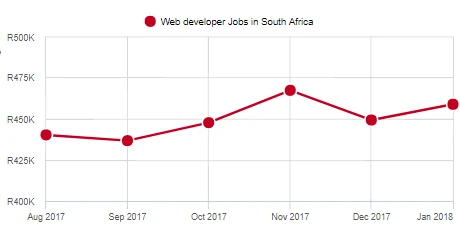
South African web developer salaries are looking healthy. Adzuna, which aggregates job listings of nearly all South African job ads, states that the average salary is R455,396 per annum.
Here is a graph from their site of average salaries for SA web developers from the past six months.
Source: Adzuna
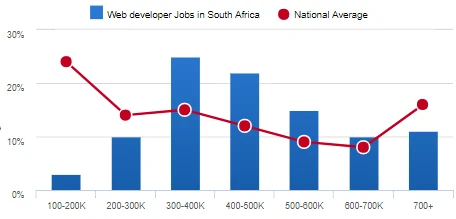
You can also check out this interesting graph: web developer salaries versus the national average. You can quickly see that web developers are definitely emerging wealthier.
Source: Adzuna
More experience obviously equates with high pay. A senior developer, for example, will earn about R42 121 per month, states Indeed, whereas an entry-level web developer will earn around R23 167 per month. If you are an extremely experienced and high-end web developer, you could earn in the region of R68,200 per month.
SA Web Developer Salaries in 2018 by City
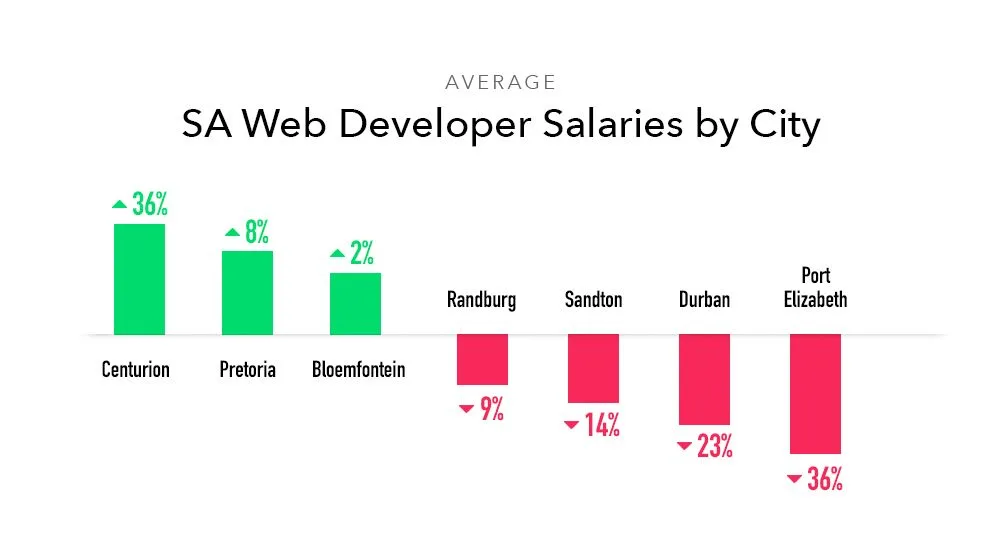
Location impacts on salary. Interestingly, junior developers in Cape Town earn, on average, 38% more than their equivalents in Johannesburg, states OfferZen. However, the opposite holds true for senior developers who, in Joburg, earn 10% more than web developers in Cape Town.
How do other cities fare?
SA Web Developer Salaries in 2018: Top Five Companies
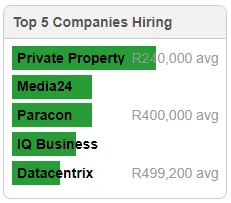
According to Adzuna, the top five companies hiring web developers in South Africa in 2018 are the following:
In summary, if you’re looking for a lucrative career change this year, web development is definitely worth thinking about. It’s also a career that is globally in demand. HyperionDev offers a 6-month part-time Online Bootcamp in Full Stack Web Development. Book a free trial now!
<NEED TO KNOW>
If you want to check out your potential salary, have a look at Stack Overflow, which is a popular developer community. Not only does it offer a Q&A for coders, but it also has a new salary calculator that lets you work out what you should be earning as a result of variables like your role, location, education level, experience and areas of expertise. It’s based on a survey that the company conducts annually with about 65 000 developers.

Web Development
UK Web Developer Salaries 2018
UK Web Developer Salaries 2018 - find out average and median UK Web Developer Salaries for 2018. Also, find out the top-paying UK cities.
Before switching careers, you want to be 100% sure your new career will offer you everything you want. That could well include a better take-home salary. If you’re thinking of becoming a web developer, then the good news is that salaries are looking pretty good in the UK in 2018. Before taking a closer look at UK Web Developer Salaries 2018, here’s a quick reminder of common web developer tasks. These include the following:
- Test and document software for web sites.
- Work with designers and people who produce content.
- Write, modify, and debug software for web sites.
- Write code to generate web pages, access databases and business logic servers.
UK Web Developer Salaries 2018
In the UK, according to CW Jobs, the average salary for web developer jobs is £47,500 ($66,396). The national average, reports Adzuna, is £33,780 ($47,218), so web developers are coming in a good notch higher. The median salary for web developers is £40,000 ($55,532) in advertised job vacancies during the last 6 months to the beginning of February 2018 – this means that 50% of advertised job vacancies are actually above the £40,000 salary mark!
What about year-on-year increases? They’re on the up. Year-on-year pay for jobs in web development have gone up 7,6% in the past year, whereas the annual change for all jobs is at only 2,5%. If you’re looking for the highest web developer field to enter, you should probably look at contract work. The average web developer contract salary is £106,836 ($149,297) and in the last month alone, that salary has risen by 18 percent!
Here’s an interesting graph showing salary and vacancy trends for UK web developers. Look at how average annual salaries have risen. Vacancies have shown some fluctuation, but have maintained about the 10 000 level, which is very positive news.

(Source: Adzuna)
UK Web Developer Salaries 2018 by City
Where’s the best place to work as a web developer in the UK? PayScale, unsurprisingly, notes that web developer salaries in London tend to be 24% above the national average.
Here are the highest paying areas for web developers jobs in the UK.
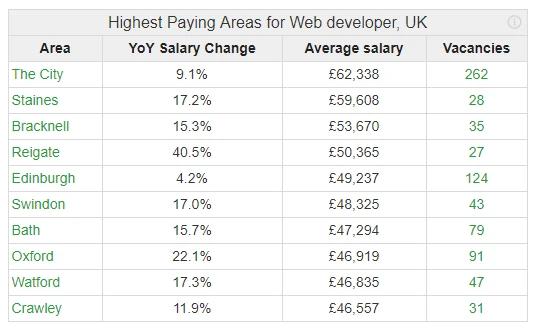
(Source: Adzuna)
In summary, if you’re looking for lucrative career change this year, web development is definitely worth thinking about. It’s also a career that is globally in demand. HyperionDev offers a 6-month part-time Online Bootcamp in Full Stack Web Development. Book a free trial now!
FUN FACT 1: UK Web Developer Salaries 2018
According to the Financial Times, salaries at banks for tech professional are even higher than at tech companies. Says the FT: ‘In the UK, starting salaries for technology roles are higher at banks than at tech firms, according to data from the pay comparison site Emolument.’
FUN FACT 2: UK Web Developer Salaries 2018
If you want to check out your potential salary, have a look at Stack Overflow, which is a popular developer community. Not only does it offer a Q&A for coders, but it also has a new salary calculator that lets you work out what you should be earning as a result of variables like your role, location, education level, experience and areas of expertise. It’s based on a survey that the company conducts annually with about 65 000 developers.
Find out more about web developer salaries around the world. Alternatively, read about online coding bootcamps and how you can become a web developer in your spare time.

Career Advice
Disruptive Coding Educators & the Digital Tech Skills Gap
The need and demand for disruptive coding educators is increasing, due to the digital tech skills gap. Formal education cannot meet the demands of students and so, disruptive coding educators are on the rise.
The need and demand for informal education is increasing, and it is becoming clear that it is often easier to learn the skills needed to be an effective developer and obtain a job in the industry through online courses and project-based work experience. The informal sector is particularly successful at preparing learners for jobs in tech, specifically for two main reasons: Firstly, the high demand that is not met by the formal education sector; and secondly, the nature of computing skills that tend to be well defined, specific, and measurable. For this reason, the popularity of disruptive coding educators is on the rise.
The growth of disruptive coding educators
The private sector is noticing the need to include the informal education sector and the “skills over degrees” motto is becoming increasingly popular. In IBM for example, nearly a third of new hires do not have formal four year college degrees. Marc van Zadelhoff, GM of IBM Security, highlighted that most of the skills needed in the sector do not require traditional four year college degrees, and that non traditional education platforms such as coding bootcamps are a great source for talent acquisition. Microsoft shared similar sentiments and has invested $25 million in Skillful to foster skills-orientated hiring, training, and education.
Online/ Informal coding educators to fill the digital tech skills gap
Online coding education is an increasingly important source of tech skills. The sector delivers a growing supply of programmers, from front-end to back-end developers. StackOverflow’s Developer Survey 2017 reports that 91.1% of developers are self-taught to some extent, and 44.1% of developers use online courses as a place to learn programming (Figure 1). Disruptive coding educators have a massive opportunity here to fill a large gap not being met by other formal education sources.
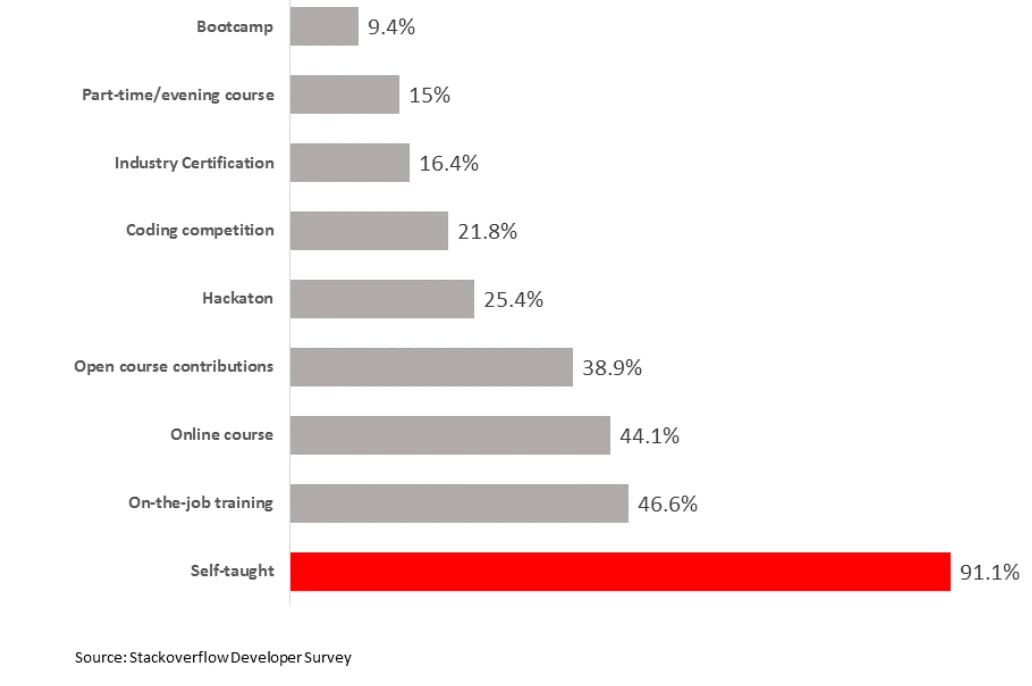
Figure 1: Developers’ types of education
Coding as a solution to unemployment
As the US struggles to provide jobs to the two-thirds of its adults who are 25 years or older and do not have a Bachelor’s degree, access to coding education can have a relieving effect on traditional hiring filters like formal education. As seen in Figure 2, already only 41% of software developers see formal education as important or very important, and only 26.9% of coders see formal education as somewhat important, as companies accept work experience as a substitute for a Bachelor’s degree.
From this, coding is seen as the new path to the middle class for people who lack four-year college degrees, as the skills-based jobs approach overrides the importance of educational pedigree and the limits of traditional class structures.
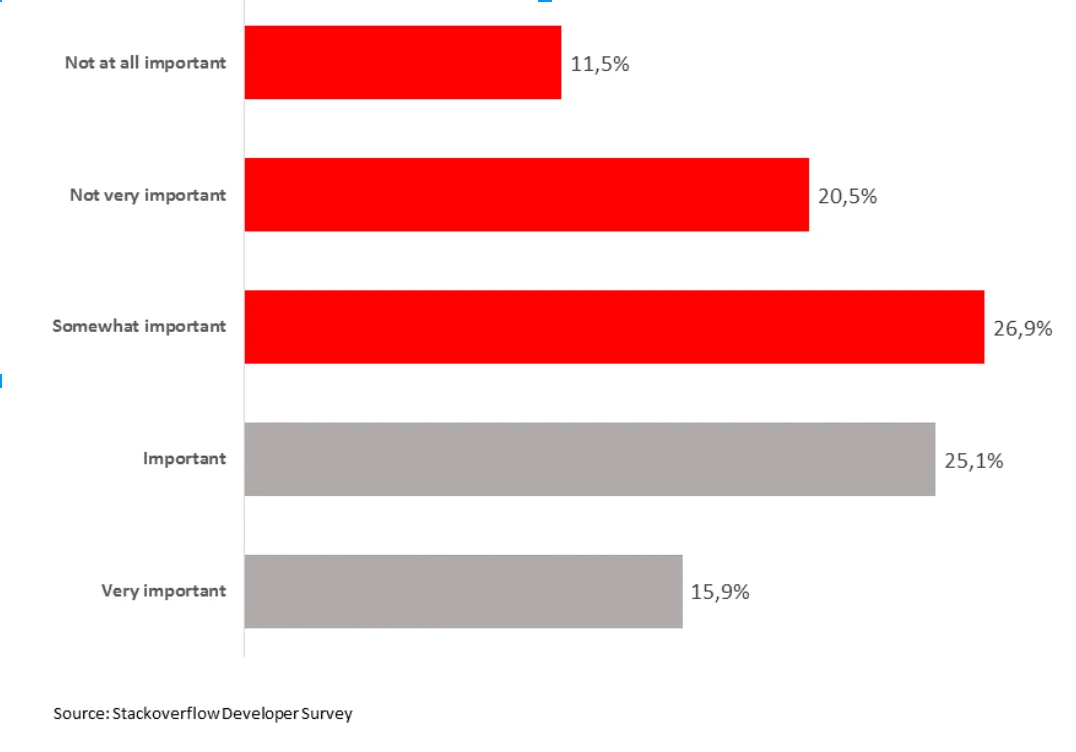
Figure 2: The importance of Formal Education among Developers
Software Engineering
2018 Software Development Trends
Learn about the top software development trends for 2018 from self-driving cars to Blockchain and how these trends are becoming a part of everyday practices
Software Engineer was recently announced as the #1 job in the US News 2018 rankings. This is a role which requires problem-solving, creativity, and analytical skills, along with knowledge of current technical tools and practices. Given the fast-paced nature of technology, it is always a good idea to stay up-to-date with the latest advances in the field. Here we have gathered a few software development trends that look to be on the rise this year, along with tips on how to start developing your skills in these high-demand areas.
Augmented Reality
The end of 2017 saw an eventual improvement in the sales of Virtual Reality (VR) headsets, but the slow adoption of this technology has not lived up to the initial hype. VR is a completely immersive experience, shutting the user off from the real-world, and this is a potential reason for the lack of widespread interest, along with the high cost of purchasing a headset. With Augmented Reality (AR), users generally only require access to a smartphone, so the potential user base is much larger. The concept is also not quite so far removed from reality, and some initial products have seen large success. The smartphone game Pokemon Go was downloaded over 650 million times and exemplifies the concept of enhancing our real-world environment with digital manipulation and interactivity.
AR seems to be making progress as a more immediately practical offering and is seeing steady increases in adoption across different fields. Snap Tech use the technology in changing room mirrors to improve the retail experience for shoppers, and Ikea’s AR app lets users test different furniture pieces in their homes.

(Source: Ikea)

The skills needed in both AR and VR industries are very similar, with experience of programming languages such as C, C++, and C# and knowledge of game engines, 3D modelling, and 360-degree imagery being a great start. (Link to C++ course?)
Smart Health
Another expanding area for technology this year is health care. The wearables market is increasing year on year, and with this comes the opportunity to both develop new devices, such as Lvl, the world’s first hydration monitor, and also the opportunity to utilise the data provided by existing devices, such as using the Fitbit SDK to access the sensor data or geolocation of the wearer to develop new apps for the device.

(Source: Lvl)

Intelligent machines and the rise of big data are also helping advance the state-of-the-art in health technology. Your.MD is one example of a chatbot using artificial intelligence as a replacement doctor, which learns how to respond to typical queries and provide relevant information. Machine learning is also used by many medical institutes and pharmaceutical companies to identify and diagnose a range of diseases, for example by using large datasets of pre-labelled images to predict the outcome of new ones.
Given the masses of data used in healthcare applications and development, skills in data science, statistics, and modelling, are all key to developing useful software in this field.
Autonomous Vehicles
Back in 2016, the Internet retailer Amazon was a leader in warehouse innovation with their fleet of 30,000 robots operating as an automated workforce, and entering into 2017, the company saw the start of drone deliveries being used to distribute packages more efficiently. Now in 2018, Amazon has just published a patent for autonomous ground vehicles, with the intention of rolling out robot deliveries that can navigate their way around urban environments.
We have already seen similar product launches with Starship Technologies autonomous vehicles used to deliver takeaways for Just Eat, and self-driving cars are also heading closer and closer to mass-market release, with companies like Uber and Lyft already offering autonomously operated taxi rides in some cities across the USA.

(Source: TechCrunch)
Although some of the skills required in this line of work are more hardware based, there are many areas of software engineering that are in high demand for the development of autonomous vehicles- such as computer vision, reinforcement learning, and motion planning.
Blockchain
The meteoric rise of Bitcoin over the past year led to cryptocurrency becoming a hot topic of conversation, but it is the technological underpinnings of this currency which should be of most interest to software developers. The concept of a blockchain – a digital, decentralised, public transaction ledger – could revolutionise many different industries. The IBM Blockchain Platform is one example of using blockchains in business, and more varied fields are being explored such as KodakCoin, which uses a blockchain to give photographers immutable copyright protection and rights for their digital assets.
Given the wide range of potential blockchain applications, different software skill sets will be required for different types of technology. However specifically with cryptocurrencies, users are more keen to be able to access their funds on the go. Mobile wallets are therefore in rising demand, with high importance placed on maintaining the necessary levels of security.
Cloud Computing
As our collective increase in the use of tech products generates more and more data, the need for storing large data volumes, processing large data volumes, and distributing large data volumes, has become apparent. The Internet of Things is anticipated to grow as an industry this year, with an expected 14% rise in connected devices, and the interconnection of more devices leads only to more data. Similarly, the rise of artificial intelligence, which is often dependent on masses of data to produce accurate predictions, will also contribute to this forecast.
Some of the biggest companies in tech are operating as cloud service providers, offering Platform-as-a-Service (PaaS), Infrastructure-as-a-Service (IaaS), and Software-as-a-Service (SaaS). Software companies are increasingly making use of these, taking advantage of the reliable and scalable access to computing power. For companies that may face varying surges in demand, having this elasticity in terms of capacity is very important, and so cloud computing is often used for streaming sites like Netflix. Many of the apps you use in your day-to-day life are also cloud-based, such as Apple’s Siri, which encodes your voice command and sends it to a server in the cloud for processing and further action.
As a Software Engineer, being able to write code that can scale exponentially will become even more necessary than it is already, and the role of architecting cloud infrastructure and knowing how to deploy solutions at scale will become key skills as more companies adopt serverless technologies. The programming languages used for cloud development are often platform-specific, but many of the most popular languages are supported, such as Java and Python.
Interested in becoming a Software Engineer? Take the Software Engineering Bootcamp by HyperionDev and get hired in 6 months.

Software Engineering
Software Engineer: Top Job Title for 2018
Software engineer top job title - the U.S. News & World Report ranked Software Engineering as their Best Job overall in 2018.
The U.S. News & World Report, a global authority in rankings and consumer advice, recently released their top 100 jobs for 2018. They looked at positive factors like ‘growth potential, work-life balance and salary’, as well as more negative factors like stress levels. Can you guess what was the top job title for 2018? Software Engineer. It was ranked as their Best Job overall. In addition, Software Engineering was seen as the ‘best STEM job’ and ‘best Technology job’.
Why is Software Engineer #1?
Kim Castro, the executive editor at U.S. News says on the website: ‘Technology is the backbone of many of our jobs across the board this year. Nearly every type of company is looking for people who can analyze and interpret data to solve problems. This technological boom is creating new opportunities for statisticians, engineers and software developers – these workers are developing the algorithms that are rapidly changing the global job market.’
Software Engineers create the technologies that we interact with every day, from the app that wakes you up in the morning to social media and music platforms. ‘Software affects almost every aspect of our daily lives. You cannot go a day without encountering some sort of software; software is everywhere,’ states Dr. Melanie Willett, content writer at HyperionDev and former ICT lecturer at Nelson Mandela University and CTI Education Group.
10-year growth for Software Engineers
The Bureau of Labor Statistics, which calculates the employment growth for various occupations, projects a startling 24% employment growth for software engineers between 2016 and 2026. This is much faster than the 7% average for other occupations. As far as other factors go, U.S News put together the Software Engineer Scorecard:
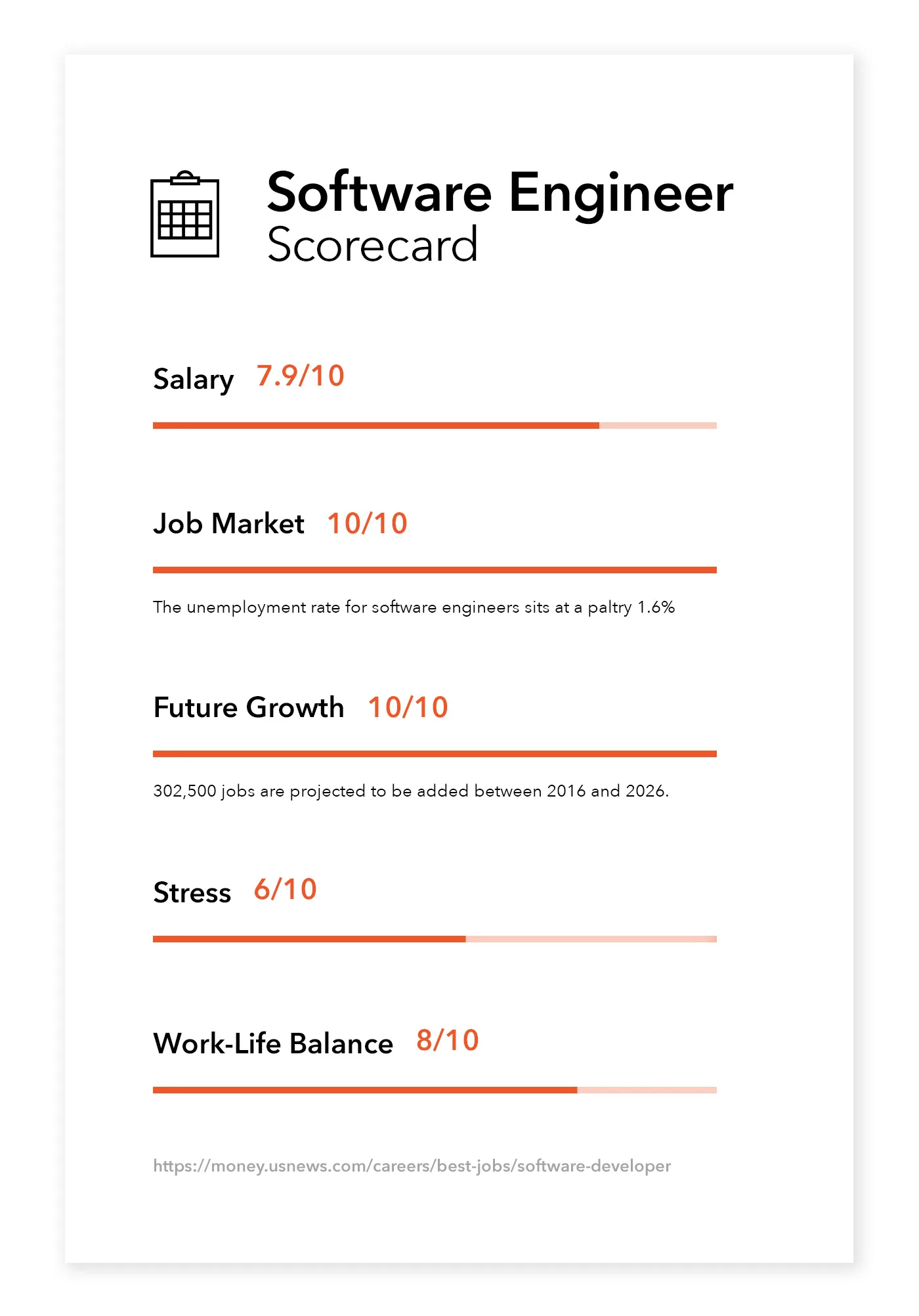
To become a Software Engineer, you will need to learn various computer languages and technologies. ‘This obviously depends on the application you’re building and the environment in which you find yourself,’ says Willett. ‘In the Software Engineering Bootcamp at HyperionDev, we teach Java and Python, which are good languages because of their versatility and their ability to be used to build many different types of applications in different environments – e.g. desktop, mobile and web.’
Conclusion
If you’re looking for an ideal career, software engineering is definitely the way to go in 2018. HyperionDev offers a 6-month part-time Online Bootcamp in Software Engineering. Book a free trial today.
If you want to learn more about what a software engineer does on a daily basis, then read this interview with Jeff Hagen who works as a manager for a team of software engineers, as well as checking out the full list of the 100 Best Jobs.

Tutorials
Deploy a Machine Learning Model with Flask
This tutorial will demonstrate how to create an API for a machine learning model, using Python along with the light-work framework Flask. This API will act as an access point for the model across many languages, allowing us to utilize the predictive capabilities through HTTP requests.
In a previous post we built a machine learning model which could classify images of house numbers from Google Street View. Since then you may have worked to improve this model, or developed your own model for a different kind of task. Often when we are getting started in machine learning we learn how to build a model and how to improve it – but how do we go from this stage, to getting it working in the real world?
Python is the language of choice for many machine learning systems, but when it comes to the application in which we want to use our model, it is more common to encounter other languages – such as Javascript for web apps. We need to be able to access the model from within its intended application, and when these are coded in different languages, it seems like a problem. It is possible to program for machine learning using a language like Javascript, but you are more limited in what you can achieve, and the process is much harder as it doesn’t have all the useful libraries developed for Python.
This tutorial will demonstrate how to create an API for a machine learning model, using Python along with the lightwork framework Flask. This API will act as an access point for the model across many languages, allowing us to utilise the predictive capabilities through HTTP requests.
Requirements and Setup
For this tutorial we will be using the Python 3 language, so check that this is installed by opening up your terminal and running the following command.
Now we can set up a new directory for our project and navigate into it.
You can also optionally use a virtual environment for this project, with the following two lines of code which create our virtual environment and then activate it.
The libraries that we will be using include Flask to build our API, scikit-learn and numpy for our model, and scipy for reading new image files. We can install all of these with pip, a tool for simple installation of Python packages.
Before we begin, we also need a machine learning model to work with. We will be using the model created in our previous image classification tutorial – but don’t worry if you haven’t completed this. In the previous post, we built a working model and were using it to output predictions for test images. But, our model only existed inside the Python file. We can use the file format .pkl to pickle our model, which means to persist it by saving to disk. You can pickle any kind of object within Python such as lists, dataframes, and dictionaries, and then unpickle them to load them back from memory, exactly as they were. This is useful with machine learning models, as it means we do not need to constantly retrain our models each time we want to use them.
Open the Python file from our previous tutorial (If you didn’t follow along previously, you can get the complete source code here) and add the following lines to save your model as a .pkl file
Once you have run the file and generated a model.pkl file, make sure it is saved in the working directory for this project.
Building an API
Now we’re ready to build our API. Let’s start with a simple skeleton Flask application. Create a new Python file api.py with the following code:
The first two lines import our library, and then we create an instance of this class using the parameter __name__ because this will be the only module in our application, and this defines where the application should look for related files (such as templates, which we will create shortly).
The last two lines are what gets our API running. We will run our app on host 0.0.0.0 as we want to run it locally on our machine, and you can use any available port, in this case we have chosen 8000. You can also set the debug parameter to True if you would like to see the debugger statements printed to the terminal. These two lines should remain at the bottom of our code in this file, with everything else going in between.
You can now go back to the terminal and start running the API with the following command:
You should get the following output:
Now you could open a web browser and navigate to http://localhost:8000 where you will see a ‘404 URL not found’ page, as our application doesn’t do anything yet!
So let’s set up an index page for the application to open with. In our api.py file we can add the following code to route our application to the file ‘index.html’ upon entry. We also need to import ‘render_template’ which is what we use to return the html files.
In our project directory we will add a folder called ‘templates’ and within this create our ‘index.html’ file. This can contain a simple header for now.
Our api.py file detects saved changes by itself so we do not need to restart it manually when testing again. We can simply refresh our page in the browser and now see our loaded webpage.
So we have a basic app serving a simple webpage. Now we need to create an endpoint to which our web page can send an image file uploaded by the user, to then process and make a prediction for, before sending this back to be displayed to the user.
API endpoint for predictions
Let’s head back into our file api.py. The first thing we want to do is to load our saved model when the app starts running.
Then, underneath our index routing section, we can create the endpoint for predictions.
What we have done here is create an endpoint ‘/predict’ for HTTP POST requests. We will be sending this request from our index page. Currently we just return the label “3” for simplicity, though we will be building our actual predictor shortly. We’ve also added one more element to our list of imports, for requests.
Now going over to our index.html file, we need to add some code which will execute our HTTP request. Currently we have a blank page with just a header. Let’s add a form which will contain a file chooser, and a ‘Predict’ button. The user can upload a 32×32 .png file and click ‘Predict’, to then receive the predicted label.
Our form action routes our application to the ‘/predict’ endpoint, with the POST method. We are using the ‘multipart/form-data’ format to send our data, and this helps us know how to deal with the data when receiving it back in the API.
The two inputs within our form are firstly the file chooser, and secondly the ‘Predict’ button.
We also have some code using syntax not normally found in HTML files: {% if label %} {{ label }} {% endif %}. This is jinja syntax, and it is used to access the variables returned from our HTTP request within the HTML file. Here we are checking that the label exists, and if it does we display it next to the ‘Predict’ button.
Now you can refresh the page in your browser, click ‘Predict’ and your page should look like this, with the label 3 displayed.
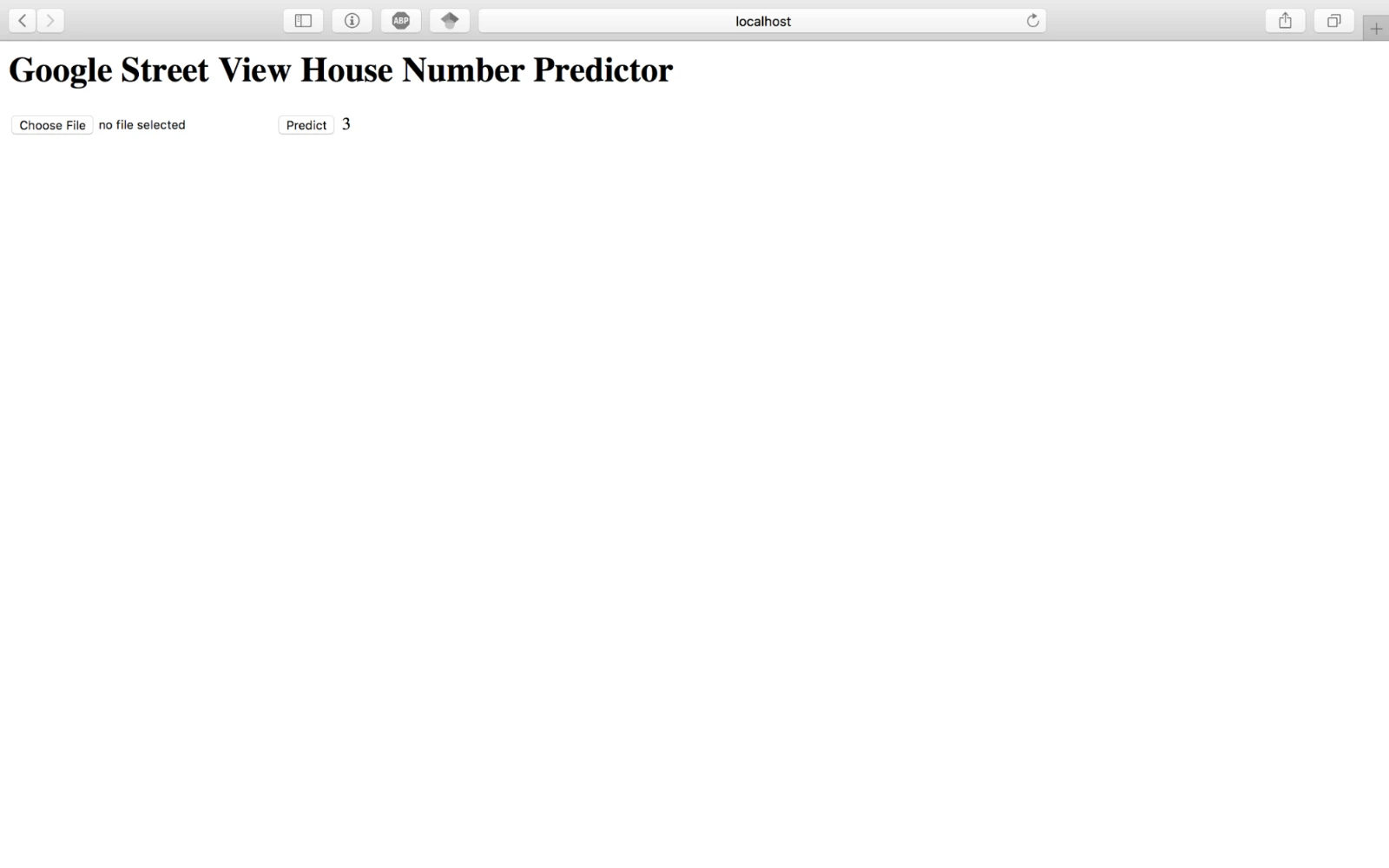
Now we want to make a real prediction. In our api.py file, we need to access the image file uploaded by the user and use our model to make a prediction for its label.
The first thing we do is look for the image file in the data received from the HTTP request. If it doesn’t exist, we will return the label “No file” to be displayed in our index page.
If the image does exist, we use the imread function to read it in as an array of pixels (as this is how we represented images when building the model). As .png files are often stored with 4 colour channels instead of the 3 we were using for the RGB representation, we will only take the first 3. The fourth channel is an Alpha channel for transparency, but this is irrelevant here, so we can just exclude it. Then we reshape our matrix as its a single image, and make our prediction on the image.
The prediction is generated as a 1D array holding 1 value, so we use the squeeze function to get the actual number out, and convert it to a string before we return it to the index page. We also need to perform one last check to test whether the label is ‘10’. As you may remember, the Street View House Number dataset used the label ‘10’ to represent the number ‘0’, so our model did the same. But when displaying the label to the user, if their image contained the number ‘0’ we want the label to match.
Let’s refresh our web page one more time and test it with a real image. You can find some examples to use in the GitHub repo for this project. Let’s test it by uploading ‘test-2.png’, and as you will see, it accurately predicts the label 2. The model we created was around 76% accurate on our testing data, so it will not generate the correct labels all of the time.
We have now created an end-to-end machine learning application. With a little bit of styling you could turn it into a nice looking web app which shows the uploaded image along with the prediction. The complete working source code is available at this repository.
Find out more about the courses offered at HyperionDev, including our popular online bootcamps in Full Stack Web Development, Mobile Development and Software Engineering. For more articles like this once, take a look at the HyperionDev blog.
This post was contributed by Ellie Birbeck.

Career Advice
Coding Mentors: Why They Matter
Coding mentors offer many advantages including coding best practice, constructive feedback and individual attention. Coding mentors are essential.
Adi, 32, had been working in the retail industry for the past ten years when he decided he wanted a change. ‘You can only do one thing for so long,’ he says. Last year, he decided to change career and enroll on a coding bootcamp. ‘I decided to do a Full Stack Web Developer bootcamp,’ he explains, ‘because I wanted to be involved in web development, back- or front-end – I didn’t mind. I thought it made sense to learn all aspects of web development.’
Adi has already been offered work at a software development company. When asked what worked best for him about his bootcamp, he mentions the flexibility (he had to continue working while upskilling as a web developer) and the mentorship. He says: ‘Coding mentors just help so much. Because someone is always around to answer your questions, you don’t get stuck that often. I found my mentorship experience both reassuring and motivating. You know you’re not going to flounder around for ages feeling frustrated.’
Research bears out Adi’s view. Chris Myers, a startup founder and CEO of a financial management solutions company, says on Forbes that if he could give young professionals one piece of advice it would be to find a mentor. ‘I firmly believe that mentorship is the best path to career success, hands down,’ he says.
Coding mentors are particularly useful. Here are some advantages:
- Coding best practice – a coding mentor helps you avoid common stumbling blocks and learn best industry practices. Of course you could learn on your own, but think how much quicker you’ll pick up things with an expert.
- Constructive feedback – when you’re learning anything, from writing a novel to learning to play the piano, feedback is essential in getting you out of a rut or in understanding how you could do something differently. Constructive feedback is specific, timely, understanding and positive.
- Individual attention – many of us have sat in massive lectures or classes where we quickly lose track of what the lecturer or teacher is saying. Or we’ve tried to pick up coding via videos online. Mentoring is different. It’s 1:1 or personalised feedback.
Masood Gool, Lead Mentor at HyperionDev, puts it like this: ‘Learning to program can be a daunting task. Sometimes you may feel you’ve been thrown in the deep end. Coding mentors are there to smooth this process, provide individuliased feedback and guide you along the path to success. This allows you to customise your learning path to achieve your goals.’
At HyperionDev for every coding assignment you submit, you’ll get tailored feedback from specialist coding mentors. You’ll then iterate or rework your solution to improve the structure, efficiency, readability and correctness of your code. This kind of mentoring enables you to master more advanced concepts faster.
HyperionDev offers three 6-month part-time Online Bootcamps in Web, Mobile and Software Development. Book a free trial now!

Tutorials
GitHub for Beginners
GitHub for beginners. If you have just learnt to code or want to learn to code, find out about GitHub. Here’s a simple guide to GitHub for beginners.
You might have heard the terms ‘GitHub’ or ‘git’ used before, but perhaps you don’t know what they mean. If you have just learnt to code or are wanting to learn to code, you should learn about GitHub. Here’s a simple guide to GitHub for beginners.
Git and GitHub: What are they?
Git is a version control system for tracking changes in computer files and coordinating work on those files among a number of people. It’s mostly used for managing the source code in software development. It’s free and open source.
GitHub is a software development platform based on how git works. With GitHub, you can host and review code, manage projects, and build software alongside millions of other developers. Add your existing code to share with prospective employers or start new projects to keep yourself relevant. GitHub accounts are free, and it’s the best place to swap ideas and code with other programmers online.
What is version control?
GitHub and Git use version control. This mean it tracks the history of changes of the source code of a project, including what has been changed, by whom and when.
How many developers are involved in GitHub?
It’s the largest host of source code in the world, as of April 2017, with almost 20 million users and 57 million repositories. Think of GitHub as a social network rather than just a tool for developers.
Why do developers like GitHub?
‘GitHub is a good place to collaborate and meet with other developers,’ says Gareth Dwyer, software and operation developer at HyperionDev. ‘Personally, I publish the code for my tutorials there, and it makes it easy for others to submit any corrections or improvements.’ To check out Gareth’s code and his profile (he has 43 repositories available) on GitHub, look here.
Basically, the advantage is that groups of developers can work together on the same documents (often referred to as the source code) simultaneously without destroying previous versions of each other’s work.
The ‘Git Repository’, or project folder if you like, is a place where developers can host their files so that people can collaborate. The collaboration can be open source (or public), or closed for a specific group. The idea is similar to Google Docs, which allows for the collaboration on word processing and spreadsheet files.
GitHub for beginners: how do I get started with GitHub?
The first step is to set up a GitHub account – you can sign up on the front page. You’ll then be taken to an empty newsfeed pages, states LifeHacker. In the middle of the page there’s a bootcamp, which helps you set up your account. One of the first things you’ll do will be to set up a repository – on the top right of your account, there’s a ‘New Repository’ button.
If you want to read more simply-written technical articles like GitHub for beginners, check out the HyperionDev blog.
HyperionDev offers three 6-month part-time Online Bootcamps in Web, Mobile and Software Development. Book a free trial now!

Career Advice
The Failure of Traditional Education in Coding Education
Coding education is becoming increasingly popular as more people want to gain valuable knowledge in this field, but universities are failing to meet demand.
Traditional coding education in the form of university degrees is growing in popularity, but also in cost. In the US the number of students expected to attend American colleges and universities is 20.4 million, an increase of 5.1 million since fall 2000. The number of graduates with a Bachelor’s degree in Computer Science in 2014-15 was 59,581 – a 50.5% increase from 2009-10 (Figure 4). Similarly, the number of graduates with Master’s degrees in 2014-15 was 31,474, which is a 75.3% increase on 2009-10 numbers.
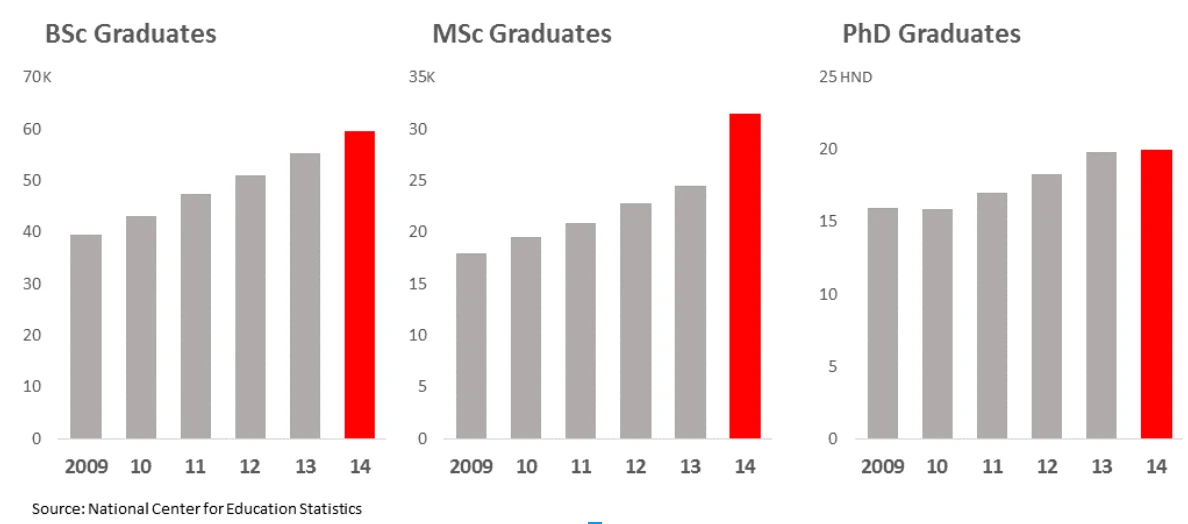
Figure 1: Number of Graduates in Computer Science in the US
The coding education boom
In the UK, Computer Science is a STEM subject taught at the majority of Higher Education Institutions (HEIs). In each of the years 2008-2014 more students have begun Computer Science undergraduate degrees than have started Physics, Chemistry, and Mathematics combined. After a big rise in the number of Computer Science students in the 1990s following the dot.com boom, the number of entrants decreased to about 17,500 full-time entrants in 2007-2008, and since then have been rising asymmetrically. In 2014-15 the number of entrants was close to 21,000. This can be seen in Figure 2.

The benefits of traditional coding education
A computer science, engineering, or mathematics degree is often regarded by employers as a signal that the student can learn coding. The degrees, especially engineering and mathematics, don’t in themselves teach strict coding but employers see graduates of those subjects as smart and hard working enough to learn how to become a software developer. Moreover, a degree trains the mind and develops qualities like perseverance and time-management in students, skills they will use throughout their life. A degree from a prestigious university, such as Oxbridge or the Ivy League, is seen as an additional signal for employers that their prospective employee is smart, as admissions are highly selective and the aforementioned institutions are known for academic excellence.
The digital tech skills gap
Currently, formal education doesn’t fill the gap in the supply of much needed tech skills. The UK government recently commissioned a report led by Sir Shadbolt into why the degree of Computer Science had the highest dropout rate in the UK and highest unemployment rate. The report identifies that supply of Computer Science graduates and needs of employees are misaligned. Insufficient technical knowledge among graduates is quoted most often by employers as the reason for lack of employment offers. The report also found that this is due to the fact that the skills needed for tech jobs like software development do not match what UK universities currently teach students.
Filling the digital tech skills gap
The pathway to creating more trained software engineers consists of 1) improving programming education and 2) ensuring its proliferation among a greater number of learners. This is what many governments, such as the UK, have realised and focused on. Although few countries have mandated Computer Science (CS) classes in senior years of High School education, the number of countries offering this has been growing steadily. In the European Union (EU) 15 countries have already integrated computer science into their senior curriculum in some form, while 9 countries in the EU have integrated or will integrate CS education at a primary school level. In the UK, the subject of ICT has recently been replaced with ‘computing’ across schools’ and millions of pounds put forward by the Department for Education to work with a group known as Computing at School (CAS) to head up the retraining of UK educators in the field.
Making coding education more accessible
In the US, although there has been a lack of uniform country-wide computer science education legislation introducing mandatory classes in programming, individual states like Idaho have passed bills introducing computer science lessons and supporting resources in public schools. Code.org, a nonprofit aimed at expanding pupils’ and students’ access to computer science education in America, has raised over $60 million from Microsoft, Apple, Google and Salesforce, and persuaded two dozen states to improve access to computer science education. It also created free introductory coding lessons as part of the Hour of Code initiative, in which even President Barack Obama took part. Former President Obama additionally highlighted this need in his 2016 State of the Union Address, with a commitment of over $4 billion to fund the Computer Science for All initiative to train school children and educators across the country in CS. Thus a concerted effort is being made at the level of secondary education.
The downfall of traditional coding education
Universities, however, do not deliver effective coding education as this has never been their main job. Computer Science, Mathematics and Engineering degrees at universities focus on exceptionally important theoretical concepts that are crucial in their own right, but very different from the skills required by employers. Such skills are the skills that non-traditional coding educators focus on. In university, students build their analytical skills with problem sets and tests and learn to engage with research literature. Course content in universities is also slow to change, as the bread and butter of academic learning are research papers. One must adhere to university hierarchy structures and bureaucratic red tape. It takes time before those are approved by the majority in the field in order to become a must-learn in the discipline. This model is not likely to change as this is not the main role of universities. When freshly graduated employees enter the workplace, employers have to spend time to bring them onboard. The average time for a new employee to become fully productive is on average 1-2 years according to Training Industry Quarterly.
Another problem is the lack of personalised feedback. Students are often in large classes that do not cater for individual attention and mentoring, especially not at a line by line in code level, and the volume of students taught means that even where tutorial group systems are implemented, the degree and quality of feedback from tutors fails to meet students’ demands for learning support. Assessment methods tend to be summative in nature, rather than focusing on formative assessment, due to the scale.
The cost of traditional coding education
Also deterring potential students is the rise of university tuition fees. For British and EU citizens it costs approximately 9,250 pounds per year, and for international students the tuition fees grow to tens of thousands of pounds annually. US colleges are even more expensive with the average tuition per year in private non-profit universities rising by 28% since 2012. At private colleges the average tuition is currently more than $33,000 per year, and at public colleges it is $9,650 for state residents. Although at least two-thirds of students benefit from bursaries, scholarships, and grants; the current total American student debt adds up to over $1.31 trillion and has a default rate of 11.2%. The average student in the class of 2016 has $37,172 in student loan debts according to Q4 2016 New York Federal Reserve.
With these factors in mind, the need for financially viable informal coding education is increasing, and it is becoming clear that it is often easier to learn the skills needed to be an effective developer who meets industry requirements and standards through online courses and project-based work experience.

Career Advice
The Digital Tech Skills Gap
The demand for coding skills is increasing at an unprecedented rate in the UK - so too is the digital tech skills gap. HyperionDev provides the solution.
Globally, the demand for coding skills is increasing at an unprecedented rate. In fact, Linkedin reported that the top 10 skills required in jobs advertised on LinkedIn were all tech related.
What is the digital tech skills gap?
The Tech Nation Report 2017 showed that the growth of digital tech jobs in the UK was more than double that of non-tech jobs between 2011 and 2015, with 85,000 new tech jobs created in just two years. UK IT staff postings also increased 10% compared to last year. In 2016 investments into digital tech companies in the UK totalled a whopping £6.8 billion, which was 50% higher than any other EU country. Despite big challenges ahead of the digital and technology sectors, mainly the uncertainty over the consequences of Brexit, the demand for digital tech jobs is increasing. Those working in the tech industry are twice as productive as other workers, and one worker in the digital sectors contributes around £103,000 per year to the economy (compared to £50,000 pounds of a non-tech worker).
The evolution of the tech industry in the UK
The tech industry has contributed £97 billion to the UK economy in 2015 alone, and has seen a 30% growth trend in their contributions to the economy over the years 2011-2015. Approximately 1.4 million digital professionals are needed over the next five years in the UK and a 39% growth in the ICT industry is predicted by 2030. This demand for talent is reflected by the fact that the salaries of tech workers in the UK are on average 40% higher than non-tech workers without software development competency, with an average salary of £50,633.
The UK Commission for Employment and Skills predicts that 518,000 additional workers will be needed in their digital tech sector by 2022. However, this figure is three times the number of Computer Science graduates produced by British universities in the last decade – giving way to the digital tech skills gap. As the Greater London Authority identified, London, for example, requires a pipeline of highly-skilled talent in the digital sector to keep its growth and excellence at the current level. There is high demand for employees in almost all tech roles, from cyber security to cloud computing, mobile applications to big data analytics, and web development to product management. The demand is not only from industry, but also from young people, with 82% of school age people interested in making things using digital technologies.
The US tech industry
Similar trends are apparent in the United States, with Code.org estimating that there are currently 512,729 open computing jobs in the US. In another report by Trilogy Education Services, they estimated that there are 1.3 million software development jobs open in 2016. The Bureau of Labour Statistics predicts that there will be 1.4 million more software development jobs than applicants who can fill them in 2020. In the US, tech jobs grew at a rate of 3% in 2015 to 6.7 million jobs, the highest growth rate year on year according to the Computing Technology Industry Association. The US government predicts that by 2018, 51% of all STEM jobs in the country will be in computer science-related fields. Based on an analysis of job postings, Indeed and Glassdoor touted tech jobs as the most lucrative with the average salary of a full-stack developer lying at $110,770.
There is a clear gap in what current coding educators provide, and what industry needs. In addition to formal coding education not meeting the demands of industry, in terms of not delivering the fast changing skill sets needed by the private sector, as well as the number of coders needed, it is increasingly becoming unaffordable for large sectors of society. The need and demand for informal education is increasing, and it is becoming clear that it is often easier to learn the skills needed to be an effective developer and land a job in the industry through online courses and project-based work experience.
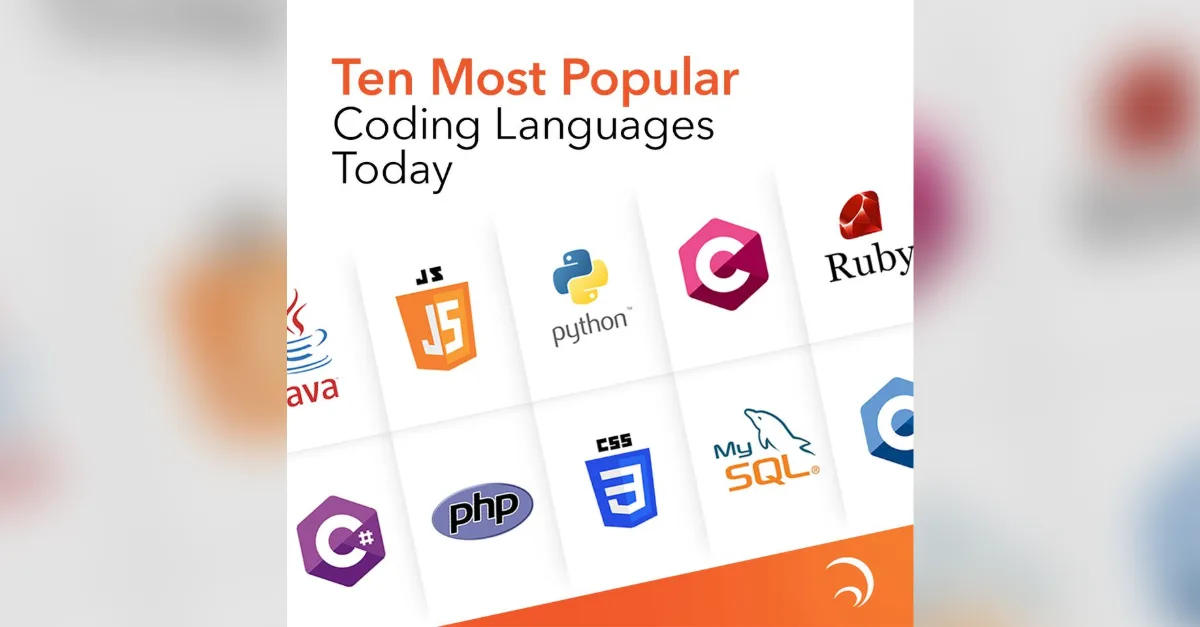
Software Engineering
10 Most Popular Programming Languages
Ten popular programming languages - find out what programming languages are in high demand these days, including Java, Python, etc.
Everyone should know a little bit of coding. Even if you don’t want to become a developer (with its high salaries and excellent job prospects), some programming is useful to:
- Make appropriate hires in your business and for your IT needs.
- Be more effective at setting up your home and work IT environments.
- Ensure programs bend to your will. Software is running your life: unlocking your car, downloading your videos, finding your romantic partners – there is software behind all these activities.
- Teach yourself structured and creative thinking via programming.
So what are the ten popular programming languages today?
1.Java
This is an extremely popular programming language. Not only is it essential for developing Android apps, but also for building server-side applications, video games and mobile apps. Java is part of the HyperionDev Software Engineering course.
2. JavaScript
This forms much of the basis for the modern web. JS allows you to do complex things on web pages – e.g. interactive maps, animated 2D/3D graphs, content updates, etc. It’s the third layer of standard web technologies, the others beings HTML and CSS. The HyperionDev Mobile Developer Bootcamp includes learning HTML, CSS and Javascript.
3. Python
Certainly Python falls under the list of ten popular programming languages. This language is great, because it’s often claimed that it’s the easiest language to learn and it’s a one-stop shop: there’s a Python framework for most things, including web apps and data analysis. Noteworthy applications built with Python include Pinterest and Instagram. If you’re interested in this language, the HyperionDev Software Engineer Bootcamp will appeal to you.
4. C
This is often the first programming language taught in College, and is one of the oldest programming languages (created in the early 1970s). It’s a good ‘in-between’ language that incorporates object-oriented features without being too extreme about it. C is often used for embedded systems – for example, the firmware of your TV or the operating system of an airplane.
5. Ruby (also known as Ruby on Rails)
Ruby is easy to learn, in high demand, and a major supplier of web apps. It’s a server-side web application framework.
6. C# (pronounced C sharp)
This language is used to develop Microsoft apps, and was developed within its .Net initiative. It’s syntactically very similar to Java.
7. PHP
PHP is often used with data-heavy websites and app development. It’s behind WordPress and Facebook. The really good news: it’s an open-source language, so there are lots of free pre-built modules that you can use and modify for your projects.
8. CSS (Cascading Style Sheets)
You’ll use this language to design beautiful websites and browser-based apps. CSS forms an integral part of the HyperionDev Full Stack Web Developer Bootcamp.
9. SQL (Structured Query Language)
This database query language is used for dealing with big data. SQL helps you select the required data from huge databases. Interestingly, it’s the fastest growing open-source relational database management system. So far, there have been 100 million downloads.
10. C++
This is also an offshoot of the C programming language, which was created back in 1983. Its range is wide, from desktop web apps to server infrastructure. It is frequently used for tasks that require high performance, such as video editing and transcoding, high-end computer-aided design, image processing, games, telecommunications and business. Flight control systems could be written in C++, so too could high-volume trading financial exchanges.
Whatever language you decide you learn, you will be pick up valuable programming skills. If you decide to learn one of the ten popular programming languages, it will be easier to pick up additional computer languages. Find out more about HyperionDev’s Bootcamps and individual programming language courses.
In addition, download HyperionDev’s Programming Guide 2017 to get more in-depth analysis of the different languages, and language trends for 2017.

Career Advice
Coding Bootcamps vs Computer Science Degrees
Coding Bootcamps vs Computer Science Degrees: which one are you better off doing with respect to salaries, job placement and time commitments?
So you want to go into tech, but you’re not sure if it’s time to head back to College for a degree, or sign up for a Bootcamp. Coding Bootcamps vs Computer Science Degrees: which one are you better off doing with respect to salaries, job placement and time commitments?
It Doesn’t Matter Where you Learn to Code
In the last few years, there’s been a massive tech skills gap in the US of approximately 500 000 vacancies. In response, ex-President Obama remarked: ‘It turns out it doesn’t matter where you learned code, it just matters how good you are at writing code. If you can do the job, you should get the job.’
It turns out he’s right: The 2017 Stack Overflow developer survey found that 90% of respondents reported that they were at least partially self-taught. This means that many are where they are today because they took decisive action to know more.
This ‘decisive action’ often involves online courses. ‘More developers say you should take an online course than any other method,’ states the Stack Overflow survey. In fact, 64.7% of developers recommend online courses, whereas only 11.2% advise a Master’s Degree as a recommended learning path.
After the Bootcamp
The point of Bootcamps, according to Business Insider, is ‘to take in students with minimal coding knowledge and shoot them back out a few months later as employable software engineers.’ Does this actually happen?
Research conducted by Louis Beryl, the founder and CEO of Earnest, a student financing company examined graduate data from 10 different Bootcamps. Their findings (via Wired) showed the following:
- The average starting salary for coding bootcamp graduates was between $60,000 and $80,000 (it was $45,000 before enrolling on the Bootcamp).
- 94% of students landed a job within three months of graduating, though not always in tech. The Stack Overflow Survey confirms this. Their research found that many who attended a Bootcamp (45.8%) were actually developers before starting the program. That’s because many developers like to upskill fairly regularly. But of the remaining respondents, 9.7% got a developer job before completing the Bootcamp program, and 11.3% immediately upon graduating. Only 3.3% of those attending bootcamps hadn’t yet found employment as a developer.
Coding Bootcamps vs Computer Science Degrees: Salaries
The 2016 Stack Overflow survey compared salaries in the US between Computer Science graduates and those who had picked up their expertise via Bootcamps. Those with a PhD or Masters in Computer Science earned the most ($122,219 and $118,803 respectively), but Bootcamp graduates (who had completed an ‘Intensive Program’) came it at 3rd place with an average annual salary of $112,493, which was above that of undergraduate degrees in Computer Science.
Remember, also, when it comes to Coding Bootcamps vs Computer Science Degrees, a Bootcamp is likely to be much shorter than a PhD or Masters program, which will take a number of years. There is loss of income, or opportunity cost, during this study period.
Only you will know what is best for you, but if you want to enter the lucrative tech field, keep in mind that the goal of a Bootcamp is to transform you into a job-ready developer in a short period of time. That’s an attractively efficient option.
HyperionDev offers three 6-month part-time Online Bootcamps in Web, Mobile and Software Development.Book a free trial now!

Career Advice
Tech Jobs are in High Demand
Tech jobs are in high demand - Cyberstates Reports looks at tech job demand in US. In 2017, the market grew about 2%, according Cyberstates.
If you’re thinking about changing careers to something tech-related, it makes sense to research whether tech jobs are in high demand. No point upskilling if you’re only going to land up in a sector where it’s difficult to find work. However, this is certainly unlikely to be the case in the tech industry.
Digital Economy Flourishing: Tech Jobs are in High Demand
The good news is that in the US in 2017, the market grew about 2%, according to an annual report, called Cyberstates, released by The Computing Technology Industry Association (CompTIA), one of the IT industry’s top trade associations. That equates to about 7.3 million workers. It seems clear that the digital economy is flourishing and tech jobs are in high demand, particular jobs in software, cybersecurity and cloud computing.
Some additional findings of the Cyberstates report, via the Chicago Tribune, included:
- New jobs added in the previous year were 182 220 – this was the result of demand in IT services and custom software services.
- The average salary is $108,900 for a US-based tech industry worker. (Check out more information about developers’ salaries globally.)
- During the last three months of 2016, the number of job opening posts in tech was 626,560.
- The tech industry adds $1.3 trillion, or 7,5 percent, to the US economy per annum.
Additional stats from the Cyberstates 2017 report, US-based:
Top 5 states — tech employees
- California 1,186,470
- Texas 592,960
- New York 377,740
- Florida 318,340
- Massachusetts 300,630
Top 5 cities — tech employees
- New York 392,400
- San Jose, Calif. 310,900
- Washington, D.C. 297,900
- Los Angeles 287,600
- Boston 263,500
Job Satisfaction also Booming
A later study conducted in June 2017, also by CompTIA, found that a net 79% of IT professionals were satisfied with their jobs, up from 73% in 2015. 73% felt that their job “provides them with a sense of personal accomplishment; while 71 % believe their job makes good use of their talents”.
However, 1 in 4 worry that their skills will become obsolete; therefore the large majority seek more training and educational opportunities. Not a bad plan considering the industry will need to fill millions of tech jobs in the next decade. Nancy Hammervik, executive vice president of industry relations at CompTIA, puts it like this: “The tech industry’s challenge is America’s challenge: developing a robust workforce that can effective fill the IT jobs of the 21st century”.
The best way to upskill is via an online technology bootcamp, because one can combine the mentoring of a coding bootcamp with the cost-effectiveness and flexibility of a MOOC. In closing, it seems that when it comes to job satisfaction and demand, now and in the future, you can’t go wrong with training in tech.
HyperionDev offers three 6-month part-time Online Bootcamps in Web, Mobile and Software Development.Book a free trial now!

Tutorials
Python NLP tutorial: Using NLTK for natural language processing
This NLP tutorial will show you how to implement some key natural language processing techniques, using Python and NLTK including tokenization and stemming.
In the broad field of artificial intelligence, the ability to parse and understand natural language is an important goal with many applications. Online retailers and service providers may wish to analyse the feedback of their reviews; governments may need to understand the content of large-scale surveys and responses; or researchers may attempt to determine the sentiments expressed towards certain topics or people on social media. There are many areas where the processing of natural language is required, and this NLP tutorial will step through some of the key elements involved in Natural Language Processing.
The difficulty of understanding natural language is tied to the fact that text data is unstructured. This means it doesn’t come in an easy format to analyse and interpret. When performing data analysis, we want to be able to evaluate the information quantitatively, but text is inherently qualitative. Natural language processing is the process of transforming a piece of text into a structured format that a computer can process and begin to understand.
Requirements and Setup
For this tutorial we will be using Python 3, so check that this is installed by opening up your terminal and running the following command.
If you get stuck at any stage during this tutorial, get your own personal mentor to help you learn coding and switch careers.
Now we can set up a new directory for our project and navigate into it.
You can also optionally use a virtual environment for this project, with the following two lines of code which create our virtual environment and then activate it.
We’re now ready to install the library that we will be using, called Natural Language Toolkit (NLTK). This library provides us with many language processing tools to help format our data. We can use pip, a tool for installing Python packages, to install NLTK on our machine.
We also need to download the necessary data within NLTK. As it’s a large library, we only need to download the parts of it which we intend to use. To do this, first open an interactive Python shell or new file, import the NLTK library, and then open the download window:
A window should open which looks similar to the one below. Here we want to select the book collection, and click download.
The download screen from NLTK
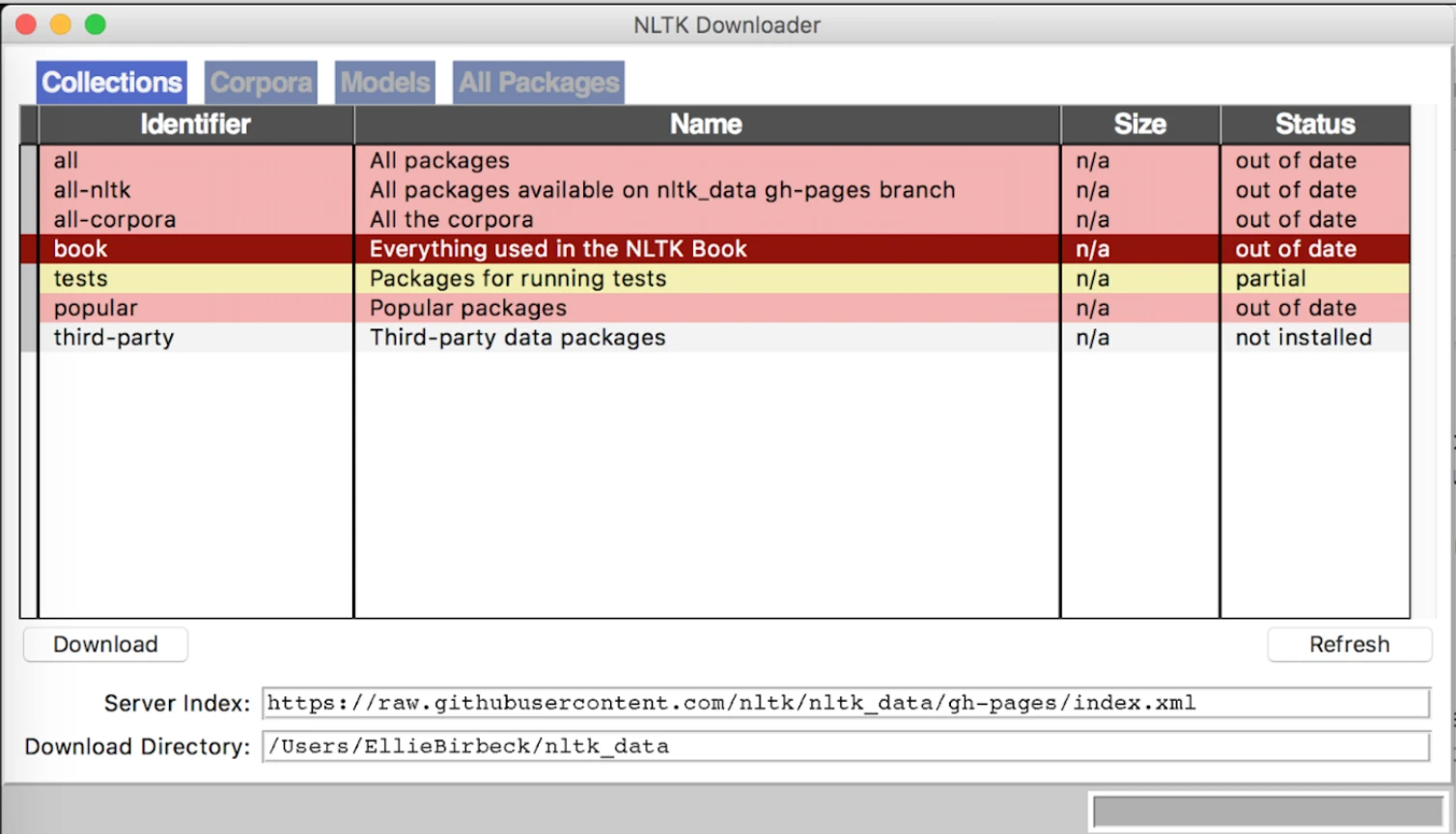
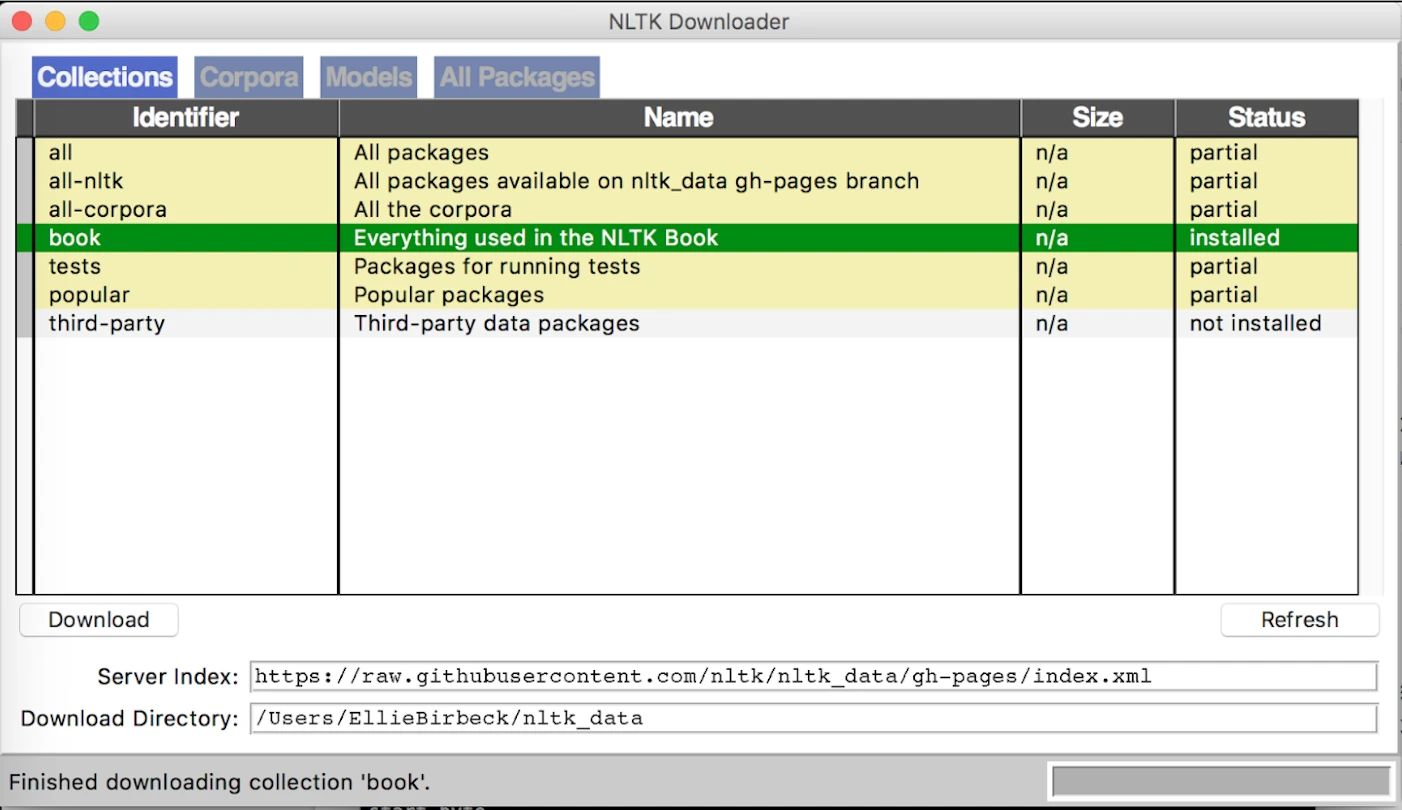
Our setup is now complete and we can begin the tutorial.
Dataset
To perform natural language processing, we need some data containing natural language to work with. Often you can collect your own data for projects by scraping the web or downloading existing files. The NLTK library helpfully comes with a few large datasets built in and these are easy to import directly. These include classic novels, film scripts, tweets, speeches, and even real-life conversations overheard in New York. We will be using a set of movie reviews for our analysis.
After importing a selected dataset, you can call a ‘readme’ function to learn more about the structure and purpose of the collected data.
We can start trying to understand the data by simply printing words and frequencies to the console, to see what we are dealing with. To get the entire collection of movie reviews as one chunk of data, we use the raw text function:
As you will see, this outputs each of the reviews with no formatting at all. If we print just the first element, the output is a single character.
We can use the ‘words’ function to split our movie reviews into individual words, and store them all in one corpus. Now we can start to analyse things like individual words and their frequencies within the corpus.
We can calculate the frequency distribution (counting the number of times each word is used in the corpus), and then plot or print out the top k words. This should show us which words are used most often. Let’s take a look at the top 50.

The first line of our output is telling us how many total words are in our corpus (1,583,820 outcomes), and how many unique words this contains (39,768 samples). The next line then begins the list of the top 50 most frequently appearing words, and we can save our plotted graph as a .png file.
We can start to see that attempting analysis on the text in its natural format is not yielding useful results – the inclusion of punctuation and common words such as ‘the’ does not help us understand the content or meaning of the text. The next few sections will explain some of the most common and useful steps involved in NLP, which begin to transform the given text documents into something that can be analysed and utilised more effectively.
Tokenization
When we previously split our raw text document into individual words, this was a process very similar to the concept of tokenisation. Tokenisation aims to take a document and break it down into individual ‘tokens’ (often words), and store these in a new data structure. Other forms of minor formatting can be applied here too. For example, all punctuation could be removed.
To test this out on an individual review, first we will need to split our raw text document up, this time by review instead of by word.
The movie reviews are stored according to a file ID such as ‘neg/cv000_29416.txt’, so this code loops through each of the file IDs, and assigning the raw text associated with that ID to an empty ‘reviews’ list. We will now be able to call, for example, review[0] to look at the first review by itself.
Now taking the first review in its natural form, we can break it down even further using tokenizers. The sent_tokenize function will split the review into tokens of sentences, and word_tokenize will split the review into tokens of words.
There are lots of options for tokenizing in NLTK which you can read about in the API documentation [here](http://www.nltk.org/api/nltk.tokenize.html). We are going to combine a regular expression tokenizer to remove punctuation, along with the Python function for transforming strings to lowercase, to build our final tokenizer.
Stop Words
We’re starting to head towards a more concise representation of the reviews, which only holds important and useful parts of the text. One further key step in NLP is the removal of stop words, for example ‘the’, ‘and’, ‘to’, which add no value in terms of content or meaning and are used very frequently in almost all forms of text. To do this we can run our document against a predefined list of stop words and remove matching instances.
This has reduced the number of tokens in the first review from 726 to 343 – so we can see that nearly half the words in this instance were essentially redundant.
Lemmatization and Stemming
Often different inflections of a word have the same general meaning (at least in terms of data analysis), and it may be useful to group them together as one. For example, instead of handling the words ‘walk’, ‘walks’, ‘walked’, ‘walking’ individually, we may want to treat them all as the same word. There are two common approaches to this – lemmatization and stemming.
Lemmatization takes any inflected form of a word and returns its base form – the lemma. To achieve this, we need some context to the word use, such as whether it is a noun or adjective. Stemming is a somewhat cruder attempt at generating a root form, often returning a word which is simply the first few characters that are consistent in any form of the word (but not always a real word itself). To understand this better, let’s test an example.
First we’ll import and define a stemmer and lemmatizer – there are different versions available but these are two of the most popularly used. Next we’ll test the resulting word generated by each approach.
As you can see, the stemmer in this case has outputted the word ‘worri’ which is not a real word, but a stemmed version of ‘worry’. For the lemmatizer to correctly lemmatize the word ‘worrying’ it needs to know whether this word has been used as a verb or adjective. The process for assigning these contextual tags is called part-of-speech tagging and is explained in the following section. Although stemming is a less thorough approach compared to lemmatization, in practise it oftens perform equally or only negibly worse. You can test other words such as ‘walking’ and see that in this case the stemmer and lemmatizer would give the same result.
Part-of-Speech Tagging
As briefly mentioned, part-of-speech tagging refers to tagging a word with a grammatical category. To do this requires context on the sentence in which the word appears – for example, which words it is adjacent to, and how its definition could change depending on this. The following function can be called to view a list of all possible part-of-speech tags.
The extensive list includes PoS tags such as VB (verb in base form), VBD (verb in past tense), VBG (verb as present participle) and so on.
To generate the tags for our tokens, we simply import the library and call the pos_tag function.
Vocabulary
So far we’ve mostly been testing these NLP tools on the first individual review in our corpus, but in a real task we would be using all 2000 reviews. If this were the case, our corpus would generate a total of 1,336,782 word tokens after the tokenization step. But the resulting list is a collection of each use of a word, even if the same word is repeated multiple times. For instance the sentence “He walked and walked” generates the tokens [‘he’, ‘walked’, ‘and’, ‘walked’]. This is useful for counting frequencies and other such analysis, but we may want a data structure containing every unique word used in the corpus, for example [‘he’, ‘walked’, ‘and’]. For this, we can use the Python set function.
This gives us the vocabulary of a corpus, and we can use it to compare sizes of vocabulary in different texts, or percentages of the vocabulary which refer to a certain topic or are a certain PoS type. For example, whilst the total size of the corpus of reviews contains 1,336,782 words (after tokenization), the size of the vocabulary is 39,696.
Conclusion
In this NLP tutorial, we have been able to transform movie reviews from long raw text documents into something that a computer can begin to understand. These structured forms can be used for data analysis or as input into machine learning algorithms to determine topics discussed, analyse sentiment expressed, or infer meaning.
You can now go ahead and use some of the NLP concepts discussed to start working with text-based data in your own projects. The NLTK movie reviews data set is already categorised into positive and negative reviews, so see if you can use the tools from this tutorial to aid you in creating a machine learning classifier to predict the label of a given review.
A Jupyter notebook with the complete running code can be found here.
Find out more about the courses offered at HyperionDev, including our popular online bootcamps in Full Stack Web Development, Mobile Development and Software Engineering. For more articles like this once, take a look at the HyperionDev blog.
This post was contributed by Ellie Birbeck.

Software Engineering
Top Tips for Newbie Developers
Tips New Developers: Learning a new skill is difficult. Read our six top tips to make your coding journey easier including daily journals and hackathons.
You’ve probably forgotten, but it takes a long time to learn to read, and it’s often difficult. Ask any six-year-old. It’s no different with coding. So here are some tips to make coding easier for newbie developers.
Don’t copy/paste when learning to code – rather type it out
When you’re just copy / pasting, you don’t necessarily understand the code itself. Rather read through the code you’re trying to learn, talk through it (even out loud), and then try to reproduce it yourself in your text editor.
Code frequently, preferably every day
This may seem like an obvious thing to say, but you only get better at something if you practise it frequently. Ask any musician or novelist. It’s the same with coding. Don’t get distracted by endlessly researching programming languages, web frameworks and coding paradigms. Get coding. Do something every day.
Give yourself an actual project
What do you feel passionate about? Animal rights? Stock trading? Fitness? Think about creating a website, an app, a game, some software. Have a look at codeconquest for some great coding project ideas.
Keep a daily journal
‘Maintain a daily journal of what you learn,’ advises Gareth Dwyer, software and operations developer at HyperonDev. If it’s something big, write a blog post about it and publish. You’ll reinforce what you learn and get feedback from others.
‘Even it feels like blogging is pointless because there are so many people who already know what you just learned, remember that if you just learned it there are many people who haven’t learned it yet,’ he says.
Join a Hackathon
‘You’ll gain more practical knowledge in one hackathon than from a month of lecturers,’ says Tim Fogarty, the EU commissioner for MLH (Major League Hacking), a global student hackathon league. ‘(They) are super-condensed learning experiences.’ Not only will you learn the technical aspects of a project like APIs, frameworks libraries, version control, testing, etc. (stuff software engineers know), but you’ll also learn about idea generation, working with others, and managing a project. In fact, if you want to learn how to code, go to a hackathon!
Find out your learning style
Mike Arpaia, a former Etsy developer who is now involved in security software for Facebook, reports on Codementor that becoming a good programmer ‘takes a long, long time and a lot of tedious evenings…Before you can write good code, you have to write hundreds of thousands of lines.’
But it’s best to find out your learning style. Do you prefer to pick up information via reading, watching videos or listening to podcasts? Once you understand your learning style, use it to your advantage and seek out material in this medium.
To conclude, because programming is a field that is always developing, you need to be open to the idea of learning new skills. You might find the best way to upskill is via an online coding course. But – like many things in life – attitude is all: you have to approach this new field of knowledge with the understanding that you may well take one step back for every two steps forwards but even at this rate, you’re still making incremental progress, and that is what counts.
HyperionDev offers three 6-month part-time Online Bootcamps in Web, Mobile and Software Development. Book a free trial now!
Still have questions?
Contact our Admissions Team, and a real person will get back to you.