
Career Advice


Career Advice
5 Ways to Prepare for a Coding Bootcamp
It's always best to prepare and plan ahead when doing anything in life and that includes your online coding bootcamp! We explore 5 ways you can technically and mentally prepare for a coding bootcamp.
Amy, 31, made the decision to change careers and become a software engineer at the beginning of 2018. ‘I’d had enough of my old job in corporate training and I wanted to do something new. However, I could only afford to study online and part-time, because I needed to carry on earning a salary. That’s why I chose the flexibility of an online coding bootcamp.’ Although Amy knew this was the right decision, she was keen to prepare for her bootcamp before it began. ‘It’s a new way of learning,’ she explains, ‘online, part-time and it’s programming! I needed to do everything I could to get up to speed before hitting the runway.’ So, how can you best prepare for a coding bootcamp? Here are five strategies to become bootcamp-fit before the action starts warming up.
1. Plan, plan, plan
Organise your schedule before your course starts. Most online coding bootcamps require 5-30 hours per week. Decide how you’re going to slot these hours into your week and then actually draw up the timetable.
Download some apps to make you productive during your ‘learning times’. Be Focused, for example, makes you get more done by breaking up projects into tasks and then scheduling breaks, so you’re forced to work for a certain number of minutes before checking your phone. It utilises what’s known as the Pomodoro Technique, which is a time management method, to break work into 25 minute intervals with short breaks between.
2. Get Technically Fit
The ideal way to prepare for a coding bootcamp is to develop some technical expertise before you start. You wouldn’t rock up at a marathon before training beforehand, right? The same thinking applies here. Use free resources online to read about the programming languages you’re going to be studying and to learn the basics.
Try Coursera, a large online course library, where courses are free. You pay if you want to get the certificate. Many topics, including coding and computer science, are taught. Or try edX, an open-source higher education program under the auspices of MIT and Harvard. Courses include Java, C# and Python, among many others. Remember, though, these courses are more of a taster and are primarily video-based, so you won’t cover much of the actual practicality of coding.
You could also try a free coding bootcamp trial offered by a number of online institutions including HyperionDev. Or sign up with an open-source community like freeCodeCamp to brush up on some beginner coding skills. The thing to remember is that most people sign up for bootcamps, because they anticipate needing mentoring when they get stuck. However, picking up some initial basics on your own is an excellent way to prepare for a coding bootcamp.
3. Get Mental
Programming can be tricky. The Footnotes, a career portal website, outlines the four psychological stages of learning to code including:
The Honeymoon: This is the first magical introduction to code.
The Cliff of Confusion: You’re getting a little stuck and need help. If you’re on a bootcamp, you’ll make good use of your mentor during this phase.
The Desert of Despair: This is a fairly long and lonely stage. You’re sitting alone and you’re really stuck. Again, this is the time to speak to your mentor to guide you through this hellish desert.
The Upswing: Things are now starting to come together. Enjoy it. You’ll build even more confidence with practise. Eventually, you’ll have great pride in the work you do and the code you write.
Prepare for a coding bootcamp by understanding your upcoming mental journey.
4. Bookmark Resources
There are many developer resources out there that programmers use when they get stuck. A good place to start is Stack Overflow, which attracts over 50 million developers on a monthly basis. You can ask your programming questions there, and you are almost guaranteed to have an avid user answer your question soon. Reddit Programming is also a good spot to bookmark and check out prior to your bootcamp. You could also look at Experts Exchange, a paid site, and Quora, which is a Q&A sites on any topic. You will find that the developer and programming world has an incredible community of support through resources and forums like these.
5. Start Trying on Your New Identity
You’re a programmer now. Act like one. Get going on GitHub, where you can host and review code, manage projects, and build software alongside millions of other developers. Add your existing code to share with prospective employers or start new projects to keep yourself relevant. GitHub accounts are free, and it’s the best place to swap ideas and code with other programmers online.
In addition, start a blog about your programming journey. You’ll be practising your web development skills as well. Update your LinkedIn account – developer demand is high; employers will be knocking on your door soon.
In closing, there are many ways to prepare for a coding bootcamp. The bottom line is that when the starting gun goes off and your bootcamp begins, you want to feel fit and ready. That way, you’ll cross the finishing line without breaking too much of a sweat. To find out more about various bootcamps offered by HyperionDev, check out their courses here.

Career Advice
Emigrating from South Africa? Learn Coding
2018 is set to bring a new record of South Africans emigrating to other countries. However, many South Africans may find issues finding the appropriate visa for their move. Upskilling or switching into software development careers may the best answer for you. Read our blog piece to find out more.
More people than ever before are emigrating from South Africa, says The South African. 2018 is set to bring a new record. One way to measure this is to look at the number of people selling their houses and why they are doing so. The 4th quarter 2017 FNB Estate Agent Survey found a huge uptick, 7.4% (moved up from 2% in 2013), of house sales occurred for reasons of emigration. The most popular destinations for those emigrating from South Africa included the UK, Australia, New Zealand and the US.
If you’re moving to another part of the world, the skills you learnt in South Africa may not be the same skills that are in-demand throughout the rest of the world. So, if you are emigrating, what skills should you be learning? It seems that coding or programming skills are in high demand all over the world, no matter where you learnt them.
Emigrating from South Africa: To the UK
A popular destination for South Africans is the United Kingdom. The good news is that across Britain a number of businesses are short of employees in key sectors, explains Business Tech. Coupled with this, UK unemployment is at a historic 42-year low of 4.3%, and Brexit has led to a fall in net migration. So for those emigrating from South Africa, what skills are in high demand in the UK?
‘The UK Shortage Occupation List details the jobs for which there is a shortage of workers in the UK,’ explains Sable International emigration consultant Philip Gamble. There are 16 jobs on the list, including programmers and software development professionals. If your job is on the list, it’s far easier to find a job in the UK and get the relevant work permit, which in this case would allow you to work in the UK for just over five years – after which you can apply for ILR (Indefinite Leave to Remain). If your job is not on the list, it may be worth your time to learn how to code and switch careers into software engineering. Find out more about what software engineers do here.
Emigrating from South Africa: To Down Under
It’s not surprising that Australia or New Zealand could exert a strong pull for South Africans wanting to emigrate. The annual Human Development report, published in 2017 by the United Nations, looked at approximately 200 countries across a range of categories, including life expectancy, education, gender equality and financial wealth. Australia ranked in the top 5.
And New Zealand is also looking great. The BBC published a recent list of the top six countries believed to be best governed. New Zealand was included in this list due to its political stability, fundamental rights and lack of violence or terrorism.
Although Australia has slashed their Skilled Occupation list, the good news is that there are still more than 400 occupations that are in high demand. These include: Web Developer, Software Engineer and Software and Applications Programmers, among many other programming disciplines.
New Zealand distinguishes their skills shortages between long-term and immediate skills shortages. A long-term skill shortage includes both international and local shortages in this occupation. A Junior Software Engineer, as well as a Web Developer, are both on the long-term skill shortage list. You can search for other occupations here.
Emigrating from South Africa: To the USA
The United States is the third most popular destination for South Africans between 2006 and 2016, states StatsSA. Here’s a graph showing the top 10 overseas destinations, not including Africa, for those emigrating from South Africa.
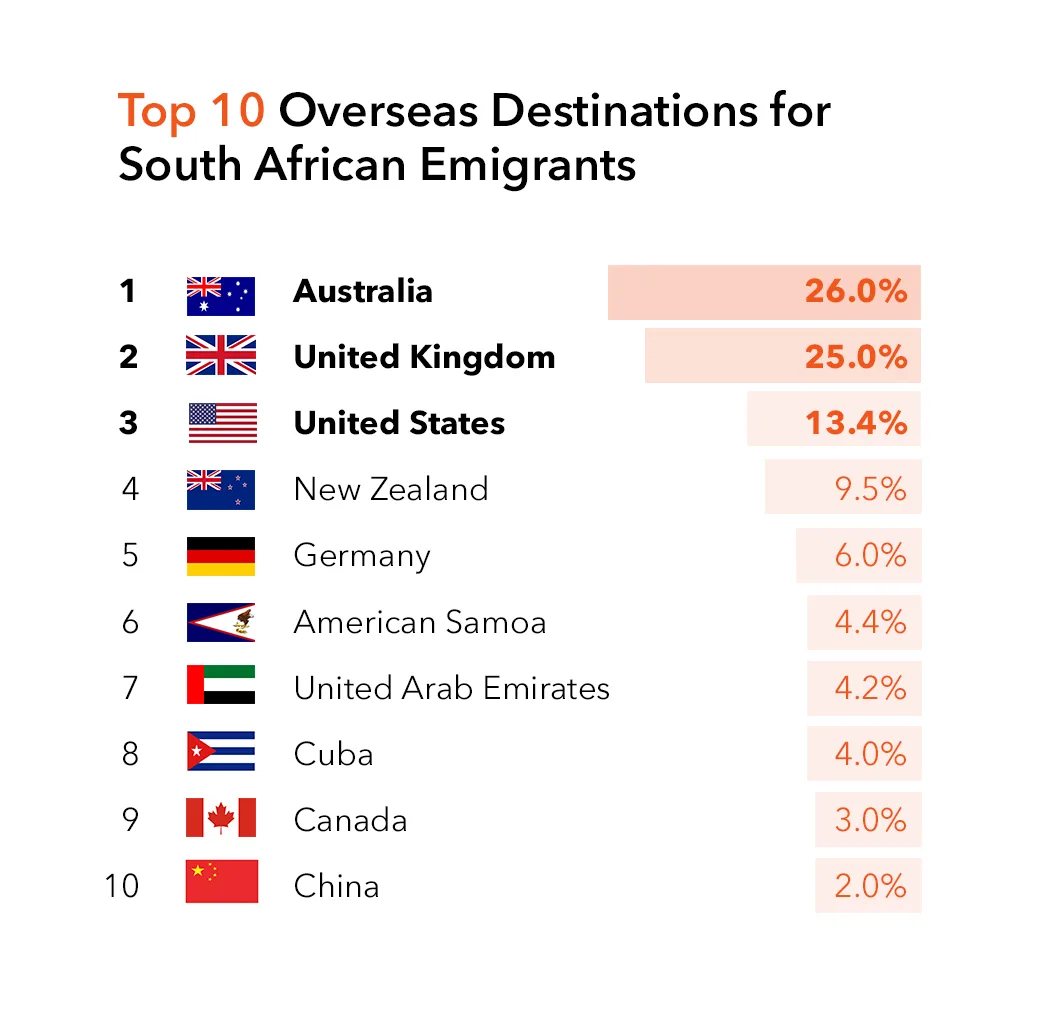
IT and computer professionals are designated as speciality occupations that can receive a US visa. Remember, there are many different visa types and requirement in the US, so it makes sense to consult with a professional, because it can be a bit of a minefield.
Conclusion
If you are keen on emigrating from South Africa, there are lots of exciting options out there if you have software development skills. If you don’t already have this experience, a programming bootcamp will stand you in a good stead for a wide variety of new, stimulating countries.

Career Advice
Battle of the Cities: Cape Town versus Joburg developer salaries in 2018
Cape Town and Johannesburg are South Africa's two major cities. But how do these cities compare when one looks at developer salaries? We explore the differences in demand and salaries for developers across years of experience and top programming languages, taking into account cost of living of both cities.
South Africans love comparing their two major cities; now even CNN has taken to comparing Cape Town with Joburg: the natural beauty of the Mother City with the pulsating buzz of the former gold mining town. On CNN, Laurice Taitz, publisher and editor of Johannesburg In Your Pocket City Guide, says: ‘A friend of mine summed it up perfectly. If Joburg and Cape Town were on a dating website, Cape Town would be the blonde in the bikini and Joburg would be the one with the really great personality.’ But how do these two great cities compare when one looks at developer demand and developer salaries. Cape Town versus Joburg developer salaries in 2018: who comes out tops?
Cape Town Ahead for Junior Developers
OfferZen, a recruitment company, has conducted research into Cape Town and Joburg developer demand in 2018 and found some interesting stats. In Cape Town, entry level salaries are on average 14% higher than their Northern cousins. Joburgers starting out in the developer profession can expect to earn about R22k per month, while developers in Cape Town earn R25k per month on average. Good news for those residing in the Mother City! Here’s a graph comparing Cape Town versus Joburg developer salaries in 2018 by years of experience.
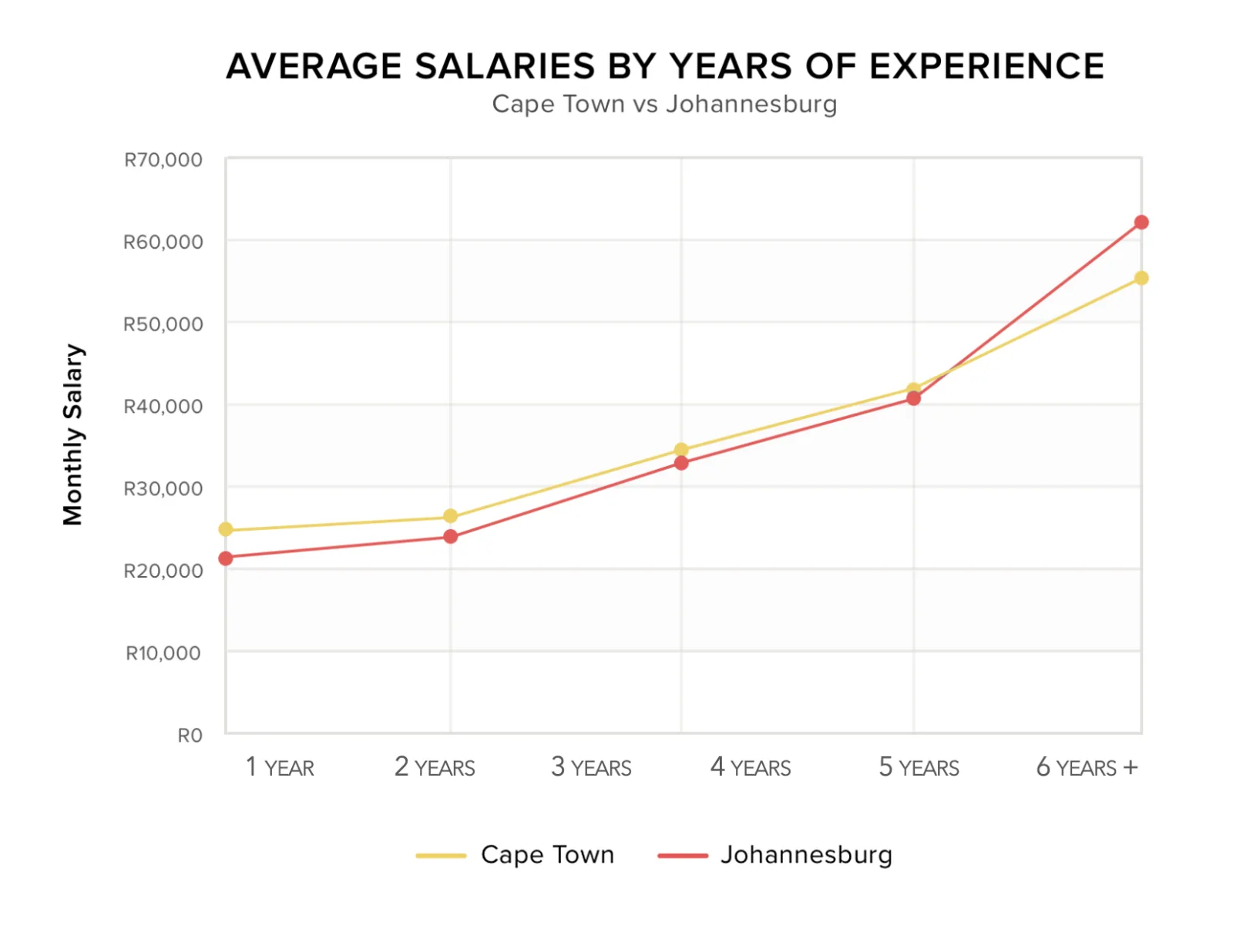
Image Source: https://www.offerzen.com/blog/developer-salaries-cape-town-vs-johannesburg-2018
Why is this the case? Here’s a potential explanation. Despite Cape Town being known as Silicon Cape due to high number of start-ups (and having, for example, its own EdTech incubator, Injini), there are many more developers in Joburg than Cape Town: approximately 30 000 to 10 000. This high supply in Joburg leads to fierce competition from companies like Amazon.
Joburg Developer Demand in 2018: Getting Ahead
However, when it comes to experience and Cape Town versus Joburg developer salaries in 2018, Joburg developers take the lead as far as money goes. Salaries increase similarly for both South African cities up to the 4-6 year mark; however, at this point, Joburgers race ahead. With more than 6 years of experience, the average monthly salary for Joburg developers is R61,240, whereas Cape Town developers with the same number of years of experience earn on average R54,750 per month. One potential reason for this is the high number of large financial institutions in Joburg.
Image Source: https://www.offerzen.com/blog/developer-salaries-cape-town-vs-johannesburg-2018
But bear in mind the cost of living in either of these cities- to maintain the same standard of living, you would need R36,788 in Cape Town and R34,000 in Joburg, states Numbeo, a large database of user-contributed data. Rent prices, for example, are 54,17% higher in Cape Town than Joburg; similarly restaurant prices are 6,31% higher in Cape Town than up North.
Top Programming Languages by City
When it comes to programming languages, there is a high demand in both cities for the following languages:
If one examines the trend a little more closely, there is a lot more demand for .NET in Joburg than in Cape Town. On the other hand, Cape Town currently has ‘high demand for UX Designers, Python, and PHP developers,’ states co-founder Philip Joubert from OfferZen in My Broadband.
Conclusion
In conclusion, whether you are in Cape Town or Joburg, it is clear that software engineers and developers earn some of the highest salaries in the country. CareerJunction’s latest salary review, as discussed in My Broadband, states that ‘salary offerings for software developers fall under the top 25 highest salaries, based on an analysis of 116 occupational fields.’ The cost to company on average for intermediate software developers is between R33,352 and R43,523, whereas senior software developers earn an average salary of between R41,726 and R53,253 per month. Not bad!
To find out more about potential programming careers, check out HyperionDev’s online, six-month bootcamps, including Software Engineering, Mobile Development and Full Stack Web Development.
Career Advice
Java Programming Trends for 2018
Java Trends for 2018 - Java is still the most popular language in 2018. This article looks at the demand for java developers, salary expectations, and other important factors.
In 2018, career growth is probably one of your key goals. And you’ve heard of Java, the go-to language for millions of software developers. Because things change fast in programming industry, it’s useful to stay up-to-date. With this in mind, what are the projected Java trends for 2018?
The TIOBE index looks at the popularity of various programming languages. This is determined by looking at the following variables: number of skilled engineers in a particular language world-wide, courses offered in that language and third party vendors. This information is combined with popular search engine results for the different languages on Google, Bing, Yahoo!, Wikipedia, Amazon, YouTube, etc. For April 2018, same as April 2017, Java was ranked as the most popular language.
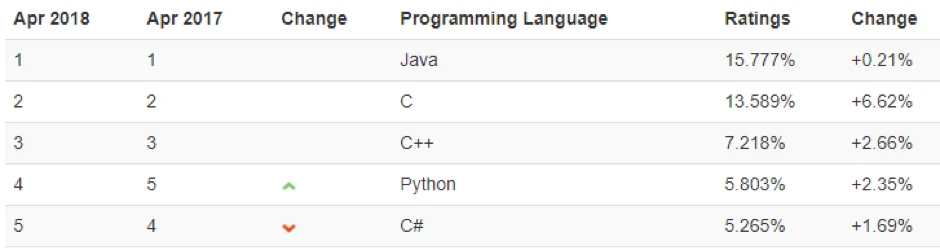
Source: https://www.tiobe.com/tiobe-index/
This is substantiated by the PYPL, Popularity of Programming Language Index, which looks at how often language tutorials are searched on Google. Java comes out on top again, according to data from March 2018. The PYPL index is useful for helping you decide which language to study or to use in a new project. Here are their top five most popular languages:
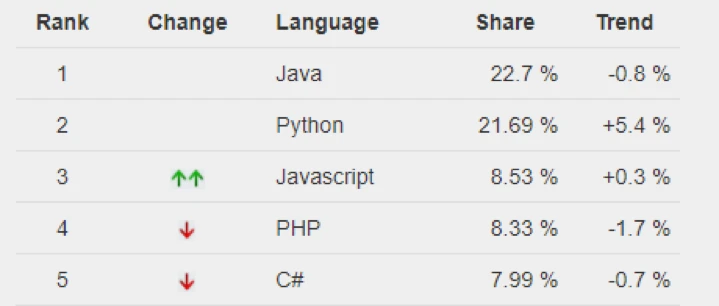
Source: http://pypl.github.io/PYPL.html
Why is Java such a popular language?
There are a number of reasons for Java’s continued popularity, according to Technotification, including:
- The language is over 20 years old and used by billions of devices and millions of developers.
- Java is run on many hardware and operating systems though the Java Virtual Machine.
- There is continued support from Oracle, one of the world’s most popular database management systems.
- Many Fortune 500 companies, up to 90%, are using Java as their server-side programming language.
- There is an excellent Java community and documentation.
Although Java might be the most popular language this year, let’s look at other Java trends in 2018 including demand for java developers, salary expectations, and other important factors.
Salary Expectations for Java Developers in 2018
According to Salary.com, the median annual Java developer salary, as of March 2018 in the US, is $89,603. The range is between $74,844 and $101,025. This data comes from thousands of HR departments and refers to companies of varying sizes, and across a wide range of industries.
Here you can see a graph showing the percentage of people earning more or less than the median expected for Java developers in 2018 in the US. As referenced below, 25% of Java developers earn more than $101,025 per annum.
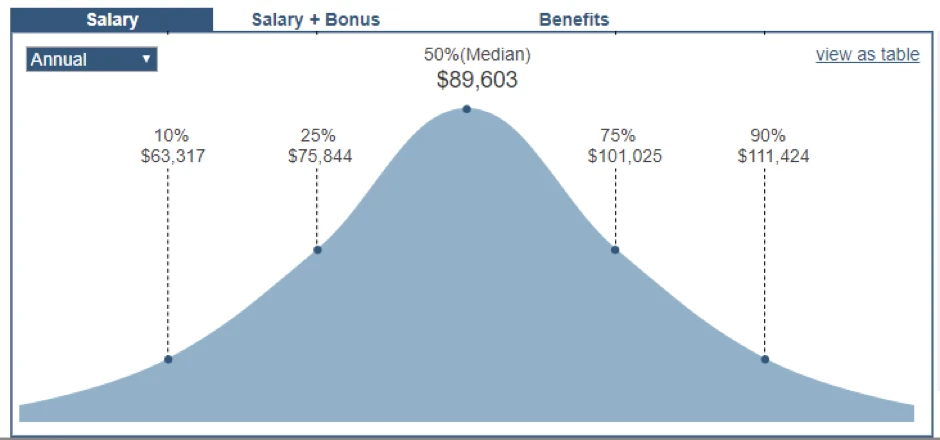
Source: https://www1.salary.com/Java-Developer-salaries.html
Demand for Java Developers in 2018
Forbes notes their 13 top tech skills for 2018. ‘Mobile application developers will continue to be in high demand, just as they have been the past few years,’ states the piece. In addition, this demand is likely to rise in 2018. Competent app developers will need to know multiple programming languages, including Java, HTML5, Objective-C, C++, C#, Python and Swift.
CodingDojo, which analysed job postings data from the job website Indeed.com, substantiates these findings by noting that job postings in 2018 are still highest for Java. Even though Java decreased in popularity by about 6000 job postings between 2017 and 2018, the language is still ‘extremely well-established’, they stated.
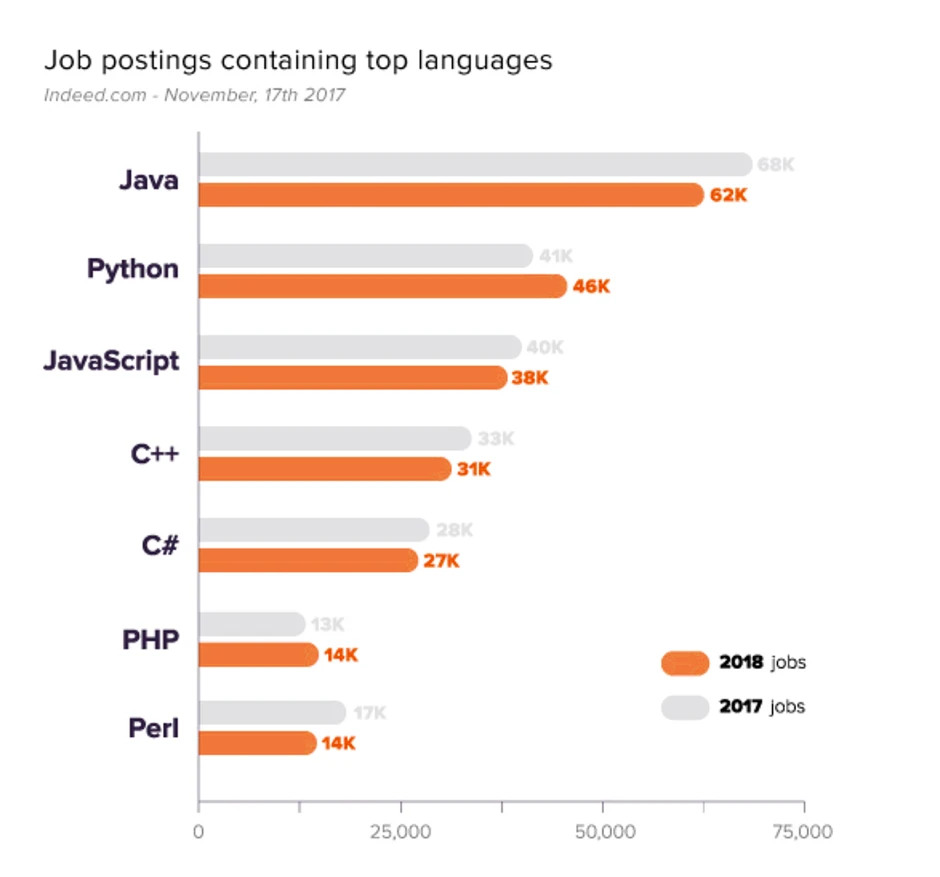
Source: http://www.codingdojo.com/blog/7-most-in-demand-programming-languages-of-2018/
In conclusion, in 2018, Java should continue to enjoy its prominence as far as popularity, developer demand and high salaries are concerned. However, other programming languages are nipping at its heels. Consider, for example, Python which has a solid claim to being the fastest-growing language in high-income countries like the US, UK, Germany and Canada, according to this Stack Overflow blog post. Nevertheless, if career growth is your aspiration for 2018, Java is an excellent programming language to learn. If you’re keen to learn Java, consider doing either a Software Engineering bootcamp or a Mobile Developer Bootcamp, both offer Java. Read more about key differences between Mobile Development and Software Engineering.

Career Advice
Is Paying for a Coding Bootcamp Worth It?
Is paying for a coding bootcamp worth it? Here are some benefits of studying programming part-time and online. Issues discussed include time, flexibility, placement rates, daily mentorship and affordability.
If you’re interested in attending a coding bootcamp to become a developer but you can’t manage full-time, should you consider a part-time online bootcamp instead? Probably. Here are some benefits of studying programming online and part-time.
1. Time
Time, as they say, is money: the sooner you get up and running, the quicker you start earning a developer salary. A degree, on average, takes three years. However, you can potentially complete a part-time online bootcamp within six months.
In the US, according to Indeed, web developers can expect to make an average annual salary of $78,631 (this estimate is based on 53,019 anonymously-submitted salaries to the site). Studying for two-and-a-half extra years will result in a loss of $196,577, and that’s without taking into account the effect of salary increases! You want to get up and running with your new skills as soon as possible.
2. Flexibility
One of the biggest benefits of online learning relates to flexibility. You get to fit in your work around your other obligations. This means that you can carry on working and earning money while studying. You can schedule your studying and calls with your personal mentor for evenings or weekends. It’s a really big advantage to maintain your monthly income while enhancing or changing your career. It also means your risk is much lower and once you’ve gained the skills, you can start applying for other jobs while still being employed.
Flexibility holds a major appeal for non-traditional students. According to a report from the American Council on Education, which was quoted in Ed Tech magazine, non-traditional students tend to be older than 25, working full-time and, financially independent, with some of them likely to be parents. In essence, they are early- to mid-career adults seeking career growth or change – and they are the ones who value flexibility the most.
3. Affordability
When it comes to cost, there is obviously a wide range. A face-to-face bootcamp in the US costs in the region of $9,000 to $21,000, with an average of $11,451. For a 4-year computer science degree, the average cost is $157,760. You can enroll at an online coding bootcamp for as little as $3000. Of course a self-guided or Massive Open Online Course (MOOC) is likely to be cheaper, but the depth of content is probably not sufficient for a career change. However, if you’re keen to develop a targeted new skill (and not necessarily a career change), for example honing your Excel skills, a MOOC might be the way to go.
Despite the cost of an online course, you are likely to reap the rewards. After surveying reports from 73 qualifying coding schools, Course Report found that 80% of graduates were employed in a job that utilised the technical skills they learnt in a bootcamp. The average salary increase was 50,5%, which equated to $23,724 extra per annum. The average post-bootcamp salary was $70,698.
4. Daily Support or Mentorship
One of the key advantages of online bootcamps, and what sets it apart from face-to-face instruction, is the ability to support the learning via mentors. ‘Mentorship,’ says Chris Myers, a start-up founder and CEO of a financial management solutions company, ‘is the best path to career success, hands down.’
Coding mentors are particularly helpful, because they:
- Teach coding best practice – a mentor helps you avoid common stumbling blocks and learn best industry practices.
- Constructive feedback – mentor feedback should be specific, timely, understanding and positive.The faster you receive feedback on your code submissions, the better.
- Individual attention – Mentorship is 1:1 personalised feedback. This is very different from massive lectures or classes, where one can quickly lose track of what the lecturer is saying.
5. Placement Rates
Coding bootcamps, and this includes online and face-to-face programs, are viable options for filling the tech shortage. A 2017 survey, conducted by Indeed, found that 72% of employers think graduates from bootcamps are ‘just as prepared’ as degree holders to be high performers. In fact, 12% of employers think bootcamp graduates are more prepared and more likely to be high performers than those with computer science degrees.
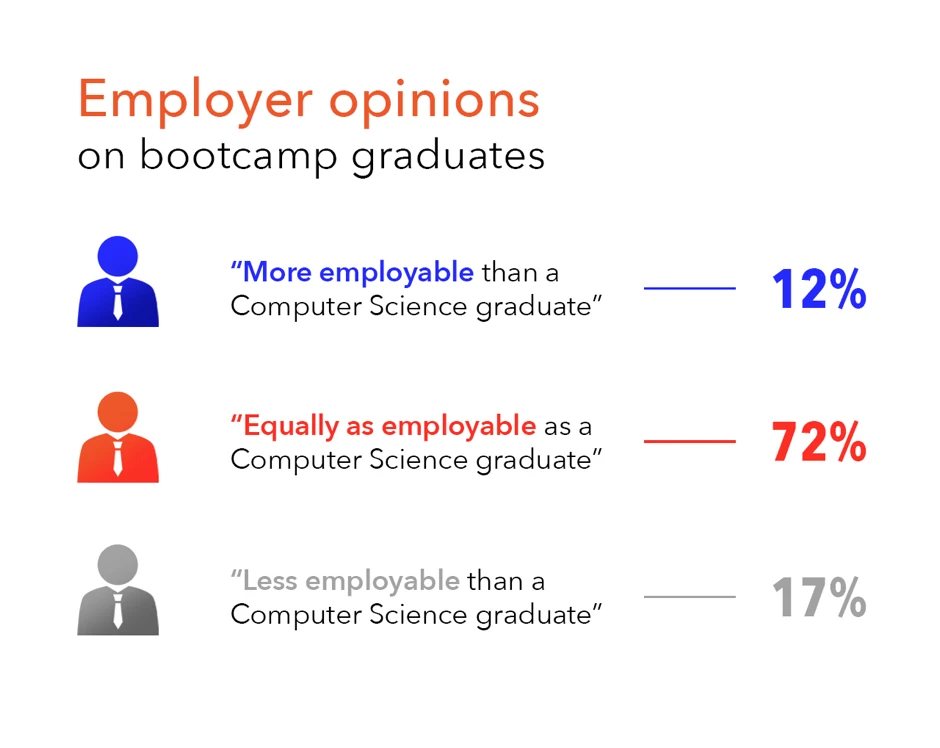
Source: http://blog.indeed.com/2017/05/02/what-employers-think-about-coding-bootcamp/
Check out HyperionDev Success stories to see how students have been placed after completing a coding bootcamp.
It’s clear that the advantages of a part time online bootcamp – including compactness, affordability, flexibility, mentorship and high placement rates – are truly powerful. Almost everyone finds some of those benefits especially attractive. Which of them are most appealing to you?
Career Advice
Stack Overflow Developer Survey 2018: Key Findings
Stack Overflow Developer Survey 2018 - find out the key findings from 2018's Stack Overflow Developer Survey. Find out about the top languages, how developers feel about their jobs, and much more.
This year’s 2018 Stack Overflow Developer Survey analysed responses from 101,592 developers from 183 countries around the world. It’s the 8th year of the survey and the largest pool of respondents ever. In this post, we explore the 5 key findings and some interesting stats that arose from the survey, such as common education paths and developers’ favorite and least favorite technologies.
5 Key Findings
Here are the five takeaway findings from this year’s survey.
- Developers working in the fields of DevOps and Machine Learning get paid the highest salaries. Opportunities in the languages and frameworks of these two fields are on the rise.
- 87% of developers are at least, in part, self-taught. Most have taught themselves a new language, framework, or tool outside of any formal education. Online education is more common (48,6%) than full-time face-to-face learning (10,5%).
- There is optimism about the possibilities offered by artificial intelligence (AI), but a lack of agreement about the dangers.
- Python is becoming increasingly popular as a programming language: it has overtaken C# this year.
- There are gender differences when it comes to assessing prospective jobs. For women, the most important thing is company culture and professional development opportunities. Men, however, look at compensation, and the particular technologies that form part of the job.
Profile of Respondents
Geographically, the respondents come from all over the world: the largest contingent are in the US (20,65%), followed by India (13,95%). However, many countries are represented including Germany (6,57%), the UK (6,32%), and France (2,61%).
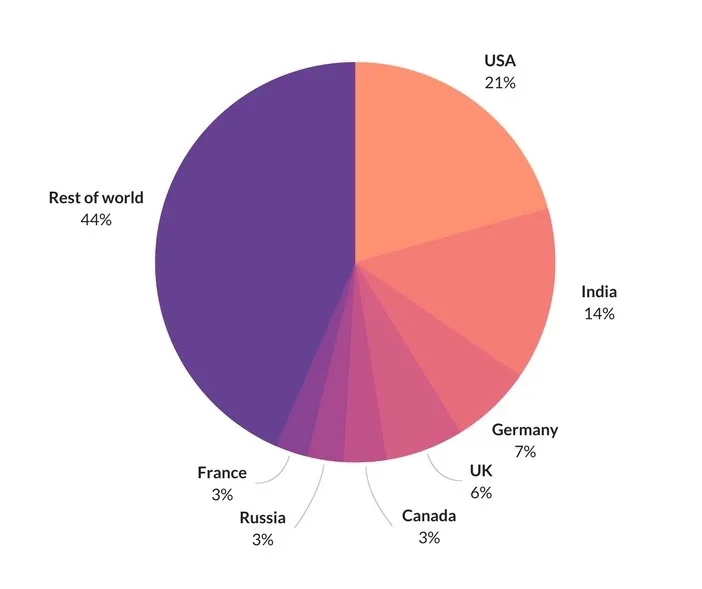
As far as potential jobs go, approximately 60% of respondents are back-end developers and about 48% work as full-stack developers, but a wide variety of jobs are represented including mobile developers, database administrators, games or graphics developers, DevOps specialists, etc.
Experience levels varied between respondents. However, a full third learnt to code only within the last five years. More than 50% have five years or less of professional programming experience.
Education
Only 46% of respondents have a Bachelor’s degree, and it is fairly common to find accomplished programmers who haven’t completed a formal degree.
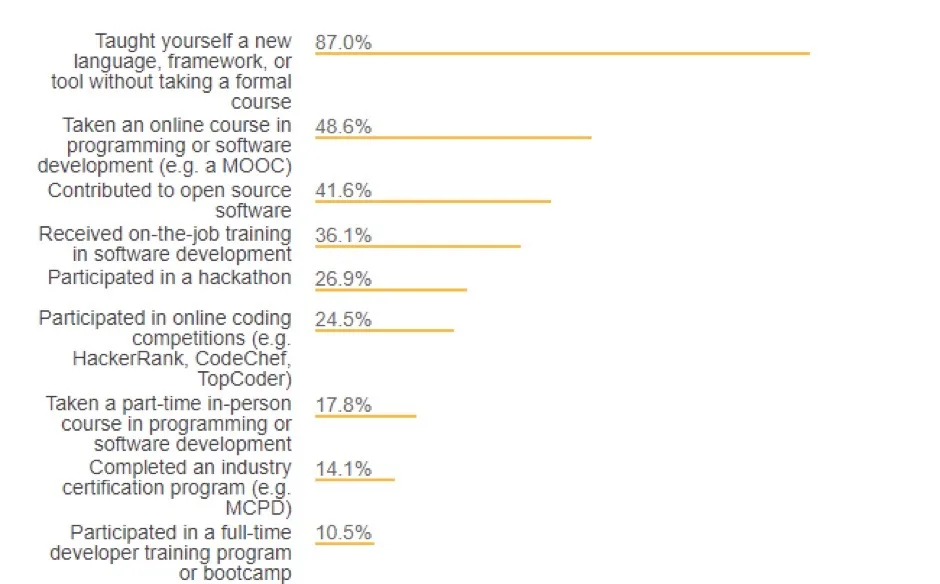
The one thing that is consistent among developers is that they tend to be lifelong learners. Outside of any formal education, 87% of them have taught themselves a new language, framework or tool. As far as online courses go, 48,6% have completed such a course. Approximately 25% have taken part in a hackathon, a day-long coding competition where computer programmers come together to code, design, and build something, whether it’s a website or a mobile app.
Lifelong learners
Developers are lifelong learners; almost 87% of all developers say they have taught themselves a new language, framework, or tool outside of their formal education. Among professional developers, almost half say they have taken an online course like a MOOC, and about a quarter have participated in a hackathon.
Here’s a graph showing how professional programmers have educated themselves:
Source: https://insights.stackoverflow.com/survey/2018#developer-profile-other-types-of-education
Bootcamps
Interestingly, if one compares online courses with bootcamps, which tend to take place in a specific location face-to face, it seems online education is more common – 48,6% have taken up online courses versus 10,5% for full-time physical developer training bootcamps.
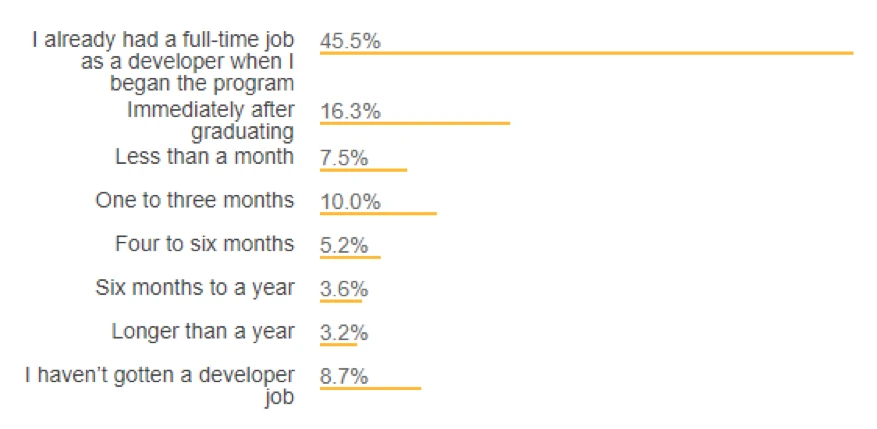
Although bootcamps are seen as a way for people new to the industry to gain entry in a short period of time, they are also very appealing for those already in the industry: almost 50% of those surveyed who attended a coding bootcamp already had jobs as developers. Their reasons for enrolling on a bootcamp included the desire to learn new areas of technology and to update their current skills. About 82% of respondents who attended a bootcamp found work within six months of finishing their course.
Here’s a graph showing how long it took programmers to find a job after attending a bootcamp:
Technology
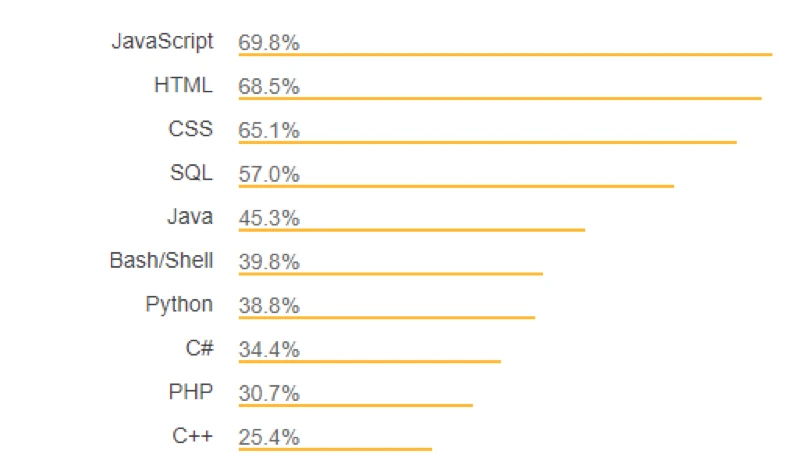
It’s always fascinating to see which technologies are most in-demand and which are dreaded. JavaScript is the programming language that is most commonly used. This has remained unchanged for six years in a row! Second up is HTML, followed by CSS.
Python is on the up: last year it overtook PHP and this year it has surpassed C#. Python, says David Robinson on the Stack Overflow blog, has ‘a solid claim to being the fastest-growing major programming language.’ The top three programming languages, plus Python, form part of HyperionDev’s Full Stack Web Developer course.
Here’s a graph of the most popular programming, scripting and markup languages:
Source: https://insights.stackoverflow.com/survey/2018#technology-programming-scripting-and-markup-languages
When it comes to frameworks, libraries and tools, the technologies used most frequently are Node.js and Angular JS, while React and .Net Core remain integral to developers. Unsurprisingly, MySQL and SQL Server, same as last year, maintain their top spots for most commonly used databases.
Most Loved, Dreaded and Wanted
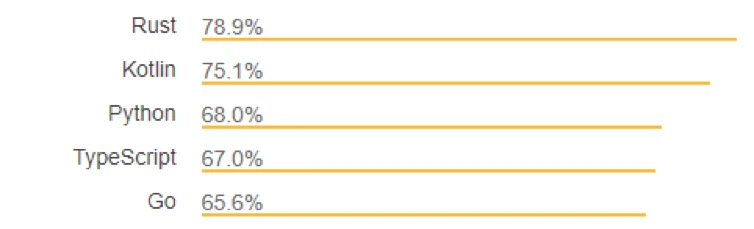
What does love mean for a developer? It means that he or she wants to continue working with a particular language. The most loved programming language for 2018 is Rust, an open-source, low-level language, ideally suited for systems, which runs blazingly fast. Kotlin is the second most loved language and Python comes in at third.
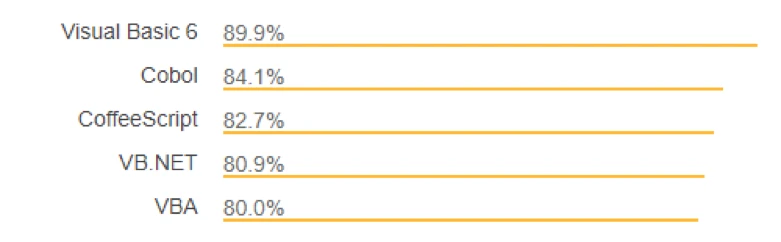
The most dreaded languages are those that developers have no interest in carrying on using, even if they are currently working with them. Visual Basic 6 tops the list – for the third year in a row! Cobol and CoffeeScript come second and third respectively.
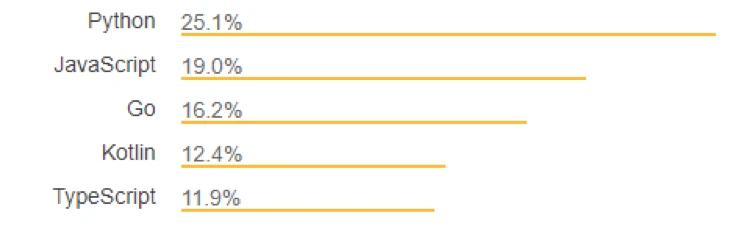
When it comes to languages that are wanted – i.e. developers are not yet using that language, but they are very keen to learn it – Python cames in at #1 for the second year in a row. This is followed by JavaScript: 19% of all respondents want to learn this language.
The Top Five: Love, Dreaded, Wanted
Five Top Loved Languages
Five Top Dreaded Languages
Five Top Wanted Languages
Source: https://insights.stackoverflow.com/survey/2018#technology-most-loved-dreaded-and-wanted-languages
Top-Paying Technologies
Which languages are associated with the highest salaries? Globally, F#, Ocami, Clojure and Groovy have median salaries above $70 000 USD, and are the highest. The F# Software Foundation can tell you more about this computer language.
However, in the US the top-paying salaries are for developers who know Erlang ($115 000 per annum) and Scala ($115 000 per annum). Among more common programming languages, the top US earners are developers conversant in Java ($100 000 per annum), C ($98 000 per annum), JavaScript ($98 000 per annum) and Python ($98 000 per annum).
The average salary in the US, for non-programmers, is much lower – almost half of what developers make on average! For those between the ages of 20 and 24, the average salary per annum is $27 456. Older people fare slightly better: between the ages of 25 and 34, you can expect an average salary of $39 416 and those between 35 and 44 earn, on average, $49 400. The best annual salary, $50 024, is earned by 45 to 54 year-olds.
How Do Developers Feel About the Future of AI
Developers were asked what they found dangerous and exciting about the future of AI. When it came to danger, there wasn’t much consensus. Each of the following factors were considered equivalently dangerous: algorithms making important decisions, AI moving ahead of human intelligence, evolving decisions of ‘fairness’ when it came to algorithmic versus human decisions, and increasing automation of jobs. As far as excitement went, 40,8% of developers noted the increasing automation of jobs.
Although most developers could identify dangerous aspects when thinking about the future of AI, there was still a general degree of optimism about what AI offers the world, with almost three quarters of developers stating that they were more excited than worried.
Employment
When it come number of developers employed, the stats look very positive: over 90% of developers are, at least part-time, employed.

Source: https://insights.stackoverflow.com/survey/2018#work-employment-status
Company Type and Size
Developers are employed in a very wide range of industries. However, most developers, approximately 38%, work in web development, information technology or SaaS (Software as a service, including software development. Other industries include: financial technology (8,7%), cloud based solutions (7,1%), data and analytics (5,7%), consulting (5,3%), etc.
Interestingly, developers working in certain industries, such as consulting and healthcare, tend to have more years of coding experience. Compared with web development or eCommerce, developers in the consulting and healthcare industries are twice as likely to have more than 20 years experience.
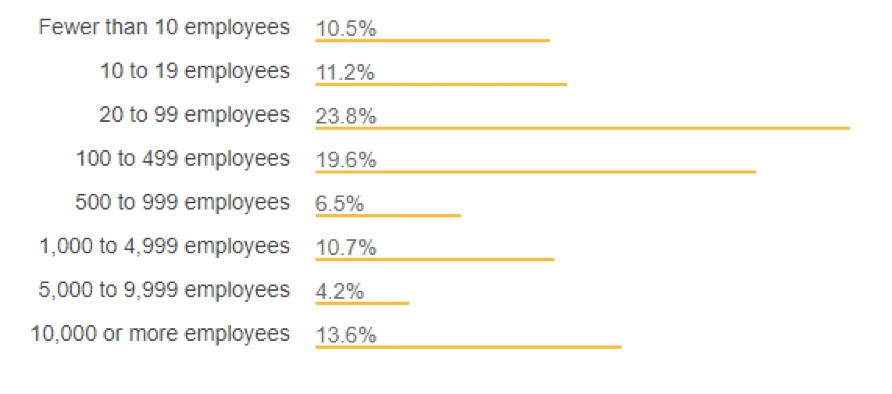
Although companies vary in size, US developers tend to work in larger companies than elsewhere in the world. Also, more experienced developers are more likely to work in larger companies.
Here’s a graph showing the percentage of developers in different-sized companies:
Source: https://insights.stackoverflow.com/survey/2018#work-company-size
The Five-Year Plan
If programmers are asked where they would like to be in five years time, just more than 50% are keen to remain in their current role, or, alternatively, another technical role. About 25% want to start their own company, but this sentiment is more likely to be expressed by developers younger than 25. Only 2,8% would like to work in a field completely unrelated to software development.
How Do Developers Feel About Their Jobs?
Some interesting results emerge here. These are the trends:
- Developers experience greater satisfaction with their career than their current job.
- Job satisfaction is significantly lower in financial services and IT.
- The highest career satisfaction is experienced by older developers, aged 50 or higher, and those with 20-30 years experience.
- Job satisfaction, on the other hand, peaks for developers between 35 and 44 years of age.
Last Job Change

As you can see, frequent job changes are the norm for software developers.
Assessing Potential Jobs
When assessing potential jobs, 28,3% of developers focus on the compensation and benefits offered. The languages, frameworks and other technologies involved in the work are also strongly considered, as well as opportunities for professional development. Low priority consideration include the diversity of the organisation and the financial performance or funding status of the company.
Salary by Developer Type
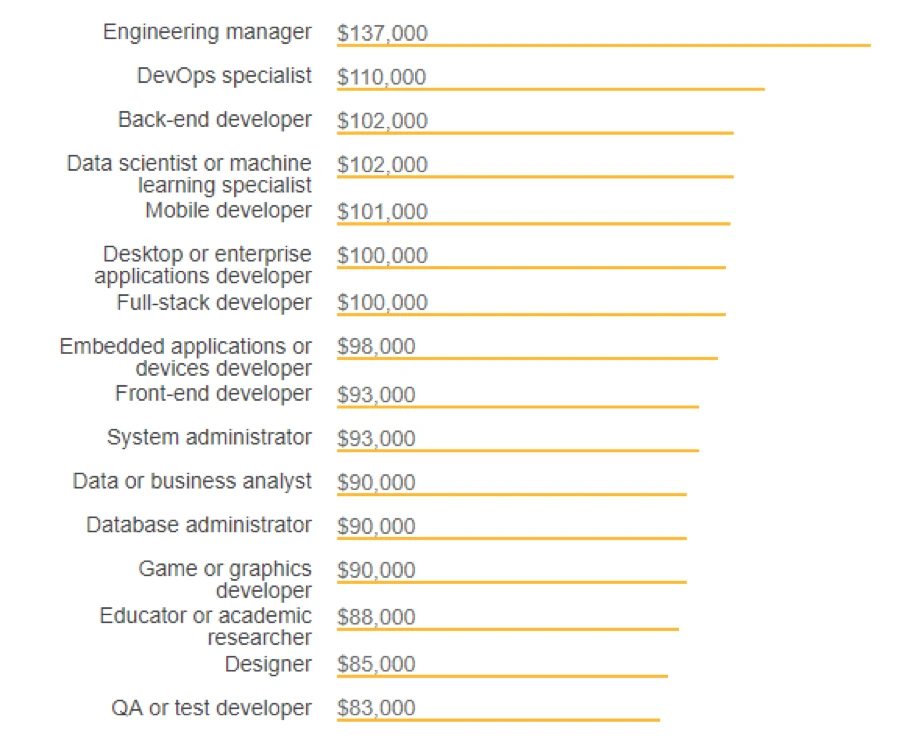
As far as salaries go, Engineering managers, at $137 000 per annum, earn the highest in the US. Coming close on their heels are DevOps specialists, who earn $110 000 per annum and back-end developers at $102 000 per year. Back-end developers draw with data scientists or machine learning specialists.
Here’s a graph showing the different salaries for various types of developers:
Source: https://insights.stackoverflow.com/survey/2018#work-salary-by-developer-type
In conclusion, the Stack Overflow Developer Survey 2018 reveals many interesting findings. Perhaps of greatest relevance to developers and those wanting to enter this field is that learning never stops. Developers are lifelong learners. Also worth noting is that developers are, by and large, satisfied in their chosen field. It’s clear that developers are in an exciting career that offers a great deal of change and stimulation.

Career Advice
Earning Money While Learning Full Stack Web Development
Earning money from web development - start earning money from web development while studying part-time for a Full Stack Web Development bootcamp,
The great thing about a part-time online programming course is that you can start earning money from web development almost from the word GO. Let’s say you’ve signed up for a Full Stack Web Development bootcamp, now’s the time to earn some spare cash on the side.
Here are some strategies to keep in mind:
1. Don’t work for free
Of course you’re keen to get some work under your belt and perhaps you’ve been offered exposure or a byline. Don’t do it! There are a number of problems when it comes to working for free. For example, you may not get honest feedback when it comes to your work. People are likely to feel bad about criticising work they received as a favour. But worse, freebies are not always valued.
Says multi-million dollar business owner Ramit Sethi on Business Insider, who is also the author of the book, Your Move: The Underdog’s Guide to Building Your Business, ‘Understand that people value what they pay for. You’re not doing them a disservice by charging them.’
2. Set up a portfolio as soon as possible
In this case, your website will be your portfolio. Here’s your chance to show off your expanding web development skills.
Creative Bloq offers these tips for setting up a killer website portfolio:
- Make sure your site is original. Don’t copy anyone else’s.
- Ensure there is space on the homepage telling people how to get hold of you. Include a variety of ways of contacting you.
- Include something personal. You should probably have a headshot photograph as well.
- For Search Engine Optimisation (SEO), include fresh, original content. Your Google ranking will be higher as well. You may want to think about starting a blog.
- Include any examples of work you have done. Your website is essentially your portfolio for earning money from a web development career.
- Think about the kind of niche or industry you want to service. Ensure your language is appropriate for these industries – e.g. language usage can be funkier for creative-type industries, and more formal for banks or financial services.
The Hard Refresh states that a portfolio is an opportunity to include the following:
- Who you are
- What kind of work you do
- How you carry out your work
- Who you want to work with
- Where you want to go next
3. Networking
Ever seen the movie Six Degrees of Separation? Basically, you want to mine your contacts – and then your contacts’ contacts. Grab coffees, connect on LinkedIn and set up meetings. Start with family and friends, but then expand outwards, like the ripples created by a stone thrown into a still pond. Something is likely to develop, whether it’s a new business contact or even a job interview.
The thing is, people like doing business with people they know or have heard about. Use this to your advantage. Have a business card ready and don’t be afraid of the soft sales talk.
You can start handing out business cards as soon as you start studying. Remember, networking takes some time to gain traction.
4. Show, don’t tell
Sign up for GitHub, where you can host and review code, manage projects, and build software alongside millions of other developers. Add your existing code to share with prospective employers or start new projects to keep yourself relevant. GitHub accounts are free, and it’s the best place to swap ideas and code with other programmers online. You can also blog or guest blog on GitHub. Just think – guest content writer can be another achievement added to your portfolio!
To earn money from web development, you need to convince people that you are a credible developer who will get the work done. GitHub gives you another opportunity, besides your portfolio, to show what you can do.
5. Finders, keepers – losers, weepers
When it comes to networking, you may think that you should avoid the competition – i.e. other web developers, but this is a short-sighted approach to take. In fact, other developers, in the same industry as you, are likely to be excellent referrers of work. It’s possible they have too much work and would be happy to refer some of it your way. Or maybe there are certain jobs they’re not keen to take on. The point is, they are in contact with potential clients and upcoming projects, and can be vital reference points in helping you to start earning money from web development.
In addition, meet other professional at hackathons, via online groups like LinkedIn or Google+, or sites such as Digital Point.
6. References
Get testimonials. Here’s something you might not know. People obtain testimonials and references by asking for them. Don’t be shy. When you’ve finished work for someone, ask him or her to write you a quick review. Then put it up on your site. If you really want to make it easier for a potential reference writer, offer to write the review yourself. You’ll be surprised how many times people will take you up on this.
The bottom line is that you can start earning money from web development almost immediately. You don’t need to wait until you have finished studying. Employ these strategies right from the beginning and you’ll be gratified by how quickly your bank balance grows.
If you’re interested in becoming a full-stack web developer, HyperionDev offers an online, part-time six-month course. You’ll cover HTML, CSS, Javascript, Node.js, MongoDB, Express, React, Python, and Django, as well as a lot more. Download the syllabus here.

Career Advice
Web, Mobile Or Software Development: Choosing The Right Career Path
Web, mobile or software development - choosing the right career path. The technology industry is arguably the fastest growing career choice in most developing nations. Each year companies release a new phone, software, or other gadget.
Students entering technology development training often find it difficult to choose between the three fastest-growing specialties.
The technology industry is arguably the fastest growing career choice in most developing nations. Each year companies release a new phone, software, or other gadget. Developers are the experts who help us stay up-to-date and fix those pesky bugs our phone keeps reporting.
But students often have a difficult time choosing between web, mobile or software development career paths. All three offer high income rewards and are growing faster than most career paths. We’ve collected data about benefits, future outlook, and job expectations to help students choose the path best suited for their interests and abilities.
Web Development Career Path
Web development is an umbrella term for experts who create webpages and applications. These professionals are responsible for making the Internet user-friendly. They collect and create web content, plan website layout and navigation, code the actual web pages, and test/upgrade sites for optimum performance. Students should have advanced fluency in programming languages such as HTML, JavaScript and CSS, PHP, Microsoft .Net Visual Basic, and Java.
Web developers subspecialize by earning certifications in MySQL, Microsoft SQL Server, IBM, and Oracle. Companies contract or hire web developers to optimize online content for search browsers (SEO), ensure content is compatible for multiple browsers, and create user-friendly layouts.
Web Development Outlook
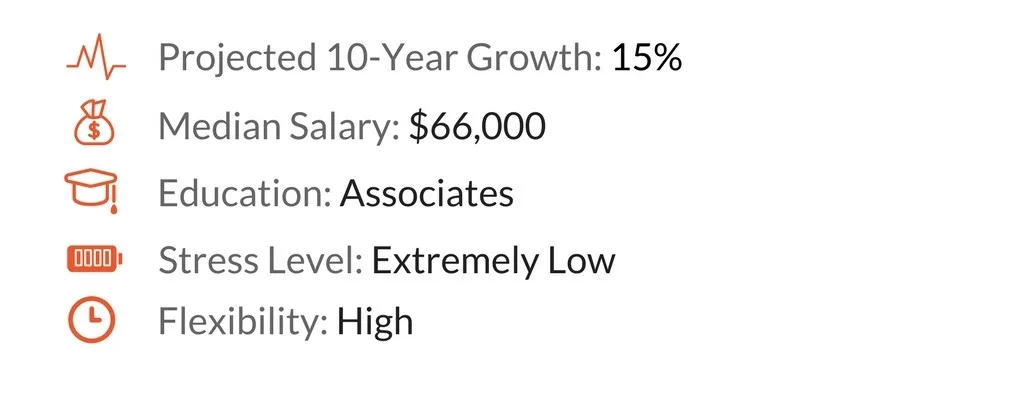
Web developers can expect a high growth potential in this industry. The U.S. Bureau of Labor Statistics estimates around 130,000 jobs added with a 15 percent growth over the course of the next ten years:
Mobile And Software Development Career Path
Experts agree that mobile developers have the best employment opportunities. Internet and software users rely on their smartphones for all communication, entertainment, education, and Internet resources. Learning to develop mobile apps and optimize online content for mobile devices is a great career tool to have.
Mobile developers are a subspecialty of system software development. They build mobile operating systems, application packages, and company-specific tools. Developers constantly update these systems to function smoothly with other third-party apps, operating systems, and core systems. Flexibility and research is the cornerstone of this industry.
As computers grow and change each year, the software that these computers are built on will also change. Companies select software developers to analyze users’ needs and create software that will help consumers optimize their digital life. Software developers test and update current software packages, recommend updates, and map the crucial interactions between hardware and other software.
One critical aspect of this career path is learning to anticipate consumer needs and understand how they will use the software. This includes identifying core functionality, user requirements, and competitor’s potential solutions.
Mobile and Software Development Outlook
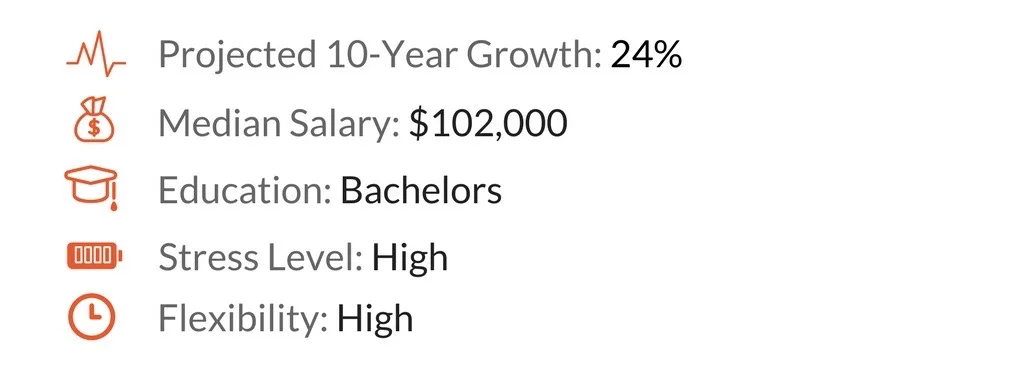
Software and mobile developers are ranked together and will enjoy similar benefits. The U.S. Bureau of Labor Statistics estimates the nation will add more than 300,000 jobs over the next ten years with a 24 percent annual growth.
In conclusion, if you’re considering a career change, a move to study web, mobile or software development would have multiple benefits. Statistics show that jobs in these fields are in demand and, importantly, growing. In addition, each of these fields offers a variety of career options, which translates into highly stimulating and diverse job opportunities for suitable candidates.
Hyperion was founded with an ambition to scale human-led education in programming. We believe that machines can’t match humans and learning to code is best achieved by having a coding educator review your code on a day-by-day basis. We developed our technology boot camp to help students learn to code.
Career Advice
How to Become a Web Developer
Here are all the basic building blocks, important programming languages, and other tips you'll need to succeed in web development.
You’ve decided it’s time for a career change in 2018. Even if you’ve never programmed before, you can become a web developer this year. It may feel overwhelming, but it need not be. This article will provide an overview on how to become a web developer by looking at the technologies, programming languages, frameworks and skills you need to know.
Briefly, full-stack web development covers both front- and back-end programming. The main function of the front-end is to deliver interactivity and to display content in an appealing way, whereas the back-end is involved with things like working out business logic, interacting with the databases, etc.
So where to start? Here’s how to become a web developer:
The Basics
Almost any course or online tutorial will start with the basic building blocks of a web page. These are HTML and CSS.
HTML
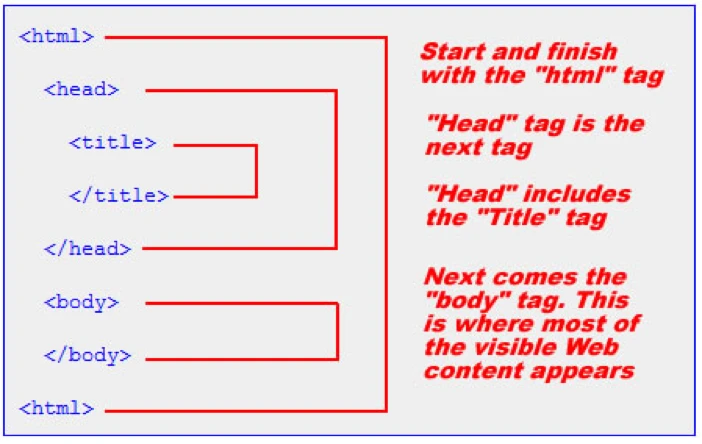
HTML stands for Hyper Text Markup Language and it describes the structure of web pages. You use tags to represent HTML elements. With HTML, you can determine the placement of paragraphs, headings, data tables, embedded images and video.
Source: https://htmlbasicsandhowtoos.weebly.com/
CSS
CSS or Cascading Style Sheets adds styling, such as fonts, colours or layouts to your website. It’s not a markup language like HTML or a programming language, which we’ll discuss later, it’s a style sheet language. For example, CSS lets you write code to make all the headings on your page blue; you would only need a single instruction for that instead of hand coding each heading separately.
Once you’ve mastered the basics, it’s time to move on to more complicated programming languages.
Intermediate Steps
JavaScript
You will need to learn JavaScript, a scripting or programming language that lets you implement complex things on a web page. JavaScript allows a website to do more than just display static information. It means you can have content updates, interactive maps, animated 2D/3D graphics, scrolling video, etc.
Interestingly, JavaScript is one of the top paying technologies in the US – at $90 000 per annum, according to the 2017 Stack Overflow survey. It runs on the browser and works as both a server-side and a front-end language.
Do I need to learn the back-end?
Certainly if you’ve set your sights on becoming a full-stack web developer, you will also cover back-end languages like Python, Ruby, Java and PHP. Back-end languages are vital, because they manage user authentication, manipulate database operations and ensure the logic of the application.
When it comes to back-end languages, Python is one of the fastest-growing languages in high-income countries such as the UK, US, Germany and Canada. This language saw a 27% year-on-year growth as the most visited search on Stack Overflow.
In addition to programming languages, you will also need to know about databases and storage. There is likely to be data on your website that needs to be accessed. Languages covered here might include SQL or MongoDB.
Adding Frameworks
What is a framework?
As a web developer, you’ll work with programming languages and frameworks. But what’s the difference? A programming language involves our communicating with computers and telling them what to do by speaking their syntactic language. Frameworks are collections of programs, which improve performance, extend capabilities and introduce coding shortcuts via libraries. This means developers don’t have to hand-code everything from scratch.
UpWork offers this great analogy: let’s say you want to make a sandwich – it’s much easier to purchase pre-baked, sliced bread than to make your own. Frameworks are like sliced bread. They are there to make the process faster. But remember, it’s not an either-or situation; as a developer, you’ll work with both programs and frameworks.
Examples of frameworks for everyday use as a web developer:
- Bootstrap: A framework for the design and layout of content on a page. It’s an open source toolkit for developing with HTML, CSS and JS (JavaScript). (Watch this beginner tutorial on Bootstrap.) Another popular open-source framework for JavaScript is Angularjs, which is a front-end framework.
- Django: This is an open source, back-end Python framework, which offers convenience, good functionality, documentation and reliable community support. (Here’s a Django tutorial for beginners.)
- Ruby on Rails: This is probably the main full-stack competitor to Django. It’s also open source and server-side, though written in Ruby.
Levelling Up: Advanced Web Development
Part of web development includes knowing high-level concepts like web architecture, especially if you’re creating more complex web applications. Here you’d want to know how to ‘structure your code, how to separate your files, where to host your large media files, how to structure the data in your database, where to perform certain computational tasks (client-side vs server-side), and much more,’ states Daniel Berowski, writing for Medium.
You’d also want to know about Git, which is a version control system for tracking changes in computer files and coordinating work on those files among a number of people. It’s mostly used for managing the source code in software development. It’s free and open source.
Now Get Started
You’ve read about how to become a web developer, so it’s clear that the path is fairly extensive. There is always something new to learn. Even experienced web developers are constantly updating their skills and knowledge, but it’s never too late to start.
If you’re interested in becoming a full-stack web developer, HyperionDev offers an online, part-time six-month course. You’ll cover much of what has been discussed in this article including HTML, CSS, Javascript, Node.js, MongoDB, Express, React, Python, and Django, as well as a lot more. Download the syllabus here.

Career Advice
Preparing for a Software Engineering Interview
A software engineering interview is unlike any other interview you will do. The main attribute interviewers are looking for in the software engineering interview process is your ability to code. In this example, we use Python to help you prepare for your software engineering interview.
Interviewing for a Software Engineering position is unlike the interview process for most other professions. Some parts are similar, in that you will likely be questioned about your previous employment and education, and asked competency questions to test your situational judgement and experiences. However, the main attribute interviewers are looking for in the process is your programming ability. You will need to demonstrate that you can think quickly and solve technical or logical problems presented to you. This often involves talking through code on the phone or a video call, or writing up a solution on a whiteboard. You can usually code in any popular programming language such as Java or C++. In order to help you with your software engineering interview, we will be using the Python programming language, as it is easy to read, and has minimal syntax, making it ideal for interview situations.
During these technical stages of the software engineering interviews, it is almost guaranteed that you will be asked questions about data structures such as stacks, trees, and hash maps. You may also be asked about algorithms, which are often ideally solved by using a particular data structure. Here we will be looking at one such data structure – linked lists. What are they, why are they used, and how are they implemented?
So let’s start with the basics. What exactly is a linked list? A linked list is a chain of connected nodes, and nodes are objects consisting of a value and a pointer to another node. The diagram below helps visualise this concept.

Defining Classes
To implement a linked list, the first thing to do is to create a Node class, which will hold the data of the node and a pointer to the next node in the chain.
class Node:
def __init__(self, data=None, next=None):
self.data = data
self.next = next
As the linked list itself is just a chain of nodes, to store the list we essentially just need a reference to the first node. Our LinkedList class is created below to store the head of the list.
class LinkedList:
def __init__(self):
self.head = None
Printing a Linked List
One of the most basic functions required of our linked list is the ability to print it. Printing the values of a linked list will be particularly useful when testing that other operations are performing as expected. An iterative method can be used to traverse through each node of the list and print out their values.
def print_list(self):
node = self.head
while node != None:
print(node.data)
node = node.next
Inserting Nodes
Two further key functions are inserting and deleting a node to and from the linked list. Let’s start with inserting a node. A node could be inserted at the head of the list, at the tail of the list, or somewhere inbetween. The simplest of these options is at the head of the list.
def insert_at_head(self, data):
self.head = Node(data, self.head)
In this single line we create a new Node object with the data passed in, and it points to the current head node. Our new node is then assigned as the head of the linked list. So our list is now headed by the new node, which points to the old head, where the list continues as previous.
Inserting a node at the tail of the list requires a little more effort.
def insert_at_tail(self, data):
# if empty list, insert as head node
if self.head==None:
self.head = Node(data, None)
else:
current_node = self.head
while current_node.next != None:
current_node = current_node.next
current_node.next = Node(data, None)
If the list is currently empty, then the tail and head are the same node, so we insert our one node as the head of the list. If the list is not empty, we iterate through the nodes until we reach the current tail. We then point this tail node to our new node, therefore appending it onto the end of the list.
We can also insert a node at a specific index (a numeric position in the list). To do this, we again first check for an empty list, in which case we insert as the head node. If the list is not empty, we want to iterate through the nodes in the list until we reach the desired index position. If we reach the end of the list before our index, then the position is out of range and no nodes are inserted. If we do reach the desired index in the linked list, we set the node at the penultimate index position to point to our new node, and set our new node to point to the previous node’s pointer.
def insert_at_index(self, data, index):
# if empty list, insert as head node
if self.head==None:
self.head = Node(data, None)
return
i=0
current_node = self.head
while i<index:
# if index out of range, do not insert
if current_node.next==None:
return False
current_node = current_node.next
i+=1
current_node.next = Node(current_node.data, current_node.next)
current_node.data = data
Deleting Nodes
For deleting a node at a specific index, the approach is similar to inserting. We again iterate through the linked list until our desired index position, but this time as well as keeping track of the current node, we also need to keep track of the previous node. This is because once our desired index position is reached, we set the previous node to point to the current node’s pointer. This essentially makes the chain skip over the current node, and it is deleted as nothing references it any more.
def delete_at_index(self, index):
# if index negative, do not delete
if index<0:
return False
i=0
prev_node = None
current_node = self.head
while i<index:
# if index out of range, do not delete
if current_node.next==None:
return False
prev_node = current_node
current_node = current_node.next
i+=1
if prev_node==None:
self.head = current_node.next
else:
prev_node.next = current_node.next
Testing
Below are some testing examples to make sure our linked list is performing as expected. Whenever you are coding up data structures, be sure to think about edge cases such as non-positive integers and values out of range.
list1 = LinkedList()
print(“Empty list:”)
list1.print_list()
print(“Node inserted at head:”)
list1.insert_at_head(‘hello’)
list1.print_list()
print(“Node inserted at head:”)
list1.insert_at_head(5)
list1.print_list()
print(“Node inserted at tail:”)
list1.insert_at_tail(‘end’)
list1.print_list()
print(“Node inserted at index 2:”)
list1.insert_at_index(11,2)
list1.print_list()
print(“Node inserted at index 0:”)
list1.insert_at_index(‘start’,0)
list1.print_list()
print(“Node inserted out of range:”)
list1.insert_at_index(‘Should not see this’,100)
list1.print_list()
print(“Node deleted at index 1:”)
list1.delete_at_index(1)
list1.print_list()
Why Linked Lists?
Now that we know the basics of linked lists, its worth considering why they would be used. The main advantage is the fact that they are a dynamic data structure, where memory is only allocated as needed, unlike arrays which have a predetermined size. They are also useful for implementing further data structures such as stacks and queues, where access to the head and tail nodes is valuable.
One disadvantage to using linked lists is that you use extra memory by storing both the data and a pointer for each node. To access a particular node in the list can require a full traversal, which is another downside in terms of time complexity.
In software engineering interviews, the topic of time complexity will often come up as an important consideration when evaluating your code. Linked lists have varied time complexities for insertion and deletion. Inserting at the head of the list is only O(1), but traversing a list takes O(n) time, and is required for inserting or deleting at a particular index, a node lookup, and more complicated operations.
Sample Interview Question
An example of a question you may be asked in an interview is how to reverse a linked list. Try to solve this on your own first, then check with our solution below to see if you used the same approach.
def reverse(self, node):
if node==None or node.next == None:
self.head = node
return
self.reverse(node.next)
node.next.next = node
node.next = None
There are different ways to approach this kind of question – so don’t worry if yours is different! Here we went for a recursive solution. We are passing in a node, which in the initial function call will be the head of the list. Then we have the base case, where we check whether we have reached the end of the list (the last node), in which case set the head node as the node passed in – this is essentially ‘reversing’ a single node.
If we have not yet reached the base case, we then have our recursive call, which reverses the list starting from the next node. The final two lines are the actual reverse, where we set our node’s next node to point back to our node, and our node to point to None, as we are at the end of the list.

What Next
Some ideas to think about for extending your knowledge of linked lists:
- So far we have been working with a linked list that is only connected in one direction – this is known as a singly linked list. There also exists a data structure called doubly linked lists, where each node has pointers to both the next node and the previous node. What would you need to add to implement this functionality?
- It might be useful to store other attributes of the linked list in the class, such as a pointer to the tail node, or a counter for the length. How could these aid our functions?
- If we wanted to lookup a particular node in the linked list, what would be the best-case and worst-case time complexity for this operation?
Check back soon for another post on data structures and algorithms which may be the key to success at your next Software Engineering interview!
Career Advice
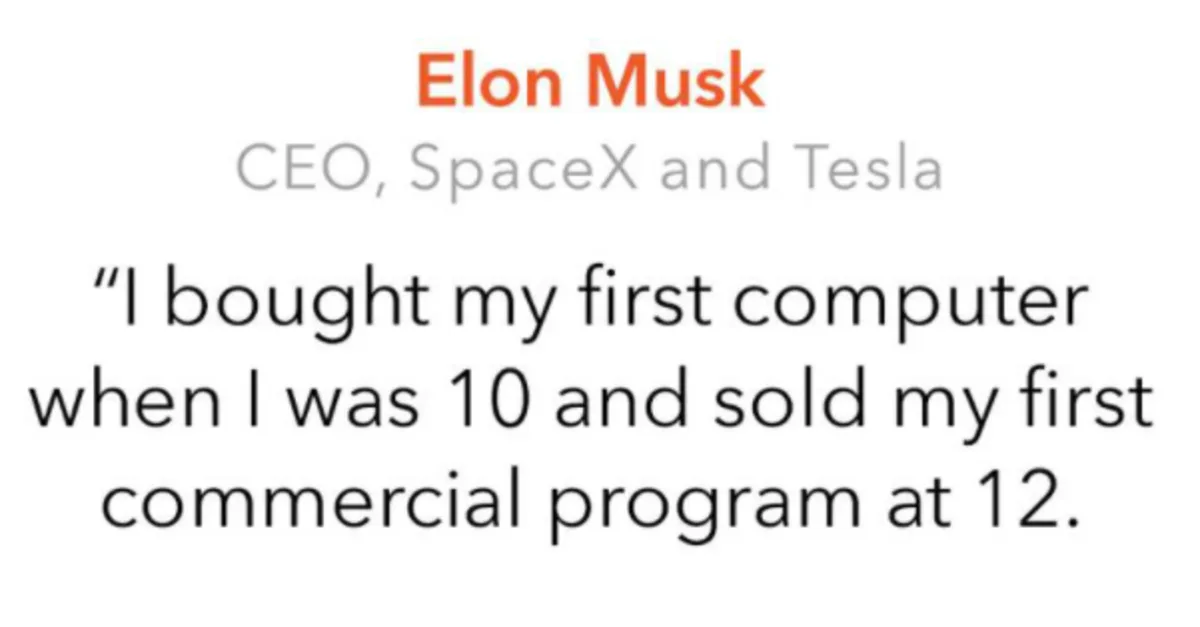
How Elon Musk Got Into Programming
Thinking about taking the first step towards becoming a developer? Watch how and why Elon Musk got into computer programming at a young age.
Thinking about taking the first step towards becoming a developer? Watch how and why Elon Musk got into computer programming at a young age.
https://www.youtube.com/watch?v=Wye6mK1OiJ4&rel=0
Want to start your own journey towards becoming the next Elon Musk? HyperionDev offers multiple online coding bootcamps that will help you with the next big step in your career path. Choose between web development, mobile development and software engineering, and start coding today!

Career Advice
Become a Software Engineer Without a Degree
Become a Software Engineer without a degree - you can become a software engineer without doing a degree. Here are a variety of strategies you can adopt.
Software Engineering is the top job title for 2018, according to the U.S. News & World Report, which compiled a list of the top 100 jobs. Factors like current salary, future job market opportunities, anticipated growth, stress and work-life balance are all assessed before drawing up the rankings table. Not only did Software Engineering come out the best, it was also awarded the ‘best STEM job’ and the ‘best Technology job’ of 2018.
But there is good news: you can become a Software Engineer without a degree. There are strategies you can adopt which will result in your learning the skills required to do the job. Here’s how.
Get Coding
When it comes to getting a job as a Software Engineer, the most important thing is to show what you can do, explains Nick Larsen, a data engineer at Stack Overflow. He says: ‘The reality of getting hired as a developer is that it’s way easier to get hired if you show the company what you have done. A portfolio of projects and products you have made….is worth more than years of experience or schooling.’
The best place to showcase your portfolio is probably GitHub. Although GitHub is frequently used for version control and managing source code in communal software projects, it’s also a great repository for platforming your projects, whether you developed them yourself or communally. You can share your projects with prospective employers, as well as swap ideas and code with other programmers. GitHub accounts are free.
Learn the Skills
The Stack Overflow Developer Survey found that most developers, 69% to be precise, are self-taught. 13% of respondents across the globe are only self-taught, whereas a mere 1,2% have a PhD in computer science (or a related field).
There are a number of options when it comes to learning Software Engineering. These include:
Teach Yourself – you could enroll on a MOOC (Massive Open Online Course), which has open access via the web and unlimited participation. Have a look for software engineering MOOCs on these sites: Mooc.org or edX. Here’s a MOOC, begun last year, called Software Engineering Essentials. Another place to start might be CS50x, a free course from Harvard University, which teaches you the basics of algorithms, data-structures, programming languages and computers.
Although MOOCs are free, they don’t suit everyone. Some people don’t like the fact that this method of delivery doesn’t provide personalised attention from mentors. When it comes to coding, you frequently need that. In addition, MOOCs tend to be more introductory in scope. You don’t really dive deeply into the subject matter.
Coding Bootcamps – if it feels overwhelming to teach yourself to code, you could enrol on a coding bootcamp. Online coding bootcamps tend to offer a structured, mentor-guided learning platform that mirror the classroom experience. You’ll probably need to devote between 5 and 30 hour per week to studying software engineering principles, but you can choose when those hours will happen. Also, if you get stuck, you’ll receive personliased mentorship.
Set yourself tests – to become a Software Engineer without a degree you need to check that you’re absorbing the information you’re learning. Sign up for something like HackerRank, which will set you algorithm problems. You will implement your solutions online. You could also try CodinGame, where you learn new concepts by solving fun challenges (related to video games) in more than 25 languages.
Besides tests, you may want to set yourself tutorials. W3Schools is an excellent site to use as a reference for this. It offers tutorials in a wide variety of languages including HTML, CSS, SQL, PHP, etc.
Have an End Goal in Mind
You want to end up as a software engineer, right? But try and be a little clearer with your goal. Do you want to work for an established tech company, a start-up, or as a freelancer? Visualising your endpoint will help you think of ways of getting there, but you need clarity about where you want to end up.
Changing careers is not simple, but the challenges can also be uniquely satisfying and enjoyable.
Become a software developer without a degree today. Try one of our free trials to see if a coding bootcamp is right for you.
WANT TO WATCH?
See John Sonmez from Simple Programmer speak about becoming a Software Engineer without a degree.
HyperionDev offers a 6-month part-time Online Bootcamp in Software Engineering. Book a free trial now!

Career Advice
Disruptive Coding Educators & the Digital Tech Skills Gap
The need and demand for disruptive coding educators is increasing, due to the digital tech skills gap. Formal education cannot meet the demands of students and so, disruptive coding educators are on the rise.
The need and demand for informal education is increasing, and it is becoming clear that it is often easier to learn the skills needed to be an effective developer and obtain a job in the industry through online courses and project-based work experience. The informal sector is particularly successful at preparing learners for jobs in tech, specifically for two main reasons: Firstly, the high demand that is not met by the formal education sector; and secondly, the nature of computing skills that tend to be well defined, specific, and measurable. For this reason, the popularity of disruptive coding educators is on the rise.
The growth of disruptive coding educators
The private sector is noticing the need to include the informal education sector and the “skills over degrees” motto is becoming increasingly popular. In IBM for example, nearly a third of new hires do not have formal four year college degrees. Marc van Zadelhoff, GM of IBM Security, highlighted that most of the skills needed in the sector do not require traditional four year college degrees, and that non traditional education platforms such as coding bootcamps are a great source for talent acquisition. Microsoft shared similar sentiments and has invested $25 million in Skillful to foster skills-orientated hiring, training, and education.
Online/ Informal coding educators to fill the digital tech skills gap
Online coding education is an increasingly important source of tech skills. The sector delivers a growing supply of programmers, from front-end to back-end developers. StackOverflow’s Developer Survey 2017 reports that 91.1% of developers are self-taught to some extent, and 44.1% of developers use online courses as a place to learn programming (Figure 1). Disruptive coding educators have a massive opportunity here to fill a large gap not being met by other formal education sources.
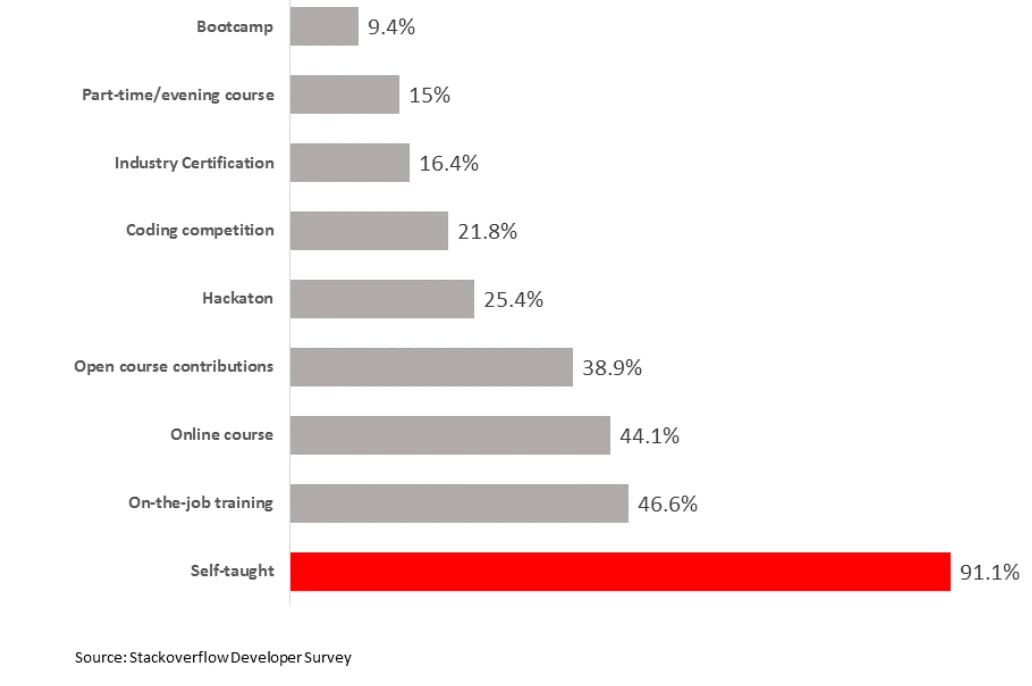
Figure 1: Developers’ types of education
Coding as a solution to unemployment
As the US struggles to provide jobs to the two-thirds of its adults who are 25 years or older and do not have a Bachelor’s degree, access to coding education can have a relieving effect on traditional hiring filters like formal education. As seen in Figure 2, already only 41% of software developers see formal education as important or very important, and only 26.9% of coders see formal education as somewhat important, as companies accept work experience as a substitute for a Bachelor’s degree.
From this, coding is seen as the new path to the middle class for people who lack four-year college degrees, as the skills-based jobs approach overrides the importance of educational pedigree and the limits of traditional class structures.
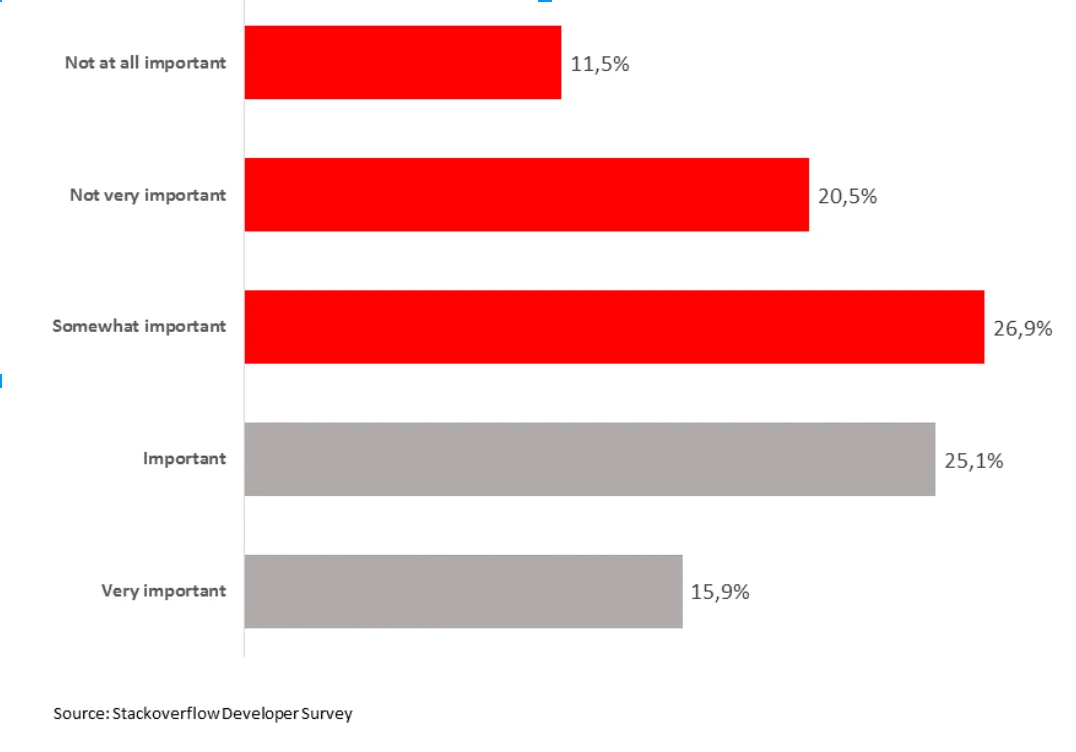
Figure 2: The importance of Formal Education among Developers

Career Advice
Coding Mentors: Why They Matter
Coding mentors offer many advantages including coding best practice, constructive feedback and individual attention. Coding mentors are essential.
Adi, 32, had been working in the retail industry for the past ten years when he decided he wanted a change. ‘You can only do one thing for so long,’ he says. Last year, he decided to change career and enroll on a coding bootcamp. ‘I decided to do a Full Stack Web Developer bootcamp,’ he explains, ‘because I wanted to be involved in web development, back- or front-end – I didn’t mind. I thought it made sense to learn all aspects of web development.’
Adi has already been offered work at a software development company. When asked what worked best for him about his bootcamp, he mentions the flexibility (he had to continue working while upskilling as a web developer) and the mentorship. He says: ‘Coding mentors just help so much. Because someone is always around to answer your questions, you don’t get stuck that often. I found my mentorship experience both reassuring and motivating. You know you’re not going to flounder around for ages feeling frustrated.’
Research bears out Adi’s view. Chris Myers, a startup founder and CEO of a financial management solutions company, says on Forbes that if he could give young professionals one piece of advice it would be to find a mentor. ‘I firmly believe that mentorship is the best path to career success, hands down,’ he says.
Coding mentors are particularly useful. Here are some advantages:
- Coding best practice – a coding mentor helps you avoid common stumbling blocks and learn best industry practices. Of course you could learn on your own, but think how much quicker you’ll pick up things with an expert.
- Constructive feedback – when you’re learning anything, from writing a novel to learning to play the piano, feedback is essential in getting you out of a rut or in understanding how you could do something differently. Constructive feedback is specific, timely, understanding and positive.
- Individual attention – many of us have sat in massive lectures or classes where we quickly lose track of what the lecturer or teacher is saying. Or we’ve tried to pick up coding via videos online. Mentoring is different. It’s 1:1 or personalised feedback.
Masood Gool, Lead Mentor at HyperionDev, puts it like this: ‘Learning to program can be a daunting task. Sometimes you may feel you’ve been thrown in the deep end. Coding mentors are there to smooth this process, provide individuliased feedback and guide you along the path to success. This allows you to customise your learning path to achieve your goals.’
At HyperionDev for every coding assignment you submit, you’ll get tailored feedback from specialist coding mentors. You’ll then iterate or rework your solution to improve the structure, efficiency, readability and correctness of your code. This kind of mentoring enables you to master more advanced concepts faster.
HyperionDev offers three 6-month part-time Online Bootcamps in Web, Mobile and Software Development. Book a free trial now!

Career Advice
The Failure of Traditional Education in Coding Education
Coding education is becoming increasingly popular as more people want to gain valuable knowledge in this field, but universities are failing to meet demand.
Traditional coding education in the form of university degrees is growing in popularity, but also in cost. In the US the number of students expected to attend American colleges and universities is 20.4 million, an increase of 5.1 million since fall 2000. The number of graduates with a Bachelor’s degree in Computer Science in 2014-15 was 59,581 – a 50.5% increase from 2009-10 (Figure 4). Similarly, the number of graduates with Master’s degrees in 2014-15 was 31,474, which is a 75.3% increase on 2009-10 numbers.
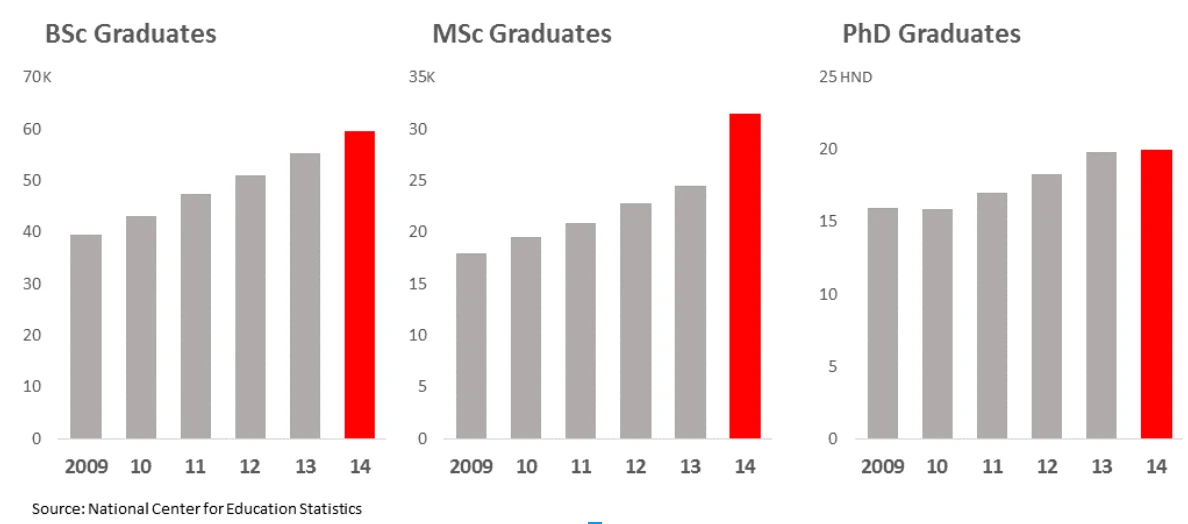
Figure 1: Number of Graduates in Computer Science in the US
The coding education boom
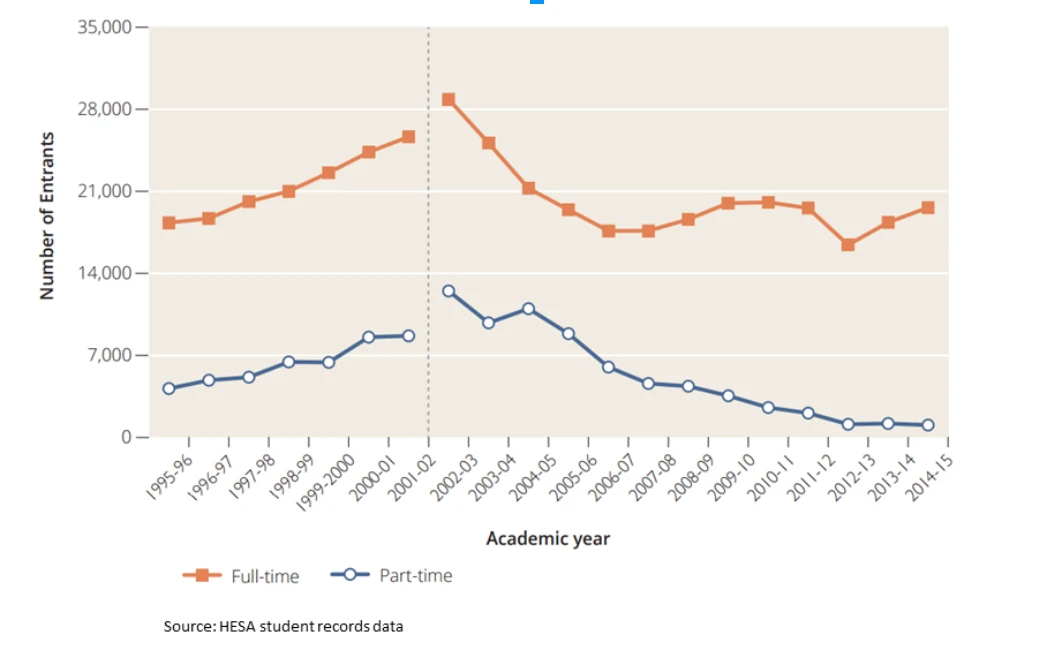
In the UK, Computer Science is a STEM subject taught at the majority of Higher Education Institutions (HEIs). In each of the years 2008-2014 more students have begun Computer Science undergraduate degrees than have started Physics, Chemistry, and Mathematics combined. After a big rise in the number of Computer Science students in the 1990s following the dot.com boom, the number of entrants decreased to about 17,500 full-time entrants in 2007-2008, and since then have been rising asymmetrically. In 2014-15 the number of entrants was close to 21,000. This can be seen in Figure 2.
The benefits of traditional coding education
A computer science, engineering, or mathematics degree is often regarded by employers as a signal that the student can learn coding. The degrees, especially engineering and mathematics, don’t in themselves teach strict coding but employers see graduates of those subjects as smart and hard working enough to learn how to become a software developer. Moreover, a degree trains the mind and develops qualities like perseverance and time-management in students, skills they will use throughout their life. A degree from a prestigious university, such as Oxbridge or the Ivy League, is seen as an additional signal for employers that their prospective employee is smart, as admissions are highly selective and the aforementioned institutions are known for academic excellence.
The digital tech skills gap
Currently, formal education doesn’t fill the gap in the supply of much needed tech skills. The UK government recently commissioned a report led by Sir Shadbolt into why the degree of Computer Science had the highest dropout rate in the UK and highest unemployment rate. The report identifies that supply of Computer Science graduates and needs of employees are misaligned. Insufficient technical knowledge among graduates is quoted most often by employers as the reason for lack of employment offers. The report also found that this is due to the fact that the skills needed for tech jobs like software development do not match what UK universities currently teach students.
Filling the digital tech skills gap
The pathway to creating more trained software engineers consists of 1) improving programming education and 2) ensuring its proliferation among a greater number of learners. This is what many governments, such as the UK, have realised and focused on. Although few countries have mandated Computer Science (CS) classes in senior years of High School education, the number of countries offering this has been growing steadily. In the European Union (EU) 15 countries have already integrated computer science into their senior curriculum in some form, while 9 countries in the EU have integrated or will integrate CS education at a primary school level. In the UK, the subject of ICT has recently been replaced with ‘computing’ across schools’ and millions of pounds put forward by the Department for Education to work with a group known as Computing at School (CAS) to head up the retraining of UK educators in the field.
Making coding education more accessible
In the US, although there has been a lack of uniform country-wide computer science education legislation introducing mandatory classes in programming, individual states like Idaho have passed bills introducing computer science lessons and supporting resources in public schools. Code.org, a nonprofit aimed at expanding pupils’ and students’ access to computer science education in America, has raised over $60 million from Microsoft, Apple, Google and Salesforce, and persuaded two dozen states to improve access to computer science education. It also created free introductory coding lessons as part of the Hour of Code initiative, in which even President Barack Obama took part. Former President Obama additionally highlighted this need in his 2016 State of the Union Address, with a commitment of over $4 billion to fund the Computer Science for All initiative to train school children and educators across the country in CS. Thus a concerted effort is being made at the level of secondary education.
The downfall of traditional coding education
Universities, however, do not deliver effective coding education as this has never been their main job. Computer Science, Mathematics and Engineering degrees at universities focus on exceptionally important theoretical concepts that are crucial in their own right, but very different from the skills required by employers. Such skills are the skills that non-traditional coding educators focus on. In university, students build their analytical skills with problem sets and tests and learn to engage with research literature. Course content in universities is also slow to change, as the bread and butter of academic learning are research papers. One must adhere to university hierarchy structures and bureaucratic red tape. It takes time before those are approved by the majority in the field in order to become a must-learn in the discipline. This model is not likely to change as this is not the main role of universities. When freshly graduated employees enter the workplace, employers have to spend time to bring them onboard. The average time for a new employee to become fully productive is on average 1-2 years according to Training Industry Quarterly.
Another problem is the lack of personalised feedback. Students are often in large classes that do not cater for individual attention and mentoring, especially not at a line by line in code level, and the volume of students taught means that even where tutorial group systems are implemented, the degree and quality of feedback from tutors fails to meet students’ demands for learning support. Assessment methods tend to be summative in nature, rather than focusing on formative assessment, due to the scale.
The cost of traditional coding education
Also deterring potential students is the rise of university tuition fees. For British and EU citizens it costs approximately 9,250 pounds per year, and for international students the tuition fees grow to tens of thousands of pounds annually. US colleges are even more expensive with the average tuition per year in private non-profit universities rising by 28% since 2012. At private colleges the average tuition is currently more than $33,000 per year, and at public colleges it is $9,650 for state residents. Although at least two-thirds of students benefit from bursaries, scholarships, and grants; the current total American student debt adds up to over $1.31 trillion and has a default rate of 11.2%. The average student in the class of 2016 has $37,172 in student loan debts according to Q4 2016 New York Federal Reserve.
With these factors in mind, the need for financially viable informal coding education is increasing, and it is becoming clear that it is often easier to learn the skills needed to be an effective developer who meets industry requirements and standards through online courses and project-based work experience.

Career Advice
The Digital Tech Skills Gap
The demand for coding skills is increasing at an unprecedented rate in the UK - so too is the digital tech skills gap. HyperionDev provides the solution.
Globally, the demand for coding skills is increasing at an unprecedented rate. In fact, Linkedin reported that the top 10 skills required in jobs advertised on LinkedIn were all tech related.
What is the digital tech skills gap?
The Tech Nation Report 2017 showed that the growth of digital tech jobs in the UK was more than double that of non-tech jobs between 2011 and 2015, with 85,000 new tech jobs created in just two years. UK IT staff postings also increased 10% compared to last year. In 2016 investments into digital tech companies in the UK totalled a whopping £6.8 billion, which was 50% higher than any other EU country. Despite big challenges ahead of the digital and technology sectors, mainly the uncertainty over the consequences of Brexit, the demand for digital tech jobs is increasing. Those working in the tech industry are twice as productive as other workers, and one worker in the digital sectors contributes around £103,000 per year to the economy (compared to £50,000 pounds of a non-tech worker).
The evolution of the tech industry in the UK
The tech industry has contributed £97 billion to the UK economy in 2015 alone, and has seen a 30% growth trend in their contributions to the economy over the years 2011-2015. Approximately 1.4 million digital professionals are needed over the next five years in the UK and a 39% growth in the ICT industry is predicted by 2030. This demand for talent is reflected by the fact that the salaries of tech workers in the UK are on average 40% higher than non-tech workers without software development competency, with an average salary of £50,633.
The UK Commission for Employment and Skills predicts that 518,000 additional workers will be needed in their digital tech sector by 2022. However, this figure is three times the number of Computer Science graduates produced by British universities in the last decade – giving way to the digital tech skills gap. As the Greater London Authority identified, London, for example, requires a pipeline of highly-skilled talent in the digital sector to keep its growth and excellence at the current level. There is high demand for employees in almost all tech roles, from cyber security to cloud computing, mobile applications to big data analytics, and web development to product management. The demand is not only from industry, but also from young people, with 82% of school age people interested in making things using digital technologies.
The US tech industry
Similar trends are apparent in the United States, with Code.org estimating that there are currently 512,729 open computing jobs in the US. In another report by Trilogy Education Services, they estimated that there are 1.3 million software development jobs open in 2016. The Bureau of Labour Statistics predicts that there will be 1.4 million more software development jobs than applicants who can fill them in 2020. In the US, tech jobs grew at a rate of 3% in 2015 to 6.7 million jobs, the highest growth rate year on year according to the Computing Technology Industry Association. The US government predicts that by 2018, 51% of all STEM jobs in the country will be in computer science-related fields. Based on an analysis of job postings, Indeed and Glassdoor touted tech jobs as the most lucrative with the average salary of a full-stack developer lying at $110,770.
There is a clear gap in what current coding educators provide, and what industry needs. In addition to formal coding education not meeting the demands of industry, in terms of not delivering the fast changing skill sets needed by the private sector, as well as the number of coders needed, it is increasingly becoming unaffordable for large sectors of society. The need and demand for informal education is increasing, and it is becoming clear that it is often easier to learn the skills needed to be an effective developer and land a job in the industry through online courses and project-based work experience.

Career Advice
Coding Bootcamps vs Computer Science Degrees
Coding Bootcamps vs Computer Science Degrees: which one are you better off doing with respect to salaries, job placement and time commitments?
So you want to go into tech, but you’re not sure if it’s time to head back to College for a degree, or sign up for a Bootcamp. Coding Bootcamps vs Computer Science Degrees: which one are you better off doing with respect to salaries, job placement and time commitments?
It Doesn’t Matter Where you Learn to Code
In the last few years, there’s been a massive tech skills gap in the US of approximately 500 000 vacancies. In response, ex-President Obama remarked: ‘It turns out it doesn’t matter where you learned code, it just matters how good you are at writing code. If you can do the job, you should get the job.’
It turns out he’s right: The 2017 Stack Overflow developer survey found that 90% of respondents reported that they were at least partially self-taught. This means that many are where they are today because they took decisive action to know more.
This ‘decisive action’ often involves online courses. ‘More developers say you should take an online course than any other method,’ states the Stack Overflow survey. In fact, 64.7% of developers recommend online courses, whereas only 11.2% advise a Master’s Degree as a recommended learning path.
After the Bootcamp
The point of Bootcamps, according to Business Insider, is ‘to take in students with minimal coding knowledge and shoot them back out a few months later as employable software engineers.’ Does this actually happen?
Research conducted by Louis Beryl, the founder and CEO of Earnest, a student financing company examined graduate data from 10 different Bootcamps. Their findings (via Wired) showed the following:
- The average starting salary for coding bootcamp graduates was between $60,000 and $80,000 (it was $45,000 before enrolling on the Bootcamp).
- 94% of students landed a job within three months of graduating, though not always in tech. The Stack Overflow Survey confirms this. Their research found that many who attended a Bootcamp (45.8%) were actually developers before starting the program. That’s because many developers like to upskill fairly regularly. But of the remaining respondents, 9.7% got a developer job before completing the Bootcamp program, and 11.3% immediately upon graduating. Only 3.3% of those attending bootcamps hadn’t yet found employment as a developer.
Coding Bootcamps vs Computer Science Degrees: Salaries
The 2016 Stack Overflow survey compared salaries in the US between Computer Science graduates and those who had picked up their expertise via Bootcamps. Those with a PhD or Masters in Computer Science earned the most ($122,219 and $118,803 respectively), but Bootcamp graduates (who had completed an ‘Intensive Program’) came it at 3rd place with an average annual salary of $112,493, which was above that of undergraduate degrees in Computer Science.
Remember, also, when it comes to Coding Bootcamps vs Computer Science Degrees, a Bootcamp is likely to be much shorter than a PhD or Masters program, which will take a number of years. There is loss of income, or opportunity cost, during this study period.
Only you will know what is best for you, but if you want to enter the lucrative tech field, keep in mind that the goal of a Bootcamp is to transform you into a job-ready developer in a short period of time. That’s an attractively efficient option.
HyperionDev offers three 6-month part-time Online Bootcamps in Web, Mobile and Software Development.Book a free trial now!

Career Advice
Tech Jobs are in High Demand
Tech jobs are in high demand - Cyberstates Reports looks at tech job demand in US. In 2017, the market grew about 2%, according Cyberstates.
If you’re thinking about changing careers to something tech-related, it makes sense to research whether tech jobs are in high demand. No point upskilling if you’re only going to land up in a sector where it’s difficult to find work. However, this is certainly unlikely to be the case in the tech industry.
Digital Economy Flourishing: Tech Jobs are in High Demand
The good news is that in the US in 2017, the market grew about 2%, according to an annual report, called Cyberstates, released by The Computing Technology Industry Association (CompTIA), one of the IT industry’s top trade associations. That equates to about 7.3 million workers. It seems clear that the digital economy is flourishing and tech jobs are in high demand, particular jobs in software, cybersecurity and cloud computing.
Some additional findings of the Cyberstates report, via the Chicago Tribune, included:
- New jobs added in the previous year were 182 220 – this was the result of demand in IT services and custom software services.
- The average salary is $108,900 for a US-based tech industry worker. (Check out more information about developers’ salaries globally.)
- During the last three months of 2016, the number of job opening posts in tech was 626,560.
- The tech industry adds $1.3 trillion, or 7,5 percent, to the US economy per annum.
Additional stats from the Cyberstates 2017 report, US-based:
Top 5 states — tech employees
- California 1,186,470
- Texas 592,960
- New York 377,740
- Florida 318,340
- Massachusetts 300,630
Top 5 cities — tech employees
- New York 392,400
- San Jose, Calif. 310,900
- Washington, D.C. 297,900
- Los Angeles 287,600
- Boston 263,500
Job Satisfaction also Booming
A later study conducted in June 2017, also by CompTIA, found that a net 79% of IT professionals were satisfied with their jobs, up from 73% in 2015. 73% felt that their job “provides them with a sense of personal accomplishment; while 71 % believe their job makes good use of their talents”.
However, 1 in 4 worry that their skills will become obsolete; therefore the large majority seek more training and educational opportunities. Not a bad plan considering the industry will need to fill millions of tech jobs in the next decade. Nancy Hammervik, executive vice president of industry relations at CompTIA, puts it like this: “The tech industry’s challenge is America’s challenge: developing a robust workforce that can effective fill the IT jobs of the 21st century”.
The best way to upskill is via an online technology bootcamp, because one can combine the mentoring of a coding bootcamp with the cost-effectiveness and flexibility of a MOOC. In closing, it seems that when it comes to job satisfaction and demand, now and in the future, you can’t go wrong with training in tech.
HyperionDev offers three 6-month part-time Online Bootcamps in Web, Mobile and Software Development.Book a free trial now!

Career Advice
Get That Junior Web Developer Job: Ace the Tech Interview
Ace tech interview - learn tips for succeeding in the tech interview, including the ten most asked questions in the tech interview.
You’ve just completed your Full Stack Web Developer bootcamp. Now what? It’s time to land your first job in tech. To get there, you’ll have to ace a tech interview. This piece will show you how to ace the tech interview, as well as other tips for landing your first job in tech.
First, here’s the good news: tech jobs are in high demand. Thousands of US job ads were analysed on the Quartz website – i.e. when the ads were put up and when they were taken down – to see how long it took to fill certain skills. The results showed that IT jobs took the longest to fill. Google, for example, took 97 days to fill IT-related jobs, primarily software engineers. On average, tech jobs stayed open 15 days longer – i.e. are harder to fill – than non-tech jobs. Check out the graph below to see the average ad duration for each specific developer skill.
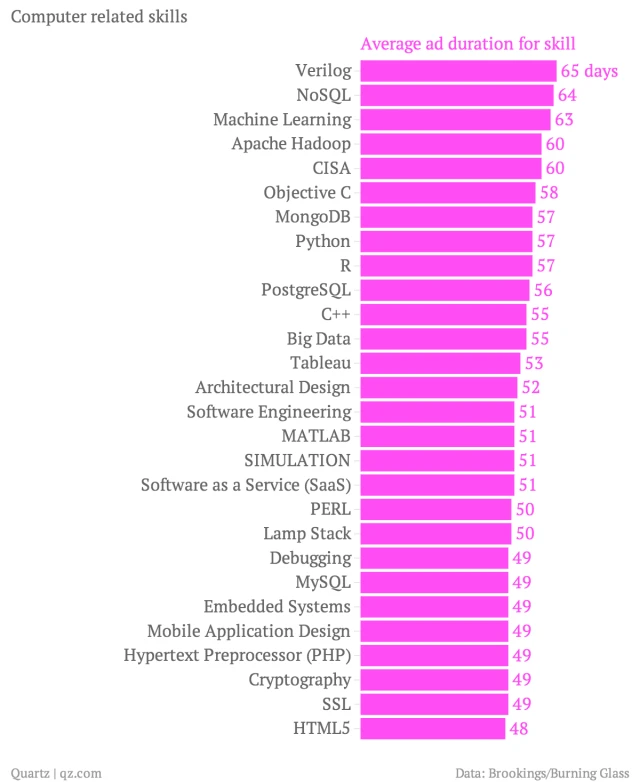
Despite the demand for tech skills, the tech interview process can be a minefield, because your technical knowledge is frequently tested (we’ll go into more detail about what you can expect – and, most importantly, how you can prepare – later in the piece), but before landing that interview, you’ll need to make sure your CV (or resume) is top-notch.
It should go without saying, but you need to emphasise your technical skills, states Nesco Resources, a staffing and recruitment agency. You want to highlight each specific qualification or skill by creating subcategories. Only list those programs or applications with which you feel comfortable. Here’s a good tip: use keywords. How do you do this? Go to any job boards – e.g. Indeed, CareerBuilder or Glassdoor – and see which keywords are used for jobs that interest you. Incorporate these words into your resume. Include additional accomplishments such as voluntary work experience, contract work and internships. Monster, a job portal sites, includes sample resumes – check out their entry level IT developer resume template.
When it comes to the actual interview, Kevin Dolan, the CTO of Metric Collective, explains on a DevPost video the three common tech interview question types (quizzes, experience and hypotheticals), and how best to approach them. Here are his tips.
Quizzes:
These are specific questions about specific technologies, as well as general concepts in computer science. The most important thing here is to avoid ‘dead air’ – i.e. silence; you want to move the conversation along. If you’re really stuck and haven’t heard about a concept, speak about an adjacent concept. Remember that you can always ask the interviewer for an explanation.
Check out CareerGuru’s top questions and answers for web developer interviews. For example, here’s a good question from that site: What are some ways to reduce the load time of a web application that you have written? Do you know the answer? Here it is: To decrease the load time of a web application you have to follow the following tips:
- Optimize images to no longer than screen resolution and save them as a compressed file
- Eliminate all JavaScript files to reduce the amount of transferable data
- Combine & Minify all CSS and JS and call them in footer
- Defer or Asynch JS Files
A few other good technical interview questions include a request to list some ways to reduce page loading time, explain how XHTML is different from HTML, and list the new APIs provided by the HTML 5 standard.
Experience questions:
These questions refer to things you have done. The interviewer is keen to see the overall narrative of projects you have worked on. Don’t be afraid of mentioning projects that haven’t been entirely successful.
If you don’t have any job experience, you could speak about hackathons you have attended, and the projects you worked on there. Alternatively, you could open an account with GitHub, a software development platform, where you can host and review code, manage projects, and build software alongside millions of other developers. Add your existing code to share with prospective employers or start new projects to keep yourself relevant. GitHub accounts are free, and it’s the best place to swap ideas and code with other programmers online. Remember to be selective with what you show on your GitHub profile. A public repository allows anyone to read your code. Hiring managers might well check out your code there. Only make substantial or interesting projects available for viewing.
Hypotheticals:
Here you are asked to walk the interviewer through a project given to you in the interview itself. Here’s a tip: repeat the problem back to the interviewer. This not only buys you time, but also give you more experience interacting with the problem. Many hypothetical questions begin with the format, ‘What would you do if….’, and then some kind of situation.
Besides these general categories, here are 12 technical interview questions along with the ten most-asked specific tech interview questions, according to Indeed:
- What are your weaknesses? Don’t name a strength that is really a weakness – e.g. I obsess about being punctual – because you’ll come across as not genuine. Rather name an actual weakness, but also include a strategy for how you overcome the weakness. For example: I noticed I can be a little lazy, but I know how to incentivise and reward myself for achieving work goals.
- How well do you know a specific programming language? Remember, most tech companies are up against a shortage, including in South Africa, and so they are not looking for perfection but merely some competence.
- The brainteaser or story problem – here your sense of logic and calm under pressure is really being tested. Feel free to ask clarifying questions, and approach the problem conversationally. The answer is less important than coming across as reasonable, articulate and analytical.
- Have you interviewed anywhere else? Remember, you don’t need to be specific.
- Do you work best alone or in a group or team? You don’t need to take a side. The ideal tech employee is capable of both independent and team work. (Check out the difference between t-shaped and i-shaped employees and which one makes the ideal tech hire.)
- Why did you leave your old job? Be careful with this one. Employers are looking for positivity and limited baggage. Don’t bad mouth your old boss.
- What salary do you want? Again, you don’t have to answer directly, because you might not yet know their budget range. Say something more vague, ‘Based on my abilities, I’m sure we can work out something fair for both for the company and myself.’ (Read further about salary negotiation tips.)
- The programming test – you will need to spend time practising. Remember, it’s the way you think that is being evaluated and not the final answer. Try these sites for code challenges: Codewars, HackerRank, Pramp and Gainlo.
- What do you do for fun? Here the interviewer wants to see something about your personality and how it will fit into the culture of the organisation. Interestingly, in the book Acing the Interview: How to Ask and Answer Questions That Will Get You The Job, Tony Beshara, the author, notes that 40% of the hiring decision rests on the issue of whether the interviewer likes you (hiring people is like ‘buying’ anything else; there are emotional factors at work).
- What are your strengths? This is simpler than it seems. Have a look at the job description and find two aspects that apply to you. Think of examples to illustrate them.
To land your first job as a junior web developer, you will need to practise. Make sure you get a more senior developer to look over your resume. And go over potential questions and how you would answer them with a good friend. With these strategies, you’ll be well on your way to climbing that first step on the lucrative tech ladder.

Career Advice
The Best Qualification for a Software Developer in South Africa
It's important to know exactly whether you should pursue IT or CS qualifications to become a software developer. We compare the salaries, employability and career paths of both IT and Computer Science degrees.
This article serves to answer that question we get asked time and time again – ‘What degree should I study if I want to become a software developer?’ We’ll compare the employability, salaries, and career paths for IT versus CS qualifications, and answer which qualification is the best for programmers.
What are the Qualifications?
There are several options for either CS enthusiasts and potential students to follow, as is the case with IT. It is essential you understand the following tables and the different qualifications before committing to years of study in a qualification that may not be the right one for your goals.
IT-based Certifications and Qualifications
There are a few options available in South Africa in terms of short-term certifications, a long course incorporating many certifications over a few years, as well as institutional National Diploma offerings. Pricing per year is based on the lowest priced or generalized qualification shown.
The South African IT Misconception
There are several issues raising confusion about qualifications in South Africa (not to mention the poor navigation of most South African universities’ websites). The first is the difference between a Degree and a Diploma. What’s labelled as a diploma here, is passed off as a degree, vice versa, there’s National Diplomas, B.Tech’s, and even the CS degrees seem to have liberal doses of BComm and Business Science with extra math streams thrown in. To clarify: an honours, masters, and PhD degree are the highest qualifications attainable in South Africa, and are formally recognised as being a higher qualification in SA under the National Qualifications Framework. Degree-level qualifications can generally only be studied at a university (such as the Universities of Cape Town, KwaZulu-Natal and Pretoria, as well as Wits), not a technical institution (like Tshwane, Cape Peninsula and Durban Universities of Technology). ‘Degree-level’ also excludes those qualifications that brand themselves as a degree, but offer a lower NQF level qualification at graduation.
The second point of confusion is an IT qualification vs a CS one. There’s so much to say on this that we’ve published an article to clear up the confusion. The takeaway of this research is that in South Africa, CS qualifications can only be attained at universities, or through one short course. The ideal course for a career in software development is a CS one.
Getting a Job, Keeping it, and Moving Up
It’s clear that in South Africa, having a BSc or BEng in Computer Science is the preferable qualification. It also means that you’re more much more likely to get a job once you move into industry, as a graduate or postgraduate. This fact is meaningful, given South Africa’s appallingly high unemployment rate of over 25%.
This trend is shown best by this study noting unemployment rates vs graduates of university degrees vs those with diplomas, and so on. Note that these aren’t simply transient trends; the unemployment problem has been ongoing for decades!
The CS graduates show higher employment rates than IT diplomates. Graph adapted from data sourced by econ3x3
As the graph shows, as of 2012, “diplomates” – students with an IT qualification – had a 85% employment rate compared to the 95% employment rate of CS graduates. That’s a significant and statistically meaningful difference.
There is a big difference here, and that’s why it’s crucial to realise how the superiority of a degree over something like an IT qualification guarantees excellent employability. Holding a degree – in all ways – is a better option to other qualifications which may claim ‘degree equivalence’, but won’t hold up under international scrutiny.
Unfortunately, more often than not, institutions offering “IT degrees” can’t deliver the same depth of understanding and job-opportunity in graduates that ‘full-meat’ CS and CE degrees can. So whilst your 3 year ‘combo courses’ of CompTIA and other bits and pieces might say “Engineering” on the box, the recognition for such a term is certainly not “Engineering” inside the box. Only an actual BSc Eng or BEng will get that for you. The exact same applies to qualifications that claim computer science. That’s a concern for those wanting to work overseas: if you’re planning to leave our borders, in short, take a CS degree with you, if you can.
So what about long-term career prospects? Data from Careers24 and CareerJunction on average salary increases for professionals “in the IT sector” in South Africa was used to compare typical job designations. The chosen jobs were those that fall under what’s considered “IT” internationally, versus a typical CS designation. The “IT” designations offered, on average, a 81,3% salary increase, versus the 122% increase of the CS designation. What does this mean? You’ll earn more money, for longer, with a CS qualification, than with an IT one.
Summary: the best qualification
All the evidence points to a BSc/BEng CS degree being the best. The core reason CS-degrees are more valued is because of how strongly they reinforce modern programming skills. What if you’ve already qualified, can’t go back to study, or don’t have the time or the means? This South African company is offering the first short CS qualifications, available part-time and online. Hyperion Development has packaged this knowledge of modern programming skills into their short courses and links successful graduates with software development roles across South Africa.
Comment with your views on this article in the comments section below, and follow Hyperion Hub developments in the future if you’d like to see more articles like these for the South African market.
Footnotes from the tables:
1 Pricing correct at time of post; sourced from noted institution’s site as-is
2 Taken from lowest-priced course Cisco CCNA, other prices vary
3 Taken from StudyITOnline.co.za, may not be indicative of market pricing
4 This is the generic CS degree as a BSc, not the BusSc or BCom CS/IT derivatives
5 BSc Mathematical Sciences: Focus CS given, Machine Learning and other specialization options also available
6 UP and UKZN call this an engineering degree, with hardware focus + CS, marketed as a BEng CS overseas
7 UP does not offer MSc/PhD by coursework, only by research. The other listed universities offer either.
8 This is currently the only short-term CS qualification of its kind available in South Africa
9 For a 5-week introductory Python course, others available

Career Advice
Should You Sign Up for a Coding Bootcamp?
Factors to consider if you want to enrol on a coding bootcamp. Coding bootcamps are very different in purpose from a computer science degree.
It’s not easy to make a big decision.
Psychology Today lists two good reasons why this might be the case:
- Lack of Self-Knowledge: You don’t don’t understand yourself well enough to know your own attitudes, preferences or tastes.
- Analysis Paralysis: You can see the pros and cons of both options and so it’s simpler just not to make a decision at all.
When it comes to deciding whether to study something new or change careers, you might find yourself stuck about what to do. We’ve outlined a number of factors worth considering before making the decision to enrol on an online coding bootcamp.
What is a Coding Bootcamp?
Before exploring these factors, it’s worth explaining exactly what an online coding bootcamp is. You can’t make a decision unless you have all the facts at your fingertips. Online coding bootcamps are structured, mentor-guided learning platforms that replicate an in-class experience. You’ll find that you need to put aside between 5 and 30 hours per week to study coding this way. But because the environment is flexible – you decide when you want to learn – you can choose when those hours will happen.
It’s useful to understand the distinction between a coding course and a Computer Science degree. In this article, the author explains how he experienced his Comp Sci degree (he studied a 4-year Computer Science Degree at a Northeastern University in Boston), and how a course like this differs from a coding bootcamp. Although he thought the degree would cover programming languages, he found that it focused mostly on “how computers are able to solve problems for programmers”. His only coding courses involved learning a programming language that was hardly ever used in the industry anymore. He concludes that many people with a CS degree are not necessarily fantastic programmers. Coding bootcamps, on the other hand, teach industry-specific coding skills – it’s more practically-oriented than theoretical.
Yusuf Isaacs, who now works as an intern at Injini, Africa’s first ed-tech incubator, did a BTech in Software Development and then followed it up with a HyperionDev Mobile Developer bootcamp, because he was tired of being stuck in tech support. “I wanted real-world skills for designing Android apps,” he says.
So, what factors should you be considering before enrolling on a bootcamp?
Should I do a bootcamp: three pivotal moments?
Stack Overflow mentions three pivotal moments in your career when a coding bootcamp might be the ideal option:
- Starting Out: You may have a college degree, but no actual tangible skills. Learning a programming language will provide you with skills that are in high demand. The average growth for all occupations between 2016 and 2026, as predicted by the US Bureau of Labor Statistics, is 7%; however, the jobs outlook for software engineers is 24%, much faster than average.
- Transitioning: It’s never too late to do something else. Perhaps you’ve started out as a Full Stack Web Developer and now you want to become a Mobile Developer who uses Java to build desirable apps, or you could be a marketing manager looking to get into tech and wanting to switch careers completely. A coding bootcamp lets you keep your day job while learning a new skill. You get a taste of the new career without needing to make any radical or permanent changes.
- Going Solo: Perhaps you want to start a new business or become a freelancer, a coding bootcamp lets you acquire the skills for these options. Or let’s say you are already a freelancer but you want to add to your skillset to acquire new customers or projects. A certification from a coding bootcamp lets potential clients know that you are competent in a particular area.
Things to consider before enrolling:
- Fear of Automation: Is there a likelihood that you will be replaced by a robot? Some careers are obviously more vulnerable than others. Bookkeepers, for example, have a 97.6% chance of being automated, whereas software developers have around a 12.8% chance.
- Unemployment: We’ve discussed people who are starting out and those who are mid-career, but what about the unemployed? Let’s say you’ve been unsuccessfully looking for a job for a while. Perhaps it’s time to acquire skills that are in high demand. Also, you can train up in only 6 months – that’s not a massive time investment, if you consider your entire working life.
- You’re indecisive: You don’t really know what you want to do. The good news about learning coding is that it opens the door to a wide range of software development careers, from a Full Stack Web Developer to a Mobile Developer, or even a Security Analyst.
- Your skills are out of date: You’ve become stuck in a very specific job and there are plans afoot to migrate systems. You need to pick up new tech skills. Forbes lists a number of tech skills that are in high demand this year, including data science, cloud and distributed computing and data visualization.
Are you ready for a career change?
Lastly, you may want to consider whether you ready for a career change. The National lists seven sign that the time is right to jump ship:
- You’re worn out and exhausted.
- Your skills and responsibilities are not a good match with your abilities.
- The salary, even if it’s large, is not enough.
- You’re not being used to your full potential.
- There is no room to grow.
- You feel overworked and under-compensated.
- You’ve lost your passion and enjoyment for your work.
It’s often easier to continue in a straight line than to shift direction. But think about it: you won’t know what is around the next corner if you don’t make that turn. Perhaps now is the right time to think about what you really want from your career.

Career Advice
5 Essential Tools & Resources for Programmers
Tools for programming - here are five essential resources: Integrated Development Environment, the Terminal, Stack Overflow and Documentation tool
Tools for Programming
Creating excellent content requires good tools and equipment. This applies equally well to programming. There are some great utilities and resources to become aware of as soon as possible, if you have not already, to make the coding process just that much more convenient. These are the essential tools for programming every programmer should use, or at the very least be familiar with:
1. Your Integrated Development Environment (IDE)
This piece of software is the all-in-one tool for creating your code. It has tools to help you go from code-writing to executing application, all in one package. While you could certainly get away with using a plain text editor like gedit, along with a baked-in debugger like gcc on Linux, or practice such equivalence on Windows with Notepad++ and Cygwin, there’s really no beating an IDE. This software has all the bells and whistles to make development efficient. Most IDEs support a bevy of languages, have code completion, a built-in debugger, plus you can step through your code, watch variables, set breakpoints to run your code to, and manage extra libraries, header files, and code dependencies. All of this can reside in one project or solution file which the IDE will helpfully keep in order for you. They’re also very extensible so you can add plugins and add-ons as you see fit.
Some of the better choices:
- Microsoft Visual Studio (full-featured and very powerful. Also free in Community guise, paid versions free for students via DreamSpark programme)
- NetBeans (full-featured, Java only)
- Code::Blocks (Swiss-army knife of IDEs, also free, cross-platform & open-source)
- Eclipse (for Java, versions for C/C++ and PHP, FOSS, and cross-platform)
- Sublime Text (Cross-platform, cross-language, evaluation versions available)
The Visual Studio 2015 IDE (Telerik)
2. The Terminal
Unix-like operating systems (including Linux distros) have always had excellent terminals. The terminal is the application which allows you to interface with the operating system in a text-based way, and is often seen as the “blank box with the white text” to which you apply text-based commands to get responses from the system. You can learn how to get started with the Unix terminal in our tutorial series here.
As noted before, in the context of programming, the terminal does compiler duty, and your favourite text editor does, well, text-editing duties. Vi and emacs are the terminal text-editors in this space. You’d write your code in the editor, then save the file and run a terminal command to compile it. Of course, unlike IDEs, it’s mostly up to you to figure out where your code is going awry if it fails to compile, and there are no extra debugging tools natively. The best part about terminals’ use in Linux is the man pages, which offer excellent explanations and syntax help for pretty much any command the terminal supports natively. There are a huge variety of terminals in existence, based on the particular distro or windowing manager in use.
The selection:
- terminals themselves: xterm (for X11), konsole (for KDE), lxterm (for LXDE), gnome-terminal (for GNOME), xfce-term (for XFCE)
- terminal editors nano, vi, emacs (Ranking this list would be a dangerous endeavour)
- Distro graphical text editors like Kate (KDE), gedit (GNOME), scite (GTK+)
The Unix Terminal (arcadix.biz)
3. Version Control
This one is almost mandatory. The StackOverflow developer survey pointed out that 10% of devs still don’t use version control (VC), but why you wouldn’t is mind-boggling. Version control software allows for software development in collaboration with others in your organisation, and keeps everything organised. The version control framework backs up your code to a safe place online, but importantly tracks every single change you make to the code you sync online.
Every time you’ve done a ‘chunk’ of work, you commit that with a note saying what you’ve done, and that makes a ‘snapshot’ of your code and everything you choose. This lets you go back if you end up messing up something, saving time not having to debug what you’ve broken. Stronger still, the code collaboration between development teams allows for working on different ‘branches’ to develop new features without breaking the existing codebase. Check out our detailed Git article for a primer on all this jargon, aimed specifically at Git VC. It’s also pretty difficult to get away from using some kind of version control software these days, since most IDEs offer some sort of VC integration.
What the industry uses:
- (recommended) Git (sites like GitHub, BitBucket etc.)
- Mercurial (Atlassian’s SourceTree client)
- SVN (TortoiseSVN)
The GitHub web UI (GitHub.com)
4. StackOverflow
This isn’t so much a software utility as it is an incredibly useful resource. The Stack Overflow network is a fantastic Q&A site where anyone can actually ask questions on anything, but the coding part of it is absolutely enormous. SO themselves reckon they have around 4.7 million programmers all helping each other: you can see where the benefit is. If a particular problem is flummoxing you, a quick post on Stack Overflow or a search for the issue (someone usually has experienced what you’ve had) often yields great answers. Further still, you can give back to the community by helping fellow programmers with your expertise. There’s no paid account sign-up business, email and username is all, and you can get started. “Rep” on the site is an important thing and denotes how valued either your questions or answers are. Increase rep and become a respected community member.
An example of a StackOverflow page.
5. Documentation Tools
The bane of a programmer’s existence often comes if they’re tasked to take over another’s code. This is due to the fact that everyone documents code differently. More often than not, however, code documentation is lacking, which makes understanding the code logic a difficult task for everyone excepting the original programmer. Documentation tool plug-ins make an excellent way of going some way to fixing this. While it still requires that the developer comments their code intelligibly, documentation tools take inline comments from code and convert them to user-facing documentation that looks pretty and reads well. It’s an invaluable tool for big open-source projects, where many contributors need to understand what the code is doing. By far the most popular documentation generator is Doxygen, but there are more than 40 other options, some proprietary, some free, some supported, and some not.
How Doxygen generated documentation looks – autogenerated from internal code comments
Those are the 5 essential tools we’d consider first when programming. Are there any we’ve missed? Comment with your additional choices in the comments section below, and follow Hyperion Hub developments in the future if you’d like to see more articles like these for the South African market.
Author: Matthew de Neef
Date originally published: 23/12/15

Career Advice
What’s the Difference Between Computer Science and IT?
Difference between computer science and IT - this article explains the key differences between computer science (CS) and IT
Information Technology (IT). Computer Science (CS). Terms which can be, and often are, confused with one another. Even specialists with tertiary education in a Computer Science/Engineering or related field sometimes have predetermined (and quite possibly incorrect) ideas about what each of these terms mean. This article will give you the low-down on what the differences are, why you’d want to pick one over the other, and what these topics even mean in the South African market.
The dictionary defines “information technology” as the study or use of systems (especially computers and telecommunications) for storing, retrieving, and sending information. “Computer Science” is simply-put, the scientific and practical approach to computation and its applications.
The Definitions: IT versus Computer Science
IT, simply put, is the collection of hands-on technician-type activities that range from network troubleshooting, hardware setup and maintenance, and installation and management of specific software packages. These activities are certified under a number of short part-time qualifications such as the ‘Microsoft Platinum Affiliate’ and ‘Gold Dell Reseller’.
Computer Science, contrary to popular belief, is not “just theory”. It’s a higher-level science, but there’s just as much practical application here as in IT – mainly through the development of software. Computer Science also involves the study of the fundamentals of hardware, software, and the essence of computation itself. This study, and the theoretical backing of important concepts along with plenty of software development, allows computer scientists to design and build the most complex technologies in the modern world.

By saying the essence of computation, words such as algorithmic complexity, (the study of how time-efficient an algorithm is to sort, search or iterate) black-box vs white-box testing (software testing methodology considering outputs and/or inner code workings) and software DLC’s (how to design, maintain and manage software) come to mind.
In South Africa, there is a strong tendency to confuse IT with Computer Science, and lack of clarity on where software development fits in. Google has recently stepped in to try help solve this.
The Nuts and Bolts of CS

A huge part of CS is the nuts and bolts, if you will, of going from conceptual UML diagrams scribbled on a napkin at your local coffee shop, to 3am caffeine-fueled coding sessions, to debugging endlessly (and thanking your lucky stars for Git) and finally, to producing a software product that will be used by many happy clients. In fact, it’s your abstract concepts, theories and concepts you probably wanted to blow off during lectures that will help you overcome that one critical hurdle to get your project done. So if you end up studying CS, there’s a high probability you’ll be a software developer, but you’ll have key further knowledge that extends beyond just the code typed from your fingers. That key extra ‘why’ knowledge is where the advantage lies. There’s thus no merit in saying that IT is more practical than CS, and that’s an important idea to grasp.

Let’s keep remembering that CS is a science, which means you’re likely to pioneer all sorts of advanced technologies, new algorithms, and operate at a research-level as well as a ‘let’s implement code practically’ level. It’s the art of thinking in a certain way, understanding, as noted before, the ‘why’ beyond the ‘how’ of the workings of code, algorithms, and research methodologies. That’s great abstract-speak, but let’s solidify it a bit: natural language processing, speech recognition tools, cybersecurity, robotics, artificial intelligence: all these doors are opened with a CS degree in hand. Again, just because it’s a science, don’t for a moment think that you’ll be lost in the world of abstract concepts all the time!
Lastly, if you’re worried about CS perhaps not propelling you into an ‘industry’ position based on what you’ve seen IT grads achieve, the good news is that in the long run, a CS degree gives you the ‘open doors’ to step up to that position anyway. IT degrees aren’t prerequisite, in fact, CS degrees are arguably more useful in achieving ambitious goals.
The Comparisons: Where’s the Overlap?
Computer engineering is Computer Science with a hardware/software integration slant, and Software Development (or software engineering if you prefer, the terms are essentially the same) is more focused on the coding aspects of CS. Where does that leave IT? While computer engineering, software development and computer science are fairly close siblings, to use a family analogy, IT isn’t really related as a field to Computer Science at all. It’s the organizational needs approach, versus the whole concept design to implementation found in CS.
The Career Prospects: How far will each get you?
A career or degree in IT seems achievable; most South African universities offer it, and it seems that recent IT graduates could stand a chance to get into upper management positions. Typical positions for those with IT qualifications includes roles such as IT managers, IT systems managers (LAN maintenance and other similar tasks), and software systems managers (Working with Git and managing developers)- roles that focus on the management of computer labs, computer equipment and networking. Notice again that IT careers are much more business-focused than its counterpart in the sciences.
The perhaps uncomfortable reality, however, is that Computer science, not IT, is in high demand in South Africa right now. This fact is more important, especially now as the mobile revolution really takes hold, and there is definitely no shortage of jobs available, from Jozi to eKapa. The advantages of choosing a CS or dev career are that if you make the choice, it’s highly probable you enjoy programming; and if that’s true, good news! You’ll be programming as a career! Applications (excuse the pun) of Software Development as a discipline, also, are endless, a quick Google will reveal a vast array of potential specialisations and options.

Computer Scientists are also in greater demand, and you could find yourself working with anything from Artificial Intelligence, to being at the cutting edge of global tech research. CS will drive you further than IT can, as well. Overseas employers are jumping at the chance to employ skilled CS grads, and that’s a springboard to success. IT on the other hand, may serve you well within South Africa, but since the international definition of the qualification waters down a bit, it’s much tougher for potential South African job-seekers to find what they’re looking for overseas, with an IT degree.
Software development, in closing, shares much if its DNA with a Computer Science degree, although in the former’s case, you can be, and a surprising majority are, employed without a formal degree, just it’s something we’d advise strongly against, for the previously discussed reasons. Software developers can also play important management roles in software projects, as they have the technical coding skill as well as the understanding of how to manage a software project. (there are plenty of odd terms to refer to how this gets done.)
Hopefully, usage of the term IT in South Africa will start to match international norms over time, and the distinct status of Computer Science and software development made clear. Comment below if you need help making the choice between IT and CS – it’s important you make the right choice when it comes to careers, industry expectations, and your future in technology.
If software development and computer science is of interest to you, and you’d like to know more, you can study a career-leveraging bootcamp or a short course through Hyperion Development! Comment with your views on this article in the comments section below, and follow Hyperion Hub developments in the future if you’d like to see more articles like these for the South African market.
Author: Riaz Moola
Date originally published: 27/11/15
Career Advice
Kano: Computer in a Box
Kano computer - the crowdfunded Kano computer designed a computer that builds like Lego, but also teaches kids how to code.
Today’s kids are growing up in a world more crammed full of technology than anyone could have dreamed of a mere 20 years ago, when things on the internet were all still prefixed with “cyber” and decent desktop computers were for those with large-framed spectacles and deep wallets. Today, 38% of kids under the age of 2 have used a mobile device for media of some sort, and 56% of those in the 8-12 age group have some mobile device. This trend goes on into preteens and teens, where 91% of teens aged 13 to 17 access the internet on mobile devices, statistically speaking, often enough.
With this trend of kids being exposed to technology and computers earlier than ever before, safety concerns come to the fore: the internet is a great place for certain safe content, but it’s also a veritable cesspool of things no child should ever see. What of media and computing consumption then? Kids are much more likely to just consume content passively, and that’s bad for their development — lack of reasoning skills, logic and one-dimensional imaginations are all symptoms of passive technology consumption. So how is this problem being tackled? .
The Raspberry Pi as Lego
The team behind the crowdfunded “Kano computer” wanted to allow kids to learn whilst using a computing device, so they designed a package that builds like Lego, but teaches programming skills. The Kano is based on a Raspberry Pi, the wildly popular credit-card sized computer that costs about R500. Whilst the Raspberry Pi itself is aimed at hackers and hardware enthusiasts, Kano offers the Pi with a specially designed case, a wireless keyboard/mouse combo, a speaker plugin and a really comprehensive manual that makes it easy for kids to set up.

Most importantly, the whole kit is designed so any kid aged 6-12 that’s ever played with Lego and can understand a user manual (which kid hasn’t?) will have an intuitive understanding of how to put it together and start it up. Once it’s on, the Kano comes with a coding kit, basically a kid-friendly API set and a bunch of applications which teach kids how to code. That in itself might sound boring, but they’ve designed lessons so that the code creates something fun and entertaining at the end of it: an achievable goal to code towards.
Kano over TV?
Building up a Kano and messing around with the coding tools will definitely be better than passively watching TV: creating your own programs is an excellent way to get young kids started with the fundamentals and logic of programming, whilst keeping them occupied and entertained. The chief goal, of course, is to make coding “fun enough” for kids that they’d build a lifelong interest in computer science, and eventually go after a career in computer science or engineering.
That’s why the new wave of DIY computers repurposed from core hacker and maker niches into something for the younger, more tech-savvy generation is the smart way. It takes hardware that’s technical in and of itself, and lowers the barrier to entry dramatically, letting primary school kids build a passion for the world of computer science and engineering that was previously just “geek territory”.

This sort of passion is what’s needed in South African youth, plus the relatively low cost (compared to, say, a regular R3000+ laptop) means that it’s more accessible to more educators even in more rural areas. Kids in South Africa have the enthusiasm and the talent, they often just aren’t given the equipment or the opportunity to show it. Hence if you’re wondering whether South Africa has access to this product, the answer is yes. You can grab one on the local site if you’re interested.
Would you buy a Kano (for your kids to learn)? What are the prospects of such a device in this country? Comment with your views on this article in the comments section below, and follow Hyperion Hub developments in the future if you’d like to see more articles like these for the South African market.
Author: Matthew de Neef
Date originally published: 01/12/15
Still have questions?
Contact our Admissions Team, and a real person will get back to you.